
MediaRecorder WebM Files Have No Duration: Patching the Header in the Browser
Our browser screen recorder, the Chrome and Edge extension version of HappyRec, records with the browser’s own MediaRecorder. By default it writes MP4 when the browser can, and WebM otherwise or when the user picks WebM. WebM files straight out of MediaRecorder have a strange flaw. They played from start to finish perfectly. But open one in a browser tab or most desktop players and the time display said nothing useful: no total length, a seek bar you could not drag, and in some players a “live” badge, as if the file were a stream that might never end.
Nothing was wrong with the audio or video. What was missing was one number. A WebM file written by MediaRecorder does not contain its own duration. This post explains why, how to confirm it, and the small function in the extension that writes the duration into the file header after the recording stops, without re-encoding anything and without loading any outside library.
The same problem affects any web app that records with MediaRecorder and saves the result as WebM: screen recorders, voice-note tools, video messages, interview apps. The fix below works for all of them, because it only depends on the file format, not on how the recording was made.
Why the duration is missing
WebM is a subset of Matroska, and Matroska stores the length of a file in an element called Duration, inside the Info element, near the start of the file. That is exactly where a player looks first.
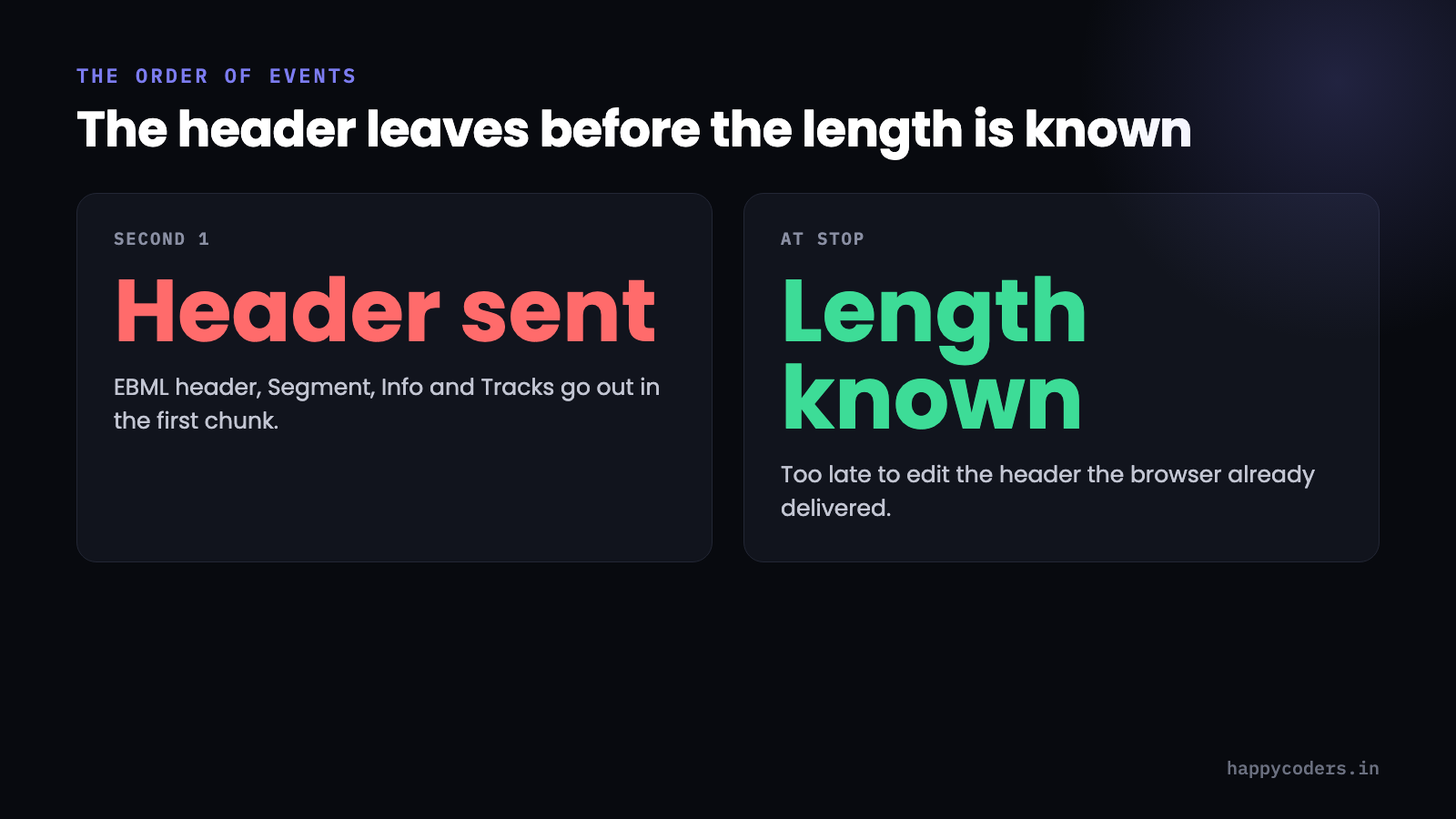
The problem is the order things happen in. MediaRecorder is a streaming encoder. Our recorder calls recorder.start(1000), so the browser hands over a chunk of encoded data every second, and the header is in the very first chunk. At that moment nobody knows how long the recording will be. The browser cannot go back and edit a chunk it has already delivered, so it simply writes the header without a Duration. The size of the top-level Segment is usually unknown for the same reason.
That is a perfectly valid file for streaming, which is what the format allows. It is a poor file for a recording somebody will download, open, scrub through and send to a colleague. A player that finds no Duration either scans the whole file to work it out, which some do and many do not, or treats the file as having no known end.
Where the fix runs
The fix has to run after the last chunk arrives and before the file is saved. In the extension, that is the stop path of the recording session:
async _doStop() {
  this._state = 'stopping';
  const durationMs = Math.round(this.elapsedMs);   // paused time already excluded
  ...
  await this._stopRecorder();                      // encoder first
  mime = (this._recorder && this._recorder.mimeType) || this.mimeType || '';
  blob = new Blob(this._chunks, { type: mime });
  if (/webm|matroska/i.test(mime)) blob = await fixWebmDuration(blob, durationMs);
  ...
}
Three details here matter.
The encoder stops first. The session waits for MediaRecorder to deliver its final chunk before it builds the blob. If the blob were built earlier, the last second of the recording would be missing, and the duration we write would be longer than the media in the file.
The type comes from the recorder, not from our request. We ask for a list of container and codec combinations in order of preference, and the browser picks one it supports. After stopping, the session reads the MIME type the recorder actually used. Only if that is WebM or Matroska does the patch run. An MP4 file is never touched.
The duration is measured, not calculated from the media. We already know how long the recording ran, because the session keeps a clock for the on-screen timer:
/// Wall-clock milliseconds recorded so far, paused time excluded.
get elapsedMs() {
  const now = this.isPaused ? this._pausedAt : performance.now();
  return Math.max(0, now - this._startedAt - this._pausedTotal);
}
Paused time is subtracted, so the number matches the media in the file even if the user paused halfway. Using our own clock is what makes this patch cheap. The alternative, decoding the file to find the timestamp of the last frame, means reading every byte of a recording that might be several hundred megabytes.
Reading EBML, the format underneath WebM
Matroska is built on EBML, a binary cousin of XML. Every element is three things in a row: an ID, a size, and then that many bytes of data. Elements nest, so the data of a parent is simply a run of child elements.
IDs and sizes are both variable-length integers. The number of leading zero bits in the first byte says how many bytes the number uses: a first byte starting with 1 means one byte, 01 means two bytes, and so on. The two are read slightly differently. An ID keeps that marker bit as part of its value, which is why the Segment ID is written as 0x18538067. A size drops the marker bit, and a size whose remaining bits are all ones means “unknown”.
// An EBML element ID keeps its length marker: 1-4 bytes.
function readId(bytes, pos) {
  const first = bytes[pos];
  if (first === undefined) return null;
  let length = 1, mask = 0x80;
  while (length <= 4 && !(first & mask)) { length++; mask >>= 1; }
  if (length > 4 || pos + length > bytes.length) return null;
  let value = 0;
  for (let i = 0; i < length; i++) value = value * 256 + bytes[pos + i];
  return { length, value };
}

// A size drops its marker bit: 1-8 bytes. All value bits set = "unknown".
function readSize(bytes, pos) {
  const first = bytes[pos];
  if (first === undefined) return null;
  let length = 1, mask = 0x80;
  while (length <= 8 && !(first & mask)) { length++; mask >>= 1; }
  if (length > 8 || pos + length > bytes.length) return null;
  let value = first & (mask - 1);
  let unknown = value === mask - 1;
  for (let i = 1; i < length; i++) {
    const b = bytes[pos + i];
    value = value * 256 + b;
    if (b !== 0xFF) unknown = false;
  }
  return { length, value, unknown };
}
Both functions return null rather than throwing if the bytes run out or the marker is invalid, and every caller checks for that. That matters, because this code runs on a file the user has just spent twenty minutes recording. A parser that throws on an odd byte must never be the reason the recording is lost.
Finding the Info element
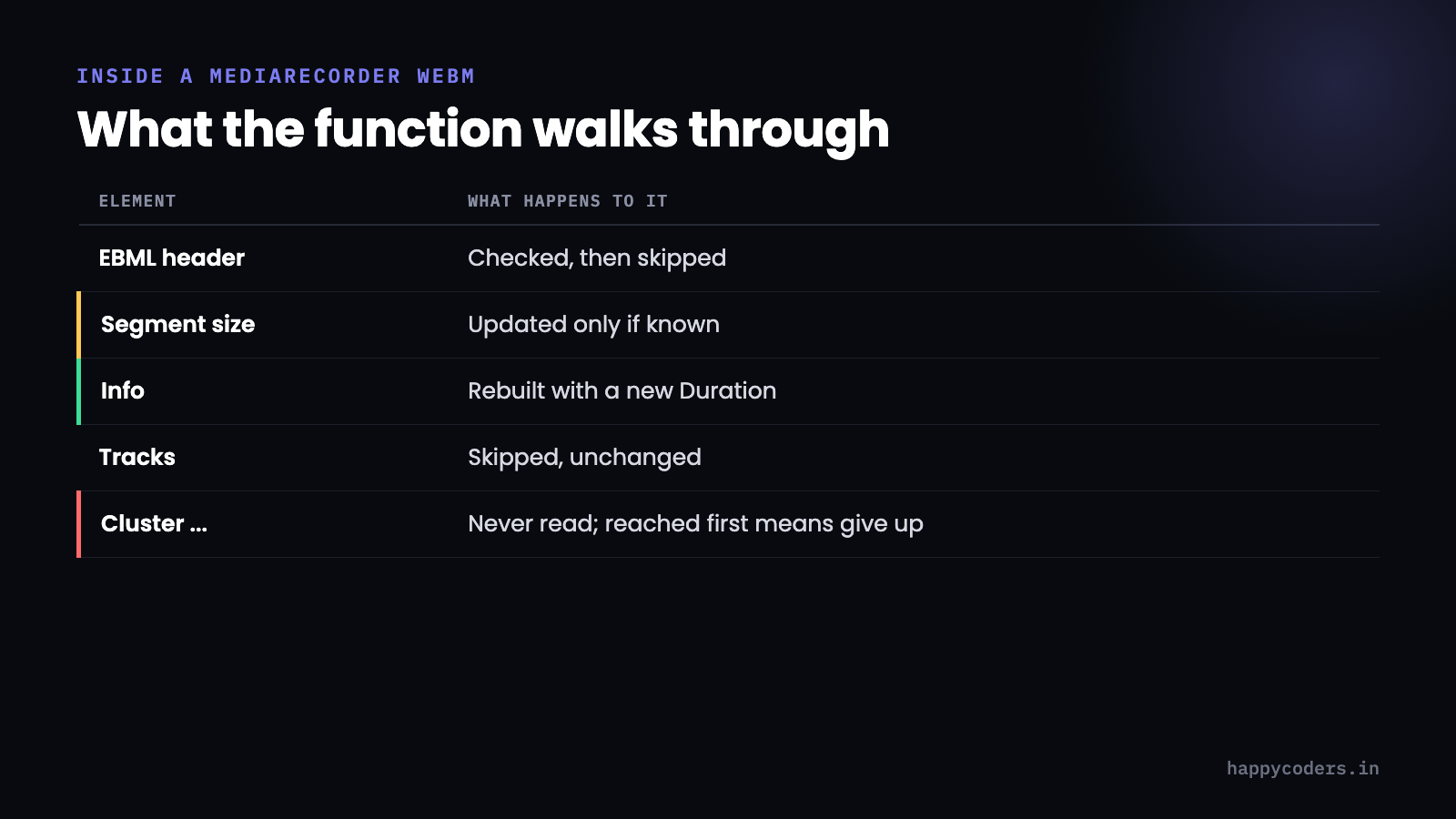
A WebM file from MediaRecorder starts with an EBML header describing the format, then one big Segment that contains everything else: Info, Tracks, and then the media itself in a long run of Cluster elements. Info is near the top, so the function reads only the first megabyte of the blob:
const head = new Uint8Array(
  await blob.slice(0, Math.min(blob.size, 1 << 20)).arrayBuffer());   // first 1 MB only

const ebml = readId(head, 0);
if (!ebml || ebml.value !== ID_EBML) return blob;                     // not WebM after all
const ebmlSize = readSize(head, ebml.length);
let pos = ebml.length + ebmlSize.length + ebmlSize.value;              // skip the EBML header

const segment = readId(head, pos);
if (!segment || segment.value !== ID_SEGMENT) return blob;
const segmentSizePos = pos + segment.length;
const segmentSize = readSize(head, segmentSizePos);
pos = segmentSizePos + segmentSize.length;                             // first child of Segment

while (pos < head.length) {
  const id = readId(head, pos);
  const size = readSize(head, pos + id.length);
  if (!size || size.unknown) return blob;
  const dataStart = pos + id.length + size.length;
  const dataEnd = dataStart + size.value;
  if (id.value === ID_CLUSTER) return blob;     // media started, no Info found: give up
  if (id.value === ID_INFO) { /* rebuild it, below */ }
  pos = dataEnd;
}
The walk skips over every child of Segment by jumping to the end of its data, without reading what is inside. It stops in three situations, and two of them are deliberate refusals:
- If it finds
Info, it patches it. - If it reaches the first
Cluster, the media has started and there is noInfobefore it. The file is not shaped the way we expect, so the function returns the original blob untouched. - If any child before
Infohas an unknown size, it cannot be skipped safely, so the function again returns the original.
The first megabyte is far more than the header needs. The ID check at the very start also protects us if the browser ever labels something WebM that is not.
Rebuilding Info with a Duration
Once Info is found, the function copies every child element except an existing Duration, if there is one, and appends a new one at the end:
let timecodeScale = 1_000_000;                 // default: 1 tick = 1 ms
const kept = [];
for (each child of Info) {
  if (child is TimecodeScale) timecodeScale = its value;
  if (child is not Duration) kept.push(child bytes);   // drop any old Duration
}
const ticks = durationMs * 1_000_000 / timecodeScale;
const duration = new Uint8Array(11);
duration[0] = 0x44; duration[1] = 0x89;        // Duration element ID
duration[2] = 0x88;                            // size: 1-byte vint, value 8
new DataView(duration.buffer).setFloat64(3, ticks);   // big-endian float64

const body = concat([...kept, duration]);
const info = concat([new Uint8Array([0x15, 0x49, 0xA6, 0x66]),   // Info ID
                     encodeSize(body.length), body]);
Duration is in ticks, not milliseconds. Matroska measures time in units set by TimecodeScale, given in nanoseconds per tick. The default is 1,000,000, so one tick is one millisecond, and that is what browsers write. The function still reads the real value if it is present, so a file with a different scale gets the right number rather than one that is off by a factor of a thousand.
Duration is a float. Unlike most Matroska numbers, Duration is a floating-point value. The new element is eleven bytes: two for the ID 0x4489, one for the size (0x88, a one-byte size whose value is 8), and eight for a big-endian 64-bit float. DataView.setFloat64 writes big-endian by default, which is what EBML uses.
Removing an old Duration first makes the function safe to run on a file that already has one. Without that step, the file would end up with two, and players disagree about which one wins.
Splicing the new header in without copying the file
The new Info is eleven bytes longer than the old one. Inserting bytes near the start of a file normally means rewriting everything after them, and for a recording that can be hundreds of megabytes, held in memory, in a browser tab. The function avoids that completely:
const parts = [];
if (!segmentSize.unknown) {
  // A known Segment size must grow by exactly what Info grew by,
  // re-encoded at its ORIGINAL width so nothing after it moves.
  const delta = info.length - (dataEnd - pos);
  const newSegmentSize = encodeSize(segmentSize.value + delta, segmentSize.length);
  parts.push(head.slice(0, segmentSizePos), newSegmentSize,
             head.slice(segmentSizePos + segmentSize.length, pos));
} else {
  parts.push(head.slice(0, pos));               // unknown size: nothing to update
}
parts.push(info, blob.slice(dataEnd));          // the rest of the file, by reference
return new Blob(parts, { type: blob.type });
The last line is the important one. A Blob can be built from other blobs, and blob.slice(dataEnd) does not copy anything. It is a reference to a range of the original recording. The new file is a few hundred bytes of fresh header followed by the original media, by reference. The extra memory is about the size of the header, whatever the length of the recording.
There is one more thing to get right. If the Segment has a known size, that size now has to grow by exactly the number of bytes Info grew by. Otherwise a strict player would decide the file ends eleven bytes early. The new size is written back at its original width, encodeSize(value, segmentSize.length), so the size field itself does not change length and nothing else in the header moves. If the Segment size is unknown, which is normal for a streamed recording, there is nothing to update.
Writing sizes back: one function, two jobs
Reading sizes is half the work. The new Info needs a size written in front of it, and a known Segment size needs rewriting. Both go through one small encoder:
function encodeSize(value, forcedLength) {
  let length = forcedLength || 1;
  if (!forcedLength) {
    // smallest width that holds the value; all-ones is reserved for "unknown"
    while (length < 8 && value >= Math.pow(2, 7 * length) - 1) length++;
  }
  const bytes = new Uint8Array(length);
  let v = value;
  for (let i = length - 1; i >= 0; i--) { bytes[i] = v % 256; v = Math.floor(v / 256); }
  bytes[0] |= 0x80 >> (length - 1);        // the length marker bit
  return bytes;
}
Called with one argument, it picks the narrowest width that can hold the value. The comparison is >= and not > for a reason: a size whose bits are all ones means “unknown”, so the largest value at each width is reserved and must move up to the next width. A size encoder that forgets this produces a perfectly valid-looking element that every parser reads as “size unknown”, which is the exact bug we are trying to fix.
Called with a forced width, it keeps the number at the width the original file used. That is what lets the Segment size change value without changing length, so nothing else in the header shifts. Arithmetic is done with multiplication and division by 256 rather than bit shifts, because JavaScript bit operators work on 32-bit integers, and an eight-byte size would silently lose its top half.
The same thinking applies when reading: readSize also builds its value with value * 256 + b. For the sizes found in a recording header, that stays well within the range where JavaScript numbers are exact.
Pause and resume
Pausing matters more than it seems. When a user pauses, the session calls pause() on MediaRecorder as well as on its own clock, so the encoder writes nothing during the pause and the media timeline has no gap. If the duration came from the wall clock, a ten-minute recording with a five-minute coffee break would claim to be fifteen minutes long. The seek bar would then end five minutes after the last frame. Because elapsedMs subtracts the paused total, the written duration matches the media.
Failing safe
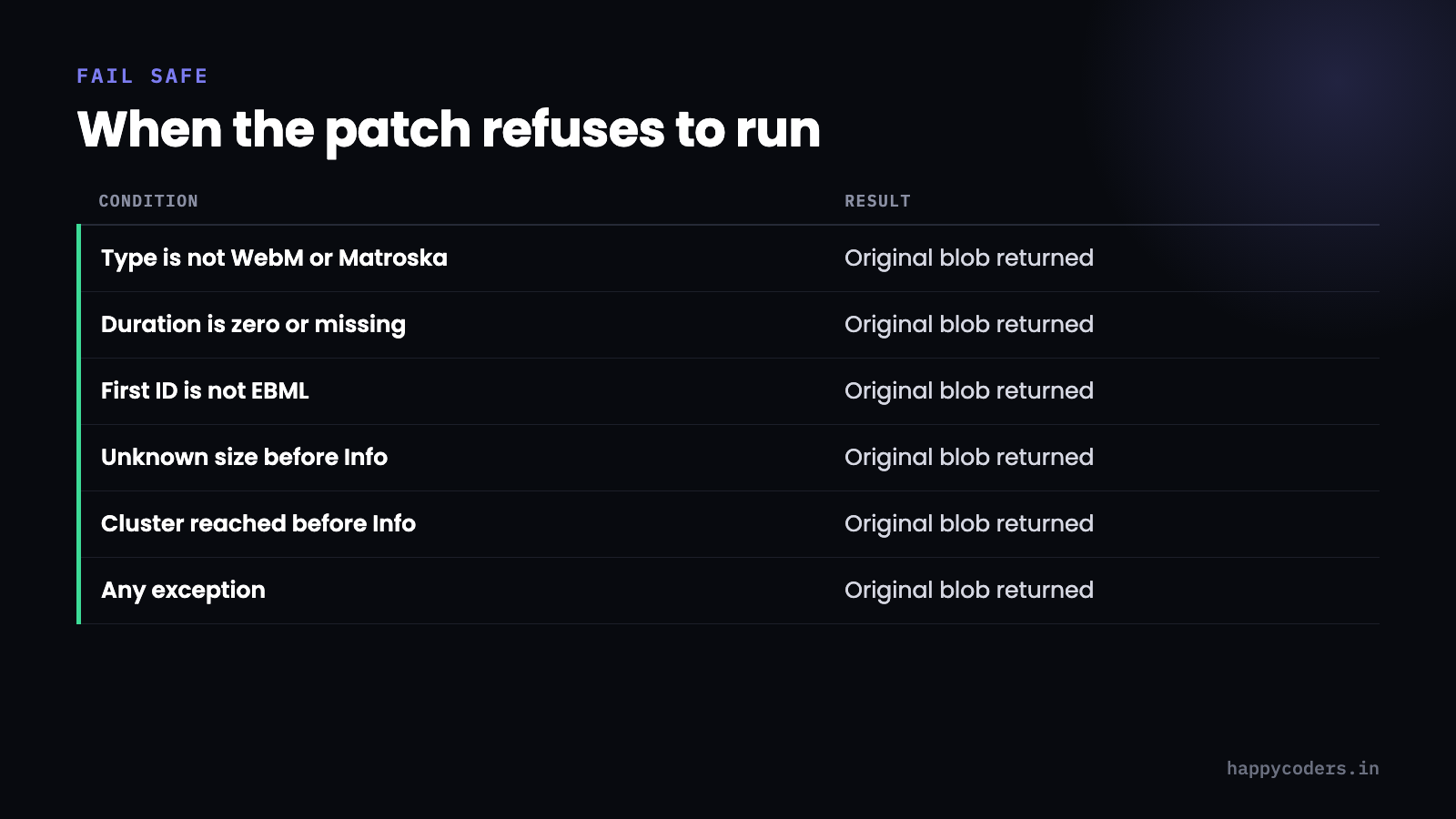
The whole function is wrapped in a try, and every exit that is not a successful patch returns the blob it was given. It does nothing at all unless three conditions hold: there is a blob, the duration is a positive number, and the type is WebM or Matroska.
That is the right design for a post-processing step on user data. The worst case of skipping the patch is a file with a missing duration, which still plays from start to end. The worst case of a patch that goes wrong is a file that does not play at all. Every uncertain branch takes the first outcome. We would rather ship a file with a slightly worse seek bar than gamble with someone’s recording.
Why we wrote it instead of adding a package
A well-known open-source package, fix-webm-duration, solves the same problem, and our function follows the same approach. We reimplemented it, in about 150 lines, for reasons that come from shipping a browser extension.
The extension loads nothing from outside itself. Every script is in the package that the Chrome Web Store and Edge Add-ons review, and nothing is fetched at run time. A dependency would have meant bundling and reviewing someone else’s code that touches every recording, for a job that needs one element rewritten. The parsing we need is small and specific: read IDs and sizes, walk one level of the Segment, rebuild one element. Code that small is easier to own than to audit.
The trade-off is that we own it. The checks above, refusing unknown sizes, refusing a missing Info, and never throwing, are how we keep that ownership cheap.
How to check a file yourself
To see whether a WebM file has a duration, any of these works:
- Open it in a browser tab. A file with no duration often shows no total time, and the seek bar cannot be dragged until it has played through.
- Run
ffprobe file.webm. A file without the element reportsDuration: N/A; a patched one reports the real length. - Run
mkvinfo file.webmfrom MKVToolNix, which prints theInfoelement and shows whetherDurationis in it.
In the extension, the fix only ever applies to WebM. If you want to avoid the question altogether, leave the video format on its default. The extension writes MP4 whenever the browser supports it, and only falls back to WebM when it does not.
Questions we were asked
Does patching the header change the video?
No. Only the Info element and, when it is known, the Segment size change. Every byte of audio and video after the header is the original data, referenced rather than copied.
Is the written duration exact?
It is the recording time measured by the session clock, rounded to the millisecond, with paused time removed. It can differ from the last frame’s timestamp by a fraction of a second. Players use it for the total time and the seek bar, and the media’s own timestamps still drive playback.
Does this also apply to audio-only WebM?
Yes. The check is on the container type, not on whether there is video, so a voice recording saved as WebM goes through the same patch. Voice recordings saved as WAV do not need it: a WAV header is written once, at the end, with the real length already known.
HappyRec is our screen recorder for Mac, with a free browser extension for Chrome and Edge. Recordings stay on your computer. See HappyRec.
Related articles

Porting a Video Compositor to Canvas 2D: Letterboxing, a Mirrored Camera Crop and a Badge That Stays Readable
What happens to one frame inside our browser screen recorder: a pure draw function, normalised crops, fit-not-stretch letterboxing, a mirror…

Mastering Flexbox & Grid for Perfect Web Layouts
Flexbox and Grid are two powerful CSS layout systems that […]

Modern CSS Tricks to Build Responsive Websites Faster
Modern CSS tricks make it easier for developers to build […]