
Adding a Column to a Table With History: Backfilling From the Audit Log, Not From Guesses
Our time tracker stored when a work session started, when it ended, and where it started: a source column that says whether someone clocked in from the desktop app, a web browser, or a manual entry. It did not store how a session ended. For a long time nobody missed it. Then a manager looked at a timesheet where one person had a ten-hour day, and asked a simple question: did they work ten hours, or did they forget to clock out and the system closed the session at the limit?
The database could not answer. A session the person closed at 18:30 and a session the system closed at the hours cap looked exactly alike: a start time and an end time. The fix sounds trivial, add a column, but the table already held over a thousand closed sessions, and every one of them would get a value or a null on the day the column arrived. This post is about that decision: what to put in a new column for rows that existed before it, where we found real answers, why we left most of the old rows empty, and how we made sure every new row gets a correct value from then on.
The column, and why it is nullable
The new column is ended_via, a short string with a fixed vocabulary:
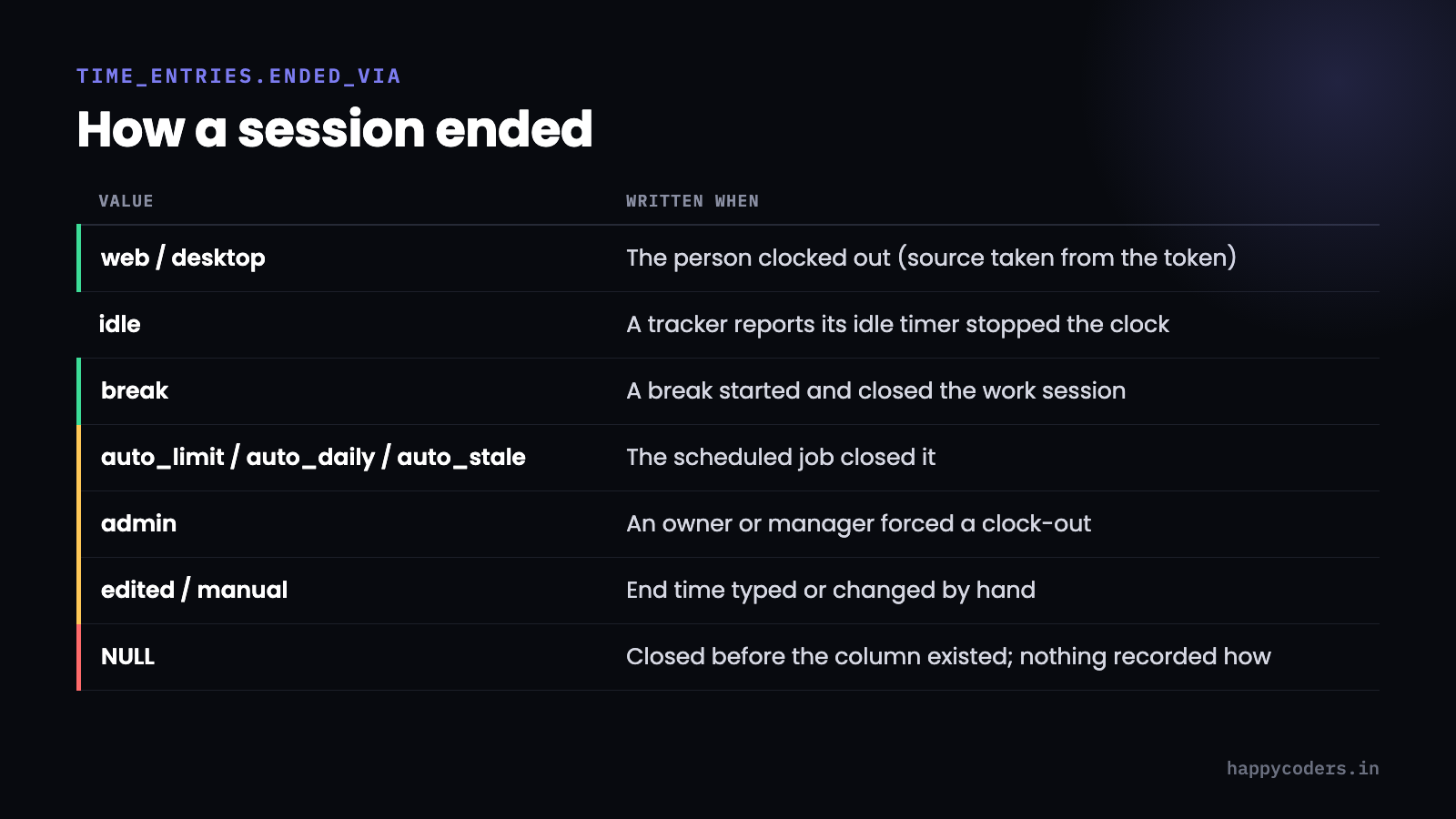
The first design decision was the one people most often get wrong: the column is nullable, and null has a meaning. It means “this session closed before we recorded how sessions close, and nothing tells us”. It is not a default. It is not “probably desktop”.
The tempting alternative was a default value. Most old sessions were almost certainly closed by the person, in the app or the browser, so filling them with desktop or web would have been right most of the time. That is exactly the problem. Once a guessed value sits in a column next to real values, nobody can tell them apart. A report that says “38 sessions ended by the hours limit this month” is only true if every auto_limit in the table was written by the code that actually closes sessions at the limit. One wrong guess in the history, and every count built on the column is quietly unreliable. An honest null is worth more than a plausible guess.
The interface follows the same rule. A session with a known ending shows a small label; a session with a null shows nothing. It does not show “Unknown” in red either, because there is nothing wrong with an old session. It simply predates the question.
Where the history already had answers
Before writing a single line of backfill, we asked: is there anywhere else in the database that recorded how some of these sessions ended, at the time they ended? There were two places.
Manual entries. A session someone typed in by hand, with a start and an end, has source = 'manual'. It ended by hand by definition. That is not a guess; it is the same fact stated twice, so those rows get manual.
The audit log. Every time the system closed a session automatically, the scheduled job wrote an audit entry, timesheet.auto_clock_out, with the session’s ID and the reason: the per-session hours limit, the daily limit, or a desktop app that had stopped reporting. Every time an owner or manager clocked someone out, the controller wrote timesheet.forced_clock_out with the session’s ID. Those entries were written for accountability, not for this feature, but they are contemporaneous records of exactly the thing we now wanted to know.
So the first query was not a migration. It was a question to the log: how many of these events are there, and do they all carry an entry ID?
-- Before writing a backfill, ask what the log can actually prove.
SELECT action, COUNT(*) AS n,
       SUM(JSON_EXTRACT(details, '$.entry_id') IS NULL) AS without_entry_id
FROM audit_logs
WHERE action IN ('timesheet.auto_clock_out', 'timesheet.forced_clock_out')
GROUP BY action;

-- And afterwards, what it did.
SELECT COALESCE(ended_via, '(unknown)') AS ended_via, COUNT(*)
FROM time_entries
WHERE ended_at IS NOT NULL
GROUP BY ended_via;
That check matters. An audit log is only useful for a backfill if its entries can be joined back to the rows they describe. If the details had been free text, “closed a colleague’s session”, we could not have used them safely. Ours stored structured JSON with the ID, so each event maps to exactly one session.
The migration
Here is the migration as it runs, in three steps: add the column, fill the rows we can derive directly, then fill the rows the audit log can prove.
public function up(): void
{
    // 1. The column. Nullable on purpose: null means "we do not know".
    if (! Schema::hasColumn('time_entries', 'ended_via')) {
        Schema::table('time_entries', function (Blueprint $table) {
            $table->string('ended_via', 20)->nullable()->after('source');
        });
    }

    // 2. Facts we can derive without guessing: a hand-entered row ended by hand.
    DB::table('time_entries')->whereNull('ended_via')->whereNotNull('ended_at')
        ->where('source', 'manual')->update(['ended_via' => 'manual']);

    // 3. Facts the audit log already recorded at the time.
    DB::table('audit_logs')
        ->whereIn('action', ['timesheet.auto_clock_out', 'timesheet.forced_clock_out'])
        ->orderBy('id')
        ->chunk(500, function ($logs) {
            foreach ($logs as $log) {
                $details = json_decode((string) $log->details, true) ?: [];
                $entryId = $details['entry_id'] ?? null;
                if (! $entryId) {
                    continue;
                }
                $via = $log->action === 'timesheet.forced_clock_out'
                    ? 'admin'
                    : 'auto_' . ($details['reason'] ?? 'limit');
                DB::table('time_entries')->where('id', $entryId)->whereNull('ended_via')
                    ->update(['ended_via' => substr($via, 0, 20)]);
            }
        });
}
Several details in it are deliberate.
It can run twice. The column is only added if it is missing, and every update is guarded with whereNull('ended_via'). Running it again after a partial failure, or on a copy of the database restored from an older backup, changes nothing that is already set. Shared hosting deploys do get interrupted, and a migration that corrupts data on a second run is a migration you will eventually regret.
It never overwrites. The same whereNull guard means the audit log cannot override a value written by the live code after the column went in. If a session was closed by the person today and an old, unrelated log entry happened to name the same ID, the real value wins.
It reads the log in chunks, in ID order. The audit table grows forever. Loading it in pages of 500 keeps memory flat on the cheapest hosting plan, and ordering by ID keeps the paging stable while it runs.
It skips what it cannot prove. An event without an entry ID is ignored, not matched by time or by user. Matching by “the session for this user that ended closest to this timestamp” would usually be right. Usually is the word we were trying to remove.
The reason maps directly. The automatic close already logged its reason as limit, daily or stale, and the column uses auto_limit, auto_daily and auto_stale. Keeping the job’s vocabulary meant the backfill and the live code would write identical values for the same event.
What the backfill actually found
On the larger of our deployments, with about 1,300 closed sessions at the time, the backfill set:
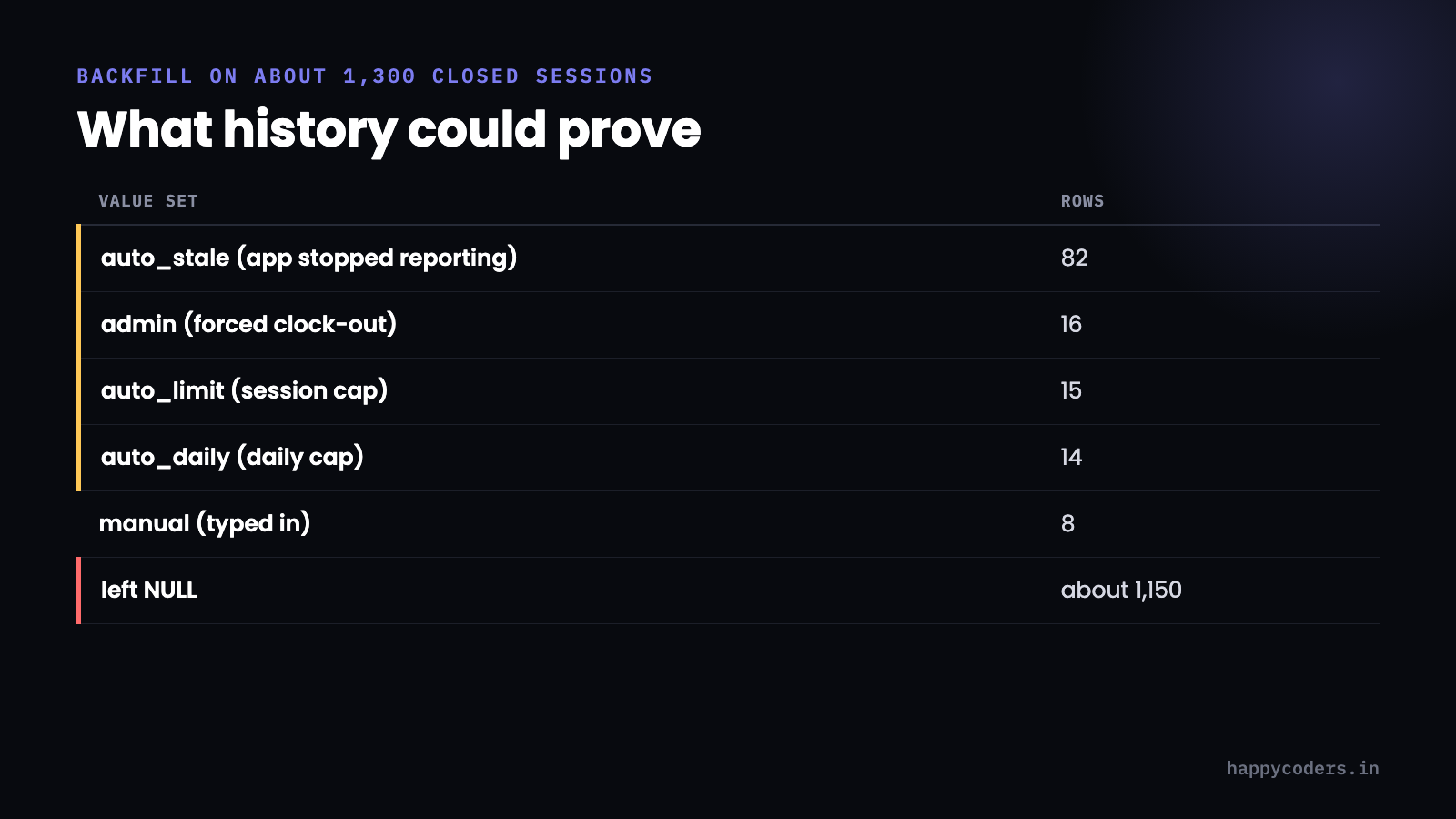
About 135 sessions got a value. Roughly 1,150 stayed null. That ratio surprised the people who asked for the feature, and it is the honest result. The sessions the system closed were the ones the system wrote down. The ordinary ones, where someone clocked themselves out, never generated an audit event, because there was nothing unusual to audit.
The interesting part is which 135 they are. These are precisely the sessions a manager has questions about: closed by the hours cap, closed because the app went quiet, closed by an admin. The backfill could not label everything, but it labelled the exceptions, and the exceptions are what the column is for.
We also kept a copy of every affected row as JSON before the migration ran, with a timestamp in the filename. A backfill is a data change, not a schema change, and rolling back a column drop does not undo it.
Recording it at every closing path
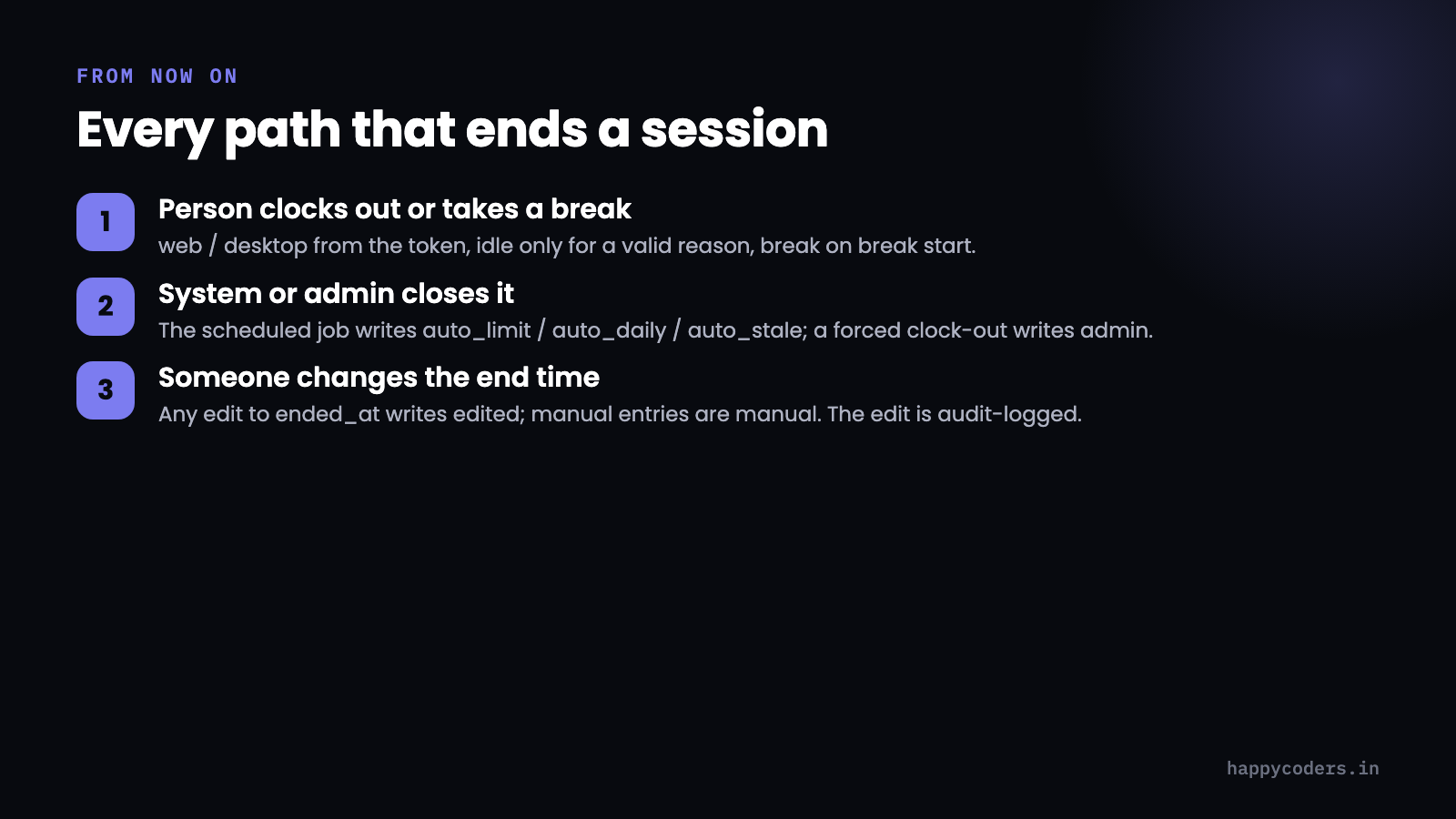
A backfill fixes the past once. The harder job is making sure the column is correct for every session closed from now on, and that means finding every place in the code that ends a session. We counted them before writing any of the new code:
- the person clocks out, from the app or the browser
- the person starts a break, which closes the work session
- the person ends a break, which closes the break session
- an owner or manager forces a clock-out
- the scheduled job closes a session at a limit or when the app stops reporting
- someone edits a session’s end time by hand
- someone creates a manual entry that already has an end
Seven paths, in a controller and a console command. Missing one would not throw an error. It would quietly write null into new rows, which the interface would show as “no label”, which looks exactly like an old session. That is the failure mode to fear with this kind of column: not a crash, but a slow leak of nulls that nobody notices for weeks.
The clock-out path is the most interesting, because it is the only one where the client tells the server why:
public function clockOut(Request $request): JsonResponse
{
    $entry = $this->openEntry($organization, $request->user()->id);
    abort_unless($entry, 422, 'You are not clocked in.');

    // Only the desktop trackers send a reason, and only one value is valid.
    // A variant spelling must fail loudly, not be recorded as a normal clock-out.
    $data = $request->validate([
        'reason' => ['sometimes', 'nullable', 'in:idle'],
    ]);

    $entry->update([
        'ended_at'  => now(),
        'ended_via' => ($data['reason'] ?? null) === 'idle'
            ? 'idle'
            : $this->entrySource($request),   // 'web' or 'desktop', from the token
    ]);
    // ...
}
When the person clocks out, the value comes from the request’s token, which already knows whether it belongs to the desktop app or a browser session. The server does not ask the client which one it is; it already knows.
The reason field is designed for the desktop trackers. When their idle timer stops the clock after a period with no keyboard or mouse activity, they are meant to send reason: "idle", so the session is labelled as closed by the idle timeout rather than by the person. The validation is strict on purpose: in:idle, nothing else. If a future tracker build sent "Idle" or "idle_timeout", a loose comparison would treat it as an ordinary clock-out, and the timesheet would claim the person stopped work deliberately. A 422 is noisy and gets fixed in a day. A silently wrong label can sit in the data for months. Older trackers that send no reason at all are unaffected; their clock-outs are labelled by source as before.
Edits replace the original ending
The edit path needed one more decision. If a session was closed by the hours limit at 19:30 and the person’s manager corrects the end time to 18:30, what should ended_via say?
$timeEntry->fill($data);

// A hand-edited end time replaces however the entry originally ended.
// Otherwise a corrected entry would still claim the system closed it.
if ($timeEntry->isDirty('ended_at') && $timeEntry->ended_at !== null) {
    $timeEntry->ended_via = 'edited';
}
$timeEntry->save();
It says edited. The original label described an end time that no longer exists. Keeping auto_limit on a row whose end is now 18:30 would claim the system closed it at a time it did not. What happened before the edit is not lost: the edit itself is written to the audit log, which is where history belongs. The column answers “how did this row’s current end time come about”, and only that.
The check is isDirty('ended_at'), so changing a session’s project or description does not touch the label. Only a change to the end time does.
A bug the new column exposed
Labelling automatic closes made one existing behaviour much easier to see. When the scheduled job closes a session at the per-session limit and the person is clearly still working, with activity in the last fifteen minutes, it opens a fresh session so genuine overtime keeps being tracked. An earlier version did the same for the daily limit. That was wrong: the person had already spent the day’s allowance, so the new session was instantly over the cap again, got closed on the next run, reopened, and so on, minting near-empty sessions every few minutes.
That had been fixed before this work. Only the per-session limit continues; the daily limit and a stale app never do. But it is the kind of loop that the new labels make obvious at a glance. A column of auto_daily five minutes apart is hard to miss. It would have been caught in a day rather than found later in a report.
Testing a backfill before it touches production
A migration like this is easy to test badly. Running it on an empty test database proves the syntax and nothing else, because there is no history to backfill. Three layers are worth having.
First, feature tests for the closing paths (the clock-method behaviour shipped with thirteen of them): clock out from a desktop token and a web token, clock out with reason: "idle", clock out with an invalid reason and expect a 422, start and end a break, force a clock-out, run the scheduled job past each limit, and edit an end time. Each asserts the exact value written. These are the tests that stop the slow leak of nulls, because a new closing path added later without a value fails the pattern immediately in review.
Second, a backfill test with made-up history: sessions with no label, audit events with and without entry IDs, and one session that already had a value. The assertions are as much about what must not change as what must: the event without an ID touches nothing, and the pre-set value survives.
Third, a dry run against a copy of the real database, comparing the counts per value with the counts of audit events per action. If the two disagree, either the log has events for sessions that no longer exist, or the mapping is wrong, and you want to know which before production does.
What we would do the same way again
- Null means unknown, and stays unknown. A backfill fills what the data can prove and nothing else. Guessed values poison every count built on the column.
- Look for contemporaneous records first. Audit logs, status histories and webhook logs written at the time are the only honest source for a backfill. Ours existed for another reason and answered the question anyway.
- Join on IDs, never on “closest timestamp”. If the log cannot name the row, skip it.
- Make the migration safe to run twice, and never let it overwrite a value the live code already wrote.
- List every write path before coding. A missed path does not crash; it leaks nulls that look like history.
- Validate client-supplied reasons strictly. A rejected request is a bug report. A loosely accepted one is wrong data.
- Snapshot the affected rows before a data backfill. Dropping the column does not undo the update.
Questions we were asked
Why not infer the old values from activity data?
We have screenshots and activity blocks for desktop sessions, so it is tempting to say “activity stopped at 18:25 and the session ended at 19:30, so the system closed it”. Sometimes that is right. But people read, think and take calls without touching the keyboard, and a quiet half hour is not proof of anything. The audit log recorded what happened; activity data only suggests it.
Could the column replace the audit log?
No. The column holds one current fact per row and is overwritten by edits. The audit log is append-only and keeps every change with who made it. They answer different questions, and the backfill only worked because the log was never trimmed to “just what the app needs”.
Did the timesheet interface need much change?
Very little. The API already returned each session’s details, so it gained one field, and the timesheet maps each value to a short label with a one-line explanation on hover. Null maps to no label at all.
Happy Tracker is our time tracking, leave and attendance system for service businesses, built on Laravel with native desktop trackers for Mac, Windows and Ubuntu. We build systems like it for clients in the US, Singapore and worldwide. See Happy Tracker.
Related articles
Two Clicks Around a Policy: Guard the Operation, Not the Endpoint
A desktop-only clock-in policy was enforced on the clock-in endpoint. Break then Resume in the browser opened a new work entry that nobody c…
“View as Member”: Letting an Admin See the App as Someone Else, Safely
“Can you send me her password?” The safe answer: a named, single-purpose Sanctum token for the member, four guards (not yourself, same org, …
Seeding Demo Data Nobody Can Mistake for a Real Customer
A seeded company with eight employees and a thousand time entries looked like our best customer for three months. How to seed so that cannot…