
“View as Member”: Letting an Admin See the App as Someone Else, Safely
“Can you send me her password? I just want to see what she sees.” Every product with roles gets this request eventually, usually from someone senior, usually for a good reason — a member says a page is broken, a report shows them the wrong numbers, a button they need isn’t there. You can’t reproduce it as an admin, because an admin doesn’t see what they see.
The answer to the request as asked is no, and not out of policy: a properly stored password can’t be sent. It’s a one-way bcrypt hash; there’s nothing to read back. But the need behind the request is real, and if you don’t meet it, people meet it themselves — with a shared password, a “temporary” reset, or a screenshot-and-guess loop over chat.
So we built the safe version into Happy Tracker: an owner or admin can view the app as one of their members, without the member’s password, with a banner that never lets them forget, and with every step written to the audit log. This post covers the design: token swapping instead of session hijacking, the privilege guard that stops it being a ladder, the frontend that keeps two identities from mixing, and the testing trap that nearly let a bug through. The code samples are simplified from the real controllers, but the rules are exactly the ones we ship.
Why not just reset the password?
It’s the workaround people reach for first, so it’s worth saying plainly why it’s worse:
- It locks the member out. Their next sign-in fails, they request a reset of their own, and now two people are racing for one account.
- It’s invisible in the wrong way. The audit log shows a password change, not “an admin looked at this account for ten minutes”. Anyone reviewing it later has to guess.
- It teaches the wrong habit. Once a team learns that admins handle problems by taking over accounts, sharing passwords stops feeling wrong — and shared passwords outlive the problem they were shared for.
- It touches everything. A password is the key to every device the member is signed in on. Viewing their screen needs none of that.
“View as member” exists so that nobody needs the workaround.
What “view as” must and mustn’t be
Before any code, we wrote down the rules. Every one of them maps to a line further down.
- No credentials touched. The member’s password, email and existing sessions are unchanged before, during and after.
- Same organisation only. You can view as someone in your own workspace, never anyone else’s — and only if they’re an active member.
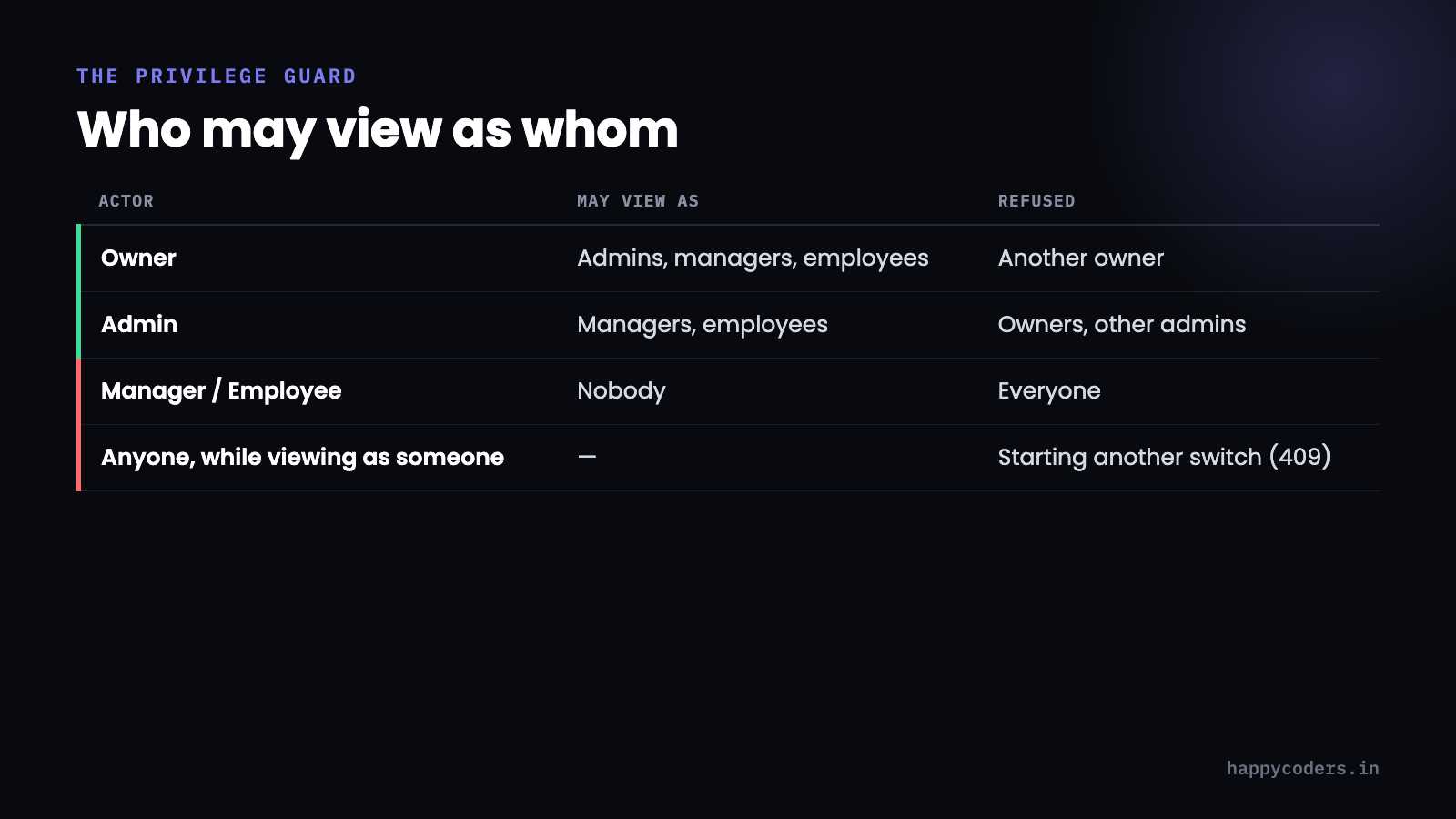
- Never upward. An admin can view as a manager or an employee, not as another admin or the owner. An owner can view as anyone except another owner.
- No chains. While viewing as someone, you can’t start viewing as someone else. One step, then back.
- Impossible to forget. A banner on every screen says whose app you’re in and offers the way back.
- Recorded. Start and stop each write an audit entry: who, as whom, when.
Swap the token, not the session
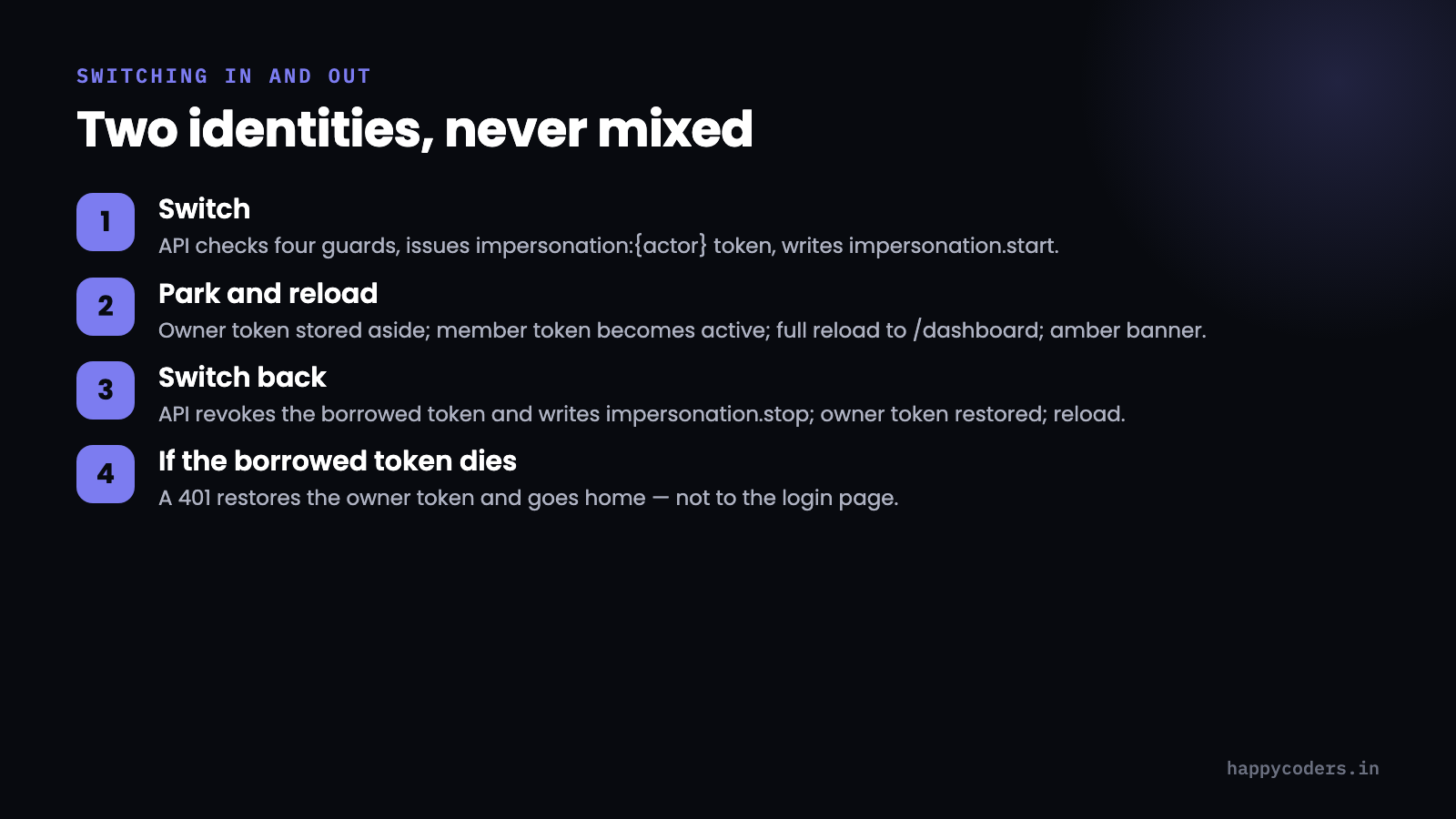
Happy Tracker’s web app talks to its API with bearer tokens (Laravel Sanctum). That made the core design simple: viewing as a member means making API calls with a token that belongs to the member, issued for this purpose, and nothing else.
The alternative — keeping the admin’s own token and adding an “acting as” header the API honours — sounds lighter, but it means every authorisation check in the codebase has to know which of two users to ask about. Miss one, and an admin’s permissions leak into the member’s view, which defeats the point of seeing what the member sees. With a real token for the member, every existing policy, scope and query works unchanged: as far as the API is concerned, the member is signed in.
The token is marked so it can always be recognised:
- Its name is
impersonation:{actorId}— who borrowed it. - It carries a single ability,
impersonation— what kind of token it is.
Starting: four guards, then a token
A simplified version of the start endpoint:
public function start(Request $request, User $user)
{
    $actor = $request->user();
    $org   = $actor->currentOrganization();

    abort_if($actor->is($user), 422, 'You are already you.');

    // the target must be an ACTIVE member of the actor's own organisation
    $member = $org->members()->wherePivot('status', 'active')->find($user->id);
    abort_unless($member, 404);

    // privilege guard: never step UP
    $actorRole  = $org->roleOf($actor);
    $targetRole = $org->roleOf($user);
    $allowed = match ($actorRole) {
        'owner' => $targetRole !== 'owner',
        'admin' => in_array($targetRole, ['manager', 'employee'], true),
        default => false,
    };
    abort_unless($allowed, 403);

    // no chains: an impersonation token cannot start another impersonation
    abort_if($actor->currentAccessToken()->can('impersonation'), 409);

    $token = $user->createToken("impersonation:{$actor->id}", ['impersonation']);
    audit('impersonation.start', actor: $actor, subject: $user);

    return ['token' => $token->plainTextToken, 'user' => $user, 'impersonator' => $actor];
}
A few details worth calling out:
- Route-model binding is not authorisation.
{user}resolves any user id in the system. The membership check inside the controller is what keeps one company’s admin from probing another company’s users — and it returns 404, not 403, so it doesn’t confirm that an id exists elsewhere. - The privilege guard is a whitelist, written as “what may each role view”, not “what may it not”. A new role added later gets no impersonation rights until someone decides it should.
- The chain check looks at the current token’s ability. A borrowed token can do everything the member can do — except borrow again.
Stopping: revoke, don’t just forget
Switching back has to destroy the borrowed token on the server, not merely discard it in the browser. A token that only the frontend forgot is still a valid credential for the member’s account.
public function stop(Request $request)
{
    $token = $request->user()->currentAccessToken();
    abort_unless($token->can('impersonation'), 409);

    $actorId = (int) Str::after($token->name, 'impersonation:');
    audit('impersonation.stop', actorId: $actorId, subject: $request->user());
    $token->delete();                       // the borrowed session is gone for good

    return response()->noContent();
}
One more route-level detail: the stop endpoint is on the allow-list of our “email must be verified” middleware. If you view as a member who hasn’t verified their address yet, every other endpoint correctly refuses — and without the exception, so would the one that gets you out.
The frontend: two tokens that must never mix
The browser now holds two identities. The design goal is that the real user’s token is never used while viewing as someone, and the borrowed token is never left behind afterwards.
// lib/api.ts — two tokens, never mixed
export async function startImpersonation(userId: number) {
  const { data } = await api.post(`/impersonate/${userId}`);
  localStorage.setItem('ht_owner_token', localStorage.getItem('ht_token')!);
  localStorage.setItem('ht_impersonation', JSON.stringify({ user: data.user, owner: data.impersonator }));
  localStorage.setItem('ht_token', data.token);
  window.location.assign('/dashboard');      // full reload: no state from the real user survives
}

export async function stopImpersonation() {
  try { await api.post('/impersonate/stop'); } finally {
    localStorage.setItem('ht_token', localStorage.getItem('ht_owner_token')!);
    localStorage.removeItem('ht_owner_token');
    localStorage.removeItem('ht_impersonation');
    window.location.assign('/people');
  }
}

// 401 while impersonating = the borrowed token died; go home, not to /login
api.interceptors.response.use(undefined, (err) => {
  if (err.response?.status === 401 && localStorage.getItem('ht_owner_token')) {
    localStorage.setItem('ht_token', localStorage.getItem('ht_owner_token')!);
    localStorage.removeItem('ht_owner_token');
    localStorage.removeItem('ht_impersonation');
    window.location.assign('/people');
  }
  return Promise.reject(err);
});
Three decisions carry most of the weight:
- A full page load on every switch. Swapping the token and re-rendering in place sounds smoother, but every store, cache and half-loaded list in the app was built for the previous identity. A reload is the only way to be sure none of it survives.
- The owner’s token is parked, not used. It sits under its own key and is read in exactly two places: switching back, and the 401 handler.
- A 401 while impersonating goes home, not to the login page. If the borrowed token stops working — the member was deactivated, another admin revoked it — the natural fallback, “you’ve been signed out”, would strand the admin on a login screen with their own session still perfectly valid in another key. Restoring the owner token is the honest behaviour.
How it fits with the rest of authentication
Happy Tracker has other rules attached to tokens, and a borrowed token has to fit cleanly between them rather than around them.
- The desktop device lock. One account may hold one desktop tracker at a time; the lock is tied to the device id that desktop apps send when they sign in. A borrowed token is created by the web app with no device id, so it is a web token: it can’t claim, release or collide with the member’s desktop lock, and viewing as someone never signs them out of their tracker.
- Web or desktop, for clock-in rules. Whether a request counts as “from the desktop app” is decided by the token’s client type, not by who is behind it. A borrowed token is a web client, so if the company only allows clocking in from the desktop app, an admin viewing as a member can’t start that member’s timer from the browser either. That is the correct outcome: the admin is seeing exactly the restrictions the member lives with.
- Listing tokens. Because every borrowed token is named
impersonation:{actorId}, a single query over the tokens table answers “who is currently viewing as whom” — useful for support, and for the cleanup job above.
The banner
Every page of the app sits inside one layout component, so the banner lives there: an amber strip above the content reading “Viewing as Priya S. — ↩ Switch back to Owner”. Amber because it isn’t an error, but it is a state you shouldn’t be in by accident. It’s rendered from the stored impersonation record rather than from the API, so it appears on the very first paint after the reload, before any data has loaded.
The Switch button itself appears only where the privilege guard would allow it — the People page computes the same rule on the client so an admin never sees a button that would return 403. The server still checks; the client check is only there so the UI doesn’t offer things it can’t do.
Audit entries a human can read
Each start and stop writes an audit entry — impersonation.start and impersonation.stop — naming both people: who switched, and into whose account. Actions taken while viewing are recorded under the member’s account, because that’s whose token made them — which is why the start and stop entries matter. Read together, they bracket exactly which actions in the member’s history were really the admin’s.
If you build this, consider going a step further than we have so far: stamping the impersonator’s id onto every audit entry written with a borrowed token. The token name already carries it, so it’s one lookup in the audit writer.
The token you forgot to stop
Switching back revokes the borrowed token. But an admin can also just close the tab. The borrowed token is then sitting in that browser’s storage, still valid, until somebody signs out of it or it’s revoked. That’s the remaining gap in our implementation, and it’s worth closing in yours from the start:
- Give impersonation tokens an expiry. Sanctum supports a per-token
expires_at. An hour is generous for “let me see what she sees”. - Clean up on a schedule. A small job that deletes any token named
impersonation:*older than its expiry costs nothing and catches the tabs nobody closed. - Show them to the member. If your app lists a user’s active sessions, list borrowed ones too, labelled with who borrowed them.
When to use it — and when not to
A feature like this is only as safe as the habits around it. The cases it was built for:
- Reproducing a reported problem. “My timesheet shows the wrong week” — look at their timesheet, as them.
- Checking a permission change. After moving someone from employee to manager, confirm they can now see their team’s approvals — and nothing more.
- Onboarding. See what a new joiner’s dashboard looks like before their first day, with their projects and leave balances in place.
And the habit we recommend: tell the member when you’ve done it, and why. The banner keeps the admin honest; telling the member keeps the trust.
The testing trap: identities that bleed between requests
The feature’s tests are mostly about who may do what, so they make several requests in a row with different bearer tokens: an admin starts, then the borrowed token tries to chain, then the admin’s token tries to climb. The first version of these tests passed when it shouldn’t have.
Laravel’s auth guard caches the resolved user for the lifetime of the application instance. In a feature test, that instance is shared across every request in the test. So after the first request authenticated as the admin, the second request — carrying the borrowed token — was still seen as the admin. The chain check looked at the admin’s token, found no impersonation ability, and let it through. The test was green; the code under test had never seen the token we sent.
The fix is to make the guard forget between requests, and to route every request through a helper so nobody can forget to do it:
function asToken(string $token): TestCase
{
    app('auth')->forgetGuards();            // without this, the previous request's user leaks in
    return test()->withHeader('Authorization', "Bearer $token");
}

it('cannot be used to climb', function () {
    [$org, $owner, $admin, $manager] = orgWithRoles();
    $adminToken = $admin->createToken('web')->plainTextToken;

    asToken($adminToken)->postJson("/api/v1/impersonate/{$owner->id}")->assertForbidden();
    asToken($adminToken)->postJson("/api/v1/impersonate/{$manager->id}")->assertOk();
});

it('cannot be chained', function () {
    [$org, $owner, , $manager, $employee] = orgWithRoles();
    $borrowed = asToken($owner->createToken('web')->plainTextToken)
        ->postJson("/api/v1/impersonate/{$manager->id}")->json('token');

    asToken($borrowed)->postJson("/api/v1/impersonate/{$employee->id}")->assertStatus(409);
});
We hit exactly the same trap later in a different feature — a web request following a desktop request in one test, silently inheriting the desktop identity — which is why the helper now exists for both. If your tests switch identities mid-test, check that each request is really authenticated as who you think it is.
What we deliberately left out
- Cross-application impersonation. Our separate super-admin panel cannot step into a customer’s workspace. Doing it safely would mean handing a token across domains, and the support case for it hasn’t outweighed the risk.
- Reading anything secret. Viewing as a member shows what the member sees. It can’t reveal their password, because nothing can.
- Silent mode. There is no way to view as someone without the banner. If an admin wants to know what a member sees, the member’s own screen is the thing being shown — not their private data.
The whole design, in short
- Issue a real, named, single-purpose token for the member; let every existing policy apply unchanged.
- Guard it four ways: not yourself, same organisation, never upward, never chained.
- Revoke on the server when switching back.
- In the browser, park the real token, reload on every switch, and send a 401 home rather than to login.
- Show a banner on every page and audit both ends.
- In tests, make the auth guard forget between requests.
It replaced the request we should never have been able to fulfil — “send me her password” — with one we can, safely and visibly.
Happy Tracker is our time tracker for service businesses; owners and admins find “Switch” on the People page. See the product. Related: an audit log people actually use, and why four roles are usually enough.
Related articles
Two Clicks Around a Policy: Guard the Operation, Not the Endpoint
A desktop-only clock-in policy was enforced on the clock-in endpoint. Break then Resume in the browser opened a new work entry that nobody c…
Adding a Column to a Table With History: Backfilling From the Audit Log, Not From Guesses
Our timesheet knew when sessions ended but not how. Adding an ended_via column meant deciding what 1,300 existing rows should say. We filled…
Seeding Demo Data Nobody Can Mistake for a Real Customer
A seeded company with eight employees and a thousand time entries looked like our best customer for three months. How to seed so that cannot…