
Two Clicks Around a Policy: Guard the Operation, Not the Endpoint
Happy Tracker lets a company say “clock in from the desktop app only”. The reason is practical. The desktop tracker takes screenshots and records activity; a browser tab cannot. A session started in a browser is just a timer, and a timer in a forgotten tab will happily run all afternoon. So when a company turns the browser off, the server refuses a clock-in that comes from one.
One morning a manager reported a session that had run for most of the day with no screenshots behind it: a gap of five hours and twenty-three minutes, while the hours on the timesheet kept climbing. The person had not found a clever exploit. They had clocked in on the desktop, which was allowed, then pressed Break and Resume in the browser. Two clicks. The rest of the day ran as a browser session that the policy was supposed to make impossible.
This post is about why that happened, because the cause is general and shows up in almost every codebase with a business rule: the rule was enforced on an endpoint, not on the thing the endpoint does. We will go through the original code, the fix, how we decided which paths should not be guarded, the test that had encoded the bypass as a feature, and a second hole in the background job that let the session run as long as it did.
How we confirmed it from the data
Before touching any code we wanted the report confirmed, because “no screenshots” has several innocent explanations: the desktop app closed, a laptop asleep, a permission revoked after an operating system update. The database answered the question in three queries.
First, the screenshots for that person and day: a steady stream in the morning, then nothing from 10:45 until a little after 16:00. Second, the time entries for the same day: a work entry with source = desktop that ended at 10:45 when a break started, a short break, then a new work entry with source = web that ran on through the afternoon. Third, activity blocks: none at all attached to the second entry.
That sequence ruled out every innocent explanation. A crashed or sleeping app would have left the original desktop entry running, not replaced it with a web one. The source column, which we had added weeks earlier for unrelated reporting reasons, turned a vague “something is wrong with the tracker” into a precise story in a few minutes. If you record where each row came from, investigations like this become reading rather than guessing.
The rule lived on one endpoint
The policy check was written as a small private method on the time-entry controller, and it was called from exactly one place: the clock-in action. That matched how everybody talked about the feature. The setting is labelled as being about clocking in, the ticket said “block web clock-in”, and the test was named after clock-in. Here is a simplified view of the two actions involved:
public function clockIn(Request $request): JsonResponse
{
    $organization = $this->currentOrganization($request);
    $this->assertMayClockInHere($organization, $request);   // the rule
    // ... open a work entry, stamped with where it came from
}

public function endBreak(Request $request): JsonResponse
{
    $organization = $this->currentOrganization($request);
    $break = $this->openEntry($organization, $request->user()->id);
    $break->update(['ended_at' => now()]);

    // A NEW work entry. Nobody asked whether this client may start one.
    $work = $organization->timeEntries()->create([
        'user_id'    => $request->user()->id,
        'project_id' => $break->project_id,
        'source'     => $this->entrySource($request),   // 'web'
        'started_at' => now(),
    ]);
}
Read endBreak as the database sees it, not as the button label describes it. It closes the break and then creates a new work entry, stamped with the source of the current request. In every way that matters to the rule, that is a clock-in. It starts a work timer, from a browser, for a person whose company has said work timers may only start on the desktop. The controller simply never asked.
The source itself was not the problem. It is derived from the authentication token: desktop trackers authenticate with a token bound to a device, and browser tokens never carry one. So the resumed entry was correctly recorded as source = web. Every report showed it honestly. The data said exactly what had happened. The guard just was not standing in front of it.
Find the operation, not the endpoint
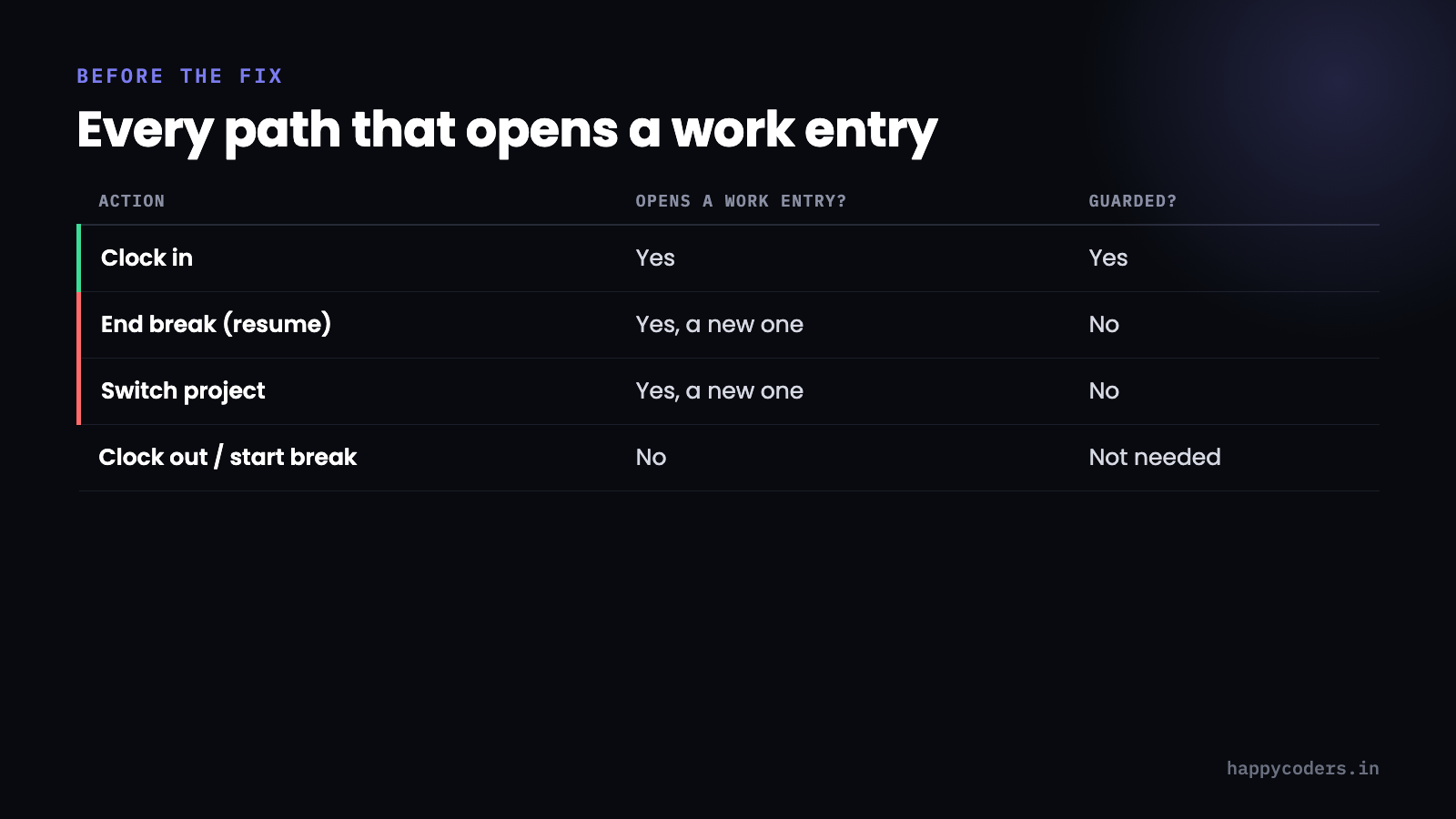
The useful question is not “which endpoint is clock-in?” but “which operations does the rule actually protect?” Here the protected operation is creating a work entry from a browser. So the audit is mechanical: list every code path that creates a work entry, and check each one for the guard.
# Every place that can create a work entry. Each must call the guard.
grep -n "timeEntries()->create\|TimeEntry::create" app/Http/Controllers -r

# Every place that calls the guard. The two lists should match,
# minus the paths you have deliberately left open (and commented why).
grep -n "assertMayClockInHere" app/Http/Controllers -r
In our codebase that list had three entries, not one:
- Clock in, which was guarded.
- End break, which closes a break and opens a fresh work entry. Not guarded.
- Switch project, in the product that has it, which closes the current work entry and opens a new one on another project. Not guarded either. Happy Tracker has no switch action, so there it was two paths, not three.
The same blind spot existed in the web app. The clock-in button was hidden when the policy applied, but the break and resume buttons were not. A hidden button is a courtesy, not enforcement. But a visible button for an action the server would refuse is a bug in its own right, so both had to change.
The fix: one guard, called by every path that opens work
The guard itself did not change. It decides whether the request comes from a browser, applies a per-person exception if one is set, and otherwise applies the company setting:
/**
 * May this request START a work timer from where it is coming from?
 * Called by every action that creates a work entry. Never by one that only ends one.
 */
private function assertMayClockInHere(Organization $organization, Request $request): void
{
    if ($this->entrySource($request) !== 'web') {
        return;                                   // desktop tracker: always allowed
    }

    $member   = $organization->users()->where('users.id', $request->user()->id)->first();
    $override = $member?->pivot?->allow_web_clock_in;   // null = follow the company

    abort_if($override !== null && ! (bool) $override, 422,
        'Clocking in from the web is turned off for your account. Start the timer in the desktop app.');

    abort_if($override === null && ClockInPolicy::orgRequiresDesktop($organization), 422,
        'Your organization does not allow clocking in from the web. Open the desktop tracker and clock in there.');
}

/** Where an entry came from: decided by the token, never by the request body. */
private function entrySource(Request $request): string
{
    $token = $request->user()?->currentAccessToken();

    return $token instanceof PersonalAccessToken && $token->isDesktopClient() ? 'desktop' : 'web';
}
Two design choices from the original feature made the fix small. First, the company-level rule lives in one class that both the API guard and the web app’s user payload read, so the server and the interface cannot disagree about whether a person is restricted. Second, the source comes from the token, not from anything the client sends, so a browser cannot claim to be a desktop app by setting a field.
The fix was to call the guard from the resume action as well, with a comment that says why, because the next person to read that method will reasonably wonder why a break action checks a clock-in policy:
public function endBreak(Request $request): JsonResponse
{
    $organization = $this->currentOrganization($request);

    // Resuming opens a NEW work entry, so it is a clock-in in everything but name
    // and has to clear the same gate. Deliberately NOT on clockOut() (stopping must
    // always work) or startBreak() (a break stops time accruing).
    $this->assertMayClockInHere($organization, $request);

    $break = $this->openEntry($organization, $request->user()->id);
    abort_unless($break && $break->kind === 'break', 422, 'You are not on a break.');
    // ... close the break, open the work entry
}
In the web app, the break and resume buttons are now hidden for a restricted person, with a short hint telling them to resume in the desktop app, so nobody discovers the rule by hitting a 422.
Which paths must stay open
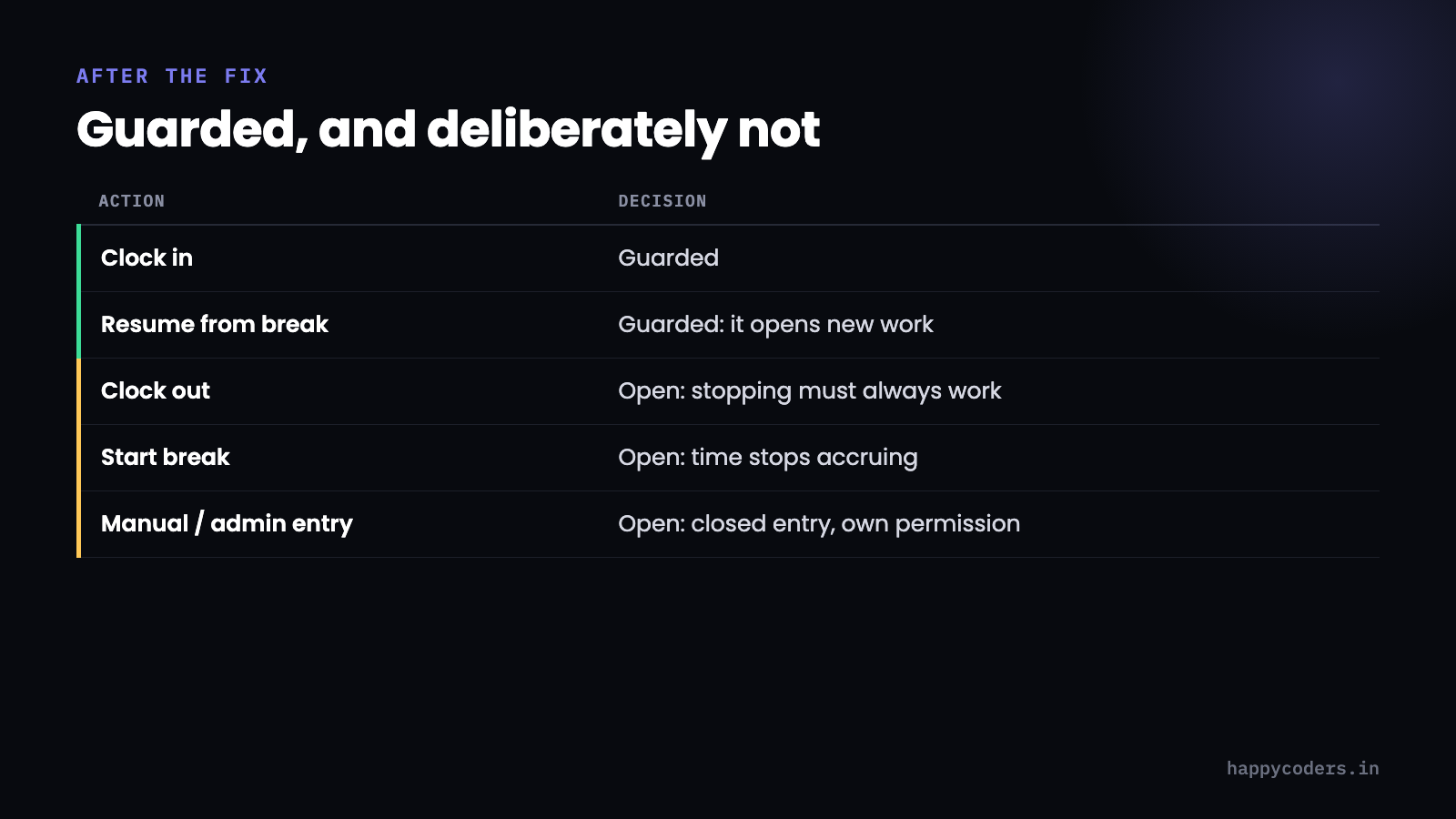
The tempting overcorrection is to put the guard on every time-tracking action. That would have been worse than the bug. Each of these was left unguarded on purpose, and each one has a comment saying so:
- Clock out. Stopping must always work, from anywhere. If a person clocked in on the desktop and the laptop dies, the browser is how they stop the clock. Guarding clock-out would trap them in a running session, which is exactly what the policy exists to prevent.
- Start break. A break stops work time from accruing. There is nothing to police, and blocking it would force people to keep a work session running while they are away.
- Manual entries. A closed entry with a start and an end, typed in after the fact, is how an admin records time for someone. It is not a running timer, and it has its own permission and audit trail. Guarding it would break a real admin feature to close a hole that does not exist there.
The general rule we took from this: guard the operations that start the thing the policy is about, and deliberately leave open the ones that stop it. Write that decision down in the code at both kinds of site. “Not guarded” should always be a choice someone made, never something nobody noticed.
The test that encoded the bypass
When we went to add a test for the fix, we found one that asserted the opposite. It was titled, roughly, “does not strand someone who clocked in on desktop and then ends a break on the web”, and its comment explained that the policy was about starting a timer, not about being trapped mid-session.
That reasoning is half right. Nobody should be trapped mid-session, and that is why clock-out stays open. But resuming from a break is not continuing a session. It starts a new work entry, with a new source, and from that moment on the rest of the day is a browser session. The test had taken a real concern, not stranding people, and attached it to the wrong action. Because it passed, it gave everyone confidence that the behaviour was intended.
We rewrote it to assert the refusal, and added a companion test so the real concern stays protected. Simplified, with the organisation prefix and fixtures left out:
it('refuses to resume from the browser after a desktop clock-in', function () {
    [$org, $user] = desktopOnlyOrg();

    $this->postJson('/api/v1/time-entries/clock-in', [], desktopHeaders($user))->assertOk();
    $this->postJson('/api/v1/time-entries/break/start', [], webHeaders($user))->assertOk();

    // The bypass: resume in a browser tab.
    $this->postJson('/api/v1/time-entries/break/end', [], webHeaders($user))
        ->assertStatus(422);
});

it('still lets the same person clock out from the browser', function () {
    [$org, $user] = desktopOnlyOrg();

    $this->postJson('/api/v1/time-entries/clock-in', [], desktopHeaders($user))->assertOk();
    $this->postJson('/api/v1/time-entries/clock-out', [], webHeaders($user))->assertOk();
});
The pair matters more than either test alone. The first proves the hole is closed. The second proves we did not close it by trapping people, which is the mistake the old test was trying to prevent.
One trap cost us an hour while writing them. Inside a single test, the resolved authentication guard is cached between requests. A web request made after a desktop request in the same test was still seen as coming from the desktop, so the policy check passed and the new test failed for the wrong reason. The helper for web headers now calls app('auth')->forgetGuards() before building the request. If a security test passes or fails unexpectedly, check that each request in it really is what it claims to be.
The second hole: why it ran for five hours
Closing the bypass stops new cases. It does not explain why a browser session could run for more than five hours in the first place. Happy Tracker has a background job that closes sessions whose tracker has gone quiet, the “stale” rule, so a desktop app that crashes or loses power does not leave a session running all night.
The stale rule measured silence from the session’s last activity block. A browser session never posts a block, so it had no last block, and the rule skipped it. The very sessions that most needed the check were the ones it could not see. A missing value had been treated as “nothing to check” rather than “maximally suspicious”.
The fix measures from the entry’s own start time when it has never reported, but only when four conditions all hold:
/**
 * Should an entry that has NEVER reported an activity block be closed as stale?
 * Only when all four hold, because each one protects real sessions.
 */
private function neverReported(Organization $organization, TimeEntry $entry): bool
{
    return $entry->kind === 'work'                              // breaks report nothing by design
        && $organization->activityModeEnabled()                 // otherwise nobody posts blocks
        && $entry->started_at->lessThan(now()->subMinutes(self::STALE_AFTER_MINUTES))
        && $entry->user
        && ClockInPolicy::blocksWeb($organization, $entry->user); // web users are not expected to report
}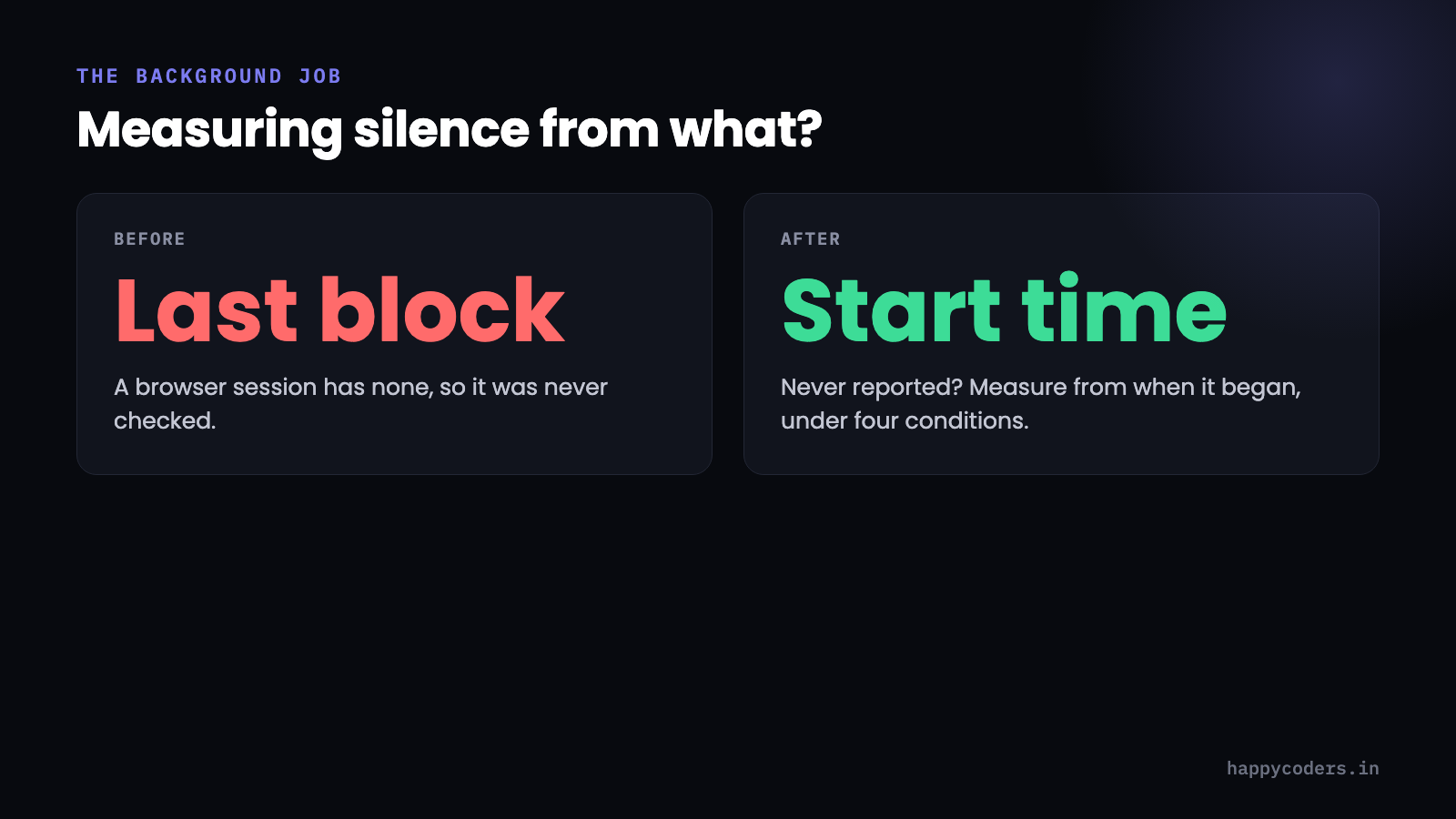
Each condition protects a real case. Breaks report nothing by design, so closing them would cut every long lunch. A company without activity mode on its plan has nobody posting blocks at all, and without that check the job would close every open session in that company every few minutes. A person explicitly allowed to use the browser is not expected to run a tracker, so their silence is normal. And the threshold is the same one used for real trackers, which post a block every few minutes, so a live desktop session has several by the time it is checked.
With both fixes in place, the worst case for someone who still manages to start a browser session under a desktop-only policy is a few minutes of recorded time, not an afternoon.
A checklist for any rule like this
- Name the operation the rule protects, in terms of data: “creating a work entry from a browser”, not “the clock-in button”.
- List every path that performs that operation, with a grep for the model’s create calls, and put the guard on each one.
- Keep the rule in one class that the API and the interface both read, so they cannot drift apart.
- Decide where the input comes from. Derive the source from the token or session, never from a field the client controls.
- Leave the exits open on purpose, and comment why at each unguarded site.
- Read old tests critically. A passing test that describes the bug as intended is the hardest kind to spot.
- Check the background jobs that are supposed to clean up after the rule. Treat a missing value as a reason to look harder, not as a reason to skip.
Questions we were asked
Why not just block every request from a browser for restricted people?
Because restricted people still need the web app: to see their timesheet, apply for leave and clock out when the laptop is somewhere else. The policy is about where a work timer may start, so that is the operation it guards.
Could middleware have caught this?
Route middleware has the same weakness as the original guard: it attaches to routes, and the problem was a route nobody associated with the rule. A check on the model, for example in a creating event on the time entry, would catch every path. But it would also fire on manual entries and admin tools that must stay open, so it needs the same list of deliberate exceptions. Either way, the work is the same: decide which operations the rule protects.
Why did nobody notice the visible resume button earlier?
Because nobody had turned the restriction on while also taking breaks in the browser. The feature was tested the way it was described: try to clock in from the web, see the refusal. The resume path only matters to someone who starts on the desktop and finishes in a browser, which is exactly the person the policy is aimed at.
Were any customers affected?
No Happy Tracker organization had the desktop-only setting switched on when we found it, so nobody was affected there. The fix shipped before the first customer who turned on the feature could run into it.
Happy Tracker is our time tracking, leave and attendance system, with desktop trackers for Windows, Mac and Ubuntu and a web app for everything else. See how it works.
Related articles
Adding a Column to a Table With History: Backfilling From the Audit Log, Not From Guesses
Our timesheet knew when sessions ended but not how. Adding an ended_via column meant deciding what 1,300 existing rows should say. We filled…
“View as Member”: Letting an Admin See the App as Someone Else, Safely
“Can you send me her password?” The safe answer: a named, single-purpose Sanctum token for the member, four guards (not yourself, same org, …
Seeding Demo Data Nobody Can Mistake for a Real Customer
A seeded company with eight employees and a thousand time entries looked like our best customer for three months. How to seed so that cannot…