
Active Time vs Idle Time: Measuring Work Without Spying on People
Active Time vs Idle Time: Measuring Work Without Spying on People
There is a number every company quietly wants and almost nobody measures honestly: of the hours people are at work, how many are actually spent working. Ask it out loud and the room gets tense, because the question sounds like an accusation. Do not ask it and you end up quoting projects from a fiction — eight hours a day, five days a week, forty hours of output — that has never been true of any team anywhere.
The honest answer is not a number you can guess. It has to be measured, and the way you measure it decides whether you end up with a management tool or a surveillance product. We have built both ends of this and the difference is smaller in code than you would like and enormous in how people react to it.
What idle time actually is
Idle time is a stretch during a clocked-in session where the machine received no keyboard or mouse input at all. That is the whole definition, and it is worth being precise about it because almost every argument about idle time comes from people using the word to mean different things.
Idle time is not “time the person was not being productive”. It is not “time spent in the wrong application”. It is not a judgement of any kind. It is the observable fact that for eleven minutes nothing was typed and nothing was clicked. What that means is a separate question with a lot of possible answers, and the system should not pretend to know which one applies.
- They were reading a specification, on paper or on a second screen.
- They were in a meeting, listening.
- They were on the phone with a client.
- They were thinking about a hard problem, which is a legitimate and frequently the most valuable thing a person does all day.
- They walked away and forgot to stop the timer.
- They went home four hours ago.
The first four are work. The last two are not. A system that cannot tell them apart should not be presenting idle time as a productivity score, and this is where a great many time trackers lose the trust of the people using them.
Idle time is evidence, not a verdict. The moment you present it as a verdict, people start moving their mouse every ninety seconds and your data is worse than if you had never collected it.
How the measurement is taken
The desktop application samples input activity while somebody is clocked in on a work entry. It does not record what was typed — it records whether anything was typed. On macOS this comes from the system’s own idle-time counter, on Linux from the equivalent power and session APIs, on Windows from the last-input timestamp. All three answer the same question: how long since this machine last saw a human.
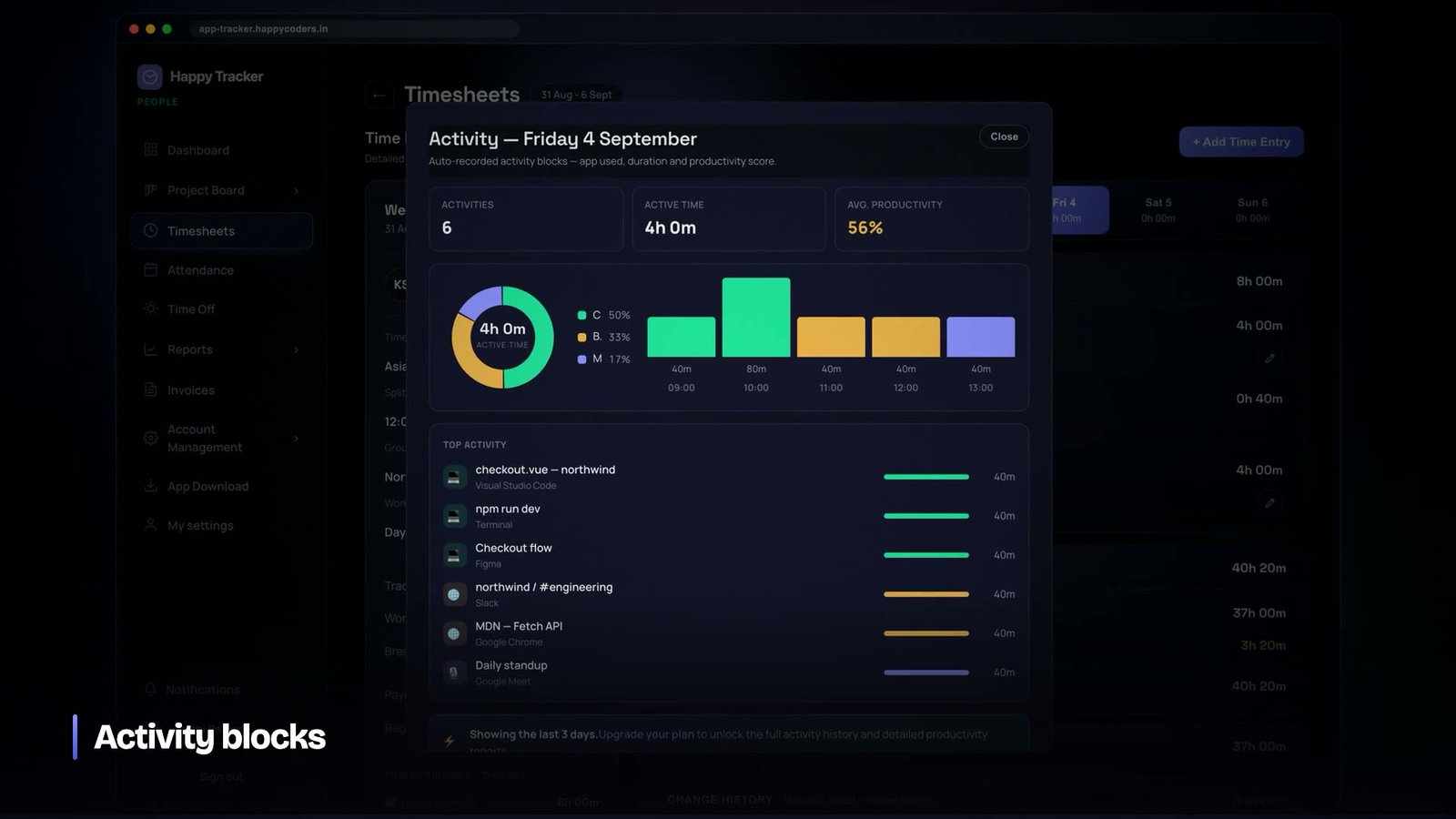
Those samples are grouped into activity blocks. A block carries the application that was in the foreground, the window title, the duration, and the number of seconds inside it with no input. Blocks are attached to the time entry they fall inside, so an hour on the timesheet can be opened up into the blocks it was made of.
The window title is the most sensitive field in the entire product and we thought about it for a long time. It is what makes the difference between a report that says “four hours in a web browser” and one that says “four hours on the client’s staging site”. It is also, unavoidably, the field that can leak something private if somebody has a personal tab open. The compromise we settled on is that the company controls whether titles are recorded at all, that the person can see every title recorded about them, and that nothing below the title — page contents, form fields, keystrokes — is ever captured.
What we deliberately do not record
It is worth stating the negatives explicitly, because “we do not do that” is only credible if you say it before you are asked.
- No keystrokes. Not hashed, not sampled, not counted per application. There is no keylogger in the product and adding one is not on any roadmap.
- No clipboard. Copying a password should not be an event.
- No microphone or camera. Ever.
- No browsing history. The foreground window title is not the same as a list of every page visited, and the difference matters.
- Nothing at all while clocked out. The tracker stops sampling the moment the session ends, and it says so on screen.
That last one is the single most important line in the product for adoption. People will accept a great deal of measurement of their working hours. They will not accept a process on their laptop that they cannot tell is off.
Turning blocks into something readable
Raw blocks are not useful to a manager. Nobody wants a report that says somebody spent three hours and forty minutes in a process called Code and ninety minutes in one called Slack. The blocks are mapped to categories — coding, communication, design, documents, browsing, and so on — through a lookup that ships with the product.
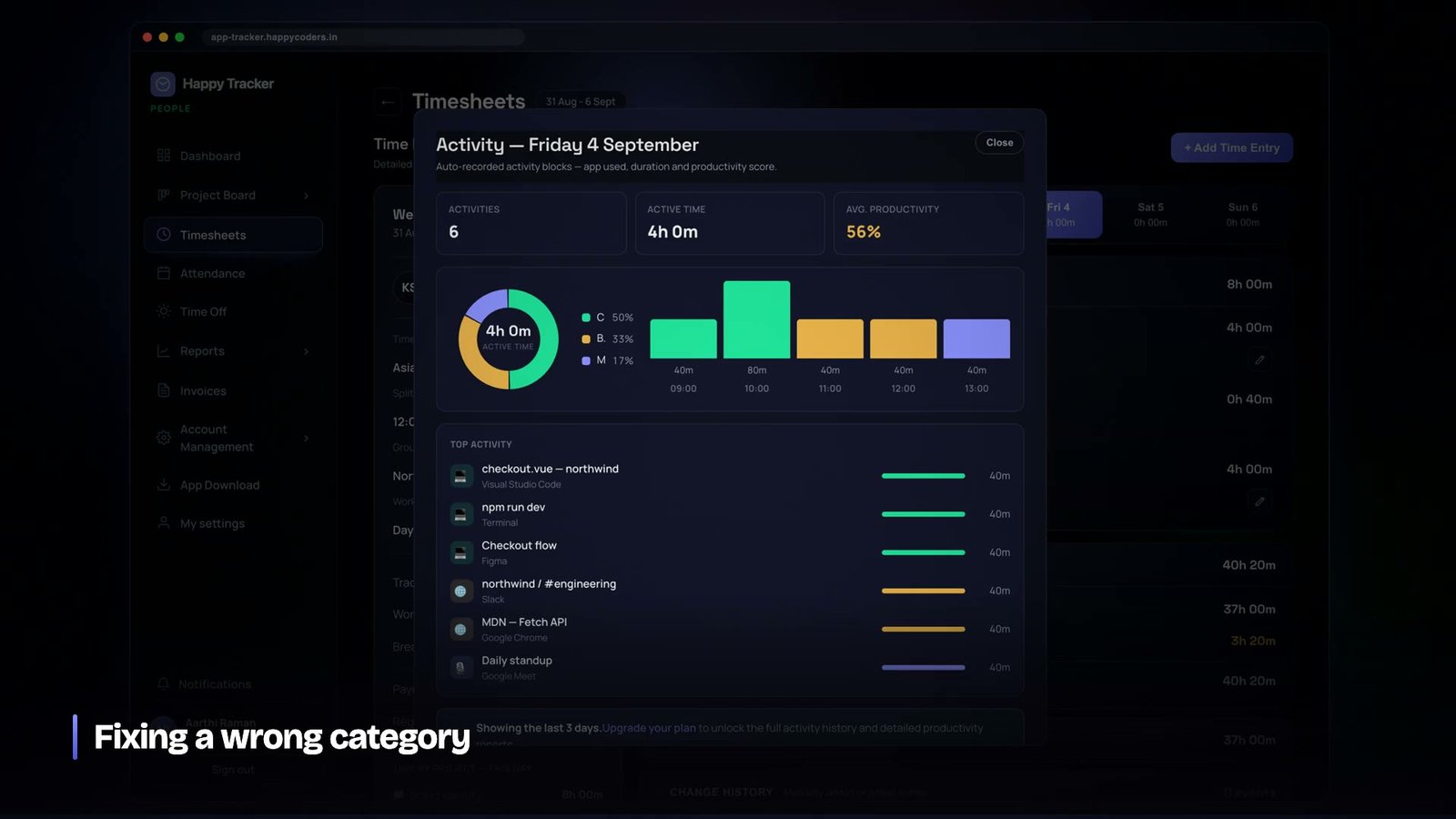
That map needs maintenance and it needs care. Tools appear constantly, and an unrecognised editor lands in “other”, which makes a developer look idle when they were writing code all afternoon. When we added a batch of newer editors to the coding category we also went back and recategorised the several hundred blocks that had already been written under the old map. If we had not, every historical report would have been quietly wrong in a way nobody would ever have caught.
The other half of that is letting people argue. A block that has been categorised wrongly can be corrected by the person it belongs to. This costs almost nothing to build and it changes the relationship with the tool completely: a classification you can dispute is a measurement, a classification you cannot dispute is an accusation.
The number that is actually useful
Once you have honest blocks, the useful number is not “productivity percentage”. It is the gap between clocked hours and active hours, tracked over time, per project.
A team that clocks forty hours and shows thirty-two active is not a team of slackers. That ratio is normal and, in most kinds of work, healthy — the missing eight hours are meetings, reading, thinking and the ordinary friction of a working week. What matters is when the ratio changes. A project where active time drops sharply for three weeks is a project where somebody is blocked, or waiting on a client, or doing work that the tracker cannot see because it happens on a whiteboard. All three of those are worth a conversation and none of them are worth a disciplinary.
The other genuinely useful application is quoting. If your team consistently converts forty clocked hours into thirty-two hours of active project work, then a project you estimated at two hundred hours of work needs two hundred and fifty hours of calendar. Companies that quote against clocked hours and deliver against active hours run late on every project and never work out why.
Automatic clock-out, and why it needs three rules
The most common cause of a wildly wrong timesheet is not dishonesty. It is a laptop that was closed at six o’clock with the timer still running, discovered the next morning as a fourteen-hour day.
We ended up with three separate rules, because one rule could not cover the cases without either closing sessions that were legitimately running or leaving obvious nonsense in the data.
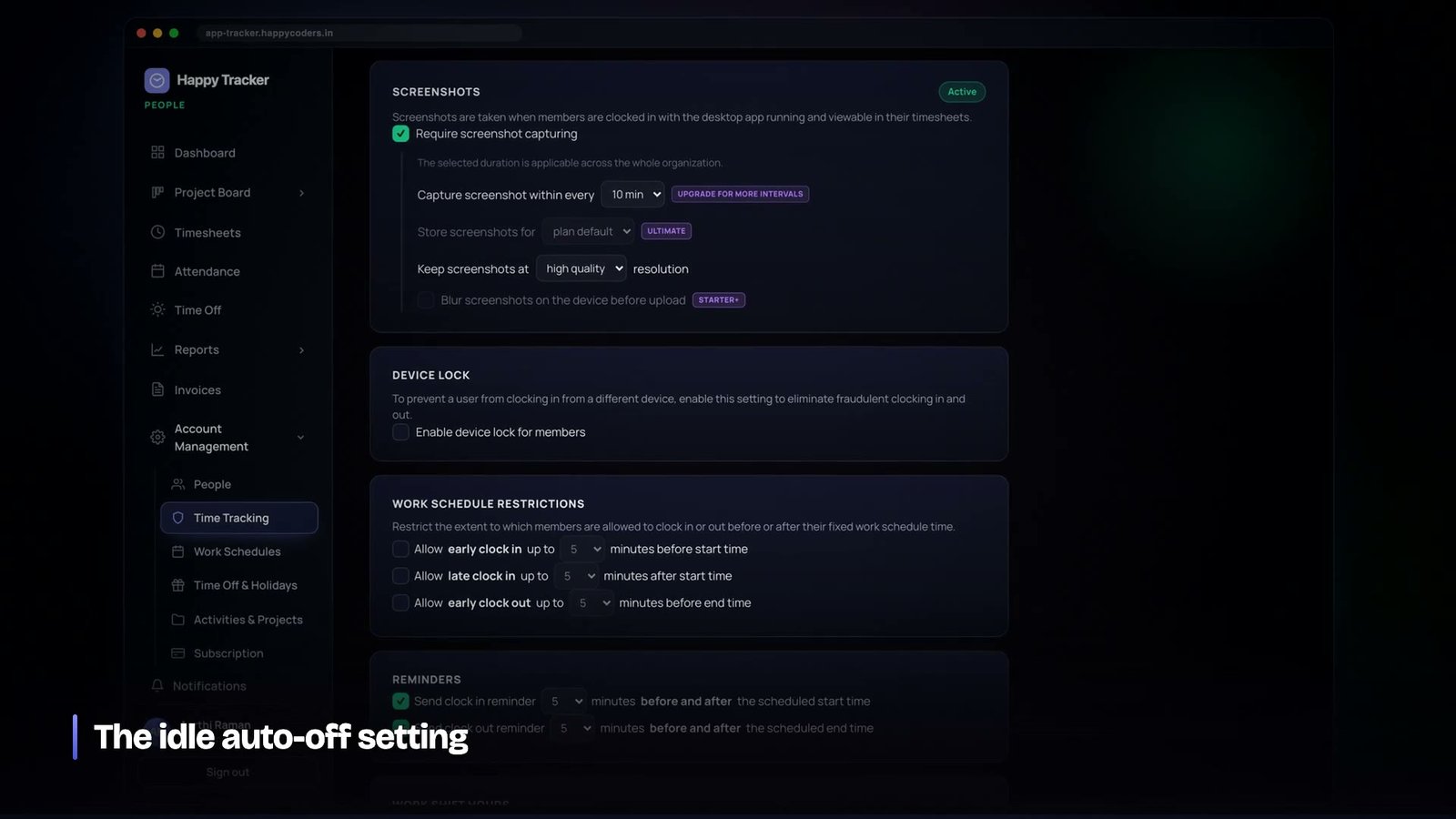
- The idle rule. After a configured stretch with no input at all, the tracker warns on screen, and if there is still no response it closes the session at the moment the idle stretch began — not at the moment it noticed. The difference is the whole point: closing at the moment of noticing would credit the person with the idle period.
- The limit rule. No single entry may exceed the organisation’s configured maximum, with a platform-wide backstop so that an organisation which has switched the policy off still cannot accumulate a forty-hour entry.
- The stale rule. If the tracker stops reporting activity blocks entirely for more than a few minutes mid-session, the machine has been shut down or has lost power. The session is closed at the end of the last block it did report, plus a short grace. This rule is deliberately gated so that it never touches a session that was started from the browser, where there are no blocks to be missing in the first place.
Each closure records which rule fired, in the audit log, so a person who finds their day shortened can see why. A silent correction is indistinguishable from a bug.
The conversation you have to be able to have
The engineering here is not the hard part. The hard part is that on the day a company switches this on, somebody in that company is going to ask what it records, and the answer has to be short, honest, and the same answer their IT team gets when they read the documentation.
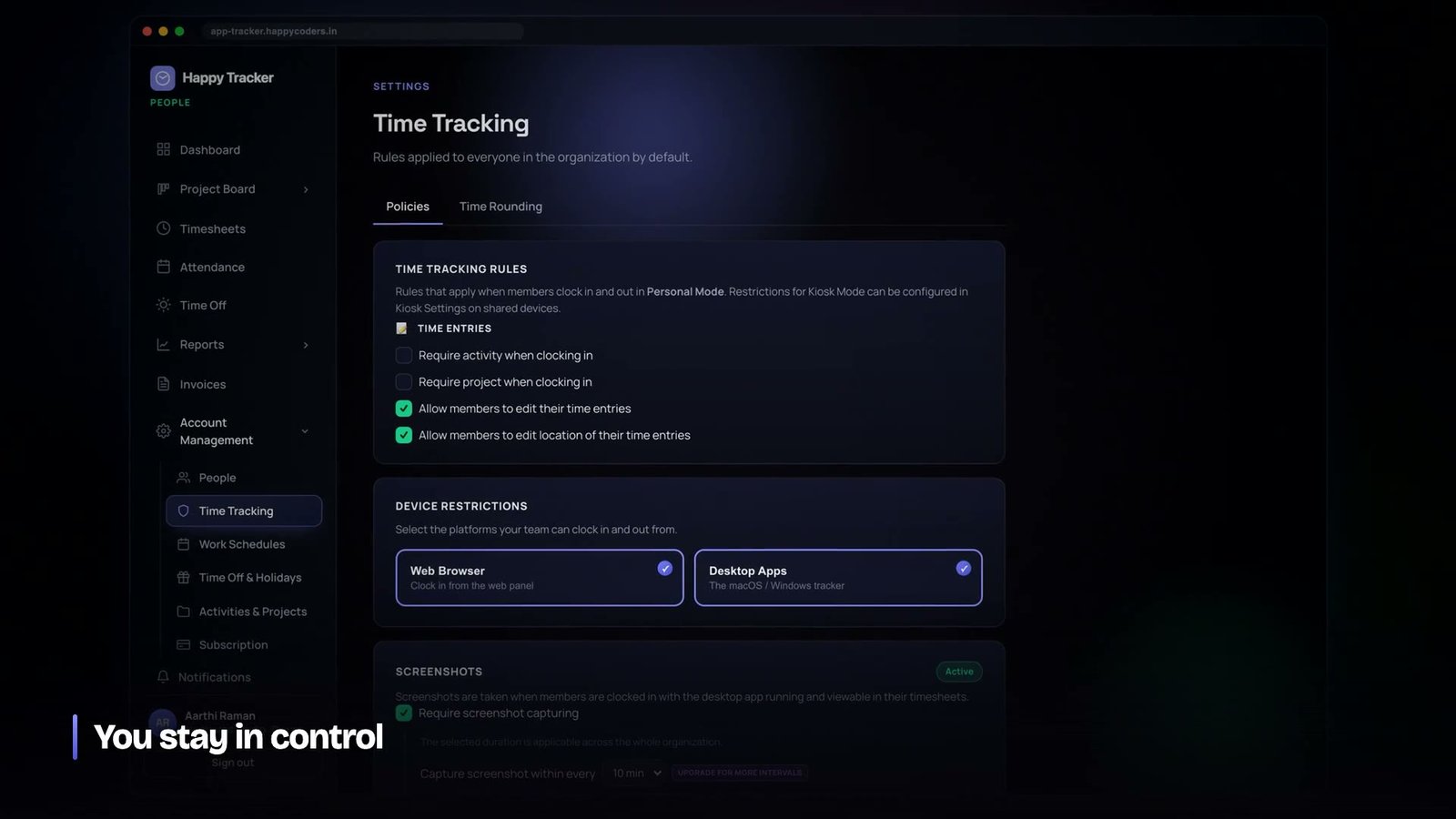
We designed backwards from that conversation. Every capture setting lives in one place. Employees can see their own data — all of it, not a summary. Screenshots can be blurred or turned off entirely and the tracker states on screen when it is recording and when it has stopped. None of that was added because a customer demanded it. It was added because a product that cannot be explained to the people it measures does not get deployed, it gets resisted, and resistance in this category looks like mouse-jiggler software rather than complaints.
If your answer to “what does it record about me” takes more than thirty seconds, you have built a product that will be fought rather than used.
Why a single productivity percentage is the wrong output
Almost every tool in this category eventually ships a number between zero and a hundred and calls it productivity. It is enormously tempting, because managers ask for it and because it is easy to compute once you have activity data. It is also the fastest way we know of to destroy the usefulness of everything underneath it.
The problem is that a single percentage collapses several unrelated things into one figure and then invites comparison between people whose jobs are not comparable. A developer writing code and a designer in a canvas tool and an account manager who spends the day on calls will produce three wildly different numbers doing three equally good days of work. Put those numbers in a league table and you have not measured productivity — you have measured how closely each person’s job resembles typing.
What we do instead is score per activity, and roll those scores up to the task and the project rather than to a ranking of people. A block in a coding tool on a coding project scores well. The same block on a design project scores neutrally rather than badly, because the system does not actually know that it was wrong. The output is a picture of where a project’s hours went, which is a question with a correct answer, rather than a judgement about a person, which is a question with a great many.
The practical test we use for any new metric is simple: if this number went down, is the right first response to ask a person to explain themselves? If yes, do not ship the number as a headline. Ship the thing underneath it that a manager can actually act on.
The observer effect is real and it is fast
Any measurement that people believe will be used against them changes the behaviour being measured, and it does so within days rather than months. In this product the failure mode is very specific and very easy to spot once you know what to look for: perfectly regular input at the edge of the idle threshold, all day, with no corresponding change in output.
You can build detection for that. We have thought about it several times and decided against it every time, because the arms race has no end and because the presence of the behaviour is a symptom rather than the disease. If people on your team are running mouse jigglers, the useful information is not which people — it is that the measurement has been framed as a threat, and that framing came from management, not from the software.
Meetings, phone calls and the rest of the invisible work
The largest single category of legitimately idle time in most teams is time spent listening. A person in a two-hour planning meeting is working, is producing almost no input events, and will appear in a naive report as two hours of nothing.
There are three reasonable ways to handle this and we support all of them, because different teams want different amounts of ceremony.
- Do nothing. Accept that active time will sit below clocked time and read the ratio rather than the raw figure. For most teams this is enough, and it requires no discipline from anybody.
- Track against an activity. Selecting a meeting or a call as the activity when clocking in means the hours land in a category that is expected to be input-light, and reports can separate it from focused work.
- Let the block explain itself. A block whose foreground application is a video-conferencing tool is self-evidently a meeting, and the category map handles it without anybody selecting anything.
What we would not recommend is asking people to start and stop a timer around every meeting. It sounds rigorous. In practice it is forgotten roughly half the time, and half-kept records are worse than no records because they look complete.
Screenshots and activity answer different questions
Idle detection tells you whether somebody was there. Screenshots, where a company chooses to use them, tell you what was on the screen. They are frequently discussed as one feature and they are not, and conflating them leads to bad policy.
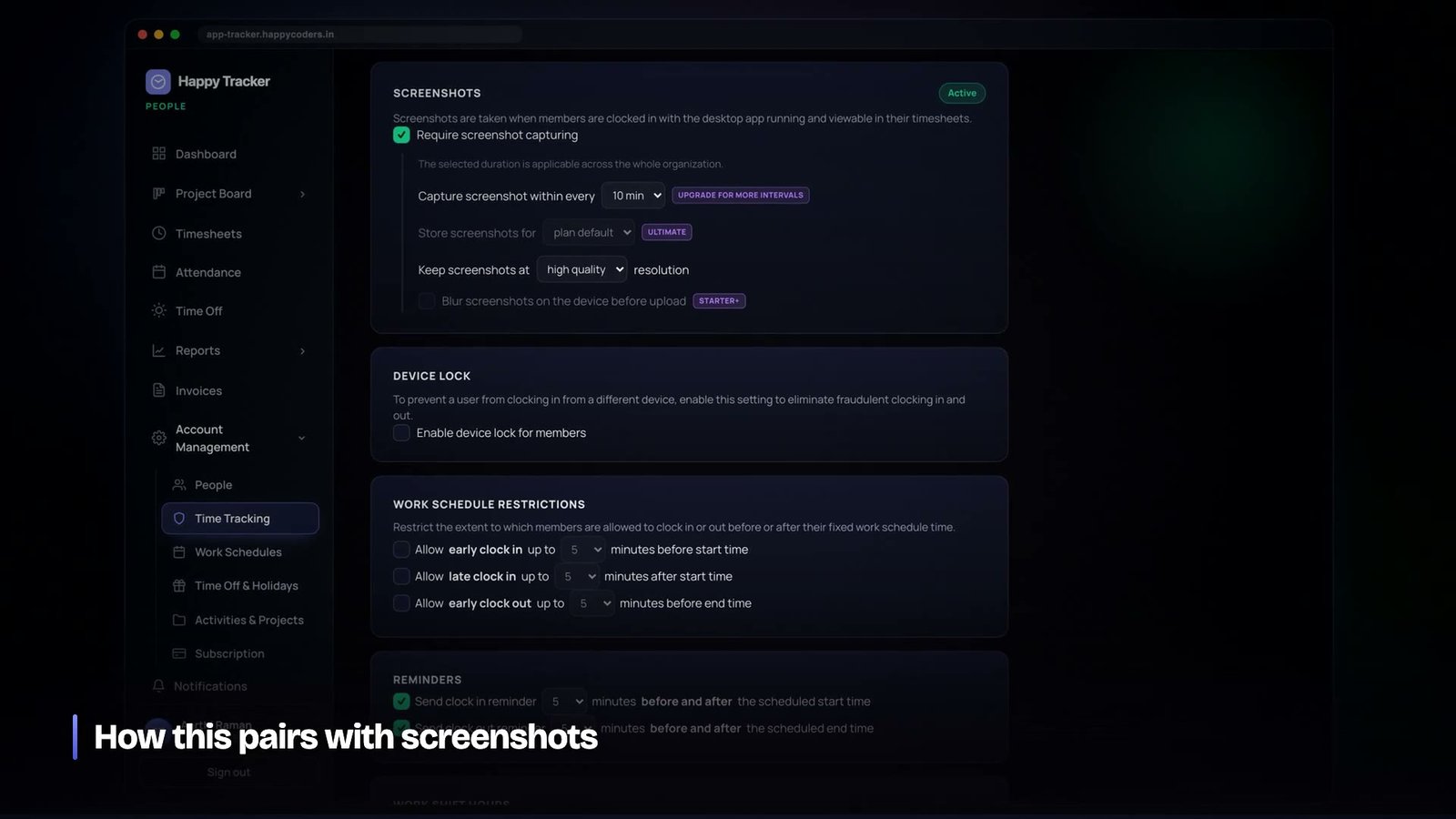
Activity data is cheap, continuous, and low in sensitivity — a list of application names and durations. Screenshots are expensive, periodic, and high in sensitivity, because a single frame can contain a private message, a salary figure or somebody else’s personal data that happened to be open in another window.
Because of that asymmetry we made them independently controllable. A company can run activity tracking with screenshots switched off entirely, which is what a surprising number of them do once they understand the difference. A company that wants screenshots can set the frequency, apply blurring so that layout is visible but text is not, and set a retention period after which the images are deleted automatically rather than accumulating forever.
The last of those is the one people forget. Screenshots that are never deleted become a liability that grows every day — storage cost, and a far larger data-protection exposure than anybody signed up for. A retention window turns an open-ended risk into a bounded one, and it should be set on day one rather than the day somebody asks.
What honest measurement changes
When this is done well, the effect on a company is not that people work harder. It is that the arguments change.
Estimates stop being negotiations and start being extrapolations from what similar work actually took. A project that is running late shows it in week two rather than week nine. Somebody who is quietly blocked shows up as a drop in active time on a specific task rather than as a missed deadline a month later. And the person who was working perfectly hard all along has, for the first time, a record that says so — which is worth more to a good employee than it is to their manager.
The companies that get the least from this are the ones that install it to catch people. They find one or two, everybody else notices, and within a month the data is worthless. The ones that get the most install it to find out where the hours went, tell everybody exactly that, and then actually act on what they find.
If you are building something similar
- Define idle as absence of input, and nothing more. Every extra inference you bake into the definition is one more thing that will be wrong for somebody’s job.
- Attach blocks to the time entry. Floating activity data that cannot be traced back to a session is impossible to audit and impossible to defend.
- Plan the category backfill before you need it. Your application map will change; the rows written under the old one will not fix themselves.
- Let people correct their own data. It costs a day to build and it buys the credibility of the whole feature.
- Close idle sessions at the start of the idle stretch. Closing at detection quietly inflates every long-idle day.
- Record which rule closed a session. Otherwise support spends its life explaining vanished hours.
- Say what you do not collect, in writing, before anybody asks.
Measured this way, idle time stops being a stick and becomes what it should have been from the start: the difference between the hours a company pays for and the hours a project actually received, which is a number worth knowing and has never once been improved by pretending it is zero.
Happy Tracker separates active from idle on the web and on native apps for Mac, Windows and Ubuntu, and it is free for up to five users with no time limit and no card. It is at happytracker.happycoders.in if you want to see the reports on your own team’s data.




