
Rate Limiting an API That Your Own Desktop Apps Hammer
Rate Limiting an API That Your Own Desktop Apps Hammer
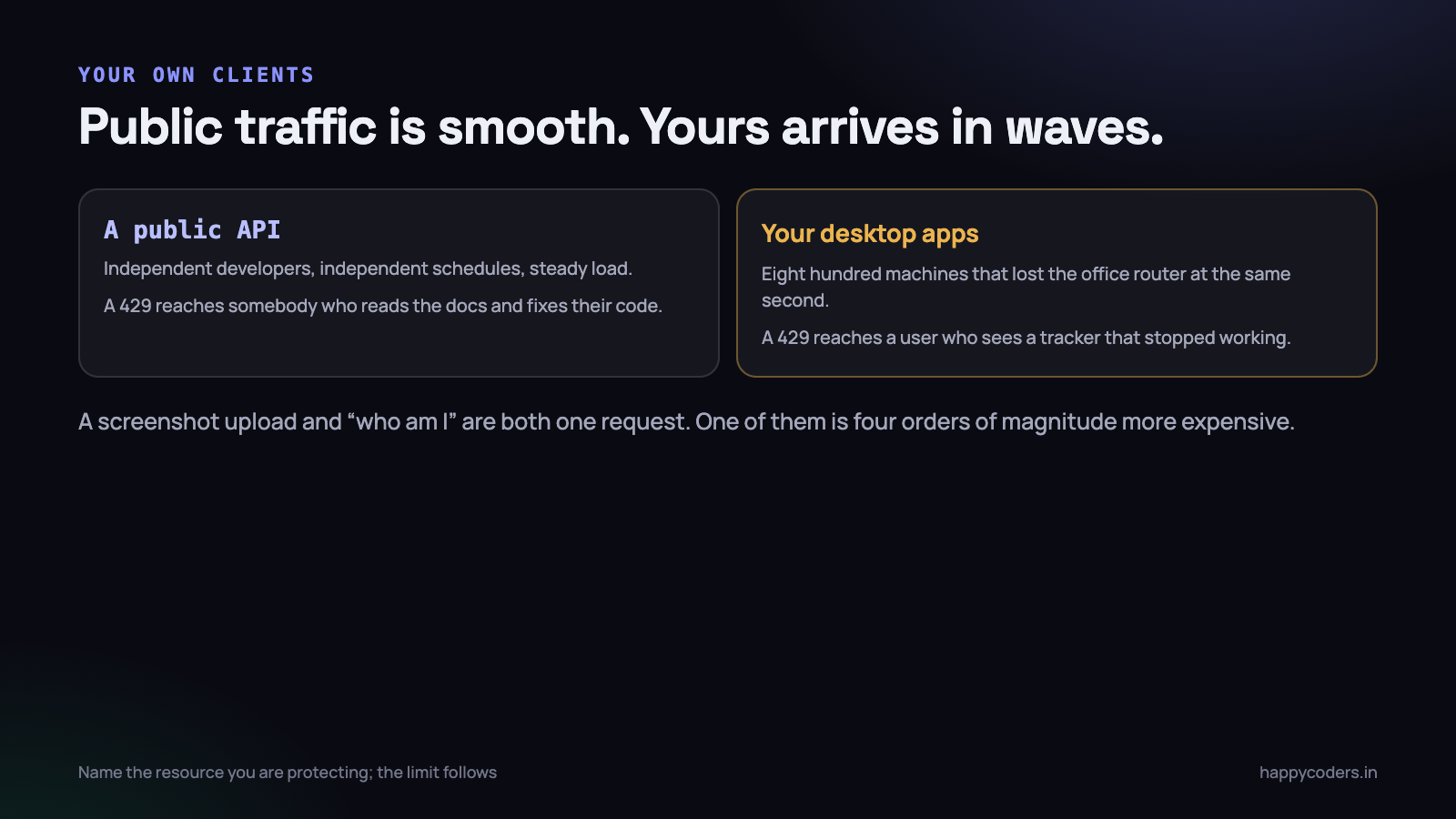
Rate limiting a public API is a solved problem: pick a number, key it on the API token, return 429 when it is exceeded. Rate limiting an API whose clients are your own desktop applications, running on thousands of machines, is a different problem with a different failure mode.
Those clients do not back off politely by default. They retry. They all lose connectivity at the same time when an office router restarts, and they all come back at the same time. And when your limit rejects them, the user does not see a 429 — they see a tracker that stopped working.
What you are actually protecting
Before choosing a number it is worth naming the thing that breaks, because different resources need different limits and a single global number protects none of them well.
- The database. Usually the real constraint. A hundred concurrent report queries will exhaust the connection pool long before the web servers notice.
- CPU on the application servers. Image processing, PDF generation, anything that is not I/O.
- Third-party quotas. If a request triggers a call to a mail provider or a payment gateway, their limit is now yours.
- Storage and bandwidth. Screenshot uploads, at a few hundred kilobytes each, from every active user every ten minutes.
- Fairness between tenants. One large customer should not be able to starve forty small ones.
Those have wildly different costs per request. A screenshot upload and a request for the current user are both one request and one of them is four orders of magnitude more expensive. Counting them the same is why a single limit is always either too loose to protect anything or too tight to work.
Key it on the right thing
The choice of key determines what the limit actually does, and the default choice is usually wrong for a desktop client.
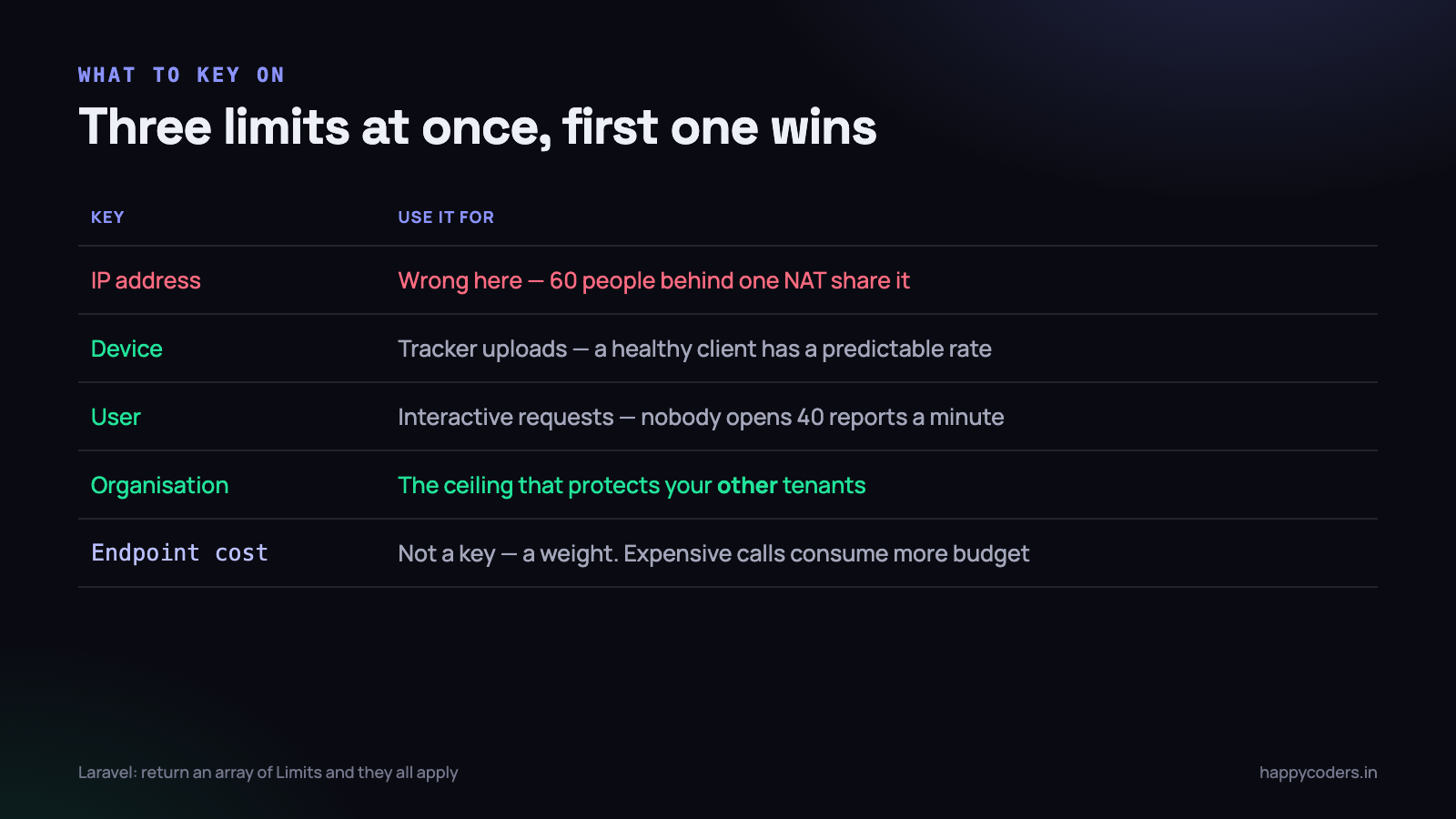
- By IP address — wrong for this. An office of sixty people behind one NAT shares an address, so a per-IP limit either punishes large customers or is set so high it protects nothing.
- By user — sensible for interactive endpoints. One person cannot open forty reports a minute.
- By device — the right key for tracker uploads. A device has a predictable, known upload rate, and a device behaving oddly is exactly what you want to catch.
- By organisation — the one people forget, and it is what protects your other tenants. A 400-seat customer syncing after an outage should not consume the whole database.
- By endpoint cost — not a key but a weight. Expensive endpoints consume more of the same budget.
We ended up applying three at once: a per-device limit for uploads, a per-user limit for interactive requests, and a per-organisation ceiling above both.
// routes/api.php
Route::middleware(['auth:sanctum', 'throttle:tracker-upload'])->group(function () {
    Route::post('/time-entries',  [TimeEntryController::class, 'store']);
    Route::post('/screenshots',   [ScreenshotController::class, 'store']);
});

Route::middleware(['auth:sanctum', 'throttle:interactive'])->group(function () {
    Route::get('/reports/{type}', [ReportController::class, 'show']);
});
// AppServiceProvider
RateLimiter::for('tracker-upload', function (Request $request) {
$user = $request->user();
return [
// the device: generous, because a healthy client is predictable
Limit::perMinute(120)->by('dev:' . $request->header('X-Device-Id')),
// the organisation: the ceiling that protects everyone else
Limit::perMinute(2000)->by('org:' . $user->organization_id),
];
});
RateLimiter::for('interactive', function (Request $request) {
return Limit::perMinute(60)->by('user:' . $request->user()->id);
});Returning an array applies all of the limits, and the first one exceeded wins. That composition is what lets a single customer burst without letting them exhaust the system.
The thundering herd
This is the failure that is specific to owning your own clients, and it is worth designing for explicitly because it is not hypothetical.
An API deploys badly and is down for four minutes. Eight hundred trackers fail, back off, and retry. If they all use the same backoff schedule, they retry together — so the moment the service returns it receives eight hundred simultaneous requests, falls over again, and the cycle repeats. The outage is now self-sustaining and it is your own software doing it.
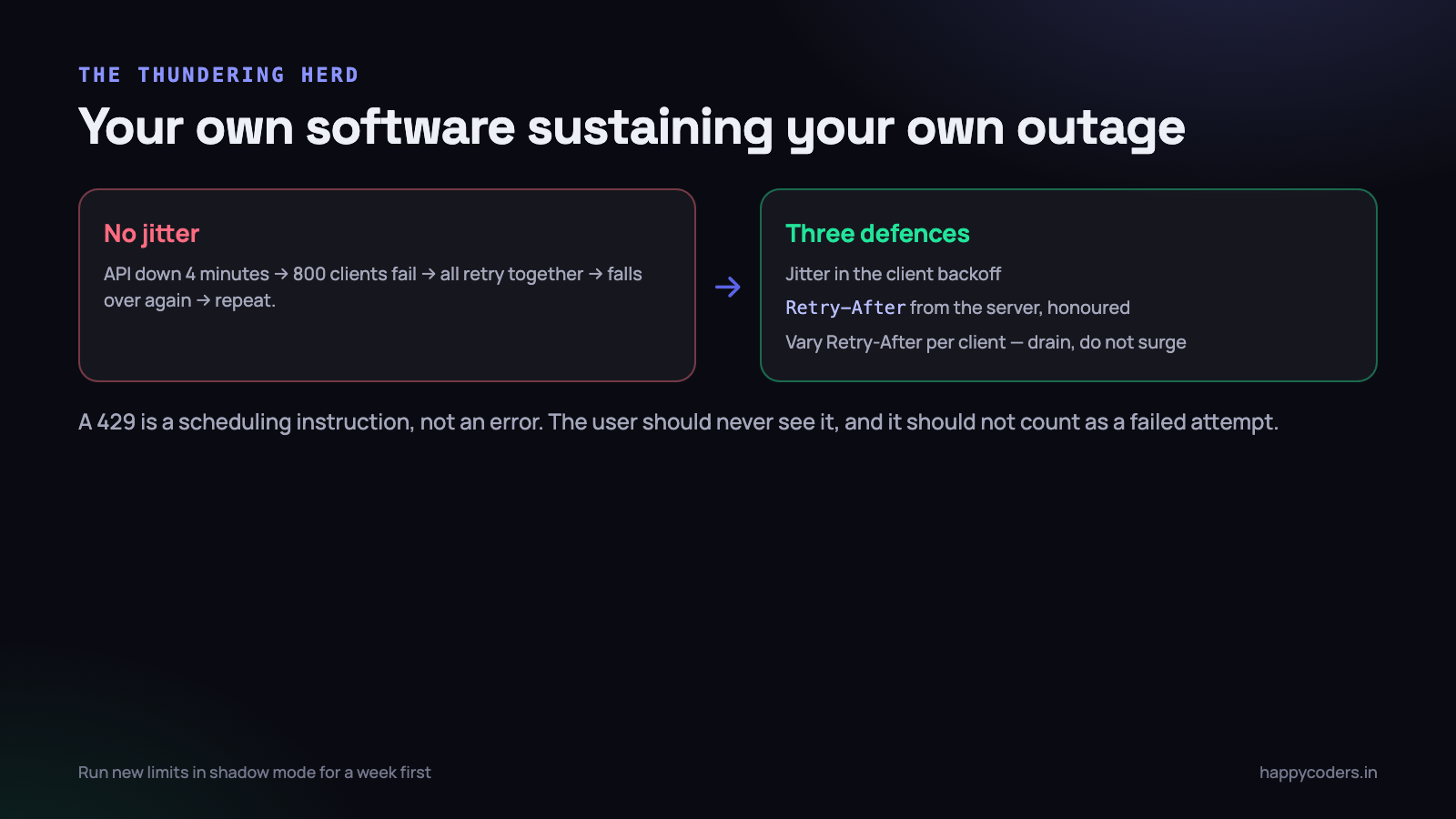
Three defences, and you want all three:
- Jitter in the client backoff. Randomise the delay by plus or minus fifty per cent. One line in the client, and the single most effective fix.
- Tell the client when to come back. A 429 should carry
Retry-After, and the client should honour it in preference to its own schedule. That moves the scheduling decision to the side that can see the load. - Spread the recovery from the server. When you know a herd is coming, vary
Retry-Afterper client — 30 seconds for some, 90 for others — and the queue drains smoothly instead of in waves.
// on the server, when the limit is hit
return response()->json(['message' => 'Too many requests'], 429)
    ->header('Retry-After', $seconds + random_int(0, 30));
A 429 is not an error the user should see
This is where rate limiting an internal client differs most from a public API. A third-party developer who hits your limit reads the docs and fixes their code. Your own user just sees a tracker that stopped, and they have no idea why.
So the client has to treat 429 as entirely routine:
- Never surface it. It is a scheduling instruction, not a failure. The queue is intact, nothing is lost, and the interface should not change.
- Do not count it as a failed attempt for backoff purposes. The request did not fail; it was deferred.
- Honour
Retry-Afterexactly, rather than applying your own delay on top. - Keep tracking. Recording continues locally regardless of what the API says. The upload queue is a background concern.
Only if a client has been unable to upload for a long period — hours, not minutes — is there anything worth telling the user, and even then it is an indicator rather than an error.
Limits are not the only tool, and often not the best one
A rate limit is a blunt instrument: it protects the system by refusing work. Several cheaper things reduce the load instead, and they are worth exhausting first.
Move the work off the request
A report that takes eight seconds does not need a tighter limit; it needs to not run inside a web request. Generate it in a job, return immediately, and notify when it is ready. Ten concurrent report requests then cost ten rows in a queue rather than ten database connections held for eight seconds each.
This is usually the single largest win available, and it changes the shape of the problem rather than capping it.
Let the client ask for less
Our tracker used to request the full project list on every start. On a customer with 900 projects that is a large response, many times an hour, for data that changes weekly. Adding a conditional request — send back 304 when nothing changed — removed most of that traffic without any limit being involved.
Make the expensive thing cheaper
If one endpoint accounts for most of the load, the honest fix is usually an index or a cache rather than a limit. A limit on a slow endpoint protects the database and leaves the user with a slow endpoint that now also fails sometimes.
Shed load deliberately, in order
When the system genuinely is beyond capacity, refusing everything equally is the worst option. Decide in advance what degrades first: reports before uploads, analytics before authentication. Losing a report is an inconvenience; losing an upload is somebody’s afternoon.
Having that order written down before an incident is what lets you make the decision calmly during one.
Where the counter lives
Rate limiting needs shared state across every application server, and the choice has consequences.
- Redis — the normal answer. Atomic increments with expiry, fast, and correct across servers. If Redis is down, decide in advance whether you fail open or closed.
- The database — workable at small scale, and a bad idea at the scale where limits matter, because you are adding database load in order to protect the database.
- In-process memory — each server counts independently, so the real limit is your number multiplied by the server count. Tolerable if you accept that; misleading if you do not.
- At the edge — a CDN or load balancer can reject before the request reaches you, which is the only approach that protects against genuine flooding. It cannot see your tenants, so it complements rather than replaces application limits.
The fail-open question deserves a decision rather than a default. We fail open on the upload path, because losing a customer’s tracked hours because Redis restarted is worse than the load, and fail closed on expensive report endpoints. Whichever you choose, choose it deliberately — the default in most libraries is to throw, which fails closed for everything.
Tell the client what it has left
Standard headers on every response, not just on the rejection:
X-RateLimit-Limit: 120
X-RateLimit-Remaining: 94
X-RateLimit-Reset: 1758000000
A well-behaved client can slow itself down before being rejected, which is strictly better for both sides. Ours halves its batch size when remaining drops below about a fifth of the limit, and the effect is that it almost never sees a 429 at all.
Numbers you can start from
These are ours, arrived at by watching real traffic rather than by reasoning. They are a starting point, not a recommendation — your endpoints cost different amounts.
- Tracker uploads — 120 per minute per device. A healthy client sends perhaps 6; the headroom exists entirely for backlog recovery.
- Screenshots — 20 per minute per device. Bounded by what the capture interval can physically produce.
- Interactive requests — 60 per minute per user.
- Reports — 10 per minute per user. Expensive, and nobody reads ten reports a minute.
- Authentication — 5 per minute per IP and per account. This one is about credential stuffing, not load, and the per-account half is what stops a distributed attempt.
- Organisation ceiling — 2,000 per minute, above all of the above.
Set them by measuring your own clients at steady state and multiplying by fifteen or twenty. The limit exists to catch something pathological, not to shape normal traffic — if legitimate users regularly hit it, it is set wrong.
Testing a limit before it meets real traffic
Limits are one of the few things that are dangerous to tune in production, because getting them wrong breaks working clients rather than degrading gracefully. Three cheap ways to gain confidence first.
- Run them in shadow mode. Evaluate the limit, log what would have been rejected, and let everything through. A week of that tells you exactly which legitimate clients your proposed number would have broken — and there are always some.
- Replay a real backlog. Take an actual day of upload traffic from the logs and replay it compressed into ten minutes. That is roughly what recovery from an outage looks like, and it is the case the limits exist for.
- Test the client, not just the server. Make a staging API return 429 for everything for five minutes and watch a real tracker. It should keep recording, stay quiet, honour
Retry-After, and drain cleanly afterwards. Most rate-limiting bugs we have found were on this side.
Shadow mode is the one to insist on. It costs a log line and it converts the number from a guess into a measurement.
Watch the rejections
A rate limit you do not monitor is a silent outage waiting to happen. Log every 429 with the key that was exceeded, and alert on the rate of rejections rather than the absolute count.
Two patterns worth watching for specifically. A single device suddenly generating thousands of rejections is a client bug — a retry loop with no backoff — and it will be in the next release unless somebody notices. And a broad rise in rejections across many organisations usually means you deployed something that made a request slower, not that the world got busier.
The short version
- Name the resource you are protecting; the limit follows from it.
- Key on device and organisation, not on IP.
- Compose several limits; the first one exceeded wins.
- Jitter in the client,
Retry-Afterfrom the server, spread the recovery. - A 429 is a scheduling instruction. The user should never see it.
- Decide fail-open or fail-closed per endpoint, deliberately.
- Send the remaining-quota headers and let good clients self-throttle.
- Alert on rejection rate, and look for the single misbehaving device.
Above all, remember who is on the other end. A public API’s rate limit is a contract with a developer. Yours is a decision about whether somebody’s morning of work reaches the server, and they will never know it was a limit that stopped it.
The thing that makes this different from a public API is that you control both sides. That is an advantage — you can make the client behave — and a trap, because a client bug you shipped will arrive from every machine at once.




