
Four Caching Layers, and Which One Is Lying to You
Four Caching Layers, and Which One Is Lying to You
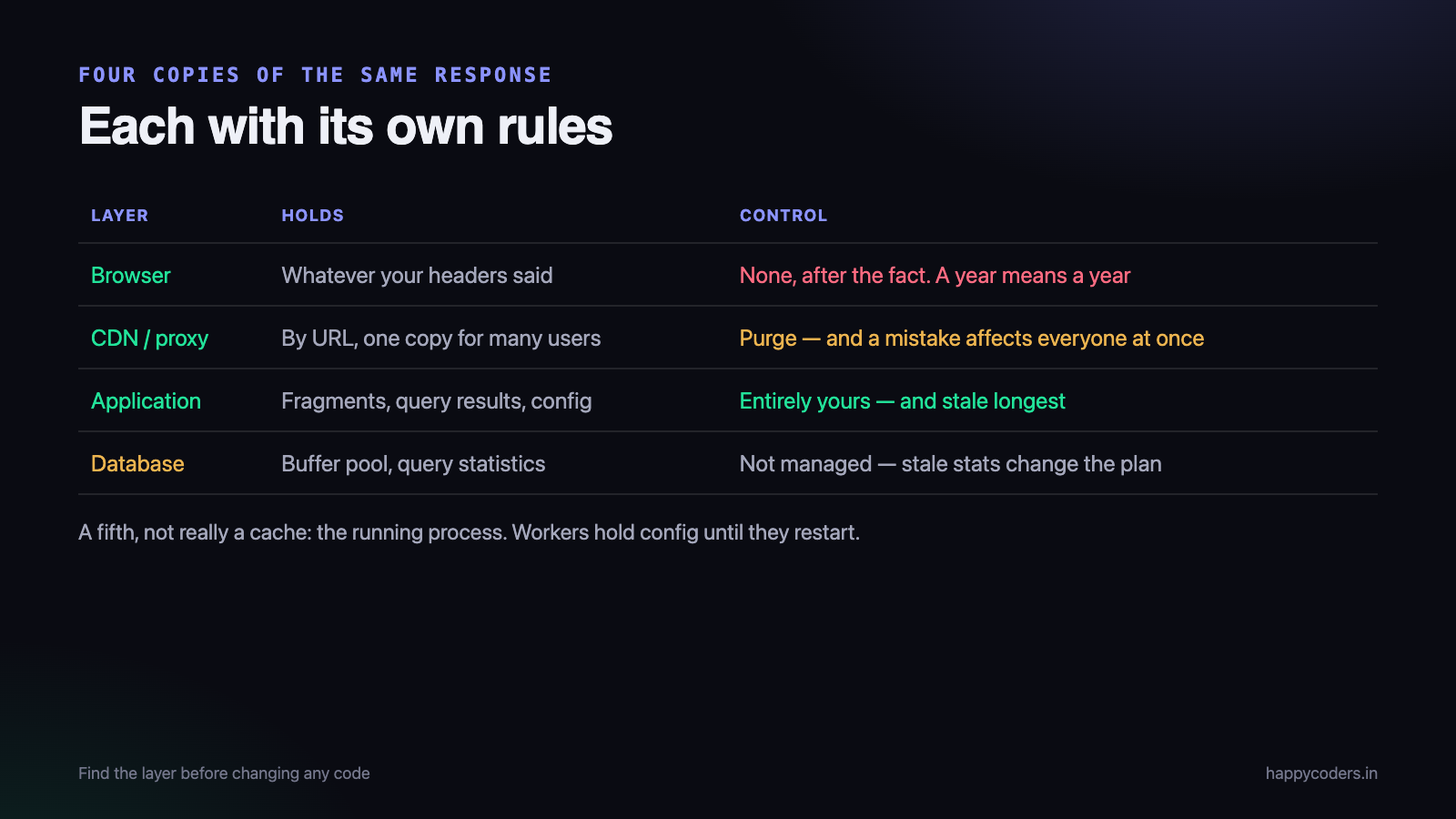
Somebody deploys a fix. It works locally, it works on staging, and one customer still sees the old behaviour. The most likely explanation is not a failed deploy — it is that something between your code and their screen is holding a copy, and there are at least four candidates.
This is what each layer caches, how to tell which one is responsible in under a minute, and the invalidation rules that stop it happening again.
The four layers
1. The browser
Holds responses according to the headers you sent, and in some cases regardless of what you meant. The most common source of “it works for me” — you hard-refreshed and the customer did not.
It is also the layer you have least control over after the fact. A response sent with a year-long cache lifetime is in that browser for a year; you cannot reach in and remove it.
2. The CDN or reverse proxy
Cloudflare, a hosting CDN, nginx or Varnish. Caches by URL, sometimes ignoring query strings or cookies depending on configuration. This layer serves many users from one copy, so a mistake here affects everybody at once.
It is the layer most likely to be misconfigured, because the person who set it up is often not the person deploying the code.
3. The application cache
Redis or Memcached, holding rendered fragments, query results, computed values, configuration. Entirely yours, entirely under your control, and the layer where stale data lasts longest because nothing expires it unless you wrote the code to.
4. The database and the query plan
The buffer pool holding pages in memory, and the optimiser holding statistics about your tables. Not a cache you manage, and occasionally the reason a query that used to be fast is not — statistics went stale after a large change, and the plan changed.
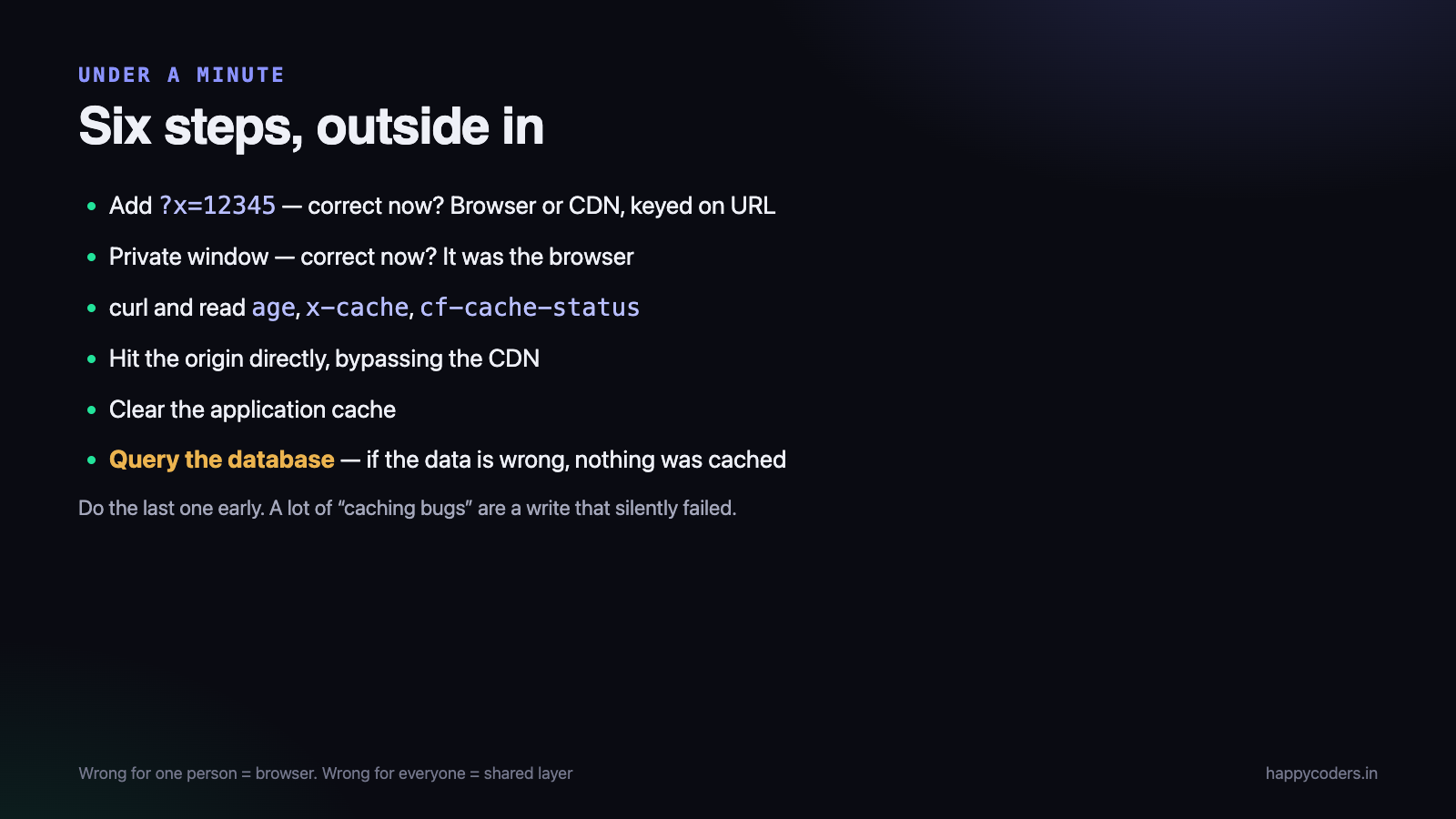
Finding the liar in under a minute
Work from the outside in. Each step eliminates a layer.
- Add a random query string.
?x=12345. If the page is correct, the problem is browser or CDN caching keyed on the URL. - Hard refresh, or open a private window. Correct now? It was the browser.
- curl the URL directly and read the response headers.
age,x-cache,cf-cache-statusand their equivalents tell you whether a CDN served it and how old the copy is. - Request the origin, bypassing the CDN. Correct at origin and wrong through the CDN identifies it precisely.
- Clear the application cache in a console. If that fixes it, the invalidation logic is what needs the work.
- Query the database directly. If the raw data is already wrong, nothing was cached — the write never happened, and you have been debugging the wrong problem.
That last step is worth doing early rather than last. A surprising share of “caching bugs” turn out to be a write that silently failed — a rolled-back transaction, a validation that returned early, a job that never ran.
Headers, and what they actually do
Most browser and CDN caching problems come from a handful of directives whose behaviour is not obvious.
# a static asset with a content hash in the filename
Cache-Control: public, max-age=31536000, immutable

# an HTML page that must always be revalidated
Cache-Control: no-cache

# a page that must never be stored anywhere
Cache-Control: no-store, private

# cache at the CDN for a minute, in the browser not at all
Cache-Control: public, max-age=0, s-maxage=60no-cachedoes not mean do not cache. It means store it, but revalidate before using it. The directive that means do not store isno-store, and mixing them up is the commonest mistake here.s-maxageapplies to shared caches only — the CDN — and lets you cache at the edge while the browser revalidates every time. For HTML this is usually what you want.immutablestops revalidation entirely. Correct for a file whose name contains a content hash, and dangerous for anything else.privatemeans browser only. Any response containing one user’s data must have it, or a shared cache can serve that user’s page to somebody else. This is not a performance bug; it is a data leak.
That last one deserves a deliberate check. A misconfigured CDN caching an authenticated page and serving it to another user is one of the worst bugs a web application can have, and it happens by accident when a cache rule matches a path more broadly than intended.
Never cache-bust by hand
Appending a version to an asset URL manually works until somebody forgets. Content hashing makes it structural:
app.a3f91c2e.js
style.7bd4e109.css
The filename changes when the content changes, so the URL is new, so no cache anywhere can serve the old one. Nothing to invalidate, nothing to remember, and the assets can be cached for a year.
Every build tool does this. The failure mode is usually the HTML that references them — it must not be cached aggressively, or browsers keep asking for the old filenames. Hashed assets cached forever, HTML revalidated every time is the pairing that works.
Application cache invalidation
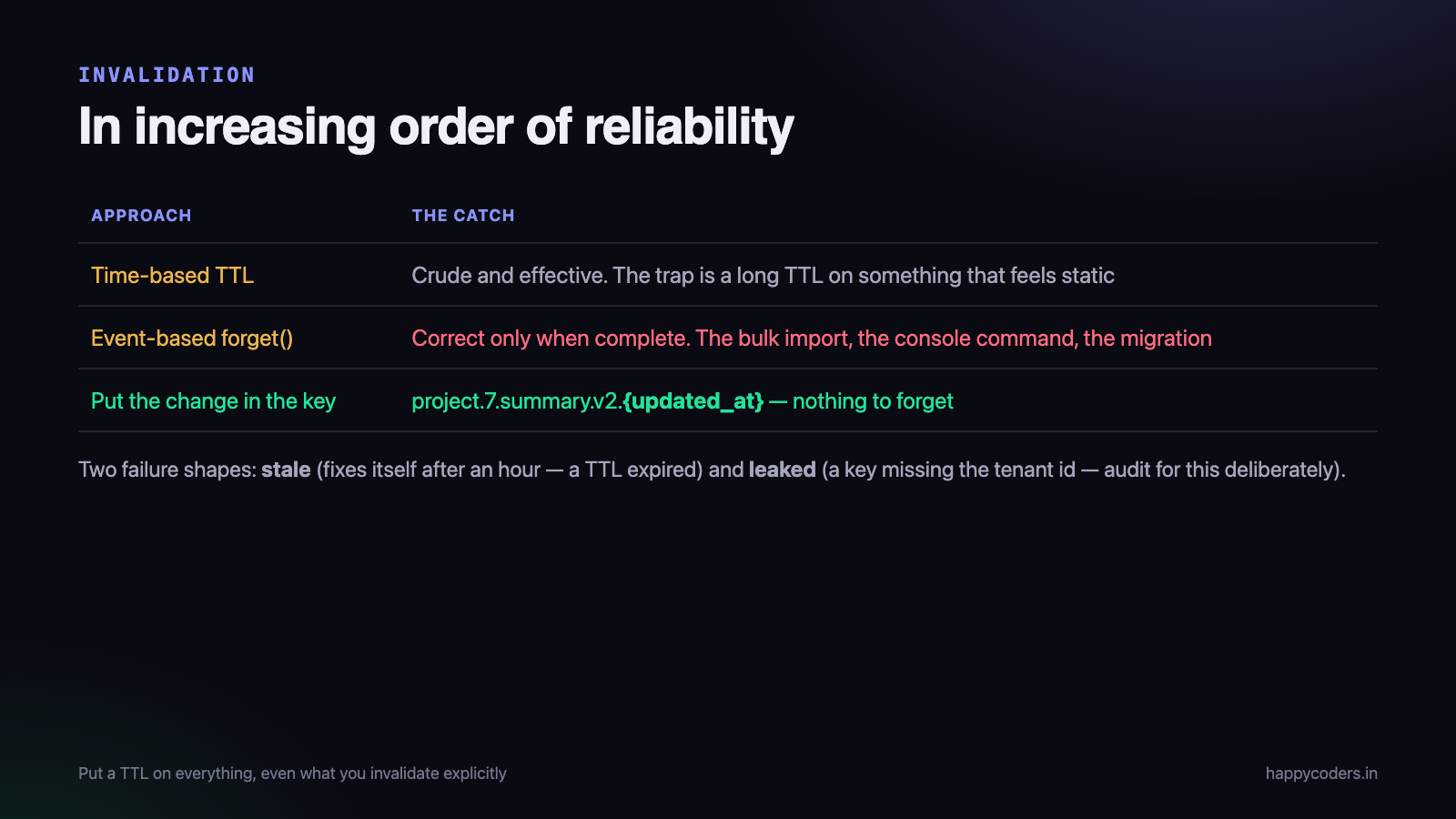
The hardest of the four, because the rules are entirely yours. Three approaches, in increasing order of reliability.
Time-based expiry
Give everything a TTL and accept staleness for that long. Crude and remarkably effective — for a dashboard figure, sixty seconds of staleness is usually fine and removes all invalidation logic.
The trap is the long TTL on something that feels static. Configuration cached for a day means a setting change takes a day, and somebody will spend an afternoon on that before remembering.
Event-based invalidation
<?php
// forget the derived value whenever the source changes
TimeEntry::saved(fn ($entry)  => Cache::forget("project.{$entry->project_id}.total"));
TimeEntry::deleted(fn ($entry) => Cache::forget("project.{$entry->project_id}.total"));
Correct when complete, and completeness is the problem. Every path that writes must invalidate — including the bulk import, the console command, the admin tool and the migration. One forgotten path produces stale data that persists indefinitely, and nobody can reproduce it.
Keys that make invalidation unnecessary
The most reliable approach is to put whatever changes into the key, so a change produces a different key and the old entry simply ages out.
<?php
$key = "project.{$project->id}.summary.v2."
     . $project->updated_at->timestamp;

Cache::remember($key, 3600, fn () => $this->buildSummary($project));
Update the project and the timestamp changes, so the key changes, so the next read is a miss and rebuilds. Nothing to forget. Include a version segment as well, so a change to the shape of the cached value invalidates every entry with one edit.
The cost is dead entries lingering until their TTL expires, which is a memory cost and almost always worth paying for the correctness.
The two failure shapes
Caching bugs come in exactly two forms, and telling them apart immediately narrows the search.
Stale: the old value is being served
The obvious one. A change was made and is not visible. It is almost always an invalidation path that was never written — a bulk import, an admin action, a console command — or a TTL longer than anybody remembers setting.
The tell is that it eventually fixes itself. If waiting an hour resolves it, a TTL expired and the invalidation logic is what needs attention.
Leaked: somebody else’s value is being served
Much rarer and far more serious. A user sees another user’s name, another tenant’s figures, another customer’s document. Two causes, both avoidable:
- A cache key missing the user or tenant.
project.summaryinstead oforg.42.project.7.summary. It works perfectly with one tenant in development. - A shared cache storing an authenticated response because
privatewas missing or a CDN rule matched too broadly.
Worth a deliberate audit rather than waiting for a report. Grep every cache key in the codebase and check that anything derived from tenant data has the tenant id in the key. It takes an hour and it is the single highest-value hour of caching work available.
Caching the miss, and the stampede
Two behaviours that only appear under load, and both surprise people the first time.
Cache the absence. A lookup that returns nothing and is not cached means every request for a missing record hits the database. On an endpoint that can be probed with arbitrary ids, that is a cheap way to bypass your cache entirely. Store a null marker with a short TTL rather than nothing at all.
The stampede. An expensive cached value expires, and forty simultaneous requests all find a miss and all start rebuilding it. The database sees forty copies of the query it was being protected from, at the worst possible moment.
The fix is a lock: the first request rebuilds, the others wait briefly for the result. Most cache libraries offer this, and on anything genuinely expensive it is worth using rather than hoping the timing never lines up. It will line up eventually, and it will do so under load.
What not to cache
- Anything cheap. Caching a query that takes two milliseconds adds a network round trip to Redis and a class of bugs, to save nothing.
- Anything that must be correct right now — a balance, a stock count, a permission check. Use a fast query and an index instead.
- Whole authenticated pages at a shared layer, unless the cache key genuinely includes the user.
- Anything whose invalidation you cannot describe in one sentence. If it takes a paragraph, the rule is too complicated to stay correct.
Cache is a trade of correctness for speed. Make the trade deliberately, on things that are actually slow, and measure that they were.
A fifth layer worth knowing about
There is one more copy that catches people out on a deploy, and it is not in the list because it is not really a cache: the running process itself.
PHP-FPM workers hold opcode caches and, in a long-running process such as a queue worker or an Octane server, application state. A configuration value read once into a static property is cached for the life of that process — which can be days. Deploying new code does not change it until the worker restarts.
This is why “it works on the web but not in the queue” is such a common report after a config change. The web servers were reloaded; the workers were not. Restarting workers on every deploy should be part of the deploy script rather than something somebody remembers.
One habit makes all of this cheaper: decide, for each thing you cache, what the worst consequence of it being stale is. A figure on a dashboard being a minute old is nothing. A permission check being a minute old is a security incident. That single question sorts most caching decisions without any further analysis.
A useful first question
When somebody reports that a change is not showing, one question settles the layer faster than any of the diagnostic steps above: is it wrong for everyone, or for one person?
Wrong for one person, right for everyone else, is almost always the browser — their browser, their copy. Wrong for everyone at once points at a shared layer: the CDN or the application cache. Wrong for one tenant and right for others points at an application cache key that includes the tenant, which narrows it to a specific line of code.
Make it visible
A caching layer you cannot see is one that will eventually cost somebody a day.
- Send a header saying whether the response was cached, at least in staging.
X-Cache: hitanswers the first question of every investigation instantly. - Log the cache hit rate per key group. A rate near zero means the caching is pure overhead; a rate near one hundred on something that should change means invalidation is broken.
- Put the cache keys somewhere findable. A short document listing what is cached, for how long, and what invalidates it, is worth an afternoon and saves several.
- Make clearing it easy and safe. One command, scoped by prefix rather than everything, so a support engineer can clear one customer’s cached figures without flushing the whole store.
And put an expiry on everything, even values you invalidate explicitly. A TTL is the backstop for the invalidation path nobody wrote — without one, a single missed case is stale forever rather than stale for an hour.
Everything above is a variation on it.
The short version
- Four layers: browser, CDN, application, database. Work outside in.
- A random query string, a private window and curl identify the layer in a minute.
no-cachemeans revalidate;no-storemeans do not keep it.- Anything user-specific needs
private, or a shared cache can leak it. - Hash your asset filenames; never cache-bust by hand.
- Prefer keys that change over invalidation you have to remember.
- Do not cache cheap things or things that must be exact.
- Send a hit/miss header and log the hit rate.
The rule that prevents most of it: when a change does not appear, determine which layer is serving the old copy before changing any code. Almost every wasted afternoon on this begins with somebody debugging the application while a CDN holds a four-hour-old page.




