Capturing the Screen on Wayland, Where You Are Not Allowed To
Capturing the Screen on Wayland, Where You Are Not Allowed To
A time tracker that takes screenshots works fine on X11. Any client could read the root window, so capture was a library call and nobody thought about it.
On Wayland that is gone. Not restricted — gone. A client cannot read the display, there is no privileged mode, and no amount of running as root changes it.
This is deliberate. On X11, any application you ran could silently watch every other application, read your keystrokes and capture your screen. Wayland was designed to make that impossible, and screen capture had to be redesigned around the user granting it.
The portal
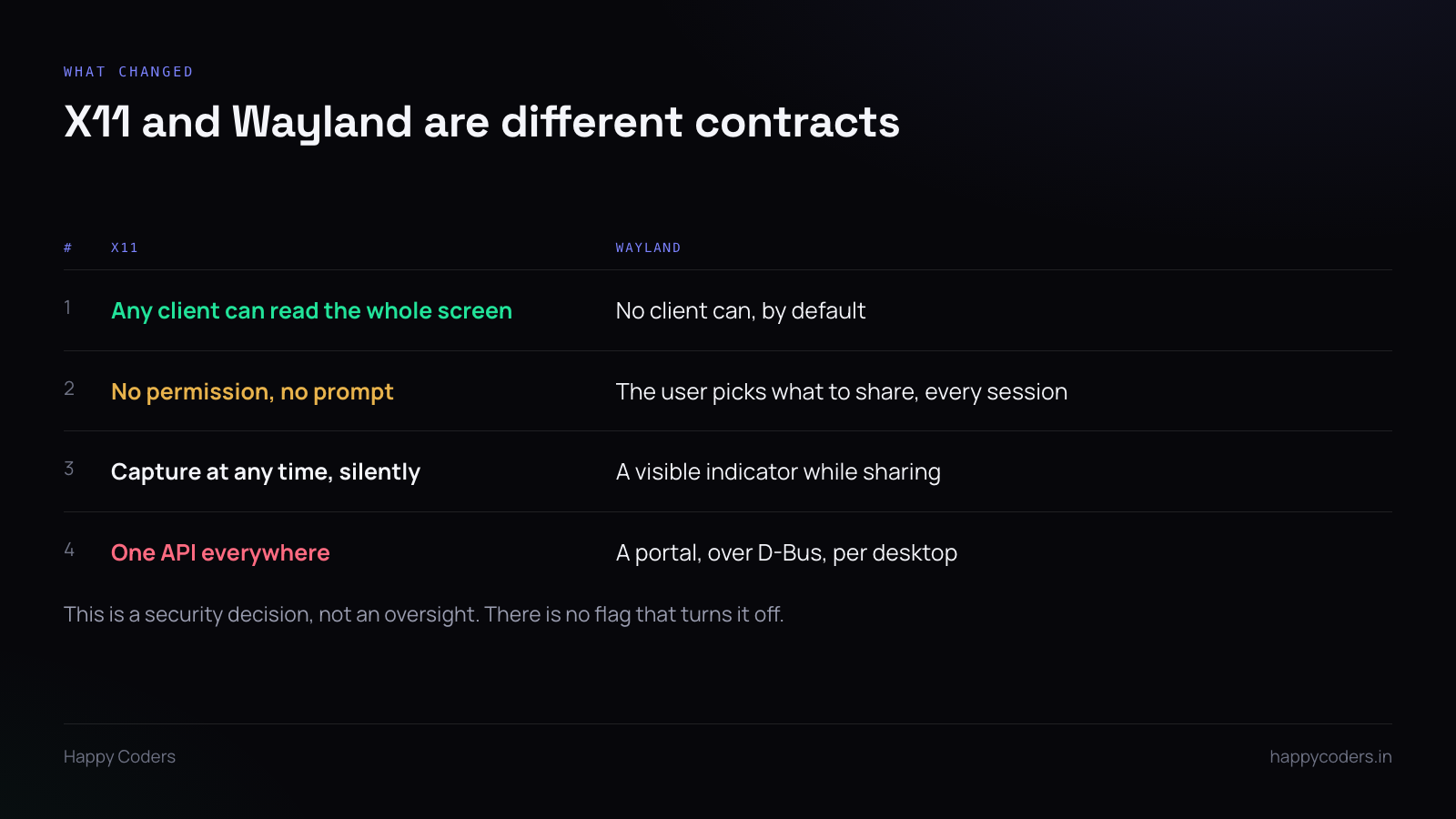
Screen capture now goes through xdg-desktop-portal, a D-Bus service the desktop environment implements. Your application asks the portal; the portal asks the user; if the user agrees, you get a stream.
The important consequence is architectural rather than technical: capture requires a user decision, and the user can say no. Any code that assumed capture always works has to grow an error path and a way to ask again.
The handshake
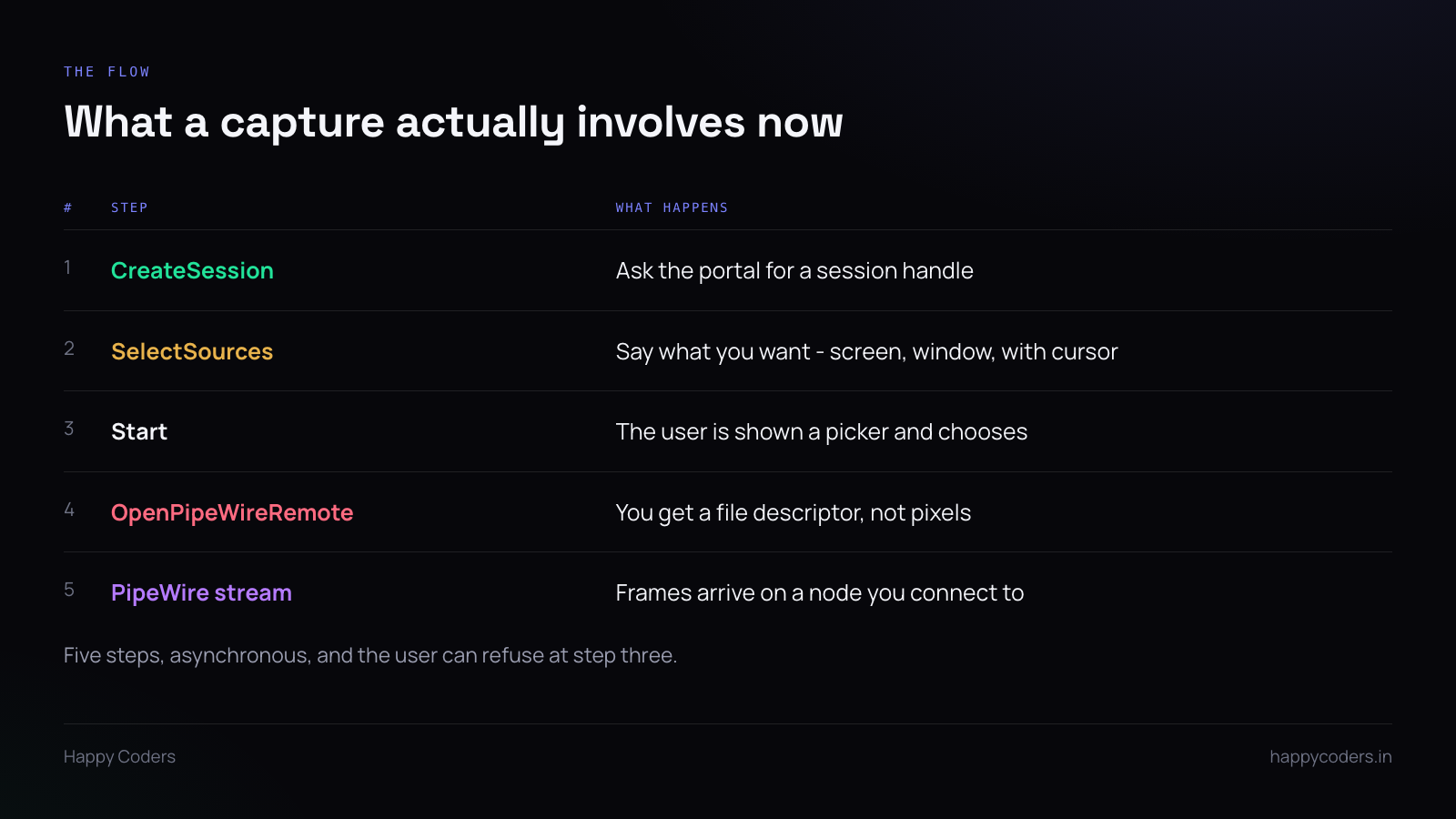
Five asynchronous steps over D-Bus. Each returns a request handle and the result arrives on a signal, so this is not a function that returns a bitmap.
CreateSession gets you a session handle. SelectSources declares what you want — whole screen, a window, whether to include the cursor. Start is the one that shows the user a picker and waits. OpenPipeWireRemote returns a file descriptor. Then you connect to the PipeWire node and frames start arriving.
Note what you do not get: pixels, directly, ever. You get a PipeWire stream, which means PipeWire is now a dependency and a thing that can fail independently.
The part that catches everyone
The user picks once, for that session. They choose which screen or window to share, and that choice is the session. If your app wants a different screen later, that is a new session and a new prompt.
For a tracker taking a screenshot every ten minutes, this is the central design question. You do not re-prompt every ten minutes — you hold one session open for the whole clock-in and pull a frame from the existing stream when you need one.
Which means: the session’s lifetime is the tracking session’s lifetime, and anything that kills the portal session — the user revoking it, the desktop restarting, a suspend-resume cycle — ends capture until you ask again.
Handle that explicitly. A tracker that silently stops taking screenshots after a laptop lid closes is worse than one that never took them, because the gap is invisible.
Restore tokens, and their limits
Newer portal versions support a restore token: the user can allow the choice to be remembered, and on the next session you present the token instead of showing the picker.
Use it where available — being asked to pick your screen every morning is the kind of friction that gets an app uninstalled.
But treat it as an optimisation, never a guarantee. The token can be refused, expire, or be invalidated by the user changing their mind in system settings. Every path still needs the fallback that shows the picker.
The desktops do not behave identically
GNOME and KDE implement the portal differently enough to matter. The picker looks different, restore token support arrived at different times, and what happens when the user has multiple monitors varies.
Test on both. A capture path that works on GNOME and silently fails on KDE is a real outcome, and the users on KDE will report it as “it does not work” with no further detail.
Also: the portal exists on X11 sessions too, and some distributions route through it regardless. Do not branch on “is this Wayland” — try the portal, fall back if it is unavailable.
What to tell the user
The prompt arrives from the desktop, not from your app, and it looks like a system dialog. If your application has not explained it first, a reasonable person refuses.
Say it before it appears: that the system will ask which screen to share, that this is how screenshots work on Linux, and that they can stop it any time. Then the dialog is expected rather than alarming.
And show, in your own interface, whether capture is currently working. The desktop shows its own indicator while sharing, which is good, but your app should be able to say “screenshots are active” or “screen sharing permission was ended” so the user is never guessing.
Why bother
Linux is a small share of desktops and it would be easy to skip.
In most Indian software teams there is at least one person on Ubuntu, and a tool that works for everyone except one person is a tool with a hole in its data. That person does not become a browser user — they become the person whose hours are missing.