
Composer Lock Files and Builds You Can Reproduce
Composer Lock Files and Builds You Can Reproduce
The deploy failed with a method that does not exist. Nobody had upgraded anything. Both machines had installed the same composer.json, two weeks apart, and got different code.
That is the entire problem the lock file exists to solve, and it only solves it if the deploy uses it.
Two files, two jobs
// composer.json — what you are willing to accept
"require": {
    "php": "^8.2",
    "laravel/framework": "^11.0",
    "guzzlehttp/guzzle": "^7.8"
}
// composer.lock — what you actually got, exactly
{
"name": "laravel/framework",
"version": "v11.34.2",
"source": { "reference": "8f5c1b3..." },
"dist": { "reference": "8f5c1b3...", "shasum": "..." }
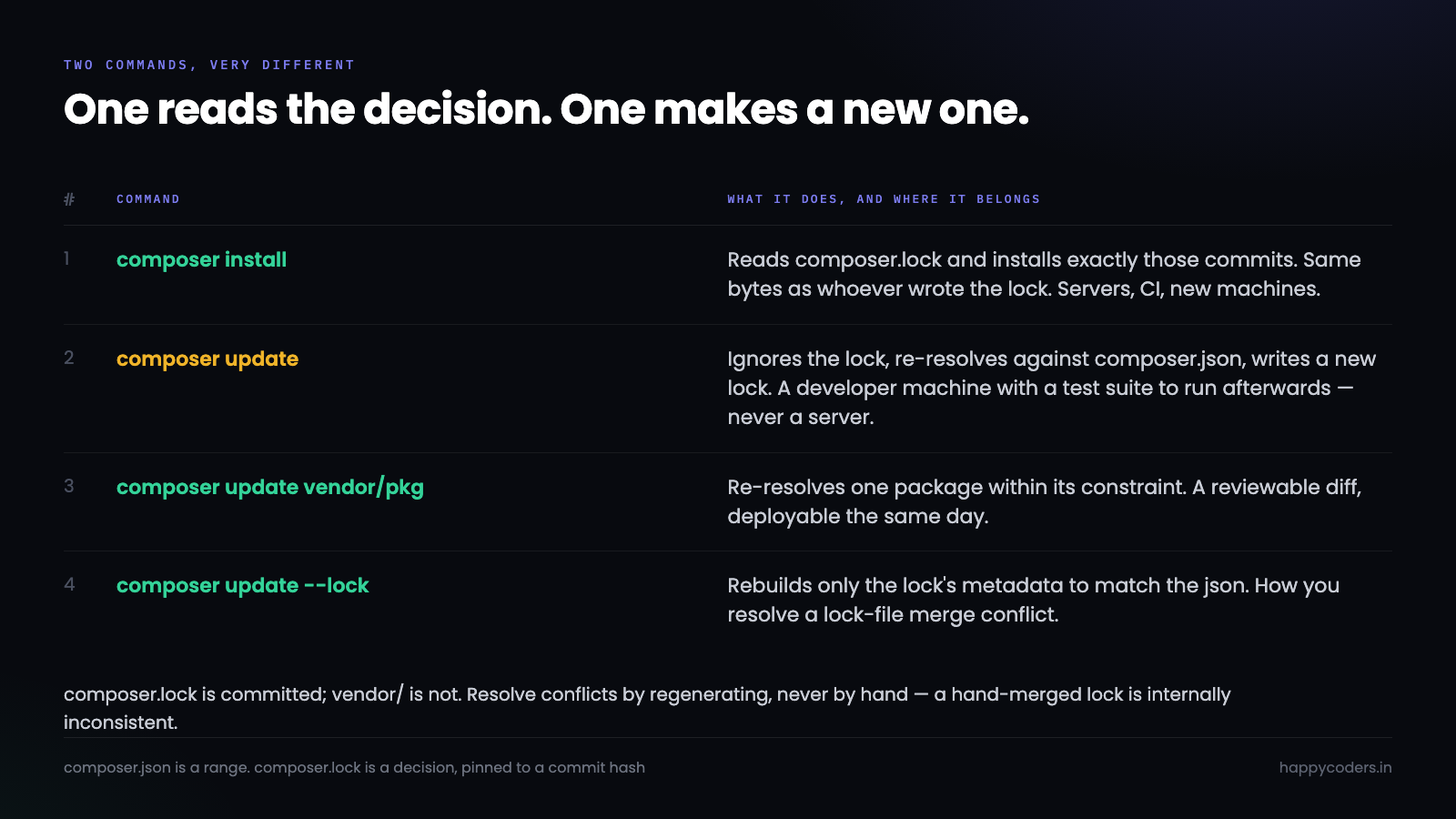
}composer.json is a range. composer.lock is a decision, pinned to a git commit hash. Installing from the json gives you whatever satisfies the range today; installing from the lock gives you the same bytes as whoever wrote it.
Which leads to the most important line in this article:
composer installreads the lock file.composer updateignores it and writes a new one. Never runupdateon a server.
What the constraint actually allows
The caret is the default and the one people misread.
"^7.8.0"    // >=7.8.0 <8.0.0   — any minor or patch
"~7.8.0"    // >=7.8.0 <7.9.0   — patch only
"7.8.*"     // >=7.8.0 <7.9.0   — same as above
"7.8.3"     // exactly 7.8.3
"*"         // anything at all
^7.8 permits 7.99. That is correct under semantic versioning and it depends entirely on the maintainer honouring it, which most do and some do not. It is the reason the lock file matters even when every constraint looks conservative.
Pinning an exact version in composer.json is almost always the wrong fix for a bad upgrade. It blocks security patches, and it tends to make the whole dependency graph unsolvable later — Composer cannot find a set that satisfies everything and reports a conflict several packages away from the one you pinned. Let the lock file do the pinning; that is its job.
The commands, in the order you will need them
# deploy, CI, a new machine: install exactly the lock file
composer install --no-dev --optimize-autoloader

# upgrade one package within its constraint, update the lock
composer update vendor/package

# upgrade one package past its constraint
composer require vendor/package:^8.0

# upgrade everything within constraints — deliberately, locally, then test
composer update
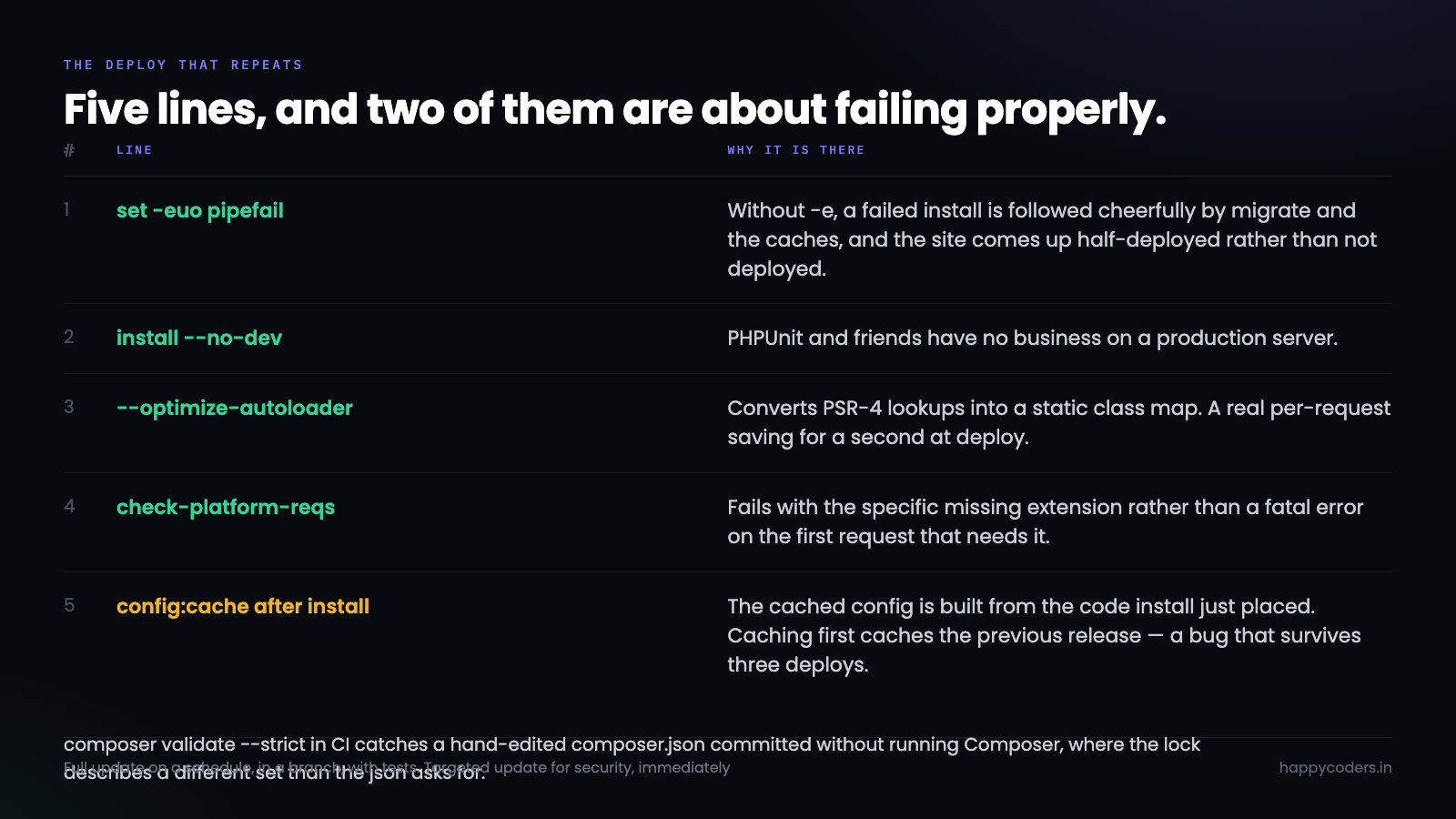
--no-dev skips PHPUnit and friends, which have no business on a production server. --optimize-autoloader converts PSR-4 lookups into a static class map — a real speed difference on every request, and it costs a second at deploy.
Two flags worth knowing for CI:
composer install --no-interaction --prefer-dist
composer validate --strict        # fails if the lock is out of sync with the json
composer validate --strict in CI catches the specific mistake of editing composer.json by hand and committing it without running Composer. The lock then describes a different dependency set than the json asks for, and nothing notices until a deploy.
The lock file in git, and the merge conflict
composer.lock is committed. Always, for an application — vendor/ is not.
The complication is that two branches adding different packages produce a conflict in a 10,000-line generated file. Do not resolve it by hand and do not pick a side.
git checkout --theirs composer.lock        # take the incoming lock
composer update --lock                      # re-resolve against the merged json
git add composer.json composer.lock
--lock updates only the lock file's metadata to match composer.json, without upgrading anything else. The conflict is resolved by regenerating, which is the only way to end up with a lock that is internally consistent.
A .gitattributes line makes the conflict less noisy in review:
composer.lock -diffPlatform requirements, and the deploy that lies
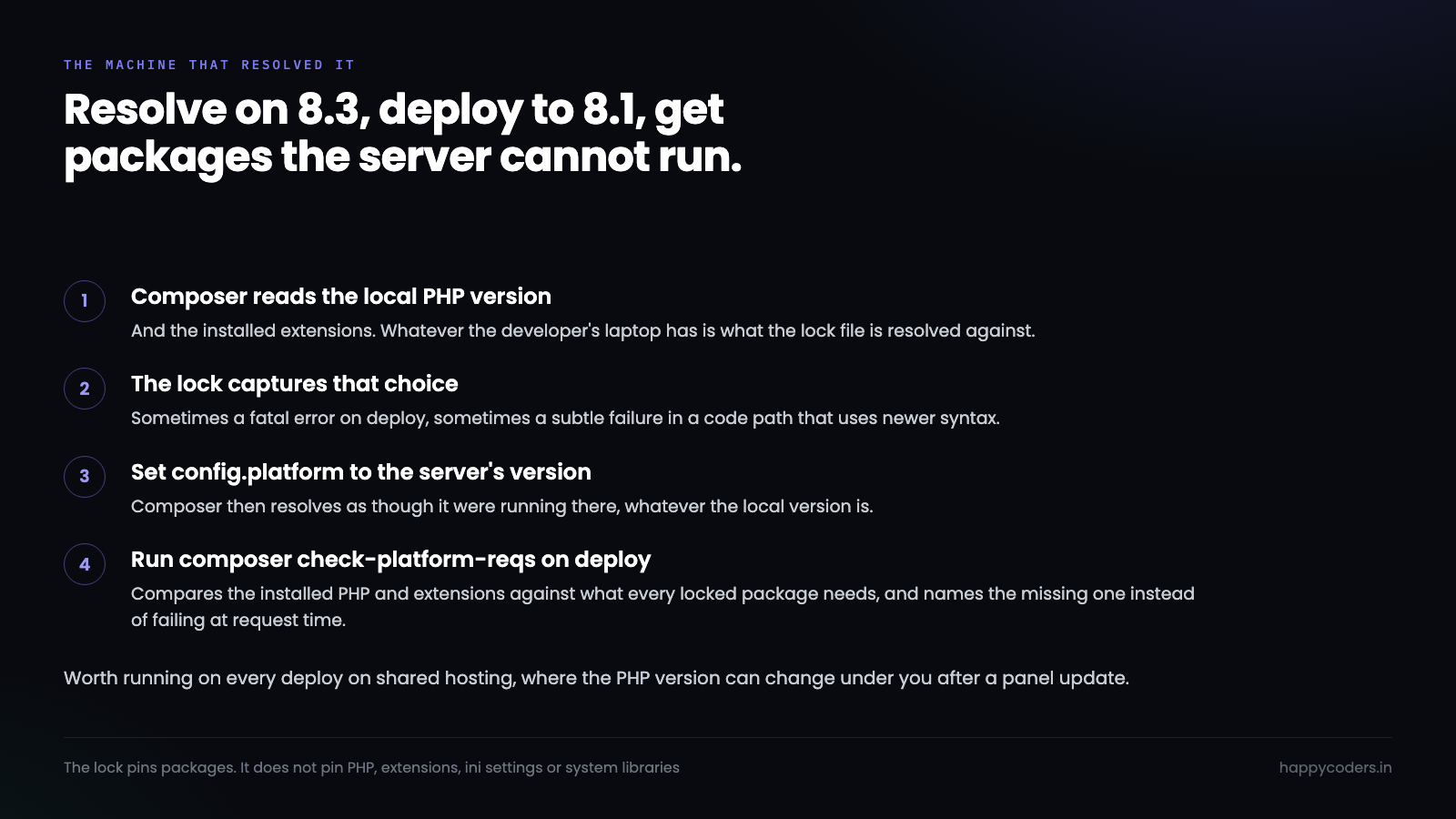
Composer resolves against the PHP version and extensions of the machine it runs on. Resolve on PHP 8.3 locally, deploy to 8.1, and you get packages the server cannot run — sometimes as a fatal error, sometimes as a subtle failure in a code path using a newer syntax.
"config": {
    "platform": {
        "php": "8.2.0",
        "ext-gd": "8.2.0"
    }
}
That tells Composer to resolve as though it were running on PHP 8.2.0 regardless of the local version. The lock file then holds packages that work on the server, and a local machine running 8.3 gets the same set.
The related check goes in CI or the deploy script:
composer check-platform-reqs # does this machine satisfy the lock?It compares the installed PHP version and extensions against what every locked package requires, and fails with the specific missing extension rather than a fatal error at request time. On shared hosting — where the PHP version can change under you after a panel update — it is worth running on every deploy.
Security updates without a rewrite
composer auditChecks every locked package against the Packagist advisories database and reports CVEs with the version that fixes each. It is fast, needs no service, and belongs in CI as a failing step.
When it reports something, the narrow fix is almost always available:
composer update vendor/affected-package --with-dependenciesThat upgrades the one package and whatever it needs, leaving the other two hundred entries in the lock untouched. The diff is reviewable, which means it can be deployed the same day — as opposed to a full composer update, which produces a 3,000-line diff that nobody reviews and everybody is nervous about.
The habit worth building: a full update on a schedule you choose, in a branch, with the test suite; targeted updates for security, immediately.
Reading what changed
After an update, before deploying:
composer outdated --direct         # only packages you require yourself
composer why vendor/package         # what pulled this in
composer why-not vendor/package 8.0 # what is blocking that version
--direct is the flag that makes outdated usable. Without it you get every transitive dependency and the signal is buried.
why-not is the one that saves the most time. "Why can I not upgrade this" usually has an answer several packages away, and it prints the chain rather than making you read constraint errors.
Deploying it the same way twice
The shape that works, whatever the deployment tool:
#!/usr/bin/env bash
set -euo pipefail

git pull --ff-only
composer install --no-dev --no-interaction --prefer-dist --optimize-autoloader
composer check-platform-reqs
php artisan migrate --force
php artisan config:cache
php artisan route:cache
php artisan view:cache
set -euo pipefail is doing real work there. Without -e, a failed composer install is followed cheerfully by migrate and the caches, and the site comes up half-deployed rather than not deployed.
Order matters too: config:cache after install, because the cached config is built from the code that install just placed. Caching before install caches the previous release's config, which is the kind of bug that survives three deploys because everything looks correct on disk.
When the lock file is not enough
Being honest about the limits, because "reproducible" is doing some work in that phrase.
The lock pins package versions. It does not pin the PHP version, the installed extensions, the ini settings, the system libraries a PHP extension links against, or anything outside Composer's world. A build that is reproducible in the Composer sense can still behave differently on two machines.
Two things narrow the gap without much effort: the platform config above, which makes resolution machine-independent, and pinning the PHP minor version in whatever provisions the server. A container closes it further, and for most small teams the first two get the practical benefit at a fraction of the cost.
There is also a supply-chain caveat worth stating. The lock stores a commit hash, so a package that force-pushes over a tag produces a checksum mismatch on install rather than silently different code — that part is sound. What the lock cannot tell you is whether the code at that hash was trustworthy when it was pinned. composer audit and reading the diff on upgrades is what covers that, and neither is automatic.
Private packages and the token that expires
A shared internal library is where Composer setup usually gets its first real complication, and there are two ways to do it.
"repositories": [
    { "type": "vcs", "url": "git@github.com:happycoders/billing-core.git" }
],
"require": {
    "happycoders/billing-core": "^2.1"
}
A VCS repository is the cheap version: Composer clones the repo and reads its tags. It works, and it is slower than Packagist because there is no metadata API — Composer has to fetch the repository to find out what versions exist, on every resolve.
Authentication is the part that breaks deploys. Composer reads credentials from auth.json, and that file must never be committed:
composer config --global --auth github-oauth.github.com <token>

# or, in CI, as an environment variable
COMPOSER_AUTH='{"github-oauth":{"github.com":"<token>"}}'
The environment-variable form is the one to prefer for CI and for a deploy script, because it leaves nothing on disk. The failure mode when it is missing is a prompt for a username, which in a non-interactive deploy appears as a hang or a cryptic timeout rather than an authentication error.
The other thing to plan for: personal access tokens expire. A deploy that has worked for eleven months and suddenly cannot clone a private package is almost always a token that quietly reached its expiry date, and the error does not say so.
Diagnosing a resolution that fails
Composer's conflict output is famously hard to read, and three flags make it tractable.
composer update vendor/package -W --dry-run   # show what would change, change nothing
composer update --profile                      # where the time goes
composer diagnose                              # connectivity, disk, config sanity
--dry-run is the one to reach for first. An upgrade that looks like one package often pulls fifteen, and seeing that list before it happens is the difference between a considered change and a surprise.
When resolution genuinely fails, read the error from the bottom. Composer prints the chain it explored, and the last few lines name the actual conflicting requirement — the top of the output is context for it. composer why-not on the package you were trying to upgrade then usually confirms it in one line.
One environment note that saves real time: resolution is memory-hungry, and on a small VPS Composer can be killed by the OOM killer mid-resolve, leaving a partial vendor/ and no useful message. COMPOSER_MEMORY_LIMIT=-1 is the usual workaround, and the better answer is not to resolve on the server at all — which is what install from a lock file already achieves, since it skips resolution entirely.
Scripts, and the deploy hook that surprises you
Composer runs scripts at defined points, and Laravel ships with several already wired up.
"scripts": {
    "post-autoload-dump": [
        "IlluminateFoundationComposerScripts::postAutoloadDump",
        "@php artisan package:discover --ansi"
    ],
    "post-update-cmd": [
        "@php artisan vendor:publish --tag=laravel-assets --ansi --force"
    ]
}
post-autoload-dump is the one that matters on deploy: it runs package discovery, which regenerates bootstrap/cache/packages.php. That is why a deploy which skips Composer but copies a new vendor/ ends up with a package installed and not registered.
Adding your own is useful and worth one caution:
"scripts": {
    "test": "phpunit",
    "lint": "pint --test",
    "check": ["@lint", "@test"]
}
A named script gives every developer and CI the same command, which is a small thing that removes a surprising amount of "how do I run this" friction. The caution is that scripts run on the deploy server too, so anything in post-install-cmd that assumes a dev environment — a dotenv file, a writable directory, a network call — becomes a deploy failure. --no-scripts exists for emergencies, and needing it regularly means something belongs in post-update-cmd instead.
What to check before you trust a deploy
A short list, because the failure at the top of this article was invisible until it was a 500.
Is the lock file committed and current? git status after a composer require — an uncommitted lock is the most common version of this bug, and it looks exactly like nothing being wrong.
Does the server run install, not update? Read the actual deploy script rather than assuming. Deploy tooling set up years ago frequently has composer update in it, put there by someone who wanted the latest of something once.
Do the versions match? composer show laravel/framework on the server and locally should print the same version. It is a five-second check and it settles the question directly rather than by reasoning about what should have happened.
That last one is worth doing as the first step of any "works locally, breaks on the server" investigation. If the versions differ, the rest of the debugging is unnecessary; if they match, you have ruled out an entire category and can look elsewhere with some confidence.
Two files worth adding once
Both take a minute and prevent a recurring annoyance.
# .gitattributes
composer.lock -diff
/tests       export-ignore
/.github     export-ignore
The -diff keeps a 10,000-line generated file out of code review, where nobody reads it and its presence discourages reading the rest. The export-ignore lines matter only if you distribute the package, where they keep the dist archive small.
// composer.json
"config": {
    "sort-packages": true,
    "optimize-autoloader": true,
    "allow-plugins": { "composer/package-versions-deprecated": false }
}
sort-packages keeps the require block alphabetical, which removes a whole class of pointless merge conflict — two branches each appending a line to the end of the same list. allow-plugins is required from Composer 2.2 onward: an unlisted plugin prompts interactively, and in a non-interactive deploy that prompt is a hang.
The short version
install on servers and CI, update only on a developer machine with tests to run afterwards. Commit the lock, resolve its conflicts by regenerating, and set the platform config so resolution does not depend on whose laptop ran it.
The failure at the top — same json, different code, two weeks apart — cannot happen once those three are in place. It is a small amount of setup for a category of bug that is otherwise very hard to see, because nothing in the codebase changed.




