Telling People From Datacenters Without Sending IPs Anywhere
Telling People From Datacenters Without Sending IPs Anywhere
Our product download counter said 47 downloads in a day. It was seven IP addresses, and five of those were servers in datacenters that fetched the installer within the same four minutes. The real number was two.
Deciding whether an IP address belongs to a person or a machine sounds like a job for a paid API. There are good ones. We didn’t want to use any of them, for a reason that is easy to overlook: to ask a web service about your visitor’s IP address, you have to send it your visitor’s IP address. This post describes the alternative we built — an offline IP-to-network lookup in plain PHP, a classifier that turns network names into “person” or “server”, and the edge cases that decide whether the result is honest.
The question we were really asking
We did not want to block anyone, and we did not need to know who anybody was. The question was narrower: for our own reporting, how many of these downloads were people? That framing matters, because it lets us accept a classifier that is wrong now and then. A few misjudged addresses shift a monthly count by one or two. A blocking system that’s wrong now and then locks real customers out.
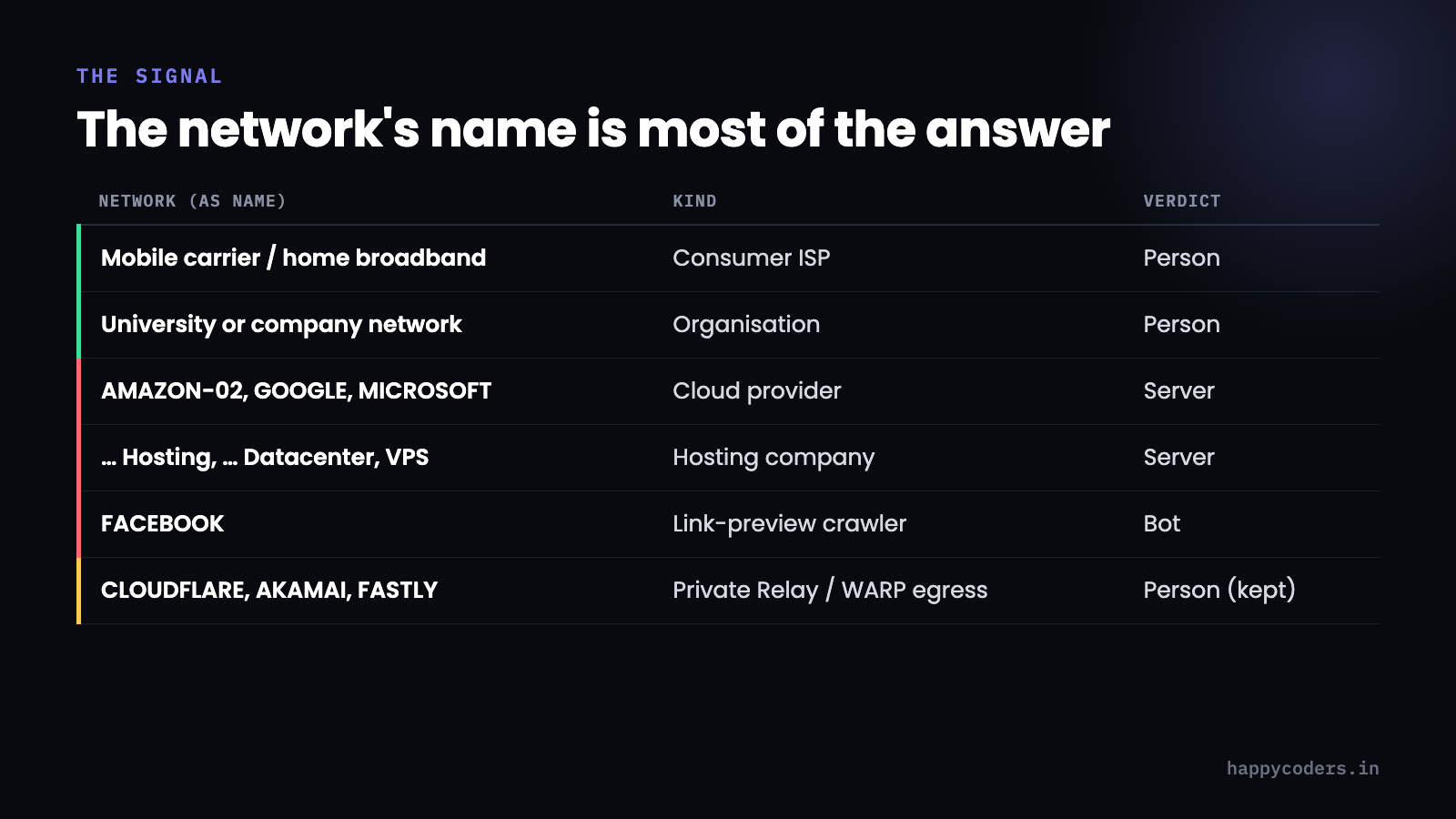
It also tells us what signal to use. Every IP address on the internet is announced by a network — an autonomous system, identified by an ASN — and every autonomous system has a registered name. A home broadband provider, a mobile carrier, a university: people. Amazon, a VPS company, a “hosting” or “datacenter” business: machines. The name of the network is, for this purpose, most of the answer.
Why not just call an API
Three reasons, in order of how much they mattered to us:
- Privacy. An IP address is personal data in most privacy laws. Most of our products are built on the promise that a user’s data stays with them. Quietly forwarding every visitor’s address to a third party, just so we can count downloads, would sit badly with that — whatever the provider’s own policy says.
- Licensing. The well-known free geolocation APIs are free for non-commercial use only. A company counting downloads of its own products is commercial use.
- Fragility. A report that depends on someone else’s rate limit fails on the busiest day — which is the day you most want the number.
The data those APIs are built on is, at its core, public: which network announces which address range. Several projects publish it as a free, regularly updated table. We use the combined IPv4 and IPv6 file from iptoasn.com.
The data
The file is a gzipped, tab-separated list of about 720,000 address ranges, sorted by start address. Each row is a range, the ASN that announces it, a country code and the network’s name:
1.0.0.0      1.0.0.255      13335   US   CLOUDFLARENET - Cloudflare, Inc.
1.0.1.0      1.0.3.255      0       None Not routed
1.0.4.0      1.0.7.255      38803   AU   GTELECOM-AS-AP - Gtelecom Pty Ltd
Compressed, it is about 11 MB. We store it next to the scripts that use it and refresh it weekly; ranges move between networks, but slowly.
The lookup
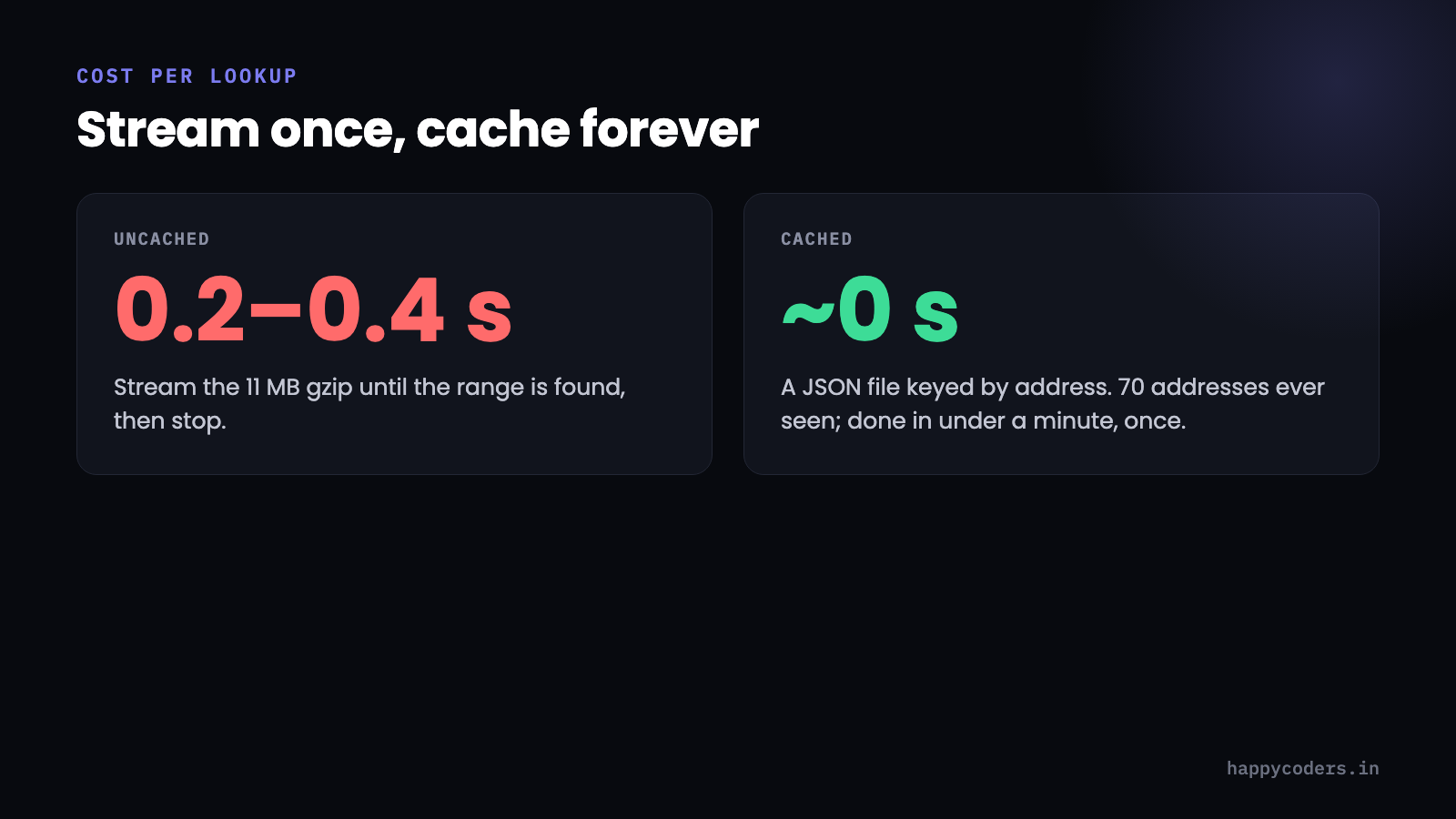
For a handful of lookups a day, the simplest correct approach is good enough: stream the gzipped file line by line until you find the range that contains the address, then stop. Two PHP details do all the work.
inet_pton() turns an address into bytes in network order — four bytes for IPv4, sixteen for IPv6. Because the bytes are big-endian, comparing two of them with strcmp() gives the same order as comparing the addresses numerically. That means one comparison function covers both families, with no 128-bit integer maths for IPv6.
The file is sorted, so you can stop early. The moment the range’s start address is greater than the address you’re looking for, the answer is “no match” and there is no point reading further. IPv4 ranges come first in the combined file and IPv6 after, so skipping rows whose byte length differs keeps the two families apart.
<?php
const ASN_DB    = __DIR__ . '/data/ip2asn-combined.tsv.gz';
const ASN_CACHE = __DIR__ . '/../logs/ip-asn-cache.json';

function ip_info(?string $ip): array
{
    static $cache = null;
    $unknown = ['asn' => 0, 'cc' => '??', 'name' => 'unknown', 'dc' => false];
    if (!$ip) return $unknown;
    $cache ??= is_file(ASN_CACHE) ? (json_decode(file_get_contents(ASN_CACHE), true) ?: []) : [];
    if (isset($cache[$ip])) return $cache[$ip];

    $bin = @inet_pton($ip);                  // 4 bytes for IPv4, 16 for IPv6
    if ($bin === false || !is_file(ASN_DB)) return $unknown;
    $len  = strlen($bin);
    $info = $unknown;

    $fh = gzopen(ASN_DB, 'r');
    while (($line = gzgets($fh)) !== false) {
        [$start, $end, $asn, $cc, $name] = array_pad(explode("t", rtrim($line, "n"), 5), 5, '');
        $s = @inet_pton($start);
        if ($s === false || strlen($s) !== $len) continue;   // skip the other family
        if (strcmp($bin, $s) < 0) break;                     // sorted: we've passed it
        if (strcmp($bin, inet_pton($end)) <= 0) {
            $info = ['asn' => (int) $asn, 'cc' => $cc, 'name' => $name, 'dc' => is_dc_name($name)];
            break;
        }
    }
    gzclose($fh);

    $cache[$ip] = $info;
    @file_put_contents(ASN_CACHE, json_encode($cache));
    return $info;
}
Uncached, a lookup reads on average half the file and takes 0.2–0.4 seconds on our shared host. Every answer is cached in a small JSON file keyed by address, so each address costs that once. Across the entire history of our download log there are 70 distinct addresses; the whole classification ran in well under a minute the first time and instantly after that.
When the linear scan stops being good enough
If you are classifying thousands of new addresses an hour — say, every request to a busy site — a scan per address is the wrong shape. Load the table once into something that supports range queries: a SQLite table with the start and end as 16-byte blobs and an index on the start, queried with “the last row whose start is ≤ this address”. That turns each lookup into a single indexed read. We didn’t need it, and the extra moving part wasn’t worth it for our volume; it’s the first thing we’d change if that volume grew.
From a network name to a verdict
The table gives you a name like AMAZON-02 – Amazon.com, Inc. or RELIANCEJIO-IN – Reliance Jio Infocomm Limited. The classifier is a list of words that only server networks put in their names:
const DC_WORDS = [
    // networks seen in our own traffic first
    'LATITUDE', 'MAXIHOST', 'IPXO', 'CLOUVIDER', 'DATACAMP', 'M247',
    // generic words that only hosting companies put in their AS name
    'HOSTING', 'HOSTER', 'DATACENTER', 'DATA CENTER', 'DATACENTRE', 'SERVER', 'VPS',
    'COLOCATION', 'CLOUD',
    // the big clouds and VPS providers
    'AMAZON', 'GOOGLE', 'MICROSOFT', 'DIGITALOCEAN', 'LINODE', 'OVH', 'HETZNER',
    'VULTR', 'CONTABO', 'LEASEWEB', 'ORACLE', 'ALIBABA', 'TENCENT', 'ZENLAYER',
    // crawlers: link previews and search bots
    'FACEBOOK', 'BABBAR', 'SEARCH-ENGINE',
];
// Deliberately NOT listed: CLOUDFLARE, AKAMAI, FASTLY (see below).

function is_dc_name(string $name): bool
{
    $u = strtoupper($name);
    foreach (DC_WORDS as $w) {
        if (str_contains($u, $w)) return true;
    }
    return false;
}
It is crude on purpose. Commercial “is this a datacenter?” databases use curated lists of ranges, and they are better. But we could read every decision this one makes, and when it was wrong we could see why in one line.
The edge cases that decide the answer
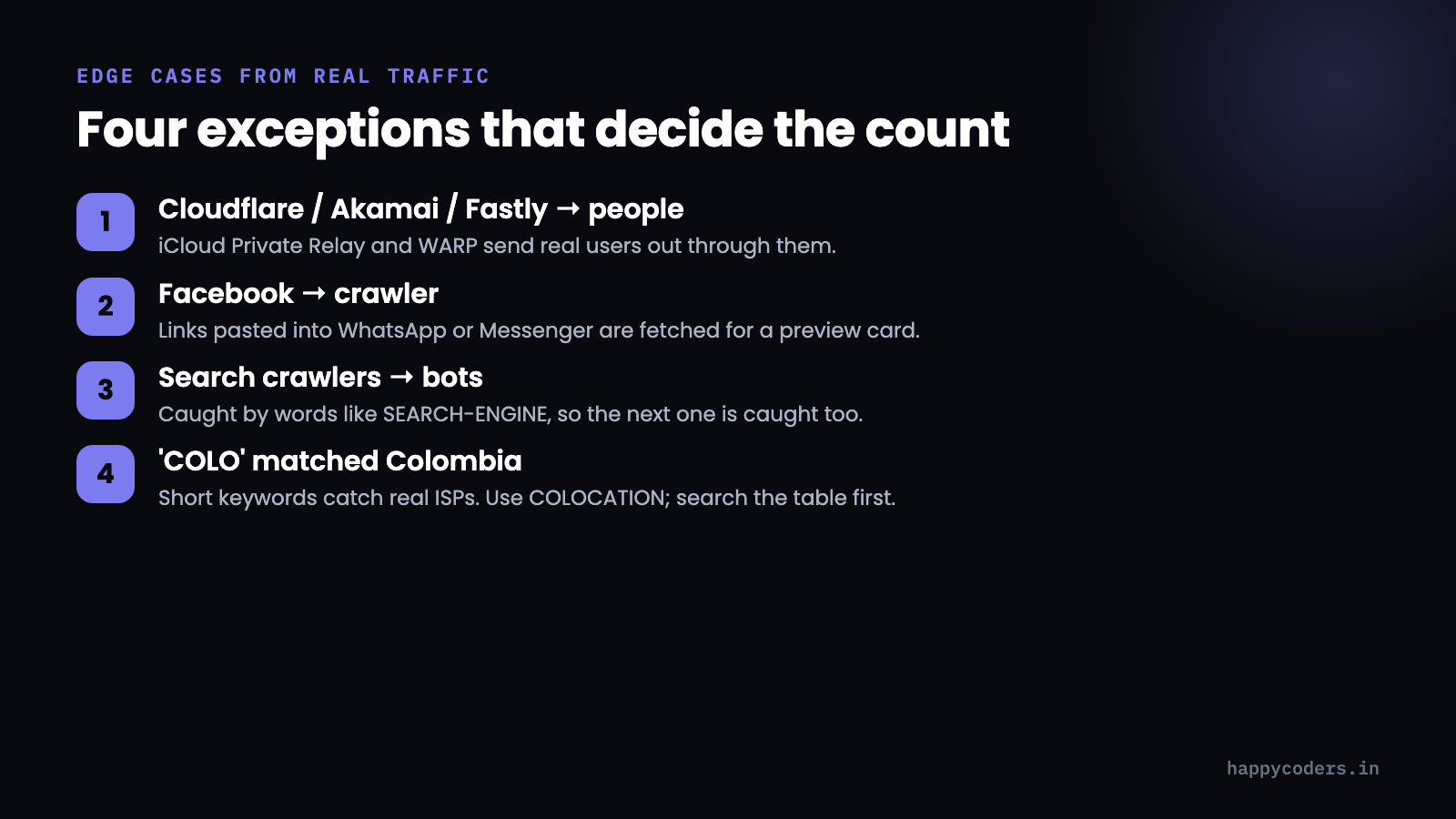
A keyword list is only as honest as its exceptions. Running it over our real traffic surfaced four that mattered.
Cloudflare, Akamai and Fastly are people, sometimes
Our first list included Cloudflare, because it is obviously infrastructure. Then we remembered where iCloud Private Relay sends Safari traffic: out through egress addresses run by Cloudflare, Akamai and Fastly. Cloudflare’s WARP app does the same for phones and laptops. Marking those networks as bots would have quietly erased exactly the privacy-conscious visitors who are most likely to be real. They are excluded from the list, and the code says why next to the list, so nobody “fixes” it later.
Facebook is a crawler, not a person
Facebook’s network showed up in our download log three times. Nobody at Meta was installing our screen recorder from a server: when someone pastes a link into WhatsApp, Messenger or Facebook, the platform fetches it to build the preview card. That fetch comes from Facebook’s network. It’s a crawler, and it goes on the list.
Search-engine crawlers name themselves
Smaller search engines often run their crawlers from their own networks and say so in the name. Those were added by word rather than by name, so the next one is caught too.
“COLO” matches Colombia
An early version listed COLO for colocation providers. It also matches every Colombian telecom with the country in its name. Short keywords are dangerous; we use COLOCATION instead, and you should search the full table for any word before adding it, to see what else it catches.
Counting people
With a verdict per address, counting is the easy part. We count one per address per day — a single person’s browser or download manager can hit a download link a dozen times in a minute — and split the result into people and bots:
function count_people(iterable $rows): array
{
    $people = $bots = [];
    foreach ($rows as $r) {
        $key = $r->ip . '|' . substr((string) $r->created_at, 0, 10);   // one per IP per day
        if (ip_info($r->ip)['dc']) $bots[$key] = 1; else $people[$key] = 1;
    }
    return ['people' => count($people), 'bots' => count($bots)];
}
Both numbers go into the report. Showing the bot column next to the people column is what stops anyone reading one as the other.
Why “one per address per day” — and where it breaks
Deduplicating by address and day is a compromise, and it is worth knowing which way it errs.
It removes the obvious inflation. A browser that shows a “this file may be dangerous” prompt often requests the file twice. Download managers split a large installer into ranges and request each one separately. Some antivirus products fetch a file before handing it to the browser. In our log, one address made 22 requests in 90 seconds and another made 12 in under 30. None of that is twenty-two people.
It also merges people who share an address. An office of thirty behind one router is one download per day. More importantly in India, mobile carriers use carrier-grade NAT, so thousands of phones can share a small pool of public addresses. Two strangers on the same mobile network downloading on the same day can collapse into one. For a small product that errs in the right direction — it undercounts rather than flatters — but it means the number is a floor, not an exact count.
IPv6 makes “one address” fuzzier
IPv6 brings a different wrinkle. Most operating systems use temporary “privacy” addresses that change regularly, and a phone can hold several at once. The same person, downloading twice in a day, might appear from two different IPv6 addresses inside the same network prefix.
If your traffic is heavily IPv6, count per /64 prefix instead of per address: zero the last eight bytes of the inet_pton() result before using it as the key. A /64 is normally one household or one device’s network. We count per address for now, because most of our download traffic is IPv4 and the difference is small, but it is the next refinement we’d make.
Keeping the table fresh, safely
The refresh runs inside the same scheduled script that sends the reports, once the file is more than a week old. It downloads to a temporary name, checks the archive is intact, and only then replaces the old file and clears the cache:
DB=/home/user/bin/data/ip2asn-combined.tsv.gz
if [ ! -s "$DB" ] || [ -n "$(find "$DB" -mtime +7)" ]; then
  curl -sS -L --max-time 120 -o "$DB.new" https://iptoasn.com/data/ip2asn-combined.tsv.gz \
    && gzip -t "$DB.new" && mv "$DB.new" "$DB" && rm -f /home/user/logs/ip-asn-cache.json
  rm -f "$DB.new"
fi
The order matters. A truncated download that replaced the good file would make every address “unknown” — and unknown counts as a person, so the bot filter would silently switch itself off. gzip -t before mv means a bad download changes nothing.
How we tested the classifier
A classifier you haven’t read the output of is a guess. Before trusting it, we ran it over every address our download log had ever recorded and printed the verdicts grouped by network name, with a count beside each:
- Read every “bot” line. Each one should be a name you’d agree is a server. If a consumer ISP appears there, a keyword is too broad.
- Read the “person” lines more carefully still. This is where the misses hide. Facebook and a small search engine’s crawler both first appeared on the people side — names with no hosting word in them — and only reading the list caught them.
- Search the table for any new keyword before adding it.
zcat ip2asn-combined.tsv.gz | grep -i colo | headshows you, in one command, every network that word would catch. That is how the Colombian telecoms showed up before they could be miscounted. - Re-run it after every change to the word list, and diff the verdicts. A one-word change that flips fifty addresses deserves a second look.
The whole review took about fifteen minutes, and it changed the list in four ways: the CDNs came out, Facebook and the search crawlers went in, and COLO became COLOCATION. It is the step most worth not skipping.
What it found
Across everything our download counter had ever recorded, 32 of 70 distinct addresses were datacenters, most of them Amazon’s cloud. One of our products had appeared to grow from 17 people to 26 month on month; with servers removed it grew from 3 to 9. The direction was right and the size was badly wrong — and we had already reported the bigger numbers. The practical side of that story, for people who don’t write code, is on our main blog: Your Download Count Is Lying: 47 Downloads, 2 People.
What it can’t do
- Residential proxies look like people. Some scraping services route through real home connections. Network names can’t see that.
- A VPN on a consumer ISP looks like its ISP. And a person using a commercial VPN looks like a server. Both are rare in our traffic; neither moves our counts much.
- It is not a security control. Don’t use a keyword list to block or rate-limit; use it to count. If you need to stop bad traffic, that is a job for your WAF or CDN, which sees far more than one site’s log.
- Names change. Networks get bought and renamed. The weekly refresh keeps ranges current; the word list needs a look every few months.
Keep less than you collect
Once an address has been classified, the report doesn’t need the address any more — it needs the date, the product, and whether it was a person. If you keep raw IP addresses in a download log, decide how long you need them and delete or truncate them after that. Storing the network number and country instead gives you nearly every useful answer this post describes without holding onto anything that identifies a visitor. We’d rather design that in now than retrofit it after someone asks what we keep.
The whole thing, in short
- Download a public IP-to-ASN table and keep it on your server; refresh it weekly, atomically.
- Look addresses up locally with
inet_pton()andstrcmp(); cache every answer. - Classify by network name, with a short, readable word list.
- Treat Cloudflare, Akamai and Fastly as people; treat link-preview and search crawlers as bots.
- Count one per address per day, and report people and bots side by side.
About a hundred lines of PHP, no API key, and not one visitor’s address sent anywhere.