Deleting Old Screenshots on Schedule Without Deleting the Work
Deleting Old Screenshots on Schedule Without Deleting the Work
Screenshots accumulate fast. Forty-eight images per person per day, ten people, and you are storing half a million images a year for something nobody looks at after the first week.
So you add a retention job. And a retention job, written slightly too broadly, is one of the few pieces of code that can destroy the thing the product exists to produce.
Where the line is
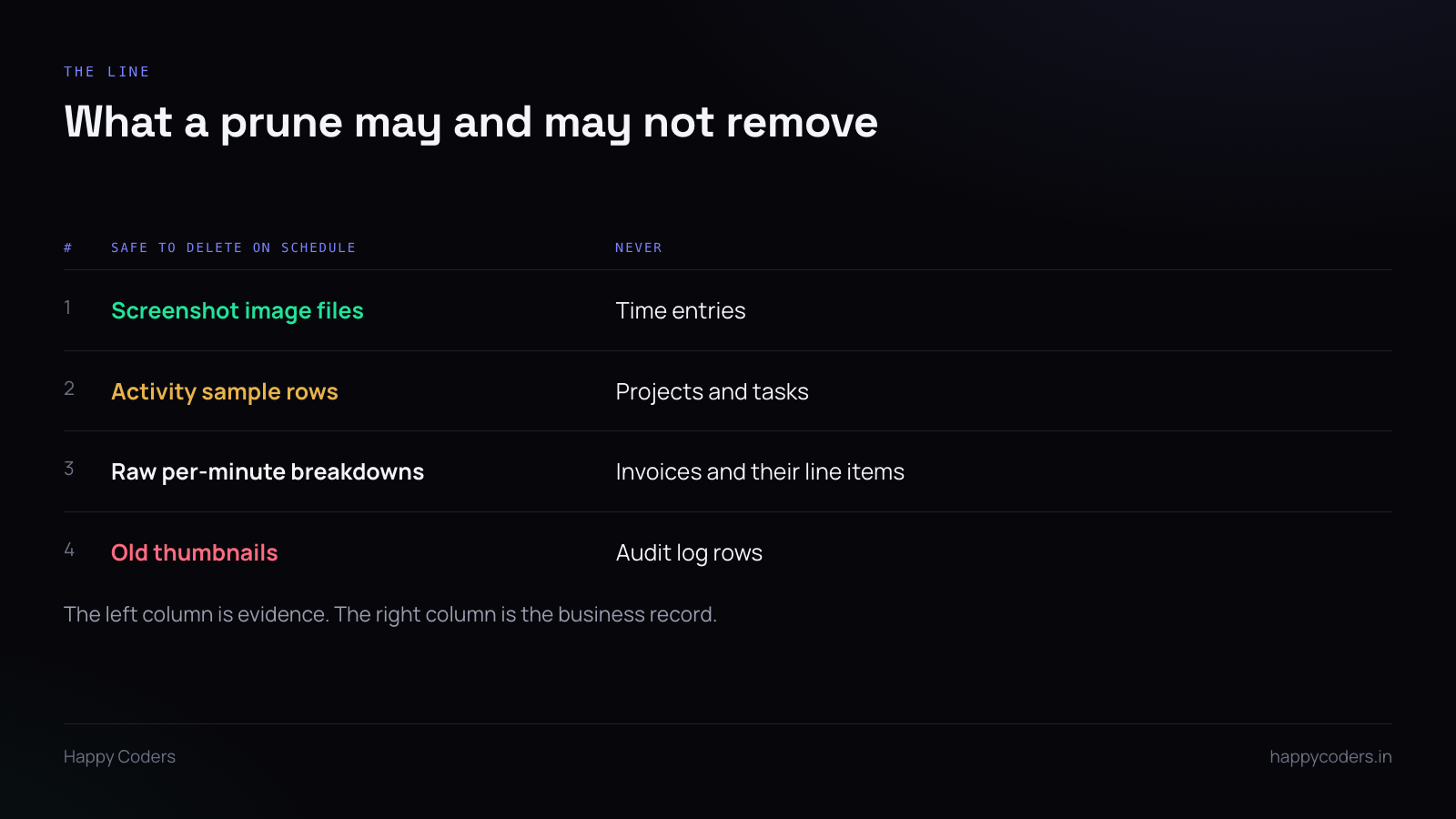
The distinction is between evidence and record.
A screenshot is evidence. It supports a claim that work happened, it is useful for about a week, and after that it is a liability — storage you pay for and data you now hold about people.
A time entry is a record. It is what the invoice was based on, what the timesheet approved, and what the client was told. It has to survive for as long as the business needs it, which is years, not days.
The prune may delete evidence. It must never touch the record. Stated that way it is obvious; the reason it goes wrong is that both live in the same system and are created by the same action, so a query written in terms of “everything from before this date” catches both.
The three it must never touch
Time entries. The hours themselves. Deleting these deletes the answer to “what did we bill for”, and no screenshot retention policy ever intended that.
Projects, tasks and clients. Structural. A time entry pointing at a deleted project is orphaned, and reports that group by project silently drop the hours.
Invoices and audit rows. These are the records you will be asked to produce by somebody who is not in your company. An audit log that is pruned on the same schedule as a screenshot is not an audit log.
Two clocks, not one
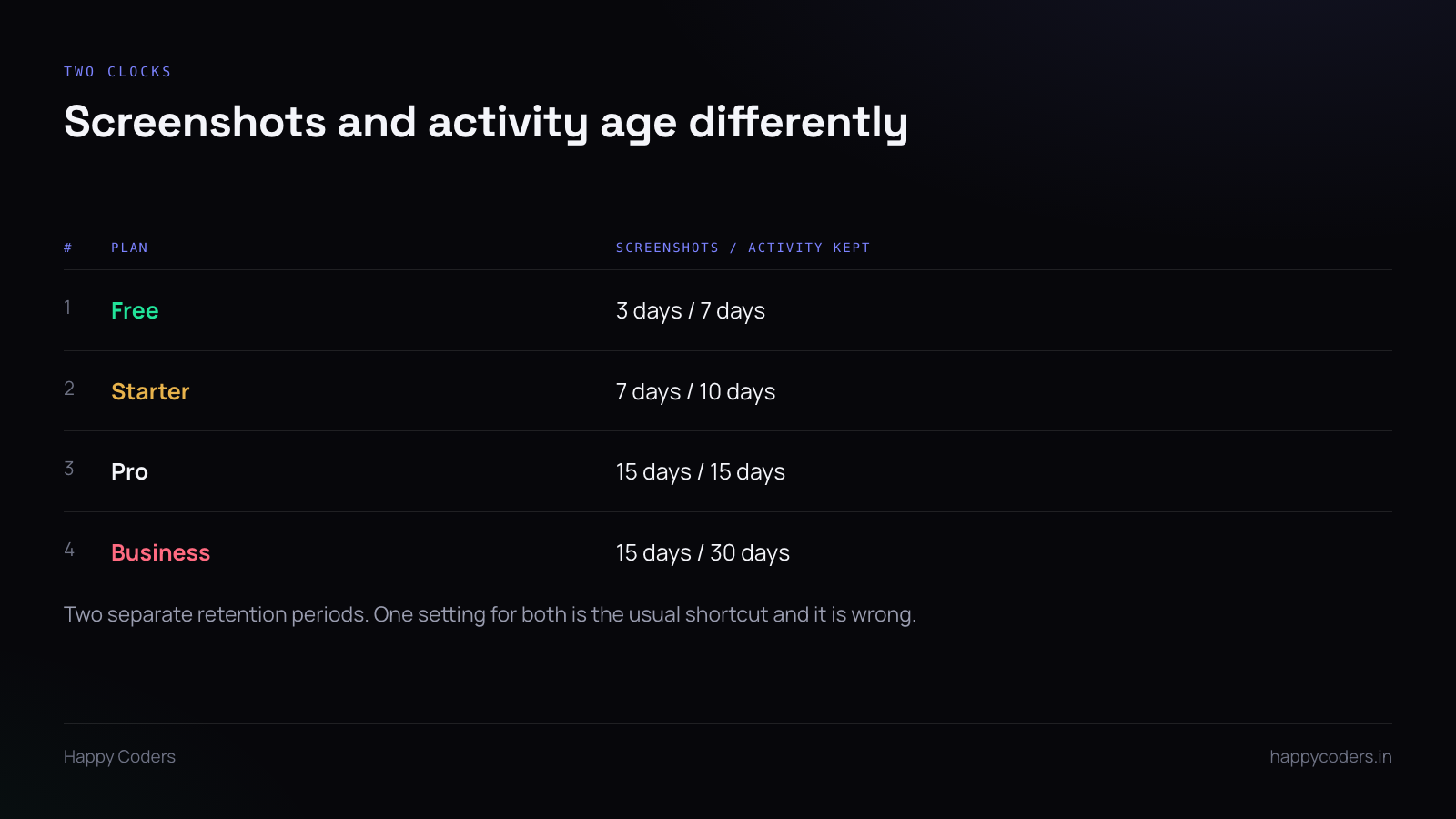
Screenshots and activity records age at different rates and should have separate settings.
Screenshots are large, sensitive, and useful only briefly. Activity data — which app, how much keyboard and mouse — is small, far less sensitive, and useful for longer, because productivity reporting over a month is a reasonable thing to want and a month of screenshots is not.
A single retention setting applied to both is the usual shortcut. It forces you to pick a number that is too long for the images or too short for the reports.
Write the job defensively
Allow-list the tables. Name the tables the job is permitted to delete from. Not “everything older than N days” with exceptions — the opposite. Then a new table added next year is excluded by default rather than included by accident.
Delete files and rows in the right order. Images usually live in object storage with rows pointing at them. Delete the file first, then the row. The other order leaves orphaned files nobody can find, which is the expensive kind of leak.
Batch it, and cap it. A prune that tries to delete two hundred thousand rows in one transaction will lock a table during business hours. Batches of a few thousand with a ceiling per run, and the backlog clears over a few nights.
Log what it did, per run. Rows deleted per table, files deleted, bytes freed. When somebody asks whether the prune has been running, the answer should be a number rather than an inspection of the data.
Dry run first. A mode that counts without deleting, and the first deployment runs in that mode for a week. Reading the counts tells you immediately if the query is too broad — the number will be far larger than you expected.
Per-organisation, not global
If retention varies by plan, the job has to resolve the period per organisation, not take one value from configuration.
The failure here is subtle: a global default gets applied to an organisation on a plan with a longer period, and their data disappears early. Nobody reports it, because people do not notice absent screenshots. It is found months later when somebody needs one.
Resolve the plan per organisation inside the loop, and treat a missing plan as the longest period rather than the shortest. Keeping too much is recoverable; deleting too early is not.
What the customer should see
Retention is a selling point and should be stated plainly rather than buried. “Screenshots are kept for 7 days and then deleted automatically” answers a question every employee has, and it is a better answer than silence.
It also sets an expectation you then have to meet. If the job has not run for three weeks because the scheduler died quietly, the stated policy is now untrue and you do not know it.
Which is the argument for an alert on the job not running, rather than only on it failing. A cron that stops being scheduled produces no errors at all, and that is the failure mode that lasts longest.