Detecting Idle Time on Mac, Windows and Linux From One Codebase
Detecting Idle Time on Mac, Windows and Linux From One Codebase
A time tracker that keeps running while nobody is at the machine produces hours that are not work, and everybody downstream knows it. The fix is idle detection, and it is one of those problems that looks like it should be a single API call and turns out to be three different APIs with three different definitions of “idle”.
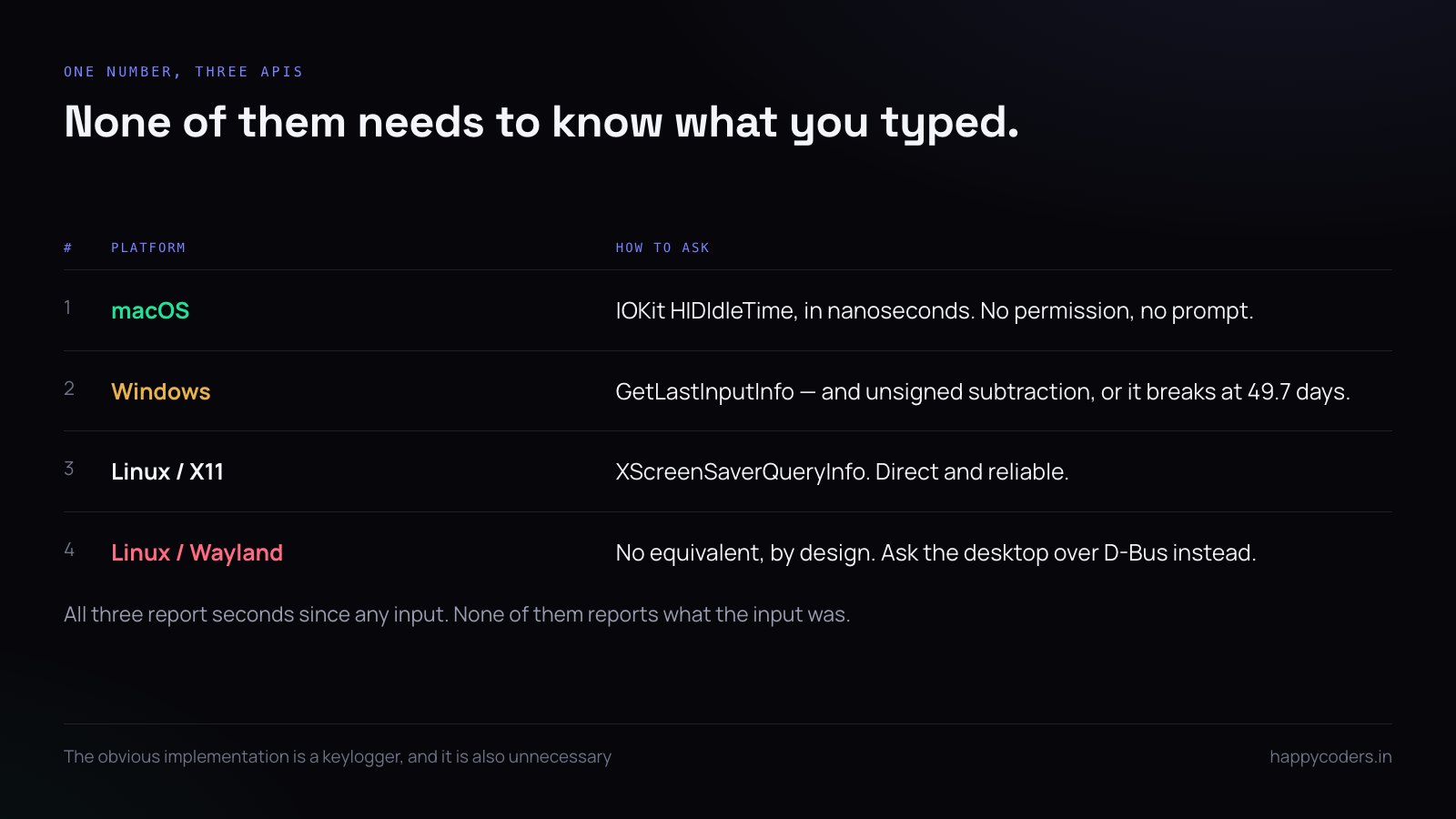
Worse, the obvious implementation on each platform is a keylogger, which is both unnecessary and the thing users are most afraid of. All three systems will tell you how long it has been since any input, without telling you what the input was.
What you are actually asking for
One number: seconds since the last human input of any kind, system-wide. Not which key, not where the mouse went. Just how long since something happened.
Every platform can answer that without any special permission, and none of the three answers it the same way.
macOS
The IOKit HID system keeps an idle counter in nanoseconds. No entitlement, no accessibility permission, no prompt:
import IOKit

func idleSeconds() -> TimeInterval {
    var iterator: io_iterator_t = 0
    guard IOServiceGetMatchingServices(kIOMainPortDefault,
            IOServiceMatching("IOHIDSystem"), &iterator) == KERN_SUCCESS else { return 0 }
    defer { IOObjectRelease(iterator) }

    let entry = IOIteratorNext(iterator)
    guard entry != 0 else { return 0 }
    defer { IOObjectRelease(entry) }

    var props: Unmanaged?
    guard IORegistryEntryCreateCFProperties(entry, &props, kCFAllocatorDefault, 0) == KERN_SUCCESS,
          let dict = props?.takeRetainedValue() as? [String: Any],
          let ns = dict["HIDIdleTime"] as? UInt64 else { return 0 }

    return TimeInterval(ns) / 1_000_000_000
}
Two things catch people. The counter resets on any input including a mouse move of one pixel, which is what you want. And it does not reset when the screen is locked, so a locked machine accumulates idle time correctly without any extra work.
Windows
GetLastInputInfo is the whole answer, and it is in user32:
[StructLayout(LayoutKind.Sequential)]
struct LASTINPUTINFO { public uint cbSize; public uint dwTime; }

[DllImport("user32.dll")]
static extern bool GetLastInputInfo(ref LASTINPUTINFO plii);

static TimeSpan IdleTime()
{
    var info = new LASTINPUTINFO { cbSize = (uint)Marshal.SizeOf() };
    if (!GetLastInputInfo(ref info)) return TimeSpan.Zero;
    uint ticks = (uint)Environment.TickCount - info.dwTime;   // unsigned subtraction
    return TimeSpan.FromMilliseconds(ticks);
}
The unsigned subtraction is not optional. TickCount wraps roughly every 49.7 days, and a signed subtraction across the wrap produces a negative idle time, which your logic will treat as active forever on a machine that has been up for seven weeks. Use Environment.TickCount64 where you can and the problem disappears.
// better where available
ulong ticks = (ulong)Environment.TickCount64 - info.dwTime;
One limitation worth knowing: GetLastInputInfo is per-session. In a remote desktop or a terminal server it reports the session your process runs in, which is usually what you want and occasionally surprising.
Linux, where it depends on the display server
Under X11 the screensaver extension answers directly:
#include

unsigned long idle_ms(Display *d) {
    XScreenSaverInfo *info = XScreenSaverAllocInfo();
    XScreenSaverQueryInfo(d, DefaultRootWindow(d), info);
    unsigned long ms = info->idle;
    XFree(info);
    return ms;
}
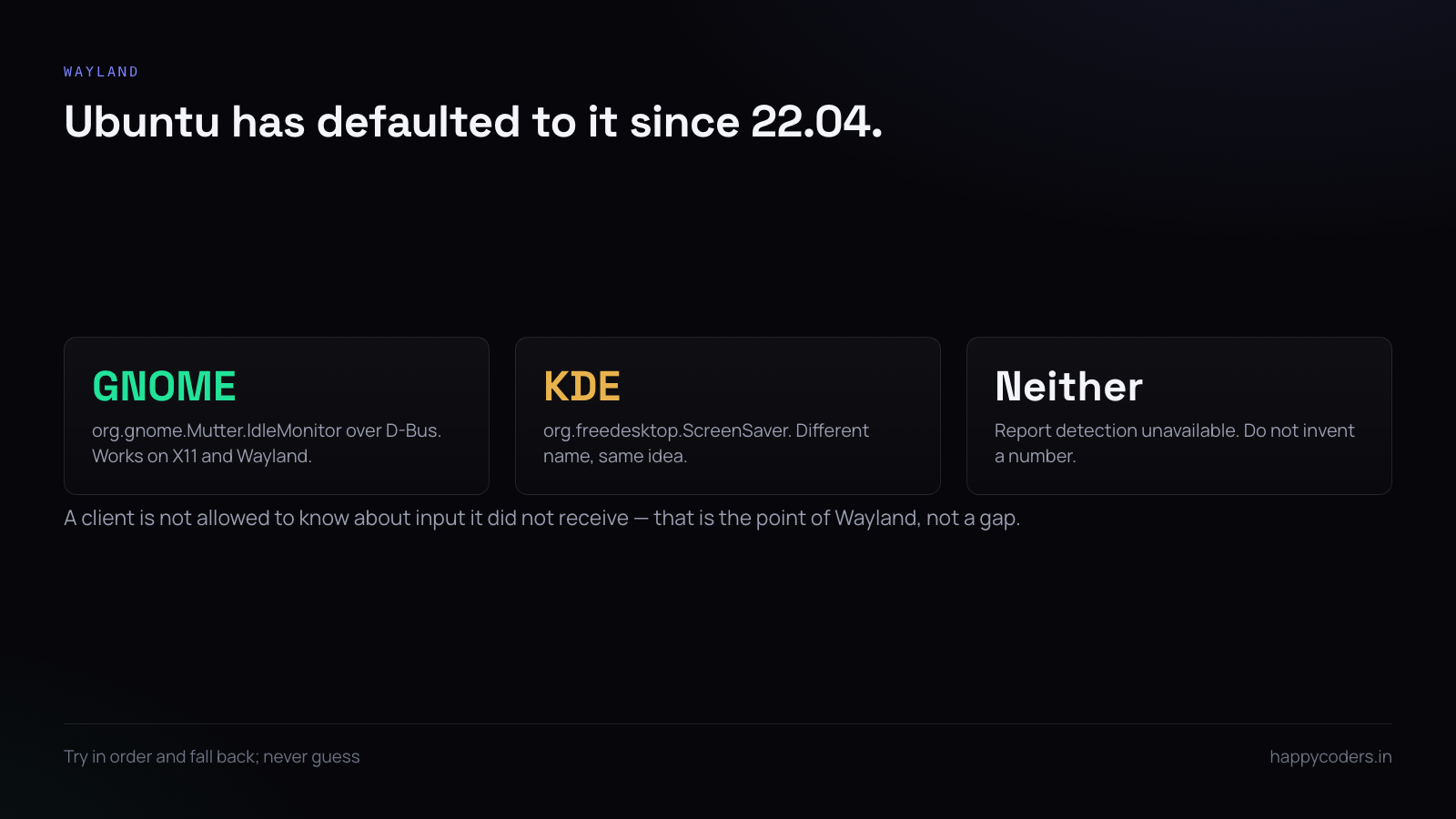
Under Wayland there is no equivalent, deliberately — a client is not allowed to know about input it did not receive. Ubuntu has defaulted to Wayland since 22.04, so this is now the common case rather than the exception.
The portable answer is the desktop environment’s own idle monitor over D-Bus:
gdbus call --session \
  --dest org.gnome.Mutter.IdleMonitor \
  --object-path /org/gnome/Mutter/IdleMonitor/Core \
  --method org.gnome.Mutter.IdleMonitor.GetIdletime
That returns milliseconds and works on GNOME under both X11 and Wayland. KDE exposes org.freedesktop.ScreenSaver instead. Neither is universal, so the practical implementation tries them in order and falls back:
fn idle_ms() -> Option {
    gnome_idle_monitor()          // GNOME, X11 and Wayland
        .or_else(xscreensaver)    // any X11
        .or_else(kde_screensaver) // KDE
}
If all three fail, do not guess. Report idle detection as unavailable and let the server treat that machine’s hours as unverified, rather than inventing a number.
One definition, three implementations
The three APIs agree closely enough to be used interchangeably, with one caveat: full-screen video. Watching a two-hour film produces no input on any platform, and all three will report two hours idle. That is correct, and it is also why “idle” must never be presented as “not working” without the user being able to say otherwise.
Polling, and how often
Do not poll every second. These calls are cheap but not free, and on a laptop a one-second timer prevents the CPU reaching its deeper sleep states.
// 15s is plenty for a 5-minute threshold
const POLL = Duration::from_secs(15);
Poll at fifteen or thirty seconds and compare against a threshold measured in minutes. The resolution you lose is far smaller than the threshold you are testing against.
What to do when the threshold is crossed
Three reasonable behaviours, and the choice should belong to the organisation rather than to you:
- Mark the stretch idle, keep the timer running. The hour is still recorded, with a visible idle portion.
- Stop the timer at the moment input stopped. Retroactive, so the idle minutes are never counted.
- Prompt when they return. “You were away for 23 minutes — keep or discard?”
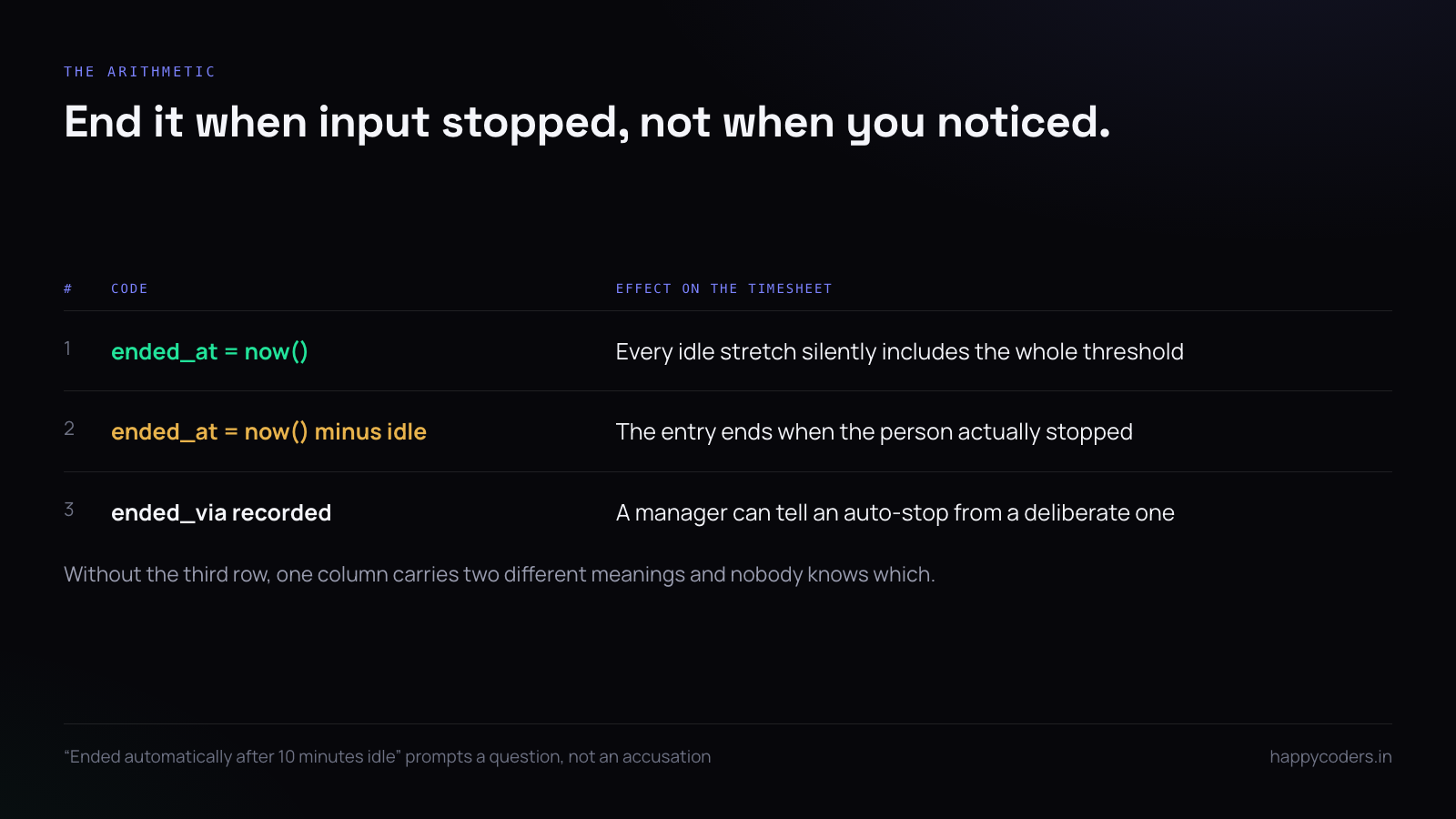
The second is the one to get right in the data. If you stop at the point it was detected rather than when input actually stopped, every idle stretch silently includes the detection threshold:
// wrong: ends the entry now
$entry->ended_at = now();

// right: ends it when input actually stopped
$entry->ended_at = now()->subSeconds($idleSeconds);
$entry->ended_via = 'idle';
Record why it stopped
A timesheet where some entries ended because somebody clicked stop and others ended because the machine went quiet is a timesheet with two different meanings in one column.
`ended_via` ENUM('web','app','idle','auto') NULLStore it, then show it. A manager seeing “ended automatically after 10 minutes idle” asks a different question than one seeing a bare stop time, and the difference is usually the difference between a conversation and an accusation.
Testing it
Idle detection is awkward to test because the test itself is input. Three things make it tractable: wrap the platform call behind an interface so tests can supply the number, assert the arithmetic rather than the API, and keep one manual check per platform in the release routine.
#[test]
fn ends_entry_when_input_stopped_not_when_detected() {
    let entry = close_for_idle(started_at, now = 1000, idle_seconds = 600);
    assert_eq!(entry.ended_at, 400);   // not 1000
}
A short answer
IOKit’s HIDIdleTime on macOS, GetLastInputInfo with unsigned arithmetic on Windows, and GNOME’s idle monitor over D-Bus on Linux with X11 and KDE as fallbacks. Poll every fifteen seconds, not every second. End the entry when input stopped rather than when you noticed. Record why it ended. And never report idle as “not working” without letting the person say otherwise.