Docker for a Team That Does Not Have a DevOps Person
Docker for a Team That Does Not Have a DevOps Person
A new developer joins on Monday and writes their first line of application code on Wednesday. In between: installing the right PHP version, discovering the project needs ext-gd and ext-intl, a MySQL version mismatch that breaks one migration, and an afternoon on a Redis connection that works for everyone else.
Then, a week later, a bug that only happens on their machine, because their PHP is 8.3 and production is 8.2.
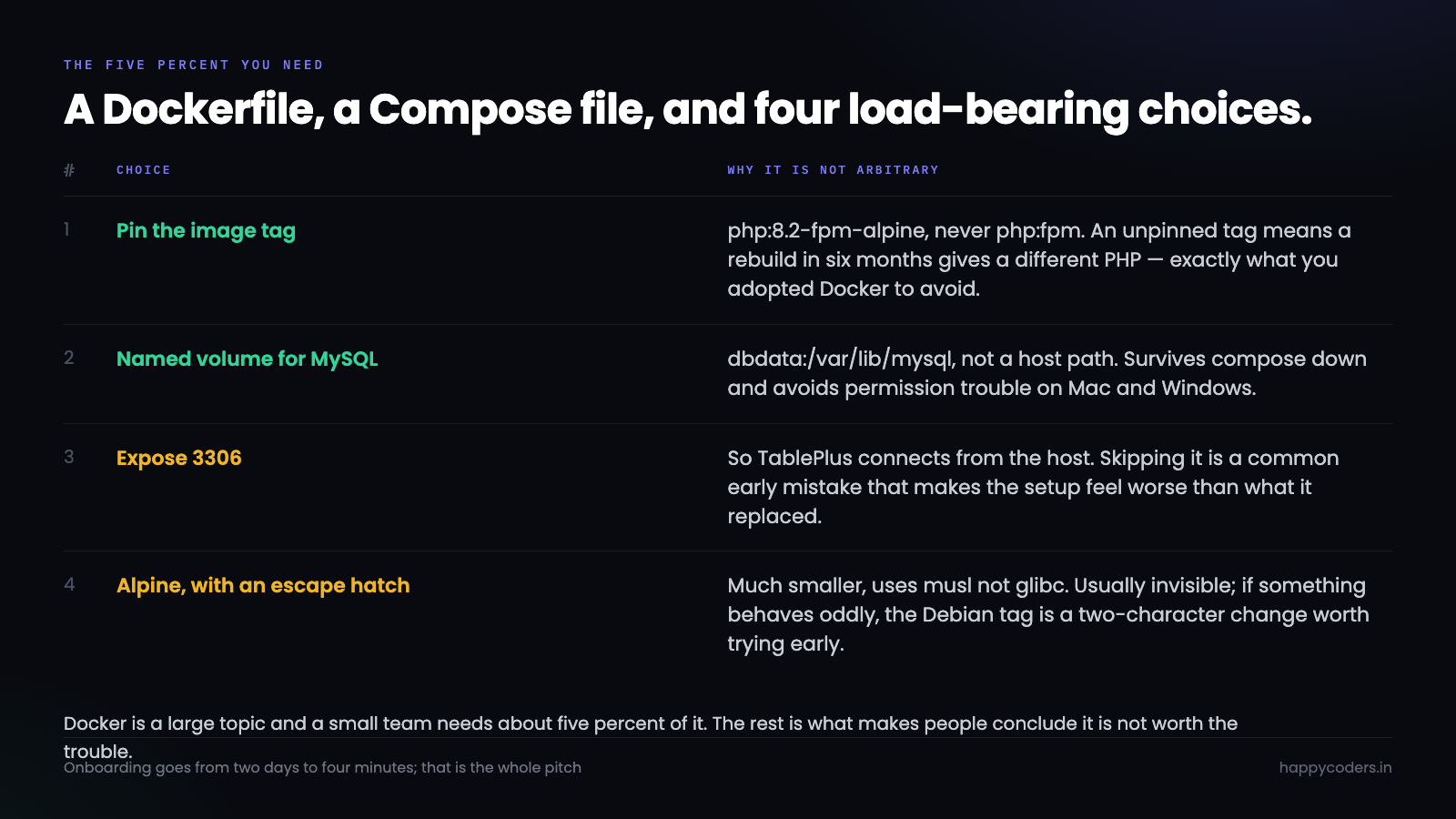
That is the problem Docker solves, and the reason to be specific about it: Docker is a large topic and a small team needs about five percent of it. The rest is a distraction that makes people conclude it is not worth the trouble.
What you actually need
Two files. One describes the PHP image, one describes the services.
# Dockerfile
FROM php:8.2-fpm-alpine

RUN apk add --no-cache icu-dev libzip-dev oniguruma-dev freetype-dev libjpeg-turbo-dev
    && docker-php-ext-configure gd --with-freetype --with-jpeg
    && docker-php-ext-install pdo_mysql mbstring zip exif pcntl bcmath gd intl opcache

COPY --from=composer:2 /usr/bin/composer /usr/bin/composer

WORKDIR /var/www
# compose.yaml
services:
app:
build: .
volumes:
- .:/var/www
depends_on: [db, redis]
web:
image: nginx:alpine
ports: ["8000:80"]
volumes:
- .:/var/www
- ./docker/nginx.conf:/etc/nginx/conf.d/default.conf
depends_on: [app]
db:
image: mysql:8.0
environment:
MYSQL_DATABASE: app
MYSQL_ROOT_PASSWORD: secret
volumes:
- dbdata:/var/lib/mysql
ports: ["3306:3306"]
redis:
image: redis:alpine
volumes:
dbdata:That is the whole thing. docker compose up -d, and a new developer has the exact PHP version, the exact extensions, the exact MySQL and Redis as everyone else, in about four minutes.
The details that are load-bearing
Four choices in those files are not arbitrary.
Pin the versions. php:8.2-fpm-alpine, not php:fpm. An unpinned tag means a rebuild six months from now produces a different PHP, which is precisely the problem you adopted Docker to avoid.
Alpine, with a caveat. Alpine images are much smaller and use musl instead of glibc. For a normal PHP application that is invisible; for anything using an extension with compiled dependencies, or ICU behaving subtly differently, it occasionally is not. If something behaves oddly and the cause is not obvious, switching to the Debian-based tag is a two-character change worth trying early.
Name the volume for the database. dbdata:/var/lib/mysql rather than a host path. A named volume survives docker compose down, and it avoids a class of permission problem on Mac and Windows where MySQL cannot write to a bind-mounted directory.
Expose the database port. 3306:3306 so TablePlus or Sequel Ace connects from the host. Skipping this is a common early mistake and it makes the setup feel worse than what it replaced.
File permissions, the thing that wastes an afternoon
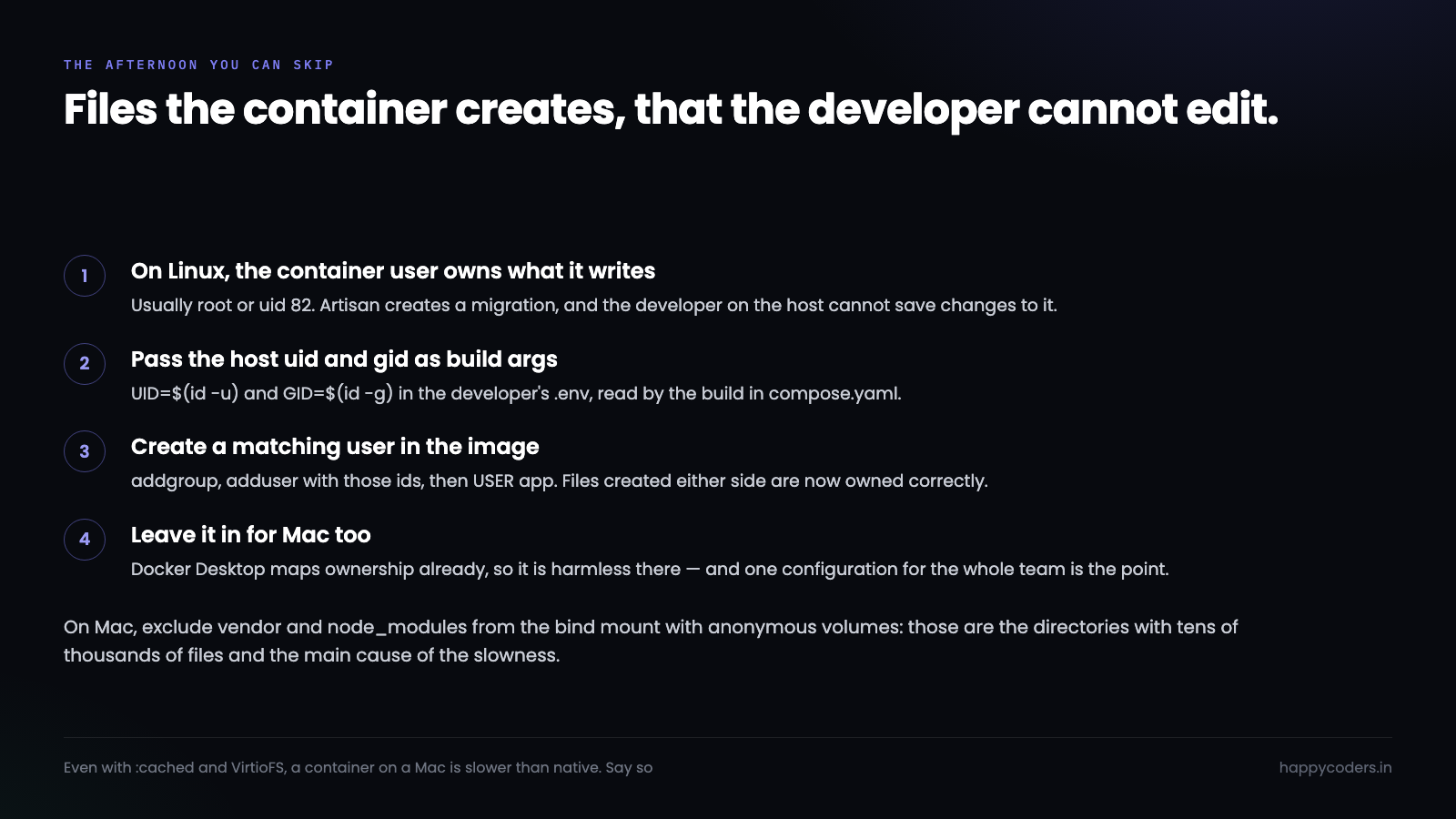
On Linux, files created inside the container are owned by the container’s user, which is usually root or uid 82. The developer on the host then cannot edit them.
# Dockerfile
ARG UID=1000
ARG GID=1000

RUN addgroup -g ${GID} app && adduser -u ${UID} -G app -s /bin/sh -D app
USER app
# compose.yaml
app:
build:
context: .
args:
UID: ${UID:-1000}
GID: ${GID:-1000}# .env, or the developer's shell
UID=$(id -u)
GID=$(id -g)The container’s user now has the same uid as the host user, so files created either side are owned correctly.
Mac users do not need this — Docker Desktop handles the mapping — but the setting is harmless there, so put it in rather than having two configurations. A team with both Mac and Linux machines and one configuration is the goal; two configurations is how the setup starts rotting.
Performance on Mac, which is the real complaint
Bind mounts on macOS are slow, because every file access crosses the virtualisation boundary. A Laravel application with a large vendor/ can feel noticeably worse than running natively.
Three things help, in order of effect:
volumes:
  - .:/var/www:cached              # relax consistency for the source tree
  - /var/www/vendor                # anonymous volume: keep vendor in the container
  - /var/www/node_modules
Excluding vendor and node_modules from the bind mount is the big one — those are the directories with tens of thousands of files, and they do not need to be visible on the host. The cost is that your editor cannot jump into vendor source, which some people mind a great deal and others never notice.
Enabling VirtioFS in Docker Desktop’s settings is the other significant one, and it is a checkbox.
Being honest: even with all three, a container on a Mac is slower than native PHP. The trade is consistency against speed, and for most teams consistency wins — but if someone says it feels slow, they are not imagining it.
What to skip
This is the part that keeps the setup maintainable, because every piece added is a piece somebody has to understand.
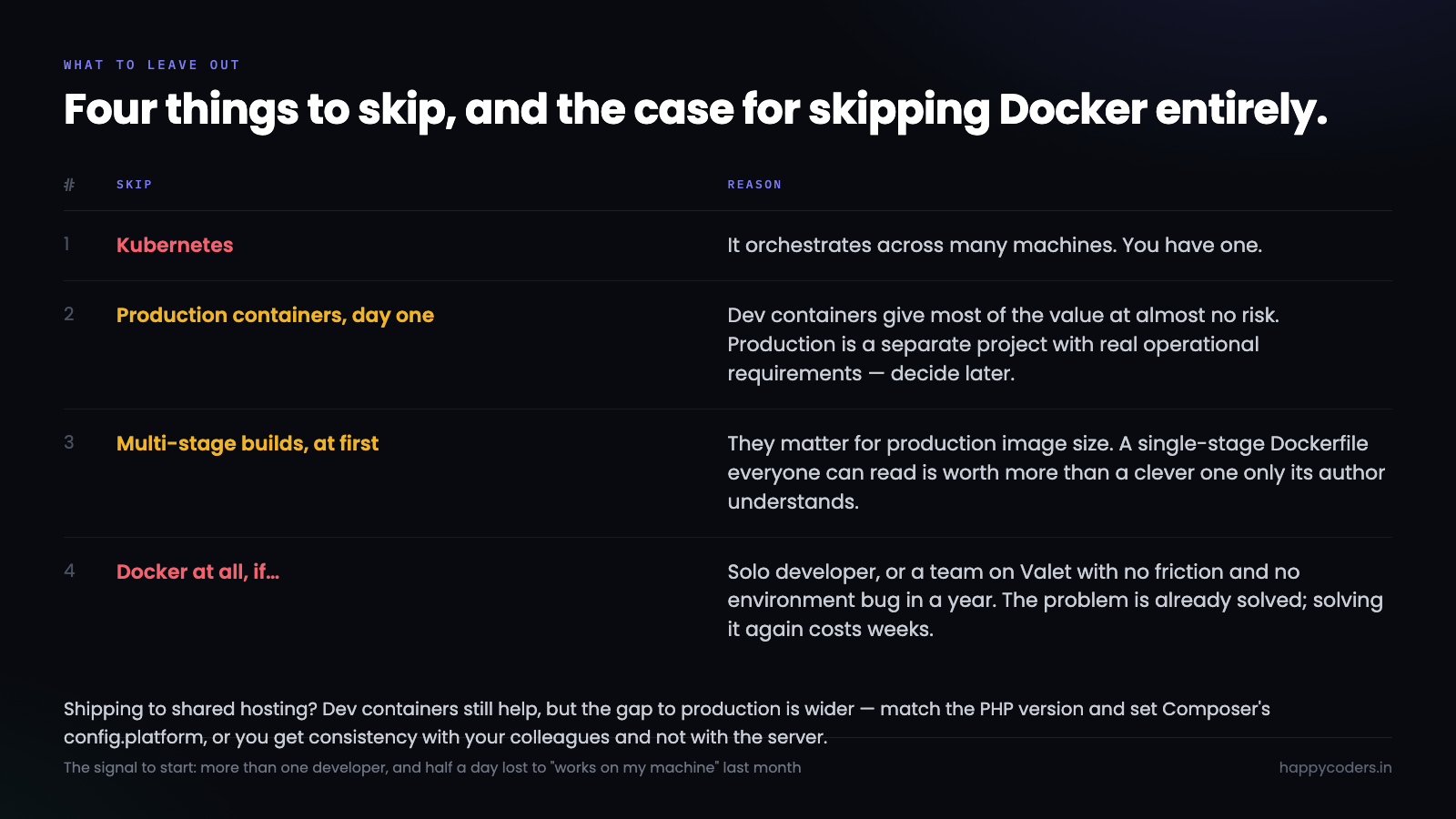
Kubernetes. Not for a team of four. It solves orchestration across many machines, and you have one.
A separate container per Artisan command. docker compose exec app php artisan ... is fine. A wrapper script is fine. A service definition per command is not.
Containerising production on day one. Development containers deliver most of the value — consistent onboarding, no environment bugs — and carry almost no risk. Production containers are a separate project with real operational requirements. Do the first, get the benefit, decide about the second later.
Multi-stage builds, at first. They matter for image size in production. In development the image size does not matter, and a single-stage Dockerfile that everyone can read is worth more than a clever one that only its author understands.
The setup that gets maintained is the one a second person can modify without asking.
The commands people actually use
Worth writing into the README, because “how do I run migrations now” is the question that makes people resent the change.
docker compose up -d                              # start
docker compose down                               # stop, keep the database
docker compose down -v                            # stop, delete the database
docker compose exec app php artisan migrate
docker compose exec app php artisan tinker
docker compose exec app composer install
docker compose logs -f app                        # tail one service
docker compose build --no-cache app               # after changing the Dockerfile
A Makefile removes most of the typing and, more usefully, documents the tasks:
up:      ; docker compose up -d
down:    ; docker compose down
shell:   ; docker compose exec app sh
test:    ; docker compose exec app php artisan test
fresh:   ; docker compose exec app php artisan migrate:fresh --seed
make fresh is the one that changes how people work. Resetting to a known database state becomes trivial, so developers stop being careful with their local data and start testing destructive things.
When not to bother
The honest cases, because Docker is not free.
A solo developer with one project. The consistency problem needs at least two machines to exist. A local PHP install is simpler and faster.
A team already on Valet or Herd with no friction. If onboarding takes an hour and nobody has had an environment bug in a year, the problem is already solved. Solving it again costs weeks.
A project that ships to shared hosting. Development containers still help, and the gap between container and production is wider than usual, so some environment bugs survive. Set config.platform in Composer and match the PHP version carefully — otherwise the container gives you consistency with the other developers and not with the server, which is only half the benefit.
The signal that it is time is specific: more than one developer, and someone has lost half a day to “works on my machine” in the last month. Before that, it is preparation for a problem you do not have.
Xdebug, which is the thing that gets asked about first
A debugger that stops working is how a Docker migration loses its supporters, so it is worth setting up on day one rather than as a follow-up.
# Dockerfile
RUN pecl install xdebug && docker-php-ext-enable xdebug

COPY docker/xdebug.ini /usr/local/etc/php/conf.d/99-xdebug.ini
; docker/xdebug.ini
xdebug.mode = off
xdebug.start_with_request = yes
xdebug.client_host = host.docker.internal
xdebug.client_port = 9003
xdebug.idekey = PHPSTORMTwo things make this work. host.docker.internal is how the container reaches the IDE on the host — on Linux it needs an explicit mapping in Compose:
  app:
    extra_hosts:
      - "host.docker.internal:host-gateway"
And xdebug.mode = off by default is deliberate. Xdebug in debug mode slows PHP down considerably, and a team that leaves it on all the time concludes containers are slow when the container is not the cause. Turn it on per session:
docker compose exec -e XDEBUG_MODE=debug app php artisan tinkerThe IDE also needs a path mapping — /var/www in the container to the project root on the host — because breakpoints are matched by path. That single setting is the reason most “Xdebug does not stop at breakpoints” reports happen, and it takes ten seconds to fix once you know.
Compose in CI, for free
Once the Compose file exists, the test pipeline can use the same definition the developers do, which is the point where the setup starts paying for itself twice.
# .github/workflows/test.yml
- run: docker compose up -d --wait
- run: docker compose exec -T app composer install --no-interaction
- run: docker compose exec -T app php artisan test
--wait blocks until the services report healthy, which removes the sleep-and-hope that CI scripts usually have around waiting for MySQL. It needs a healthcheck to be meaningful:
  db:
    healthcheck:
      test: ["CMD", "mysqladmin", "ping", "-h", "localhost"]
      interval: 5s
      retries: 10
-T on exec disables TTY allocation, which CI runners do not have — its absence is the cause of “the input device is not a TTY” and it is the single most common CI failure with Compose.
The real benefit is not the pipeline being shorter. It is that a test failing in CI can be reproduced exactly on a laptop with the same two commands, which changes how quickly people fix them.
The database, and the seed that makes it usable
A fresh container gives everyone the same empty database, which is consistent and not yet useful. The gap between “it runs” and “I can work on it” is data.
  db:
    volumes:
      - dbdata:/var/lib/mysql
      - ./docker/mysql-init:/docker-entrypoint-initdb.d
Any .sql or .sh file in that directory runs once, when the volume is first created. It is the right place for a second database for the test suite:
-- docker/mysql-init/01-test-db.sql
CREATE DATABASE IF NOT EXISTS app_test;
GRANT ALL ON app_test.* TO 'root'@'%';
Note “when the volume is first created” — editing those files later does nothing until docker compose down -v. That surprises people, and it is worth a comment in the file itself.
For realistic data, seeders beat a dumped database. A dump from production carries real customer records onto every developer’s laptop, which is a problem that starts as a convenience and becomes a disclosure. Factories and a seeder give everyone a comparable dataset with nobody’s real name in it:
docker compose exec app php artisan migrate:fresh --seedIf a production-shaped dataset genuinely is needed — for a performance problem that only appears at scale — anonymise it in the export and keep the script that does the anonymising in the repository, so the next person does not have to decide how much scrubbing is enough.
Writing the README that keeps it alive
The setup survives on whether a second person can change it, and that is mostly a documentation problem.
Four things belong in the README, and they are short:
The three commands to start. Clone, copy .env.example, docker compose up -d. If there is a fourth step, automate it into a make setup target rather than documenting it.
What to do when the Dockerfile changes. docker compose build app is not obvious to someone who has only ever run up, and the symptom of not knowing it is a bug report about a missing extension that was added last week.
How to reset. docker compose down -v && docker compose up -d && make fresh. Knowing there is a reliable way back to a clean state is what stops people being cautious with their local environment.
Which versions are pinned and why. One line: PHP 8.2 and MySQL 8.0 because that is what production runs. It is the sentence that stops someone bumping the tag to match their laptop and reintroducing the problem the whole setup exists to prevent.
Two failures worth recognising on sight
Both come up in the first week and both look like Docker being broken when it is not.
Changes to the Dockerfile do nothing. docker compose up -d reuses the existing image. It does not rebuild. The fix is docker compose up -d --build, and the symptom is somebody insisting an extension is installed while the container disagrees.
The container starts and immediately exits. docker compose ps shows it stopped and up reports success, because Compose started it correctly and the process inside died. docker compose logs app has the actual error, and it is almost always a syntax error in a config file the image copied in.
Where it ends up
Two files, four minutes to onboard, and a class of bug that stops occurring. That is a reasonable return for an afternoon of setup, and it is available without learning orchestration, image optimisation or anything else the topic is usually taught with.
The failure mode to avoid is a setup elaborate enough that only its author can change it. When that person is on leave and the PHP version needs bumping, the team goes back to local installs — and the second attempt is much harder to argue for than the first.