
Four Rejections: What the Mac App Store Actually Checks
Four Rejections: What the Mac App Store Actually Checks
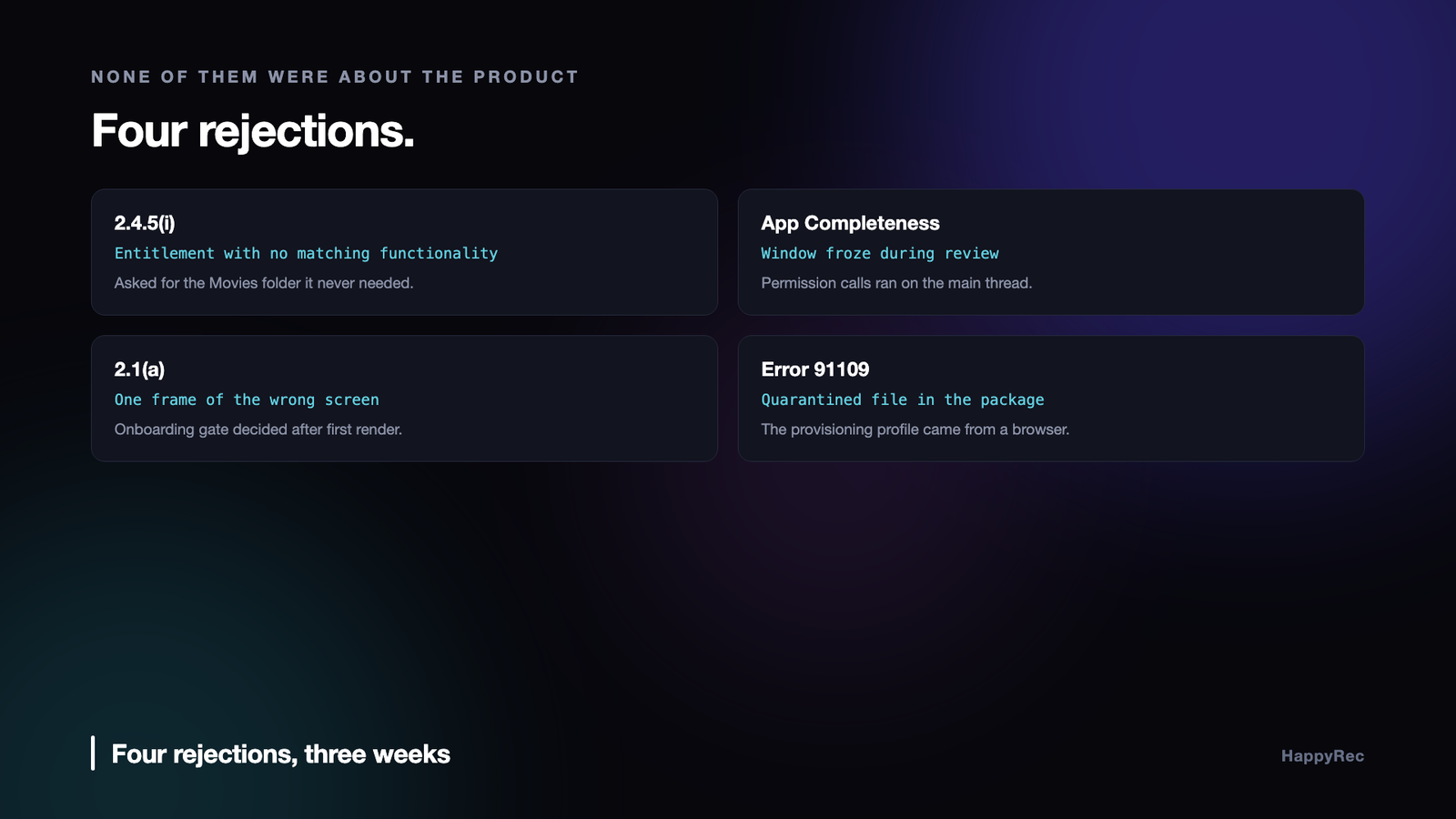
Every rejection notice reads like a form letter, because it is one. A guideline number, a sentence of boilerplate, and occasionally a screenshot. What it never contains is the thing you actually need, which is which line of your code or your build script caused this.
HappyRec is a screen and voice recorder for macOS. Getting it onto the Mac App Store took four rejections. None of them were about the product. All four were about the gap between an app that works on the developer’s machine and an app that survives an unfamiliar reviewer on unfamiliar hardware with a fresh install.
Here is each one, what it actually meant, and what changed.
Rejection one: an entitlement with nothing to justify it
Guideline 2.4.5(i). The app requested com.apple.security.assets.movies.read-write, and the review found no functionality that required it.
The reasoning was ours and it was lazy. A screen recorder writes video files; video files belong in Movies; therefore ask for the Movies folder. It sounds obvious enough that nobody questions it.
What we had not noticed is that the app already had everything it needed without that entitlement. HappyRec has the user-selected-file entitlement and persists access through security-scoped bookmarks, so a user who picks a save folder gets that folder — including ~/Movies if that is what they pick. And the default save folder lives inside the app’s own sandbox container, which macOS grants unconditionally, no entitlement and no picker involved.
So the entitlement bought exactly nothing. It widened the app’s declared access with no feature behind it, and the guideline exists precisely to catch that.
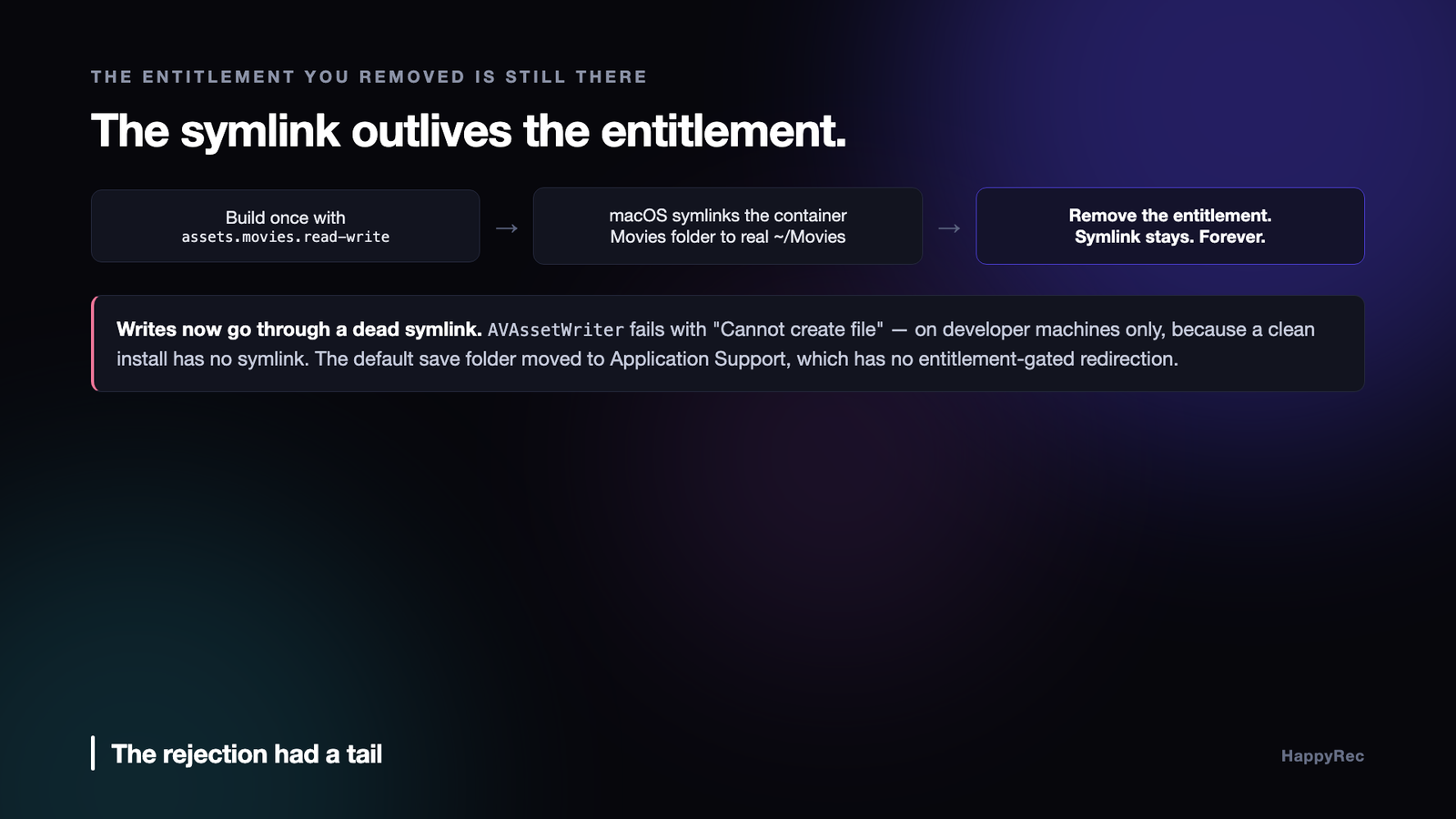
The removal had a tail nobody warns you about. Once an app has been built even once with the Movies entitlement, macOS symlinks the sandbox container’s Movies folder straight through to the real ~/Movies. It never cleans that symlink up when the entitlement goes away.
Which means the next build — correct, entitlement removed, approved — tries to write through a symlink to a path it no longer has permission for. AVAssetWriter and AVAudioFile both fail with an opaque “Cannot create file”, on developer machines only, because those are the only machines with the leftover symlink. A clean install is fine. Your own Mac is broken, permanently, in a way that looks like a code bug.
The default save folder now points at Application Support instead:
// Deliberately NOT .moviesDirectory: macOS symlinks a sandboxed app’s container Movies folder straight through to the real ~/Movies the moment the app is ever built with the Movies entitlement — and never cleans that symlink up again.
Application Support has no entitlement-gated redirection. It is always a genuine, private, container-local directory, which makes it the only default that is safe regardless of what entitlements the app has ever been built with on a given machine.
Rejection two: the app froze during review
App Completeness. The reviewer clicked a button in onboarding, the window stopped responding, and they had to force-quit. That is an automatic rejection and it is the correct call.
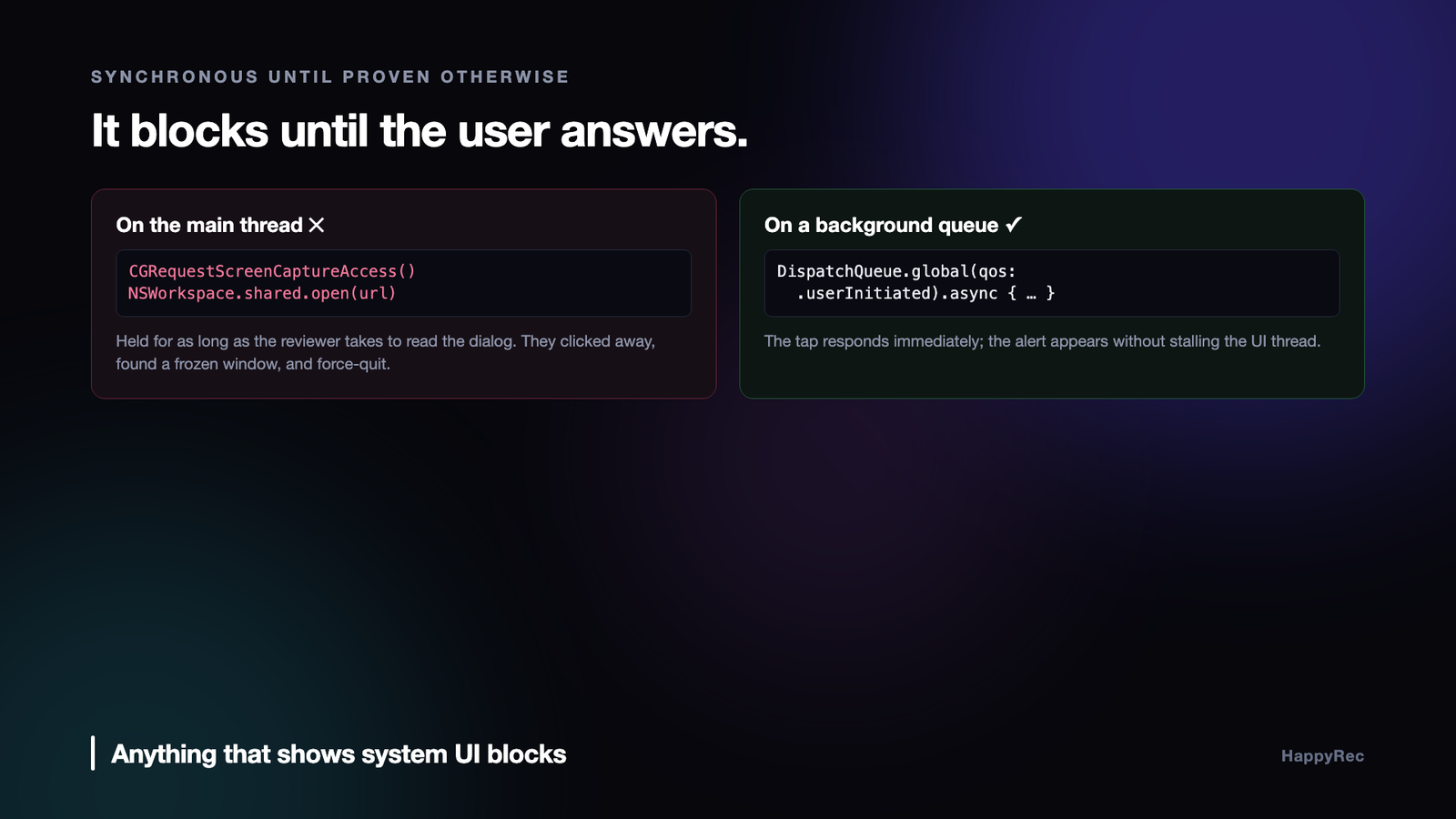
The cause was two synchronous calls on the main thread, both of which look completely innocent.
CGRequestScreenCaptureAccess() blocks the calling thread until the user answers the system alert. Not until the alert appears — until it is answered. Call it from a SwiftUI button handler and the main thread is held for as long as the person takes to read the dialog. A reviewer working through a queue does not read your dialog immediately. They click elsewhere, find a frozen window, and file the rejection.
NSWorkspace.shared.open(_:) is the second one, and it is less obvious. Deep-linking into a System Settings pane looks like fire-and-forget. It is a synchronous Launch Services round trip — locating and activating another application — and it holds the main thread for the duration.
Both now go to a background queue:
DispatchQueue.global(qos: .userInitiated).async {
_ = CGRequestScreenCaptureAccess()
}
The rule this taught us generalises well beyond these two calls: anything that shows system UI, or asks another process to do something, is synchronous until proven otherwise. The documentation rarely says so. The symptom is always a beachball on somebody else’s machine, because on yours you answer the dialog in half a second and never notice.
Rejection three: one frame of the wrong screen
Guideline 2.1(a). The reviewer’s screenshot showed HappyRec’s main window with a warning banner reading “Screen Recording is not enabled”, on first launch, before any onboarding had appeared.
They were right, and it lasted about one frame.
The onboarding gate was being decided in an async prepare() that ran after the first render. SwiftUI drew the main window with its unconfigured state and its error banner, and then the onboarding sheet appeared over the top. On a fast machine you see a flicker. On a slower one, or when a screen recording is running — which is exactly what a reviewer capturing evidence is doing — you get a clean screenshot of an app that looks broken on launch.
The fix was to move the decision into the synchronous initialiser, so it is already correct on the very first render:
// Decide the onboarding gate synchronously, here in init — not in the async prepare() — so it’s already correct on RecorderView’s very first render.
The general lesson is worth more than the specific fix: any state that determines what the user sees first must be resolved before the first render, not after it. An async load that resolves in twenty milliseconds is still a frame of the wrong UI, and the one person guaranteed to screenshot that frame is the person deciding whether to approve your app.
Rejection four: the package was refused before review
Error 91109, from App Store Connect, at upload. Not a review rejection — the package never reached a human.
A file inside the app bundle carried the com.apple.quarantine extended attribute. App Store Connect rejects any quarantined file in a submission.
The culprit was the provisioning profile. Profiles are downloaded through a browser from the developer portal, browsers set the quarantine attribute on downloads, and cp preserves extended attributes. So the profile arrives quarantined, gets copied into the bundle still quarantined, and the package is refused with a numeric code and no indication of which file is at fault.
One line in the packaging script:
xattr -cr build/HappyRec.app
Strip it recursively, after assembling the bundle and before signing. It costs nothing and it removes an entire category of failure caused by any file that ever passed through a browser.
The one that never became a rejection
Worth including because it is the same species and it cost more than any of the four.
The first hardened build could not record audio. No microphone prompt, no error, and no entry for the app in System Settings ▸ Privacy ▸ Microphone. Everything looked correct in code and everything worked in development.
Microphone access needs two different entitlement keys. com.apple.security.device.microphone for the App Sandbox, and com.apple.security.device.audio-input for the Hardened Runtime — the second only mattering once the build is signed with --options runtime, which is to say only in the build you submit. The camera does not have this problem, because Apple reused one key for both subsystems there, so the camera works while the microphone silently does not.
The reason it never became a rejection is that we caught it in the last check before submission, on a build signed exactly the way the release build is signed. That check is the single most valuable habit to come out of all of this.
What the pattern is
Four rejections, and not one was a disagreement about what the app should do. Every one lived in the gap between the artefact you build all day and the artefact you actually ship.
- The entitlement was only wrong under review, never at runtime.
- The freeze only manifested for someone who does not already know the answer to your dialog.
- The wrong frame only mattered to someone photographing first launch.
- The quarantine attribute only existed because a human downloaded a file in a browser.
- The missing entitlement key only mattered in a hardened build.
Local development never exercises any of these, and no test suite reaches them. They are properties of packaging, signing, timing and first-run state.
What the review notes do not say
Every rejection arrives with a short paragraph and a screenshot. The paragraph names a guideline; the screenshot shows a screen. Neither tells you what the reviewer was actually doing when it happened, and that is the information you need.
What we learned to do is reconstruct the session rather than read the note literally. A rejection that cites a guideline about permission requests, with a screenshot of an empty window, is not really about permission text — it is about what your app does when permission has been refused. The reviewer refused it, and your app showed nothing at all.
That reframing changed how we fixed things. The literal fix is to rewrite the usage description string. The real fix is to build a state for every permission your app asks for: not yet asked, asked and granted, asked and denied, and restricted by policy. Four states, four screens. Most applications ship two and get rejected for the other two.
The tests a reviewer runs that nobody writes down
After enough rounds, a pattern emerges in what actually gets exercised. It is not the feature list. It is the edges around it.
- Refuse everything. The reviewer denies microphone access, denies file access, denies anything you ask for, and then uses the app. If it shows an empty window or a spinner, it is rejected.
- Run it with no network. If a feature that has nothing to do with the network stops working, that is a rejection.
- Use it on a fresh account. Empty state, no documents, no history. If the first screen a new user sees is blank, that is a rejection.
- Resize it small. Content that becomes unreachable at the minimum window size is a rejection.
- Look for anything that shows system UI. A save panel, a permission prompt, a share sheet — these are checked because they are where sandboxing usually breaks.
None of that is secret and none of it is in a document you can read start to finish. It is simply what a careful person does with an unfamiliar application in ten minutes.
Answering a rejection
The reply matters more than people expect. A rejection is handled by a person who is going to spend a few minutes on your app again, and what you write decides where those minutes go.
Three things that consistently helped. Name the exact build and the exact change, so the reviewer is not hunting for it. Describe the steps to see the fix, in order, as though writing for somebody who has never opened the app. And answer only the point raised — a reply that argues with a different guideline reads as an argument, and an argument gets another round.
Where we genuinely disagreed, we said so once, plainly, with the reason, and then complied anyway while asking for clarification separately. Shipping is worth more than being right on a point that will be re-litigated in three months.
The rules that are enforced but not written down
A guideline document tells you what is prohibited. It does not tell you which prohibitions are checked mechanically, which are checked by a person, and which are effectively never checked at all. That distinction is what decides how much time a submission costs you, and it is only learnable by submitting.
Mechanical checks happen before a human sees the build: entitlements that do not match the provisioning profile, private API symbols, missing icon sizes, an unsigned framework. These fail fast, the message is precise, and fixing them is mechanical too. They are the cheap rejections.
Human checks are the expensive ones, because they depend on what the reviewer did. Two submissions of the same build can pass and fail, not through inconsistency but because one reviewer refused a permission and the other did not. The lesson is not that review is arbitrary; it is that every path a curious person could take has to work.
And there is a third category worth naming: things that are prohibited, obviously present in shipping applications, and simply not looked for. It is tempting to reason from those and conclude the rule is dead. We would advise against it. The cost of being wrong is a rejection on a build you needed out this week, and rules in this category get enforced in waves.
Preparing a submission so review is short
Most of what makes a review go quickly happens before you press submit.
- Write review notes that assume nothing. If a feature needs a file to demonstrate, attach one. If a permission has to be granted for the app to do anything, say so in the first line.
- Test every permission refused. Reset the privacy database, launch, and say no to everything. Then use the app for five minutes.
- Test with no network and a fresh account. Both together, not separately.
- Check every screen at the minimum window size. Not just that it renders — that every control is reachable.
- Take the screenshots from the build you are submitting. A screenshot showing a feature the build does not have is a rejection, and it happens more often than you would think when a feature slips.
Half an hour of this before submission is routinely worth a week of turnaround afterwards, because each rejection costs a full review cycle regardless of how small the fix is.
The checklist
- Justify every entitlement out loud. If you cannot name the feature that needs it, remove it before a reviewer does.
- Know that removed entitlements leave residue. The Movies symlink outlives the entitlement and only breaks developer machines.
- Treat system UI calls as blocking. Permission requests and
NSWorkspace.openbelong off the main thread. - Resolve first-render state synchronously. One frame of the wrong screen is a screenshot in a rejection notice.
- Strip extended attributes before packaging. One line, whole category of upload failures gone.
- Test the hardened, signed build — not the debug build, not the raw binary. Some bugs exist only there.
- Install from the package onto a clean account before submitting. First-run state is where three of these lived.
- Keep a build script, not a ritual. Every fix above is a line in a script now, which is the only reason none has come back.
None of this makes review pleasant, but it does make it predictable, and predictable is what you want from a gate you have to pass every release. The four rejections cost about three weeks between them. Rebuilding the submission path so that each one became a line in a script cost an afternoon, and has held since.
HappyRec is a native macOS screen and voice recorder — no Electron, no kernel extensions — with a formant-preserving voice changer and a presenter overlay. It is on the Mac App Store, and at happyrec.happycoders.in.




