
Offline First: Buffering Tracked Time When the Network Disappears
Offline First: Buffering Tracked Time When the Network Disappears
A desktop time tracker runs on a laptop on a train, in an office with unreliable wifi, and in a co-working space whose network disappears for ten minutes at a time. If a dropped connection costs somebody an afternoon of tracked work, the application is uninstalled that week — and rightly.
This is the architecture we settled on: what is stored locally, how uploads survive retries, and what happens when the same account is tracking on two machines.
The rule that shapes everything
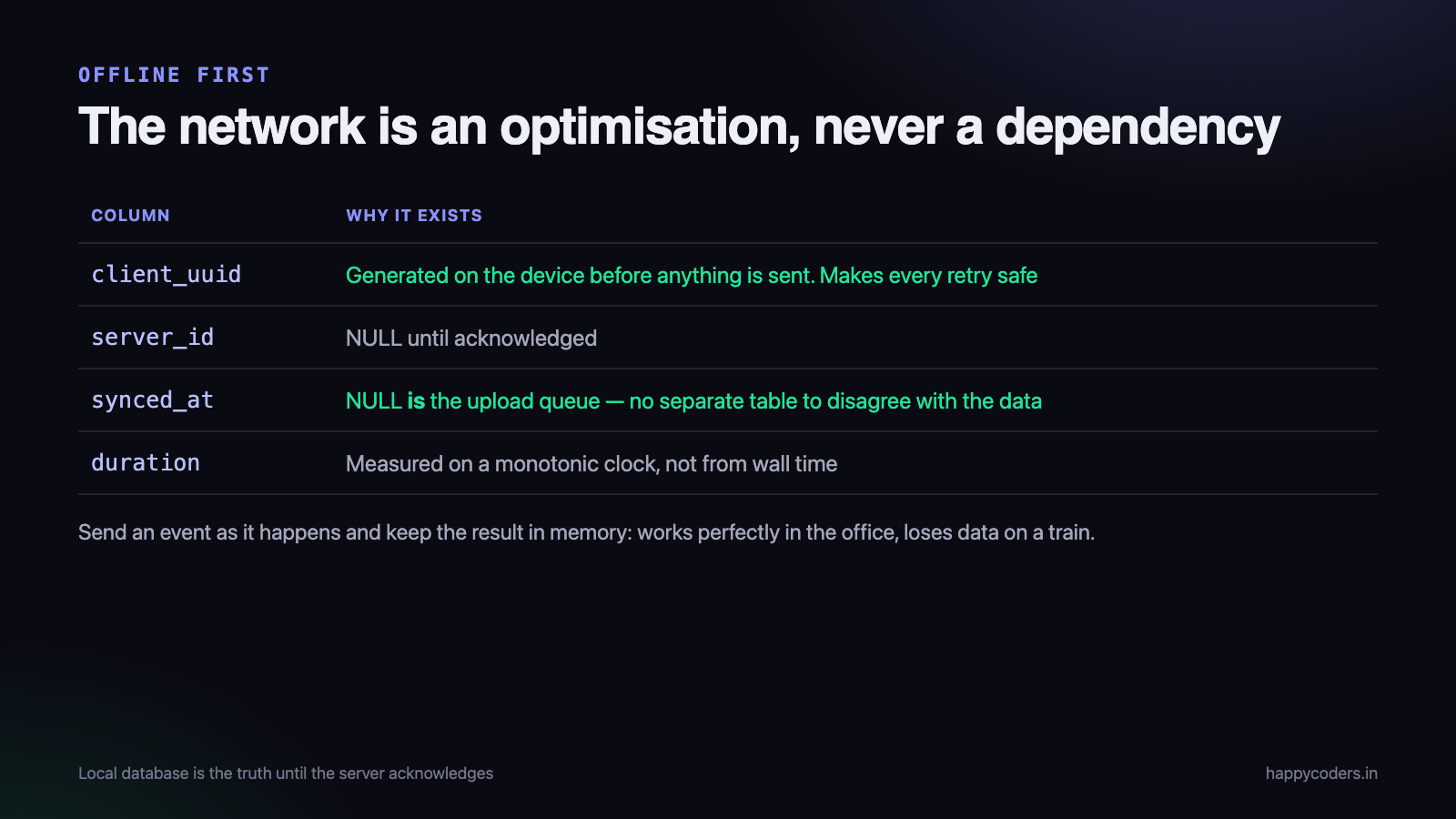
The local database is the source of truth until the server acknowledges a record. Nothing is ever held only in memory, and nothing is discarded locally because a request appeared to succeed.
That sounds obvious and it rules out the architecture most trackers start with, which is to send an event to the server as it happens and keep the result in memory. That design works perfectly in an office and loses data on a train.
-- the local store, SQLite on the client
CREATE TABLE time_entries (
    local_id    INTEGER PRIMARY KEY AUTOINCREMENT,
    server_id   INTEGER,              -- NULL until acknowledged
    client_uuid TEXT NOT NULL UNIQUE, -- generated locally, never changes
    project_id  INTEGER NOT NULL,
    started_at  TEXT NOT NULL,        -- UTC
    ended_at    TEXT,
    duration    INTEGER,
    synced_at   TEXT,                 -- NULL means pending
    attempts    INTEGER DEFAULT 0
);
CREATE INDEX idx_pending ON time_entries (synced_at) WHERE synced_at IS NULL;
Two columns do the heavy lifting. client_uuid is generated on the device before anything is sent, which is what makes retries safe. synced_at being null is the entire definition of the upload queue — no separate queue table, no risk of the queue and the data disagreeing.
Idempotent uploads, or duplicates forever
The failure that produces duplicate entries is specific and common: the request reaches the server, the server writes the row, and the response is lost on the way back. The client sees a timeout, retries, and a second row appears.
The client cannot distinguish “never arrived” from “arrived and the reply was lost”, so it must retry, so the server must be able to recognise a repeat.
The client_uuid is what makes that possible. The server treats it as a unique key and an upsert:
public function store(Request $request)
{
    $entry = TimeEntry::updateOrCreate(
        ['client_uuid' => $request->client_uuid],   // the idempotency key
        [
            'organization_id' => $request->user()->organization_id,
            'user_id'         => $request->user()->id,
            'project_id'      => $request->project_id,
            'started_at'      => $request->started_at,
            'ended_at'        => $request->ended_at,
        ]
    );

    return response()->json(['id' => $entry->id, 'client_uuid' => $entry->client_uuid]);
}
Now a retry is harmless. The second request finds the existing row and returns the same id. The client stores the server id, sets synced_at, and stops trying.
Make the uniqueness a database constraint rather than only application logic. Two retries arriving simultaneously from a flaky connection will race, and only the database can settle it.
Batching, and the size that bites
A laptop that has been offline for a day comes back with several hundred pending records. Uploading them one request at a time is slow and hammers the API; uploading all of them in one request produces a payload the server rejects or times out on.
Batches of fifty to a hundred, sequential rather than parallel, with the whole batch idempotent:
func syncPending() async {
    while let batch = store.pendingEntries(limit: 100), !batch.isEmpty {
        do {
            let ack = try await api.upload(batch)     // one request, N entries
            store.markSynced(ack)                     // only what the server confirmed
        } catch {
            backoff.recordFailure()
            return                                    // stop; try again later
        }
    }
}
Two details that matter. Mark only what the server explicitly acknowledged, entry by entry — a partial success must not mark the whole batch. And stop the loop on the first failure rather than working through the rest; if the network is down, the next ninety-nine requests will also fail and all you achieve is draining the battery.
Backoff, with jitter
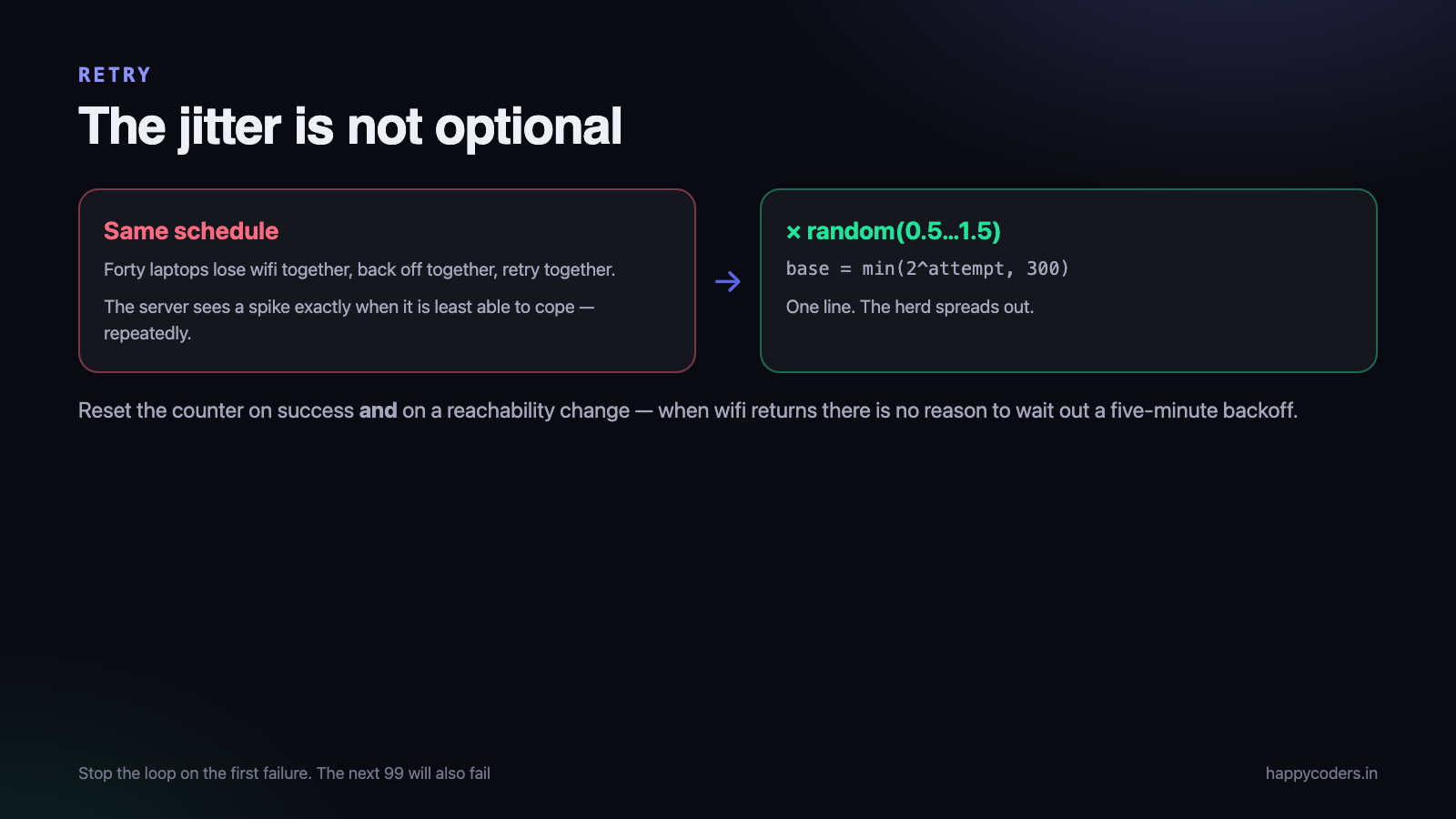
Retrying every five seconds forever is how a client becomes a denial of service against its own API. Exponential backoff with a ceiling is standard; the part that is often missed is the jitter.
func nextDelay(attempt: Int) -> TimeInterval {
    let base = min(pow(2.0, Double(attempt)), 300)   // cap at five minutes
    return base * Double.random(in: 0.5...1.5)       // spread the herd
}
Without jitter, an office of forty laptops that all lost connectivity at the same moment will all retry at the same moment, repeatedly. The server sees a spike every time the delay elapses, which is exactly when it is least able to cope. Randomising the delay spreads them out and costs one line.
Reset the attempt counter on success, and also on a network-reachability change — when wifi comes back, there is no reason to keep waiting out a five-minute backoff.
Clock skew: do not trust the device
A laptop’s clock can be wrong by minutes, by hours, or deliberately. If the client sends wall-clock start and end times and the server stores them unquestioned, a wrong clock produces entries in the future, entries overlapping other entries, and — where hours decide pay — an obvious route to abuse.
What we do:
- Measure duration on the client with a monotonic clock. Elapsed time is measured correctly even if the wall clock jumps, and it is the number that actually matters.
- Send both the client’s wall-clock times and the measured duration.
- Have the server record its own received-at time on every upload.
- Flag rather than silently correct. If the client’s times and its duration disagree, or the start is in the future, store the entry and mark it for review. Silently rewriting somebody’s hours is worse than showing a warning.
The instinct is to have the server overwrite the times. Resist it: for genuinely offline work, the client’s timestamps are the only record of when the work happened, and the server’s clock knows only when the upload arrived.
Two devices, one account
Somebody starts a timer on a desktop, goes home, and starts one on a laptop. Now there are two open sessions and they overlap.
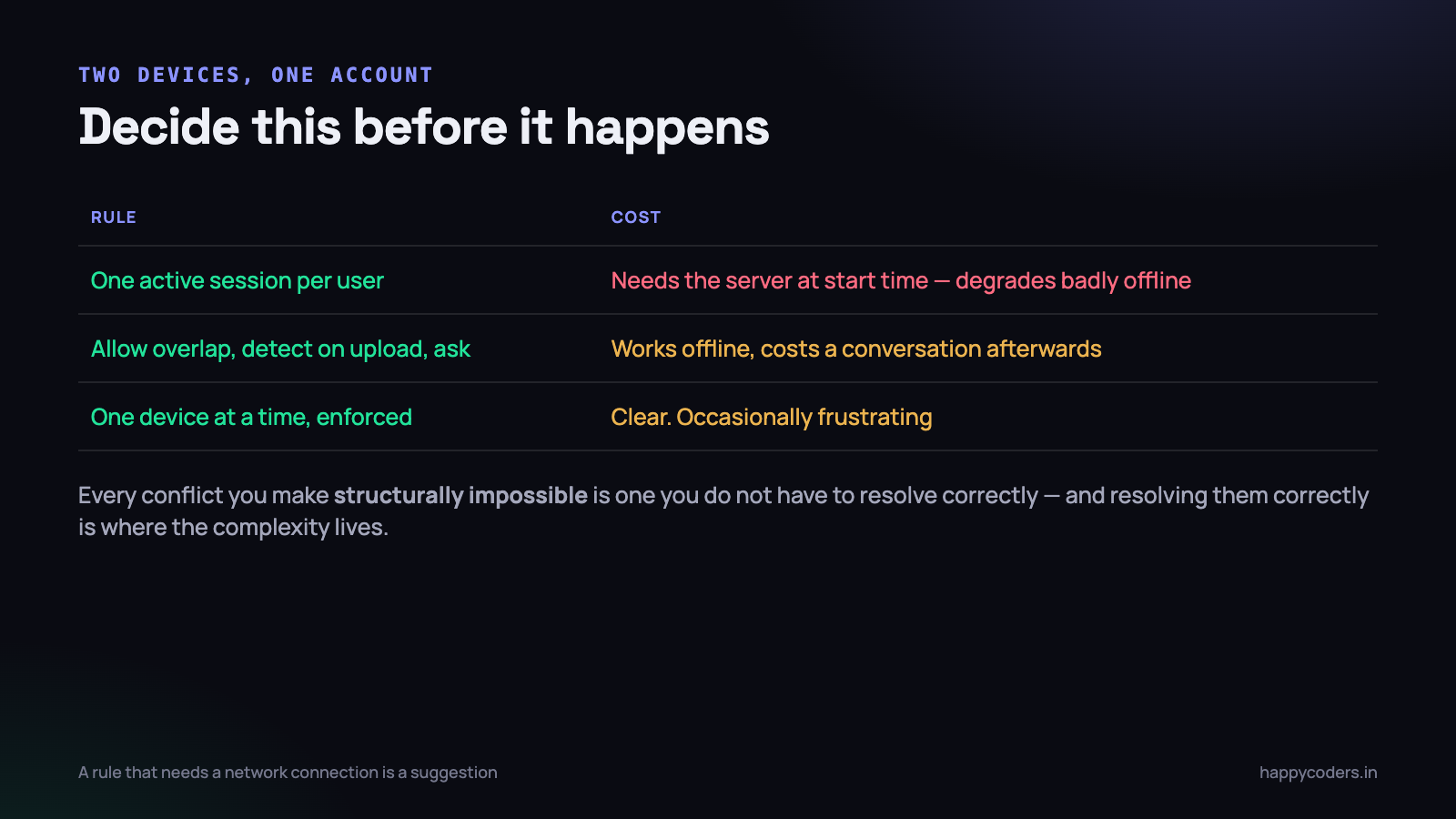
This is a product decision before it is a technical one, and there are three coherent answers:
- Allow one active session per user. Starting on a second device stops the first, which is what most people expect. Requires the server to be reachable at start time, so it degrades badly offline.
- Allow overlap, detect it on upload, and ask. Works offline, costs a conversation with the user afterwards.
- One device at a time, enforced by a device lock. Clear, and occasionally frustrating for people who legitimately switch machines.
We use the third for the desktop trackers and allow the browser as an exception, because the common case is somebody who owns one work machine, and the clarity is worth more than the flexibility. Whichever you pick, the important part is that the client behaves predictably offline — a rule that can only be enforced with a network connection is not a rule, it is a suggestion.
Editing something that has not been uploaded yet
The queue gets more interesting the moment the user can change their own entries, which they must be able to do. Somebody corrects a timer they left running, while that entry is still sitting unsynced.
The rule that keeps this simple: edit the local row in place and leave it in the queue. Because the upload is an upsert keyed on the UUID, an edited pending entry is simply uploaded once, with the corrected values. No separate update request, no ordering problem, no chance of the create and the edit arriving out of order.
Deletion is the case that needs care. Deleting a pending row that the server has never seen is a local delete and nothing more. Deleting one the server has acknowledged needs a tombstone — a record of the deletion that is itself queued, so it survives being offline. A client that simply removes the row locally will have the entry reappear at the next full sync, which is a confusing bug to receive a report about.
-- a deletion is a queued fact, not an absence
CREATE TABLE pending_deletes (
    client_uuid TEXT PRIMARY KEY,
    deleted_at  TEXT NOT NULL,
    synced_at   TEXT
);
Deciding what wins
With editing on two devices, genuine conflicts become possible: the same entry changed in two places while both were offline. There are only three honest strategies and it is worth choosing deliberately rather than discovering the default.
- Last write wins, by server receive time. Simple, and silently discards somebody’s change. Fine for a preference, wrong for anything that decides pay.
- Last write wins, by client edit time. More intuitive — the later edit is usually the intended one — and depends on client clocks you just decided not to trust.
- Keep both and ask. Correct, and costs a user interface nobody wants to build for a case that happens rarely.
What we do is narrower and avoids most of it: an entry can only be edited on the device that created it, or in the browser. Two offline devices therefore cannot diverge on the same record in the first place. It is a restriction, and it removes an entire class of problem that would otherwise need a conflict interface used twice a year.
That is the general shape of the trade in offline systems. Every conflict you can make structurally impossible is one you do not have to resolve correctly, and resolving them correctly is where the complexity lives.
Tell the user, quietly
An offline-first client should look almost identical whether or not it is connected — that is the point. But “almost” matters, because a user who does not know their data is queued will assume it is lost.
- A small, calm indicator when there are pending entries. Not an error, not a dialog. “12 entries waiting to sync”.
- Never block the interface on connectivity. Everything works offline including editing and deleting.
- Warn on quit if a substantial backlog is pending, so nobody wipes a machine with three days of unsent work on it.
- Show the last successful sync time somewhere findable. It is the first thing support asks about.
How much to keep, and for how long
A local database that only grows is its own problem. A tracker running for two years accumulates a great deal, and the client does not need all of it.
The policy that works: keep everything until it is acknowledged, then keep a rolling window. Ninety days locally is generous for the two things the client actually needs history for — showing the user their own recent week, and letting them correct something from a few days ago. Older entries live on the server, where the reports are generated anyway.
Prune on a schedule rather than on startup, and never prune anything with a null synced_at, no matter how old it is. An entry from four months ago that never uploaded is not stale data — it is the only copy of a day somebody worked, and it is exactly the case a careless cleanup destroys.
What to test
- Pull the cable mid-session and keep working for twenty minutes. Everything should behave normally.
- Kill the process with pending entries and restart. Nothing lost, the queue resumes.
- Return a 500 from the server for every upload. The client should back off, not spin.
- Return a success but drop the response. This is the duplicate test, and it is the one that matters most.
- Move the clock forward two hours mid-session, then back.
- Sleep the machine for a day with entries pending.
- Sync 2,000 backlogged entries at once and watch the memory and the server.
The fourth is worth building a switch for in the test server, because it is the only way to reproduce the duplicate bug reliably, and it is the bug users notice.
The other cost is testing. Most of these paths only execute in conditions a developer has to create deliberately, so if the test harness cannot drop the network, stall a response and move the clock, the code is written but not verified. Build those three switches early.
And one habit worth keeping: whenever a support case turns out to be a sync problem, add it to that list. Every item above arrived from a real report rather than from planning.
The short version
- Local database first. The network is an optimisation, never a dependency.
- A client-generated UUID on every record, and an upsert on the server.
- Batch, sequentially, and mark only what was acknowledged.
- Exponential backoff with jitter and a ceiling.
- Monotonic duration plus wall-clock times; flag disagreements rather than rewriting them.
- Decide the two-device rule, and make it work offline.
- A quiet indicator, never a blocking dialog.
One thing worth saying about the cost: an offline-first client is more code than an online one, and most of the extra is error handling for conditions that are rare in the office where it was written. It is tempting to defer. The honest counter-argument is that retrofitting it means changing the storage layer, the API contract and the conflict rules at once, on an application that already has users — which is a rewrite wearing a smaller name.
Almost all of this is a consequence of the first line. Build a client that assumes the network and you will retrofit the rest painfully; build it local-first and offline behaviour is the default rather than a feature.




