One Account, One Device: Enforcing a Desktop Lock Without Locking People Out
One Account, One Device: Enforcing a Desktop Lock Without Locking People Out
The requirement sounds like an afternoon of work: one account should be signed in to one desktop tracker at a time. Somebody should not be able to run the tracker on a laptop at home and a desktop in the office and have both logging time.
It is an afternoon of work. It is also, if you get one distinction wrong, the fastest way to lock out your entire user base at once.
The requirement, precisely
Written loosely, “one account, one device” is ambiguous in a way that matters. Written precisely it is:
- A given account may hold one active desktop tracker session at a time.
- The web application is exempt. Browsers are not devices for this purpose and a person may have the web app open anywhere.
- Signing in on a second machine must fail with a useful message, naming the machine already holding the session.
That third point is not decoration. “Login failed” sends the user to support. “Already signed in on DESKTOP-4A2B — sign out there first” sends them to the other machine.
The two fields
Here is the part that goes wrong.
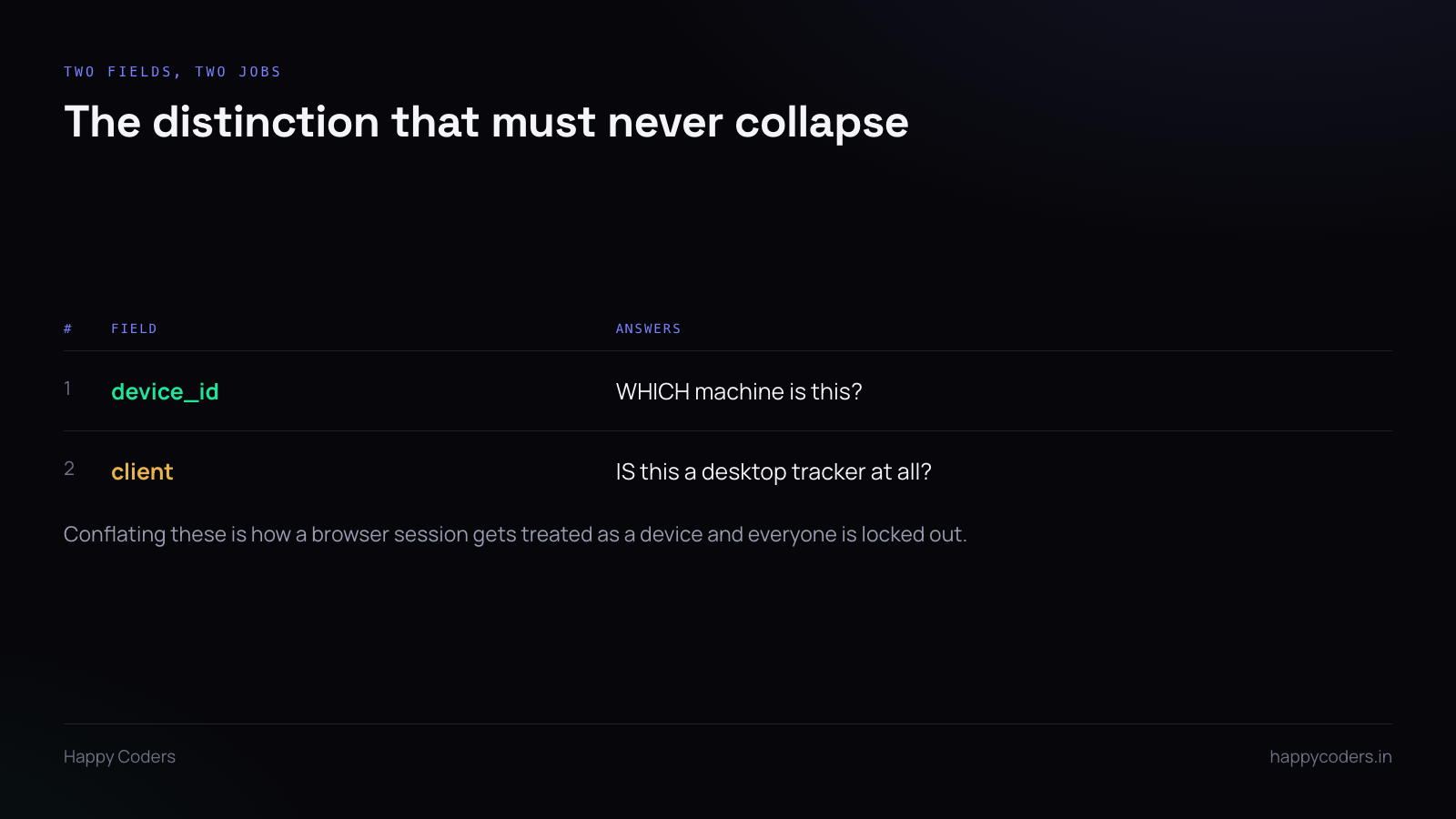
An access token issued to a desktop app usually carries two pieces of metadata that look like they are about the same thing and are not.
device_id answers which machine is this. It is a stable identifier generated by the app on first run and stored locally. It is the thing the lock is actually about.
client answers is this a desktop tracker at all, as opposed to the web app or a script. It is a category, not an identity.
They sit next to each other on the token. They are both strings. They are both about “what is making this request”. And if the lock is implemented against the wrong one, every desktop tracker in existence shares the same value — because they are all the same kind of client — and the system concludes that every user is already signed in somewhere else.
That is not a hypothetical failure mode. It is the obvious one, it passes a single-user test perfectly, and it only shows itself at scale.
What the check has to do
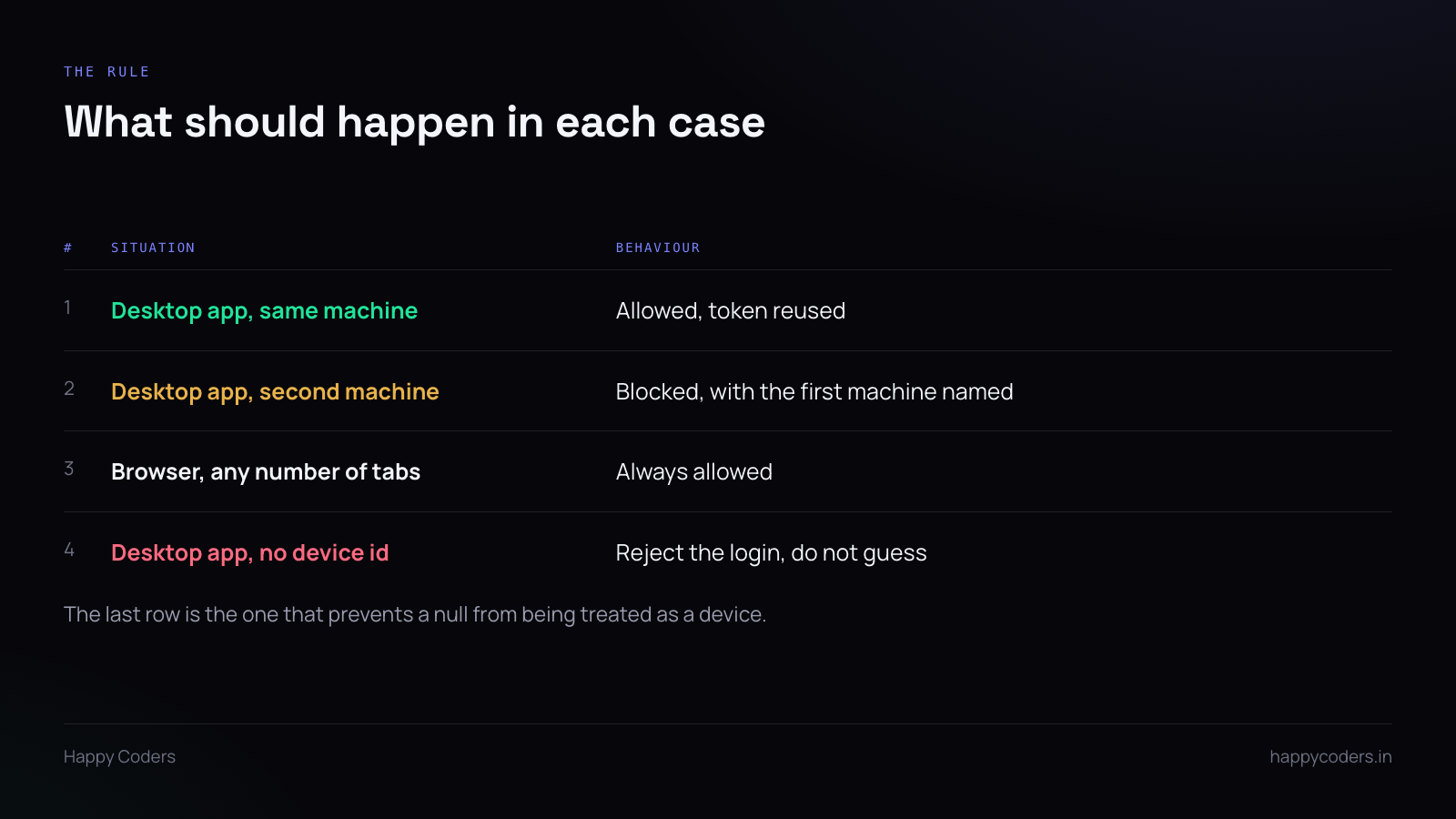
On login from a desktop client:
- If there is no
device_id, reject. Do not substitute a default, do not fall back to the client name, do not treat null as a device. A desktop app that cannot identify its machine has a bug, and guessing on its behalf hides the bug and creates a worse one. - Look for an existing active desktop token for this user with a different
device_id. - If one exists, refuse and return the other device’s name.
- If one exists with the same
device_id, this is a re-login on the same machine. Allow it and replace the token.
And before any of that: if the client is the web app, skip the whole check. The exemption has to be the first branch, not a condition buried inside the lookup, because the cost of getting it wrong is that browsers start competing with trackers for the single slot.
Where the device id comes from
Generate it once on the machine, store it locally, send it with every request. A random UUID is fine and is better than anything derived from hardware.
Resist the temptation to build it from a MAC address or a disk serial. Those look more authoritative and they change — network adapters get virtualised, disks get replaced, and VMs clone with identical values. A stored random identifier is stable in exactly the way you need and meaningless in exactly the way you want.
It also should not be a secret. It identifies a machine; it does not authenticate it. Authentication is the token’s job.
Releasing the lock
People lose machines. Laptops die, get stolen, go back to a previous employer. If the only way to release a lock is to sign out from the machine holding it, you have built a trap.
Two releases are needed:
An administrator can clear it. Someone in the organisation should be able to release a member’s device lock without involving the vendor.
It expires. A token that has not been seen for some period should stop holding the slot. A machine that has been off for a month is not actively signed in, whatever the database says.
Without the second, every dead laptop leaves a permanent lock behind, and the admin screen slowly fills with ghosts.
Testing it properly
Single-user testing proves nothing here. The bug only appears when two different users are involved, or when the same user has both a browser and a tracker.
The cases that matter:
- Two different users, both on desktop trackers, simultaneously. Both must work.
- One user, tracker on machine A, then tracker on machine B. Second must fail with A’s name.
- One user, tracker running, then the web app in a browser. Both must work.
- One user, tracker, then the same tracker restarted. Must work.
- A desktop login with the device id missing. Must fail cleanly.
The first case is the one that catches the field confusion, and it is the one most likely to be skipped, because testing with two accounts is more effort than testing with one.
What it costs when it goes wrong
A device lock failure is not a degraded experience. It is a total outage for every desktop user simultaneously, it looks like an authentication problem rather than a logic problem, and it arrives with a support queue attached.
The fix is usually one line. Finding out that it is one line takes considerably longer, because the error being reported — “I cannot log in” — points at the authentication system rather than at the thing that was added last week.
Which is the argument for logging the decision. When the lock refuses a login, log the user, both device ids and the client. Then the one-line fix takes ten minutes to find instead of an afternoon.