
File Uploads at Scale in PHP: Streaming Instead of Buffering
File Uploads at Scale in PHP: Streaming Instead of Buffering
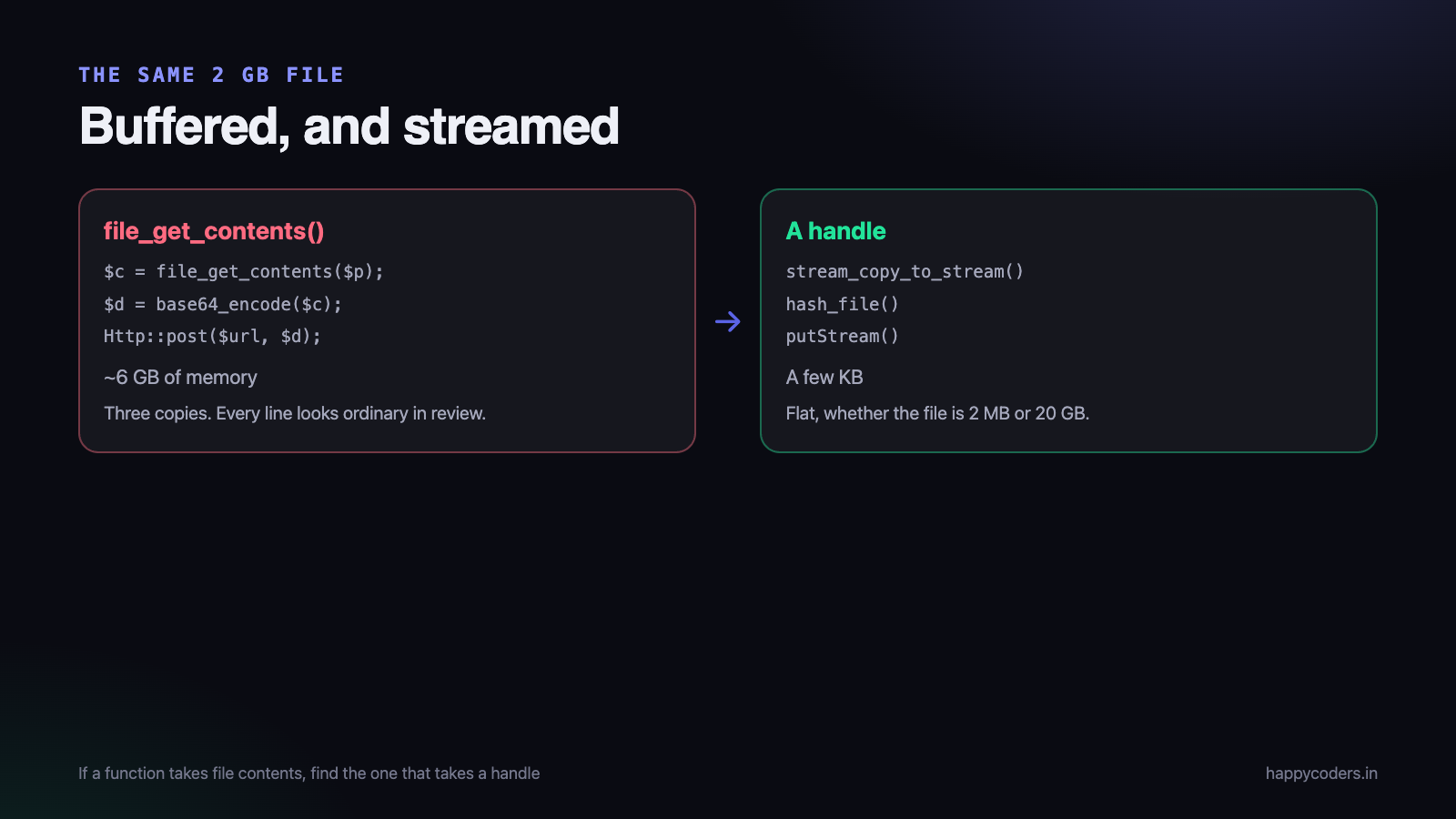
A user uploads a two-gigabyte screen recording and the process dies with a memory error. The obvious fix — raise memory_limit — works until two people upload at once, and then it takes the server down instead of one request.
The real problem is that the default path holds the whole file in memory. It does not have to.
Where the memory goes
A normal PHP upload already writes to a temporary file rather than to memory, which is better than most people assume. The memory problems come from what happens next.
<?php
// each of these loads the whole file into memory
$contents = file_get_contents($tmpPath);         // 2 GB
$data     = base64_encode($contents);            // now 2.6 GB more
$response = Http::post($url, ['file' => $data]); // and again inside the client
Three copies of a two-gigabyte file. Every one of those lines looks ordinary in a code review.
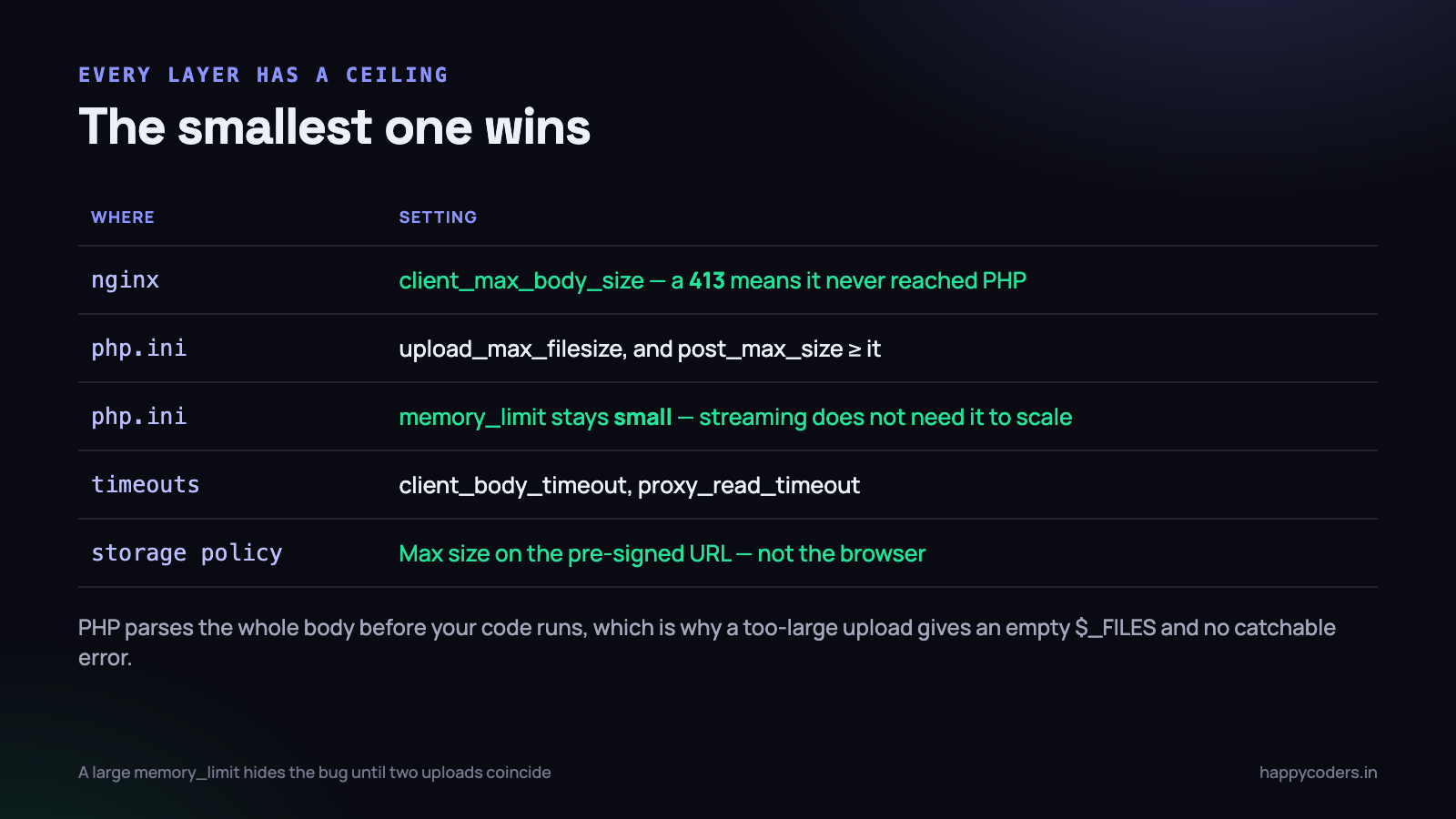
The other source is post_max_size. PHP parses the entire request body before your code runs at all, so a request larger than that limit is rejected before any of your validation executes — which is why a too-large upload sometimes produces an empty $_FILES and no error you can catch.
Stream instead of reading
The fix throughout is to work with a handle rather than a string, and let data pass through in fixed-size pieces.
<?php
$in  = fopen($tmpPath, 'rb');
$out = fopen($destination, 'wb');

stream_copy_to_stream($in, $out);   // 8 KB at a time, constant memory

fclose($in);
fclose($out);
Memory use is a few kilobytes regardless of whether the file is two megabytes or twenty gigabytes. The same principle applies to hashing, to compressing and to sending it onward:
<?php
// hash without loading
$hash = hash_file('sha256', $tmpPath);

// upload to object storage, streamed
Storage::disk('s3')->putStream($key, fopen($tmpPath, 'rb'));

// send onward without buffering
Http::withBody(fopen($tmpPath, 'rb'), 'application/octet-stream')->post($url);
The rule that covers all of it: if a function takes a string of file contents, look for the variant that takes a handle or a path. Almost every one has one, and the handle version has flat memory use.
Uploading straight to object storage
For large files the best request is the one your server never handles. A pre-signed URL lets the browser upload directly to storage, and the application only records that it happened.
<?php
// the server issues a time-limited, constrained upload URL
$url = Storage::disk('s3')->temporaryUploadUrl(
    "uploads/{$user->id}/" . Str::uuid(),
    now()->addMinutes(15)
)['url'];
Your bandwidth, memory and request timeouts stop being involved at all. Three things must be constrained on that URL or you have opened a hole:
- The key prefix — so a user cannot write anywhere in the bucket.
- A maximum size — enforced by the storage policy, not by the browser.
- The content type — so the object is not later served as HTML.
And validate afterwards. The file never passed through your code, so nothing checked what it is. A job that inspects the object after upload and quarantines anything unexpected is the piece people skip.
Chunked and resumable uploads
A two-gigabyte upload over a mobile connection will be interrupted. Without resumption the user starts again, and after the second failure they stop trying.
The shape is the same everywhere:
- The client splits the file into parts — five to ten megabytes is a reasonable size.
- An upload session is created server-side with an id, the total size and the number of parts.
- Each part is uploaded separately, carrying the session id and its index.
- The server records which parts arrived. A resumed upload asks which are missing and sends only those.
- When all parts are present, they are assembled, and the assembled file is validated.
<?php
public function storeChunk(Request $r)
{
    $session = UploadSession::where('uuid', $r->session)->firstOrFail();
    abort_unless($session->user_id === $r->user()->id, 403);

    $path = "chunks/{$session->uuid}/{$r->index}";
    Storage::disk('local')->putStream($path, fopen($r->file('chunk')->path(), 'rb'));

    $session->parts()->updateOrCreate(     // idempotent: a retried part is fine
        ['index' => (int) $r->index],
        ['size'  => $r->file('chunk')->getSize()]
    );

    return response()->json([
        'received' => $session->parts()->pluck('index'),
    ]);
}
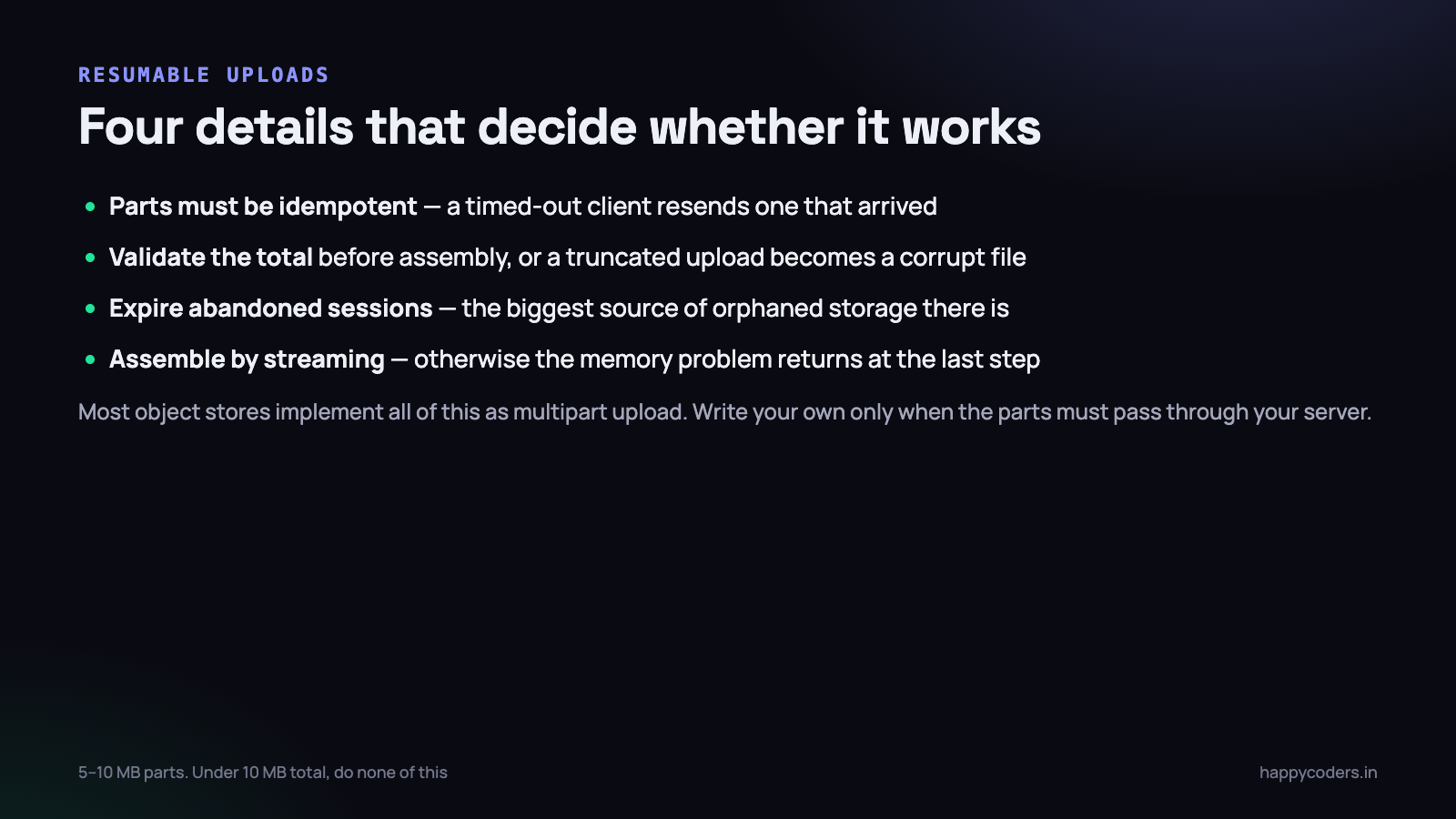
Four details decide whether this works in practice:
- Parts must be idempotent. A client that times out will resend a part that arrived. The upsert above makes that harmless.
- Validate the total. The declared size and the sum of the parts must agree before assembly, or a truncated upload becomes a corrupt file.
- Expire abandoned sessions. People start uploads and close the tab. Without a cleanup job the chunk directory grows forever.
- Assemble by streaming. Concatenating parts by reading each into memory reintroduces the original problem at the last step.
Most object stores implement all of this natively as multipart upload, and using theirs rather than writing your own is usually the right call. Write your own only when the parts genuinely have to pass through your server.
Knowing when it finished, reliably
A direct-to-storage upload has one weakness worth designing around: your application is not involved, so it does not know the upload happened unless somebody tells it.
The obvious approach — the browser calls your API after the upload succeeds — works most of the time and fails exactly when you would expect. The tab is closed, the network drops between the storage service and your server, the request is lost. The object exists and nothing in your database references it.
Two defences, and using both is cheap:
- Record the intent before the upload starts. Issue the pre-signed URL and write a row with a status of
awaitingat the same moment. Now an orphaned object has a row, and the row can be reconciled rather than guessed at. - Let the storage service notify you. Most object stores can fire an event on object creation. That path does not depend on the browser surviving, and it is the one that catches the closed tab.
Then a periodic job resolves the stragglers: rows in awaiting older than an hour either have an object — in which case promote them — or do not, in which case clean them up. It is fifteen lines and it removes the whole category.
The limits that have to agree
A large upload passes through several layers, and each has its own ceiling. They must all be raised together or the smallest one wins — usually with an unhelpful error.
; php.ini
upload_max_filesize = 2G
post_max_size       = 2G      ; must be >= upload_max_filesize
max_execution_time  = 0       ; for the CLI; web requests need the server timeout too
memory_limit        = 256M    ; stays small, because you are streaming
# nginx
client_max_body_size 2G;
client_body_timeout 300s;
proxy_read_timeout 300s;Note that memory_limit stays modest. If streaming is done correctly it does not need to scale with the file, and a large limit only hides the bug until several uploads coincide.
The failure worth recognising: nginx returning 413 means the request never reached PHP, so no amount of PHP configuration will help. Check the web server first.
Choosing the approach
Three architectures, and the expected file size mostly decides which one you need.
- Under about 10 MB — the ordinary PHP upload. An avatar, a PDF, a spreadsheet. The default path is fine, streaming still costs nothing, and none of the complexity above is warranted.
- 10 MB to a few hundred — stream through the server, or go direct. Either works. Direct-to-storage is better if bandwidth or worker time is scarce; through the server is simpler and keeps validation in one place.
- Hundreds of megabytes and up — direct to storage, chunked, resumable. Not optional. At this size connections drop, timeouts fire, and a user who has to restart will not.
The mistake worth avoiding is building the third for an application that needs the first. Resumable chunked uploads are a real amount of code and a real amount of state to keep clean, and for a profile picture they are pure cost.
The opposite mistake is more expensive: shipping the first for a feature that will eventually take video. The migration path from a buffered upload to a chunked one touches the client, the API and the storage layout, and it is usually forced by a customer complaint rather than chosen.
Processing after the upload, not during
Once the bytes are stored, the instinct is to do the work immediately — transcode the video, generate thumbnails, extract text, scan for viruses. Doing any of it inside the upload request undoes most of the benefit of streaming.
A request that streams two gigabytes efficiently and then spends four minutes transcoding is still a four-minute request, still holds a worker, and still times out behind a proxy configured for sixty seconds.
The shape that works:
- The upload request stores the file and records a row with a status of
pending. It returns in a second. - A queued job does the processing, with a timeout appropriate to the work rather than to a web request.
- The row moves to
readyorfailed, and the interface reflects it.
Two details make this robust rather than merely asynchronous. The job must be safe to run twice, because queues retry — so derive output names from the input rather than generating new ones each run. And a job that fails must leave the row in a state somebody can see and act on, not stuck in pending forever, which is indistinguishable from slow.
Cleaning up after yourself
Large-file features generate orphans faster than anything else in an application, and every one of them is paid storage.
- Temporary upload files. PHP removes its own on request end, but a file you moved somewhere else during a request that then failed is yours now.
- Abandoned chunk sessions. The largest source. Somebody closes the tab at part 40 of 200, and those forty parts stay unless a job removes them.
- Processing intermediates. The transcoder’s scratch files, the extracted frames, the unzipped archive.
- Objects whose database row was deleted — the same reconciliation problem that applies to any object storage.
A weekly job that removes upload sessions older than a day, and reconciles storage against the database, is half an hour of work. Without it the disk fills on a Sunday, which is when nobody is watching.
Testing it honestly
Upload code is almost always tested with a small file, which exercises none of the behaviour that matters.
- Generate a genuinely large file —
fallocateorddmakes a two-gigabyte file instantly — and watch the process’s memory while it uploads. Flat is the pass condition. Rising with the file size means something is still buffering. - Kill the connection halfway. Then check what is left behind: a partial file, a stuck session row, a temporary file nobody will remove.
- Upload two large files at once and watch total memory. One at a time proves very little about a production server.
- Exceed each limit in turn — the web server’s, PHP’s, your application’s — and check that the error the user sees is useful in each case. The 413 from nginx is the one that usually reaches the user as nothing at all.
What the user sees
Large uploads are also a user interface problem, and the engineering is wasted if the experience is not handled.
- Real progress, from the upload event — not a fake animation. People wait patiently for a bar that moves and abandon one that does not.
- The size limit before they choose the file, and a clear message if they exceed it. Letting somebody wait twenty minutes to be told the file is too large is the worst possible ordering.
- Resumption that just happens. If the connection drops, the client should retry the missing parts without the user doing anything.
- Do not block the interface. Uploads continue in the background while they carry on working.
- A clear final state. “Uploaded and processing” is different from “ready”, and users need to know which they are looking at.
Downloads have the same problem
Worth a section because the same bug appears on the way out and is easier to miss, since it only breaks when files get large.
<?php
// loads the whole file into memory before sending a byte
return response(file_get_contents($path), 200, $headers);

// streams it
return response()->streamDownload(function () use ($path) {
    $handle = fopen($path, 'rb');
    while (! feof($handle)) {
        echo fread($handle, 8192);
        flush();
    }
    fclose($handle);
}, $name);
Better still, do not serve it yourself. A signed, time-limited URL to object storage means the download never touches your application at all — no memory, no worker occupied for the duration, no bandwidth through your servers.
Where files must be served through the application for authorisation, the pattern that keeps both is to check permission and then hand off: return a redirect to a short-lived signed URL, or use the web server’s internal redirect mechanism so it does the sending while your code only decides whether it may. That way authorisation stays in PHP and the bytes never do.
The short version
- Never read a file into a string. Use handles, paths and stream functions.
- Memory should be flat regardless of file size — if it is not, something is buffering.
- Pre-signed direct-to-storage uploads take your server out of the path entirely.
- Constrain the prefix, the size and the content type on any pre-signed URL, and validate afterwards.
- Chunk anything large, make parts idempotent, expire abandoned sessions.
- Every layer’s limit must agree; a 413 means it never reached PHP.
- Real progress, the limit stated up front, and resumption without user involvement.
The whole article reduces to one habit: never hold a file in memory when you can pass it through. Once the code works in handles rather than strings, the file size stops being a variable in your capacity planning.
On the security side of the same feature, see PHP file upload security: the checks that actually matter.




