
Picking a Bitrate: File Size Against Readable Text
Picking a Bitrate: File Size Against Readable Text
You set up the encoder, take the sensible-looking preset, and record a walkthrough. Playing it back, the terminal text has a faint haze around it and the smallest UI labels are not quite readable.
The preset was fine. It was tuned for camera video, and a screen is not camera video.
Why screen content behaves differently
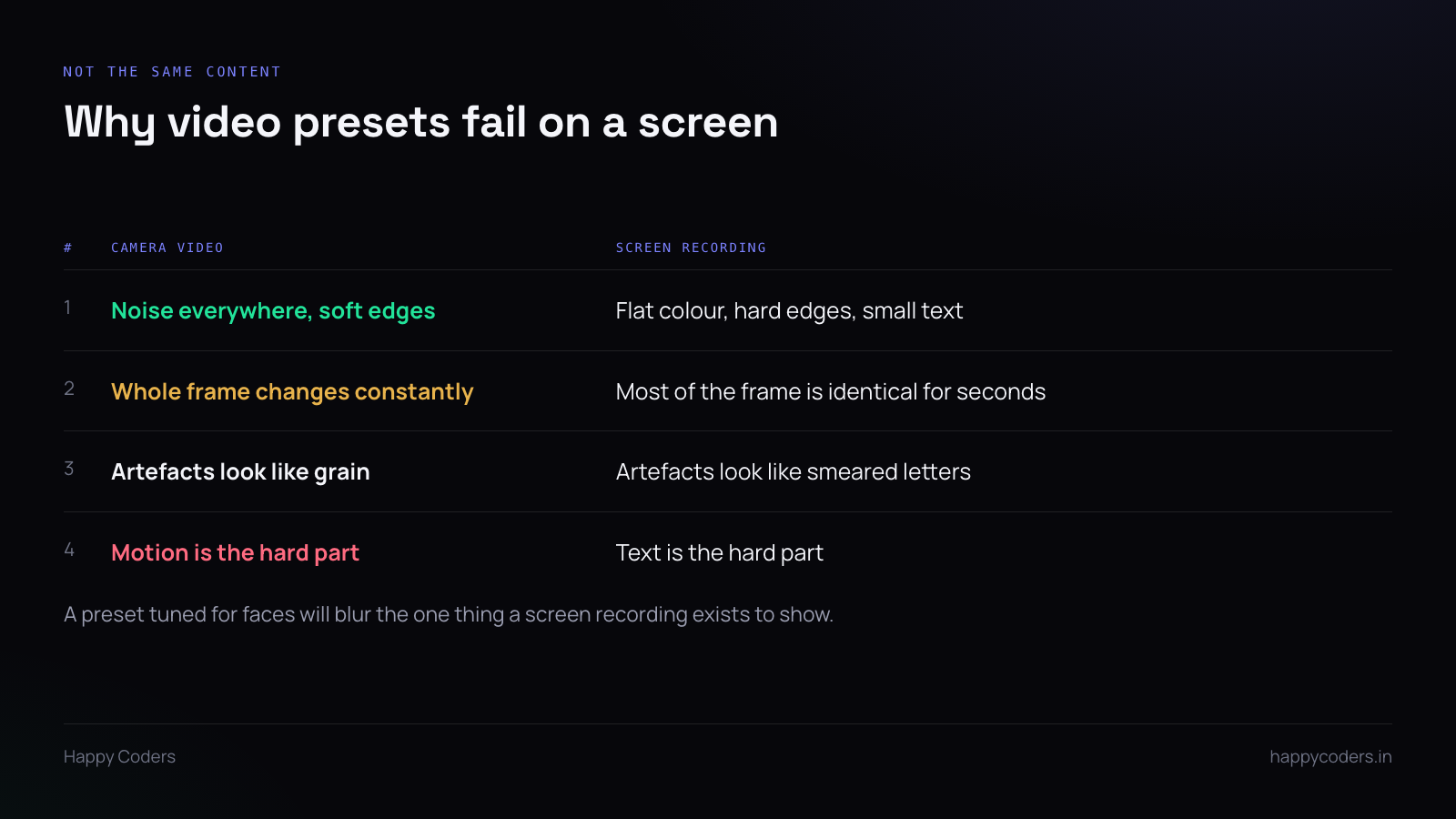
Camera footage is noisy and soft. Every pixel differs slightly from its neighbour, edges are gradual, and the compressor’s job is mostly about motion. Lose a little detail and it reads as film grain.
A screen is the opposite. Large flat areas of identical colour, perfectly hard edges, and text where a single pixel’s worth of error is the difference between a readable letter and a smudge.
Most of the frame also does not change at all for seconds at a time, which should make it cheap — and does, if the encoder is told what it is looking at.
Where the two diverge most: compression artefacts on a face look like softness, and on text they look like damage. The viewer notices immediately because they are trying to read.
Where to start
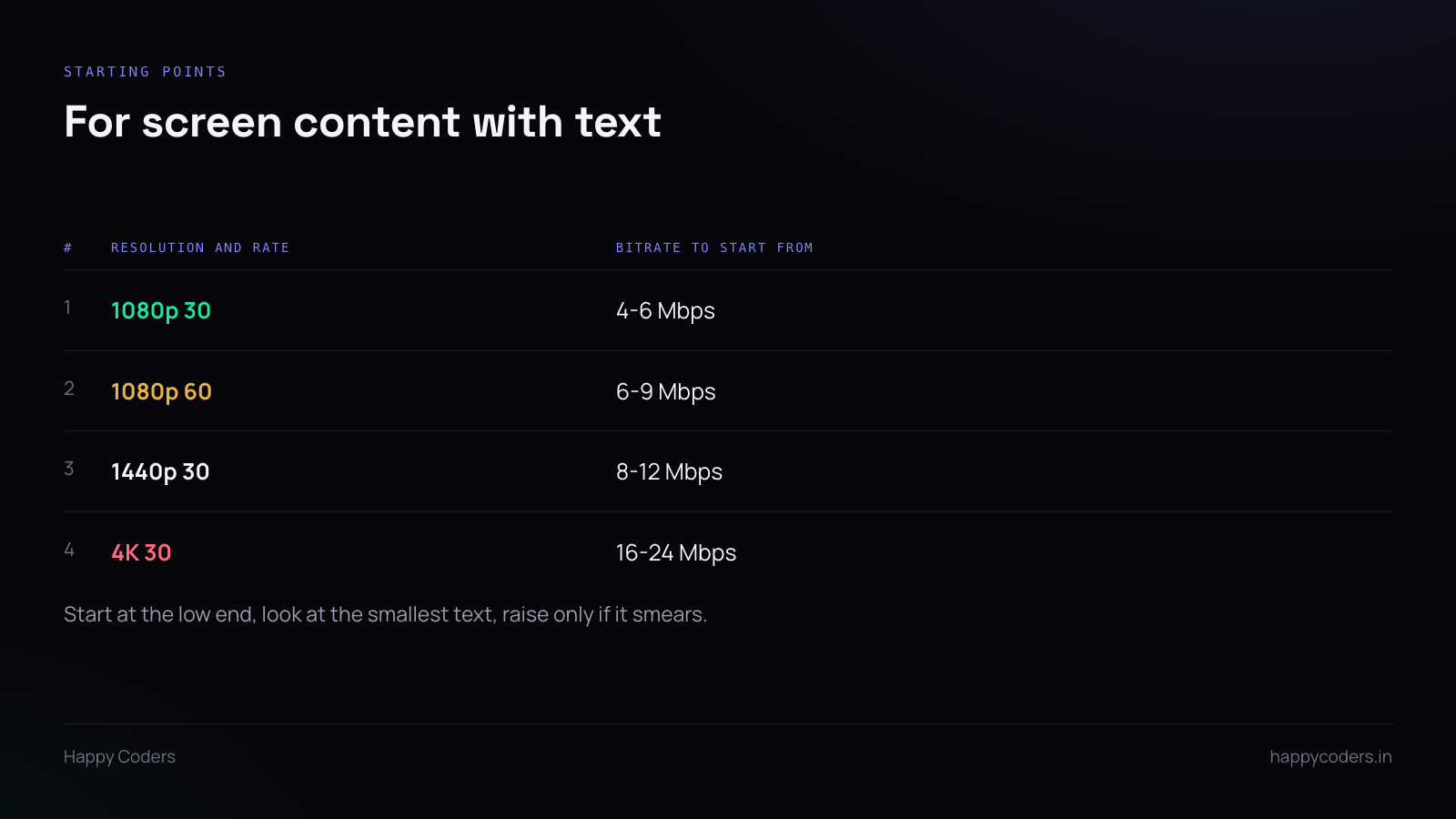
These are starting points, not answers. Begin at the low end of the range and go up only if the test below fails.
The ranges are wider than camera presets because the content varies more. A recording of a mostly-static document needs far less than one scrolling code at 60fps.
The test that settles it
Record thirty seconds of the worst case: the smallest text your users will actually show, with some scrolling, on a busy screen.
Play it back at 100% size, not fullscreen on a large display. Can you read the smallest text? Does it hold while scrolling, or does it smear and then resolve when the scroll stops?
If it smears, raise the bitrate. If it is crisp, lower it until it is not, then go back one step.
Ten minutes, and it beats any table including the one above — because it uses your encoder, your content and your eyes.
Things that matter more than the number
Tell the encoder it is screen content. Most encoders have a tuning option for this. It changes how aggressively detail is discarded and is often worth more than a bitrate increase.
Keyframe interval. Long intervals save space, and on screen content where most of the frame is static they save a lot. Two seconds is a reasonable compromise; much longer and seeking becomes unpleasant.
Chroma subsampling. 4:2:0 halves colour resolution, which is invisible on faces and visible on coloured text — red text on a dark background is the classic case. If your users record code in a dark editor, this is a real consideration, and it costs more than a bitrate bump to fix.
Frame rate. Dropping 60 to 30 is usually a bigger quality win per byte than raising the bitrate, because screen content rarely needs 60.
Constant or variable
Variable bitrate spends more on complex sections and less on static ones, which suits screen recording well — a static slide costs almost nothing and the scroll gets what it needs.
Constant is predictable in file size, which matters if you are streaming or have a hard upload limit.
For a local recording, variable with a sensible ceiling is usually right. Set the ceiling so the worst case is still fine, and the typical case comes out much smaller.
What the user actually wants
Not a bitrate field. Two or three named options, each tested against the case above.
Something like: smaller file for sharing, balanced, best quality for text. The names describe outcomes; the numbers behind them are your job.
If you do expose the number, say what it affects in the same breath — “higher keeps small text readable, and makes the file larger”. A field labelled “Bitrate (kbps)” with no context gets set to the maximum by everyone who notices it and ignored by everyone who does not.
Hardware encoding changes the arithmetic
Hardware encoders are fast and generally produce slightly larger files than a slow software encode at matching quality.
For a screen recorder that trade is obviously right — the machine stays responsive, the fan stays down, and a laptop can record for an hour. If you offer both, default to hardware and let the rare user who wants the smallest possible file choose otherwise.




