
Picking the Right Pixel Format for Screen Capture
Picking the Right Pixel Format for Screen Capture
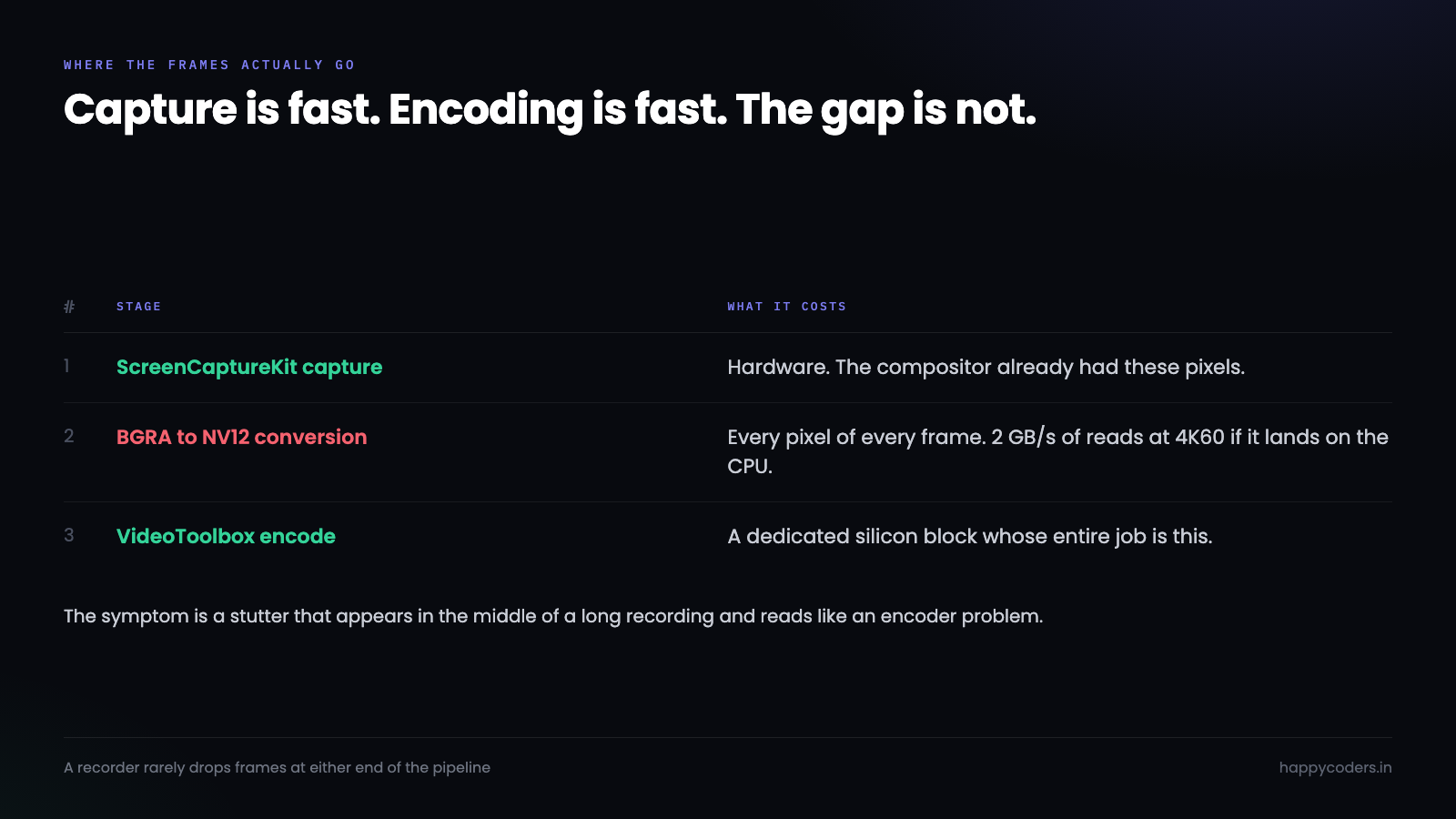
A screen recorder that drops frames at 4K is almost never dropping them because capture is slow, or because encoding is slow. Both of those are hardware operations on a modern Mac and both are fast.
It drops them in the gap between the two, converting pixels from the format the capture API produced into the format the encoder wanted. That conversion is arithmetic on every pixel of every frame, and if it lands on the CPU it will eat a core and give you nothing visible in return.
Two ways to describe the same pixel
A pixel format is a promise about how colour is laid out in memory. Two families matter here and they are built on different assumptions.
BGRA stores four bytes per pixel — blue, green, red, alpha — and every pixel carries full colour information. It is what a compositor works in, because a window server has to blend translucent layers and needs colour precision everywhere. At 4K that is 3840 × 2160 × 4, about 33 MB for a single frame.
NV12 is a YUV format. It separates brightness from colour, keeps brightness at full resolution, and stores colour at quarter resolution — one colour sample for every four pixels. That works because human vision is far more sensitive to brightness detail than to colour detail. The same 4K frame is about 12 MB, a little over a third of the size.
Both describe the same picture. One is built for compositing, the other for compression. Neither is wrong; they are answers to different questions.
Video encoders are built for NV12 and its relatives, because the chroma subsampling has already thrown away data the encoder would have discarded anyway. Hand an encoder BGRA and it will accept it, then convert it internally before doing any real work.
What ScreenCaptureKit actually gives you
This is the part worth being precise about, because the documentation lets you assume you have a choice and the platform quietly has a preference.
let config = SCStreamConfiguration()
config.width  = 3840
config.height = 2160
config.pixelFormat = kCVPixelFormatType_32BGRA        // the default
config.minimumFrameInterval = CMTime(value: 1, timescale: 60)
ScreenCaptureKit will also accept kCVPixelFormatType_420YpCbCr8BiPlanarFullRange and its video-range sibling, which are NV12 under longer names. Ask for one of those and in most configurations the system gives it to you directly, because the conversion happens closer to the source where it is cheaper.
// NV12, full range — what the encoder would have asked for
config.pixelFormat = kCVPixelFormatType_420YpCbCr8BiPlanarFullRange
The reason to care is not elegance. It is that every conversion you avoid is a conversion nobody pays for.
Where the twenty per cent goes
Take a concrete case. 4K at 60 frames a second, captured as BGRA, encoded to H.264.
Each frame arrives as 33 MB of BGRA. The encoder wants 12 MB of NV12. Something must read all 33 MB, compute a brightness value per pixel and two colour values per group of four, and write 12 MB out. Sixty times a second that is two gigabytes a second of reads and 750 megabytes a second of writes, plus the arithmetic in between.
On a CPU, in a straightforward loop, that is most of a core. With vectorised code it is less, and it is still work that did not need doing.
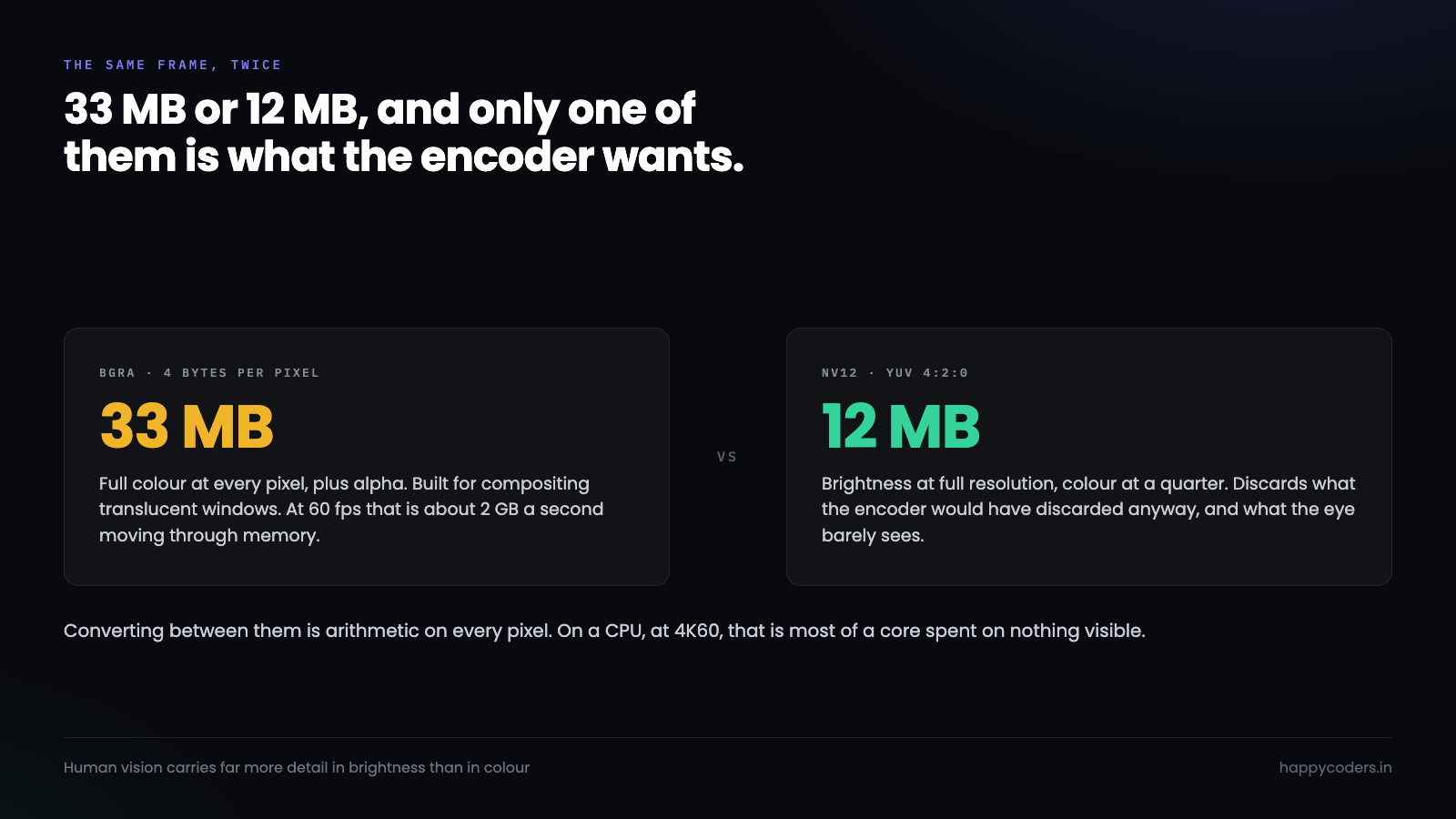
The symptom is specific and it is easy to misread. The app is not slow to start a recording. It is not slow for the first minute. It gets gradually worse as the machine warms, and the recording develops a stutter somewhere in the middle that was not on screen while you were recording it. That reads like an encoder problem and it is a conversion problem.
Three ways to convert, and what each one costs
If a conversion is genuinely needed — and sometimes it is, because you are compositing a camera bubble or burning in a watermark — there are three places to do it.
By hand, on the CPU. A loop over pixels. Correct, portable, and the slowest thing in this article by a wide margin. Reasonable for a one-off thumbnail. Never reasonable per frame.
vImage, from Accelerate. Apple’s vectorised image library has conversions for exactly this, and they are perhaps five to ten times faster than naive code because they use the vector units properly.
import Accelerate

var srcBuffer = vImage_Buffer()   // BGRA
var lumaBuffer = vImage_Buffer()  // Y plane
var chromaBuffer = vImage_Buffer()// interleaved CbCr

vImageConvert_ARGB8888To420Yp8_CbCr8(
    &srcBuffer, &lumaBuffer, &chromaBuffer,
    &conversionInfo, nil, vImage_Flags(kvImageNoFlags)
)
Still CPU work, but honest CPU work. This is the right answer when you have to touch the pixels anyway.
The GPU, via Core Image or Metal. If the frame is already a CVPixelBuffer backed by an IOSurface — and ScreenCaptureKit’s frames are — it is already in memory the GPU can read without a copy. Doing the conversion there costs almost nothing in CPU terms.
The trap is the copy. Pull those pixels into a normal array, work on them, and push them back, and you have paid for two transfers across the memory bus to save one conversion. That is a net loss, and it is the most common way a well-intentioned optimisation makes things worse.
The compositing case, where it gets interesting
A recorder that draws a camera bubble or a watermark over the video cannot avoid touching pixels. So the question becomes what format to do that work in.
Compositing in NV12 is awkward. Brightness and colour live in separate planes at different resolutions, so drawing a shape means writing to two planes with two different coordinate systems, and any alpha blending has to be done twice with different maths.
Compositing in BGRA is natural — one plane, four bytes per pixel, alpha where you expect it.
So the pipeline that actually makes sense is not “pick one format” but “convert once, at the right moment”:
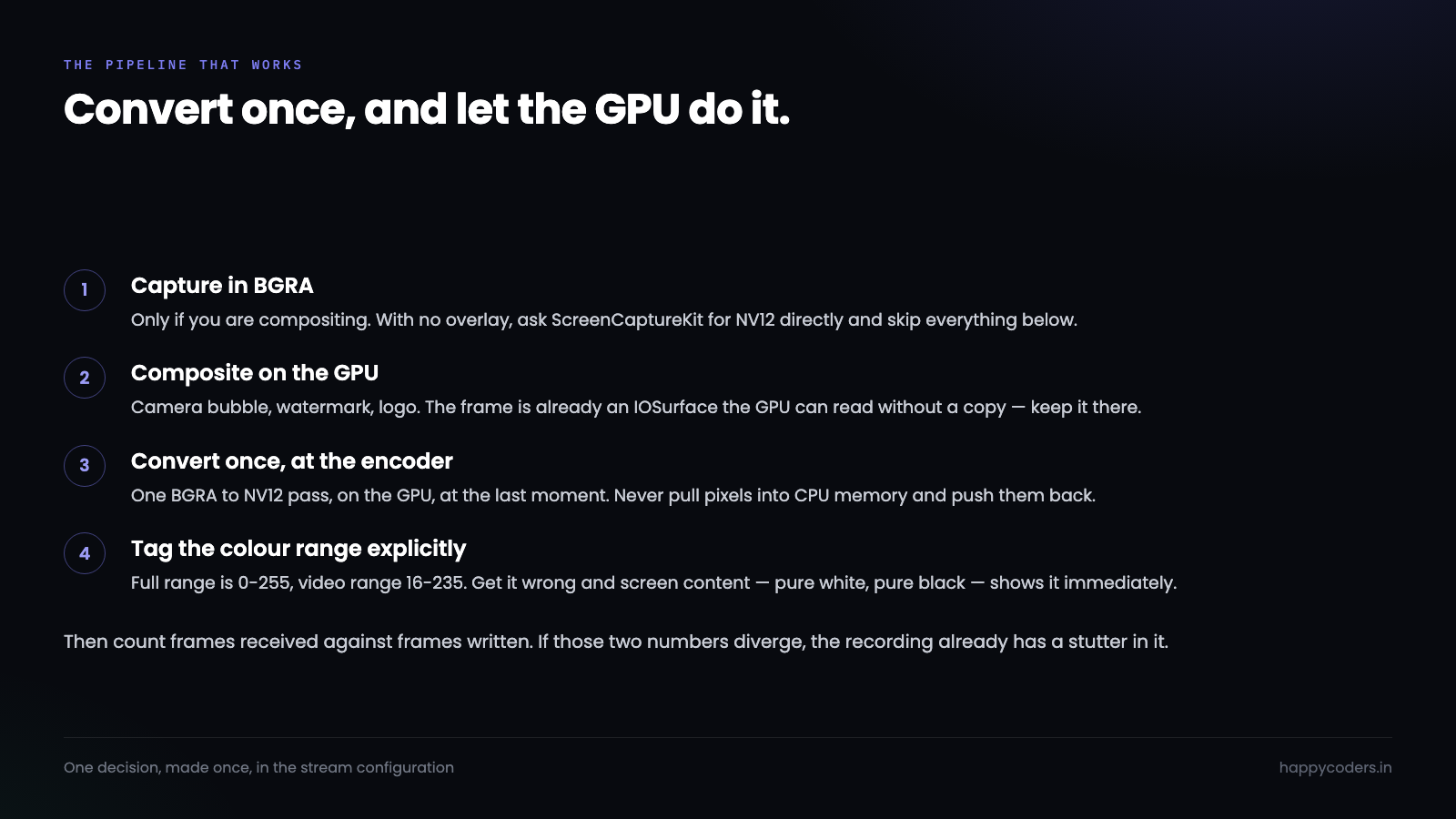
Capture in BGRA, composite in BGRA on the GPU, convert once to NV12 on the way into the encoder. One conversion per frame, on hardware built for it, at the last possible moment. A recorder with no overlay skips the middle step and captures NV12 directly.
Unified memory changes the arithmetic, not the rule
On an Intel Mac with a discrete GPU, “do it on the GPU” carries a transfer cost in both directions, and for a small enough frame the transfer can cost more than the conversion saved. That is where the old advice to keep everything on the CPU came from.
Apple Silicon removes that. CPU and GPU share the same physical memory, so an IOSurface-backed CVPixelBuffer is visible to both without a copy. The GPU reads the exact bytes ScreenCaptureKit wrote. There is no upload and no download, only a change of who is reading.
This is why the same code can behave so differently on two Macs, and why a pipeline tuned on a 2019 Intel machine can be leaving most of the win on the table on an M-series one.
The rule survives the hardware change though, and it is worth stating plainly: the expensive thing is not the conversion, it is the copy. A conversion that happens where the data already lives is nearly free on both architectures. A conversion that requires moving 33 MB somewhere else first is expensive on both. Unified memory widens the gap between those two; it does not invent it.
The practical test is whether your code ever calls CVPixelBufferLockBaseAddress in the per-frame path. That call is the moment you decided to look at the pixels with the CPU. Sometimes it is necessary. Every time it appears in a hot loop it is worth asking why.
Ten-bit and HDR, and when it stops being optional
Everything above assumed eight bits per component, which is what almost every screen recording needs. There is a case where that changes.
If the thing being recorded is itself HDR — a video playing in a browser, a colour-graded timeline in an editor, a game with HDR output — then capturing in an eight-bit format clips it. The recording comes back looking flat and slightly grey compared to what was on screen, and no amount of encoder tuning recovers it, because the information was discarded at capture.
The ten-bit equivalent of NV12 is kCVPixelFormatType_420YpCbCr10BiPlanarFullRange, usually written x420. It costs roughly 25% more memory and needs an encoder configured for HEVC Main 10, because H.264 in its common profiles cannot carry it.
// Only if the source is genuinely HDR. Otherwise this is pure cost.
config.pixelFormat = kCVPixelFormatType_420YpCbCr10BiPlanarFullRange
config.colorSpaceName = CGColorSpace.displayP3_PQ
For a tutorial, a bug report, a handover or a walkthrough — which is most of what anybody records — eight-bit is correct and ten-bit is a larger file for no visible gain. The honest default is eight-bit, with ten-bit as a setting for the people who know why they want it.
Proving it is the conversion, not something else
Suspecting the conversion is easy. Proving it takes about ten minutes and is worth doing before rewriting anything.
Run the recorder at your normal settings and take a Time Profiler trace for thirty seconds. A conversion problem has a distinctive shape: a wide, flat band of time in vImage, in Core Image kernels, or in your own pixel loop, spread evenly across every frame rather than spiking. Encoder problems look different — they cluster around keyframes.
Then change one thing. Ask the capture session for NV12 instead of BGRA and run the same trace, even if the overlay breaks and the output looks wrong. If the band disappears and CPU drops, the conversion was the cost and you now know what you are buying with a pipeline change. If it does not, the problem is somewhere else and you have saved yourself a rewrite.
Changing one thing and measuring beats reasoning about pixel formats, however confident the reasoning feels.
Colour range, which nobody mentions until it is wrong
NV12 comes in two flavours and choosing wrong produces a bug that is subtle enough to ship.
Full range uses 0–255 for brightness. Video range uses 16–235, a convention inherited from analogue broadcast where the extra headroom carried signalling.
Tag a full-range buffer as video range and the decoder stretches 16–235 across the whole scale. Blacks crush, whites blow out, and the whole recording looks slightly contrasty in a way that is hard to name. Tag it the other way and everything goes flat and washed out.
// Say which one you meant. Do not let it be inferred.
CVBufferSetAttachment(pixelBuffer,
    kCVImageBufferYCbCrMatrixKey,
    kCVImageBufferYCbCrMatrix_ITU_R_709_2,
    .shouldPropagate)
Screen content makes this worse than camera footage does, because screens are full of pure white backgrounds and pure black text — exactly the values at the ends of the range, where the error is most visible. A washed-out recording of a terminal is instantly obvious to the person who made it.
Measuring it rather than guessing
Every claim above is testable on your own machine in a few minutes, and the numbers differ enough between Macs that it is worth doing.
Record for sixty seconds at your target settings and watch three things. In Activity Monitor, the CPU percentage of your own process — a recorder that is not compositing should sit low. In Instruments, the Time Profiler, where a conversion shows up as a broad flat band rather than a spike. And the frame count your own writer reports against the frame count the capture session delivered.
That last one is the number that matters, and it is the one most recorders do not keep.
// Count what you were handed and what you wrote. The gap is the bug.
private var framesReceived = 0
private var framesWritten  = 0

func stream(_ s: SCStream, didOutputSampleBuffer b: CMSampleBuffer, of t: SCStreamOutputType) {
    framesReceived += 1
    guard writerInput.isReadyForMoreMediaData else { return }   // silently dropped
    writerInput.append(b)
    framesWritten += 1
}
If those two numbers diverge, the recording has a stutter in it whether or not anyone has noticed yet. Log them at the end of every recording and the class of problem stops being mysterious.
The buffer pool nobody sets up
One more cost hides next to the conversion, and it is easy to fix once you have seen it.
If your conversion step allocates a fresh destination CVPixelBuffer for every frame, you are asking the allocator for 12 MB sixty times a second and handing it back just as fast. That is not free, it fragments, and it produces exactly the kind of gradual slowdown that gets blamed on thermal throttling.
// Allocate once. Reuse for the whole recording.
var pool: CVPixelBufferPool?
let attrs: [String: Any] = [
    kCVPixelBufferPixelFormatTypeKey as String: kCVPixelFormatType_420YpCbCr8BiPlanarFullRange,
    kCVPixelBufferWidthKey as String: 3840,
    kCVPixelBufferHeightKey as String: 2160,
    kCVPixelBufferIOSurfacePropertiesKey as String: [:],   // keep it GPU-visible
]
CVPixelBufferPoolCreate(nil, nil, attrs as CFDictionary, &pool)
The IOSurface key in there is not decoration. Without it the buffers come back as plain memory, the GPU cannot read them without a copy, and the pipeline you carefully arranged around zero-copy quietly stops being zero-copy.
The failure mode is the worst kind: nothing errors, the recording still works, and it is merely slower than it should be in a way no log mentions.
What to actually do
No overlay, no watermark, no camera bubble: ask ScreenCaptureKit for NV12 and hand the buffers straight to the encoder. Nothing converts anything.
With an overlay: capture BGRA, composite on the GPU, convert once to NV12 at the encoder boundary. Never pull pixels into CPU memory to do it.
Either way, set the colour range and the matrix explicitly rather than letting them be inferred, and count frames in against frames out so a regression announces itself.
None of this is exotic. It is one decision, made once, in the stream configuration — and it is the difference between a recorder that holds 4K60 comfortably and one that quietly drops every fifth frame after ten minutes.




