
Queue Workers That Do Not Fall Over in Production
Queue Workers That Do Not Fall Over in Production
Getting a queue working takes an afternoon. Dispatch a job, run php artisan queue:work, watch the email go out. Keeping one working for two years without anybody thinking about it is a different piece of engineering, and almost none of it is in the job class.
This is what we have learned running workers in production for a time-tracking product — invoice PDFs, screenshot processing, outbound webhooks, monthly reports — and the specific ways they stop, usually quietly.
Tries, backoff and retryUntil
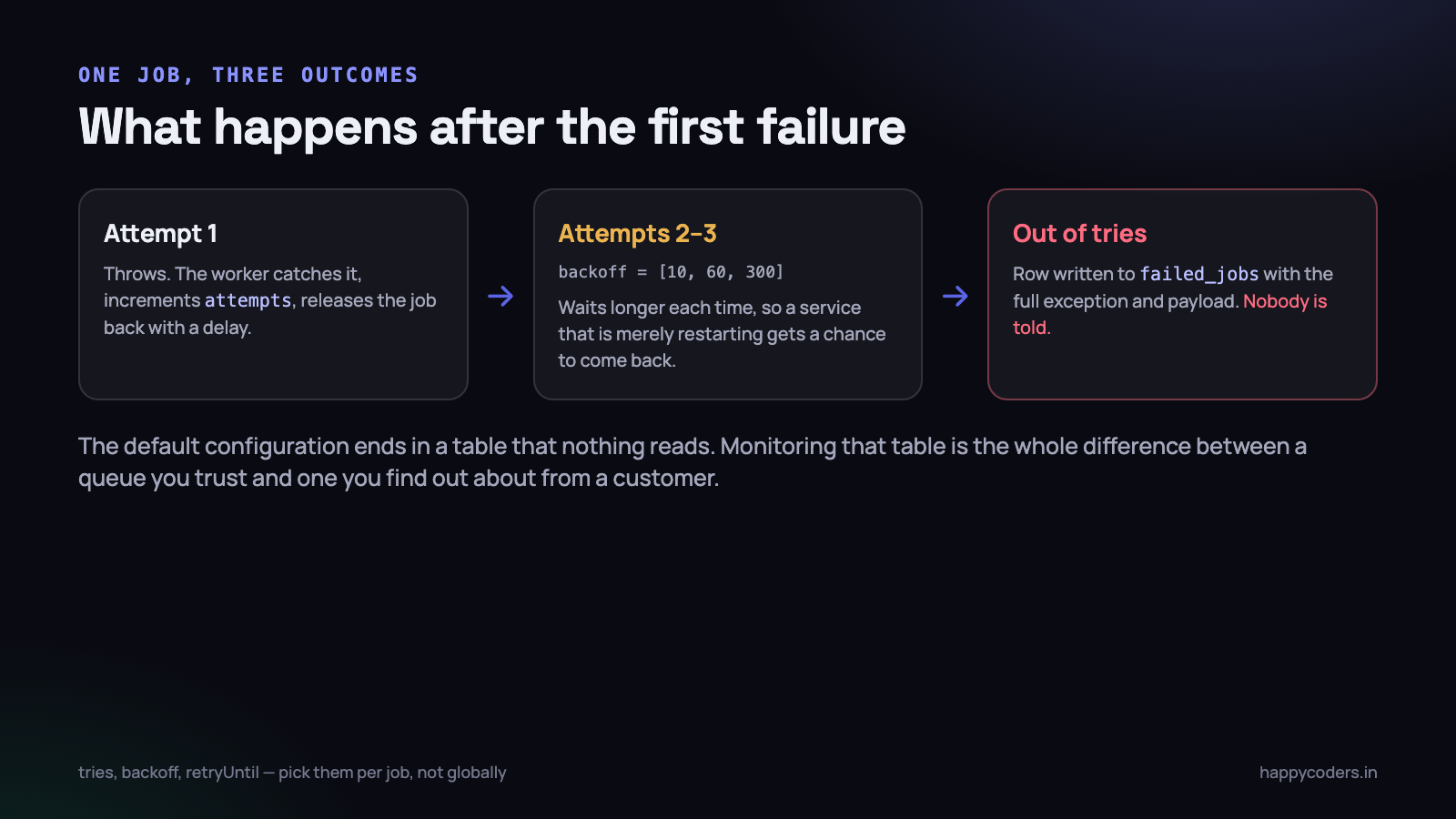
Three settings control what happens after a job throws, and the defaults are wrong for most jobs because there is no single right answer for all of them.
<?php

class SendInvoiceEmail implements ShouldQueue
{
    public int $tries = 5;
    public int $timeout = 60;

    // seconds to wait before attempt 2, 3, 4, 5
    public array $backoff = [10, 60, 300, 900];

    public function retryUntil(): \DateTime
    {
        return now()->addHours(6);
    }
}
$tries is a count. Five attempts for anything that depends on a network service; one attempt for anything where a retry cannot help.
$backoff is the important one and the one most often left at zero. A job that fails because a payment gateway is restarting will fail again 40 milliseconds later, and again, and be exhausted before the gateway has finished booting. An array of increasing delays turns three wasted attempts into three attempts spread over twenty minutes, which is long enough for most transient failures to clear. Jitter helps too — if four hundred jobs all back off by exactly 60 seconds they all return at exactly the same moment, which is how you retry a struggling service into the ground.
retryUntil() replaces the count with a deadline, and for time-sensitive work it is the better model. An OTP email that has been bouncing around the queue for six hours should not be delivered; it should be abandoned. When retryUntil() is defined it takes precedence over $tries, so a job can retry as often as it likes inside the window and stop dead at the edge of it.
Pick per job, not globally. The
--triesflag on the worker command applies to everything that queue handles, which means your report generation and your OTP delivery get the same retry policy. They should not.
The table you must actually monitor
When a job exhausts its attempts, Laravel writes a row to failed_jobs with the connection, the queue, the full serialised payload and the exception with its stack trace. Then it stops. Nothing is emailed, nothing is alerted, no log line goes anywhere you are watching.
This is the single most common queue failure in production, and it is not a bug in the queue. It is a table with rows in it that nobody looks at. We have opened failed_jobs on a client system and found 11,000 rows going back fourteen months, including about 300 invoice emails that customers never received.
Two things fix it, and you want both.
Alert on the event, not on the table
<?php
// EventServiceProvider::boot()
Queue::failing(function (JobFailed $event) {
    Log::channel('queue')->error('job failed', [
        'connection' => $event->connectionName,
        'queue'      => $event->job->getQueue(),
        'job'        => $event->job->resolveName(),
        'attempts'   => $event->job->attempts(),
        'exception'  => $event->exception->getMessage(),
    ]);

    // and tell somebody, rate-limited so a flood is one message
    RateLimiter::attempt('job-failed-alert', 4, function () use ($event) {
        Notification::route('slack', config('alerts.slack'))
            ->notify(new QueueFailureAlert($event));
    }, 600);
});
The rate limiter matters. When a dependency goes down, two thousand jobs fail in four minutes, and an alert per failure will get your alerting channel muted permanently. Four messages per ten minutes tells you the same thing without the damage.
Alert on depth and on age
A scheduled check every five minutes that reads two numbers per queue: how many rows are waiting, and how old the oldest one is. The second is more useful than the first. A queue with 5,000 jobs that are all thirty seconds old is fine — it is working through a burst. A queue with 40 jobs where the oldest is nineteen minutes old has no worker running.
<?php
$depth = Queue::size('interactive');
$oldest = DB::table('jobs')
    ->where('queue', 'interactive')
    ->min('created_at');

$ageSeconds = $oldest ? now()->timestamp - $oldest : 0;

if ($ageSeconds > 300) {
    // the worker is dead, stuck, or starved
}
Also alert on failed_jobs growing, not on its absolute size. A count that goes from 40 to 41 overnight is normal. One that goes from 40 to 900 is an incident that started at a particular moment, and the timestamps will tell you when.
Poison messages
A poison message is a job that cannot succeed no matter how many times you run it. An invoice for a client record that was deleted. A webhook to a URL whose domain has expired. A PDF for a project with a null date that the code dereferences.
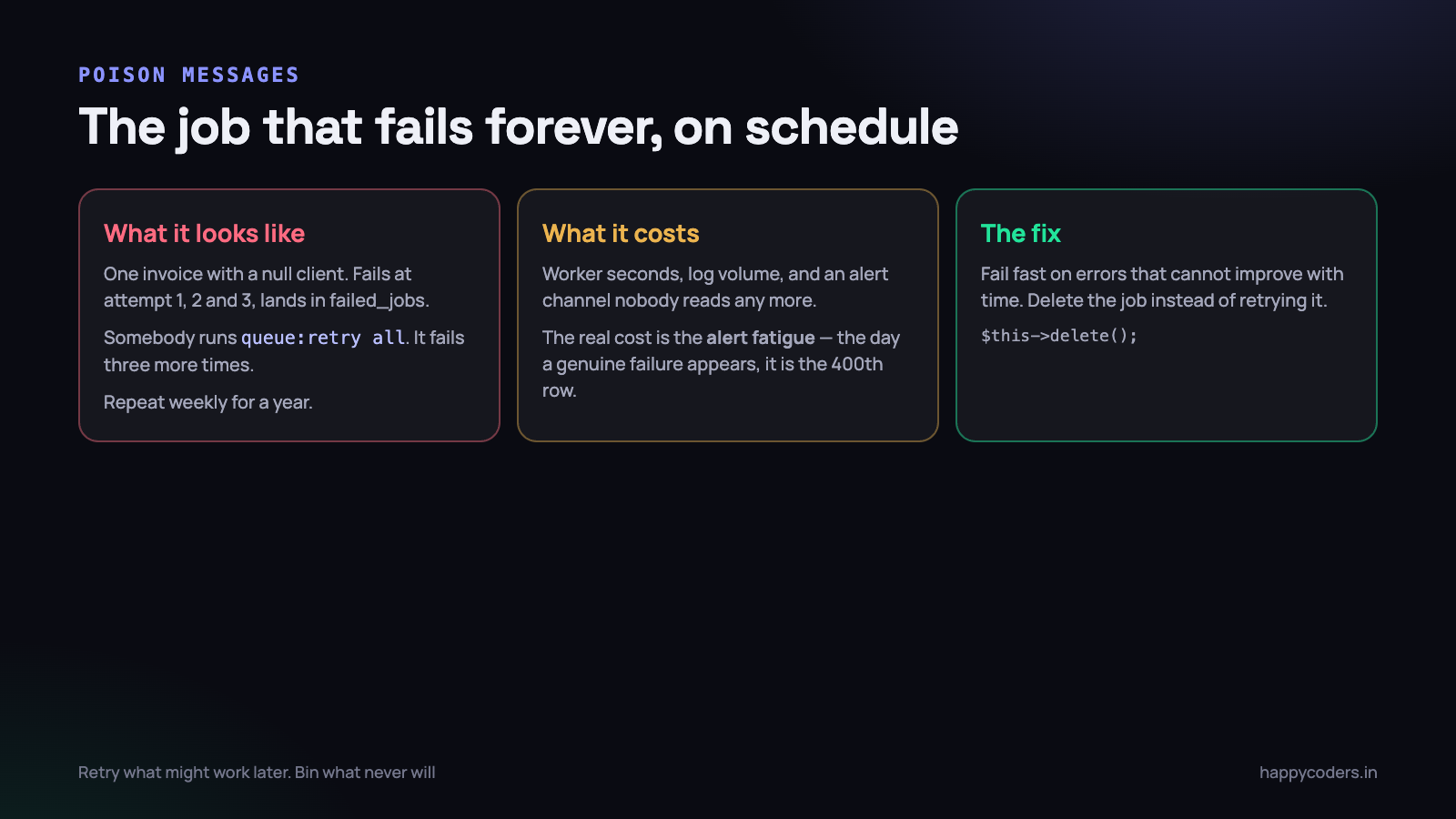
The damage is not the worker time, although a few thousand pointless retries a month is real. The damage is that your failure signal becomes noise. Once an alert channel has four hundred copies of the same exception in it, nobody reads the four hundred and first, and that is the one that matters.
The fix is to distinguish errors that might improve with time from errors that never will, and to stop retrying the second kind.
<?php
public function handle(): void
{
    $invoice = Invoice::find($this->invoiceId);

    // the record is gone. No amount of retrying brings it back.
    if (! $invoice) {
        Log::info('invoice vanished, dropping job', ['id' => $this->invoiceId]);
        $this->delete();
        return;
    }

    try {
        $this->gateway->charge($invoice);
    } catch (InvalidCardException $e) {
        // a permanent, customer-side failure — record it, do not retry
        $invoice->markCardRejected($e->getMessage());
        $this->delete();
    } catch (GatewayTimeoutException $e) {
        // transient — let it retry
        throw $e;
    }
}
$this->delete() removes the job from the queue without marking it failed. The rule of thumb: a 4xx-shaped problem is yours or the customer’s and should be recorded and dropped; a 5xx-shaped or network problem belongs in the retry path.
Two supporting habits. First, use ShouldBeUnique on jobs where a duplicate is harmful, so that a retry storm cannot produce forty copies of the same invoice. Second, never run queue:retry all as a routine. Retry a specific id after you have read the exception. Retrying everything is how a poison message survives for years.
Memory, and why restarts are correct
A web request starts a PHP process, does a small amount of work and dies. Everything it leaked goes away. A queue worker is a long-lived PHP process, and PHP was not designed for that. Static caches grow, the Eloquent model cache grows, an event listener registered in a loop grows, and a library that keeps a static array of everything it has seen grows fastest of all.
After 40,000 jobs the worker is holding 900 MB and the kernel eventually kills it mid-job. So you do not let it get there.
php artisan queue:work redis \
    --queue=interactive \
    --tries=3 \
    --timeout=60 \
    --max-jobs=1000 \
    --max-time=3600 \
    --memory=256 \
    --sleep=3
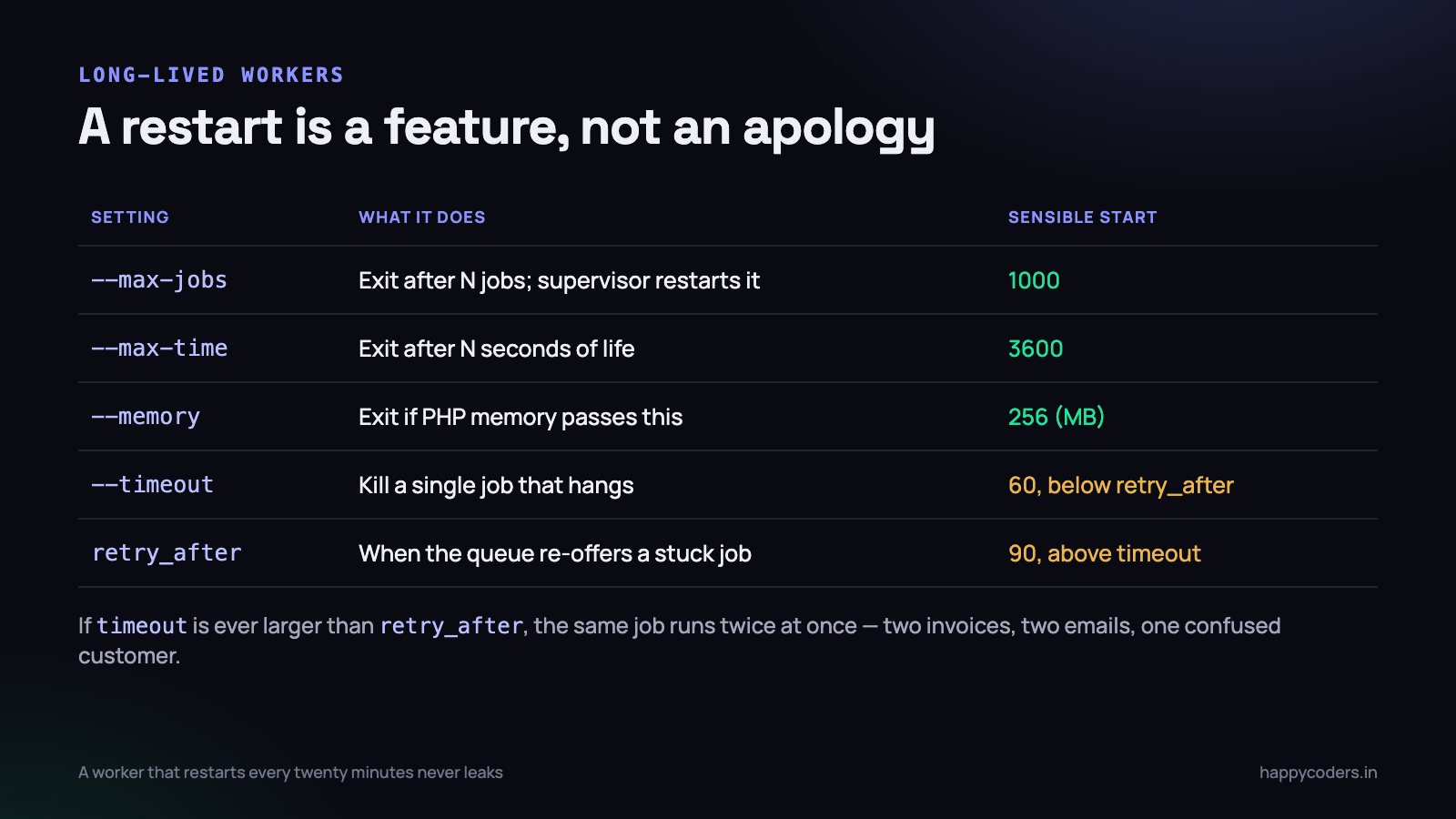
With --max-jobs=1000 the worker finishes its thousandth job, exits cleanly with status 0, and the supervisor starts a fresh one. The restart takes about 200 ms and the queue does not notice. This is not a workaround for a leak you failed to find; it is the correct operating model for a long-lived PHP process, and it means a leak you never find cannot take you down.
--timeoutmust be smaller than the queue’sretry_after. If a job can run for 120 seconds but the queue re-offers it after 90, a second worker picks it up while the first is still working. Two invoices, two emails, one confused customer. Settimeout: 60andretry_after: 90and keep the gap.
Supervisor is the standard way to run this on a Linux box. The configuration is short and the two options that matter are autorestart and stopwaitsecs:
[program:tracker-worker-interactive]
command=php /var/www/tracker/artisan queue:work redis --queue=interactive
         --tries=3 --timeout=60 --max-jobs=1000 --memory=256
autostart=true
autorestart=true
stopasgroup=true
killasgroup=true
user=www-data
numprocs=2
stopwaitsecs=90
stdout_logfile=/var/log/tracker/worker.log
stopwaitsecs should be comfortably larger than your job timeout. It is how long supervisor waits after sending SIGTERM before it sends SIGKILL, and it is what lets an in-flight job finish rather than being cut in half during a deploy.
The deploy bug everybody hits once
You deploy a fix. You test it. The bug is still there. You deploy again, more carefully. Still there.
The worker started before the deploy and it has the old code loaded in memory. PHP read those class files once, at boot, and it will keep running them until the process ends. Your new code is on disk and nothing is reading it.
# in your deploy script, AFTER the new code is in place
php artisan queue:restart
This does not kill anything. It writes a timestamp to the cache; each worker checks it between jobs and exits gracefully when it sees a value newer than its own start time. The supervisor then starts a fresh process with the new code. An in-flight job finishes normally.
Three things go wrong with it. If your cache driver is array or the workers use a different cache store than the web application, the signal never arrives. If a job runs for twenty minutes, the restart does not take effect until it finishes. And if the deploy swaps a symlinked release directory, a worker whose old release folder has been deleted can fail in confusing ways — so restart before you prune old releases, not after.
The related trap: a job serialises its arguments into the payload. A job dispatched by old code and run by new code is deserialised against the new class. Adding a constructor argument between the dispatch and the run gives you jobs that fail on a missing property for exactly as long as the old payloads are in the queue. Add new properties with defaults, and never remove one in the same deploy that stops sending it.
Separate queues and priorities
One queue means a password reset waits behind a monthly report that touches 90,000 rows. Splitting is a deployment change, not a code change, and it is the highest-value thing on this page after monitoring the failed table.
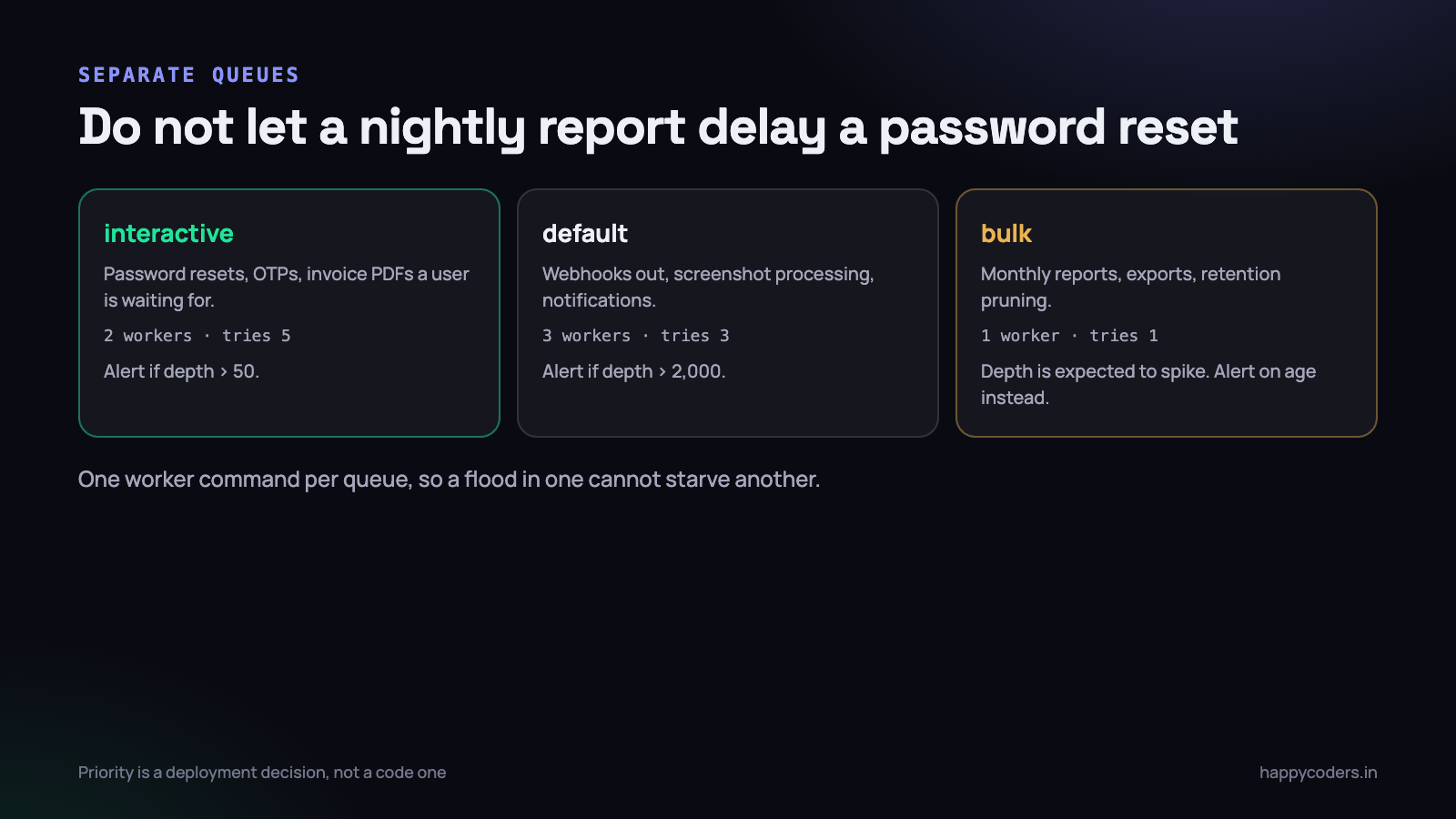
Two ways to run them, and the difference matters.
- One worker, ordered queues:
--queue=interactive,default,bulk. The worker drainsinteractivecompletely before it looks atdefault. Simple, but a sustained flood oninteractivestarves the rest. - Separate worker processes per queue. More processes, more memory, and guaranteed progress on every queue regardless of what the others are doing. This is what you want in production.
Sizing is simpler than it looks. One worker runs one job at a time. If your invoice PDFs take four seconds each and you need to handle 300 in a burst, one worker takes twenty minutes and four workers take five. Parallelism comes from numprocs, not from anything in the job.
Watch what your workers are actually contending for. Eight workers all writing to the same database will spend their time waiting on locks, and four would have been faster. Add processes in twos and watch throughput, not process count.
What to log so it is diagnosable next week
The exception message and stack trace tell you where the code broke. They rarely tell you why, because the why is in the state the job was working on, and that state has moved on by the time anybody looks.
Log a structured line at the start and end of every job, and make sure both carry the same correlation id.
<?php
public function handle(): void
{
    $ctx = [
        'job'      => class_basename($this),
        'job_id'   => $this->job->getJobId(),
        'attempt'  => $this->attempts(),
        'org_id'   => $this->organizationId,
        'invoice'  => $this->invoiceId,
        'queued_at'=> $this->queuedAt->toIso8601String(),
    ];

    Log::channel('queue')->info('job.start', $ctx);
    $start = microtime(true);

    try {
        $this->doWork();
        Log::channel('queue')->info('job.ok', $ctx + [
            'ms' => (int) ((microtime(true) - $start) * 1000),
        ]);
    } catch (\Throwable $e) {
        Log::channel('queue')->error('job.fail', $ctx + [
            'ms'    => (int) ((microtime(true) - $start) * 1000),
            'error' => $e->getMessage(),
            'class' => get_class($e),
        ]);
        throw $e;
    }
}
Five fields earn their place every time. The attempt number, so you can tell a first failure from a fourth. The tenant id, so you can see that every failure belongs to one customer. The entity id, so you can go and look at the row. The time the job was queued, so you can compute how long it waited, which is the number that tells you whether you are short of workers. And the duration, because a job that used to take 2 seconds and now takes 40 is a problem you want to see before it becomes a timeout.
What not to log: the full job payload. It contains customer data, sometimes personal data, and it is already stored in failed_jobs if the job fails. Log identifiers and let the reader go and fetch the record.
Use a separate log channel for queue output. Worker logs and web logs interleaved in one file is the difference between finding a failure in a minute and reading for twenty.
Shutdown, and the job cut in half
A worker that is killed mid-job leaves the world in a partial state: the PDF written but the invoice not marked as sent, the webhook delivered but the delivery record missing. This happens on every deploy and every server reboot, so it is worth understanding rather than hoping about.
There are two signals and they behave completely differently. SIGTERM asks the worker to stop; the worker finishes the job it is holding, then exits. SIGKILL stops the process immediately, in the middle of whatever it was doing, and there is nothing the code can do about it. Everything in your operating setup should be arranged so that the first one is enough and the second never fires.
That means stopwaitsecs larger than the longest job, a deploy that waits for workers rather than racing them, and a container terminationGracePeriodSeconds that is not the 30-second default if your jobs run longer than thirty seconds. And it means the job itself should be written so that being run twice is harmless, because a SIGKILL will eventually happen and the job will be re-offered.
The cheapest protection is ordering. Do the external, irreversible thing last, and write your own state first, inside a transaction. A job that marks the invoice sent and then sends the email can re-run and send a second email; a job that sends the email and then marks it can re-run and send nothing. Neither is perfect, and the second failure mode is almost always the cheaper one to live with.
A short list of things we got wrong
- Running the worker under
nohup. It survives until the first crash and then there is no queue at all, silently, until somebody notices emails stopped. Use a supervisor. - Leaving
retry_afterat 90 with a job that took four minutes. Duplicate screenshot processing for a week before we understood it. - Dispatching inside a transaction. The worker picked the job up and queried for a row the transaction had not committed yet. Use
dispatch()->afterCommit(), or setafter_commiton the connection. - No alert on
failed_jobs. Six weeks of failed webhook deliveries. The customer told us. - A daily report job with
$tries = 3and no uniqueness guard. Three copies of the same email to a client at 6am IST.
What to do on Monday morning
- Open
failed_jobsand count the rows. Read the oldest one. If there are rows older than a week, you have been running without a failure signal. - Add the
Queue::failinghandler with a rate-limited alert. Fifteen minutes of work, and it is the highest-value change here. - Check
timeoutagainstretry_afterinconfig/queue.php. Timeout must be smaller. If it is not, you have duplicate execution today. - Add
--max-jobsand--max-timeto your worker command, and confirm the supervisor restarts it. - Confirm
queue:restartis in the deploy script, after the code is in place and before old releases are pruned. - Split one queue into two — anything a user is waiting for, and everything else. Give each its own worker.
- Add a check that alerts on the age of the oldest waiting job. That single number catches a dead worker faster than anything else.
None of this is sophisticated. It is the difference between a queue you can leave alone for a year and one that has been quietly dropping work since March.
Related: making a background job idempotent, and when to use a queue instead of a cron job.




