Rate Limiting Login Without Locking Out a Whole Office
Rate Limiting Login Without Locking Out a Whole Office
Rate limiting the login endpoint is one of those things that is obviously necessary and easy to get wrong in a way that produces a support queue instead of security.
The wrong version: five failed attempts from an IP, block the IP for fifteen minutes. It looks correct and it fails on the first office.
Why per-IP fails
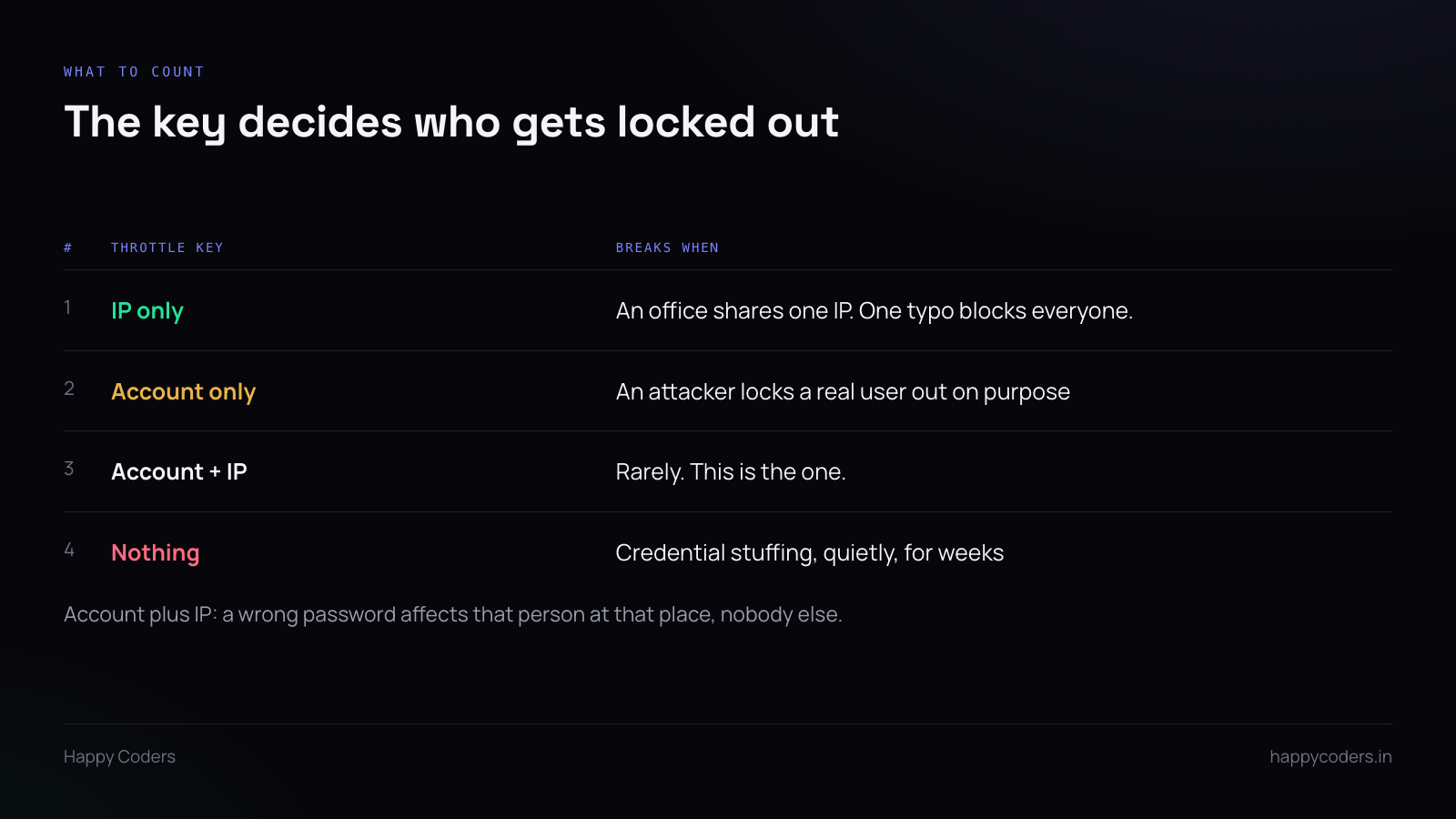
A company of forty people behind one connection shares one public address. One person types their password wrong five times on a Monday morning and the whole office is locked out of a product they are paying for.
It is worse on mobile networks, where carrier-grade NAT puts thousands of unrelated users behind a handful of addresses.
The inverse is also true: per-IP limiting barely inconveniences an attacker. Credential stuffing comes from a rotating pool of addresses, a few attempts from each, and never trips a per-IP counter at all.
So per-IP blocks your customers and not the attack.
Why per-account alone fails too
Counting failures per account and locking it after five is the obvious correction, and it hands anyone a way to lock out any user they can name. Fire five wrong passwords at a known email address and that person cannot work.
For a product where the email is a work address and therefore guessable, that is a denial of service with a one-line script.
Count the pair
Key the limit on account plus IP together.
Then a person typing their own password wrong affects only themselves, at the place they are sitting. Their colleagues on the same connection are unaffected. Somebody attacking their account from elsewhere does not lock them out of their own office.
On top of that, a much looser per-IP ceiling catches the case of one address trying many different accounts — which is the actual signature of credential stuffing, and is a different thing from one account being retried.
Delay before you block
A hard block after N attempts is a blunt instrument. A delay that grows with each failure is kinder and more effective.
First two failures, no delay. Then a second, then two, then four. A human barely notices; an automated attempt is slowed to uselessness. If failures keep coming after that, then block.
The honest person who mistyped gets back in on the third try. The script does not.
Do not throttle everything the same way
This is where it goes wrong in practice.
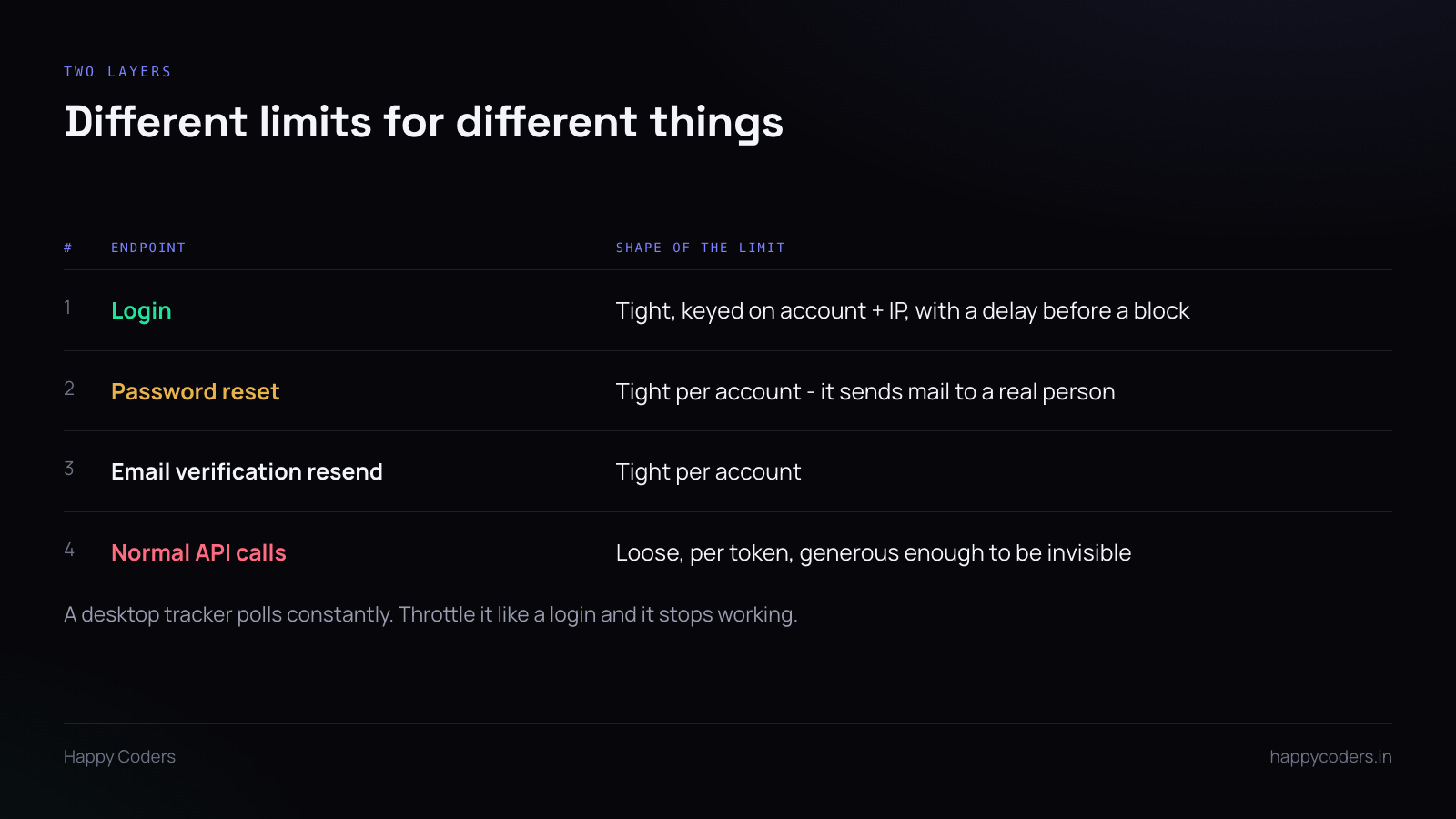
A desktop tracker is not a browser. It polls, it syncs time entries, it uploads screenshots, it checks in regularly. Apply a login-shaped limit to the API it uses and the tracker starts failing silently on busy machines, and the bug report will be “it stopped tracking sometimes” — which is almost impossible to diagnose from the client side.
Different endpoints want different shapes:
Login: tight, keyed on account and IP, with escalating delay.
Password reset and verification resend: tight per account, because each request sends mail to a real person’s inbox. These are abused as a way to spam somebody, not to break in.
Normal authenticated API traffic: loose, keyed on the token, generous enough that no legitimate client ever reaches it.
What to return
Return 429, with a Retry-After header. A client that can read that header can back off properly instead of hammering.
Do not return a message that says whether the account exists. “Too many attempts” is correct. “Too many attempts for this account” tells an attacker they have found a real email address, which is the one thing the login endpoint should never confirm.
Log the blocks, with the reason
When a limit fires, log the key it fired on and the counts. Not the password, obviously.
Two reasons. When a customer says they cannot log in, the log tells you in seconds whether they tripped a limit and which one — otherwise you are debugging authentication, which is a much bigger haystack. And a sudden rise in blocks across many accounts is the earliest signal that something is being attempted at scale.
Without the log, an attack in progress looks exactly like a quiet week.