
Designing a Retention Job That Cannot Delete the Wrong Thing
Designing a Retention Job That Cannot Delete the Wrong Thing
We keep screenshots for a while and then delete them. How long depends on the plan — a month on the cheapest tier, longer further up — and a job runs every night to enforce it.
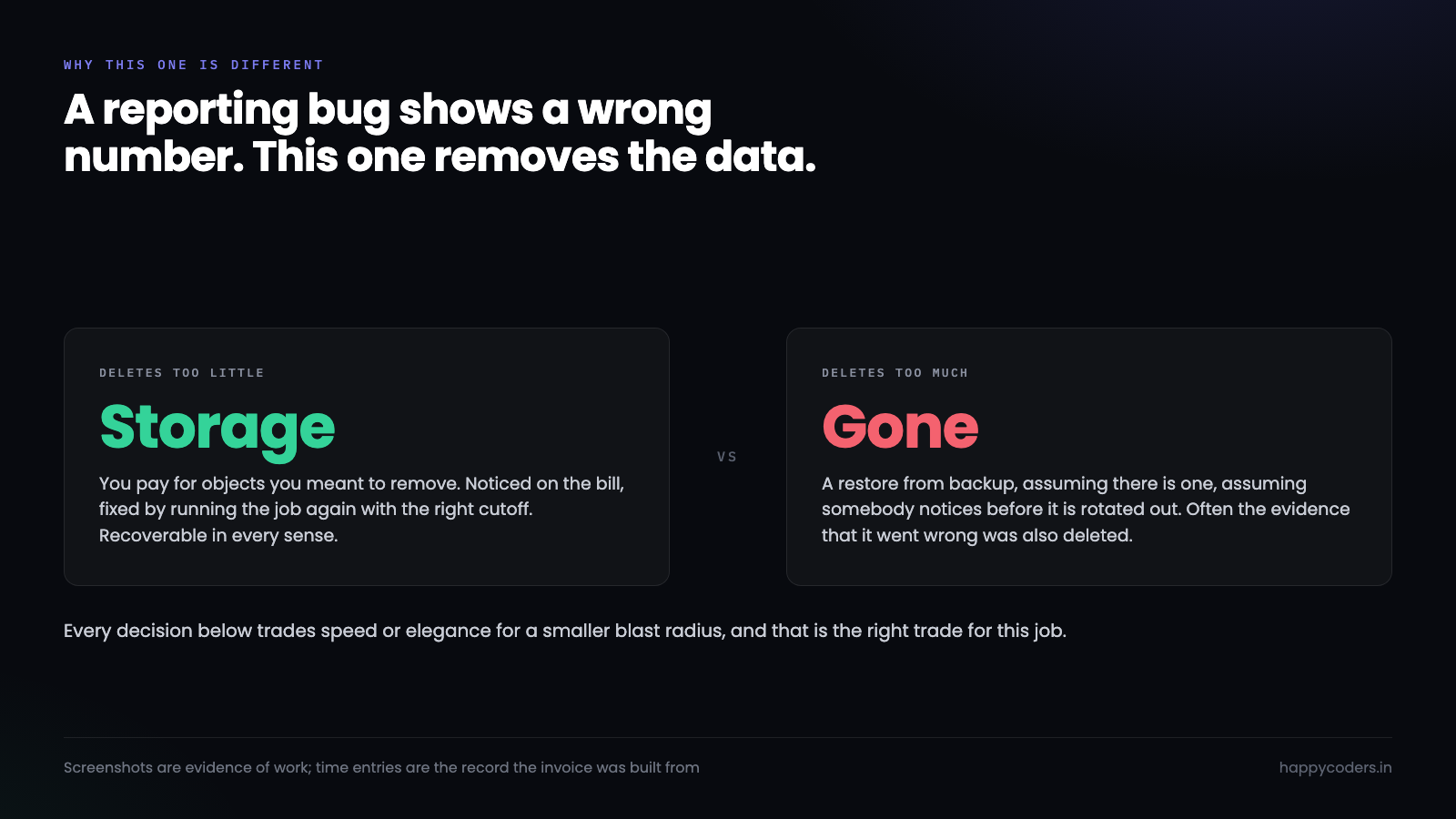
It is a small piece of software with an unusual property: when it is wrong, it is wrong irreversibly. A reporting bug shows you a wrong number and you fix it. A deletion bug removes data and the fix is a restore from backup, assuming there is one, assuming somebody notices in time.
That asymmetry is the whole design constraint. Everything below exists because the cost of the job deleting too much is enormously higher than the cost of it deleting too little.
Name what must never be deleted, in code
The first thing to write is not the delete. It is the list of things the job is allowed to touch, stated explicitly enough that adding a table is a deliberate act.
final class RetentionPolicy
{
    /** Tables this job may delete from. Nothing else, ever. */
    public const DELETABLE = [
        'screenshots'      => 'taken_at',
        'activity_blocks'  => 'started_at',
    ];

    /** Named here so the intent survives a refactor and a new joiner. */
    public const NEVER_DELETE = [
        'time_entries',   // the billing record. Losing one loses money.
        'projects',
        'tasks',
        'invoices',
        'users',
    ];
}
The second constant does nothing at runtime, and it is not decoration. It is the answer to “can we also prune old time entries, they are taking space” asked eighteen months from now by someone who was not in the original conversation. A comment in a commit message does not survive that. A constant in the file being edited does.
Screenshots are evidence of work. Time entries are the record of it. One can age out; the other is what the invoice was built from.
The dry run has to be the same code
Every retention job should have a dry-run mode. Most of them have a broken one, because the dry run is written as a separate query that reports what the real query would probably delete.
Those two drift. The dry run says forty thousand rows, the real run deletes forty-two thousand, and the difference is the bug nobody found.
The version that works uses one code path and decides at the last moment:
public function prune(bool $dryRun = true): PruneReport
{
    $report = new PruneReport($dryRun);

    foreach (Organization::cursor() as $org) {
        $cutoff = now()->subDays($this->retentionDays($org));

        $query = Screenshot::query()
            ->where('organization_id', $org->id)     // never a global default
            ->where('taken_at', '<', $cutoff);

        $count = $query->count();
        $report->add($org, $count, $cutoff);

        if ($dryRun) { continue; }                   // the ONLY difference
        $this->deleteInBatches($query);
    }

    return $report;
}
Same query object, same filters, same loop. The dry run counts and the real run deletes, and there is no second implementation to fall out of step.
Default the flag to true. A retention command that deletes when run with no arguments is a command that will one day be run with no arguments by someone exploring.
Scope per tenant, even when it is slower
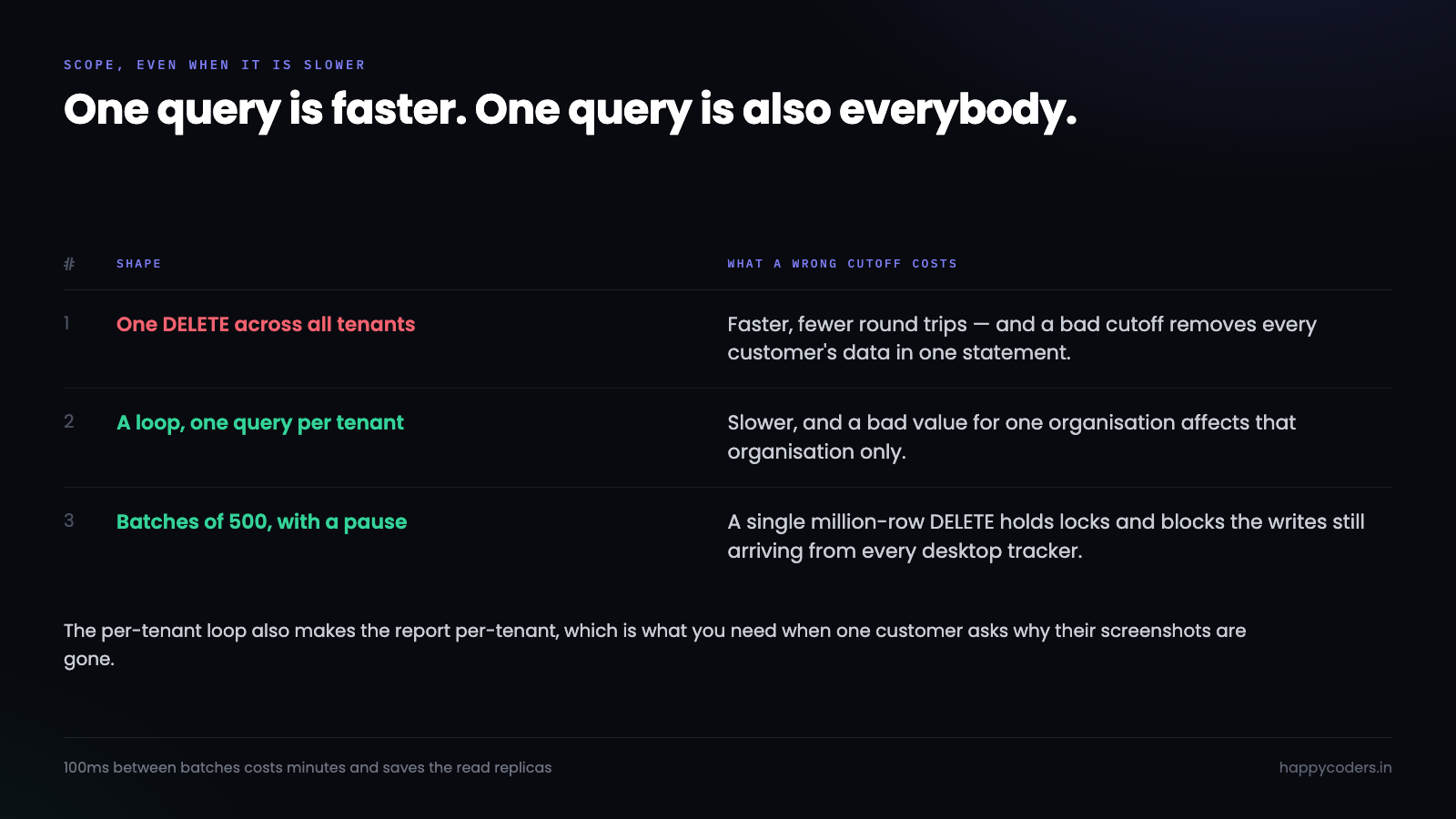
The loop above runs one query per organisation. A single query across all of them would be faster:
-- Faster, and one mistake away from a catastrophe
DELETE FROM screenshots WHERE taken_at < ?
The reason not to is what happens when the retention value is wrong. With the per-tenant loop, a bad value for one organisation deletes one organisation’s screenshots. With the global query, a bad cutoff deletes everyone’s.
Same bug, two blast radii. On a nightly job that has all night to finish, the slower shape is worth the difference.
It also makes the report per-organisation, which is what you want when somebody asks why their screenshots are gone — you can answer for that customer specifically rather than reasoning about a global run.
Delete in batches, or take the site down
A single DELETE covering a million rows on InnoDB holds locks for the whole statement, grows the undo log, and blocks the writes arriving from every desktop tracker still running. The job finishes and the last ten minutes of everyone’s time tracking failed.
private function deleteInBatches(Builder $query, int $size = 500): int
{
    $deleted = 0;
    do {
        $ids = (clone $query)->limit($size)->pluck('id');
        if ($ids->isEmpty()) { break; }

        Screenshot::whereIn('id', $ids)->delete();
        $deleted += $ids->count();

        usleep(100_000);        // 100ms. Let replication and other writers breathe.
    } while (true);

    return $deleted;
}
The pause is not superstition. Without it the job saturates the write path and any read replica falls behind, which shows up as customers seeing stale data during the night’s run. A tenth of a second between batches costs a job that has hours a few extra minutes and costs everyone else nothing.
Cloning the query inside the loop matters too. Reusing the same builder accumulates conditions on some versions and silently changes what you are selecting.
The file behind the row
Deleting a screenshot row and leaving the object in S3 means paying to store files nothing references. Deleting the object first and failing before the row means a row pointing at nothing, which is worse — the UI shows a broken image and the user files a bug.
Order matters, and so does accepting that the two stores cannot be made transactional with each other:
// Row first. An orphaned object costs money; an orphaned row breaks the UI.
DB::transaction(function () use ($ids, $keys) {
    Screenshot::whereIn('id', $ids)->delete();
    OrphanedObject::insert(                       // a sweep picks these up
        collect($keys)->map(fn ($k) => ['s3_key' => $k, 'created_at' => now()])->all()
    );
});

// Outside the transaction, where a failure is survivable
Storage::disk('screenshots')->delete($keys);
The orphan table is the honest answer to a problem that has no clean solution. S3 deletes will occasionally fail, and when they do you want a list rather than a slow leak you discover in a bill.
An audit row that outlives what it describes
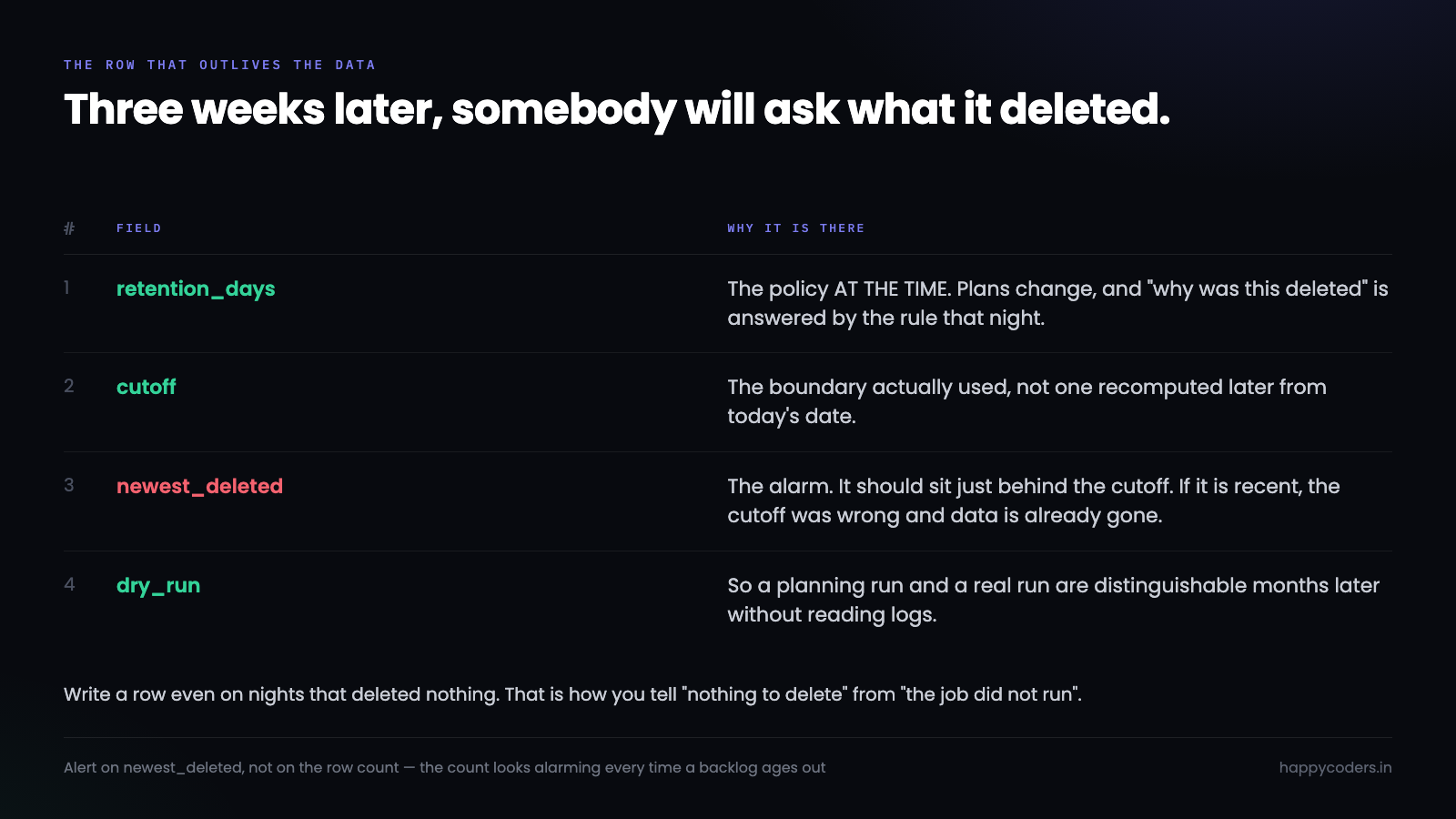
Three weeks after a run, somebody asks whether the job deleted a particular customer’s data on a particular night. Without a record, that question has no answer, because the evidence was the thing that got deleted.
Schema::create('retention_runs', function (Blueprint $t) {
    $t->id();
    $t->foreignId('organization_id');
    $t->string('table_name');
    $t->unsignedInteger('retention_days');   // the policy AT THE TIME
    $t->dateTime('cutoff');                  // the boundary actually used
    $t->unsignedInteger('rows_deleted');
    $t->dateTime('oldest_deleted')->nullable();
    $t->dateTime('newest_deleted')->nullable();
    $t->boolean('dry_run');
    $t->timestamps();
});
retention_days is recorded per run rather than read from the plan later, because plans change. If a customer moves from a 30-day plan to a 90-day one, the question “why was this deleted” is answered by what the policy was that night, not by what it is now.
newest_deleted is the alarm. It should sit just behind the cutoff. If it is recent, the cutoff was computed wrongly and the job just removed data it should not have — and that is the number to alert on rather than the row count, which looks alarming every time a large customer’s backlog ages out.
Soft delete first, hard delete later
There is a middle step worth taking on anything you are nervous about, and it costs one column.
Instead of removing the row, mark it. A second job, running on a longer delay, removes what was marked and has stayed marked. Now there is a window — a week, say — during which a mistake is visible and reversible.
// Stage one: mark, do not remove
$query->update(['pending_deletion_at' => now()]);

// Stage two, a week later: remove what has been marked and not rescued
Screenshot::whereNotNull('pending_deletion_at')
    ->where('pending_deletion_at', '<', now()->subDays(7))
    ->delete();
The cost is real: those rows still occupy space and still need excluding from every read. The benefit is that the worst class of bug — a cutoff computed wrongly, running for one night before anybody looks — becomes a thing you undo with an UPDATE rather than a restore.
Whether it is worth it depends on how confident you are in the cutoff arithmetic, and the honest answer for most teams on the first version of this job is: less confident than they think.
We did not do this for screenshots, because the volume is large and the S3 objects are the real cost. We did it for the first month, then removed it once the audit rows showed the cutoffs behaving. That is a reasonable pattern in itself — a safety net you take down deliberately, after evidence, rather than one you never put up.
Time zones, which decide what “thirty days” means
A retention cutoff is a date subtraction, and date subtraction is where this kind of job grows its subtlest bug.
If the server runs in UTC and the customer is in India, now()->subDays(30) computes a boundary five and a half hours away from the one they would draw. For most of the data that does not matter. For the screenshots taken in that window it means a day’s worth vanishes a day early, from the customer’s point of view.
// Compute the cutoff in the organisation's zone, then convert for the query
$cutoff = now($org->timezone)
    ->startOfDay()
    ->subDays($retentionDays)
    ->utc();
The startOfDay is the part that makes it explain-able. Without it the cutoff is “thirty days ago to the second”, which means the job deletes a slightly different slice depending on what time it happened to run. With it, retention means whole days, the boundary is the same whether the job runs at 2am or 4am, and a customer asking “why did today’s batch disappear” gets an answer that makes sense.
A rule a customer can predict is worth more than a rule that is precise to the second. Whole days in their own timezone is a rule they can predict.
Testing a thing that destroys its own evidence
Two tests carry most of the weight, and neither is about the happy path.
public function test_it_never_touches_a_protected_table(): void
{
    $org = Organization::factory()->create(['screenshot_retention_days' => 30]);
    TimeEntry::factory()->count(5)->for($org)
        ->create(['started_at' => now()->subYears(2)]);   // far older than any cutoff

    app(RetentionJob::class)->prune(dryRun: false);

    $this->assertSame(5, TimeEntry::count());   // still all there
}

public function test_the_dry_run_count_matches_what_is_deleted(): void
{
    $org = Organization::factory()->create(['screenshot_retention_days' => 30]);
    Screenshot::factory()->count(40)->for($org)->create(['taken_at' => now()->subDays(60)]);
    Screenshot::factory()->count(10)->for($org)->create(['taken_at' => now()->subDays(5)]);

    $planned = app(RetentionJob::class)->prune(dryRun: true)->total();
    $actual  = app(RetentionJob::class)->prune(dryRun: false)->total();

    $this->assertSame(40, $planned);
    $this->assertSame($planned, $actual);      // the two paths agree
}
The first test is the one that would have caught the incident we were most afraid of. The second is the one that catches drift between the dry run and the real run, which is how a job that everyone trusts becomes a job that lies.
Include rows exactly on the boundary in the fixture. Off-by-one on a < versus <= is the most common bug in this kind of code and the least likely to be noticed, because it is one day’s worth of data.
Telling the customer before the data goes
A technically perfect retention job still produces angry emails if the first time anybody hears about it is when the screenshots are missing.
Retention is usually written into the plan, which means it is in a pricing table somewhere that nobody read. That is legally sufficient and practically useless. The thing that prevents the support ticket is a notice in the product, at the moment it becomes relevant.
Two places carry most of the weight. On any screen showing screenshots, a quiet line saying how long they are kept on this plan. And an email a week before the first large batch ages out for an account, which is the only one that ever needs sending — after that it is routine and nobody needs telling every night.
// Warn once per organisation, the first time a significant batch is due
$due = Screenshot::where('organization_id', $org->id)
    ->where('taken_at', '<', $cutoff->copy()->addDays(7))
    ->count();

if ($due > 100 && !$org->retention_warning_sent_at) {
    Mail::to($org->owner)->send(new RetentionNotice($due, $cutoff));
    $org->update(['retention_warning_sent_at' => now()]);
}
There is a product argument underneath this that is worth making explicitly: retention is a feature, not just a cost control. Screenshots of people’s work accumulating forever is a liability for the customer as much as for us, and a tracker that quietly deletes them on a schedule is doing something they would have had to build themselves.
Saying that in the interface — “kept for 30 days on your plan, then deleted automatically” — turns a limitation into a privacy statement, which it genuinely is.
Running it where you can watch it
The first live run should be a dry run whose output a person reads. Not a log line — a report, per organisation, with the cutoff and the count and the oldest and newest timestamps.
Read it against what you expect. A customer on a 30-day plan with two years of history should show a large number once and a small number every night afterwards. A number that stays large means the deletes are not working. A number that is large on a customer who joined last month means the cutoff is wrong.
Then run it for real on one organisation before all of them. A retention job is one of the few pieces of software where a staged rollout is trivially easy — it already loops over tenants — and where the downside of skipping it is permanent.
Ours runs nightly, deletes nothing outside two tables, batches at five hundred rows with a pause, and writes a row per organisation per run whether or not it deleted anything. That last part means an empty night is recorded as an empty night, which is how you tell “nothing to delete” from “the job did not run”.




