
Scheduled Jobs You Can Trust: Cron, Heartbeats And Idempotence
Scheduled Jobs You Can Trust: Cron, Heartbeats And Idempotence
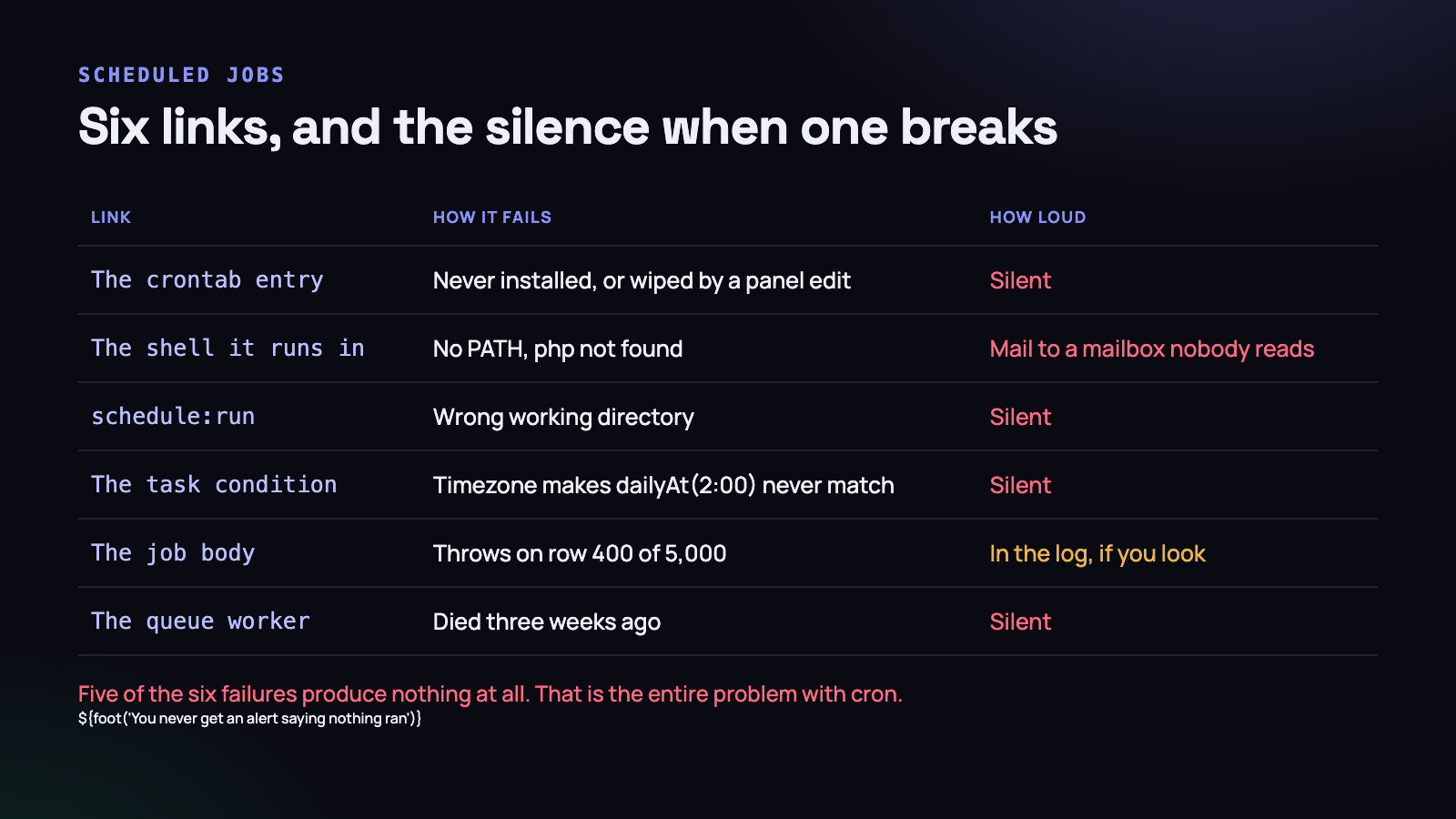
The worst property of cron is not that it fails. It is that it fails quietly. A web request that breaks produces a 500, a log line, an error in your monitoring, and eventually a customer email. A scheduled job that never runs produces nothing at all — no error, no alert, no trace. The absence of work looks exactly like the absence of a problem.
We found this out on a Hostinger shared plan, where a cron entry that the control panel displayed happily in its list had never executed once. Ten days of nightly summaries did not exist, and we only noticed because a customer asked where their report had gone.
This is what we do now, and why each part of it exists.
The scheduler needs exactly one cron entry
Laravel’s scheduler is often misunderstood as an alternative to cron. It is not. It is a program that has to be run every minute by cron, and which then decides which of your defined tasks are due at that minute.
* * * * * cd /home/u123/app && php artisan schedule:run >> /dev/null 2>&1One line. Every task you ever define lives in PHP, under version control, reviewed like any other code. That is a real improvement over twelve crontab entries that exist only on a server and are lost the day it is rebuilt.
The catch is the dependency. If that single line does not run, everything stops at once — every report, every reminder, every cleanup, every renewal — and the application continues serving pages perfectly, so nothing looks wrong.
It is a single point of failure with no alarm attached. That is the problem worth solving, and it is solvable in about an hour.
The panel that accepted a command and never ran it
On shared hosting you do not usually edit a crontab. You paste a command into a form in a control panel, which writes it somewhere on your behalf.
Some of those panels do not handle compound commands. They will accept cd /path && php artisan schedule:run, display it back to you in the list of scheduled jobs, and then either strip everything after the first token, execute it in a shell that does not understand the operator, or run it in a context where the path does not resolve. The entry looks correct on screen. It never produces a line of output.
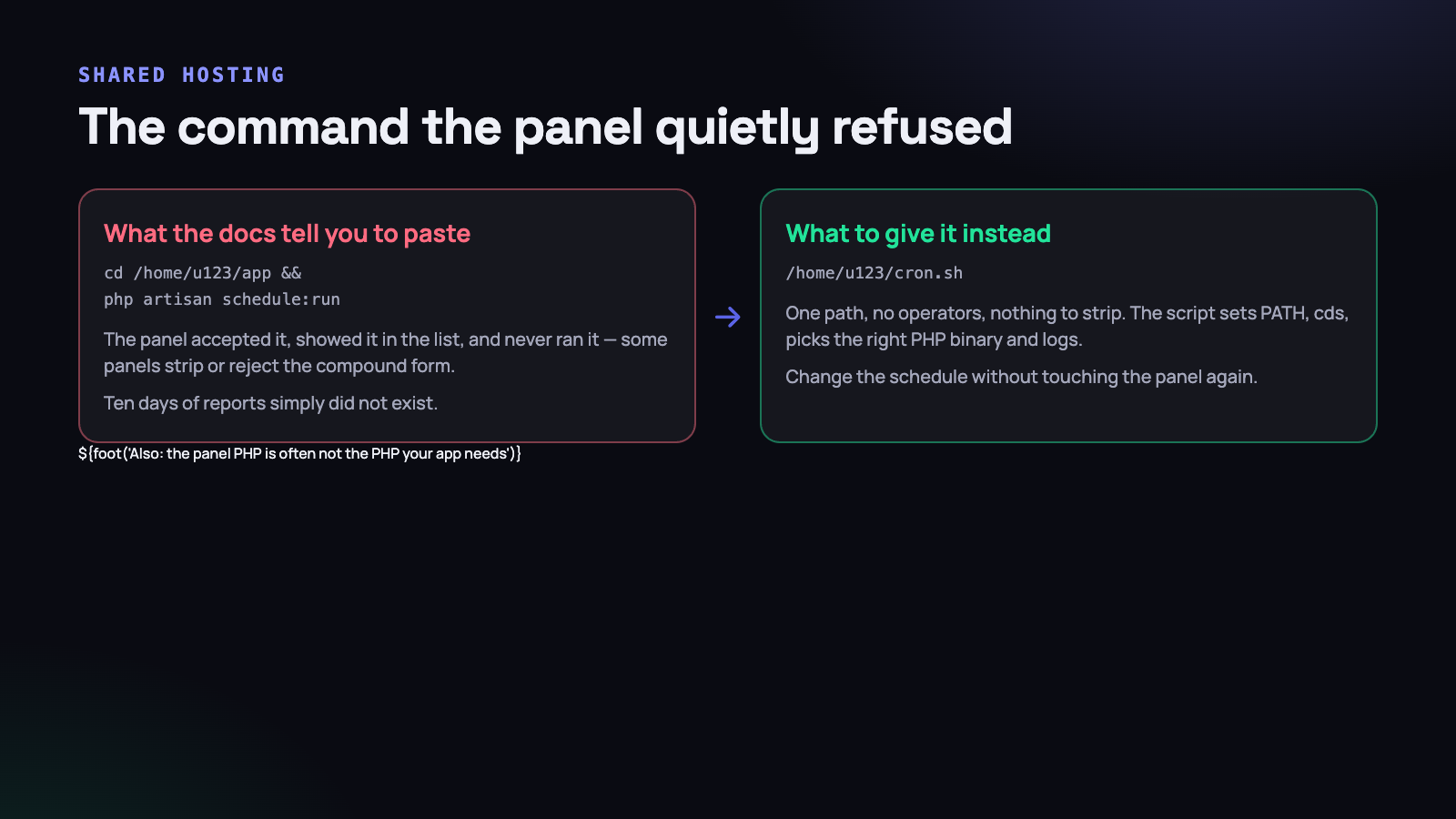
Debugging this is unpleasant precisely because the evidence is on the panel’s side. The command is right there. You test it over SSH and it works. You conclude the problem must be in the application.
The fix is to give the panel something it cannot get wrong: a single path, with no operators, no quotes and nothing to strip.
#!/bin/bash
# /home/u123/cron.sh  -  chmod +x this file

export PATH=/usr/local/bin:/usr/bin:/bin

cd /home/u123/domains/conceps.in/app || exit 1

/opt/alt/php83/usr/bin/php artisan schedule:run \
    >> storage/logs/schedule.log 2>&1
Then the panel gets one word: /home/u123/cron.sh.
Four things that script fixes, all of which are common on shared hosting.
- The PATH. A cron shell is not a login shell. It has a minimal environment, and
phpis frequently not on it. The result is “command not found” in a mail spool nobody reads. - The PHP binary. The
phpon the default path is often an old panel build — 7.4 when your application needs 8.3. Name the binary explicitly and the ambiguity disappears. - The working directory. Laravel resolves a great deal relative to the project root. Without the
cd,artisanis not even found. - The output. Redirecting to a log file instead of
/dev/nullcosts nothing and turns an invisible failure into a readable one. This alone would have shortened our ten days to one.
And because the schedule now lives in a file you control, changing it never involves the panel again. That matters more than it sounds: panel edits are exactly where a working cron entry gets accidentally deleted.
Test it the way cron will run it, not the way you run it:
env -i /bin/bash /home/u123/cron.sh. That strips your environment and reproduces the empty-PATH failure on your own terminal, in one command.
The diagnostic order when a job did not run
“The nightly report did not arrive” has four possible causes and they are diagnosed in a fixed order. Working through them in any other order wastes an hour, because each step is only meaningful once the one before it is confirmed.
- Is cron firing at all? On hPanel and most cPanel-derived hosts, each job’s stdout and stderr are written to files under
~/.logs/with names likecronjob_12345.log. If the file does not exist or its timestamp is days old, cron is not running your entry — stop here, and fix the entry before looking at anything in PHP. An empty file with a recent timestamp is the good case: it means the command ran and printed nothing. - Is the scheduler being reached? Add
Schedule::call(fn () => Heartbeat::stamp(’scheduler’))->everyMinute()and watch the file for two minutes. If cron fires but this never updates, the failure is between the two — wrong path, wrong PHP binary, a fatal error before the framework boots. - Is the task actually due?
php artisan schedule:listprints every registered task with its expression and its next due time, in the timezone it will use. This is where a task nobody has run for a month turns out to be scheduled at an hour that never arrives. - Did the job throw? Only now is it worth reading the application log. Run the command by hand with
-vvvand see it fail in front of you.
The reason for the order is that failures at the earlier steps are invisible at the later ones. A broken cron entry produces an application log that looks completely healthy, which is exactly how ten days go by.
Two host-specific details worth knowing before you need them. Those ~/.logs/ files are the only record on many shared plans, because cron’s usual mail delivery is disabled — so if you redirect to /dev/null you have thrown away the one diagnostic the host was giving you for free. And the panel’s idea of “php” is frequently not your application’s PHP version, which produces a syntax error from a modern codebase parsed by an old binary. Both are visible in those log files within seconds of looking.
A heartbeat file, so you can prove it ran
Once the entry is fixed, the remaining question is how you would ever know if it broke again. A log file only helps somebody who goes looking, and nobody goes looking at something that has been working.
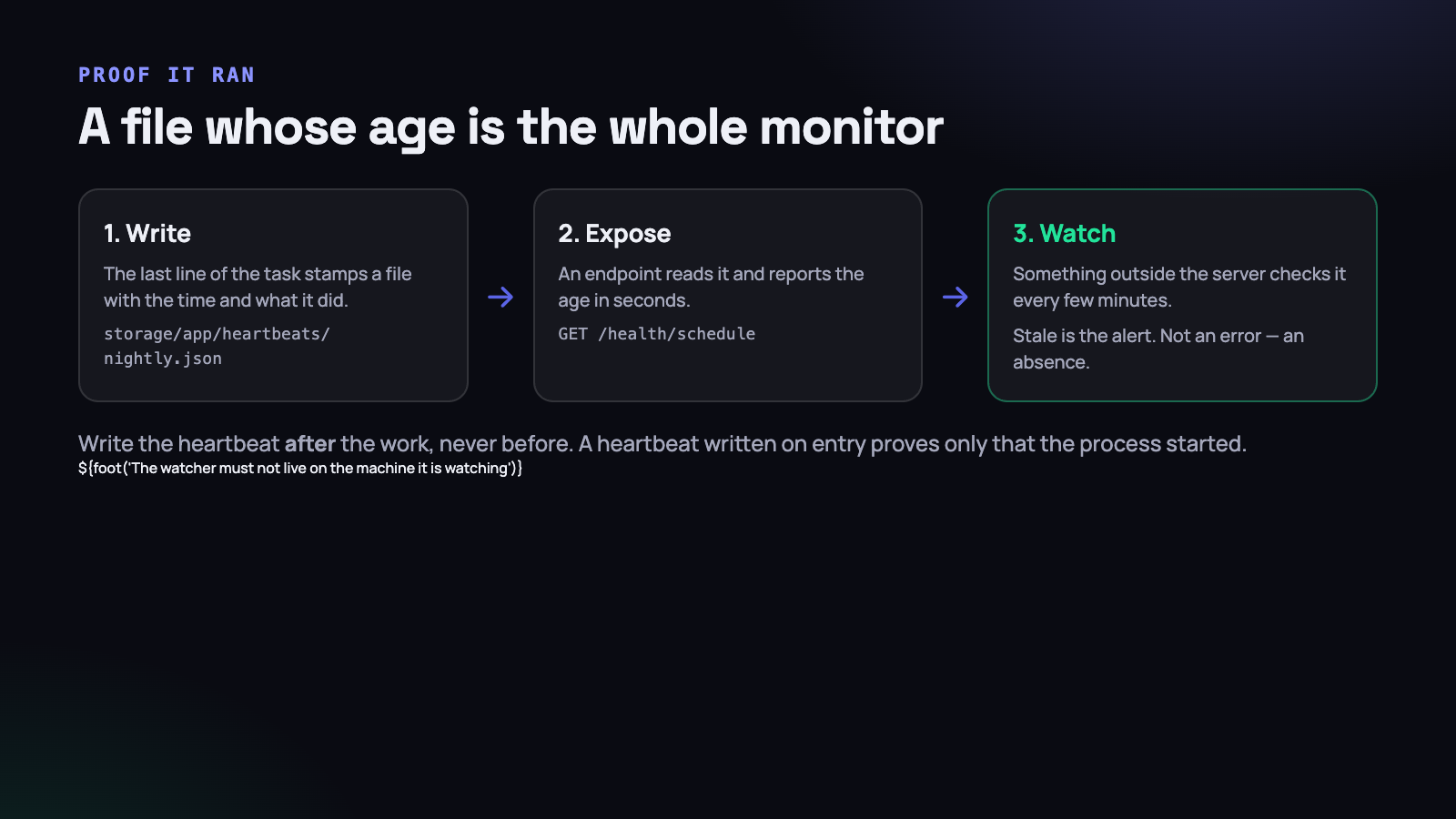
The answer is a heartbeat: the job itself writes a small file when it finishes, and something outside the server watches how old that file is.
Schedule::command('reports:nightly')
    ->dailyAt('02:00')
    ->timezone('Asia/Kolkata')
    ->withoutOverlapping(30)
    ->onSuccess(fn () => Heartbeat::stamp('reports.nightly'))
    ->onFailure(fn () => Heartbeat::fail('reports.nightly'));
class Heartbeat
{
public static function stamp(string $key, array $meta = []): void
{
Storage::disk('local')->put("heartbeats/{$key}.json", json_encode([
'at' => now()->toIso8601String(),
'status' => 'ok',
'meta' => $meta,
]));
}
}Note onSuccess rather than a call inside the command. A heartbeat written at the top of the job proves the process started; a heartbeat written after a successful completion proves the work was actually done. Those are different claims, and only the second one is useful.
Include something in meta that describes the work: how many reports were generated, how many rows were pruned. A job that ran successfully and processed zero rows for a week is a different problem from a job that did not run, and the meta field is what lets you tell them apart.
Exposing it
Route::get('/health/schedule', function () {
    $expected = [
        'reports.nightly'    => 26 * 3600,    // daily, one hour of slack
        'screenshots.prune'  => 26 * 3600,
        'subscriptions.renew'=> 2 * 3600,     // hourly
    ];

    $stale = [];

    foreach ($expected as $key => $maxAge) {
        $beat = Heartbeat::read($key);

        if (! $beat || $beat->ageInSeconds() > $maxAge) {
            $stale[$key] = $beat?->ageInSeconds() ?? 'never';
        }
    }

    return response()->json(
        ['stale' => $stale],
        $stale ? 503 : 200
    );
});
Point an external uptime checker at that URL every five minutes. The check must live outside the server it is checking — a monitor that runs from the same cron that has stopped working is not a monitor.
Give each job an expected interval with an hour of slack, and return a 503 when anything is stale. Uptime services already know how to alert on a 503, so you get the notification channel for free without building one.
Keeping the alert worth reading
An alert that fires often is an alert nobody opens, and a scheduled-job monitor is unusually prone to this because a job can be five minutes late for entirely benign reasons — a slow night, a backup running, a deploy.
- Set the slack generously. A daily job with a 26-hour threshold still catches a broken cron within a day and never fires because last night was busy.
- Alert on stale, not on late. The question is “has this stopped happening”, not “did it start on time”.
- One alert per job, not per check. Otherwise a broken scheduler sends you a message every five minutes for a weekend.
- Name the job in the message. “Health check failed” at two in the morning tells the person on call nothing they can act on.
Make the job idempotent and the whole problem shrinks
Everything above detects failure. This next part makes the failure cheap to recover from, and it is the highest-leverage decision in the whole design.
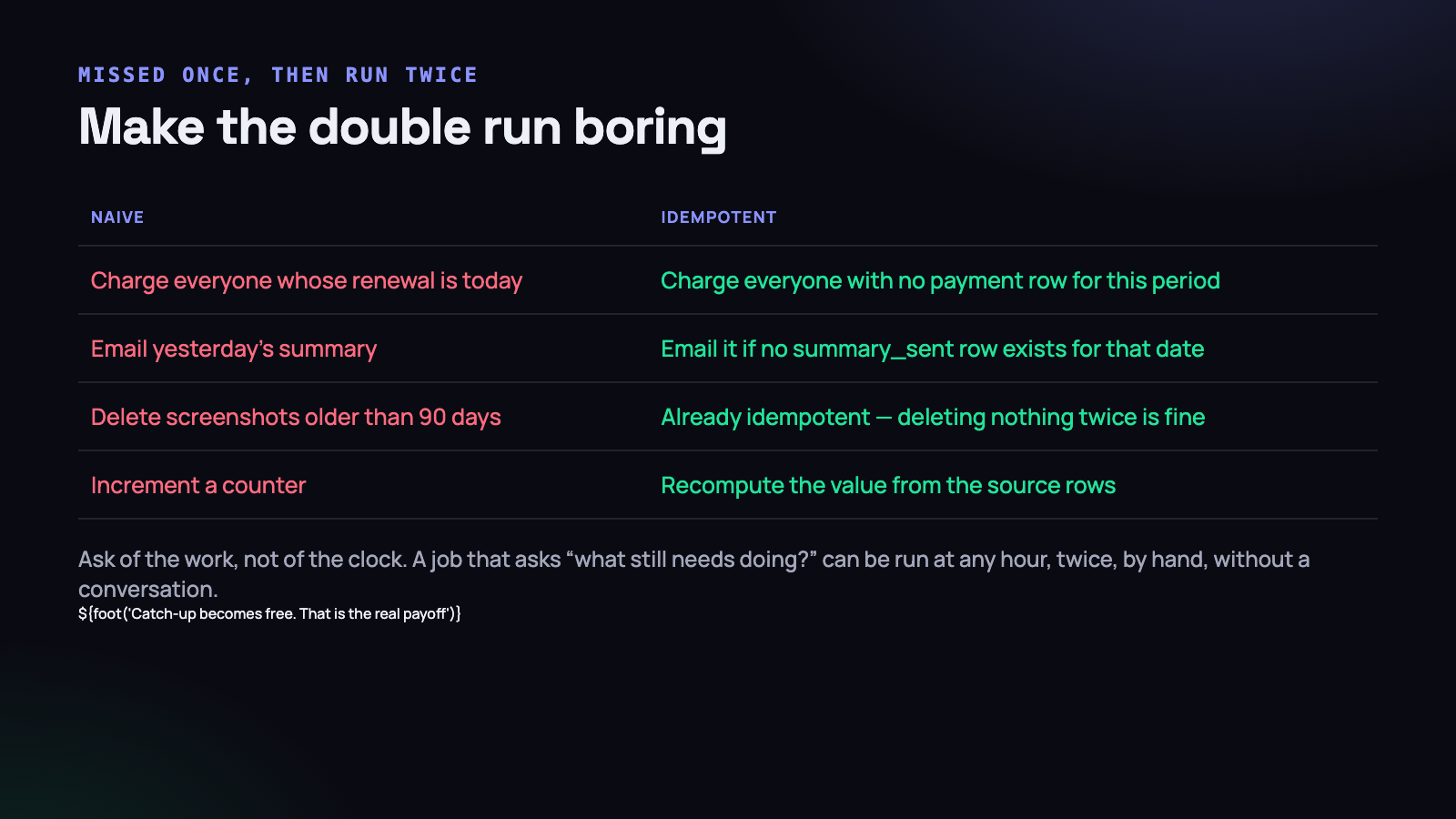
A job that can safely run twice can also be run by hand, out of hours, after an outage, without anybody having to reason about what already happened. A job that cannot be run twice turns every missed run into a careful manual operation performed by whoever is most nervous.
// Not safe. Runs twice, charges twice.
$subscriptions = Subscription::where('renews_on', today())->get();

foreach ($subscriptions as $sub) {
    $this->charge($sub);
}

// Safe. Asks what still needs doing.
$subscriptions = Subscription::where('renews_on', '<=', today())
    ->whereDoesntHave('payments', fn ($q) =>
        $q->where('period_start', today()->startOfMonth())
    )
    ->get();

foreach ($subscriptions as $sub) {
    $this->charge($sub);
}
The second version has three properties the first does not. It can be run twice in a row with no effect the second time. It catches up automatically if it was missed — note the <= rather than =, which means a job that did not run on the 1st still renews those subscriptions on the 2nd. And it can be run by anybody at any time without a conversation.
The general rule is to ask the data what still needs doing, rather than asking the clock what day it is. A time-based query is a claim that the scheduler is perfect. A state-based query needs no such claim. There is more on the specific techniques — unique keys, upserts and the ordering of side effects — in making a background job safe to run twice.
The hardest part is usually external side effects. A database write can be made idempotent with a unique constraint. An email cannot be un-sent. For anything that leaves the system, record the fact that it was sent in the same transaction as the work, and check that record before sending:
DB::transaction(function () use ($user, $date) {
    $sent = SummarySent::firstOrCreate([
        'user_id' => $user->id,
        'for_date'=> $date,
    ]);

    if (! $sent->wasRecentlyCreated) {
        return;                      // already sent; do nothing
    }

    Mail::to($user)->queue(new DailySummary($user, $date));
});
The unique index on (user_id, for_date) is what makes it correct under concurrency. Application-level checks lose that race; the database does not.
Overlapping, and jobs that outgrow their interval
A job scheduled hourly that begins taking seventy minutes will eventually have two copies running at once, competing for the same rows. withoutOverlapping() takes a lock so the second run exits immediately.
Two things about it that catch people out.
Always pass an expiry. withoutOverlapping(30) releases the lock after thirty minutes. Without a value, the default is twenty-four hours, and if the process is killed — an out-of-memory kill, a deploy, a server restart — the lock is never released and the job silently does not run for a day. This failure is indistinguishable from the cron entry being broken, and it is diagnosed by people who have already checked the cron entry three times.
A skipped run should be visible. By default, being blocked by the lock is silent. Log it, and count it. A job that is skipped once is noise; a job skipped every hour for two days means it has outgrown its interval and needs to be split into queued chunks rather than run longer.
On the subject of long jobs: the scheduler runs tasks in sequence within a single schedule:run invocation. A task that takes eleven minutes delays everything defined after it. Anything substantial should dispatch queued jobs instead of doing the work itself, so the scheduler stays a dispatcher and the workers do the lifting.
The queue worker, which is the same failure one layer down
Once the scheduler dispatches jobs instead of doing the work itself, you have moved the silent failure rather than removed it. The cron fires, schedule:run executes, the task dispatches four hundred jobs, and the worker that should pick them up died three weeks ago during a deploy.
From the outside this is identical to a broken cron: nothing happens and nothing complains. The jobs table fills up, which is at least visible if you look.
Two additions close it.
- A process supervisor that restarts the worker — supervisor, systemd, or on shared hosting a cron entry every five minutes that starts the worker only if it is not already running. Workers die: on a fatal error, on a deploy, on a memory limit. Assume it and plan the restart.
- A queue-depth check in the same health endpoint. If the oldest pending job is more than a few minutes old, something is wrong with the worker even though the scheduler is fine. This is a two-line query and it catches an entire class of outage.
$oldest = DB::table('jobs')->min('available_at');

if ($oldest && now()->timestamp - $oldest > 300) {
    $stale['queue'] = now()->timestamp - $oldest;
}
Add failed_jobs to the same check. A growing failed table means the work is being attempted and losing, which needs a different response from work that is never attempted at all — and both look like “the report did not arrive” from the customer’s side.
Recovering a missed run
When you do discover ten days of missing work, the recovery is where idempotence pays for itself in a single afternoon.
If the jobs are written in terms of state, recovery is running the command. It finds the subscriptions with no payment for the period, the summaries with no sent record, the screenshots past the retention window, and it does them. There is nothing to reason about and nothing to undo if you run it twice while watching.
If the jobs are written in terms of the clock, recovery is a script somebody writes under pressure, with a date loop in it, tested on production because there is no other environment with the right data. That script is where the second incident comes from.
Two habits make recovery calmer regardless:
- Accept a date argument on every date-based command.
php artisan reports:nightly --for=2026-09-04costs one line and turns a recovery into a loop you can run by hand. - Make the command report what it did. “Generated 14 reports, skipped 302 already present” tells you it worked. Silence tells you nothing, and after an incident you need to be told.
Testing a scheduled job
Scheduled work is chronically untested, because the scheduler feels like infrastructure. The job itself is ordinary code and deserves the same treatment as anything else.
public function test_nightly_report_is_safe_to_run_twice(): void
{
    $this->seedOneDayOfEntries();

    $this->artisan('reports:nightly --for=2026-09-04')->assertSuccessful();
    $this->artisan('reports:nightly --for=2026-09-04')->assertSuccessful();

    $this->assertDatabaseCount('daily_reports', 1);
    Mail::assertSentCount(1);
}
That single test is worth more than any amount of monitoring, because it makes the recovery path safe rather than merely observable. Write one for every job that sends something, charges something or deletes something.
Then assert the schedule itself is registered — Laravel exposes the task list, so a test can confirm that the command you think runs nightly actually has an entry. It catches the rename that silently detached a job from the scheduler.
Timezones, the quiet cause of a task that never fires
dailyAt(’02:00’) is evaluated in your application timezone. If the application runs on UTC and you are thinking in IST, your two-in-the-morning job actually runs at 07:30 IST — during the working day, which for a heavy report job is a noticeable problem.
Set the timezone explicitly on every time-based task, rather than relying on a global default that somebody may change:
Schedule::command('reports:nightly')
    ->dailyAt('02:00')
    ->timezone('Asia/Kolkata');
India has no daylight saving, which is why this ships and then behaves oddly for the first customer in a zone that does. Store the zone name, never a fixed offset.
What to do on Monday morning
- Prove your scheduler ran in the last five minutes. Add
Schedule::call(fn () => Heartbeat::stamp(’scheduler’))->everyMinute(), wait, and check the file. If it is not there, nothing else in your schedule has been running either. - Replace the compound cron command with a shell script that exports PATH, names the PHP binary and redirects output to a log. Test it with
env -i. - Stop redirecting to /dev/null. One log file, rotated, is the difference between ten days blind and one.
- Add a heartbeat to your three most important jobs and a health endpoint that returns 503 when any of them is stale. Point an external uptime checker at it.
- Take your most important job and ask whether running it twice would be harmful. If it would, rewrite the query to ask what still needs doing rather than what date it is.
- Check every
withoutOverlapping()has an expiry argument. This takes two minutes and prevents a day-long silent outage.
None of this is sophisticated. A shell script, a JSON file, a health route and a query written in terms of state rather than time — perhaps two hours of work in total. What it buys is the ability to answer “did last night’s job run?” with a number instead of a guess, and that single change turns scheduled work from something you hope about into something you know about.




