
A Path Is Not Permission: Security-Scoped Bookmarks in a Sandboxed Mac App
A Path Is Not Permission: Security-Scoped Bookmarks in a Sandboxed Mac App
The bug report is always the same sentence. It worked yesterday. Today it says it cannot save.
Nothing changed. No update, no permission revoked, no folder moved. The user picked a save folder through a normal open panel, recorded happily for an afternoon, quit the app, came back the next morning, and the app can no longer write to a folder they explicitly chose and can see sitting there in Finder.
This is the App Sandbox behaving exactly as documented, and the reason it surprises people is that the sandbox is not the thing they think it is. It does not grant access to paths. It grants access to URLs, and only for the lifetime of the process that obtained them.
HappyRec is sandboxed, ships on the Mac App Store, and lets users choose where recordings are saved. Here is what it takes to make a chosen folder still work tomorrow.
A path is not permission
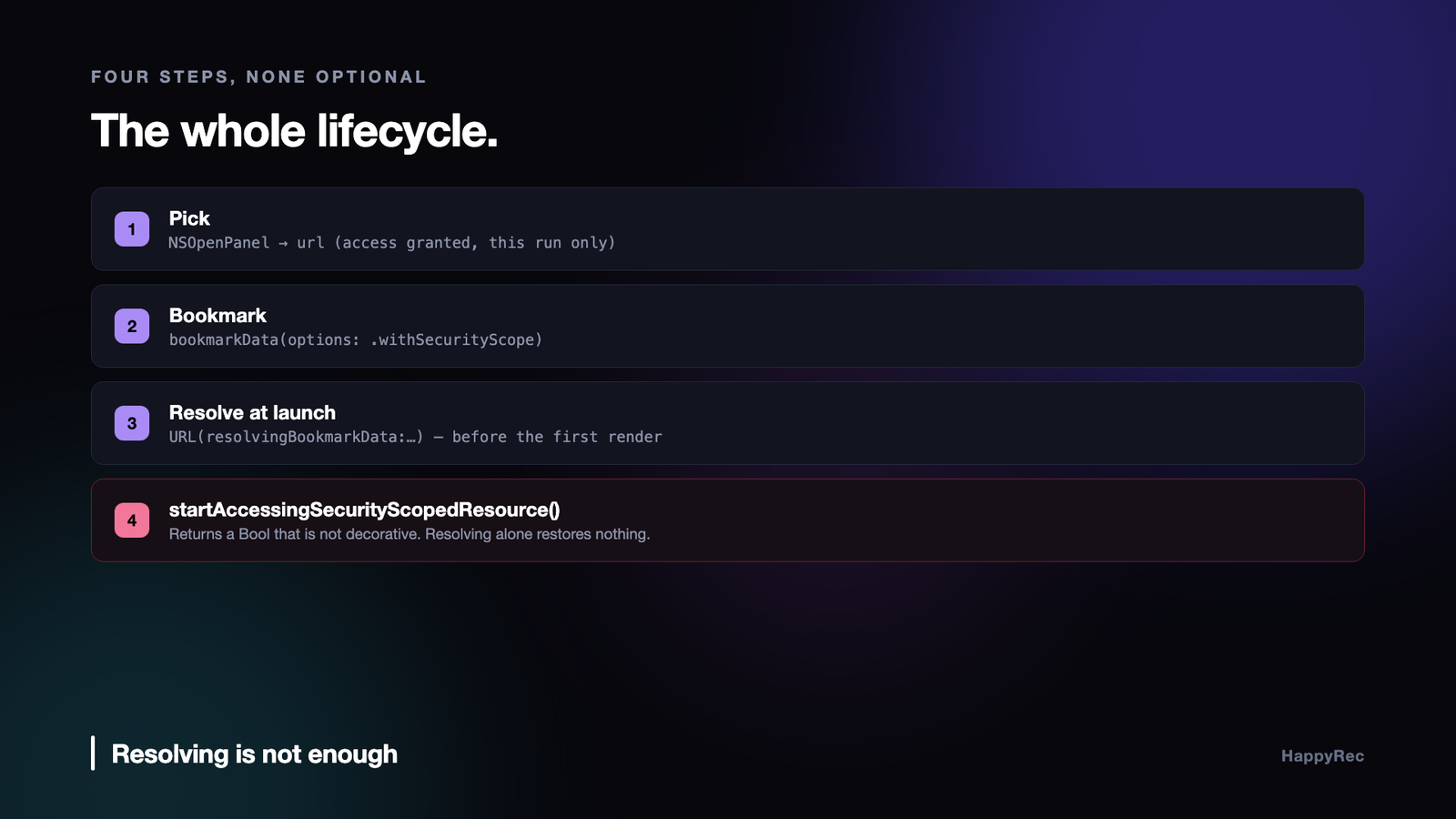
When a user picks a folder through NSOpenPanel, the sandbox extends access to the returned URL. That is real access — you can write there immediately, and everything works.
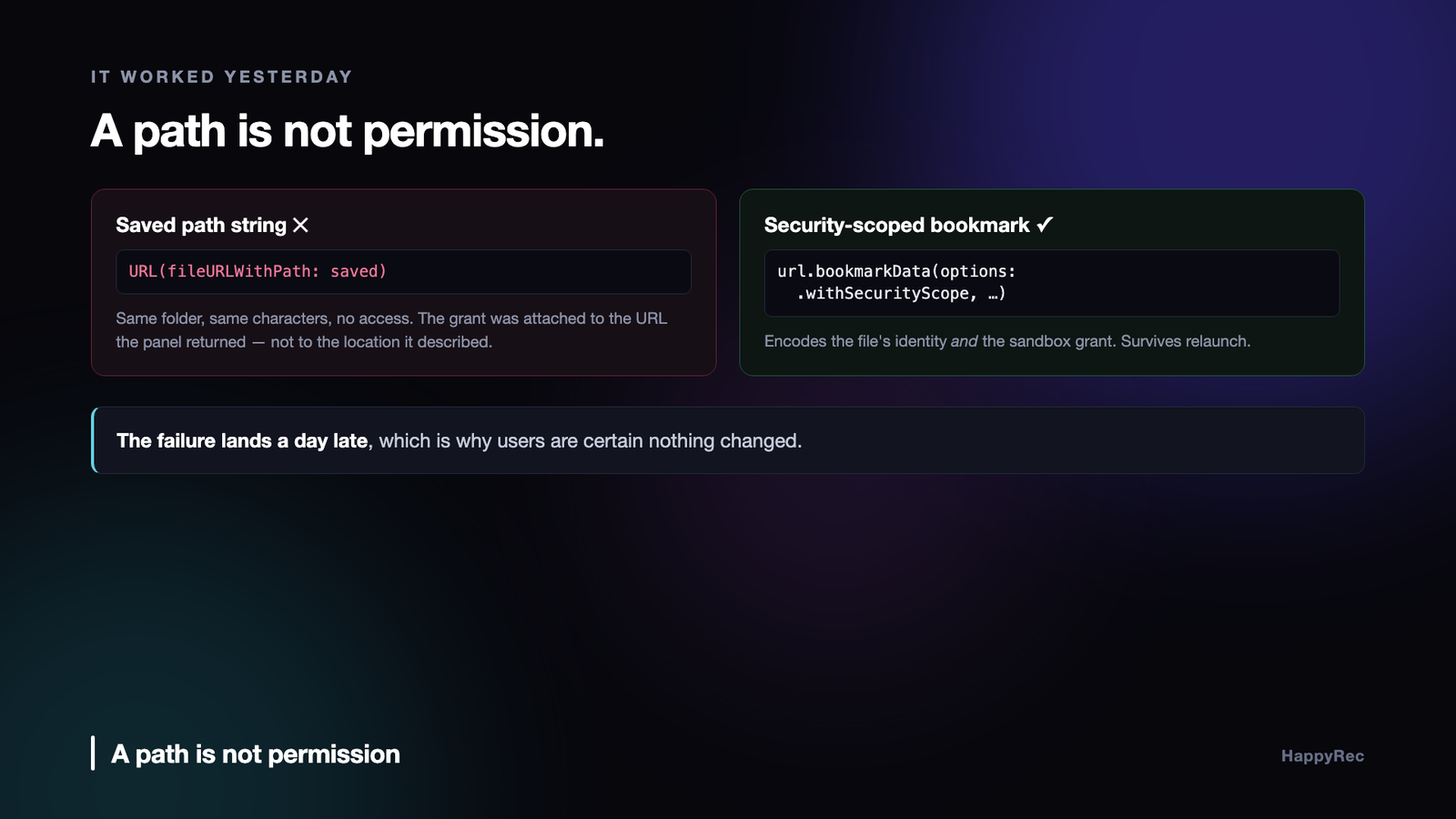
What is easy to miss is what you are allowed to keep. Storing the folder’s path as a string and reconstructing it later looks equivalent:
let url = URL(fileURLWithPath: savedPathString) // ← no access
It points at the same folder. It is the same path, character for character. It has no access at all, because the grant was attached to the URL the panel handed you, not to the location it described. Reconstructing a URL from a string produces a new object that was never granted anything.
Within a single run this mistake is invisible: the original URL is usually still around somewhere. It only appears after a relaunch, when everything you have is the string. Which is why the failure lands a day later, with a user certain that nothing changed — and from their side, nothing did.
Bookmarks are the only thing that survives
A security-scoped bookmark is an opaque blob that encodes both the file’s identity and the sandbox grant. Store the blob; resolve it next launch; get a URL that still works.
Creating one at the moment of the pick:
try url.bookmarkData(options: .withSecurityScope,
includingResourceValuesForKeys: nil,
relativeTo: nil)
The .withSecurityScope option is the entire point. A bookmark without it is a bookmark to a location, and resolves to a URL with no access — the same failure as the path string, arrived at by a longer route.
Resolving is where the second half of the contract lives, and where it is most often broken:
guard let url = try? URL(resolvingBookmarkData: data, options: .withSecurityScope, …),
url.startAccessingSecurityScopedResource() else { return nil }
Resolving alone does not restore access. startAccessingSecurityScopedResource() does, it returns a Bool that is not decorative, and access stays open only until you stop it or the process ends. Ignoring that return value gives you a URL that looks correct and fails on write.
There is a matching stopAccessingSecurityScopedResource(), and the pairing matters more than it appears to. Access is reference counted; leaking scopes across a long-running session eventually exhausts a system limit and new resolves start failing for no visible reason. HappyRec keeps the currently-open URL in a property and releases it before a new pick replaces it:
accessedSaveFolderURL?.stopAccessingSecurityScopedResource()
accessedSaveFolderURL = url
Resolve at launch, and give up cleanly
Bookmarks are resolved during initialisation, before any UI reads the save folder, so the first render already shows the right destination.
They can also fail, and that has to be a supported outcome rather than an error state. A folder can be moved, renamed, deleted, or sit on a volume that is not mounted this morning. The grant itself can be revoked. When resolution fails, the stored bookmark is dropped rather than retried forever:
if let bookmark = defaults.data(forKey: “saveFolderBookmark”) {
if let url = SecurityScopedBookmark.resolve(bookmark) { … }
else { defaults.removeObject(forKey: “saveFolderBookmark”) }
}
The app falls back to its default location and carries on. A recorder that refuses to record because a folder from last month is missing has chosen the wrong thing to be strict about.
The same treatment applies to every user-chosen file, not just the save folder. HappyRec lets a user pick a logo image to burn into recordings, and that image is a second bookmark with the identical lifecycle — pick, bookmark, resolve at launch, release before replacing, drop if it fails.
The default folder is the interesting decision
An app also needs somewhere to write before the user has chosen anything, and for a screen recorder ~/Movies is the obvious answer. It is also the wrong one, for a reason that has nothing to do with taste.
Reaching the real ~/Movies from a sandboxed app requires either a user pick or the Movies entitlement. Apple rejected our submission over that entitlement under guideline 2.4.5(i) — the app already had user-selected-file access and bookmarks, so there was no functionality the entitlement enabled that was not already possible.
Removing it produced a stranger problem. Once an app has been built even once with the Movies entitlement, macOS symlinks the sandbox container’s Movies folder through to the real ~/Movies, and never removes that symlink when the entitlement goes away. The next build — correct, approved — writes through a symlink to a path it no longer has access to. AVAssetWriter and AVAudioFile both surface that as an opaque “Cannot create file”.
Only on machines that ever built the old version. Which is to say: your machine, and no customer’s.
The default is now Application Support inside the container:
// Application Support has no such entitlement-gated redirection — it’s always a genuine, private, container-local directory.
macOS grants a sandboxed app its own container unconditionally. No entitlement, no picker, no dialog on first launch, and no dependence on what the app was built with in the past. Users who want ~/Movies pick it, once, and the bookmark keeps it.
Every grant is tied to your signature
One more piece of state travels with all of this, and it explains a class of bug that looks like the sandbox misbehaving during development.
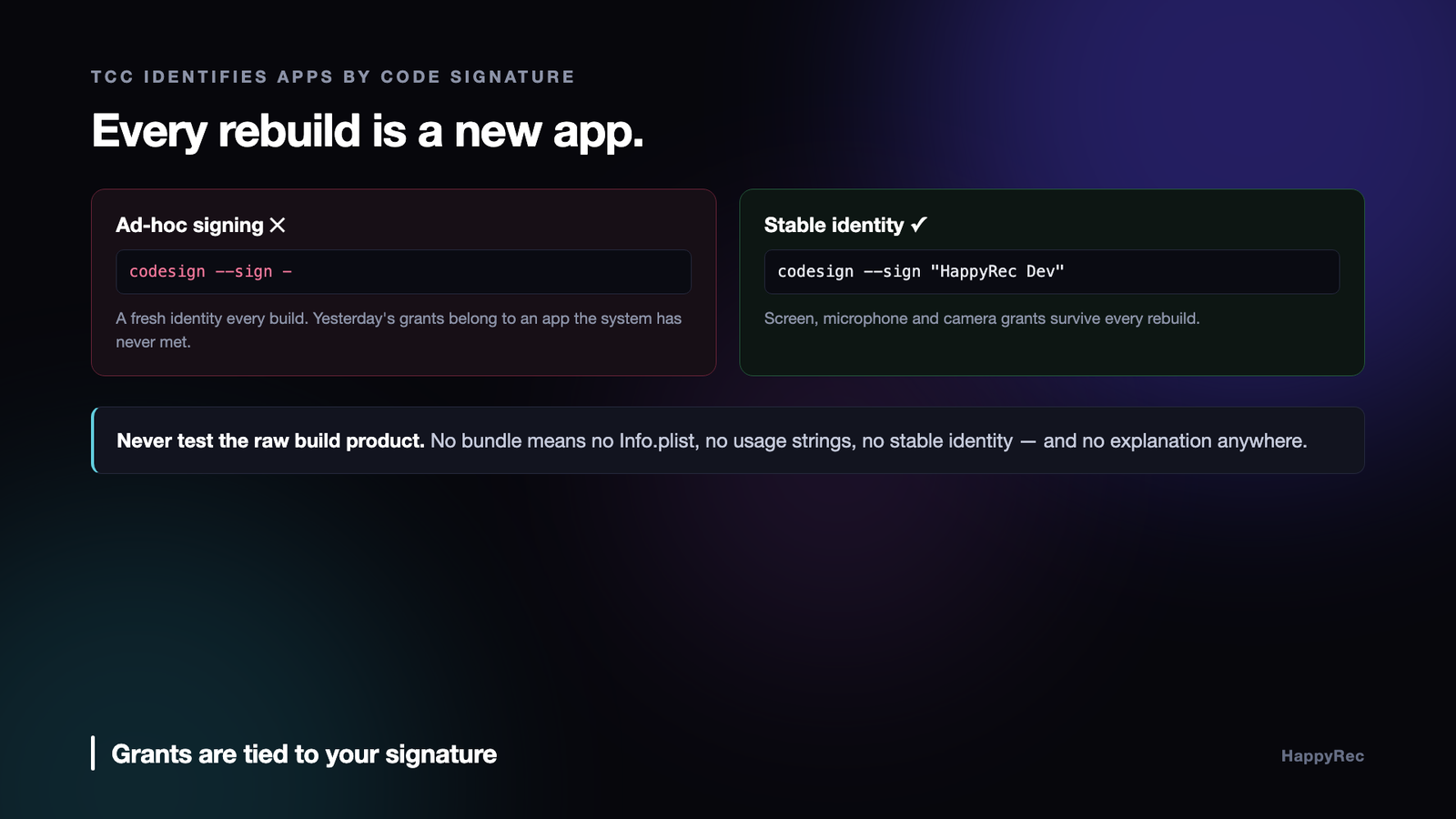
TCC — the system behind the microphone, camera and screen recording permissions — identifies an application by its code signature, not by its path or bundle identifier. Ad-hoc signing produces a different identity on every build. So every rebuild is a new application as far as the system is concerned, with no history and no grants, and the permissions you granted an hour ago are gone.
Developers reasonably read that as flakiness. It is consistency; the input changed.
The fix is a stable self-signed certificate in the login keychain, used for every local build, so the identity stays put across rebuilds. It is worth making the build script say out loud when it cannot find one, because a silent fallback to ad-hoc signing produces an afternoon of permission confusion with no clue as to the cause.
And the related trap: never test the raw build product. A bare executable has no bundle, no Info.plist, no usage strings and no stable identity, so the system blocks it and the reason is invisible. Always launch the built .app.
When a bookmark stops working
A security-scoped bookmark is not permanent, and the ways it expires are not obvious from the API.
The one that catches everybody is signing. A bookmark is tied to the identity of the application that created it. Re-sign the app with a different certificate — moving from a development build to a distribution build, or changing team — and every bookmark you have stored becomes unresolvable. Not an error at resolve time that you can recover from gracefully: the resolve reports the bookmark as stale, and stale means asking the user to pick the folder again.
During development this is invisible, because you are usually signing the same way each time. It appears the day you ship, in the form of users who set up a folder yesterday and are being asked for it again today, and it looks exactly like a bug in your persistence layer.
The second is the file moving. A bookmark survives a rename and a move within the same volume, which is one of the genuinely good things about the design. It does not survive the volume going away, and an external disk that was unmounted and remounted may or may not resolve depending on how it was formatted.
The pairing that must always balance
Every call that starts accessing a security-scoped resource must be matched by one that stops. This sounds like ordinary resource management and it has a sharper edge, because the failure is not a leak that grows slowly. It is a hard limit.
An application that keeps starting access without stopping will, after enough files, simply stop being granted access to anything. Nothing throws; the call returns false and every subsequent file operation fails with a permission error on a file the user definitely gave you. Debugging that from the symptom is miserable, because the code that fails is nowhere near the code that caused it.
The only reliable pattern is to make the pairing structural rather than remembered. Wrap the access in a scope that stops it when it exits, whatever happens inside — including an early return and including a thrown error. Then there is no path through the function that can skip the stop, and the balance is a property of the shape of the code rather than of somebody’s discipline.
What to store, and what to store it in
Bookmarks are opaque data blobs and they are not small. Storing them in user defaults works and stops being reasonable somewhere around a few dozen, at which point the defaults file is being rewritten in full every time a single bookmark changes.
What we do instead is keep them in an application support file of our own, keyed by a stable identifier rather than by path — because the path is precisely the thing that is allowed to change while the bookmark stays valid. The display path shown in the interface is resolved fresh each time from the bookmark, so a folder the user renamed shows its new name without any migration.
One more detail worth stating: when a resolve comes back stale but succeeds, you are expected to create a new bookmark from the resolved URL and replace the stored one. Skipping that step works for a while and then fails, because the staleness that was tolerable accumulates until it is not.
Asking for access without irritating the user
Every security-scoped bookmark starts with an open panel, which means the sandbox has a user-experience consequence as well as a technical one: your application has to ask, and how it asks decides whether people finish setting it up.
The pattern that works is to ask once, for the broadest reasonable scope, at the moment the user is already thinking about it. A recorder asking for a folder immediately after the user has chosen to save a recording is asking at the right time. The same panel appearing on first launch, before the person has any idea what the app does, gets cancelled.
Ask for a folder rather than a file wherever the workflow allows it. A folder bookmark covers everything inside it, including files that do not exist yet, which means one panel instead of one per recording. Users who would find a prompt per file intolerable accept a single prompt for a folder without comment.
And explain the panel before it appears, in one sentence, in your own interface. The system panel has no room for your reasoning, and a file picker that appears without warning reads as the application doing something the user did not ask for.
Recovering when a bookmark is gone
Whatever you do, some bookmarks will stop resolving, and the recovery path is a real part of the feature rather than an error case to log.
The thing not to do is fail silently and fall back to a default location. The user set a folder deliberately; writing somewhere else without saying so means their recordings are somewhere they will not look. Files that end up in an unexpected directory are indistinguishable from files that were never written.
What works is to detect the failure at the moment of use, tell the person plainly which folder is no longer reachable, and offer the panel again with that folder pre-selected if it still exists. Most of the time the resolve failed for a reason the user can fix in one click — the disk is plugged in, the folder is still there, the grant simply expired.
Keep the old bookmark until the new one resolves successfully. Replacing it first and then failing leaves the user with nothing, and a stale bookmark is still better than an empty one because it at least records what they had chosen.
The checklist
- Never persist a path string for a user-chosen location. It is not permission and it will fail after relaunch.
- Create bookmarks with
.withSecurityScope. Without it you have stored a location, not a grant. - Call
startAccessingSecurityScopedResource()and check what it returns. Resolving is not enough. - Release the previous scope before replacing it. Access is reference counted and leaks have a limit.
- Resolve during initialisation, so the first frame already shows the right destination.
- Treat resolution failure as normal. Drop the bookmark, fall back, carry on.
- Bookmark every user-chosen file, not only folders. A picked image has the same lifecycle.
- Default to your own container. It needs no entitlement and no picker, and it cannot be broken by an entitlement you once shipped.
- Sign local builds with a stable identity. Ad-hoc signing resets every grant on every build.
The mental shift that makes all of this straightforward is small: stop thinking of the file system as a place your app can reach, and start thinking of it as a set of grants your app has been handed. Grants have owners, lifetimes and an explicit way to be persisted. Once the model is that, the API stops feeling arbitrary and the bug that arrives a day late stops being mysterious.
HappyRec is a sandboxed, native macOS screen and voice recorder with a formant-preserving voice changer and a presenter overlay. It is on the Mac App Store, and at happyrec.happycoders.in.




