
Time Zones Will Break Your Timesheet: Storing and Displaying Work Hours Correctly
Time Zones Will Break Your Timesheet: Storing and Displaying Work Hours Correctly
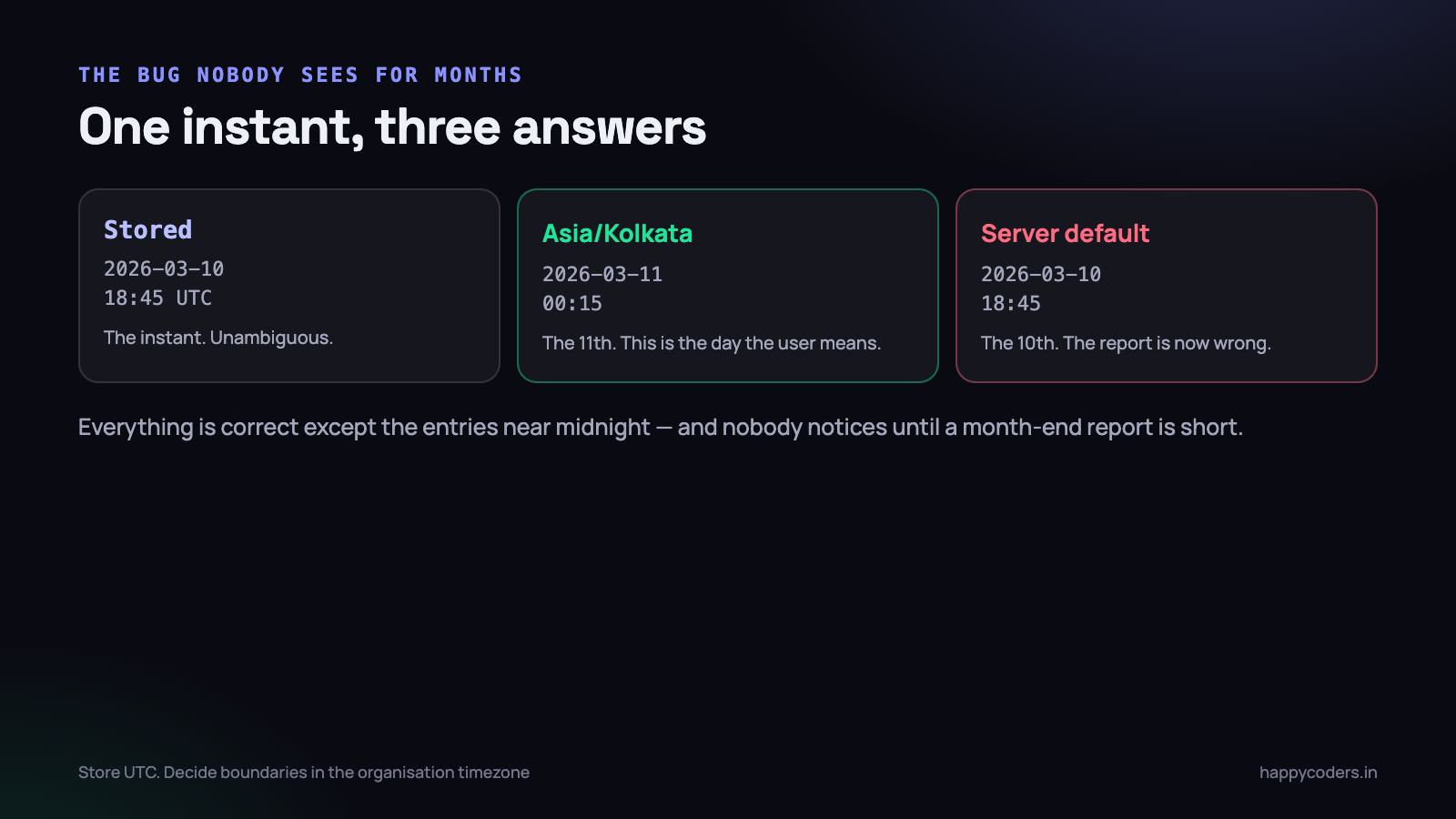
Time zone bugs in a time-tracking product have a signature: everything is correct except the entries near midnight, and nobody notices for months. Then a report for March is short by four hours, or a week shows six days, and the cause is a boundary computed in the wrong place.
This is the set of rules we settled on after finding several of these the hard way, and the reasoning behind each one.
Rule one: store UTC, always
Every timestamp in the database is UTC. Clock-in, clock-out, activity blocks, audit entries, everything. This is not a preference; it is the only choice that survives a server being moved, a customer changing country, or two customers being in different countries at once.
The reason is that a local time is ambiguous and an instant is not. “2:30 on 2 November” may have happened twice or not at all, depending on the zone and the year. A UTC instant is one moment, everywhere, forever.
-- correct: an instant
started_at TIMESTAMP NOT NULL        -- stored UTC

-- wrong: a wall clock reading with no zone
started_at DATETIME NOT NULL         -- 09:00 where? whose 09:00?
Make sure the application, the database connection and the server agree that the stored value is UTC. In Laravel that means APP_TIMEZONE=UTC and leaving it alone. Changing the application timezone to Asia/Kolkata “so the logs read nicely” is a decision that will cost you a weekend later.
Rule two: a working day belongs to the organisation, not the server
A timesheet asks “how many hours on Tuesday”. Tuesday is a local concept. For a company in Chennai it starts at 18:30 UTC the previous day; for one in London it starts at midnight UTC in winter and 23:00 UTC in summer.
So every boundary — start of day, start of week, start of month, start of a sprint — is computed in the organisation’s timezone and then converted to UTC for the query.
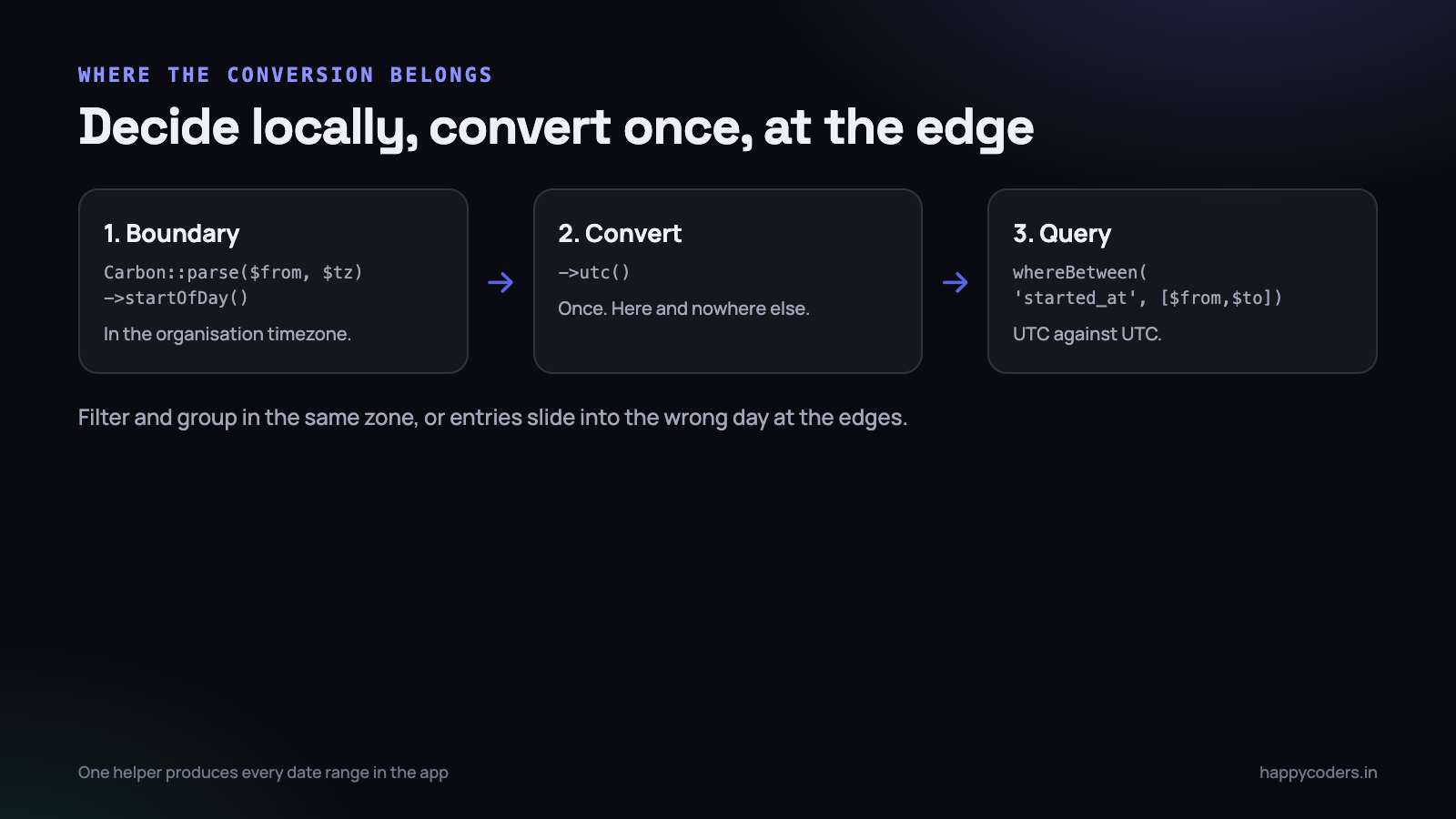
<?php
$tz = $organization->timezone;                 // e.g. 'Asia/Kolkata'

$from = Carbon::parse($request->from, $tz)->startOfDay()->utc();
$to   = Carbon::parse($request->to,   $tz)->endOfDay()->utc();

$entries = $organization->timeEntries()
    ->whereBetween('started_at', [$from, $to])
    ->get();
The mistake this prevents is subtle: computing the range in the server’s timezone produces a report that is correct for most entries and wrong for the ones within a few hours of midnight. Nobody spots it until somebody works late.
Where the timezone should live
Before the rules are useful you have to decide whose timezone is authoritative, and there are three candidates: the organisation, the user, and the browser. They are not interchangeable and mixing them is the root of most of the bugs below.
- The organisation timezone is a column on the organisation, set once by the owner. It defines the working day, the week boundary and the month boundary for every report. This is the one reports should use.
- The user timezone is optional and only affects display. It is useful for a genuinely distributed team and it must never influence a boundary, or two people running the same report get different numbers.
- The browser timezone is a guess, is frequently wrong on shared or virtual machines, and is the only one you did not choose. Use it at most to suggest a default when somebody signs up.
Make the organisation timezone a required field at signup rather than defaulting silently to UTC. A default that is wrong for every Indian customer, and invisible in the interface, produces reports that are five and a half hours out and a support conversation that takes an hour to unpick.
Rule three: group in the same zone you filtered in
A daily chart needs entries grouped by date. If the range is computed in the organisation’s zone and the grouping is done by the database’s date function — which uses the database’s zone — the two disagree, and entries slide into the wrong day at the edges.
-- risky: whose date is DATE() using?
SELECT DATE(started_at) AS day, SUM(duration) FROM time_entries GROUP BY day;

-- explicit: convert, then take the date
SELECT DATE(CONVERT_TZ(started_at, '+00:00', ?)) AS day, SUM(duration)
FROM time_entries WHERE started_at BETWEEN ? AND ? GROUP BY day;
The alternative — and what we prefer for anything complex — is to fetch the rows and group in application code, where the timezone is explicit and testable. It costs a little memory and removes a class of bug that is very hard to see in a chart.
Rule four: a day is not always 24 hours
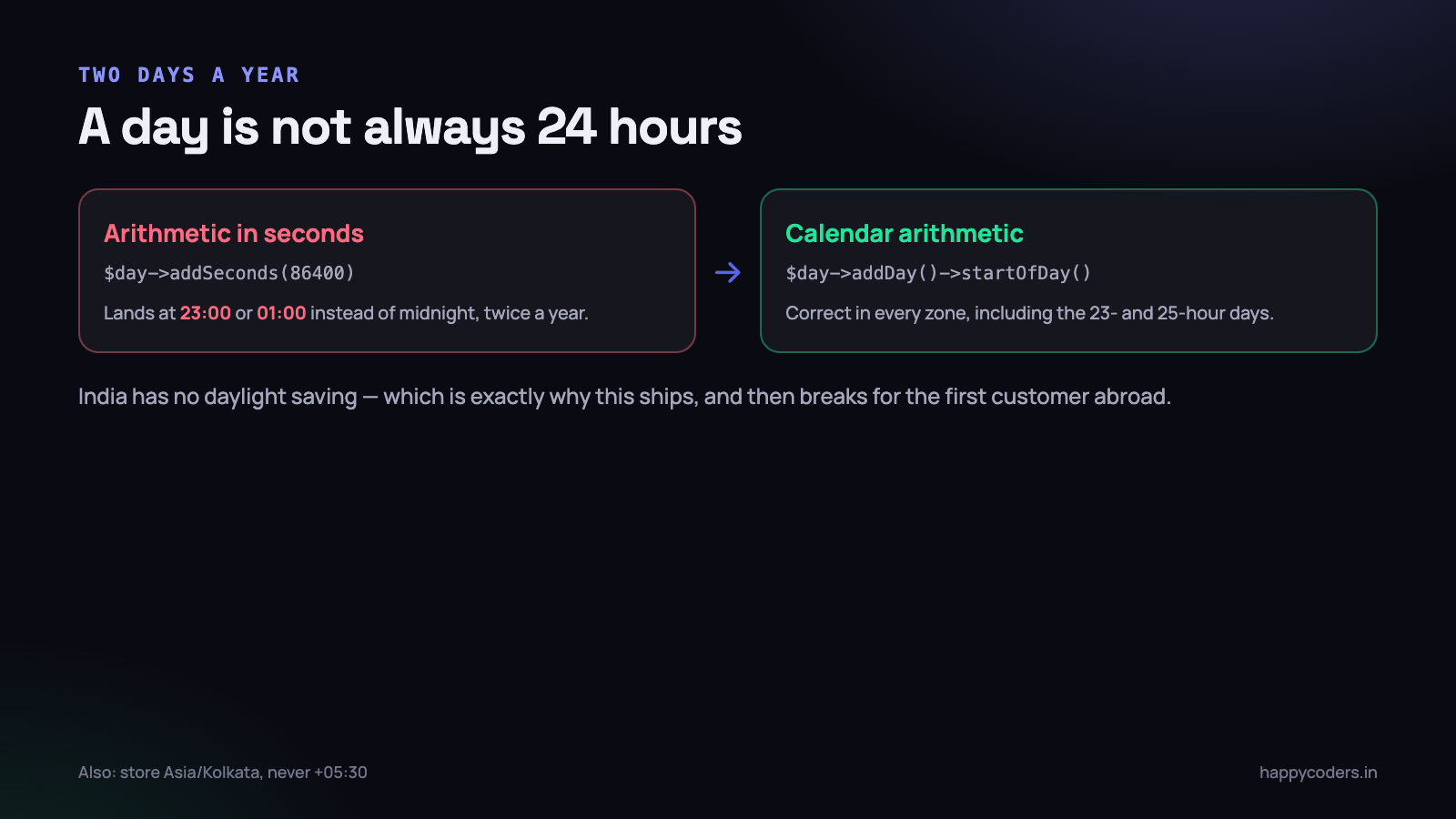
In a zone with daylight saving, one day a year has 23 hours and another has 25. Code that adds 86400 seconds to move to the next day will, twice a year, land at 23:00 or 01:00 instead of midnight.
<?php
// wrong - assumes every day is 86400 seconds
$next = $day->copy()->addSeconds(86400);

// right - calendar arithmetic, DST aware
$next = $day->copy()->addDay()->startOfDay();
India has no daylight saving, which is exactly why this ships from an Indian team and then breaks for the first customer in Europe or North America. Use calendar arithmetic everywhere, even when your own zone would forgive you.
Rule five: a session can cross midnight
Somebody starts at 22:30 and stops at 01:15. Which day do those hours belong to?
There are two defensible answers and you must pick one and write it down: attribute the whole session to the day it started, or split it at midnight. We attribute to the start day, because it matches how people describe their own work — “I worked late on Tuesday” — and because splitting creates two entries that no longer correspond to anything the user did.
Whichever you choose, the same rule must be used by the timesheet grid, the daily chart, the attendance report and the invoice generator. A single place in the code that answers “which day does this session belong to”, called by all of them.
What happens when the timezone changes
A customer moves, or the owner realises the timezone was wrong at signup and fixes it. What should happen to the data already recorded?
Because everything is stored in UTC, nothing needs to be rewritten — and that is the point of the first rule. The instants are unchanged; only their interpretation moves. But two things do change, and both need thinking about:
- Historic reports will produce different numbers. A day boundary moved, so entries near midnight change days. If somebody has already been invoiced from the old figures, the new report will not match the invoice.
- Approved or locked periods should not silently shift. If your product locks a month after approval, store the totals that were approved, rather than recomputing them every time the page is opened.
The practical answer is to record the change — who changed the timezone, when, from what to what — and to warn on the screen that past reports may differ. Snapshotting approved periods is the stronger fix and is worth doing if invoices are generated from the data.
Rule six: display in the viewer’s zone, label it, and be consistent
A manager in Chennai reviewing a developer in Germany needs to know whose clock a time refers to. Two workable policies:
- Everything in the organisation’s timezone. Simple, consistent, and what most teams expect — the company has one working day.
- Everything in the viewer’s timezone, clearly labelled. Better for genuinely distributed teams, and it requires the label or nobody can tell.
What does not work is mixing them, which is what happens by accident when some views format on the server and others format in the browser with JavaScript. Pick one, and make the formatting go through a single helper so a new screen cannot quietly do it differently.
Testing the parts that break
These bugs do not appear in ordinary tests because ordinary tests use ordinary times. Test the edges deliberately:
- An entry at 23:45 local time. Confirm it appears on the right day in the grid, the chart and the report.
- A session crossing midnight. Confirm every screen agrees which day it belongs to.
- An organisation in a negative-offset zone such as America/New_York, as well as Asia/Kolkata. Half of these bugs only appear when the offset sign flips.
- A DST transition. Freeze the clock to the last Sunday in March in Europe/London and run the weekly report.
- A half-hour offset. Asia/Kolkata is +05:30. Code that assumes whole-hour offsets exists, and it is always found by an Indian customer.
<?php
public function test_a_late_night_entry_belongs_to_the_day_it_started(): void
{
    $org = Organization::factory()->create(['timezone' => 'Asia/Kolkata']);

    $this->travelTo(Carbon::parse('2026-03-10 23:45', 'Asia/Kolkata'));
    $entry = $this->clockIn($org);
    $this->travelTo(Carbon::parse('2026-03-11 01:15', 'Asia/Kolkata'));
    $this->clockOut($org);

    $grid = $this->grid($org, '2026-03-10', '2026-03-10');
    $this->assertSame(90, $grid->minutesOn('2026-03-10'));   // all 90 minutes on the 10th
}
The desktop client adds one more problem
A tracker running on somebody’s laptop has its own clock, and that clock can be wrong — by accident, or deliberately. Never trust a timestamp sent by a client for anything that decides pay or billing.
The server stamps clock-in and clock-out from its own clock. The client may send a timestamp for ordering or for offline buffering, but the authoritative value is the server’s. When work is buffered offline and uploaded later, send the elapsed durations and the client’s own monotonic timing, and reconcile against the server clock on arrival — rather than accepting wall-clock times from a machine you cannot see.
A short checklist
- Every stored timestamp is UTC, and the app timezone is UTC.
- Every boundary is computed in the organisation’s zone, then converted.
- Filtering and grouping happen in the same zone.
- Calendar arithmetic, never arithmetic in seconds.
- One function decides which day a session belongs to, and everything calls it.
- One helper formats times for display, and everything uses it.
- The server stamps the time, not the client.
- Tests cover late-night entries, midnight crossings, negative offsets, half-hour offsets and a DST change.
None of it is difficult. All of it is invisible until a customer in another country runs their first month-end report, which is the worst possible moment to find out.
The bugs this produces in the wild
It is worth naming the specific failures, because each one appears in a support ticket long before it appears in a test.
- The disappearing hour. A monthly report is short by exactly the hours somebody worked between midnight and 05:30 local time on the first of the month, because the range was built in UTC.
- The seven-day week that shows eight days. A weekly chart built from UTC dates renders a partial extra column at one end, and everybody assumes the data is wrong.
- The entry that is on two days at once. The grid says Tuesday because it groups in one zone; the daily total says Wednesday because it groups in another.
- The negative duration. Clock-out is stored as a local time and clock-in as UTC, and subtracting them produces minus five and a half hours. Always visible, always embarrassing.
- The report that is right for the owner and wrong for the manager. Formatting happens in the browser in some views and on the server in others, so two people see two versions of the same screen.
- The month that ends on the 30th at 18:30. Somebody computed
endOfMonthin UTC and converted it the wrong way, so the last evening of every month is missing.
Every one of these is the same mistake with a different symptom: a boundary or a conversion done in the wrong place. Which is why the fix is architectural rather than a series of patches — one place that produces a date range, one place that decides which day a session belongs to, one place that formats a time.
Two smaller traps worth knowing
Storing a timezone, not an offset
Store Asia/Kolkata, never +05:30. An offset is what a zone happens to be today; a zone knows its own history and its own future. A stored offset is silently wrong for every date on the other side of a daylight-saving change, and countries do occasionally change their rules outright — when that happens, an updated timezone database fixes every stored zone name and cannot fix a single stored offset.
Dates that are not instants
A leave request for the 14th, a holiday, a project deadline — these are calendar dates, not moments in time. Storing them as timestamps is how a leave day becomes the 13th for a user in a negative-offset zone. Store a plain DATE and never convert it. The rule is simple: if the thing has a time of day, it is an instant and belongs in UTC; if it does not, it is a date and belongs in a date column, untouched by any conversion.
These two account for a surprising share of the timezone tickets that arrive after the reporting layer is already correct, because they live in different parts of the codebase and nobody thinks of them as timezone code at all.
A concrete implementation shape
What this looks like in a Laravel codebase, condensed:
<?php
final class OrgClock
{
    public function __construct(private readonly Organization $org) {}

    private function tz(): string { return $this->org->timezone ?: 'UTC'; }

    /** Local calendar range -> UTC instants, for every query in the app. */
    public function range(string $from, string $to): array
    {
        return [
            Carbon::parse($from, $this->tz())->startOfDay()->utc(),
            Carbon::parse($to,   $this->tz())->endOfDay()->utc(),
        ];
    }

    /** The single answer to "which day does this session belong to". */
    public function dayOf(CarbonInterface $instant): string
    {
        return $instant->copy()->setTimezone($this->tz())->toDateString();
    }

    /** The single formatter for display. */
    public function display(CarbonInterface $instant, string $fmt = 'd M Y, H:i'): string
    {
        return $instant->copy()->setTimezone($this->tz())->format($fmt);
    }
}
It is a small class and it is deliberately boring. Its value is not the code, it is that a new report written next year by somebody who has never thought about any of this will call range() and be correct by default. Every timezone bug in this list comes from a developer doing the conversion themselves, reasonably, and getting it subtly wrong.
Enforce it the same way you enforce anything else: a test that fails if a raw startOfDay() appears in a controller, or simply a code review habit. The discipline matters more than the mechanism, because these bugs are not caught by the compiler, by the type system, or by any test that uses a convenient time of day.




