
Transactional Email That Reaches the Inbox: SPF, DKIM, DMARC
Transactional Email That Reaches the Inbox: SPF, DKIM, DMARC
A customer says the password reset email never arrived. You check the logs and the send succeeded. You resend it and it succeeds again. Three days later somebody finds four of them in the spam folder, filed between a loan offer and a cryptocurrency newsletter.
Nothing in the application is broken. The problem is that a receiving mail server has no reason to believe your message came from you, and in the absence of a reason it assumes the worst. Fixing this is a day of DNS work and a change in how you send, and it is one of the highest-value days you can spend on a small product.
Why the mail function is a dead end
Every PHP tutorial starts with the same two lines, and they will work on your laptop:
<?php
mail($to, 'Your invoice', $body, "From: billing@yoursite.in\r\n");
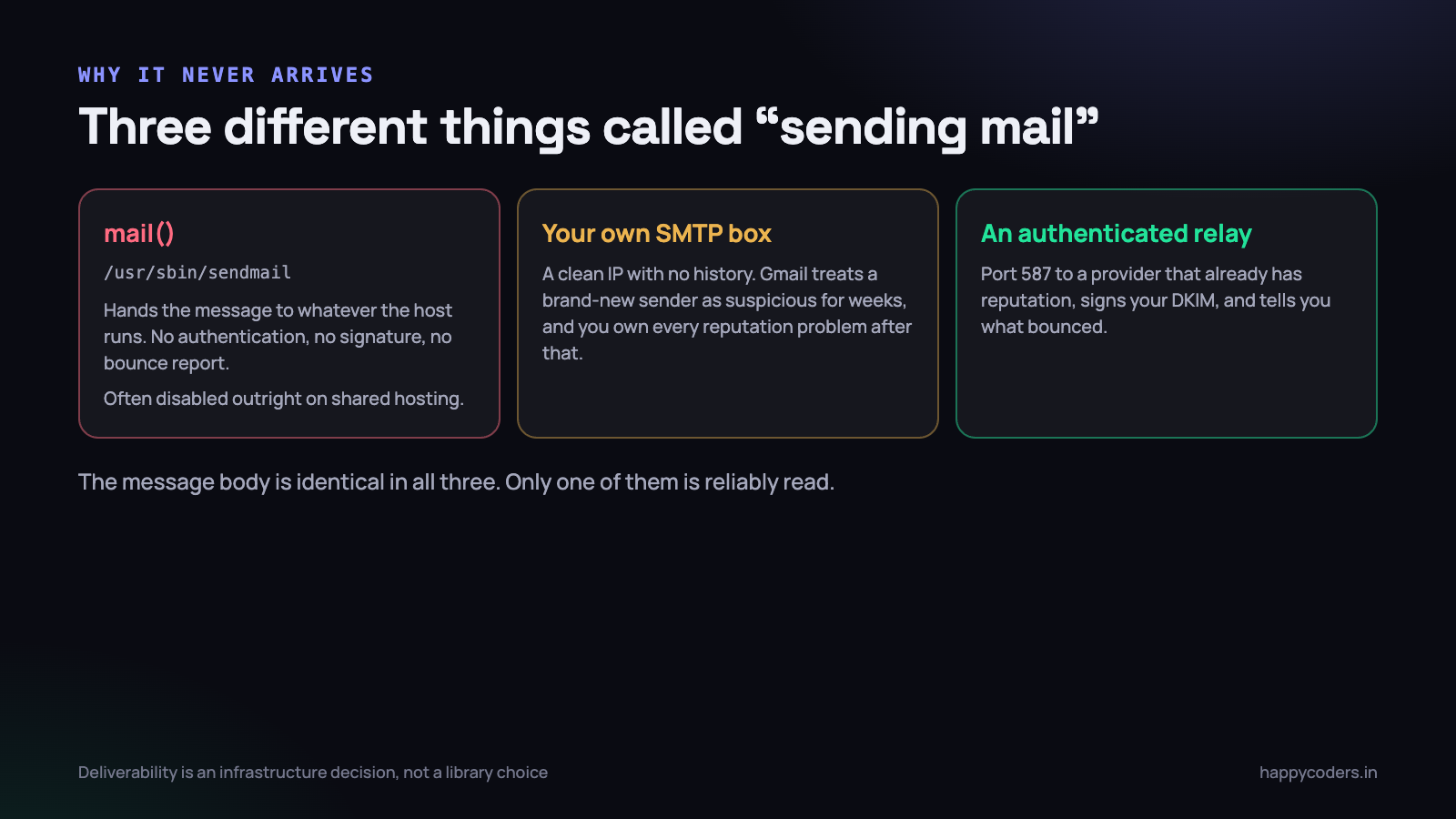
That call does not send anything. It hands the message to a local binary, usually /usr/sbin/sendmail, and returns true if the binary accepted it. True means “queued somewhere”, not “delivered” and certainly not “read”. Three separate things then go wrong.
- The message is unauthenticated. It is not signed, and the sending IP is a shared host’s IP that hundreds of other sites also use. Gmail has no way to distinguish your invoice from the marketing mail the site next door sent this morning.
- You get no feedback. A bounce goes to a system mailbox nobody reads. You cannot tell a wrong address from a blocked one, so bad addresses stay on your list forever and keep damaging your reputation.
- On most shared hosting it is simply switched off. Hostinger, among others, disables the sendmail binary entirely. The function returns false, or returns true and the message vanishes, and your application reports success either way.
We hit exactly that on a production deployment: the code was fine, the configuration was fine, and mail was disabled at the host. The only supported path was authenticated SMTP to a relay. That is not a limitation worth fighting. It is the correct architecture, and the host simply forced the issue early.
If you take one thing from this article: never let application code call
mail()directly. Send through an SMTP transport with credentials, even in development. It costs nothing and it removes an entire class of “works here, not there”.
The three DNS records, explained properly
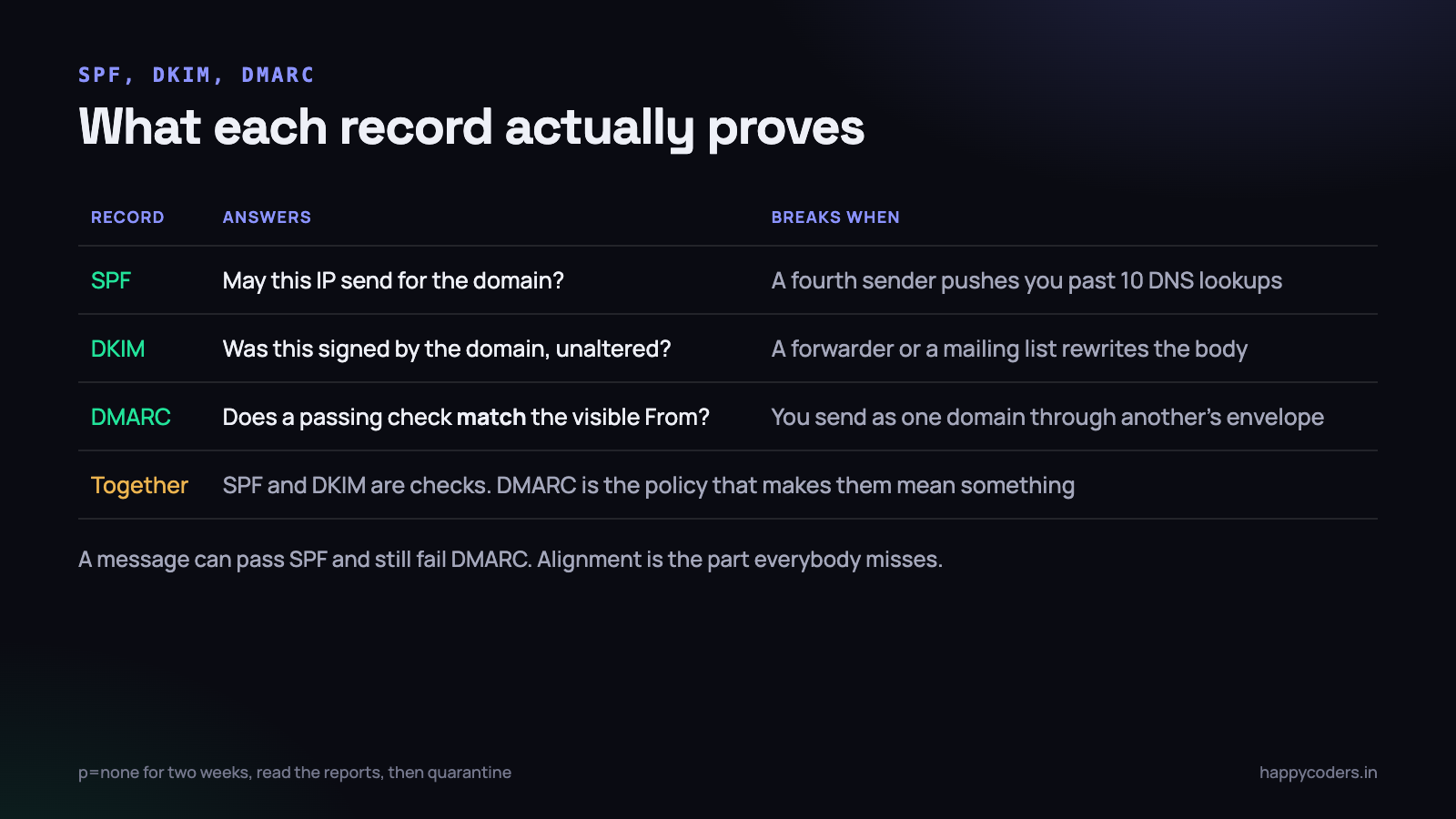
SPF, DKIM and DMARC get described as “email authentication” as though they were one thing. They are three separate mechanisms answering three separate questions, and you need all three because each one has a hole the others cover.
SPF says which servers may send
SPF is a TXT record on your domain listing the servers allowed to send mail for it. A receiving server looks at the connecting IP, looks up your record, and checks whether the IP is in the list.
v=spf1 include:_spf.google.com include:spf.myrelay.com ~allTwo details decide whether this works. The first is the ending. ~all is a soft fail, meaning “anything else is probably not us”; -all is a hard fail, meaning “anything else is definitely not us”. Start with ~all while you are still discovering which systems send mail on your behalf, and tighten to -all once the list has been stable for a month.
The second is the ten-lookup limit. Every include: costs a DNS lookup, and each included record may contain its own includes. Cross ten and the whole record is invalid — not degraded, invalid, exactly as though you had published nothing. Three or four providers is enough to trip it. Check the count with any SPF validator whenever you add a sender.
SPF has a real weakness worth naming: it validates the envelope sender, which the recipient never sees. A message can pass SPF perfectly while displaying any From address the sender chose. On its own it stops almost nothing.
DKIM signs the message itself
DKIM puts a cryptographic signature in the message headers. You publish the public key in DNS; your sending service holds the private key and signs each message with it. The recipient fetches the key and verifies that the message really came from a system holding the private half, and that the body has not been altered on the way.
; selector "mail1", published as a TXT record at:
mail1._domainkey.yoursite.in

v=DKIM1; k=rsa; p=MIIBIjANBgkqhkiG9w0BAQEFAAOCAQ8AMII...
The selector is the arbitrary label before _domainkey, and it exists so you can hold several keys at once. That is what makes key rotation possible without downtime: publish a new selector, switch the sender to it, verify, then remove the old record a week later.
DKIM is stronger than SPF because it survives a forward. It breaks when something rewrites the message — a mailing list appending a footer, or a security appliance inserting a banner — which is why you still want SPF as the second path.
DMARC ties them to the address the human sees
This is the record most small teams skip, and it is the one that makes the other two count. DMARC checks alignment: that the domain which passed SPF or DKIM is the same domain as the visible From address. It also tells receivers what to do when nothing aligns, and asks them to send you reports.
_dmarc.yoursite.in  TXT
v=DMARC1; p=none; rua=mailto:dmarc@yoursite.in; adkim=r; aspf=r
Start at p=none. That changes no delivery decisions and simply turns on the reports, which arrive daily as XML from Google, Microsoft and others. Read them for two weeks. They will show you every system sending as your domain, including the two you had forgotten — a CRM, an old invoice script on a server nobody has logged into since March.
Once the reports show only senders you recognise, move to p=quarantine, and after another few weeks to p=reject. Going straight to reject before reading reports is how a company discovers, on a Monday, that its accounts department has been sending purchase orders through a system nobody told engineering about.
Send transactional mail from a subdomain
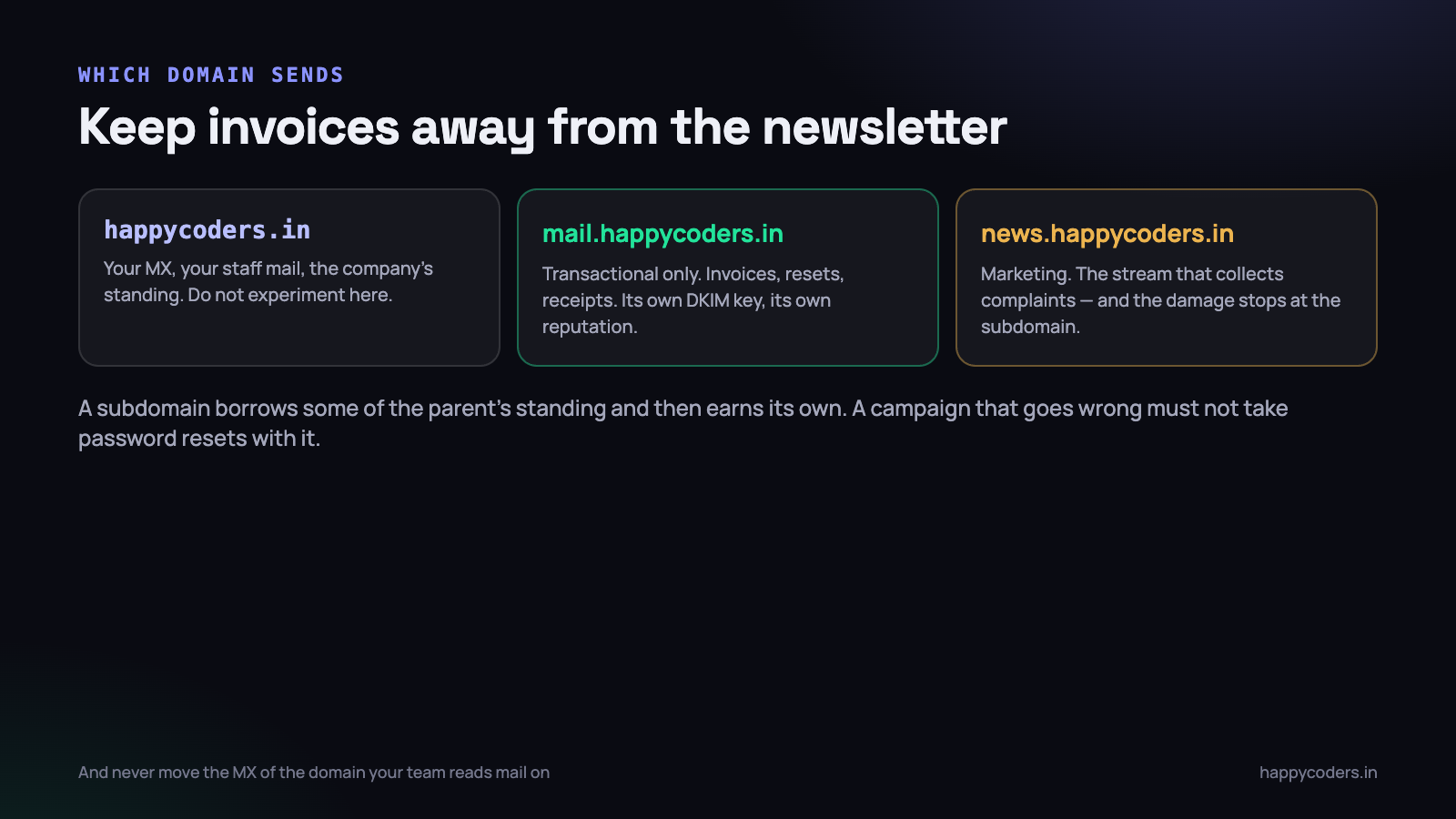
Use a subdomain for the mail your application sends: mail.yoursite.in or notify.yoursite.in, with its own DKIM key. There are three reasons, and the third is the one that gets teams eventually.
- Reputation is tracked per sending domain. A marketing campaign that collects complaints damages the domain it was sent from. If invoices and campaigns share a domain, a bad campaign takes password resets down with it.
- You can apply different policies. Transactional mail can run at
p=rejectalmost immediately, because you control every system that sends it. Marketing, with its third-party tools, usually cannot. - Your corporate mail is untouched. The domain your staff read mail on has MX records pointing at Google Workspace or Microsoft 365. Nothing about your application’s sending should ever require changing those. This is worth writing on a wall somewhere — changing the MX record of a live domain to make an application send mail is a self-inflicted outage that takes hours to notice and hours more to undo.
A new subdomain starts with a thin reputation, inherits some standing from the parent, and builds its own within a few weeks of consistent, low-complaint sending. For transactional volumes — a few hundred messages a day, almost all of them wanted — that happens quickly.
When the host has disabled sendmail
On most Indian shared hosting plans the local mail binary is either disabled or so heavily rate-limited that it is useless. The supported path is authenticated SMTP to a relay on port 587, and the configuration is short.
# .env
MAIL_MAILER=smtp
MAIL_HOST=smtp.yourprovider.com
MAIL_PORT=587
MAIL_ENCRYPTION=tls
MAIL_USERNAME=no-reply@yoursite.in
MAIL_PASSWORD=...
MAIL_FROM_ADDRESS=no-reply@mail.yoursite.in
MAIL_FROM_NAME="Your Company"
Three things to get right here. Port 587 with STARTTLS, not port 25 — most hosts block outbound 25 to stop spam, and a send that times out after 30 seconds is usually this. The From address must be a real mailbox at a domain you have set up SPF and DKIM for, not an invented one. And the SMTP credentials belong in the environment file, never in a config file that is committed.
Send through a queue, not inside the request. An SMTP conversation takes 200 to 800 milliseconds when it is healthy and 30 seconds when the relay is having a bad morning. A user waiting on a signup form should never be waiting on that, and a queued send gets retries for free.
<?php
// dispatched, not sent, inside the request
Mail::to($user)->queue(new InvoiceIssued($invoice));
Bounces and complaints are data you must collect
A bounce is the receiving server telling you something about the address, and there are two kinds that mean opposite things.
- A hard bounce is permanent: the mailbox does not exist. Send to it again and you look like a sender working from a bought list, which is one of the strongest negative signals there is. Mark the address dead on the first hard bounce and stop.
- A soft bounce is temporary: mailbox full, server down, greylisting. Retry these a few times over a day, then give up and flag the address for a human to look at.
- A complaint is somebody pressing “report spam”. Providers report these back through feedback loops. Suppress that address immediately and permanently, even if the mail was transactional — arguing that they asked for it changes nothing about the damage.
Every reasonable relay posts these to a webhook. Take the ten minutes to receive it, because without it your sending list only degrades. A suppression table with an address, a reason and a timestamp is enough to start:
<?php
Schema::create('email_suppressions', function (Blueprint $t) {
    $t->id();
    $t->string('email')->unique();
    $t->string('reason');          // hard_bounce | complaint | manual
    $t->timestamp('suppressed_at');
});
Then check it before every send. A queued job that skips a suppressed address costs one indexed lookup and protects the reputation every other message depends on. The webhook itself needs the usual care around retries and duplicate deliveries — the same discipline as any other incoming hook, covered in reliable webhook delivery.
Test deliverability before you launch, not after
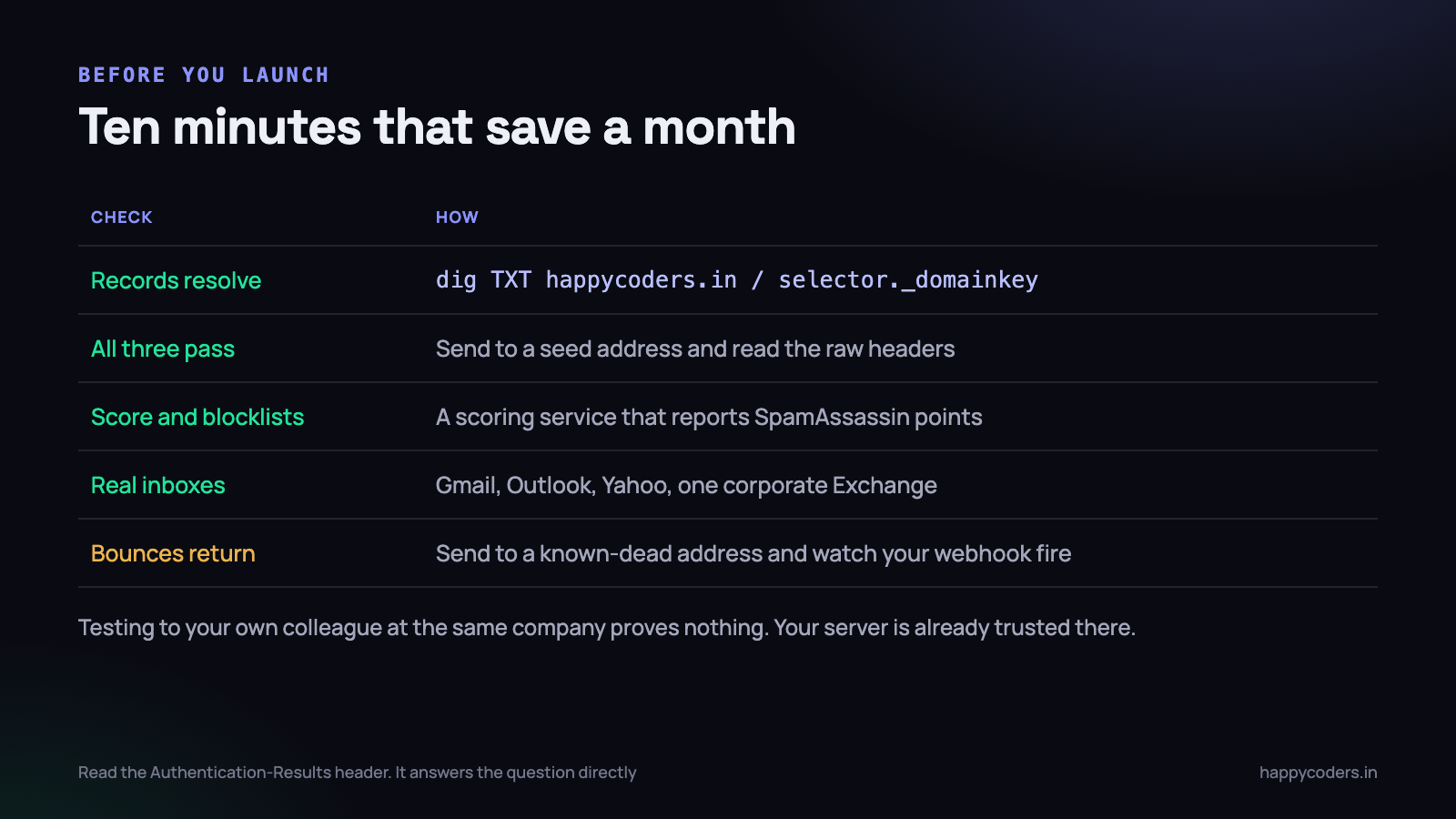
The single most misleading test is sending to a colleague at the same company. Your server is already trusted there, your mail probably does not even leave the building, and it proves nothing about Gmail.
- Check the records resolve.
dig TXT yoursite.infor SPF,dig TXT mail1._domainkey.yoursite.infor DKIM,dig TXT _dmarc.yoursite.infor DMARC. Do this from outside your own network, and remember DNS changes may take a few hours to propagate. - Read the raw headers of a real message. Send to a Gmail address you control, open the message, and look at the original. The
Authentication-Resultsheader states plainly whether SPF, DKIM and DMARC passed. This is the single most direct answer available anywhere and most people never look at it. - Use a scoring service. Several sites give you a throwaway address, receive your message and report a SpamAssassin score with the individual rules that fired. The rules are more useful than the score — they name the specific problem.
- Test the real inboxes. Gmail, Outlook, Yahoo and one corporate Exchange if any of your customers are companies. Corporate filters are stricter than consumer ones and they are the ones that silently quarantine.
- Prove a bounce comes back. Send to an address you know is dead and watch your webhook fire and your suppression row appear. If it does not, you do not have bounce handling; you have a webhook endpoint.
The content mistakes that ruin perfect configuration
Authentication gets you considered. The message itself still has to look like what it claims to be, and a handful of habits will get a properly signed invoice filtered anyway.
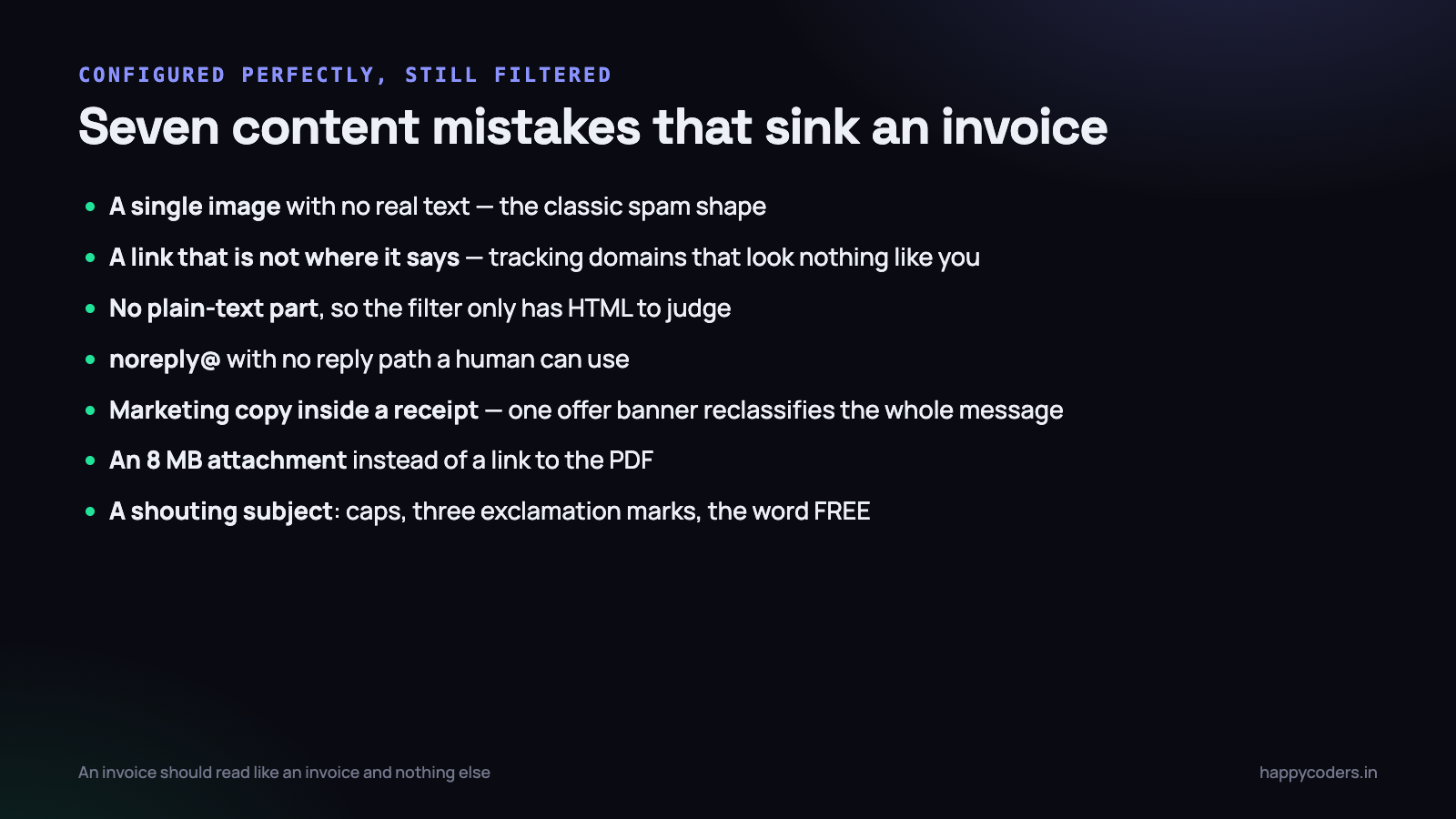
One big image and nothing else
A message whose entire content is a single image with no meaningful text is the classic spam shape, because it is what people do when they want to hide the text from filters. A designer sending a beautiful invoice template as one PNG has produced exactly that signature.
No plain-text alternative
Send multipart: HTML and a plain-text version of the same content. It costs nothing, several filters treat its absence as a small negative, and some corporate clients display the text part to the recipient anyway.
Links that do not go where they say
Click-tracking that rewrites every URL to an unrelated domain looks precisely like phishing, because that is the same technique. If you track clicks, use a tracking domain on your own subdomain with a proper certificate. And never write out a full URL as anchor text and link it somewhere else.
Marketing copy inside a receipt
An invoice that also carries a banner about a new plan is no longer a transactional message, and filters are good at telling the two apart. Keep them separate. The receipt gets delivered because it is a receipt.
A no-reply address with no way back
A From address that discards replies is a mild negative signal and a genuine annoyance to customers. Use a real mailbox, or at minimum set a Reply-To that a person actually reads.
Attachments where a link would do
A 6 MB PDF attached to every invoice is slow, fills mailboxes and raises scrutiny. Host the file and send a signed link that expires. It also gives you a record of who opened it, which attachments cannot.
Volume, consistency and the first month
Reputation is built from patterns, and two patterns matter more than the rest. The first is consistency: two hundred messages a day for a month is a much better signal than nothing for three weeks and six thousand on a Tuesday. If you are migrating an existing list to a new sending domain, ramp over a fortnight rather than switching everything at once.
The second is the complaint rate. Under 0.1 per cent is normal for transactional mail. Above 0.3 per cent and providers begin throttling you, usually without telling you. Since transactional mail is asked for by definition, a rising complaint rate almost always means something has crept into the transactional stream that should not be there.
Watch, for the first month, three numbers: delivered versus accepted, the hard bounce rate, and complaints. All three come from the relay. If the delivered number is well below accepted, messages are being dropped after acceptance, and that is a reputation problem rather than a code problem.
What to do on Monday morning
A working sequence, in order, and none of it takes long.
- Run
curlordigand find out what SPF, DKIM and DMARC records you have today. For a lot of small applications the honest answer is none, and knowing that takes two minutes. - Send one message to a Gmail address you own and read the
Authentication-Resultsheader. Write down which of the three pass. - Publish a DMARC record at
p=nonewith a reporting address. It changes nothing and starts telling you the truth immediately. - Move sending to an authenticated SMTP relay on a mail subdomain, with its own DKIM key, and delete any remaining call to
mail(). - Point the relay’s bounce and complaint webhook at a suppression table, and check that table before every send.
- Two weeks later, read the DMARC reports and tighten the policy to
quarantine.
The order matters. Reports first, because they tell you what is actually sending as your domain; policy last, because a strict policy published before you know the answer blocks your own mail. Every step in between is reversible.
None of this is difficult, and all of it is invisible when it works. The measure of success is that nobody ever tells you an invoice went missing — which is why it stays un-done in so many products until a customer misses a payment deadline over it.
Related reading: sending email in Laravel.




