
Two Keys for One Permission: Why the macOS Microphone Prompt Never Appears
Two Keys for One Permission: Why the macOS Microphone Prompt Never Appears
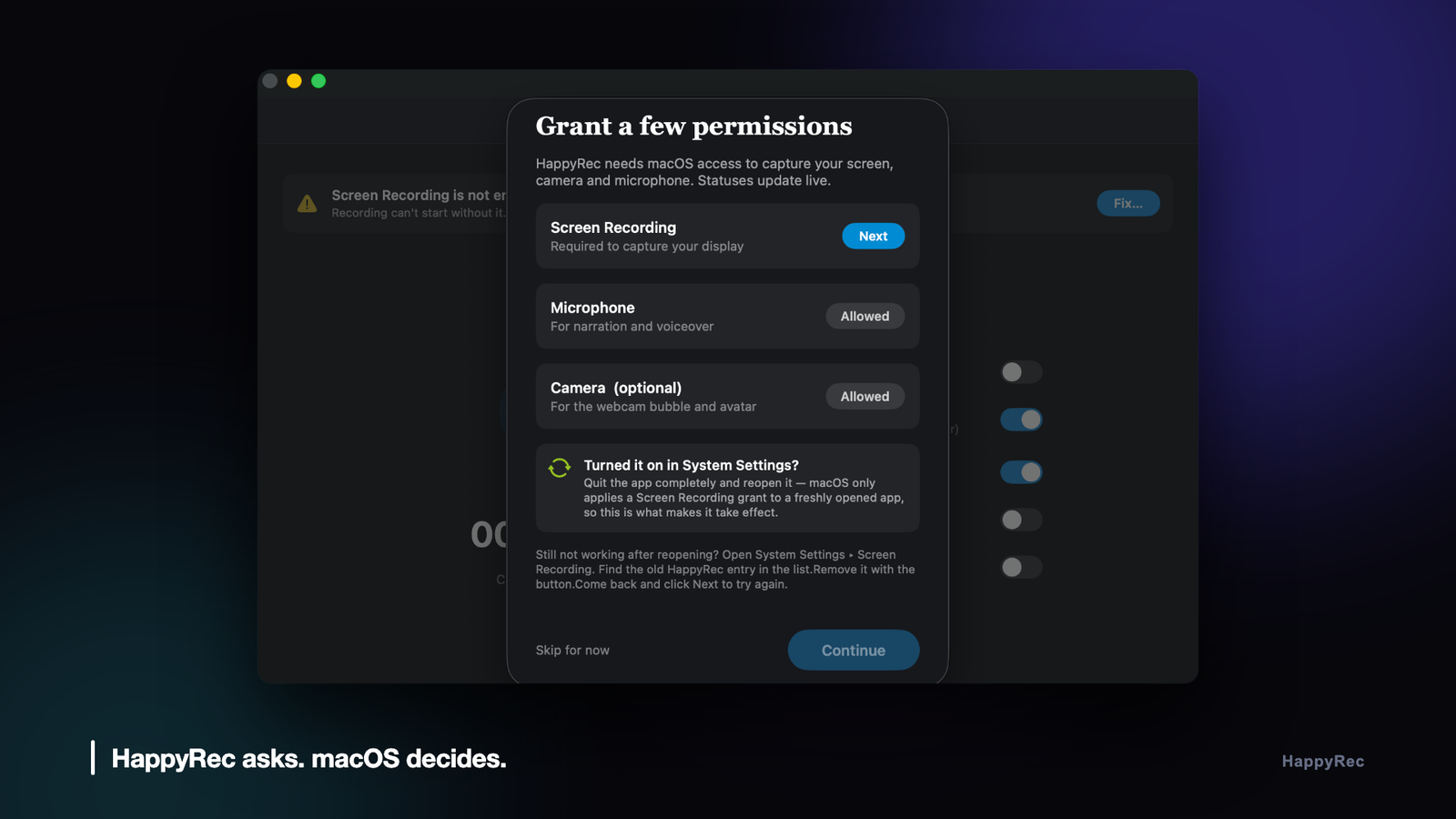
There is a category of bug that belongs almost entirely to Apple platforms: the one where the operating system decides your application is wrong, declines to tell you, and declines to tell the user either.
HappyRec is a screen and voice recorder for macOS. The microphone is not an optional extra in a product like that; it is most of the point. The macOS microphone permission worked correctly in development for months. The first build we packaged for the App Store could not record audio at all — and produced no dialog, no error, no entry in System Settings, and nothing in the console. The cause was a single missing key in the entitlements file, and finding it took a day that should have taken ten minutes.
This is what that failure looks like, why it happens, and how to recognise the whole family of macOS failures it belongs to.
What “denied” looks like when nothing denied it
The code that asks for the macOS microphone permission in HappyRec is unremarkable:
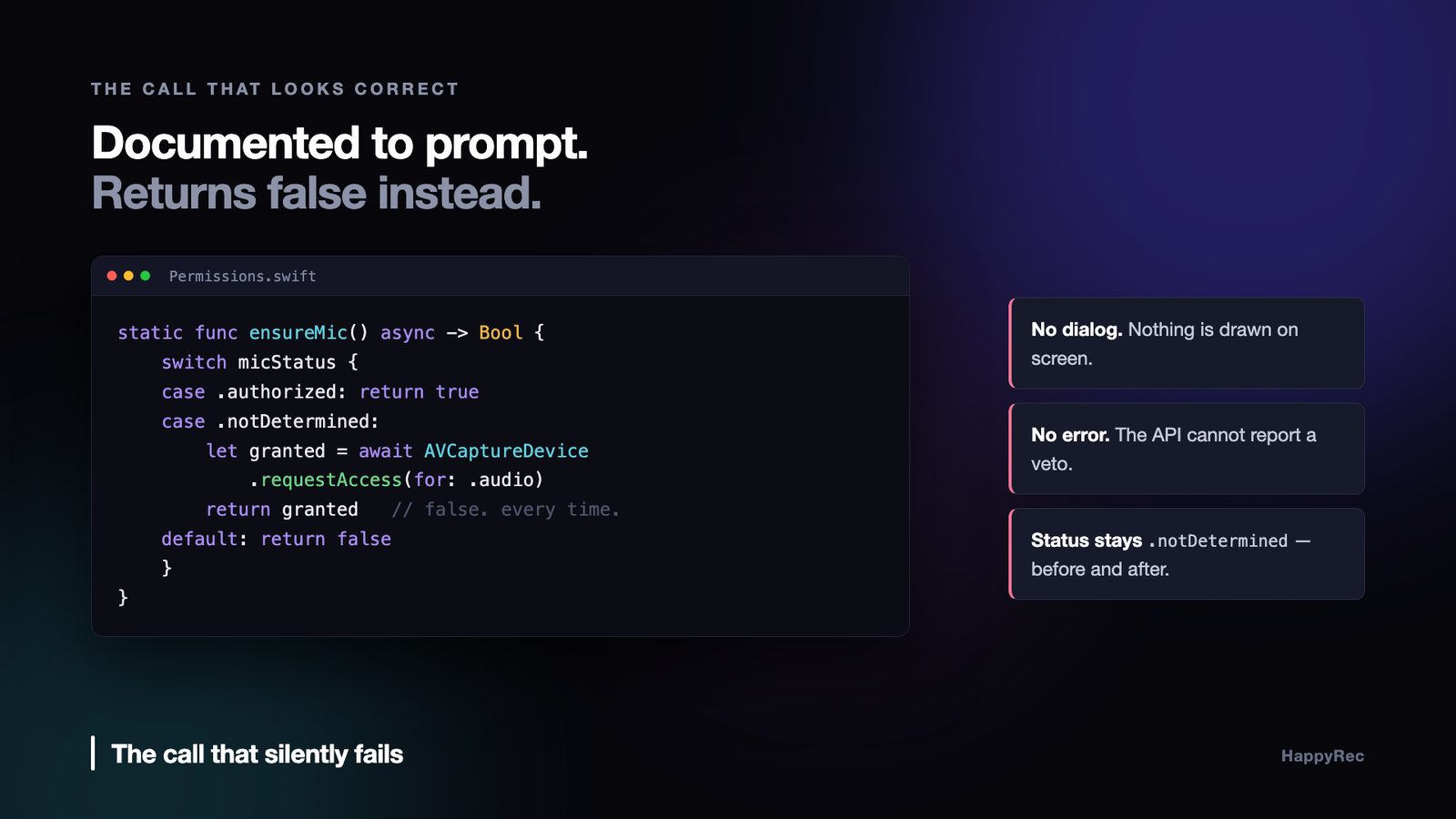
AVCaptureDevice.requestAccess(for:) is documented to present the system prompt when the current status is .notDetermined. In the hardened App Store build, three things were true at once:
- The authorisation status stayed at
.notDetermined, before and after the call. requestAccessreturnedfalseimmediately, with no dialog on screen.- HappyRec did not appear in System Settings ▸ Privacy & Security ▸ Microphone at all.
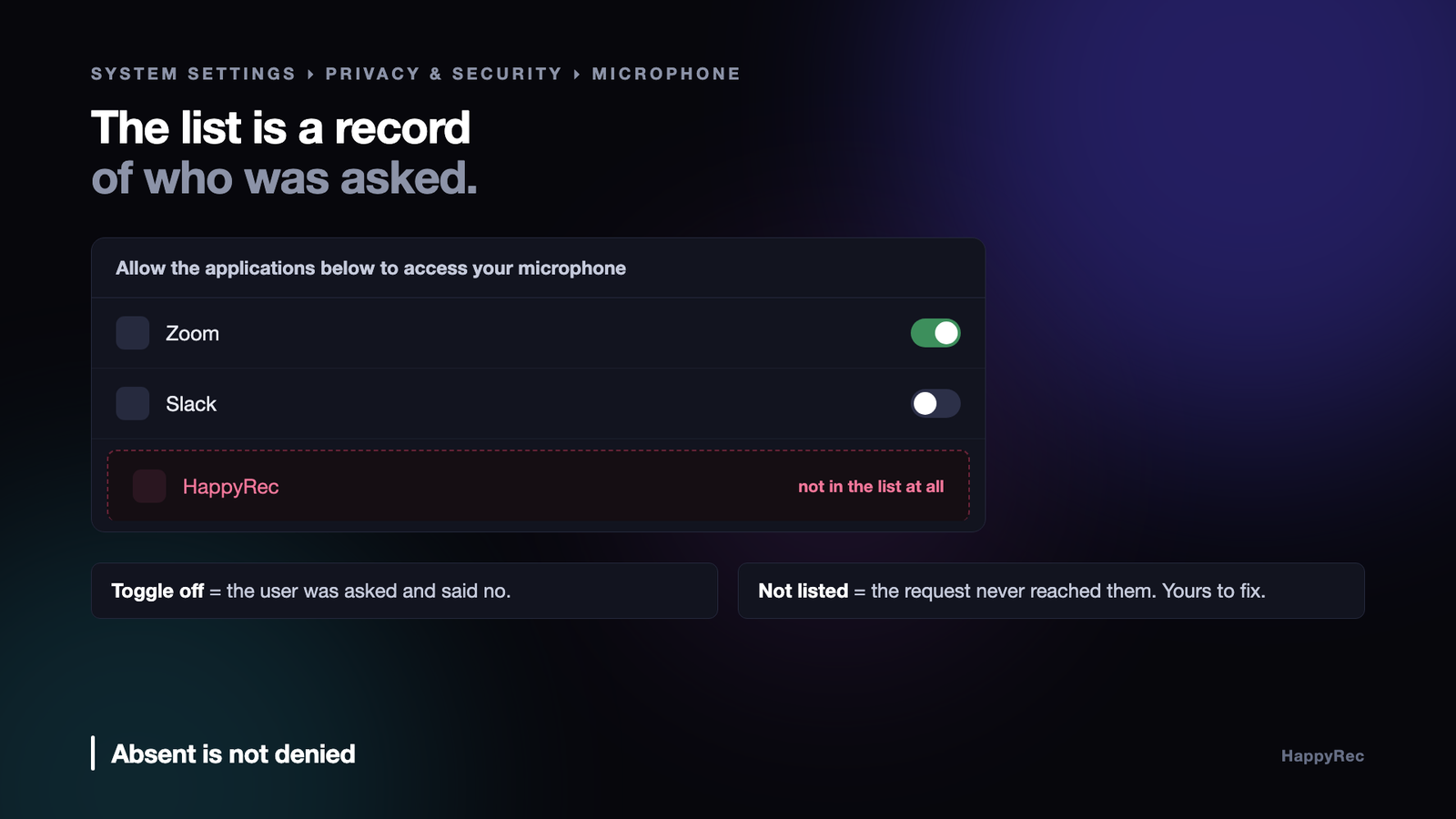
That third fact is the one that matters, and it is the one that is easiest to look straight past. An application the user has denied still appears in that list, with its toggle switched off. The list is a record of every app that has ever asked. HappyRec was not in it as denied. HappyRec was not in it.
Absence and denial look identical from inside your process — both give you false — but they are entirely different bugs. Denial is the user’s decision. Absence means the request never reached the user, which means it is your problem, and it means no amount of instrumentation inside your own app will explain it. The decision was not made in your process.
Ask the daemon that actually decided
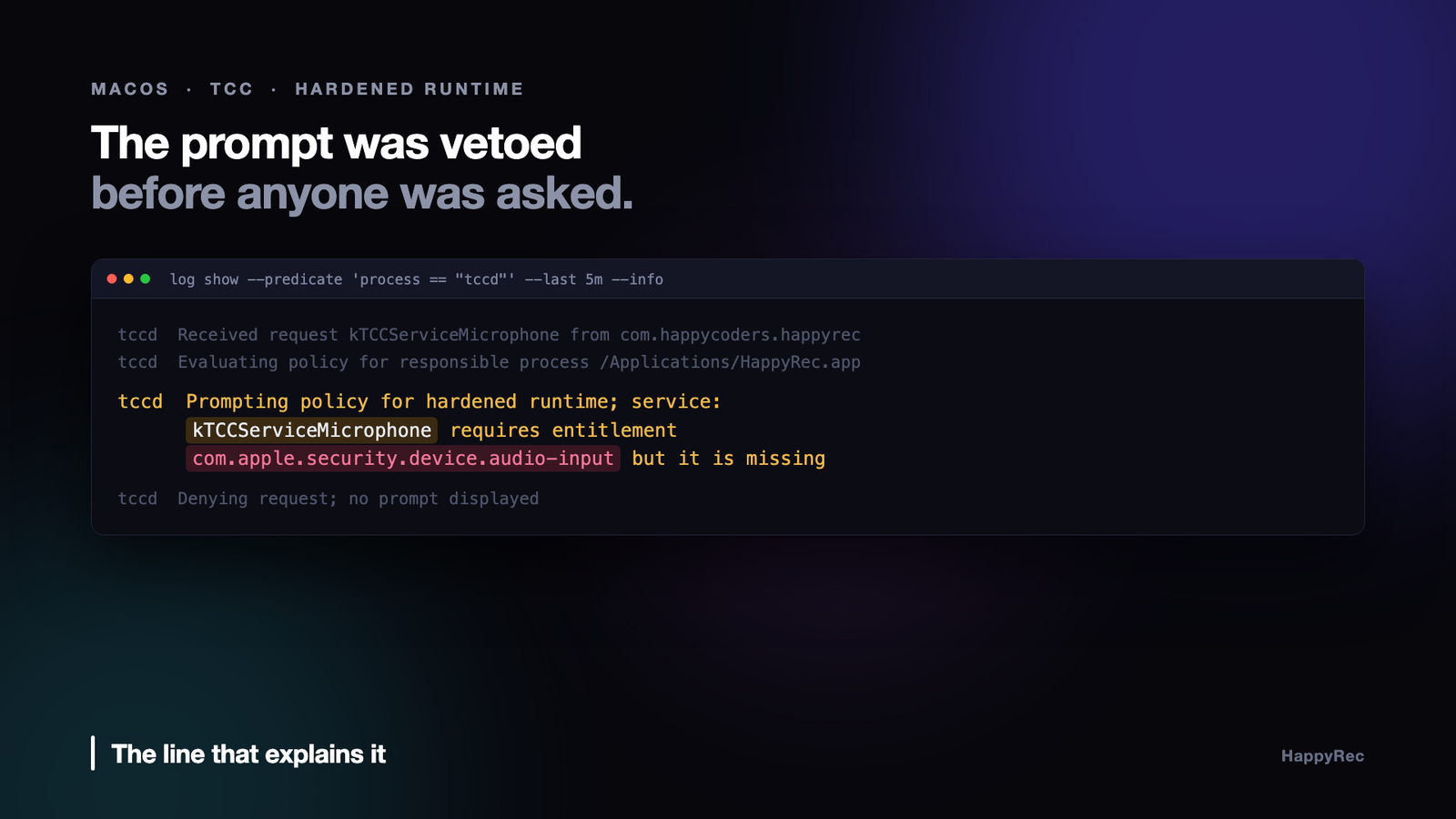
The macOS microphone permission prompt, like every privacy prompt on the system, is brokered by tccd, the daemon behind the TCC (Transparency, Consent and Control) database. It is chatty, and running log show --predicate 'process == "tccd"' --last 5m --info will tell you exactly what it thought of your request.
Buried in that output was one line that ended the investigation:
Read it carefully, because it describes the whole mechanism. tccd did not deny the request on the user’s behalf. It refused to put the request to the user in the first place. The prompt was vetoed by policy before any human was involved, and the API dutifully reported back the only thing it could — that access was not granted.
From the app’s point of view this is indistinguishable from a user pressing “Don’t Allow”. From the system’s point of view they are not remotely the same event. That gap is where the day went.
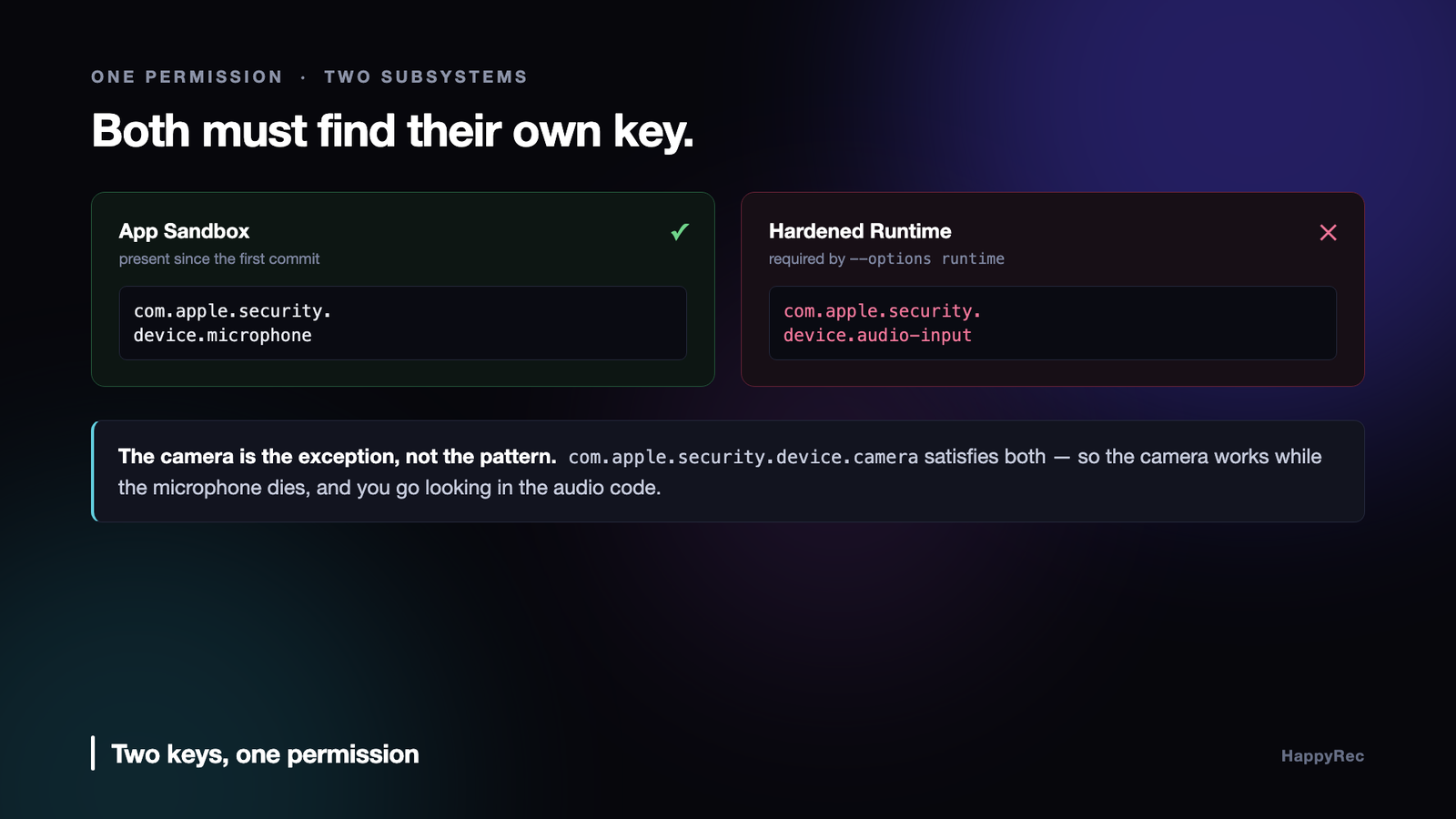
The macOS microphone permission needs two entitlement keys
The macOS microphone permission is gated by two different entitlement keys belonging to two different security subsystems:
com.apple.security.device.microphone— the App Sandbox key.com.apple.security.device.audio-input— the Hardened Runtime key.
These are not aliases for each other, and neither is a superset of the other. They come from different eras of macOS security. The Sandbox key dates from the sandbox’s introduction; the Hardened Runtime arrived much later, alongside notarisation, and brought its own vocabulary of entitlements for the same underlying resources.
If your app is sandboxed and hardened — which is exactly what a Mac App Store submission is — then both subsystems evaluate the request independently, and both must find their own key. Satisfying one and not the other gets you the failure above.
The reason this hides so effectively during development is worth stating plainly, because it is structural rather than accidental. Local development builds are usually not hardened. Our own bundling script signs without --options runtime; only the App Store packaging script adds it.
The App Store build was therefore the first hardened build in the project’s entire history. It was also the first build that failed. Every test on every developer machine up to that point had exercised a code path where the missing key could not possibly matter. The bug was not introduced by the submission; it was revealed by it, having been latent since the first commit.
The camera works, which is why you look in the wrong place
Here is the detail that turns a ten-minute fix into a lost day.
The camera does not have this problem. com.apple.security.device.camera satisfies both the App Sandbox and the Hardened Runtime. Apple reused a single key for both subsystems there. There is no separate camera-input key to forget.
HappyRec uses the camera too — for the Face Cam bubble and for the Vision face tracking behind the avatar. So in that first broken build, the camera prompt appeared correctly, the camera permission was granted correctly, the camera appeared correctly in System Settings, and the camera worked. Only the macOS microphone permission was dead.
Which is precisely the wrong signal. A working camera and a dead microphone reads as a microphone-specific problem: a hardware format mismatch, a sample rate the encoder rejects, an audio graph that refused to build. HappyRec has an audio pipeline with genuine complexity in it — an AVAudioEngine graph with a three-step fallback ladder, a manual-rendering effects path, a formant-preserving pitch converter — and every one of those was a more plausible suspect than the entitlements file. We debugged the audio engine first. Of course we did.
There is no principle here to reason from. The camera got a shortcut and the microphone did not. The symmetry you would reasonably assume exists is simply absent, and assuming it is what costs you the day.
Both keys stay in our entitlements permanently, with the reason documented outside the file — an entitlements plist is not the place for a comment explaining itself.
Four things the macOS microphone permission actually requires
Getting the macOS microphone permission prompt to appear on a modern, sandboxed, hardened app requires all four of the following. Any one missing produces silence, and the silences are hard to tell apart.
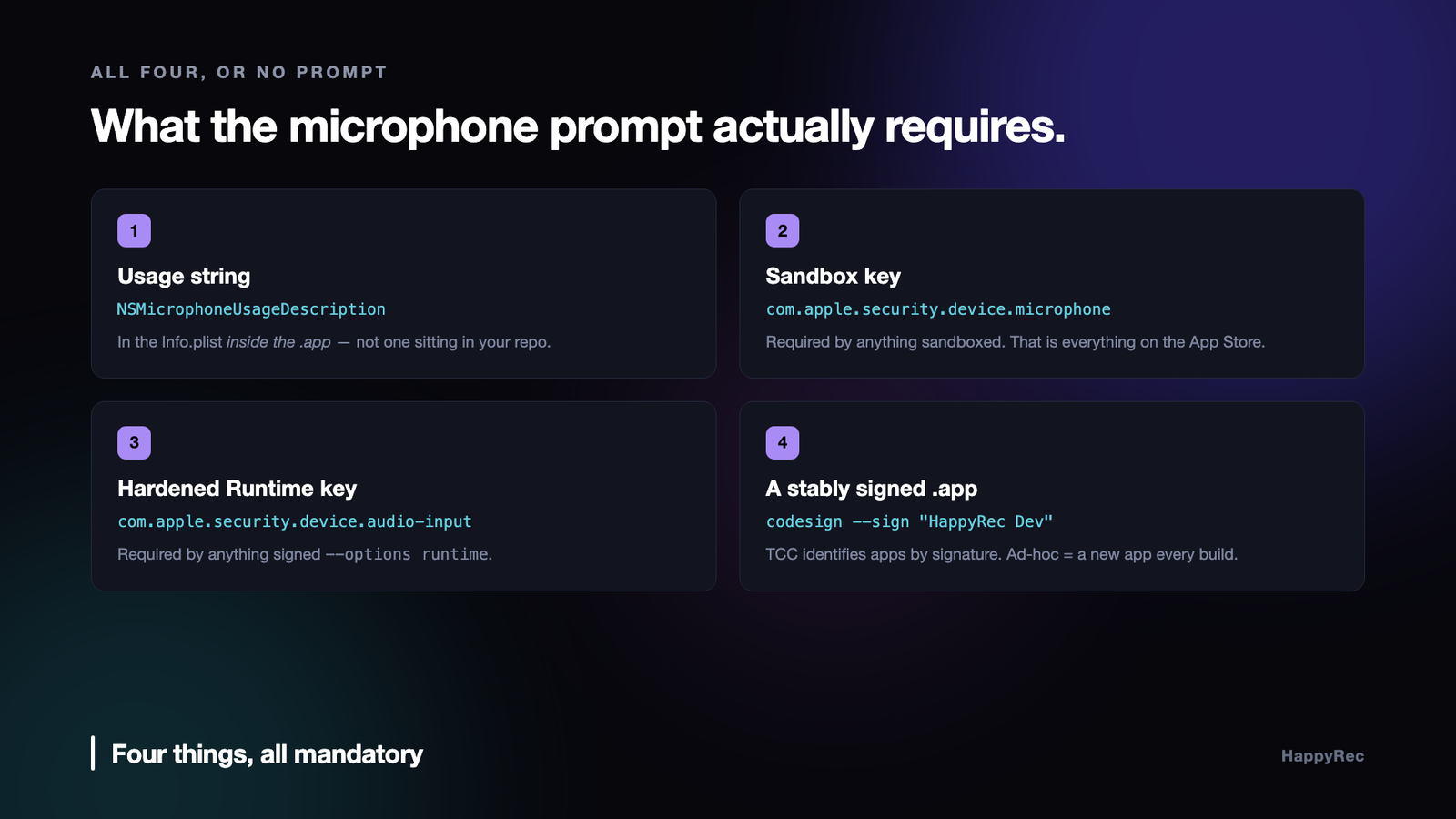
1. A usage string in the bundle’s Info.plist
NSMicrophoneUsageDescription must be present, and it must be in the Info.plist inside the .app bundle — not merely in a file sitting in your repository. Write it for a person who is about to decide whether to trust you, because that is who reads it. Ours says what we do with the audio and, for the camera string, what we deliberately do not do:
HappyRec uses your camera for the Face Cam bubble and to animate your avatar. In Avatar mode your face is never recorded.
2. The App Sandbox key
com.apple.security.device.microphone. Required for anything sandboxed, which is everything on the Mac App Store.
3. The Hardened Runtime key
com.apple.security.device.audio-input. Required for anything signed with --options runtime, which is everything notarised and everything submitted.
4. A properly signed .app bundle
This is the requirement people skip, and it produces the most confusing symptom of the four, because it makes permissions appear to work and then stop working for no reason at all.
TCC identifies an application by its code signature, not by its path and not by its bundle identifier. Ad-hoc signing (codesign --sign -) produces a fresh identity on every single build. macOS is not being capricious when the grant disappears after a rebuild; from its point of view a different application is asking, and it has never met that application before.
The fix is a stable local signing identity — a self-signed code-signing certificate in the login keychain, created once and reused. HappyRec’s build script looks for a certificate called “HappyRec Dev”, and when it cannot find one it falls back to ad-hoc signing and says so out loud — permissions reset each rebuild — because a silent fallback here costs somebody an afternoon.
The same requirement rules out the shortcut everyone reaches for. swift build produces a bare executable: no bundle, no Info.plist, no usage strings, no stable identity. Launching that binary directly, or hitting Run in an IDE that launches it directly, gets the microphone blocked every time — and the reason is invisible, because the binary you are testing is not, as far as macOS is concerned, an application at all. Always launch the built .app.
Screen recording is a third dialect entirely
Having internalised that the macOS microphone permission needs two keys, it is tempting to expect the rest of TCC to be similar. It is not. Screen Recording behaves differently again, and the differences are load-bearing.
CGPreflightScreenCaptureAccess() returns a plain Bool. There is no tri-state. Camera and microphone give you .notDetermined, .denied, .authorized, .restricted — four states you can branch on and build a coherent UI around. Screen Recording gives you yes or no, and “no” covers both “the user has never been asked” and “the user said no”, which need completely different responses from your interface.
CGRequestScreenCaptureAccess() then makes it worse: it presents its dialog only the first time it is ever called for a given app. Every call after that is a silent no-op regardless of what the user answered. You cannot re-prompt. You cannot detect that you cannot re-prompt.
The only workable answer is to keep your own third state. HappyRec persists a flag the first time it asks, and a second attempt routes the user to System Settings instead of firing a request that macOS will never surface again.
Two further constraints on that same code path, both learned the expensive way:
Never call these on the main thread. CGRequestScreenCaptureAccess() blocks the calling thread until the user answers the alert. NSWorkspace.shared.open(_:), used to deep-link into a System Settings pane, is a synchronous Launch Services round trip. Calling either straight from a SwiftUI button handler freezes the UI thread for as long as it takes — which, for a modal the user might ignore for a minute, is a beachball and a force-quit. That got a submission rejected under App Completeness. Both now go to a background queue.
Enumerating shareable content is a permission request. Calling SCShareableContent before Screen Recording has been granted triggers the system prompt as a side effect, at whatever moment your code happens to run. Check CGPreflightScreenCaptureAccess() first, always, and never enumerate speculatively at launch.
A grant only applies to a freshly launched process. Granting Screen Recording does nothing for the running instance. The app must be quit and reopened. We tried three different ways to automate that relaunch — shelling out to open -n, launching from applicationWillTerminate, spawning a new instance before terminating the old one — and every one of them left stray extra instances running in real testing. The onboarding screen now simply asks the user to quit and reopen. It is the only approach that has never failed.
A fourth silent failure, from the same family
Once you have seen one of these, you start recognising the shape. Here is another that cost us an afternoon, with an even quieter failure mode.
Our entitlements file hardcodes the real Apple Team ID, because the App Store packaging script needs it there for Apple Distribution signing. Locally, we sign with a self-signed certificate. A self-signed identity has no authority to claim someone else’s team ID — so the kernel’s code signature validation fails, and the sandboxed app is SIGKILLed at launch.
Not crashed. Killed. No crash report, nothing on stderr, no dialog. You double-click the app and nothing happens.
The fix is to strip those two keys for local signing only, which the build script does with PlistBuddy before handing the file to codesign. And that rewrite has a second consequence worth knowing about: never put XML comments in an entitlements plist. AMFI’s parser rejects <!-- --> outright, and codesign fails with Failed to parse entitlements: AMFIUnserializeXML: syntax error near line N. Our local script happened to survive it for a while because PlistBuddy rewrites the file and drops comments on the way through; the App Store script, which signs the raw file, did not. Document the rationale for an entitlement anywhere except in the plist itself.
How to debug the silent class
The common thread is that in every one of these cases, the decision is made outside your process, by a daemon that will never call back into your code. Adding logging to your own app cannot help, because your app is not where anything was decided. It only ever sees the result.
Three commands are worth committing to memory.
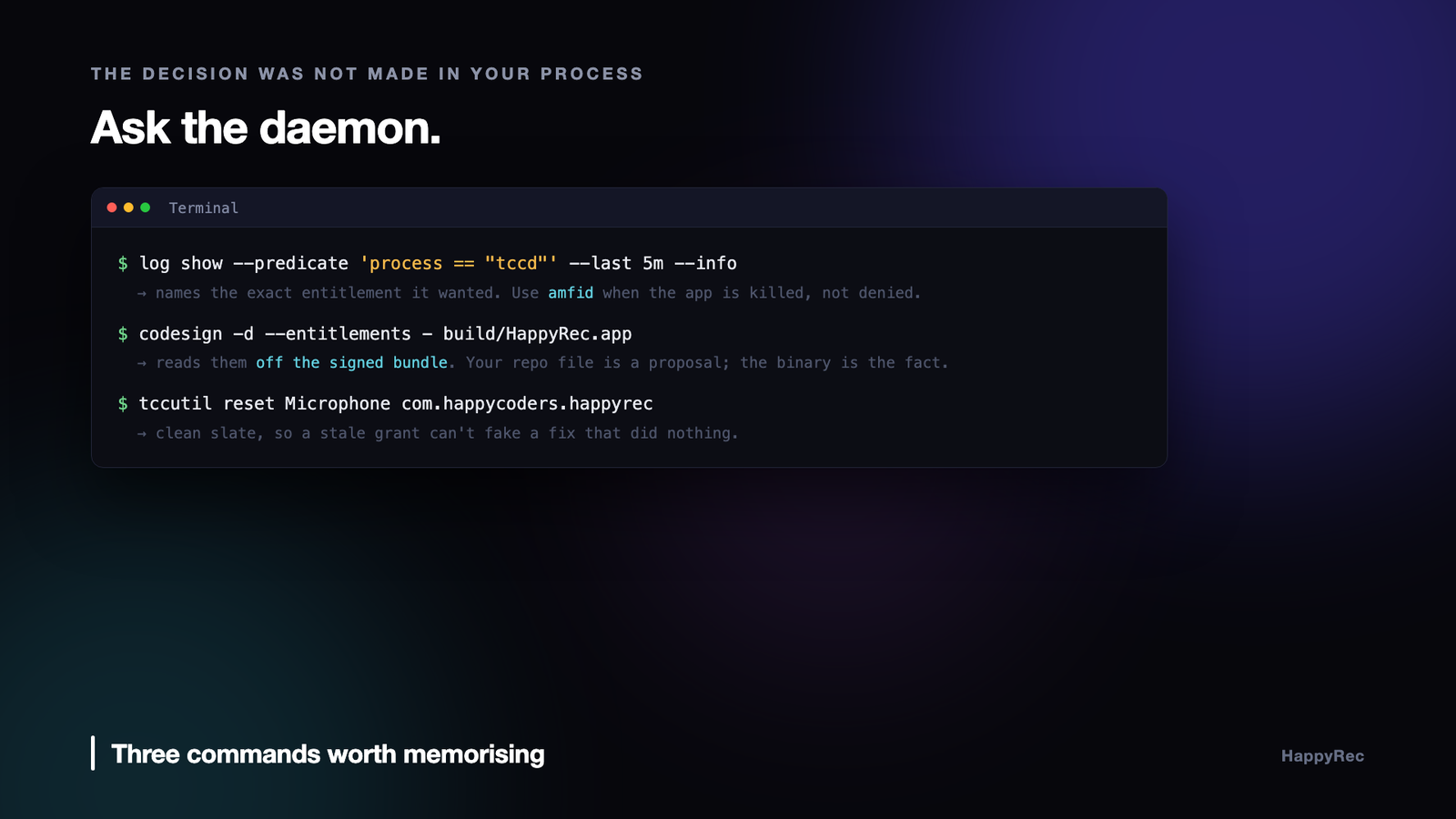
Ask the privacy daemon what it thought. It will name the exact entitlement it wanted. Substitute amfid when an app is being killed at launch rather than merely denied a resource.
Read the entitlements back off the signed bundle. This is not the same document as the file in your repository, and in our project it is deliberately not the same document — the build script strips two keys on the way through. What is in the binary is the only thing that has any effect on anything. Verify that, not your source file.
Reset to a clean slate before re-testing. Otherwise a stale grant from an earlier build masks whether your fix actually worked, and you will “confirm” a fix that did nothing.
The checklist
- Ship both microphone keys. The macOS microphone permission is evaluated separately by the Sandbox and by the Hardened Runtime, and each needs its own.
- Treat the camera’s single key as the exception. It is a reused key, not a pattern you can generalise from.
- Put usage strings in the bundle’s Info.plist, and write them for the person deciding whether to trust you.
- Sign with a stable identity, not ad-hoc. TCC identifies apps by signature; a new signature is a new app that has never asked for anything.
- Never test the bare build product. No bundle means no usage strings, which means no prompt, ever.
- Read entitlements back off the signed bundle. The file in your repo is a proposal; the binary is the fact.
- Absent from System Settings is not the same as denied. Denied means the user decided. Absent means they were never asked, and that is yours to fix.
- Ask the daemon, not your own logs.
tccdandamfidwill name the missing entitlement outright. - Keep no comments in entitlements plists. AMFI’s parser rejects them and the error names a line number, not a cause.
The uncomfortable part of all of this is that none of it is reachable by the compiler, the type system, or any test you can run before packaging. It is a class of bug that only exists in the gap between the artefact you build and the artefact you ship — which means the only real defence is to build and run the shipping artefact, signed exactly the way it will be signed for release, long before the day you plan to release it. Our version of that lesson was a macOS microphone permission that had been quietly broken since the first commit, and it cost a day and a rejected submission. It is a good deal cheaper to learn it from somebody else’s.
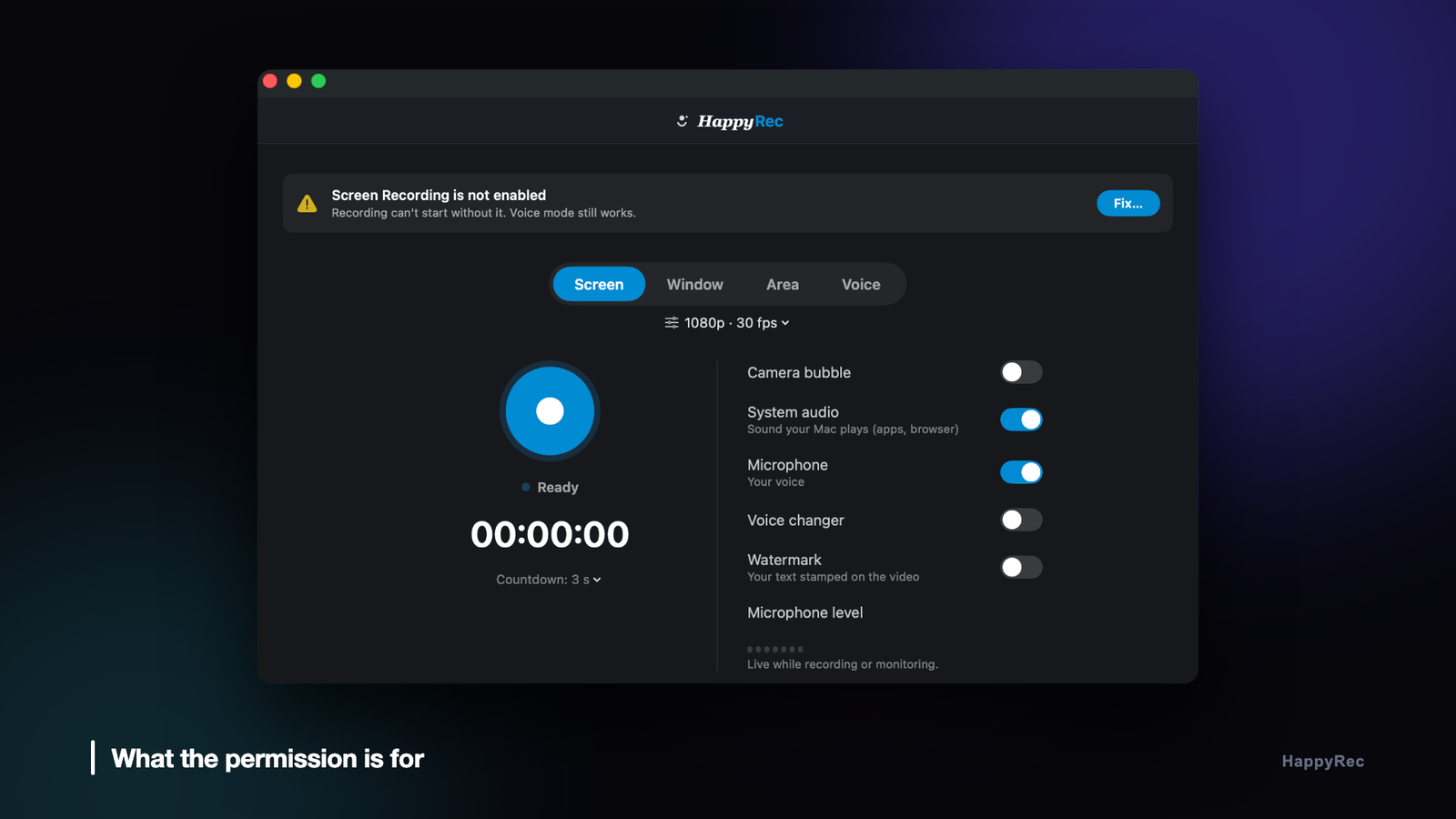
HappyRec is a native macOS screen and voice recorder — no Electron, no kernel extensions — with a formant-preserving voice changer and a presenter overlay that burns your face cam, avatar or logo straight into the recording. It is on the Mac App Store, and at happyrec.happycoders.in.




