
Why a Timesheet Should Never Be a Form
Why a Timesheet Should Never Be a Form
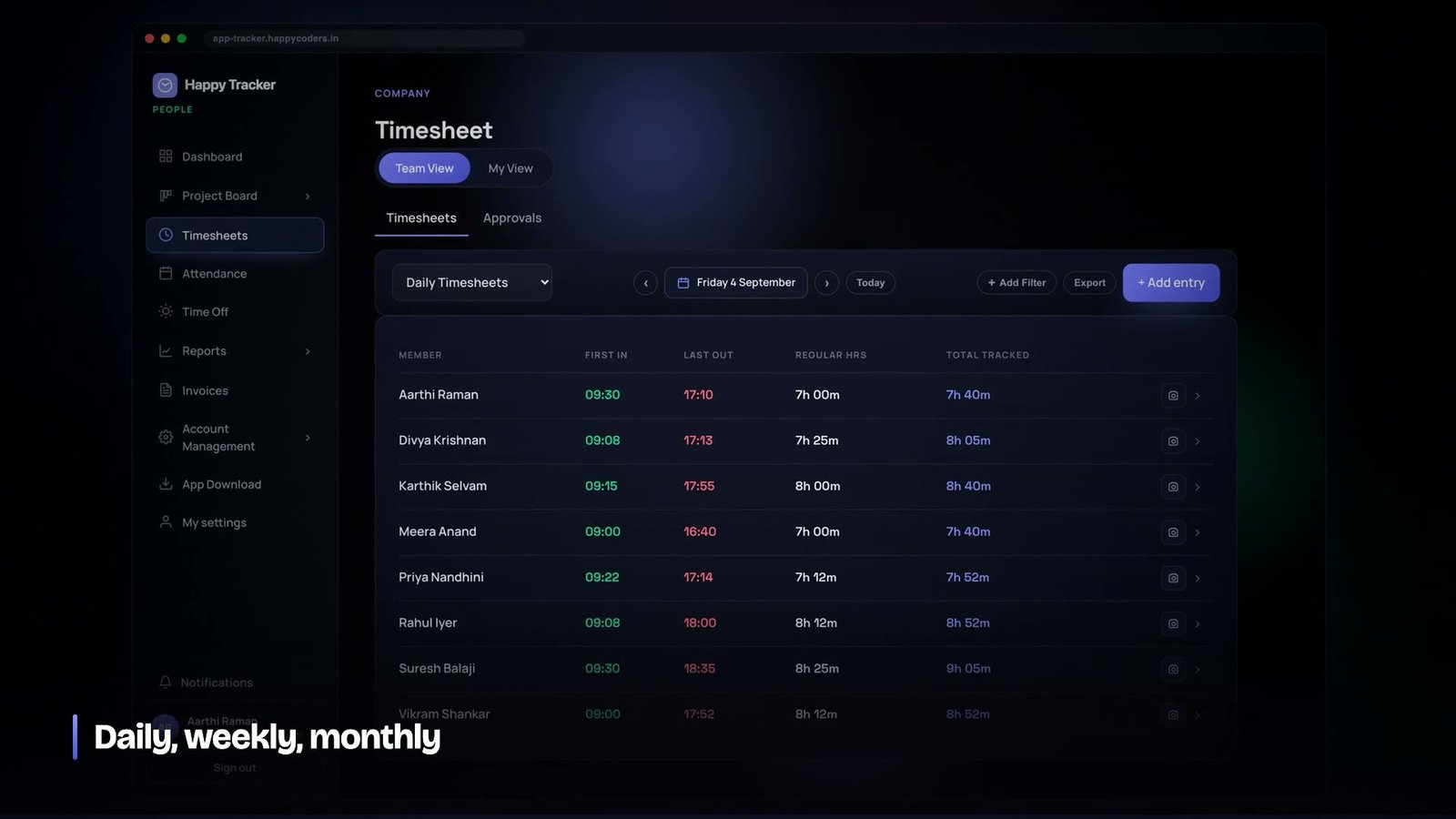
Every company that bills by the hour eventually discovers the same uncomfortable fact: the timesheet is the only document in the business that is written entirely from memory, and it is written under deadline pressure by people who have already stopped thinking about the work.
On the twenty-eighth of the month somebody sends the reminder. On the thirtieth the sheets arrive. They are neat, they are plausible, and a surprising number of them are round numbers. Eight hours. Four hours. Two hours. Real work does not land on round numbers, and everybody in the room knows it, and the sheet gets approved anyway because there is nothing else to approve.
When we started building Happy Tracker, this was the first thing we decided to stop doing. Not to improve the form. Not to add validation to the form. To remove the form, and derive the same document from something that was already true.
The problem is not laziness, it is recall
It is tempting to frame manual timesheets as a discipline problem. If people would just fill them in daily, the argument goes, they would be accurate. In practice that does not happen, and when it does happen the sheets are not much better.
The reason is that a working day is not stored in memory as a set of durations. It is stored as a sequence of events, and a fairly lossy one. You remember that you spent the morning on the checkout bug and the afternoon in meetings. You do not remember that the checkout bug actually took two hours and forty minutes because you were pulled into a fifty-minute conversation about deployment in the middle of it, and that the afternoon contained a twenty-five minute gap where you went downstairs for coffee and ended up debugging somebody else’s problem on the way back.
Asking somebody to reconstruct that at the end of a month is asking them to invent. They will do it honestly and they will still be wrong, usually in the same direction: the total will come out close to the number of hours they were contracted to work, because that is the number their brain reaches for when the memory runs out.
A timesheet filled in from memory is not a record of work. It is a reconstruction of an expectation. The two look identical on paper and behave completely differently when a client disputes an invoice.
Clock events are the primitive, everything else is derived
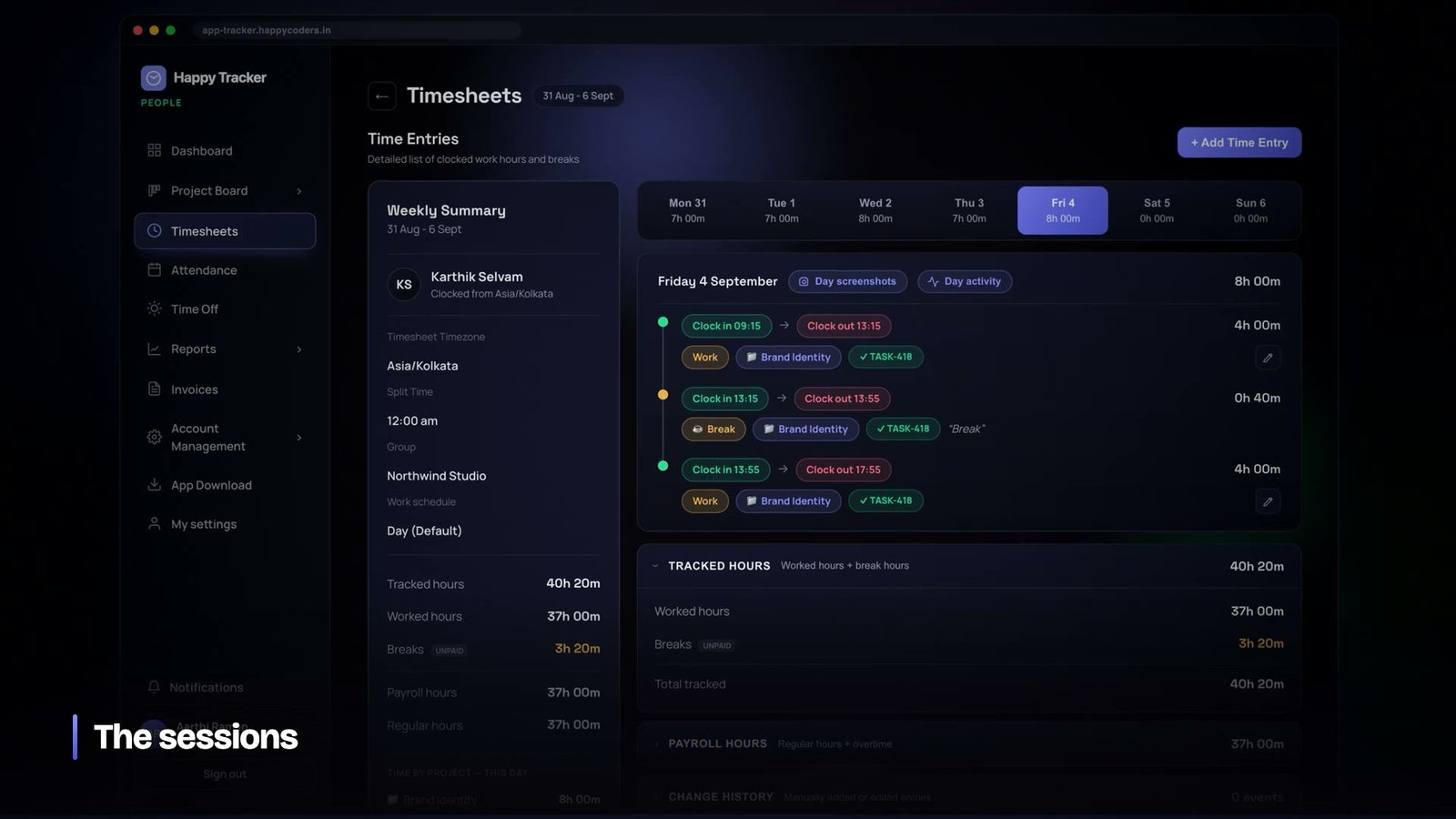
The design decision that follows from this is simple to state and surprisingly far-reaching to implement. The system records events, not durations. A clock-in is an event. A clock-out is an event. Starting a break is an event, ending it is another. Every one of them carries a timestamp from the server, a user, and — where it applies — the project and the activity the person selected.
Nothing in the database stores “Karthik worked seven hours on Tuesday”. That sentence is computed, on demand, from the events that exist. If the events change, the sentence changes with them, and there is no second copy to fall out of sync.
This sounds like a small distinction. It is not. Consider what happens when an administrator corrects a forgotten clock-out. In a form-based system you are editing a number, and every derived report that already consumed that number is now stale unless something goes and recalculates it. In an event-based system you are editing the event, and every report that reads the events is simply correct the next time it runs. There is no recalculation step because there was never a cached answer.
What an event actually stores
A single time entry in our schema carries more than a start and an end. It carries the kind of entry — work or break, and they are genuinely different things — the project it belongs to, an optional activity, and the source it came from: web, or one of the desktop trackers. That last field turned out to matter far more than we expected, and we will come back to it.
- Start and end timestamps, both taken from the server clock, never the client’s. A laptop with a wrong system time should not be able to invent forty minutes.
- Kind — work or break. Break time is recorded with the same care as work time and then excluded from every total that means “worked”.
- Project and activity, so the hours can be grouped later without anybody re-tagging anything.
- Source, so you can tell a browser clock-in from a desktop one. This is what makes device policies possible at all.
- Who recorded it, which is not always the same person as who it belongs to — administrators can log time for a member, and that fact is part of the record.
Because breaks are their own kind of entry rather than a subtraction applied to a work entry, the arithmetic never gets confusing. Starting a break closes the open work entry and opens a break entry, remembering the project and activity. Ending it closes the break and opens a fresh work entry with the same project and activity, so the person picks up exactly where they were without touching a dropdown.
The timesheet as a query
Once every day is a list of events, the weekly grid that people actually look at becomes a query rather than a table. For a given date range and a given set of members, the system asks: what is the first clock-in on this day, what is the last clock-out, how many seconds of work entries are there, how many seconds of break, and what is the resulting status — present, absent, on leave, or a non-working day.
The important property is that every number in that grid can be expanded into the events that produced it. If a manager looks at seven hours and twenty minutes and wants to know where it came from, one click shows the individual sessions, with times. There is no point in the chain where a human typed a number that the system then trusted.
This is also what makes disputes short. When a client asks why Tuesday was six hours and not eight, the answer is not a discussion. It is a list of sessions with start and end times, and if one of them is wrong, you fix that session and the total updates.
Manual entries still exist, and that is fine
We did not remove the ability to add time by hand, and we would not recommend that anybody does. People forget to clock in. Laptops die. Somebody works from a client site for a day. The system has to have an answer for that or people will simply keep a private spreadsheet and you are back where you started, but with worse data.
What changed is the default. A manual entry is the exception, it is visibly distinct from a tracked one, and it is recorded in the audit log along with who created it. When ninety-five per cent of a month is tracked and five per cent is manual, you can trust the total. When one hundred per cent is manual, you cannot trust any of it, and no amount of approval workflow fixes that.
Approval locks the week, not the number
Approval is the other place where form-based thinking causes trouble. In a spreadsheet world, approving a timesheet means a manager writes their name at the bottom of a document. Nothing about the document changes. If somebody edits it afterwards, the signature is still there, now attached to different content.
We made approval a lock on a range of dates for a specific person. Once a week is approved, the API refuses to create, edit or delete any entry that falls inside it, and it refuses at the server, not in the interface. Clocking in to a locked week fails. Someone with the right role can unlock it, which is itself an audited action, and then the edits become possible again.
This is a small amount of code and it changes the meaning of the word “approved” entirely. Approved now means the content is frozen, not that somebody looked at it once.
Owners are a special case, and pretending otherwise is worse
One detail we got wrong first time round: we applied the same approval flow to everybody, including the owner of the company. Owners have no reporting line. There is nobody above them to approve their week, so their weeks sat permanently unapproved and quietly broke every report that filtered on approval status.
The fix was not to give owners a fake approver. It was to make the system state the truth: an owner’s week reads as auto-approved, the interface says “no approver needed” instead of showing a toggle that does nothing, and the underlying record is never created. The rule is visible rather than hidden inside a special case.
What the sheet is worth once it is automatic
The payoff for all of this is not tidiness. It is that a set of numbers nobody typed can be used for things nobody would previously have trusted them for.
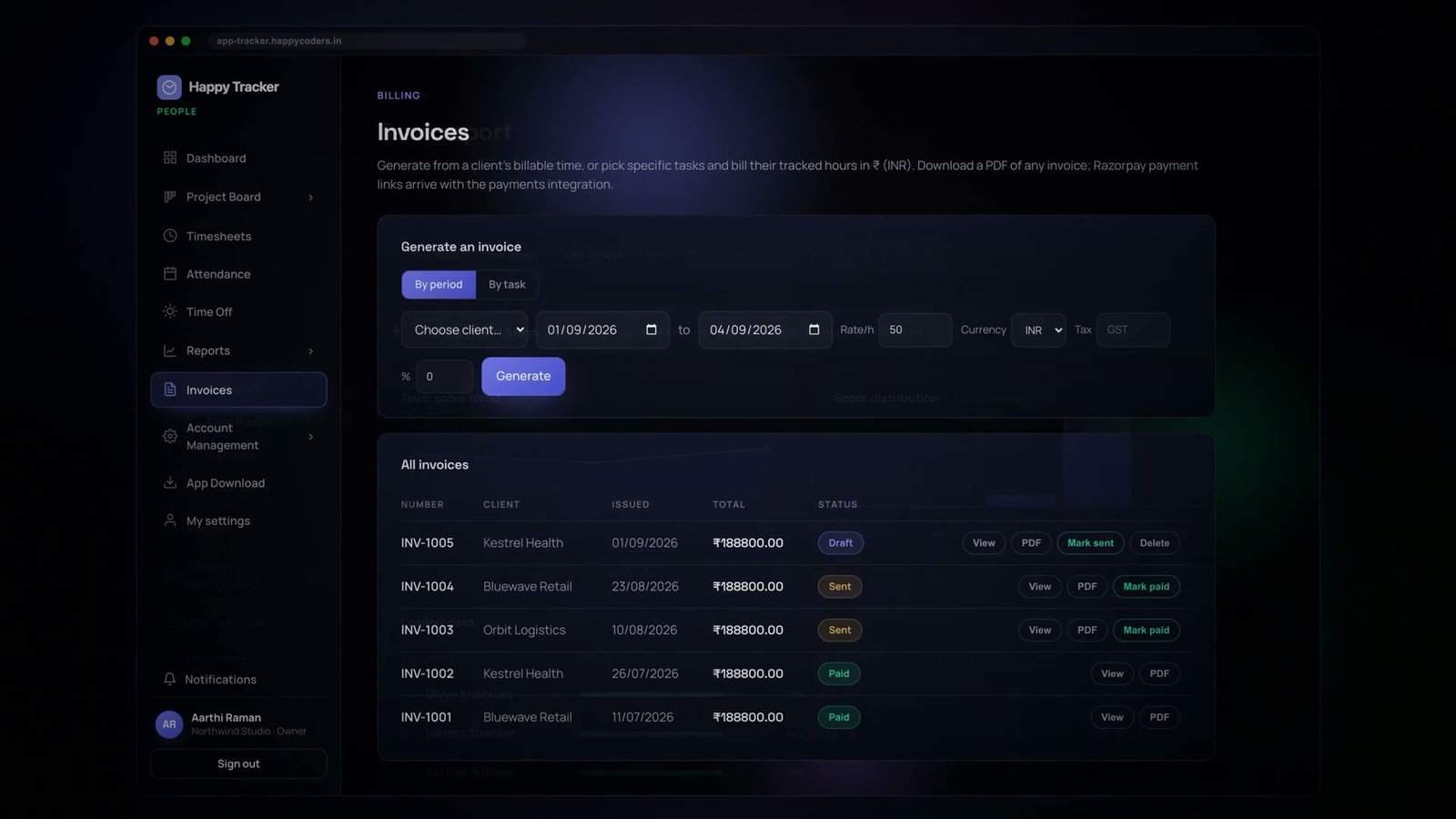
Billable time can go straight to an invoice, per client, per project, at whatever rate applies, without a human re-keying anything. Payroll can take attendance from the same source. A project’s estimate can be compared against its real hours at any moment rather than at the end. None of that is safe on top of numbers that were written from memory on the thirtieth.
It also changes what the month-end conversation is about. Instead of “please send your timesheet”, which is an administrative chase, the conversation becomes “this project took forty per cent longer than we estimated, why” — which is the conversation that was worth having all along and never happened because everybody was busy collecting forms.
The desktop tracker turns an event into a description of an hour
Clock events tell you the shape of a day. They do not tell you what the day contained. For a lot of companies that is enough — a consultancy billing a client for eight hours does not need to justify the eighth hour to anybody. For others, particularly anyone managing people who work remotely, the shape is not sufficient, and this is where most time trackers quietly become surveillance products.
We took a narrower path. The desktop application, while somebody is clocked in on a work entry, records activity blocks: short spans that note which application was in the foreground, for how long, and whether there was any keyboard or mouse input at all during the span. Those blocks are attached to the time entry they fall inside, which means an hour on the timesheet can be expanded into the applications that hour was actually spent in.
The design constraint we set ourselves was that a block should be enough to answer “was this work” and never enough to answer “what exactly was said”. A block records the application name and the window title, not keystrokes, not clipboard contents, not the contents of any document. There is no keylogger and there was never going to be one, and that is a product decision rather than a feature we have not got round to.
This turned out to be the right constraint for a boring commercial reason as much as an ethical one. Tools that record too much create a legal review problem for the customer’s HR department, and a tool that has to survive a legal review before anybody can trial it does not get trialled. A tool that can be explained honestly to a room of employees in two sentences gets adopted.
Categorising activity without asking anybody to tag anything
Raw application names are not useful on their own. Nobody wants a report that says a developer spent four hours in an application called Code. The blocks are mapped to categories — coding, communication, design, browsing, and so on — using a lookup that ships with the product and is extended as new tools appear.
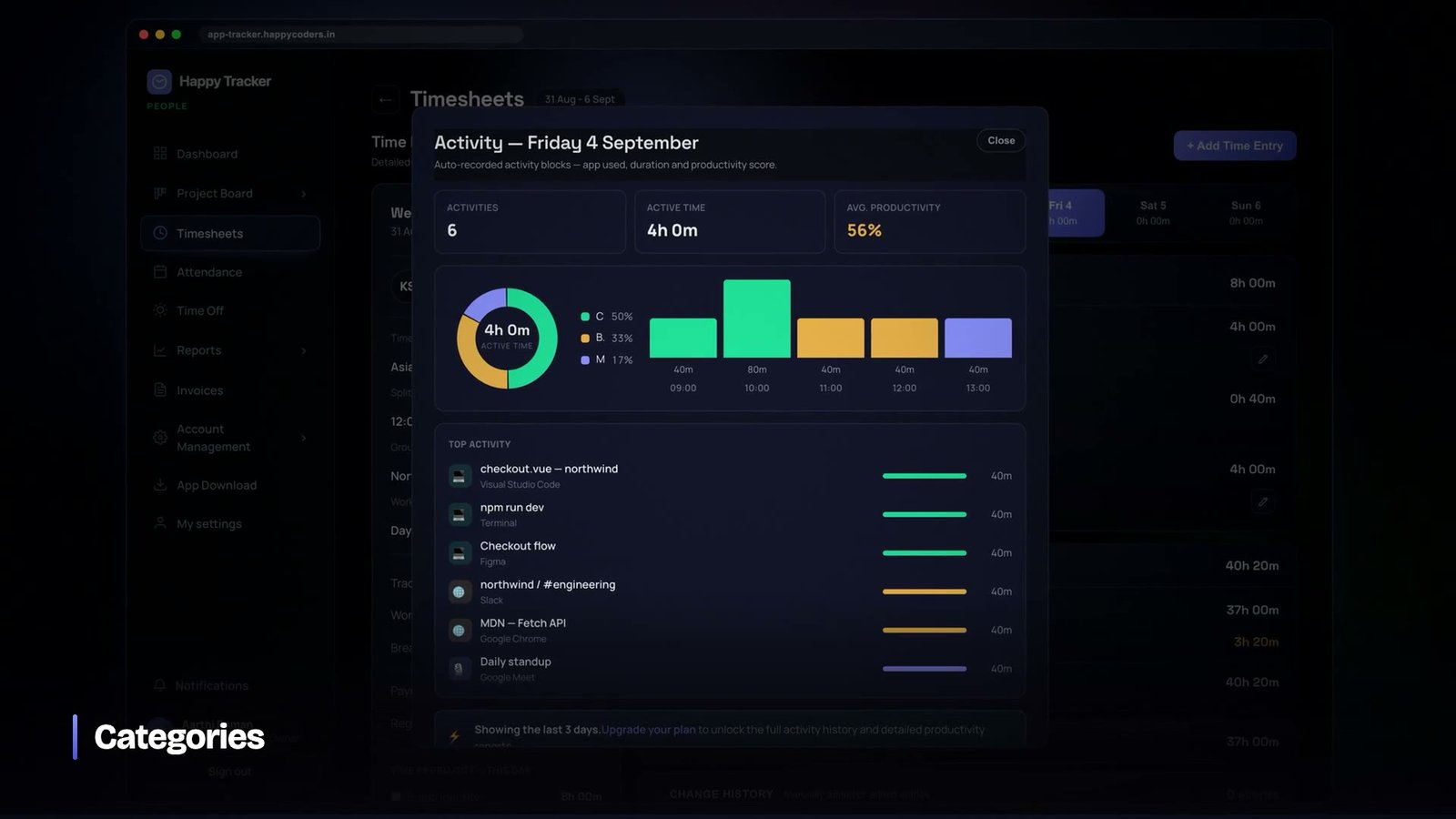
That map is deliberately conservative. When we added a set of newer editors to the coding category we also backfilled the several hundred existing blocks that had been sitting in “other”, because leaving them uncategorised would have made every historical report subtly wrong in a way nobody would have noticed. If you build something like this, plan for the backfill from the start: the category map will change, and the data that was written under the old map does not update itself.
A person can also correct a block that has been categorised wrongly. This matters more than it sounds. A system that classifies your work and gives you no way to argue with the classification is a system people learn to resent, and resentment shows up as workarounds rather than complaints.
The field we did not add, and the outage it caused
This is the part of the story we tell against ourselves, because it is the most useful thing in the article for anyone building the same kind of system.
Every time entry records where it came from. Early on, we worked out “where it came from” by looking at whether the authentication token carried a device identifier. Desktop applications register a device; browsers do not. If the token had a device, the entry was a desktop entry. If it did not, it was a web entry. Simple, and it worked.
Then a customer turned on a policy that said clock-in was only permitted from the desktop application, and a number of people using the desktop application were immediately told that their organisation did not allow clocking in from the web. They were, at that moment, standing inside the desktop application looking at the message.
The cause was that older builds of the desktop app had signed in before device registration existed. Their tokens were perfectly valid, they were genuinely desktop sessions, and they carried no device identifier — so the system read them as browsers. The check was answering the wrong question. We had conflated which machine is this with what kind of client is this, because for a while those two questions happened to have the same answer.
The fix was to separate them properly: one field that records the kind of client, stamped at login, and a separate device identifier used only for the single-device lock. Old sessions were backfilled by name so nobody was signed out, and a regression test now asserts that a token issued by an old build still reads as desktop. The tempting fix — backfilling a device identifier onto those sessions — would have satisfied the check and then thrown every one of those users out on the device lock instead, turning a confusing error into a real outage.
If two attributes happen to coincide today, that is not a reason to store one of them. It is a reason to store both, because the day they diverge you will be debugging in production with users locked out.
Rounding is a policy, not a formatting choice
One last thing that looks cosmetic and is not. Somewhere in every billing system there is a decision about rounding, and it is almost always made by whoever wrote the display code.
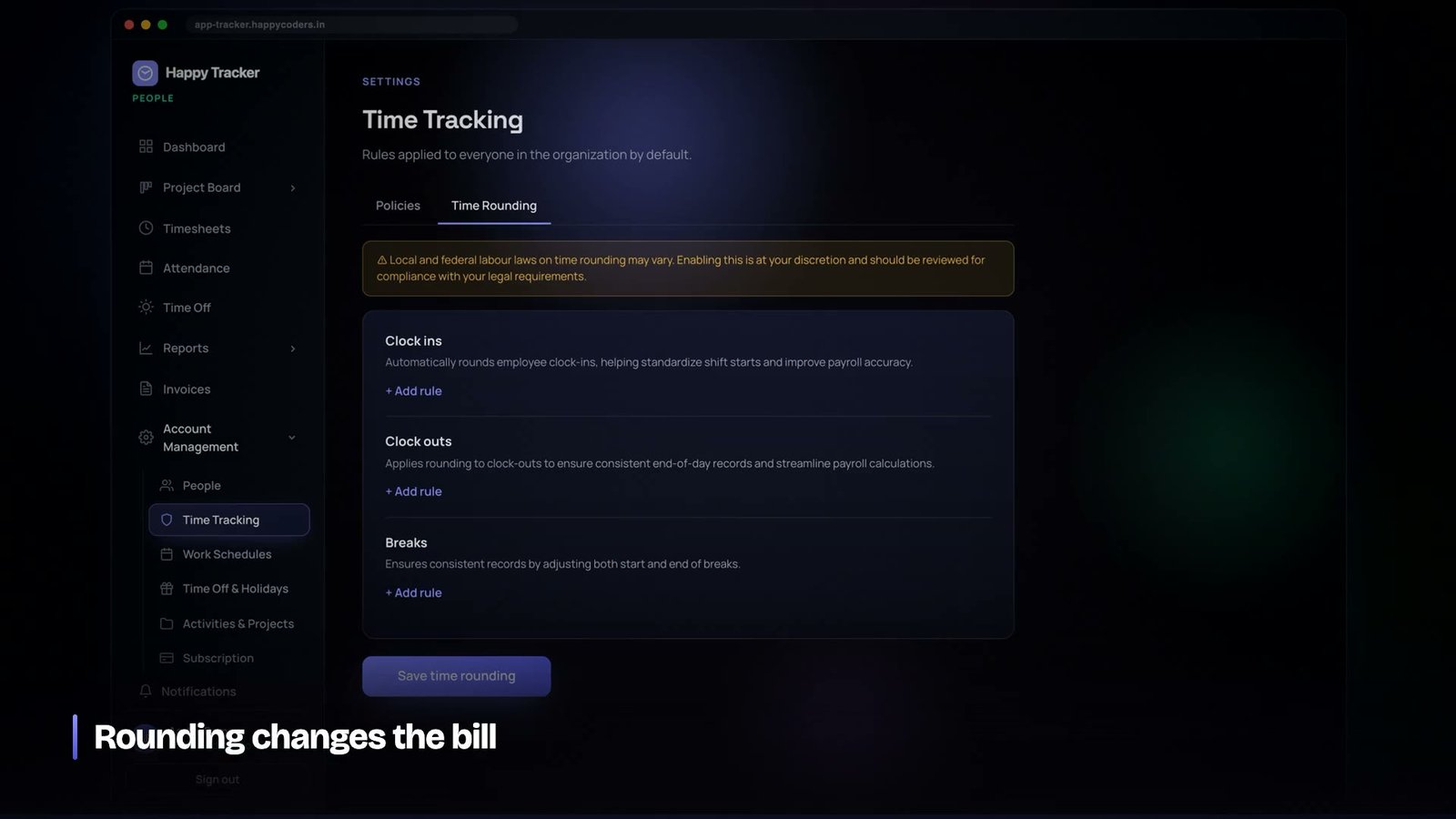
Six minutes rounded up to fifteen, applied across a team of twenty for a month, is not a rounding error. It is a material change to an invoice, and the client is entitled to know the rule. We surfaced it as an explicit organisation setting with the consequence stated next to it, rather than letting it live inside a helper function where it would eventually be changed by someone who thought they were adjusting a display.
The month-end conversation, before and after
It is worth being concrete about what changes in the office rather than in the database. Before, the last three days of the month contained a chase, a spreadsheet, and an approval that nobody could meaningfully perform because there was nothing to check the sheet against. After, the sheet exists on the first of the month, already complete, and the only work left is reviewing the handful of manual entries and unlocking anything that needs a correction.
The time saved is real and it is not the main benefit. The main benefit is that the conversation stops being administrative. When the numbers arrive by themselves, the question in the room becomes why a project took forty per cent longer than it was quoted at — which is the question that was always worth asking and never got asked, because everybody was busy collecting forms.
If you are building something similar
A few things we would tell ourselves at the start of this:
- Store events, derive everything else. The moment you cache a computed total in a column, you own a synchronisation problem for the rest of the product’s life.
- Use the server clock for every timestamp. Client clocks are wrong, sometimes deliberately.
- Make breaks a kind of entry, not a subtraction. It removes an entire class of arithmetic bug and it makes break policy reportable.
- Record the source of every entry. You will want to write policy against it later — which devices may clock in, which may not — and you cannot retrofit a field that was never populated.
- Let approval lock the data. An approval that does not change what can be edited is decoration.
- Keep manual entry, but make it visible. Removing it drives people to spreadsheets; hiding it destroys trust in the totals.
None of this is exotic. It is the difference between a system that records what happened and a system that collects claims about what happened, and once you have used the first kind it is very hard to go back to the second.
Happy Tracker does the whole of the above and is free for up to five users with no time limit and no card — enough to run a small team for a month and see whether automatic timesheets change the month-end conversation at your company. You can look at it at happytracker.happycoders.in.




