
Writing to Disk Fast Enough for 4K60 Without Dropping Frames
Writing to Disk Fast Enough for 4K60 Without Dropping Frames
4K at 60 frames a second is roughly 500 megabytes per second of raw frames. Even after hardware encoding you are writing tens of megabytes a second, continuously, for as long as the recording lasts.
Most recorders that drop frames at this rate are not short of disk throughput. They are losing frames somewhere earlier and blaming the disk.
Four places a frame can go
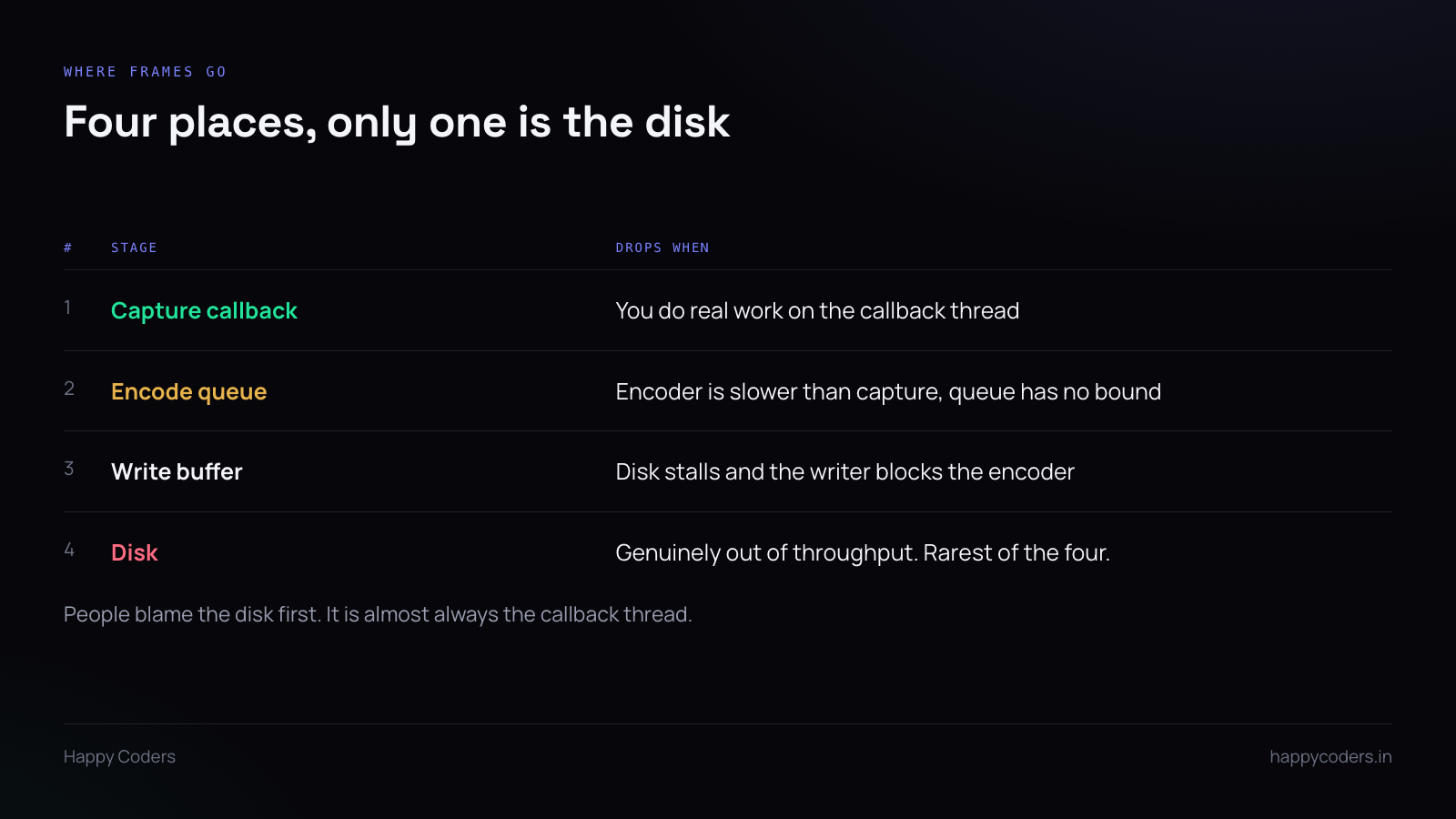
The capture callback
This is the usual culprit and it is worth checking first.
The capture API calls you back on its own thread with each frame. That thread has a budget — at 60fps, 16 milliseconds — and if you are still working when the next frame is ready, the system drops it rather than queueing.
So anything slow on that thread costs frames: encoding inline, compositing a camera bubble, drawing a watermark, allocating memory, taking a lock another thread holds.
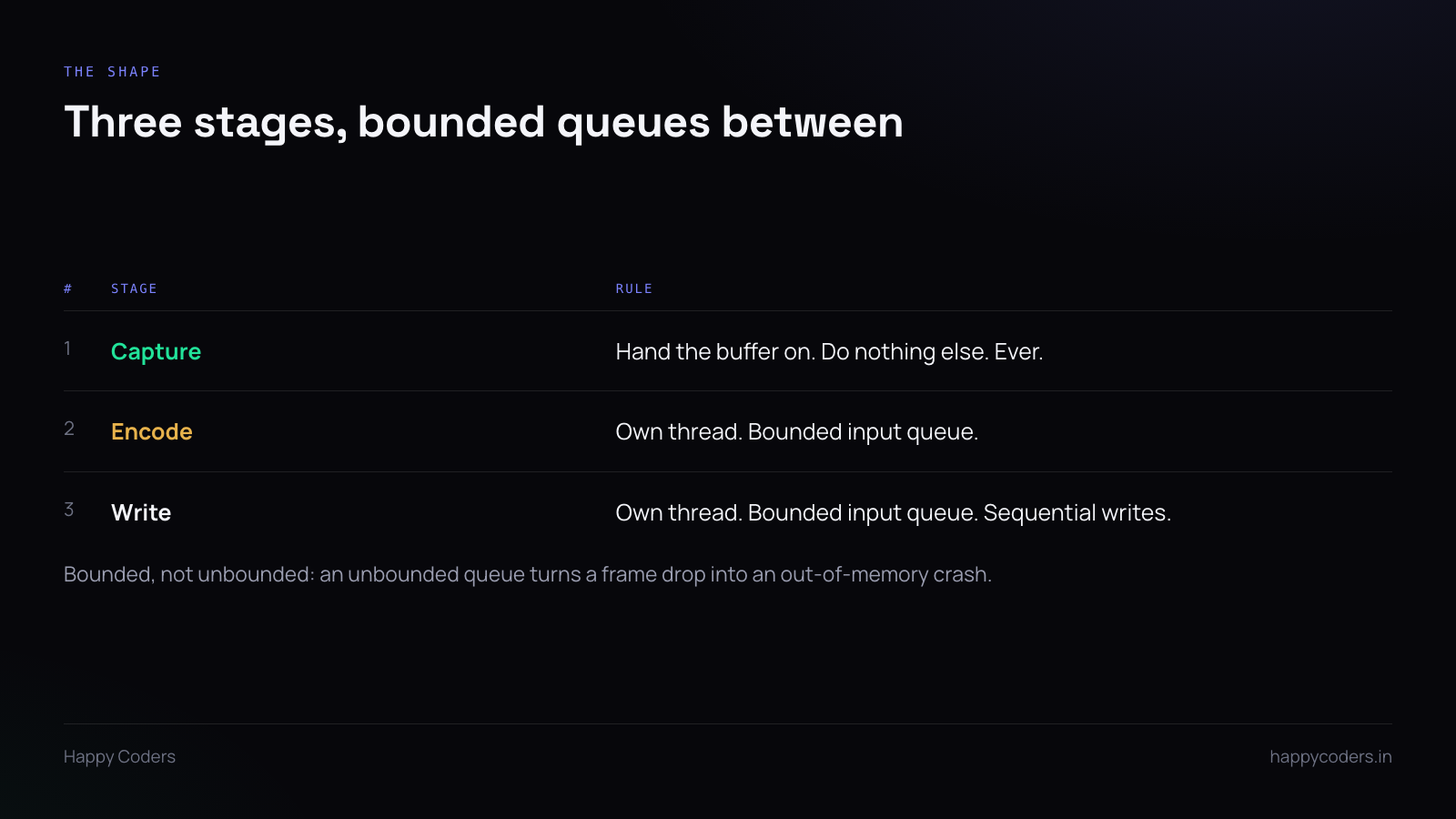
The rule is absolute. Retain the buffer, push it to a queue, return. Nothing else.
The encode queue
If the encoder is slower than capture, the queue grows. An unbounded queue grows until memory runs out and the application is killed — which is how a frame-drop problem becomes a crash.
Bound it. When it is full, you have to choose: drop the newest frame, drop the oldest, or block capture. For screen recording, dropping is correct and the oldest is the better one to drop, because it keeps latency from growing.
Whatever you choose, count it. A recorder that drops frames silently gives you nothing to debug.
The write buffer
Disk writes are not uniform. Most return in microseconds; occasionally one takes 50 milliseconds because the filesystem is flushing or the drive is doing housekeeping.
If the encoder writes directly, that stall propagates straight back to capture, and three frames are gone.
Separate thread, bounded queue, so a stall is absorbed rather than transmitted.
The disk
The rarest cause on modern hardware, and the first one everybody blames.
Worth ruling out with a measurement rather than a guess — sustained sequential write throughput, measured on the actual target path, not the system drive.
Where the file is written
Several of the genuinely slow cases are about location rather than speed.
A synced folder. Recording into a folder that syncs to the cloud means a client is reading and uploading the file while you write it. Catastrophic, and the user has no idea they did anything wrong.
A network drive. Every write crosses a network with variable latency. Fine until it is not.
An external drive over a shared bus. A USB drive sharing bandwidth with a webcam and a display will not sustain what its specification suggests.
Record locally, to internal storage, and move afterwards. Worth detecting and warning about when the chosen location looks like one of the above — a line in the interface prevents a whole class of support request.
Write sequentially, and do not seek
Container formats that need a header rewritten at the end force a seek back to the start when finalising. Fine for a finished recording, bad if it happens during one.
Write forward only. Keep the index in memory and write it at the end.
This also has a safety benefit: a file written sequentially is more likely to be partially recoverable if the machine dies mid-recording, which for a long session is worth something.
Count the drops and show them
Keep counters at each stage — frames captured, frames encoded, frames written. At the end, if they do not match, you know exactly where the loss happened.
Surface it. “Recording complete. 4 frames dropped.” is honest and almost never alarming at that scale. The alternative is a user who notices a stutter and has no idea whether it is their machine, their eyes, or your software.
If the number is large, say so more loudly and suggest the specific fix — lower the frame rate, lower the resolution, record a window instead of the full screen.
Before blaming the disk
Run the same recording at 1080p30 and see whether frames still drop. If they do, it is not throughput — 1080p30 is a small fraction of the data and almost any disk handles it.
That one comparison separates a real I/O limit from a pipeline problem, and it takes two minutes. Most of the time it points straight back at the capture callback.




