
Zero-Downtime Deploys on Shared Hosting
Zero-Downtime Deploys on Shared Hosting
The deploy is a git pull in the document root, and for about ninety seconds the site is serving a half-updated application: new templates against old classes, a controller that references a migration which has not run, an autoloader that does not know about a file Composer is still downloading.
Most of the time nobody notices. Occasionally a customer is mid-checkout, and the error they see is genuinely unexplainable because the code that produced it existed only during those ninety seconds.
The usual advice is containers, a load balancer and blue-green. On a Rs 300 per month shared plan there is no root, no Docker, no second server and often no exec(). Almost all of the benefit is still available, and it comes from one idea.
The idea: the running site is a symlink
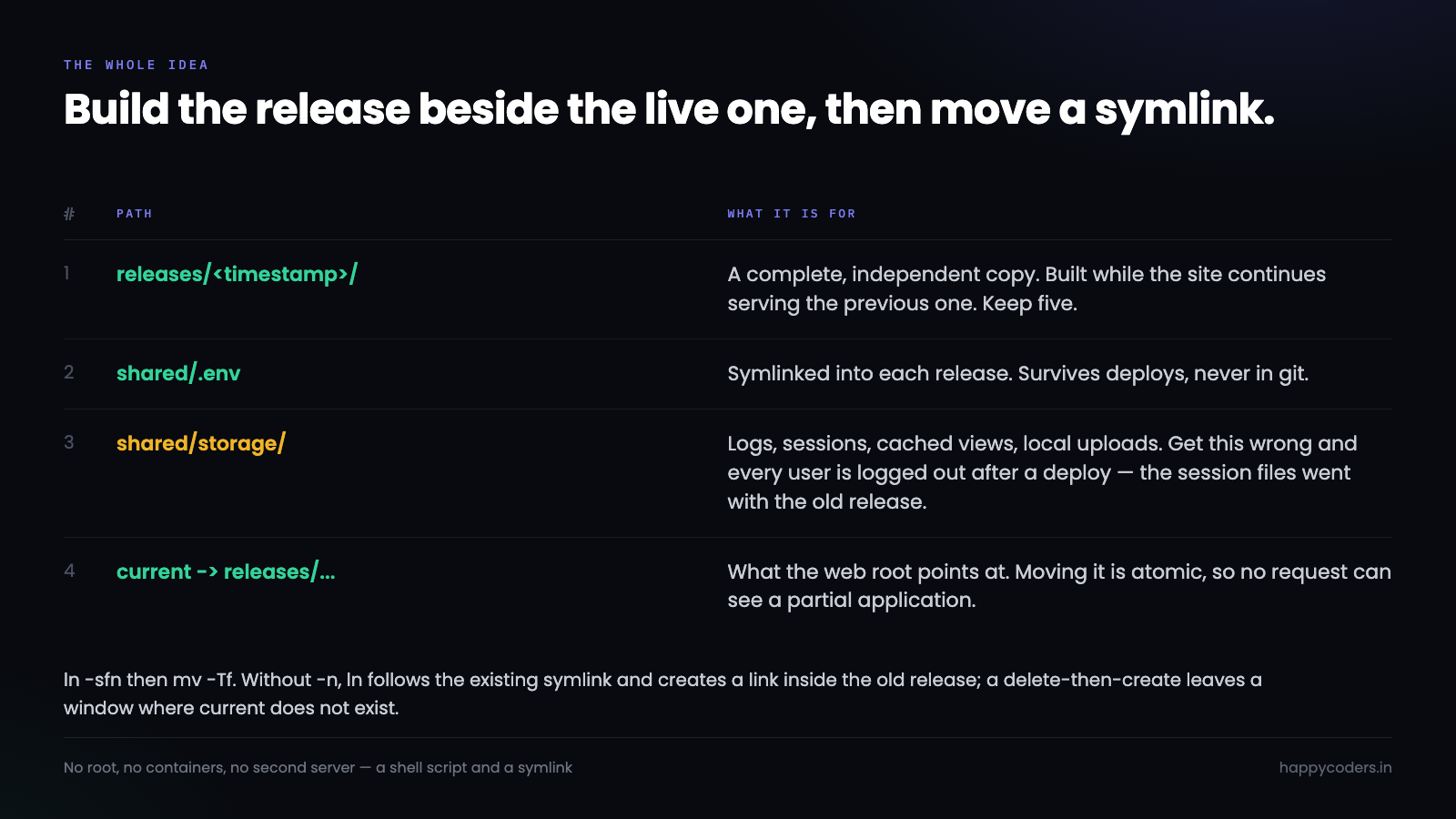
Instead of one directory that gets modified in place, keep several complete releases and point a symlink at whichever one is current.
~/app/
    releases/
        20260918143000/
        20260922091500/
        20260929173000/     <- the new one, fully built
    shared/
        .env
        storage/
    current -> releases/20260929173000
A release is built completely — code pulled, dependencies installed, caches warmed — while the site continues serving the previous one. Then the symlink moves. That move is a single filesystem operation, so there is no moment where a request can see a half-built application.
ln -sfn releases/20260929173000 current.tmp && mv -Tf current.tmp currentBoth flags matter. -n stops ln from following an existing symlink and creating a link inside the old release, and mv -Tf replaces the symlink atomically rather than deleting and recreating it — a delete-then-create leaves a window, brief but real, where current does not exist.
The shared-hosting complication
On a proper server the web root points at current/public and you are finished. On shared hosting the document root is usually fixed by the panel — public_html — and may not be changeable to a path outside itself.
Three options, in order of preference.
Point the panel at a subdirectory. Most panels, including hPanel and cPanel, let you set a domain’s document root to any folder under the account. Set it to app/current/public and the symlink does the rest. Check whether it follows symlinks — most do, some have it disabled.
Make public_html itself the symlink. Delete the directory and replace it with a link:
rm -rf ~/public_html
ln -sfn ~/app/current/public ~/public_html
This works on a surprising number of hosts. The risk is that some panel operations recreate public_html as a real directory and silently break the link, so it is worth a check in the deploy script.
Keep public_html real and symlink its contents. The fallback when neither works: leave index.php and .htaccess as real files in public_html, edit index.php to bootstrap from current, and symlink the asset directories.
// public_html/index.php
$base = __DIR__ . '/../app/current';
require $base . '/vendor/autoload.php';
$app = require_once $base . '/bootstrap/app.php';
Less elegant, and it still gives the atomic switch, which is the point.
What has to be shared
Anything that outlives a release lives in shared/ and is symlinked into each release.
ln -sfn ~/app/shared/.env      $RELEASE/.env
ln -sfn ~/app/shared/storage   $RELEASE/storage
For Laravel that is .env and storage/ — the latter holding logs, sessions, cached views and, if you are storing locally, uploaded files. Getting storage wrong is the mistake that shows up as every user being logged out after a deploy, because the session files went with the old release.
The related one: public/storage is itself a symlink created by artisan storage:link, so you now have a symlink inside a release pointing at a symlink in shared. It works, and it needs to be recreated per release:
php artisan storage:linkThe order of operations
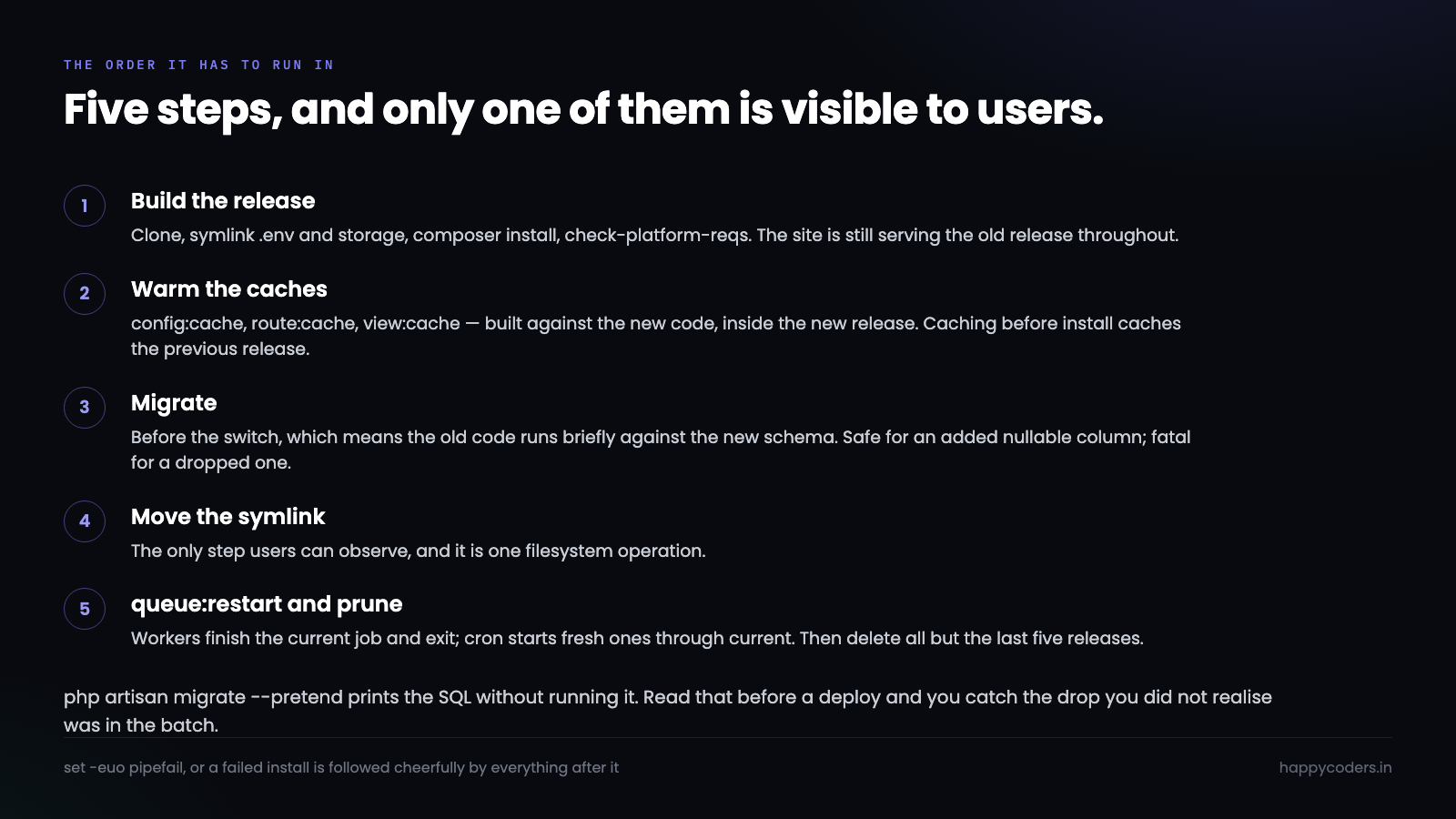
This is where deploys that use symlinks still manage to break, and the ordering is worth being precise about.
#!/usr/bin/env bash
set -euo pipefail

APP=~/app
REL="$APP/releases/$(date +%Y%m%d%H%M%S)"

# 1. build the new release, site still serving the old one
git clone --depth 1 --branch main "$REPO" "$REL"
ln -sfn "$APP/shared/.env" "$REL/.env"
rm -rf "$REL/storage" && ln -sfn "$APP/shared/storage" "$REL/storage"

cd "$REL"
composer install --no-dev --no-interaction --prefer-dist --optimize-autoloader
composer check-platform-reqs

# 2. caches, built against the new code
php artisan config:cache
php artisan route:cache
php artisan view:cache

# 3. migrations — before the switch, and only if backward compatible
php artisan migrate --force

# 4. the switch
cd "$APP"
ln -sfn "$REL" current.tmp && mv -Tf current.tmp current

# 5. after the switch
php "$REL/artisan" queue:restart
ls -1dt "$APP"/releases/* | tail -n +6 | xargs rm -rf
Everything expensive happens before the switch, which is what keeps the switch instant. Two steps deserve their own explanation.
Migrations, and the only rule that matters
The migration runs before the symlink moves, which means for a few seconds the old code is running against the new schema. That is fine for most migrations and fatal for some.
A migration deployed alongside code must be safe for the previous release to run against.
Adding a nullable column is safe — old code ignores it. Adding a table is safe. Adding an index is safe, though on a large table it can lock.
Dropping a column is not safe, and neither is renaming one, because the old code still selects it. The answer is the expand-contract pattern, which is two deploys:
// deploy 1: add the new column, write to both, read from the old
$table->string('phone_e164')->nullable();

// deploy 2, once every row is backfilled: read from the new, drop the old
$table->dropColumn('phone');
It feels like extra work for a rename. It is the difference between a deploy you can do at 3pm and one that needs a maintenance window, and on a site with actual traffic that is the whole argument.
The other habit worth having: php artisan migrate --pretend prints the SQL without running it. Reading that before a deploy catches the drop you did not realise was in the batch.
Queue workers, which do not notice the symlink
A worker started from the old release has already loaded its classes and will keep running that code indefinitely, processing jobs with a version of the application that no longer exists on disk.
php artisan queue:restartThis does not restart anything. It sets a timestamp in the cache; each worker checks it after finishing its current job and exits gracefully if it started before that time. Whatever supervises the worker then starts a fresh one, which picks up the new release through current.
On shared hosting there is usually no Supervisor, so the worker is a cron entry:
* * * * * cd ~/app/current && php artisan queue:work --stop-when-empty --max-time=55A worker that exits when the queue is empty, started every minute, with a time limit below the cron interval so two never overlap. It is not as responsive as a persistent worker and it is reliable, restarts itself on every deploy by definition, and cannot leak memory for long.
Note the cd ~/app/current — through the symlink, so cron always runs the current release without being updated.
Rollback
The reason to keep five releases:
cd ~/app
PREV=$(ls -1dt releases/* | sed -n 2p)
ln -sfn "$PREV" current.tmp && mv -Tf current.tmp current
php "$PREV/artisan" queue:restart
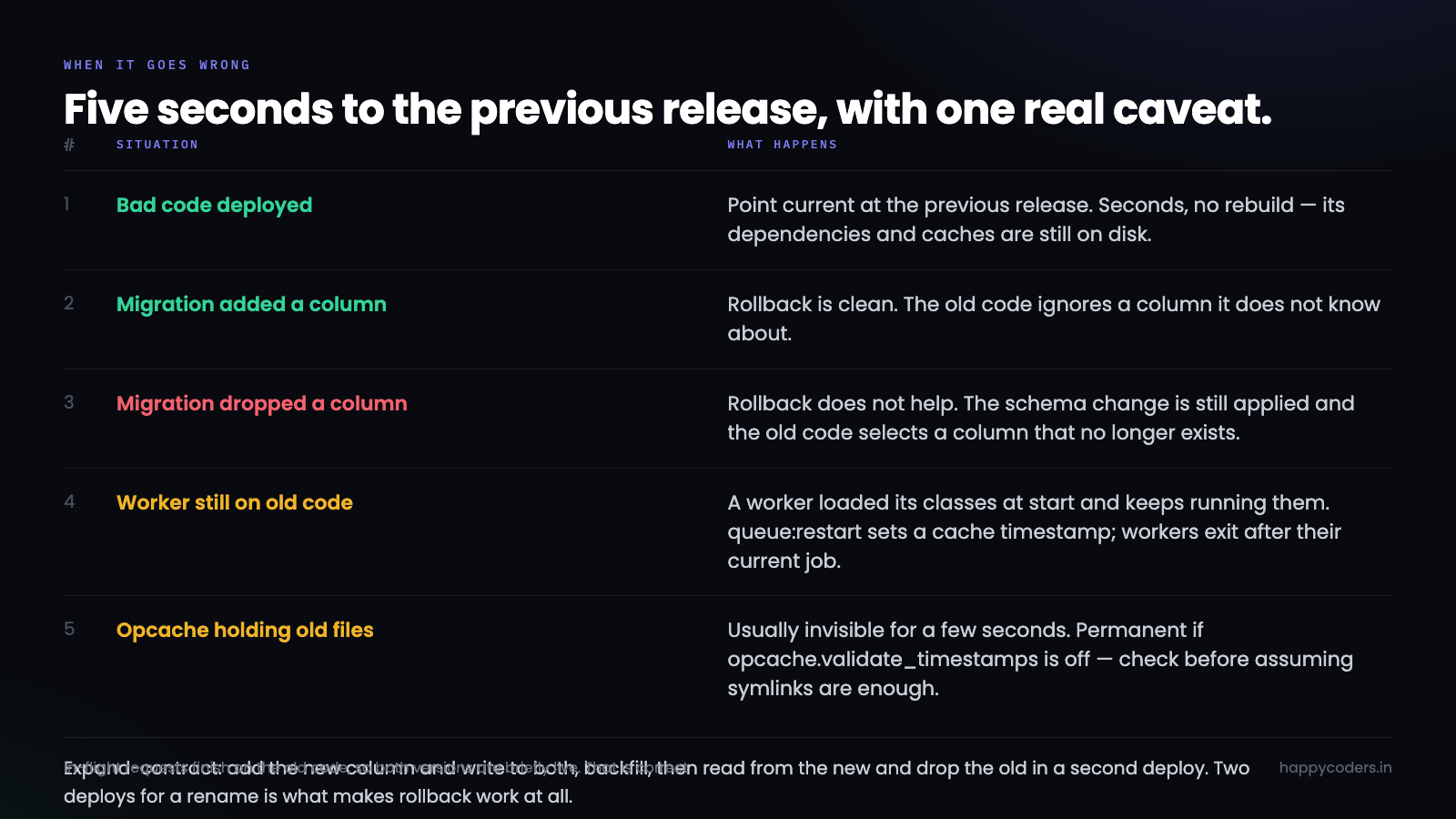
Seconds, and no rebuild — the previous release is still on disk with its dependencies and caches intact.
The honest caveat: this rolls back code, not data. A migration that ran is still applied, and if it dropped a column the old code needs, the rollback does not help. Which is the practical reason to follow the expand-contract rule even when it feels excessive — it is what makes rollback actually work.
Deploying without SSH at all
Some shared plans give SFTP and a panel and nothing else. The symlink approach still works; the trigger changes.
The pattern is a deploy script that lives in the account and is invoked by something other than a shell — most reliably a cron entry checking a flag file, or a small authenticated endpoint.
// public/deploy.php — behind a secret path and an IP check
$secret = getenv('DEPLOY_TOKEN');

if (!hash_equals($secret, $_GET['token'] ?? '')) {
    http_response_code(404);
    exit;
}

touch(__DIR__ . '/../../deploy.trigger');
echo "queued";
# cron, every minute
* * * * * [ -f ~/deploy.trigger ] && rm ~/deploy.trigger && ~/bin/deploy.sh >> ~/deploy.log 2>&1The endpoint does nothing but create a file, so even if the token leaks the worst outcome is an unscheduled deploy of the current branch — not arbitrary execution. The actual work happens in cron, under the account’s own shell, where it has the environment a deploy needs.
Two things to get right. Return immediately rather than running the deploy inline, because a PHP request that takes ninety seconds will hit max_execution_time and leave a release half-built. And log to a file you can read over SFTP, since without SSH the log is the only way to find out why a deploy failed.
Worth saying plainly: an endpoint that triggers a deploy is an attack surface, small as it is. A cron job that polls a git branch every five minutes has none, and for most small sites the five-minute delay is not worth the trade.
What to verify after the first one
The first symlinked deploy usually reveals one of three things, and all three are quick to check.
Are paths resolving through the symlink or past it? PHP’s __DIR__ gives the resolved real path, not the symlink path — so a value stored during one deploy that contains releases/20260929173000 will point at a deleted directory two deploys later. Cached config is the usual culprit: check with php artisan config:show that no absolute path baked in a timestamped directory.
Did storage actually symlink? Write a file through the app and confirm it appears in shared/storage, not inside the release. ls -la on the release’s storage entry should show an arrow, and if rm -rf did not run before the ln, it will instead show a real directory that silently collects files nobody will ever find again.
Is the old release actually gone from opcache? The simplest check is to deploy a change to a template and a change to a class in the same release. Templates update immediately; if the class change has not taken effect, opcache is holding the old path and the site needs either a reset or validate_timestamps turned on.
After the first deploy, keep the previous release and make a trivial change, deploy again, and roll back. Five minutes, and it confirms the rollback path works before the day you need it under pressure — which is the only time anyone finds out it does not.
Assets, and the cached file that is not there any more
A build step introduces one problem the symlink does not solve by itself.
Vite and Mix write hashed filenames — app-8f2c1b.js — and a page served from the old release references the old hash. If the browser requests it a moment after the switch, and the old release still exists, it resolves fine. Two deploys later, when the pruning has removed that release, it is a 404 and the page renders unstyled.
The window is small and real: a user who left a tab open, a page cached by a CDN, a mobile browser restoring a session from yesterday.
Two mitigations, and the first is nearly free:
# keep enough releases that stale references still resolve
ls -1dt "$APP"/releases/* | tail -n +8 | xargs rm -rf
Keeping seven releases instead of three costs disk, which on shared hosting is usually the resource you have most of. It buys a week during which any stale asset reference still finds its file.
The more thorough answer is to put built assets somewhere shared rather than inside the release, so old hashes persist across deploys and are cleaned on a schedule of their own. That is more moving parts, and it is worth it only once the site is busy enough for the 404s to show up in the logs.
The related detail: build assets locally or in CI and commit or upload the output. Running npm ci && npm run build on shared hosting is slow where Node exists at all, and it adds a minute to every deploy for something that does not depend on the server.
Keeping the releases directory honest
A deploy that fails halfway leaves a partial release on disk, and the next deploy’s pruning counts it as one of the five it keeps.
# build into a temp name, rename on success
REL="$APP/releases/$(date +%Y%m%d%H%M%S)"
BUILD="$REL.building"

git clone --depth 1 --branch main "$REPO" "$BUILD"
# ...everything else against $BUILD
mv "$BUILD" "$REL"                 # only reached if nothing failed
With set -e, any failure exits before the rename, so a partial build is never named like a real release. A line at the top of the script clears the debris from last time:
rm -rf "$APP"/releases/*.buildingDisk is the other thing to watch. Five Laravel releases with vendor/ each is a few hundred megabytes, and on a plan with a quota that is enough to matter. If space is tight, --no-dev is already doing most of the work; beyond that, sharing a single vendor/ directory between releases is possible and defeats the purpose, since a dependency change then affects the running release immediately.
What you still do not get
Being clear about the limits, because “zero downtime” is a strong claim.
In-flight requests still run the old code to completion, which is correct and means both versions are briefly live. Opcache may hold compiled files from the old path for a few seconds, which is usually invisible and occasionally is not — opcache.validate_timestamps being off makes it permanent, so check that before assuming symlinks alone are enough. And a genuinely breaking schema change still needs a window, however careful the deploy is.
What you do get is that the ninety-second broken window disappears entirely, a bad deploy is undone in five seconds instead of a panicked git revert and rebuild, and the deploy stops being something to do late at night. On shared hosting, from a shell script and a symlink, that is most of what the expensive setup was buying.




