
API Versioning Without Pain When Desktop Apps Are Involved
API Versioning Without Pain When Desktop Apps Are Involved
A web application and its API can be deployed together. Change the response, change the JavaScript, ship both, and within one page refresh every client in the world is running the new code. Versioning is barely a problem.
Add a desktop application to the same API and the problem changes shape entirely. A tracker installed on a laptop in Coimbatore is running the build from March. It will keep running the build from March until somebody opens it, notices an update prompt, and agrees to it. That may be next week. In a company with a managed IT policy it may be next year.
This is how we version an API that a SPA, a Mac app, a Windows app and an Ubuntu app all call, without a coordinated release every time somebody wants to rename a field.
Put v1 in the path and stop thinking about it
There are three ways to signal a version: in the URL path, in a custom header, or in the Accept header as a media type. There is a long-running argument about which is correct. For a small team, the argument is not worth having.
// routes/api.php
Route::prefix('v1')->group(function () {
    Route::get('/time-entries', [TimeEntryController::class, 'index']);
    Route::post('/time-entries', [TimeEntryController::class, 'store']);
});
Path versioning wins on the things that matter when there are four of you. You can see the version in a log line without parsing headers. You can curl a versioned endpoint from a terminal without remembering flags. A support engineer can read a bug report and know immediately which contract the client was speaking. And the router does the dispatch for free.
Content negotiation via Accept: application/vnd.company.v2+json is more architecturally pure and it is genuinely better for large public APIs with many consumers. It is also invisible in every tool your team already uses, and that invisibility costs more than the purity is worth at this size.
Start at
/v1on day one, even when there is only one version and no plan for a second. Retrofitting a prefix onto a live API with desktop clients in the field is a far worse afternoon than typing four characters at the start.
What counts as breaking
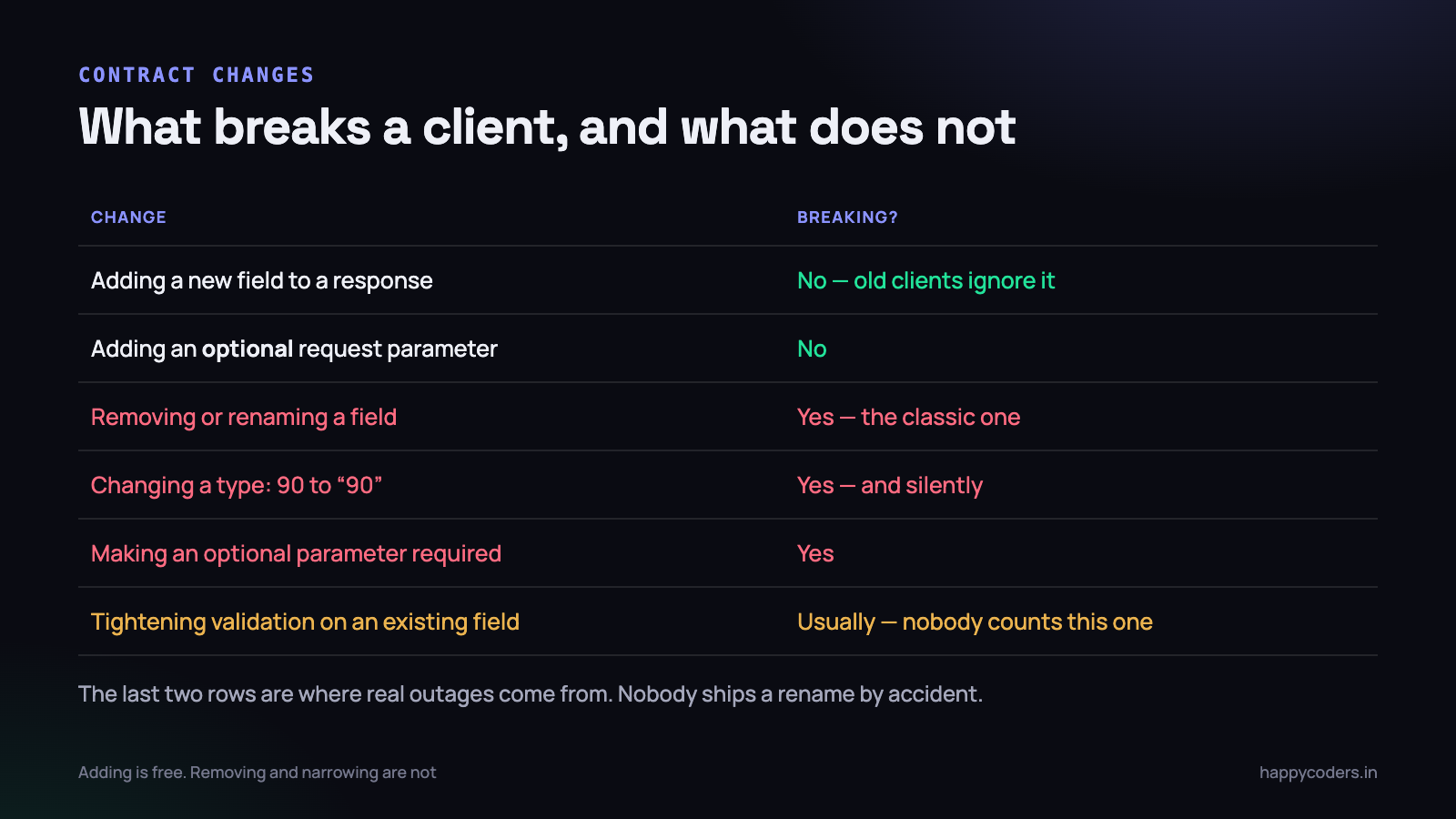
This is the part that goes wrong, because most teams have an intuition for the obvious cases and none at all for the subtle ones.
The reliable test is not “did I remove something”. It is: could a client written against the old contract, which I have never seen and cannot inspect, now behave differently? That framing catches the cases the intuitive test misses.
Not breaking
- Adding a field to a response. A client that does not know about
billable_ratesimply does not read it. Extra bytes, no behaviour change. - Adding an optional request parameter with a default that preserves the previous behaviour. The word optional is doing all the work; the default must be the old behaviour, not the better one.
- Adding a whole new endpoint. Nobody calls it yet by definition.
- Adding a new value to an enumeration — with a caveat. If a client has a switch statement over statuses and no default branch, a new status is breaking in practice. Worth knowing which of your clients does that.
Breaking
- Removing or renaming a field. The obvious one, and the one that gets caught in review.
- Changing a type.
90becoming“90”looks harmless in a JSON viewer. In a strongly typed Swift or C# client it is a decoding failure, and the app shows an error screen rather than a wrong number. - Making an optional parameter required. Every existing client omits it.
- Tightening validation. A description field that was unlimited and is now capped at 500 characters will reject requests that used to succeed. Almost nobody counts this as a version change, and it produces real support tickets.
- Changing the shape of errors, or the HTTP status for an existing condition. A client that branches on 422 and now gets 400 falls into its generic failure path.
- Changing defaults. Pagination going from 100 per page to 25 breaks any client that assumed it got everything in one call.
The last three are where versioning discipline is actually tested. Nobody deletes a field by accident. Everybody tightens a validation rule on a Tuesday afternoon.
Additive change as the default
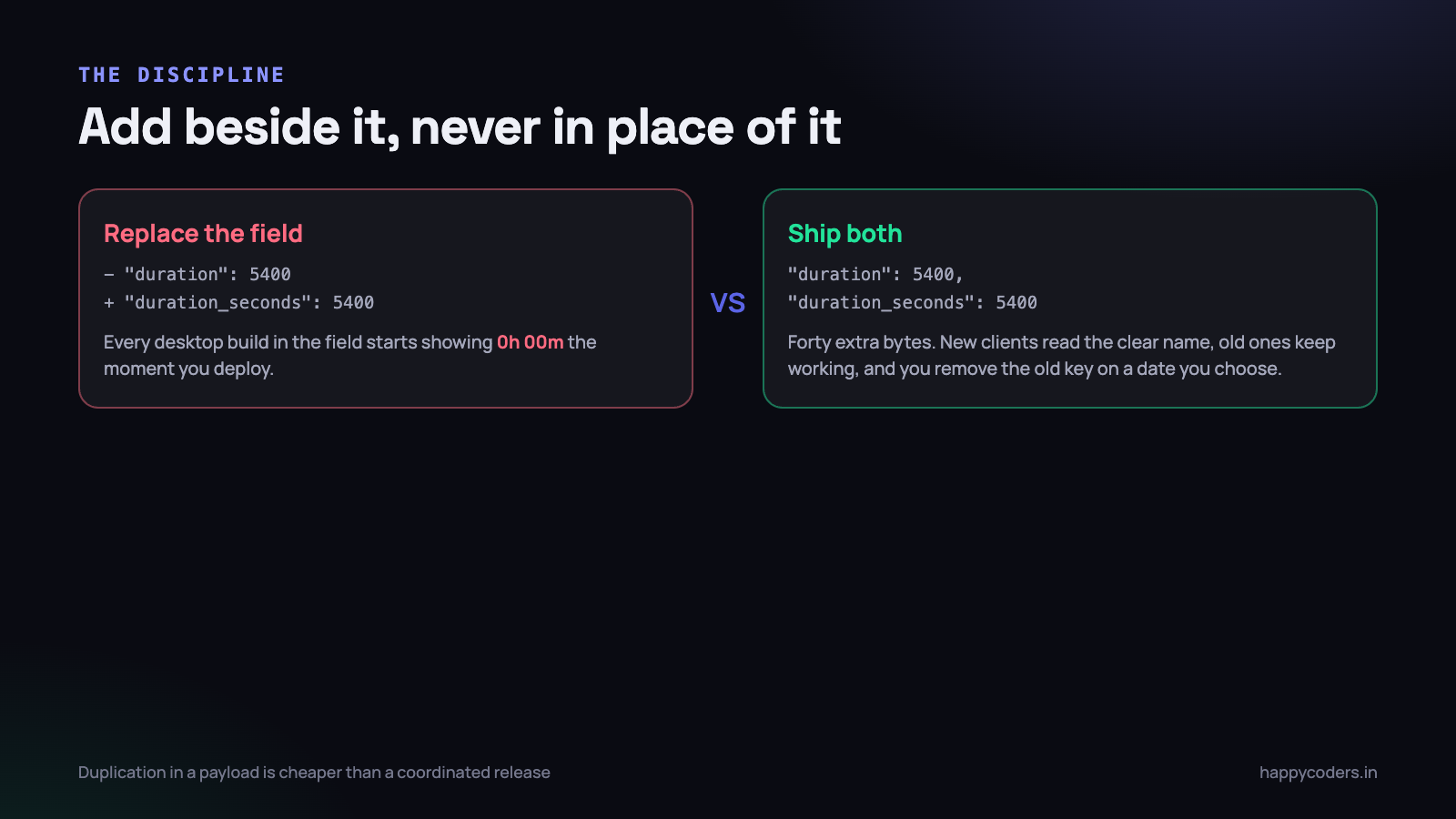
Once you accept that old clients will exist for months, one rule handles about ninety percent of changes: add beside, never replace.
<?php
// TimeEntryResource
public function toArray($request): array
{
    return [
        'id'               => $this->id,
        'duration'         => $this->duration_seconds,  // v1 name, kept
        'duration_seconds' => $this->duration_seconds,  // clearer name
        'project'          => $this->whenLoaded('project', fn () => [
            'id'   => $this->project->id,
            'name' => $this->project->name,
        ]),
    ];
}
Two keys with the same value. It looks untidy and it is the cheapest thing on the page. New clients read the clear name, every client in the field keeps working, and the removal of the old key becomes a decision you schedule rather than an emergency you cause.
The same principle covers request parameters. When the new behaviour needs a different input, accept both and prefer the new one:
<?php
// accept the old name and the new one; old wins only if new is absent
$projectId = $request->input('project_uuid')
          ?? $request->input('project_id');
And for behaviour that genuinely must change, gate it behind an opt-in parameter so that only clients asking for it get it. Existing callers see exactly what they saw yesterday.
Deprecating a field honestly
Additive change means the payload accumulates. At some point you do want to remove the old key, and there is a way to do that which does not involve guessing.
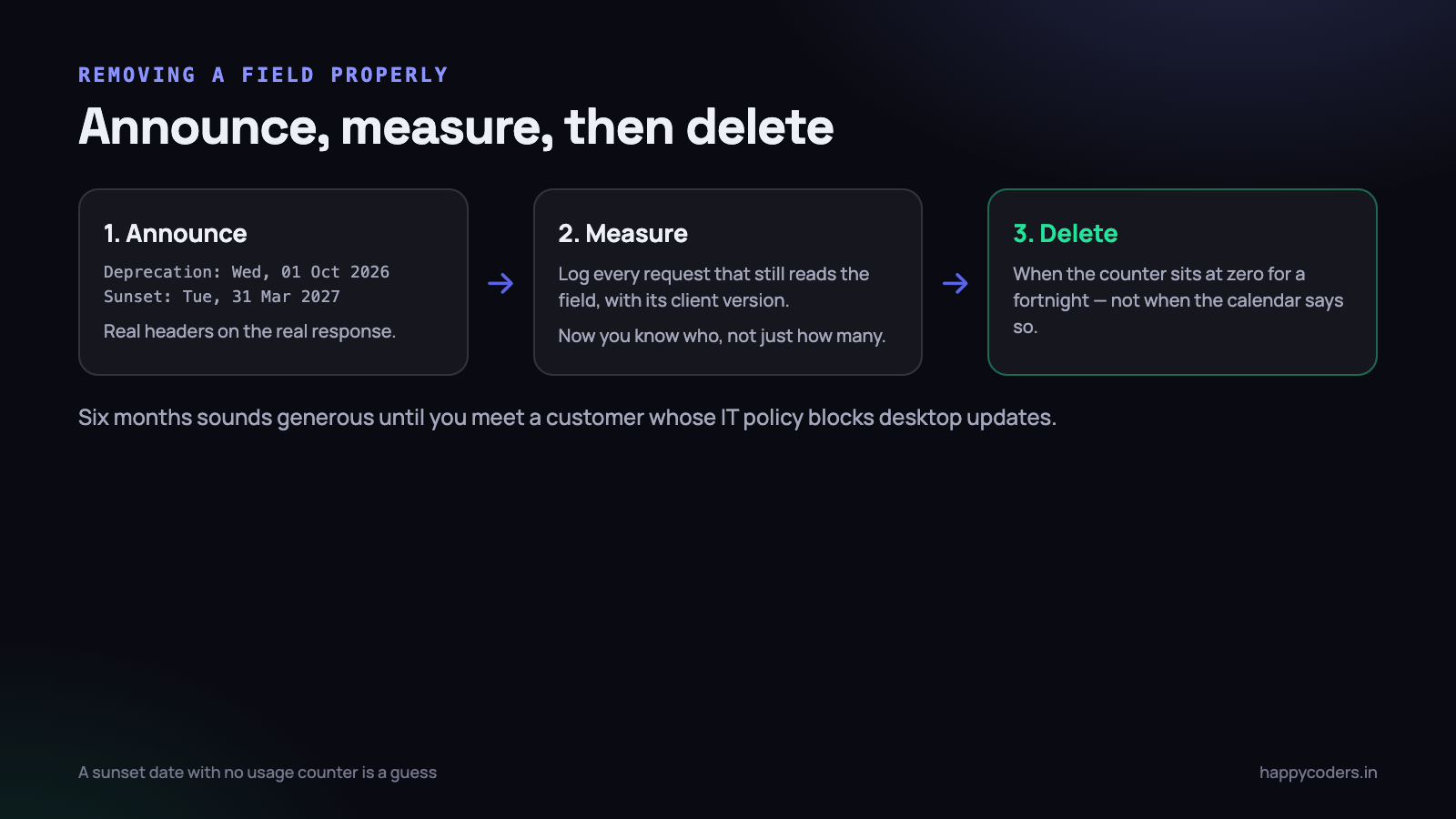
Announce it in the response
There are standard headers for this. Use them, because they are machine readable and they put the information in front of whoever is debugging rather than in a changelog nobody read.
<?php
// middleware on routes that still serve the deprecated shape
$response->headers->set('Deprecation', 'Wed, 01 Oct 2026 00:00:00 GMT');
$response->headers->set('Sunset',      'Tue, 31 Mar 2027 00:00:00 GMT');
$response->headers->set('Link',
    '<https://docs.example.com/v1-sunset>; rel="deprecation"');
Count who is still using it
This is the step that turns the date from a hope into a decision. Log every request that reads the deprecated field, with enough detail to identify the caller.
<?php
if ($request->has('project_id') && ! $request->has('project_uuid')) {
    Log::channel('deprecations')->info('v1.project_id', [
        'org'            => $request->user()->organization_id,
        'client'         => $request->header('X-Client'),   // mac|win|linux|spa
        'client_version' => $request->header('X-Client-Version'),
    ]);
}
Now the removal conversation has facts in it. “Thirty-one organisations are still sending the old parameter, all of them on Windows builds older than 2.4.0” is something you can act on. You can email those thirty-one, or you can look at why the Windows updater is not reaching them.
Delete when the counter is zero, not when the date arrives
The date is a commitment to yourself, not a trigger. If usage is still non-zero on the sunset date, the correct response is usually to find out why rather than to break those customers — and the answer is frequently that the update mechanism is broken, which is a more important bug than the one you were trying to fix.
The desktop client that will not update
This is the constraint that shapes everything else, so it is worth being concrete about it.
A SPA is effectively always current. Deploy, and the next page load has new code; a cache-busted bundle guarantees it. A desktop application is a different animal. It updates when the user agrees, and users decline update prompts. Corporate machines block installers. A laptop that sits in a drawer for two months comes back running whatever it was running.
Our practical experience is that the tail is roughly six months. After a release, about seventy percent of installs are current within two weeks, most of the rest within two months, and a stubborn few percent are still on the old build half a year later. Any plan that assumes everyone upgrades in a fortnight is a plan that will break somebody.
Make the client identify itself
Every desktop request should carry who it is. Two headers, set once in the HTTP layer of each app.
X-Client: mac
X-Client-Version: 2.4.1
With those in place you can do things that are otherwise impossible: serve a compatible response shape to old builds, log deprecation usage usefully, and answer “how many people are still on the build with the sync bug” without guessing. It also gives you a clean escape hatch for the genuinely unavoidable break.
<?php
// last resort: keep an old build alive with a narrow shim
if ($request->header('X-Client') === 'win'
    && version_compare($request->header('X-Client-Version', '0'), '2.4.0', '<')) {
    $payload['duration'] = $payload['duration_seconds'];  // it only reads this
}
Shims like this are a debt and should be written with a removal condition in the comment, not left open-ended. But one narrow shim in a controller beats forcing an update on a customer whose IT department needs three weeks to approve one.
Give the client a way to refuse
If you ever need to hard-stop very old builds — a security fix, a protocol change — that mechanism has to exist before you need it. A field in the login response that says “this version is no longer supported, download here” and an app that renders it clearly is a hundred lines, and it means the alternative to a shim is a helpful screen rather than a silent failure.
Feature detection beats version sniffing
A tempting pattern once you have version headers is to branch on them all over the codebase. It works for a while and then it does not, because the conditions multiply and none of them can ever be removed safely.
The better pattern is the one browsers taught the web: let the client ask what is available, and let it decide.
GET /api/v1/capabilities

{
  "features": ["sprints", "offline_queue", "screenshot_blur"],
  "limits":   { "upload_mb": 10, "batch_size": 500 },
  "min_supported_client": "2.1.0"
}
The desktop app fetches this on login and enables what it can use. Ship a new server feature and old clients ignore it because it is not in the list they understand. Withdraw one and clients stop offering it, without a release. The alternative — “if server version is at least 3.2 then show the sprint picker” — encodes the same information in a form that cannot be changed from the server.
Version sniffing asks “who are you?” Feature detection asks “what can you do?” Only the second one survives a client you cannot update.
When a v2 is genuinely worth it
Additive change and deprecation cover most things. Sometimes they do not, and it is worth being clear about the boundary because a premature v2 is an expensive mistake.
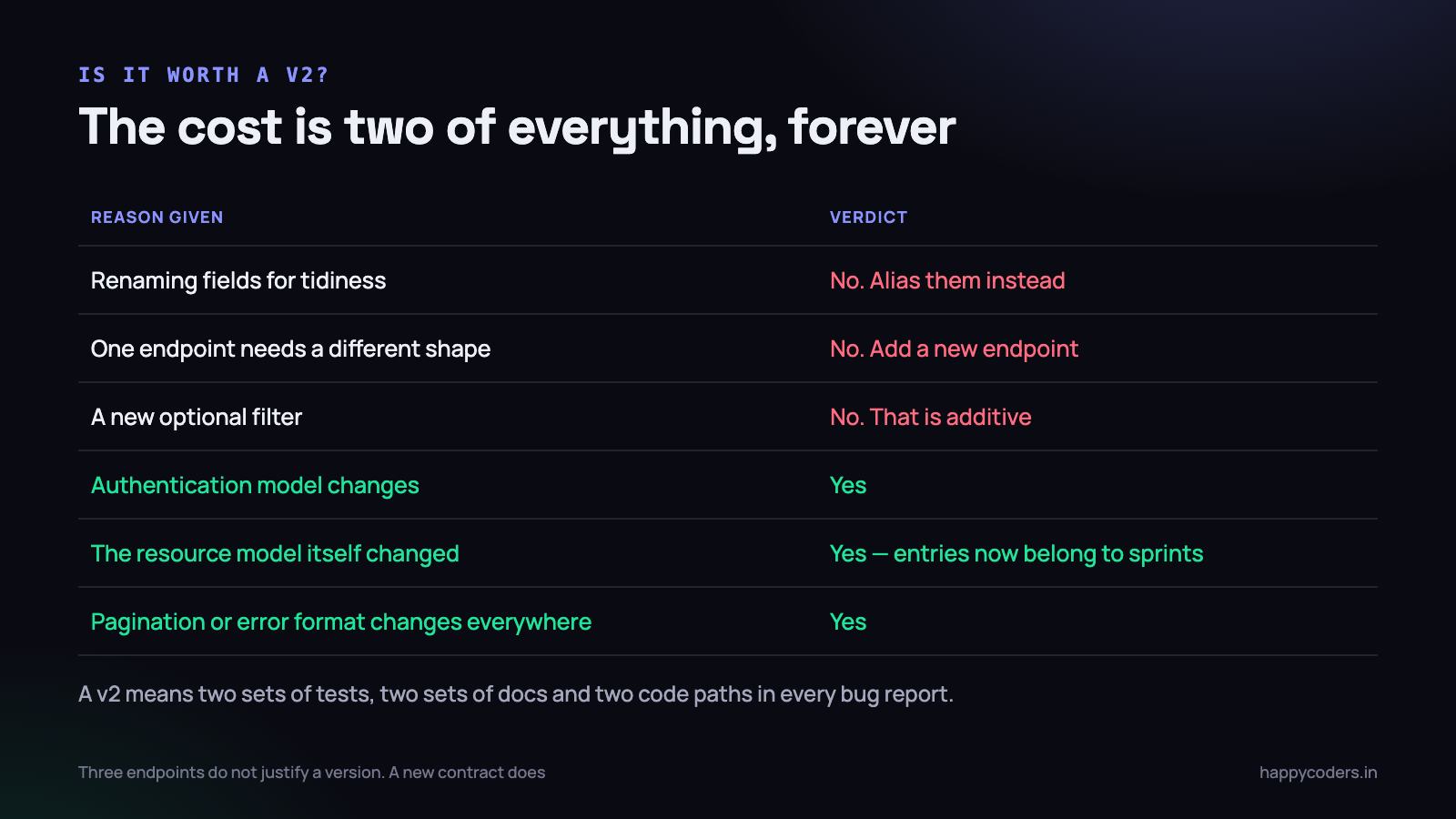
A second version is justified when the contract changes, not when a few endpoints do.
- Authentication changes. Moving from long-lived API tokens to short-lived tokens with refresh is not something you can make additive. Every client must change.
- The resource model changed underneath. When time entries stop belonging directly to projects and start belonging to sprints, half the endpoints change meaning rather than shape. Patching that into v1 produces an API nobody can reason about.
- Cross-cutting format changes. A new error envelope or a move from offset to cursor pagination touches every endpoint. Doing it additively means every response carries both forever.
And the reasons that are not sufficient, which are the ones that come up more often: tidying up field names, one endpoint needing a different shape (add a new endpoint), a new optional filter (additive), or a feeling that the API has grown untidy. Untidiness is real and a version bump does not fix it; it duplicates it.
If you do build a v2
- Run both from the same domain logic. Two sets of controllers and resources over one service layer. Two copies of the business rules is how the versions silently diverge in behaviour.
- Announce the v1 sunset when v2 ships, with a date and the usage counter already in place.
- Do not port every endpoint. The endpoints nobody calls are an opportunity to stop maintaining them.
- Keep v1 read-only near the end if you can. It reduces the surface you have to keep correct while the last clients migrate.
Two live versions is the practical ceiling for a small team. If you ever find yourself with three, the real problem is that changes are being made breaking when they did not have to be.
The deploy itself is a version boundary
One thing that catches teams out even when the versioning policy is sound: during a deploy, old code and new code are both live for a few seconds, and old code is also running against the new database.
That makes a migration and an API change a two-release problem rather than a one-release problem, in exactly the same way and for exactly the same reason as the desktop client. Renaming a column and updating the resource in one deploy means that for the length of the rollout, requests hitting the old application code query a column that no longer exists.
- Release one: add the new column, write to both, read from the old one. Nothing breaks in either direction.
- Release two: switch reads to the new column, once every process is running the new code.
- Release three: stop writing the old column and drop it, when nothing has read it for a while.
It is the same discipline as the API contract — add beside, migrate, then remove — applied to a window of thirty seconds instead of six months. Teams that have internalised it for deploys usually find the client version story easy, because the reasoning is identical and only the timescale differs.
Tests are the contract
A rule that lives in a wiki is a rule that gets broken. The only durable version of “do not remove fields” is a test that fails.
<?php
public function test_v1_time_entry_keeps_its_documented_keys(): void
{
    $response = $this->getJson('/api/v1/time-entries');

    $response->assertOk()->assertJsonStructure([
        'data' => [['id', 'duration', 'duration_seconds', 'started_at', 'project']],
    ]);
}
This is a low-cost, high-value test and it is not about correctness — it is about the contract. The day somebody deletes duration during a cleanup, the build tells them it is a breaking change before a customer does. That is the entire mechanism, and it takes six lines per resource.
Worth adding a type assertion alongside the structure one, because the type change is the sneaky break: assert that duration is an integer, not merely present.
On Monday morning
- Check whether your API has a version prefix. If not, add
/v1now and keep the unprefixed routes as aliases. It costs an hour today and it is the single thing you cannot retrofit cheaply later. - Make every desktop build send
X-ClientandX-Client-Version. Without those two headers you are guessing about your own users. - Write one structure test per API resource. Six lines each, and it converts your versioning policy from a convention into a build failure.
- Find the deprecated field you have been meaning to delete and add the usage log rather than deleting it. In a fortnight you will know whether the deletion is safe instead of hoping.
The whole approach rests on one uncomfortable fact: you do not control when your clients update, so the contract has to keep working for people who never agreed to your schedule. Once you plan for that, versioning stops being a design argument and becomes a small amount of routine bookkeeping.
Related: desktop app token auth and device binding, and what actually matters when testing a Laravel API.




