
Token Auth For A Desktop App: Keychains And Device Binding
Token Auth For A Desktop App: Keychains And Device Binding
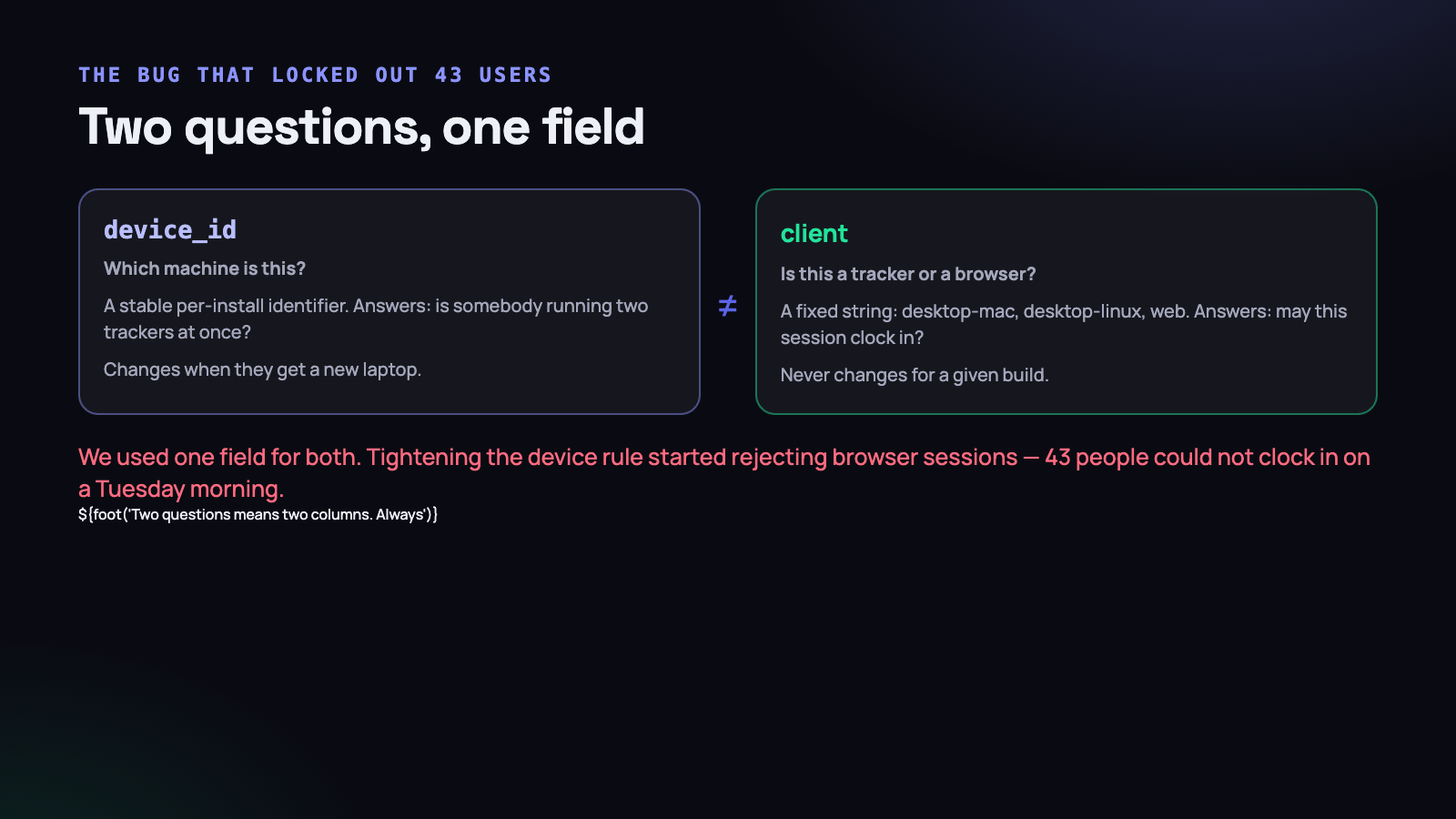
On a Tuesday morning in September, forty-three people could not clock in. Not a crash, not an outage, not a slow page — the API was healthy, the website was fine, and every desktop tracker in the country was refusing to start a timer with a message about another device.
The cause was one column doing two jobs. This is the whole story, and the design it produced: how a desktop application authenticates against a Laravel API, where the token lives, how you stop one account running two trackers at once, and the distinction that we learned the expensive way.
Why a desktop app is not a browser
A browser session is short, cookie-backed, CSRF-protected and tied to a tab somebody eventually closes. A desktop tracker is none of those things. It runs for eight hours, survives sleep and reboot, must work on a train with no connection, and nobody wants to type a password into it every morning.
So it holds a long-lived bearer token. That token is effectively a password that never expires, which raises three questions the browser never had to answer: where do you keep it, what does it identify, and how do you take it away.
Sanctum, and the abilities you should actually set
Laravel Sanctum’s personal access tokens are the right primitive here — a random string, hashed in the database, exchanged for a user on each request. The login endpoint for the desktop apps looks like this:
public function login(LoginRequest $request)
{
    $user = User::where('email', $request->email)->first();

    if (! $user || ! Hash::check($request->password, $user->password)) {
        throw ValidationException::withMessages([
            'email' => __('auth.failed'),
        ]);
    }

    $token = $user->createToken(
        name: $request->device_name,          // 'Raguvaran-MacBook'
        abilities: ['tracker'],
    );

    $token->accessToken->forceFill([
        'device_id' => $request->device_id,   // which machine
        'client'    => $request->client,      // what kind of app
    ])->save();

    return response()->json([
        'token'   => $token->plainTextToken,
        'user'    => new UserResource($user),
        'org_tz'  => $user->organization->timezone,
    ]);
}
Two custom columns on the tokens table. They look almost interchangeable. They are not, and the rest of this article is largely about why.
A word on abilities: give the desktop token the narrow set it needs and nothing else. A tracker uploads time entries, activity blocks and screenshots, and reads a project list. It does not need to change a rate, approve leave, or delete a user. If a token is ever stolen from a laptop, the blast radius is whatever you put in that array.
Where the token lives
The first version of almost every desktop app writes the token to a JSON file in the application support directory. It works immediately and it is a plaintext credential sitting on disk.
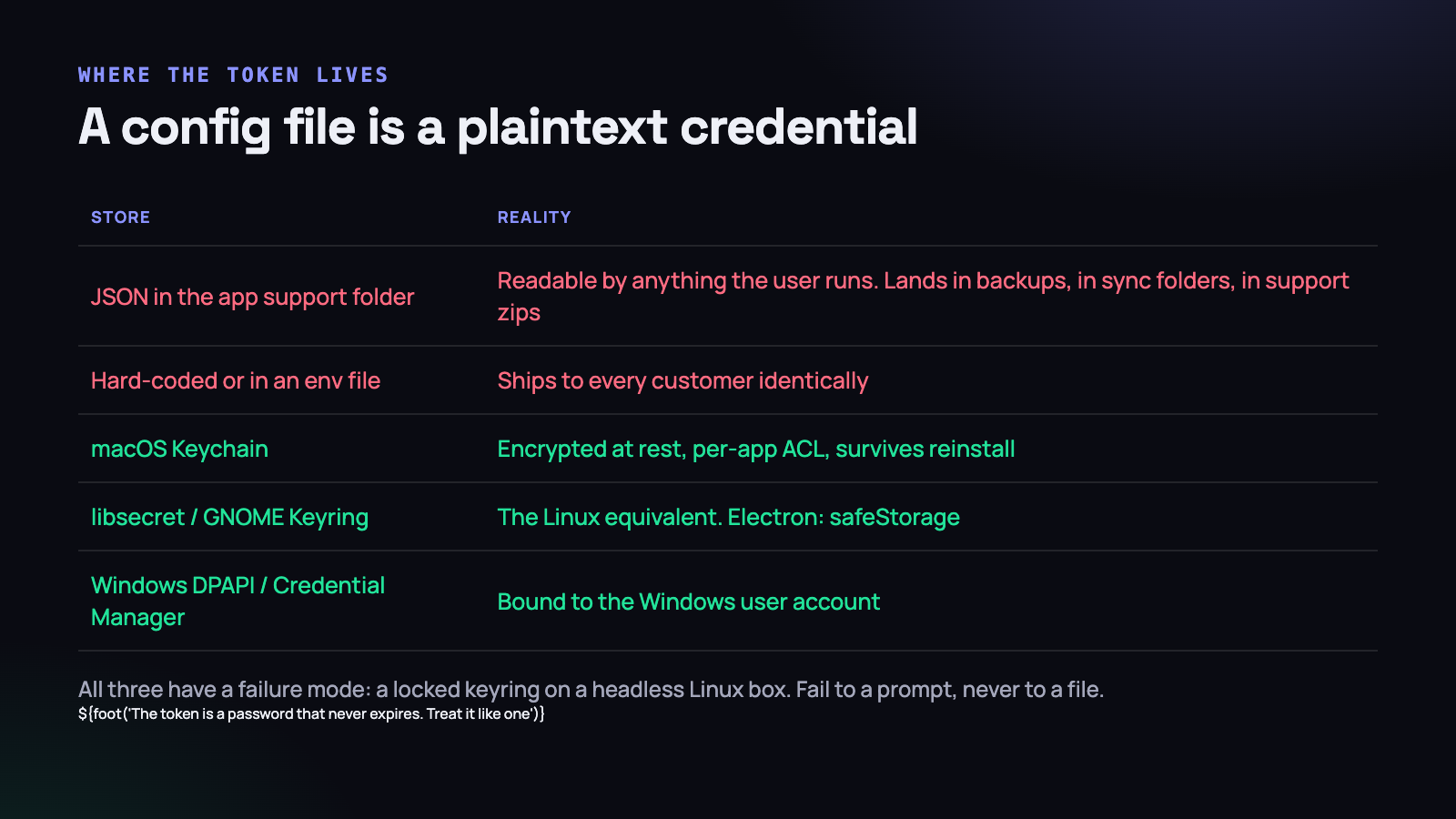
That file gets copied into Time Machine backups, into Dropbox if the folder is synced, and into the zip somebody sends to support when they report a bug. It is readable by any process running as that user, including whatever they installed last week from a search result.
Every desktop platform has a proper answer, and all three are a handful of lines.
// macOS - Swift, Keychain Services
let query: [String: Any] = [
    kSecClass as String:       kSecClassGenericPassword,
    kSecAttrService as String: "in.conceps.tracker",
    kSecAttrAccount as String: "api-token",
    kSecValueData as String:   token.data(using: .utf8)!,
    kSecAttrAccessible as String: kSecAttrAccessibleAfterFirstUnlock,
]
SecItemDelete(query as CFDictionary)
SecItemAdd(query as CFDictionary, nil)
// Linux - Electron, safeStorage over libsecret
const { safeStorage } = require('electron');
function saveToken(token) {
if (!safeStorage.isEncryptionAvailable()) {
throw new Error('No keyring available'); // fail to a prompt, not a file
}
const blob = safeStorage.encryptString(token);
fs.writeFileSync(tokenPath, blob);
}On Windows, DPAPI through the Credential Manager does the same job, bound to the Windows user account so another account on the same machine cannot read it.
The kSecAttrAccessibleAfterFirstUnlock attribute deserves a mention, because the default is stricter and produces a puzzling bug: the tracker cannot read its own token when it launches at login before the user has unlocked the keychain. After-first-unlock is the right level for a background agent that starts with the session.
And note the throw in the Electron snippet. On a headless Linux box or a minimal desktop environment, there may be no keyring daemon running at all. The tempting fallback is to write the token to a file “just this once”. Do not. Fail to a login prompt, never to a plaintext file — because the fallback path is the one that ends up running on a shared machine.
One account, one tracker
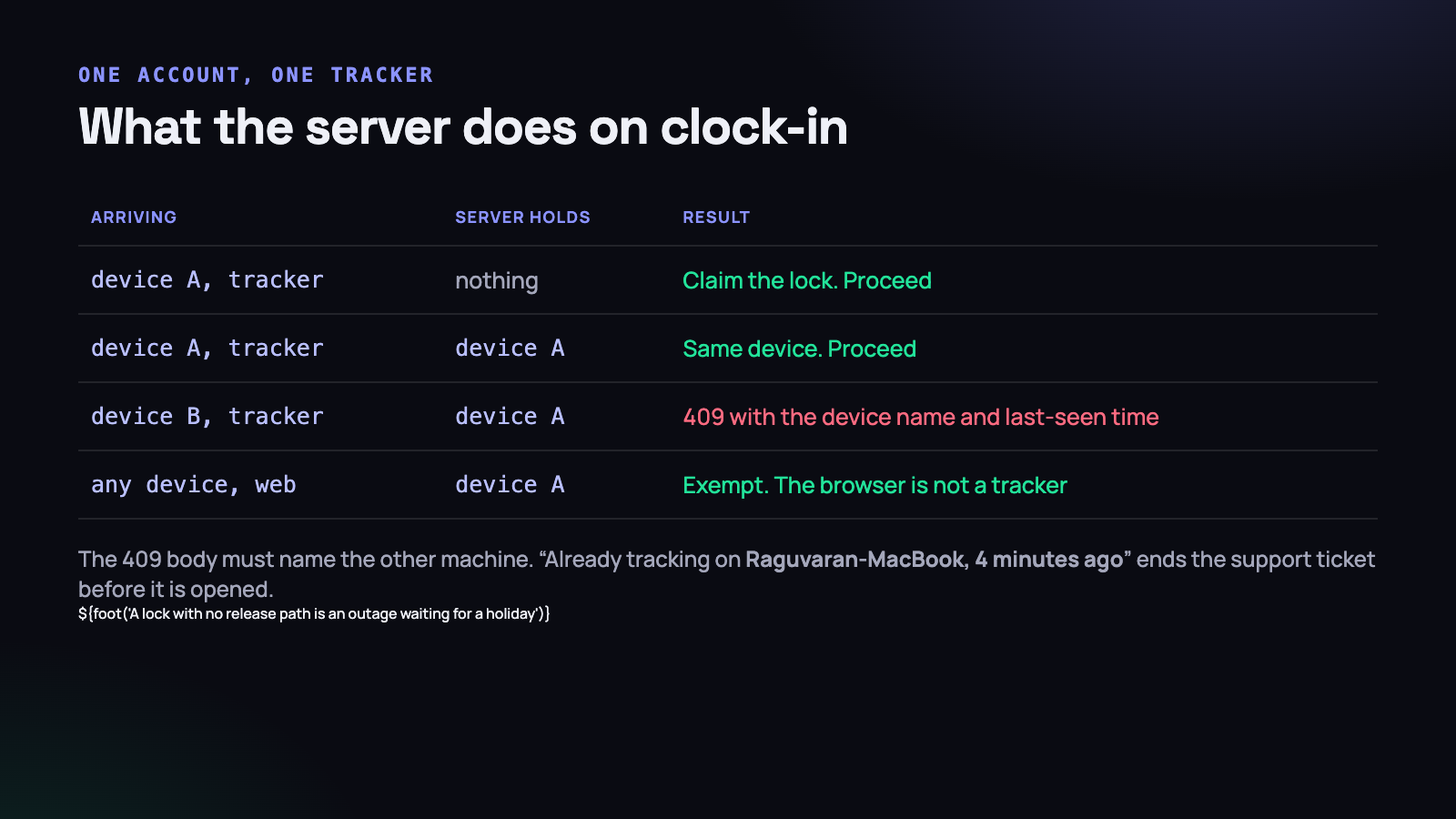
Here is the product requirement that started the trouble. A tracker that runs on two machines at once double-counts time, produces overlapping entries, and gives an employee an easy way to log ten hours in an eight-hour day. Customers asked for it to be impossible.
So the token carries a device identifier, generated once at install and stored beside the token, and the server holds the device that currently owns the timer.
public function claim(User $user, string $deviceId, string $client): void
{
    if ($client === 'web') {
        return;                               // the browser is not a tracker
    }

    $lock = $user->deviceLock;

    if ($lock && $lock->device_id !== $deviceId && $lock->isFresh()) {
        throw new DeviceLockedException($lock->device_name, $lock->last_seen_at);
    }

    $user->deviceLock()->updateOrCreate([], [
        'device_id'    => $deviceId,
        'device_name'  => request('device_name'),
        'last_seen_at' => now(),
    ]);
}
Three details make this liveable rather than infuriating.
The lock goes stale. isFresh() checks the heartbeat is within a few minutes. A laptop that was closed and put in a bag does not hold the lock forever — otherwise a person who changes machines is locked out until somebody in support intervenes, at a weekend, and that is how a security feature becomes an outage.
The error names the other machine. “Already tracking on Raguvaran-MacBook, last seen 4 minutes ago” ends the confusion instantly. “Device locked” generates a ticket every single time.
There is a release path the user controls. A “sign out other devices” button in the web app, which clears the lock and revokes the other token. Any lock without a self-service release is a future emergency.
The two questions, and the day we conflated them
Now the incident.
The tokens table had a device_id. It was used for the device lock, and it was also — because it was there and it was convenient — used to answer a second question elsewhere in the codebase: is this request coming from a desktop tracker or from a browser?
Those are genuinely different questions.
- Which machine is this? Answered by a per-installation identifier. It is unique per device, it changes when somebody gets a new laptop, and it exists to stop two trackers running at once.
- What kind of client is this? Answered by a fixed string baked into the build —
desktop-mac,desktop-linux,desktop-win,web. It never varies for a given application, and it exists to decide which rules apply.
A separate feature needed the second answer. Some organisations restrict clock-in to the desktop tracker, so the server has to know whether a clock-in request is coming from a tracker or a browser. The code that implemented it read device_id, because a browser session had no device id, so an empty device_id meant “browser”.
That held until we tightened the device lock and started issuing a device id to web sessions too, so the lock could report which browser held it. A reasonable change, reviewed, tested against the device-lock tests, deployed on a Monday evening.
On Tuesday morning, forty-three people across several organisations tried to clock in from their browsers. Each one now had a device_id, so the restriction logic classified them as trackers, so a rule intended for desktop apps applied to browser sessions — and the lock rejected them because the actual tracker on their machine already held it.
The tests all passed. Every one of them tested the device lock, which was working correctly. Nothing tested the interaction between the device lock and the client-type restriction, because in the model everybody carried in their head those were the same field.
The fix took eleven minutes: add a client column, populate it from the token, and change the restriction to read client instead of device_id. The lesson took longer to internalise.
When one field answers two questions, the two answers are coupled forever. Any change made for one will silently alter the other, and no test written for either will catch it, because the coupling exists in nobody’s test and in nobody’s documentation. The symptom shows up in production, in a different feature, in the morning.
If you find yourself writing a comment that says “this is also used to tell whether…”, that is the moment to add a column.
The second lesson is about the test suite. A field with two meanings creates a test gap that is invisible by construction: both features have thorough tests, both suites are green, and the case that breaks lives in the space between them where nobody thought to look. After this we added a small set of tests that cross feature boundaries deliberately — a browser session under an organisation with device restrictions on and a tracker already running, which is precisely the combination that failed. It is one test. It would have caught the whole thing.
Revoking a token, and what the app does about it
Revocation on the server is trivial: delete the row in personal_access_tokens. What matters is how the desktop app behaves when it next gets a 401.
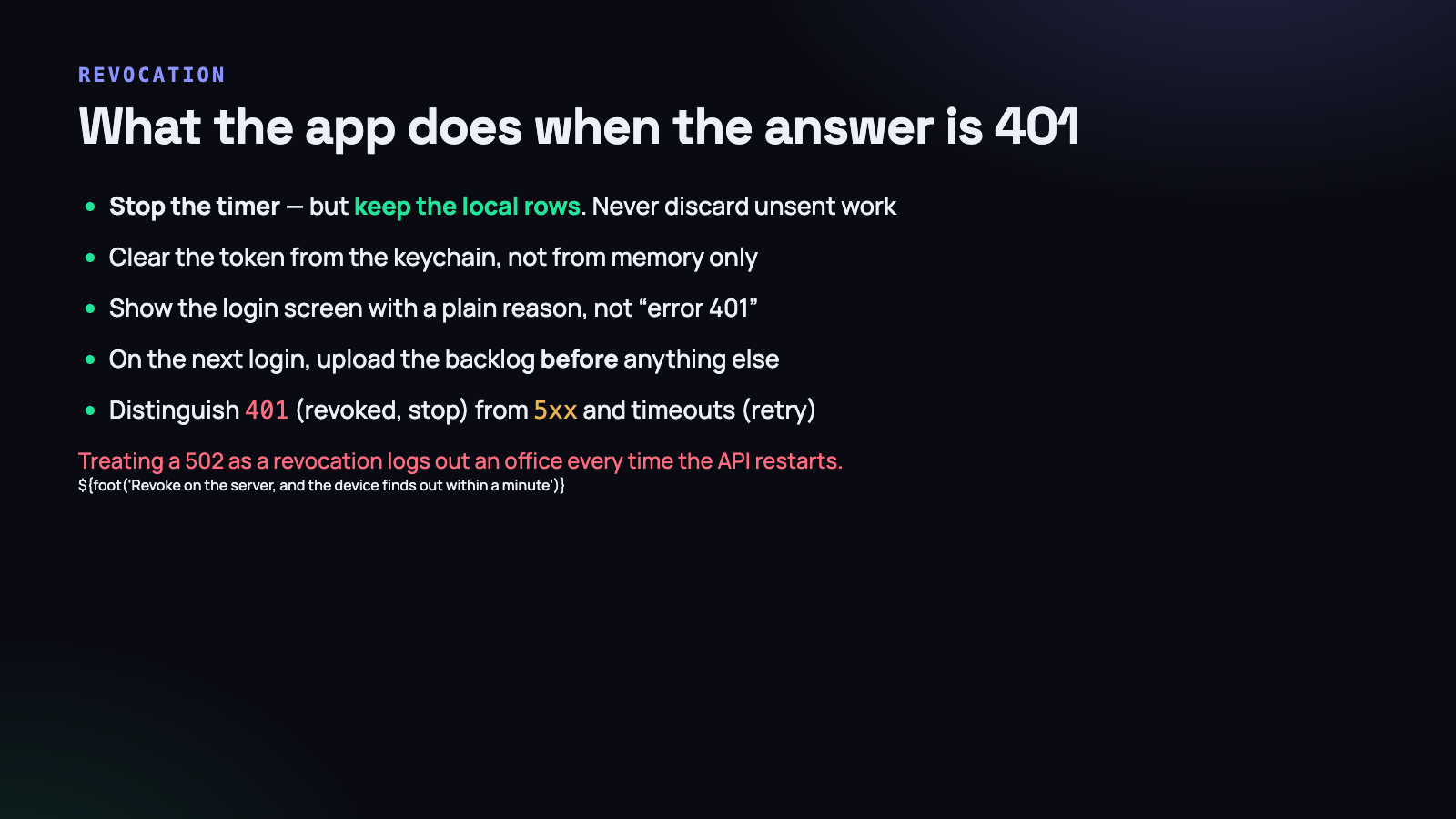
The rule that matters more than any other: a 401 must never destroy local data. An employee who was removed from an organisation at 4pm still worked from 9am, and those entries are sitting in the local queue. If the app reacts to revocation by clearing its database, that work is gone, and getting it back involves an apology.
func handle(response: HTTPURLResponse) {
    switch response.statusCode {
    case 401:
        timer.stop()
        keychain.deleteToken()
        state = .loggedOut(reason: .revoked)   // local rows untouched
    case 402:
        timer.stop()
        state = .loggedOut(reason: .subscriptionEnded)
    case 500...599, -1001:
        backoff.recordFailure()                // retry; do not log out
    default:
        break
    }
}
The other half of that rule is equally important: do not treat a 5xx or a timeout as a revocation. If a deploy restarts the API and every tracker in the country interprets the resulting 502 as “your token is gone”, you have just logged out your entire customer base and generated a day of support. Only an explicit 401 with a clear body clears the token. Everything else backs off and retries, exactly as it does when the network disappears entirely.
When the user logs back in, upload the backlog before anything else and before starting a new timer. The first thing they will do is check whether yesterday is still there.
No refresh tokens, and why
The standard advice is short-lived access tokens plus a refresh token, so a stolen credential expires quickly. It is good advice for a web client. For this application we decided against it, deliberately, and it is worth saying why rather than pretending the question never came up.
A refresh flow assumes the client can reach the authorisation server when the access token expires. A tracker on a train cannot. Give it a fifteen-minute access token and a person working offline for an afternoon is locked out of their own application, holding four hours of work it will not let them record. The failure mode of the security improvement is worse than the risk it mitigates.
What we do instead is narrow the blast radius rather than the lifetime:
- One token per device, named after the machine, so revoking one does not disturb the others.
- A tight ability list — upload, heartbeat, read projects. Nothing that changes money or permissions.
- Server-side revocation that takes effect within a minute, because the tracker heartbeats constantly when it is online.
- A last-used timestamp per token, so a credential that has not been seen for months can be cleaned up automatically.
If your desktop client is only ever used by people in an office with reliable connectivity, take the refresh flow. If it is used on trains and in co-working spaces with unreliable wifi, the long-lived token in a keychain is the honest choice — and the honest part is admitting that and compensating elsewhere, rather than shipping a fifteen-minute token and quietly adding a two-day fallback nobody documents.
Show the user their own devices
One screen in the web app repays its cost many times over: a list of active tokens, with the device name, the platform, the last time it was seen and a revoke button.
$user->tokens()
    ->select('id', 'name', 'client', 'last_used_at', 'created_at')
    ->orderByDesc('last_used_at')
    ->get();
It answers “why does it say another device is tracking?” without support involvement, it gives somebody who lost a laptop an immediate action, and it makes the whole mechanism visible rather than mysterious. A device lock that the user cannot see or release is experienced as a bug no matter how correct it is.
Store the plaintext token nowhere, of course — Sanctum hashes it and shows it once. The list works entirely from the metadata.
Clock skew and offline grace
Two time-related problems appear the moment the app is allowed to work offline.
Clock skew. A laptop’s clock can be wrong by minutes or hours, and on a tracker it can be wrong deliberately. Never let the client decide whether a token has expired, and never accept a client timestamp as authoritative for anything that decides pay. Measure elapsed time with a monotonic clock, send both the wall-clock times and the measured duration, and have the server record its own received-at. Where the two disagree by more than a tolerance, store the entry and flag it for review rather than silently rewriting somebody’s hours.
Offline grace. If the tracker cannot reach the API, does it keep working? It has to — a tracker that stops at the first dropped packet is useless. But an unlimited grace period means a revoked token keeps recording for as long as somebody keeps the machine off the network.
The compromise that has held up: a bounded grace window, measured on the server’s clock rather than the client’s.
- Every successful API call returns a server timestamp. The app stores the most recent one it has seen.
- The tracker keeps recording while the gap between that stored server time and its own monotonic elapsed time is under the grace period — seventy-two hours works well for a laptop that travels.
- Past the window, the timer stops and the app says why, plainly: it has not reached the server since Friday.
- Nothing queued is ever discarded, regardless of how long the gap was.
Because the window is anchored to a server timestamp and advanced by a monotonic clock, moving the system clock forward does not extend it. That is a small detail with a real effect: it means the grace period cannot be gamed by changing the date.
What to do on Monday morning
- Find where your desktop app stores its token. If it is a file, move it to the platform keychain this week. It is under fifty lines on each platform.
- Grep your API for every use of your device identifier. If it appears in code that is deciding anything other than “which machine is this”, split it into a second column today.
- Check what your app does on a 500. Point it at a server returning errors and confirm it backs off rather than logging out. This is a five-minute test that prevents a bad afternoon.
- Check what your app does on a 401. Revoke a token from the database while a timer is running and confirm the local rows survive.
- Read your device-lock error message aloud. If it does not name the other machine and when it was last seen, rewrite it.
- Audit your token abilities. List what the desktop token can actually do, and remove everything the tracker does not call.
Most of the token design here is unremarkable, and that is the point — Sanctum plus a keychain plus a narrow ability list is a solved problem. The part that is not solved by any library is the modelling: deciding what each field means, and refusing to let a field mean two things because a second meaning was convenient on the afternoon somebody needed it.
Forty-three people, one Tuesday morning, one column. It is a cheap lesson at that price.




