
Composite and Covering Indexes: Why Column Order Decides Everything
Composite and Covering Indexes: Why Column Order Decides Everything
Most advice about database indexes stops at “the column in your WHERE clause needs an index”. That gets you from a four-second query to a fast one exactly once. After that you have a table with nine indexes, writes that have quietly doubled in cost, and a query that is still slow despite having an index on every column it mentions.
The part that is missing is that a composite index is not a set of columns. It is a sorted list, and everything that follows — which queries it helps, which it ignores, why the order matters more than the contents — comes out of that one fact.
An index is a sorted list
Picture a phone directory sorted by surname, then first name, then city. You can find every Ramasamy instantly. You can find every Ramasamy whose first name is Karthik instantly. You cannot find everybody in Tirunelveli without reading the entire book, because city is the third thing it was sorted by and the book is not sorted by city at all.
A B-tree index in MySQL is that directory. When you write:
CREATE INDEX te_org_user_started_idx
    ON time_entries (organization_id, user_id, started_at);
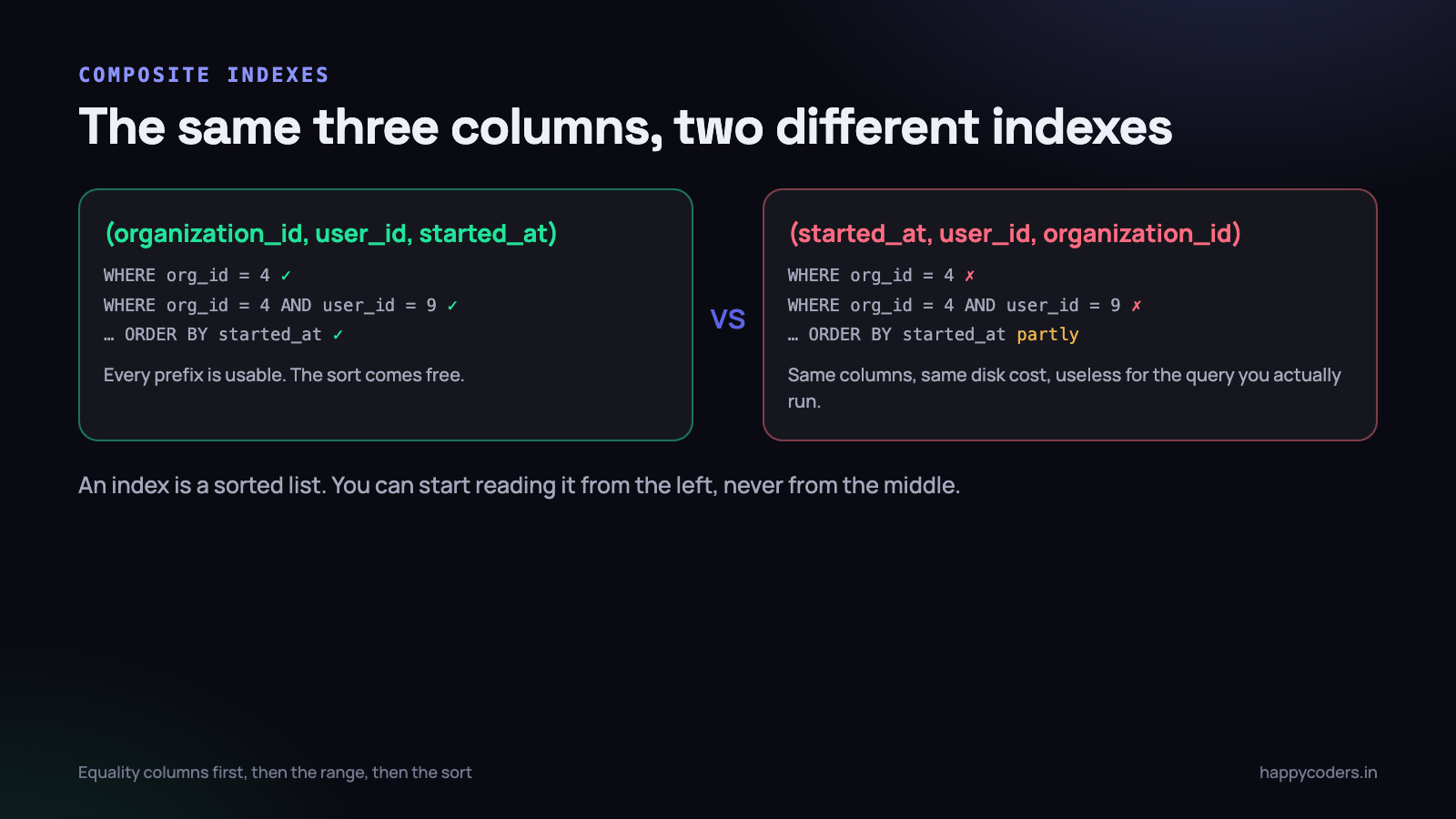
you have not indexed three columns. You have built one sorted list whose sort key is the three values joined together, in that order. Everything the index can do follows from where you are allowed to start reading it — which is the left-hand end, and nowhere else.
The leftmost-prefix rule
With the index above, these queries can use it:
WHERE organization_id = 4— uses the first column.WHERE organization_id = 4 AND user_id = 9— uses the first two.WHERE organization_id = 4 AND user_id = 9 AND started_at > ’2026-09-01’— uses all three.WHERE organization_id = 4 ORDER BY user_id— the sort is free, because the index is already in that order.
And these cannot:
WHERE user_id = 9— skips the first column. No prefix to seek to.WHERE started_at > ’2026-09-01’— same problem, two columns further in.WHERE user_id = 9 AND started_at > ’2026-09-01’— still noorganization_id, still useless.
This is the leftmost-prefix rule, and it is the single most useful thing to know about indexes. An index on (a, b, c) serves (a), (a, b) and (a, b, c). It does nothing at all for (b), (c) or (b, c).
A useful corollary: if you already have an index on
(organization_id, user_id)and you add one on(organization_id), the second one is pure waste. It is a prefix of the first. Every query it could serve, the wider index already serves.
So what order?
There is a reliable recipe, and it is not “most selective column first” — that advice is repeated everywhere and is wrong as often as it is right.
- Equality columns first. Every column compared with
=orIN, in any order among themselves. - Then the sort column, if the query has an
ORDER BYthat you want to come for free. - Then the range column —
>,<,BETWEEN,LIKE ’abc%’. At most one of these is useful, because the index stops being sorted usefully after the first range.
That last point catches people. In WHERE org_id = 4 AND started_at > X AND duration > 900, only one of the two ranges can be served by the index. The other is applied as a filter to the rows that come back. Put the more selective one in the index and stop.
In a multi-tenant application the first column is almost always decided for you. Every query is scoped to an organisation, so organization_id goes first in nearly every index, even though it has the worst selectivity of any column on the table. Selectivity does not decide the position; the shape of your queries does.
Cardinality, and why indexing a boolean is pointless
Cardinality is the number of distinct values in a column. It decides whether an index will be used at all — not whether it exists, but whether the optimiser bothers.
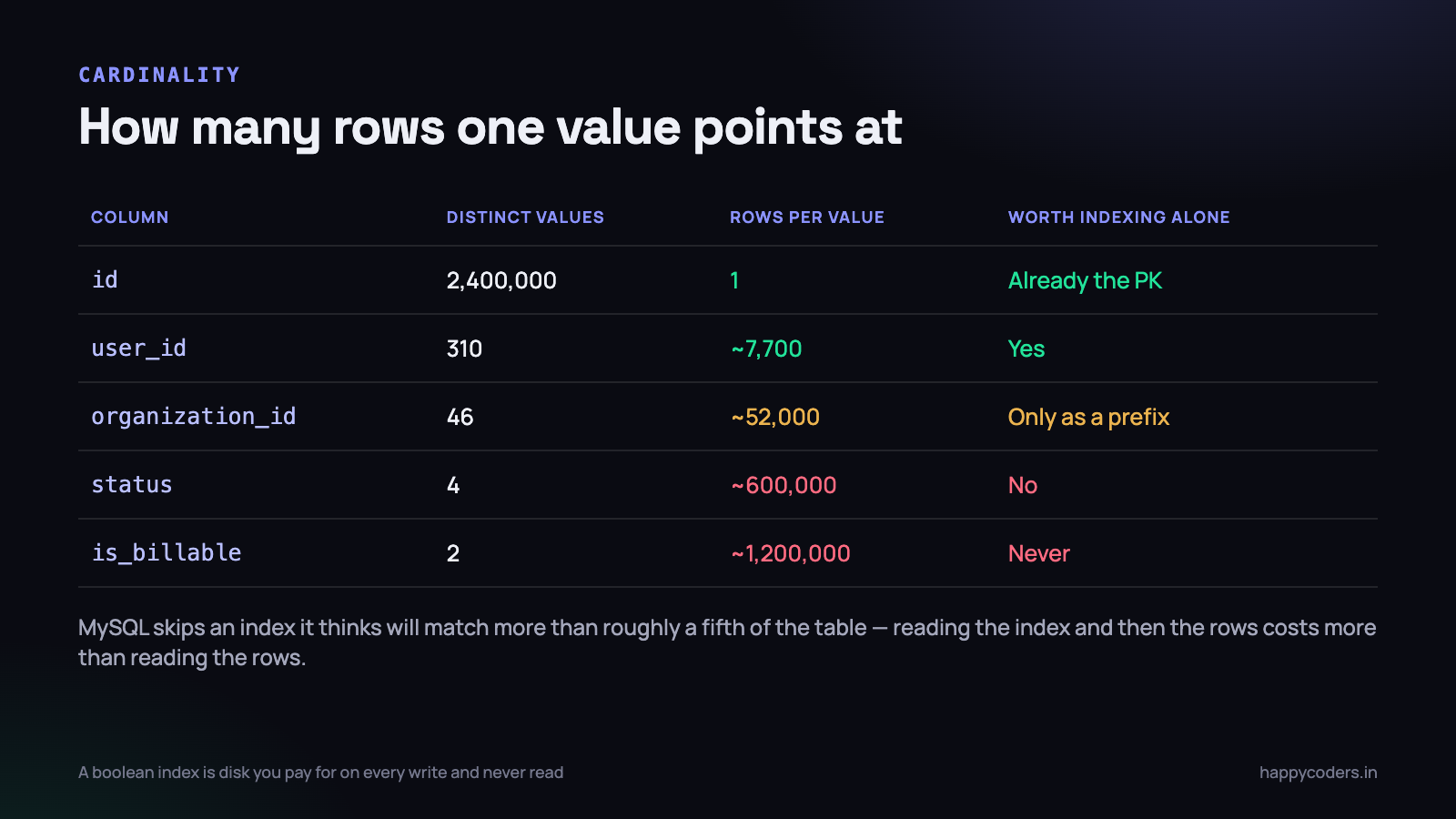
When MySQL uses a secondary index it does two things: walks the index to find matching entries, then goes back to the table to fetch each row those entries point at. That second step is a random read per row. If the index matches 600,000 rows out of 2.4 million, the optimiser correctly decides that reading the whole table sequentially is cheaper than 600,000 random lookups, and ignores your index completely.
So an index on is_billable, or status with four values, or deleted_at IS NULL, is almost always dead weight. You pay for it on every insert, every update and every delete, and no query ever uses it.
There are two honest exceptions worth knowing:
- As a trailing column in a composite index.
(organization_id, is_billable, started_at)is perfectly reasonable — the low-cardinality column narrows an already-narrow set. - When the distribution is skewed. If
status = ’failed’matches 0.2% of rows and you only ever query for failed, a partial index would be ideal. MySQL has no partial indexes, so people fake them with a generated column that is NULL for the common case — NULLs are not stored in the index, so it stays tiny.
Covering indexes, and what Using index means
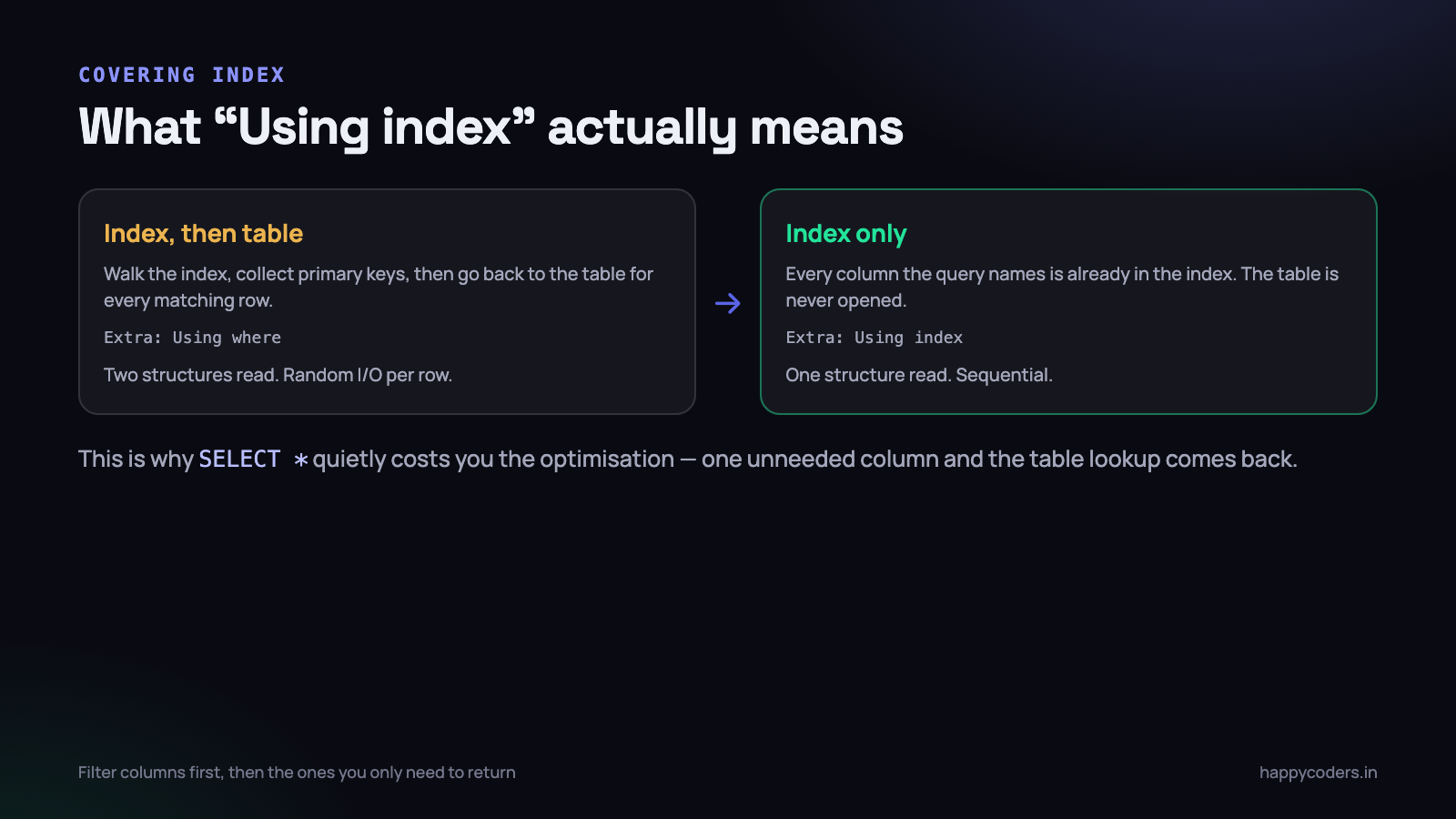
Now the part that turns a fast query into a very fast one. If every column the query touches — in SELECT, WHERE, ORDER BY and GROUP BY — is present in the index, MySQL never opens the table. It answers the whole query from the index. That is a covering index, and EXPLAIN reports it as Using index in the Extra column.
Here is a real report query against a table of 2.4 million rows, before and after. First, with an index on (organization_id, started_at):
mysql> EXPLAIN SELECT user_id, duration FROM time_entries
    -> WHERE organization_id = 4 AND started_at >= '2026-09-01'\G

           table: time_entries
            type: range
   possible_keys: te_org_started_idx
             key: te_org_started_idx
         key_len: 9
            rows: 48211
           Extra: Using index condition
Forty-eight thousand index entries read, then forty-eight thousand random row lookups to fetch user_id and duration. It ran in 310 ms. Now widen the index so it carries those two columns as well:
CREATE INDEX te_org_started_cover_idx
    ON time_entries (organization_id, started_at, user_id, duration);
table: time_entries
type: range
key: te_org_started_cover_idx
key_len: 9
rows: 48211
Extra: Using where; Using indexSame row estimate, same key length, one extra word in Extra — and 34 ms instead of 310. The table was never touched. The whole query was answered by reading one contiguous run of a sorted structure.
Two rules for building these. The columns you filter and sort on must come first, in the order described above. The columns you only return go on the end, where their position is irrelevant. And keep the list short: every column you bolt on the end makes the index bigger, which makes it slower to scan and more expensive to maintain on write.
This is the concrete cost of
SELECT *. Not style, not bandwidth — the covering optimisation. One column you did not need is enough to send the query back to the table for every matching row.
Reading EXPLAIN without guessing
Three fields tell you almost everything. The rest is detail.
- type — how the table is reached.
constandeq_refare ideal,refandrangeare what you normally want,indexmeans a full scan of the index, andALLmeans a full table scan. SeeingALLon a large table is the signal to stop and look. - key — which index was chosen. If
possible_keyslists your index butkeyisNULL, the optimiser considered it and rejected it. That is a cardinality problem or a stale statistics problem, not a missing-index problem. - Extra — where the truth is.
Using indexis the covering case.Using filesortmeans the sort could not come from the index.Using temporarymeans a temporary table was built, usually for aGROUP BYthat no index supports.
One more field worth reading: key_len. It tells you how many bytes of the composite index were actually used, which tells you how many columns were used. If you built a three-column index and key_len only accounts for the first, the second and third are doing nothing for that query. It is the fastest way to confirm a leftmost-prefix problem rather than assume one.
On MySQL 8, EXPLAIN ANALYZE runs the query and reports actual timings and actual row counts next to the estimates. When the estimate says 200 rows and the reality is 200,000, you have found why the plan is wrong: the statistics are stale and ANALYZE TABLE is your fix, not a new index.
Five ways to write past your own index
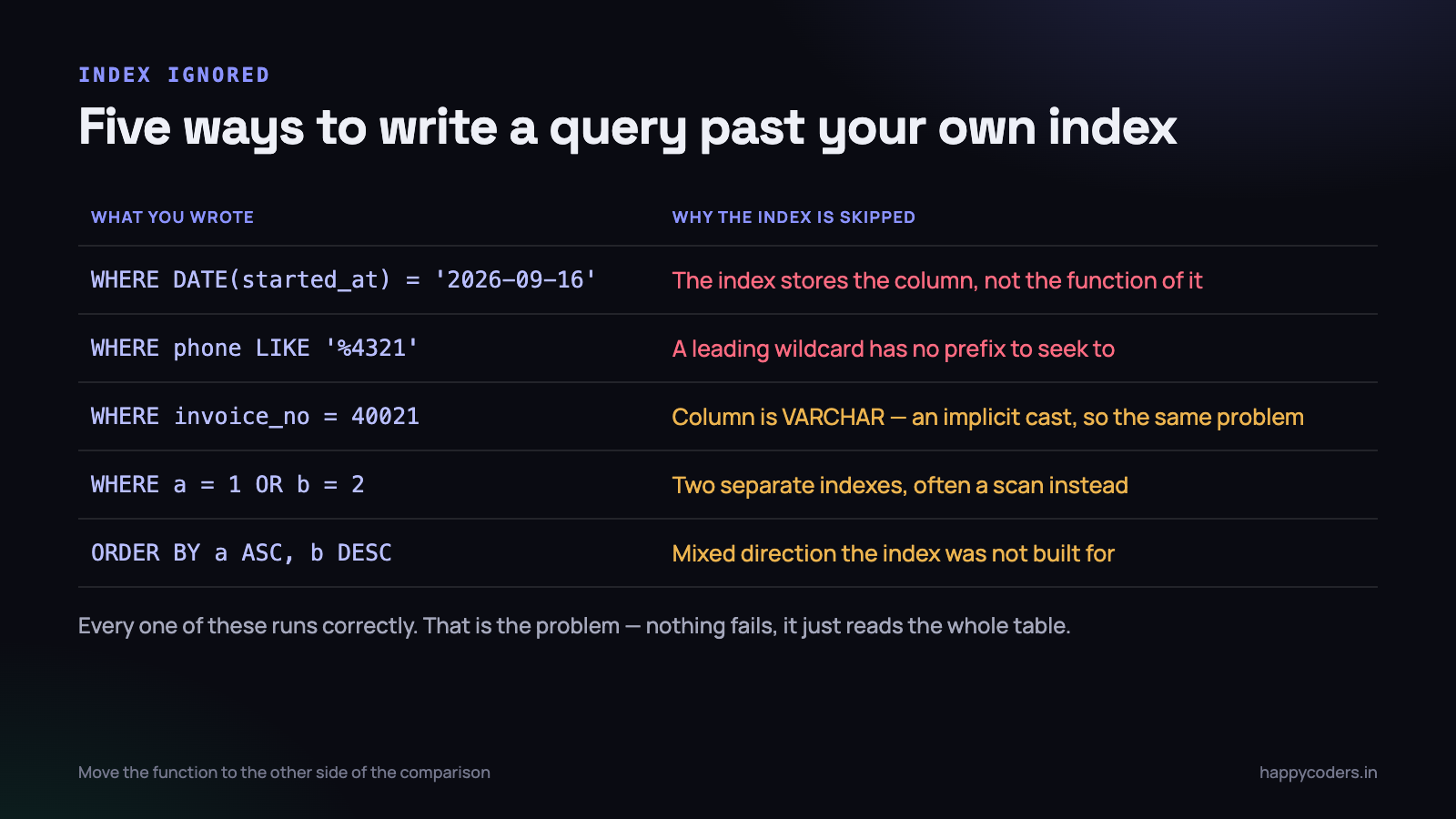
The most common of these by a wide margin is wrapping the indexed column in a function.
-- ignores the index on started_at: it stores the column,
-- not DATE() of the column
WHERE DATE(started_at) = '2026-09-16'

-- uses it: the function moved to the other side
WHERE started_at >= '2026-09-16 00:00:00'
  AND started_at <  '2026-09-17 00:00:00'
The same shape appears as YEAR(created_at) = 2026, LOWER(email) = ? and CONCAT(first, ’ ’, last) LIKE ?. The fix is always the same: rewrite so the bare column sits on the left of the comparison. If you genuinely cannot, MySQL 8 supports functional indexes — CREATE INDEX ... ((DATE(started_at))) — but the rewrite is nearly always better and works on older versions too.
The implicit-cast case is more insidious because there is nothing visibly wrong. If invoice_no is a VARCHAR and you query WHERE invoice_no = 40021 with an integer, MySQL converts the column to a number for every row. That is a function call on the column, so the index is gone. Quote the value and it comes straight back.
The OR case is worth a note of its own. WHERE a = 1 OR b = 2 with separate indexes on a and b sometimes gets an index merge and often gets a table scan. Rewriting as a UNION of two indexed queries is ugly and reliably fast. Measure before you reach for it, but know it is available.
What every index costs you on the way in
Indexes are not free reads. They are reads paid for with writes, and the exchange rate is worse than most people assume.
Every INSERT has to add an entry to every index on the table. Every UPDATE that touches an indexed column has to remove the old entry and insert a new one in a different place in the tree. Every DELETE has to remove an entry from each. A table with nine indexes does nine pieces of tree maintenance per row written.
On a busy write table this is measurable. We have seen a bulk import of 40,000 activity rows go from 90 seconds to 22 seconds by dropping three unused indexes — nothing else changed. If you are importing millions of rows, dropping indexes before and rebuilding after is a standard and very effective trick.
There is a storage cost too, and it is bigger than people expect because every secondary index in InnoDB implicitly contains the primary key. A four-column covering index on a table with a large primary key can approach the size of the table itself.
- Keep the primary key small. A
BIGINTauto-increment is 8 bytes and is repeated in every secondary index entry. A UUID stored as a 36-character string is 36 bytes, repeated everywhere, and is also random, which fragments the tree on insert. - Prefer one wide index to three narrow ones.
(a, b, c)replaces indexes on(a)and(a, b)entirely. - Do not index a column you only ever write. Audit columns,
updated_by, that flag somebody added for a feature that shipped in 2023.
Finding the indexes nothing uses
This is the part that never gets done, and it is ten minutes of work. MySQL 8 tracks index usage in the performance schema, and it will tell you outright which indexes have never been read since the server started.
SELECT object_schema, object_name, index_name
FROM   performance_schema.table_io_waits_summary_by_index_usage
WHERE  index_name IS NOT NULL
  AND  count_star = 0
  AND  object_schema NOT IN ('mysql', 'performance_schema', 'sys')
ORDER BY object_schema, object_name;
Two cautions before you drop anything. The counters reset when MySQL restarts, so give it at least a full billing cycle — an index used only by the monthly report will look unused for twenty-nine days. And never drop a unique index on usage grounds; it may exist to enforce a constraint rather than to speed up a read.
The reverse question — which queries have no index — is answered by the slow query log with log_queries_not_using_indexes turned on for an hour. Ranked by total time rather than by slowest instance, so that a fast query run ten thousand times shows up above a slow one run twice.
Also look for duplicates.
SELECT * FROM sys.schema_redundant_indexeslists every index that is a prefix of another on the same table. On a codebase where several people have each added “an index on that column” over three years, this usually finds four or five.
A worked example from our own tracker
The activity report in Happy Tracker lists blocks of tracked time for one organisation over a date range, grouped by user, showing the category and duration. The table had two indexes: one on organization_id, one on started_at. Both were added by people solving a different problem, and neither helped this query.
The query was doing a range scan on started_at across all organisations, then filtering. For our largest customer it read 180,000 rows to return 3,000. Replacing both indexes with one composite, ordered by the recipe above and widened to cover the returned columns:
DROP INDEX ab_org_idx     ON activity_blocks;
DROP INDEX ab_started_idx  ON activity_blocks;

CREATE INDEX ab_report_idx ON activity_blocks
    (organization_id, started_at, user_id, category, duration);
The report went from 1.9 seconds to 90 ms, and the table got smaller, because two indexes were replaced by one. That is the usual shape of a real index fix: not adding, but consolidating around the query you actually run.
What to do on Monday morning
- Pick your three slowest pages and run
EXPLAINon the query behind each one. Readtype,keyandExtra. Nothing else yet. - For any query showing
ALLon a big table, write down the WHERE columns, the ORDER BY column and the SELECT columns. That list is your index, in that order: equalities, sort, range, then the returned columns. - Check
key_lenon queries that do use an index, to confirm how many columns of it are really being used. - Run the unused-index query above and put a reminder in a month to run it again before you drop anything.
- Run
sys.schema_redundant_indexesand drop the prefixes it finds. That one is safe today. - Grep your code for
DATE(,YEAR(andLOWER(next to a column name in a WHERE clause. Each hit is a query silently ignoring an index you already pay for.
The goal is not the largest number of indexes. It is the smallest number that covers the queries you actually run, in the order those queries need, carrying the columns those queries return. Most tables we have worked on needed fewer indexes than they had, arranged better.
Related reading: how to use MySQL indexes to fix a slow query, and the N+1 query problem — which no index will save you from.




