
N+1 Queries: How to Find Them Before Your Customers Do
N+1 Queries: How to Find Them Before Your Customers Do
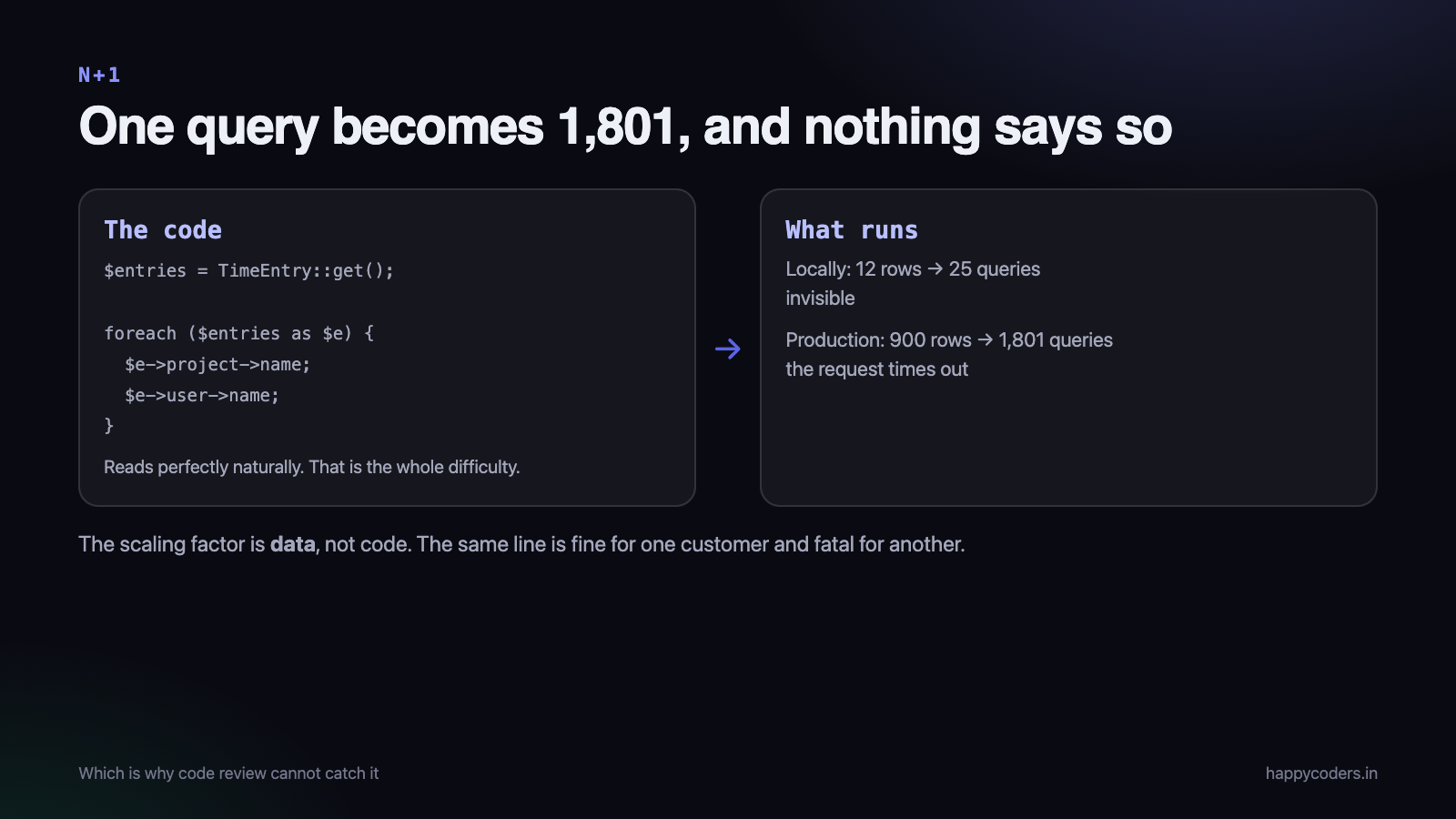
A page loads in 80 milliseconds locally and takes nine seconds for one customer. Nothing in the code looks slow. The database is not under load. The cause is almost always the same: one query to fetch a list, then one more query per item in it.
This is why it is invisible in development, how to make it impossible to miss, and the fixes — including the cases eager loading does not cover.
What it looks like
<?php
$entries = TimeEntry::where('organization_id', $orgId)->get();   // 1 query

foreach ($entries as $entry) {
    echo $entry->project->name;     // 1 query per entry
    echo $entry->user->name;        // and another
}
Fifty entries produces one query plus a hundred more. The code reads perfectly naturally — that is the whole difficulty. Nothing about $entry->project->name announces that it is a database round trip.
Locally, with twelve seeded rows on a database in the same process, twenty-five queries at half a millisecond each is invisible. In production, with a customer who has 900 entries on the page and a database one network hop away, it is 1,801 queries at two milliseconds and the request times out.
The reason it survives review is that the scaling factor is data, not code. The same line is fine for one customer and fatal for another.
Make it impossible to miss
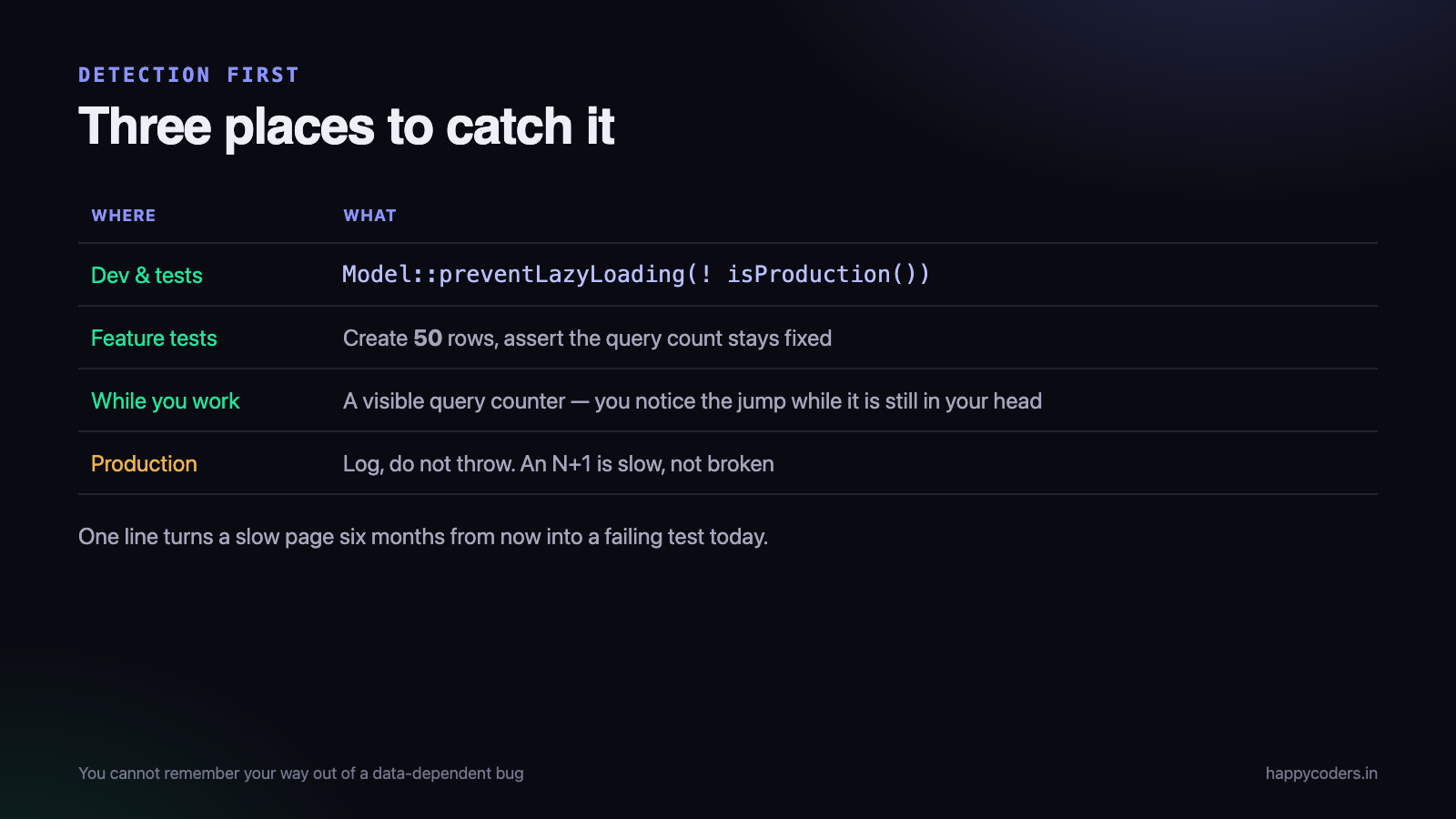
Detection first, because a fix you apply by remembering is a fix that lasts until the next feature. There are three places to catch it and you want all three.
1. Fail in development and tests
Laravel can throw when a relationship is accessed lazily. Turn it on everywhere except production:
<?php
// AppServiceProvider::boot()
Model::preventLazyLoading(! app()->isProduction());
Now the code above raises an exception in a test rather than producing a slow page in six months. This is the single most effective change on the page, and it is one line.
In production, log rather than throw — an N+1 is slow, not broken, and taking a page down over it is a worse outcome than the query count:
<?php
Model::handleLazyLoadingViolationUsing(function ($model, $relation) {
    if (app()->isProduction()) {
        Log::warning('lazy load', ['model' => get_class($model), 'relation' => $relation]);
        return;
    }
    throw new LazyLoadingViolationException($model, $relation);
});
2. Count queries in feature tests
A test that asserts on the number of queries is the only thing that stops a regression, and it is also documentation of what the endpoint is supposed to cost.
<?php
public function test_the_entries_page_does_not_scale_with_rows(): void
{
    TimeEntry::factory()->count(50)->create(['organization_id' => $this->org->id]);

    DB::enableQueryLog();
    $this->get('/entries')->assertOk();
    $count = count(DB::getQueryLog());

    $this->assertLessThan(15, $count, "expected a fixed number of queries, got {$count}");
}
Note what the test is really asserting: that the count does not depend on the row count. Create fifty rows rather than three, and the test fails loudly the day somebody adds an innocent-looking accessor.
3. See it while you work
A query counter in the development toolbar, or a simple listener that prints the count and total time after every request. Once the number is visible, people notice when it jumps — and that notice happens while the change is still in their head.
The fixes
Eager loading, for the ordinary case
<?php
$entries = TimeEntry::with(['project', 'user'])
    ->where('organization_id', $orgId)
    ->get();
Three queries regardless of how many entries there are. This covers the great majority of cases.
Nest it for deeper relationships, and select only the columns you need — a relationship loading forty columns to display one is a smaller problem than N+1 but not a free one:
<?php
->with(['project:id,name,client_id', 'project.client:id,name'])
When selecting specific columns on a relationship, the foreign key must be in the list or the relationship cannot be matched up and silently comes back empty.
Counting without loading
A common and expensive mistake: loading an entire relationship to call count() on it.
<?php
// loads every entry of every project into memory
$project->entries->count();

// one aggregate query for all projects
$projects = Project::withCount('entries')->get();
$projects->first()->entries_count;
The same applies to sums and averages — withSum, withAvg and withExists do the work in the database instead of in PHP.
Lazy eager loading, when the condition comes later
Sometimes you do not know what to load until after the parent query. Loading afterwards is still two queries rather than N:
<?php
$entries = TimeEntry::where(...)->get();

if ($request->boolean('with_projects')) {
    $entries->load('project');           // one extra query, not fifty
}
A join, when you only need a column
If all you want from the relationship is one field and you are not using the related model, a join is fewer round trips and less memory than loading a second set of objects.
The trade is that you lose the model — accessors, casts and relationships on the joined data are gone — so this is for read-only lists and report queries, not for code that then acts on the object.
The N+1s that eager loading does not fix
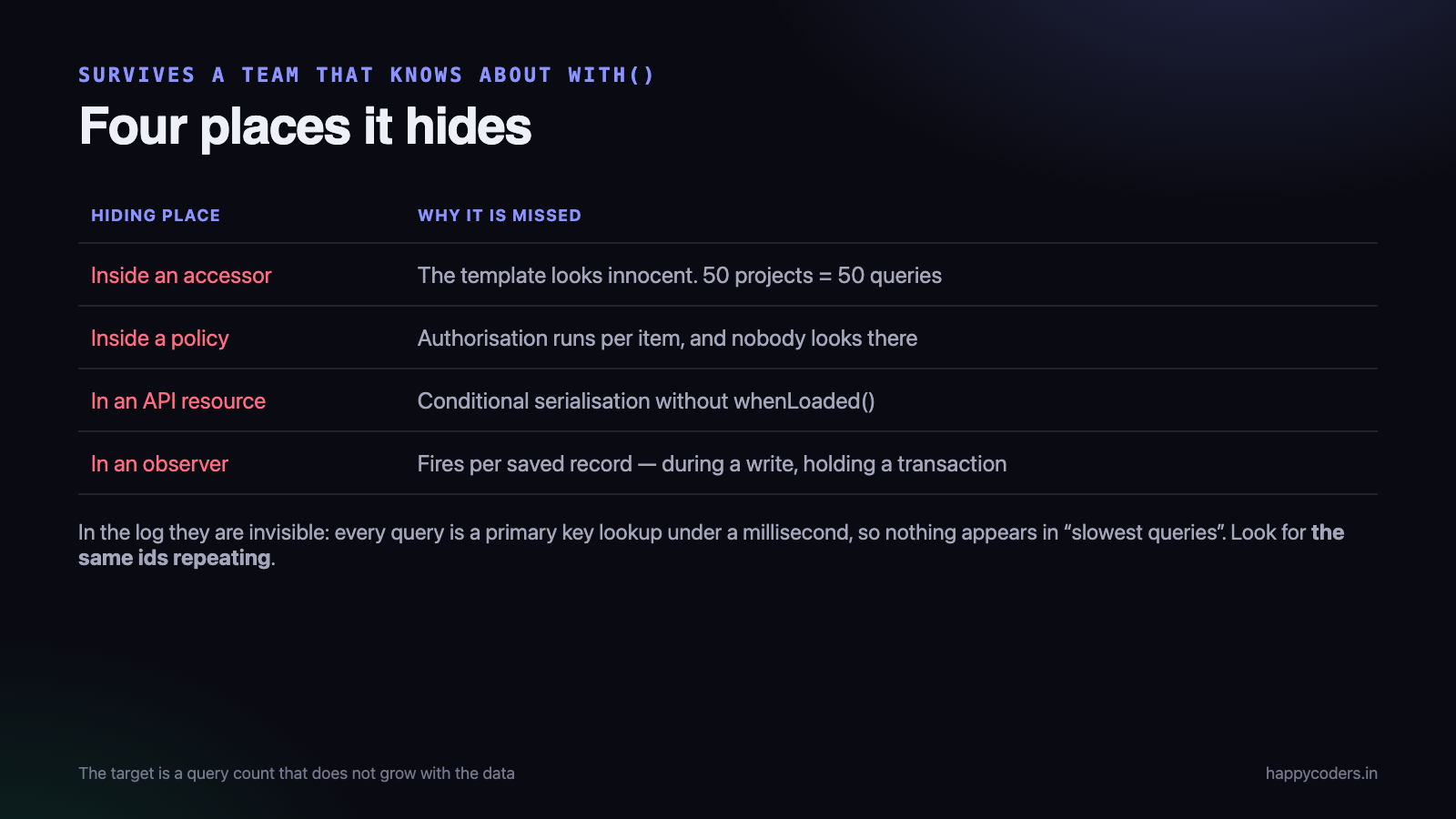
These are the ones that survive a codebase where everybody knows about with(), and they are worth knowing by name.
Inside an accessor
<?php
public function getIsOverBudgetAttribute(): bool
{
    return $this->entries->sum('duration') > $this->budget;   // queries, per model
}
A list rendering that attribute for fifty projects does fifty queries, and the template looks completely innocent. Accessors that touch relationships are the most common hidden N+1 there is.
Inside a policy or an authorisation check
A policy that loads the organisation to check a permission runs on every item in a list. Authorisation is called far more often than people picture, and it is rarely looked at when investigating a slow page.
In an API resource
Resource classes serialising a relationship conditionally will trigger a load per item if the relationship was not eager loaded. whenLoaded() exists precisely for this and is easy to forget.
In events and observers
A model observer that fires on each of a hundred saved records, and queries inside it, is an N+1 with a different shape — and it happens during a write, where it also holds a transaction open.
Why it is a data bug, not a code bug
Worth naming explicitly, because it explains why this class of problem keeps recurring in teams that understand it perfectly well.
Most bugs are deterministic: the code is wrong, and it is wrong everywhere. An N+1 is conditionally wrong — the same line is correct for one customer and unusable for another, and the difference is a number in a database you do not control.
That has three consequences worth planning around.
- Code review cannot catch it reliably. A reviewer sees a loop over a collection and a property access, which is what correct code also looks like. Only tooling that counts queries sees the difference.
- Seeded test data hides it by design. A factory creating three records makes the fifty-one-query page look like a four-query page. Seed volumes should match your largest customer’s order of magnitude, at least in the tests that assert performance.
- It appears long after the code shipped. A customer grows from forty projects to four hundred over two years, and a page that was always fine becomes slow with no deploy to blame. Support cannot connect it to a change because there was not one.
This is also why the detection tooling is worth more than the knowledge. You cannot remember your way out of a bug whose severity depends on a customer’s row count.
A shape worth recognising in the logs
Once you know what it looks like, the slow query log gives it away immediately.
-- an N+1 in a log, in the only form you will ever see it
SELECT * FROM projects WHERE id = 41
SELECT * FROM projects WHERE id = 19
SELECT * FROM projects WHERE id = 41      <- and the same ones repeatedly
SELECT * FROM projects WHERE id = 7
SELECT * FROM users    WHERE id = 3
...  (1,800 more)
Two tells. Every query is fast — each one is a primary key lookup taking under a millisecond, so nothing appears in a “slowest queries” list at all. And the same ids repeat, because several entries share a project and each one fetches it again.
That repetition points at a second cheap fix worth knowing: an identity map or a per-request cache that remembers models already loaded turns the duplicates into one query each. It does not fix the N+1, and it often halves the damage while you do.
When the fix is worse
Eager loading is not free, and there are two ways it goes wrong in the other direction.
Loading relationships nobody uses. A global $with on a model, or a habitual with(...) on a query used by ten endpoints, loads data for the nine that do not need it. Fewer queries, more memory, slower overall.
Loading a huge relationship. Eager loading a relationship with fifty thousand rows turns 1,000 fast queries into one query that returns fifty thousand objects and exhausts memory. When the related set is large, pagination or an aggregate is the answer, not with().
The honest goal is not “the fewest queries”. It is a query count that does not grow with the data, and a memory footprint that also does not.
Fixing one without breaking the next page
A practical hazard when working through a backlog of these: the fix for one page frequently creates the problem on another, because the change is usually made on a shared query or a shared model.
Three habits that keep it contained.
Eager load at the call site, not on the model
A global $with property is tempting when the same relationship is needed on four pages. It then loads on the fifteen places that do not need it, including background jobs and API endpoints returning a single field. Put the with() on the query for the page that needs it, and repeat yourself — the repetition is cheaper than the coupling.
Use a query scope for the shape a page needs
<?php
// on the model, named for the screen rather than the relationship
public function scopeForEntriesList($query)
{
    return $query->with(['project:id,name', 'user:id,name'])
                 ->withCount('comments');
}
Now the intent is documented, the shape is reusable for that screen, and changing it does not silently affect anything else. When somebody later adds a column to the list, the place to change is obvious.
Add the query-count assertion with the fix
Fixing an N+1 without adding the test that locks it in means fixing it again in a year. The assertion takes four lines and it is the only thing that survives the next refactor, the next developer and the next feature on that page.
This is the part most often skipped, because the fix feels finished when the page is fast. It is finished when the page cannot silently become slow again.
Finding the ones already in production
For an existing application, three passes find nearly all of them:
- Turn on the lazy-loading exception locally and click through the application. Every violation is a real one, and you get a stack trace pointing at the line.
- Read the slow query log for repetition. An N+1 does not look like one slow query; it looks like the same query shape hundreds of times with different ids. Ranking by total time rather than by slowest instance is what makes it visible.
- Ask which pages are slow only for large customers. That is the signature. A page that is fine for a ten-person organisation and slow for a two-hundred-person one is almost always this, and support usually knows which pages they are before engineering does.
It is not only an ORM problem
The name comes from ORM discussions, and the pattern is older and broader than Eloquent. It is worth recognising the same shape elsewhere, because the same fix applies.
- A REST client in a loop. Fetch a list of orders, then call the product endpoint once per order. Identical structure, and now the round trips are over the internet rather than to a local database — so the same fifty iterations cost seconds rather than milliseconds.
- A GraphQL resolver without a data loader. The default behaviour of a naive resolver tree is an N+1, which is why batching is mandatory rather than an optimisation there.
- A cache read per item. Fifty individual Redis GETs instead of one MGET. Each is fast; fifty round trips are not.
- A file read per row when rendering a list of documents.
In every case the fix has the same shape: collect the identifiers first, fetch them in one call, then match them up in memory. That is all eager loading does, and it works equally well against an HTTP API or a cache.
The short version
Model::preventLazyLoading()outside production. One line, and the highest-value change here.- Assert query counts in feature tests, with enough rows that a regression fails.
- Show the query count while you develop.
with()for the ordinary case;withCount()and friends for aggregates.- Check accessors, policies, API resources and observers — the hidden ones.
- Do not eager load what the endpoint does not use, or what is enormous.
- The target is a query count that does not grow with the data.
Every one of these bugs was written by somebody who knew what an N+1 was. The difference between a codebase that has them and one that does not is not knowledge — it is whether the tooling makes them visible the moment they are written.
Related: why reports get slow and what to do before they do, and MySQL indexes explained.




