
A CSV Import That Survives What Users Actually Upload
A CSV Import That Survives What Users Actually Upload
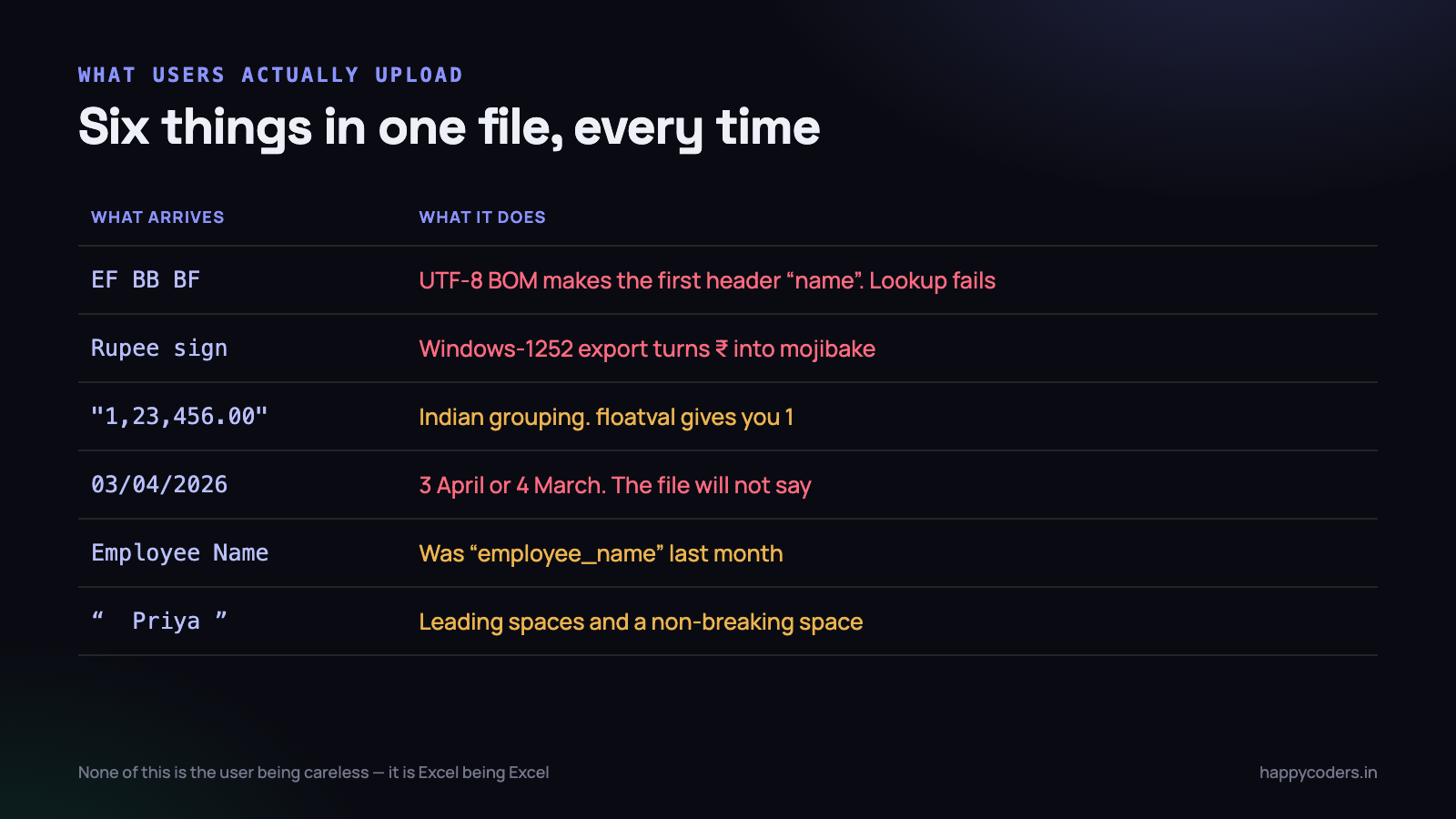
Every CSV import starts the same way. Somebody writes twenty lines that open the file, loop the rows and insert them. It works on the sample file. It goes to production. Within a week it has produced duplicate records, half-imported a file and failed, and thrown a message containing the word SQLSTATE at an accounts assistant.
The gap is not skill. It is that the sample file was exported by the developer, and every real file was exported by Excel on a Windows machine by somebody who edited it first.
This is what actually arrives, and the shape of an import that copes: normalise on the way in, validate the entire file before writing a single row, hand back an error report a non-developer can act on, and make a second upload of the same file a no-op.
What actually arrives
The byte order mark
Excel writing UTF-8 puts three bytes at the front of the file: EF BB BF. They are invisible in every editor and they attach themselves to your first column header, so name becomes name and every lookup against that key fails. The symptom is maddening: the header is clearly there, and the code insists it is not.
<?php
$handle = fopen($path, 'r');

// strip the BOM if present, otherwise rewind
$bom = fread($handle, 3);
if ($bom !== "\xEF\xBB\xBF") {
    rewind($handle);
}
Windows-1252 pretending to be UTF-8
Save As CSV in Excel on Windows still commonly produces Windows-1252, not UTF-8. Names with accents, smart quotes pasted from Word, and the rupee sign all arrive as bytes that are not valid UTF-8. Insert them into a utf8mb4 column and you get either mojibake or a SQLSTATE error, depending on your connection settings.
Do not try to guess per field. Detect once for the file and convert the whole thing.
<?php
$sample = file_get_contents($path, false, null, 0, 65536);

if (! mb_check_encoding($sample, 'UTF-8')) {
    // Windows-1252 is the overwhelmingly likely alternative from Excel
    $contents = mb_convert_encoding(file_get_contents($path), 'UTF-8', 'Windows-1252');
    file_put_contents($workingCopy, $contents);
}
Two notes. Sample the first 64 KB rather than the whole file so a 200 MB upload does not cost you 200 MB of memory for a check. And convert into a working copy — never overwrite what the user uploaded, because you will want the original when they dispute the result.
Four date formats in one column
This is the one that causes real financial damage, because it fails quietly. A column exported from three different systems and edited by two people contains 15/08/2026, 2026-08-15, 15-Aug-2026 and 08/15/2026. PHP’s strtotime will happily parse all four and will read the first and the last differently — and both are valid dates, so nothing errors.
strtotime(‘03/04/2026’)returns 4 March, because it assumes American order for slash-separated dates. An Indian user typing 3 April gets a record a month out, with no error and no warning anywhere.
The answer is an explicit list of accepted formats, tried in order, with ambiguity treated as a validation failure rather than a guess.
<?php
private const DATE_FORMATS = ['Y-m-d', 'd/m/Y', 'd-m-Y', 'd-M-Y', 'd.m.Y'];

private function parseDate(string $raw): ?Carbon
{
    $raw = trim($raw);
    if ($raw === '') {
        return null;
    }

    foreach (self::DATE_FORMATS as $format) {
        $d = Carbon::createFromFormat($format, $raw);
        // createFromFormat accepts 31/02; this catches the rollover
        if ($d && $d->format($format) === $raw) {
            return $d->startOfDay();
        }
    }
    return null;     // caller records a row-level error
}
The equality check on the round trip is what rejects 31/02/2026. Without it, createFromFormat quietly rolls over to 3 March and you have imported a date that was never in the file.
Better still, when the format is genuinely ambiguous, ask. A preview step that shows “we read 03/04/2026 as 3 April — is that right?” with a day-first or month-first toggle takes an afternoon to build and eliminates an entire category of silent corruption.
Indian number formats and stray symbols
Amount columns arrive as ₹1,23,456.00, 1,23,456, Rs. 45000, 45,000.00 INR and occasionally (1,200) meaning negative, which is an accounting convention Excel produces by default.
The lakh-crore grouping matters here: 1,23,456 is not 123,456 parsed with a stray comma, but the fix is the same because you strip all separators before parsing. What you must not do is call floatval on the raw string — floatval(‘1,23,456’) returns 1, cheerfully, and nothing errors.
<?php
private function parseAmount(string $raw): ?float
{
    $s = trim($raw);
    if ($s === '') return null;

    $negative = str_starts_with($s, '(') && str_ends_with($s, ')');

    // strip currency symbols, words, spaces (incl. non-breaking) and separators
    $s = preg_replace('/[^\d.\-]/u', '', $s);

    if ($s === '' || ! is_numeric($s)) return null;

    return $negative ? -abs((float) $s) : (float) $s;
}
One trap in that regex: it removes commas without knowing whether they were thousands separators or decimal points. That is correct for Indian and British input and wrong for European input where 1.234,56 means one thousand. If your users are only Indian, this is fine; if not, the separator convention has to be a setting rather than an assumption.
Headers that changed since last month
Matching on exact header strings breaks the first time somebody re-exports from a system that has been updated. employee_name becomes Employee Name, a trailing space appears, someone adds a column in the middle.
<?php
private const ALIASES = [
    'employee_name' => ['employee name', 'name', 'staff name', 'employee'],
    'start_date'    => ['start date', 'from', 'date', 'start'],
    'hours'         => ['hours', 'duration', 'total hours', 'hrs'],
];

private function mapHeaders(array $raw): array
{
    $map = [];
    foreach ($raw as $index => $header) {
        // lower-case, collapse non-breaking spaces, strip punctuation
        $key = preg_replace('/[^a-z0-9 ]/', '',
               strtolower(trim(str_replace("\xC2\xA0", ' ', $header))));
        $key = preg_replace('/\s+/', ' ', $key);

        foreach (self::ALIASES as $canonical => $accepted) {
            if ($key === $canonical || in_array($key, $accepted, true)) {
                $map[$canonical] = $index;
            }
        }
    }
    return $map;
}
Three things are doing the work there, and all three earn their place. Lower-casing and trimming handles Employee Name against employee_name. Replacing the non-breaking space handles the invisible character Excel inserts when somebody copies a header out of a web page — it looks exactly like a space and compares unequal to one. Collapsing runs of whitespace handles the double space nobody can see.
The alias map is the part worth maintaining deliberately. Every client’s system calls the same column something slightly different: Assignee, Owner, Assigned To, Responsible. Each new spelling you meet is one line added to the map and one fewer support conversation forever. Keep it in config rather than code so a non-developer can extend it.
What the map must never do is fall back to guessing by position. It is tempting — the file has the right number of columns, so surely column four is hours — and it is how a payroll export with an extra column inserted in the middle puts salary figures into the notes field of every record, visible to everyone in the organisation. A file with an unrecognised layout is a file you refuse, not one you interpret.
So when a required column is missing after aliasing, stop before reading a single data row. Tell the user which header you could not find and list the ones you did find, in the order they appear. That message alone resolves most import support tickets without a developer ever seeing them.
The delimiter is not always a comma
A file called CSV is regularly tab separated, or semicolon separated because the machine that exported it had a European locale where the comma is the decimal point. Excel will open all three without comment, so the user has no reason to believe anything is unusual.
Sniff it from the header line rather than asking: count commas, semicolons and tabs in the first line and take the winner. Six lines of code, and it removes a support conversation that is very hard to have over the phone.
Quoting is the related trap. A field containing a comma is wrapped in quotes, and a description field can legitimately contain a line break inside those quotes — which means a CSV row is not the same thing as a file line. Splitting on newlines yourself will cut that record in half and produce two broken rows. fgetcsv handles this correctly, which is the main reason to use it rather than explode, and it is worth having one test file with an embedded newline and an embedded quote in it so that a future refactor cannot quietly break the handling.
Stream it, do not load it
A 50 MB CSV read with file() or file_get_contents() becomes several hundred megabytes of PHP strings and arrays, and the request dies with a memory exhaustion error that says nothing about CSVs.
<?php
$handle = fopen($path, 'r');
$headers = fgetcsv($handle);
$line = 1;

while (($row = fgetcsv($handle)) !== false) {
    $line++;
    if ($row === [null]) continue;      // blank line
    yield $line => array_combine($canonicalKeys, $row);
}

fclose($handle);
A generator keeps exactly one row in memory at a time, so a 500,000 row file costs the same as a 50 row file. Track the line number as you go and carry it through everything — it is the single most useful thing in the error report, and it is impossible to recover later.
Guard the row length too. array_combine throws when a row has fewer fields than the header, which happens whenever a trailing column is empty in some editors. Pad short rows and record a warning rather than crashing on line 4,000.
Validate everything, then write
This is the structural decision that matters more than any of the parsing above.
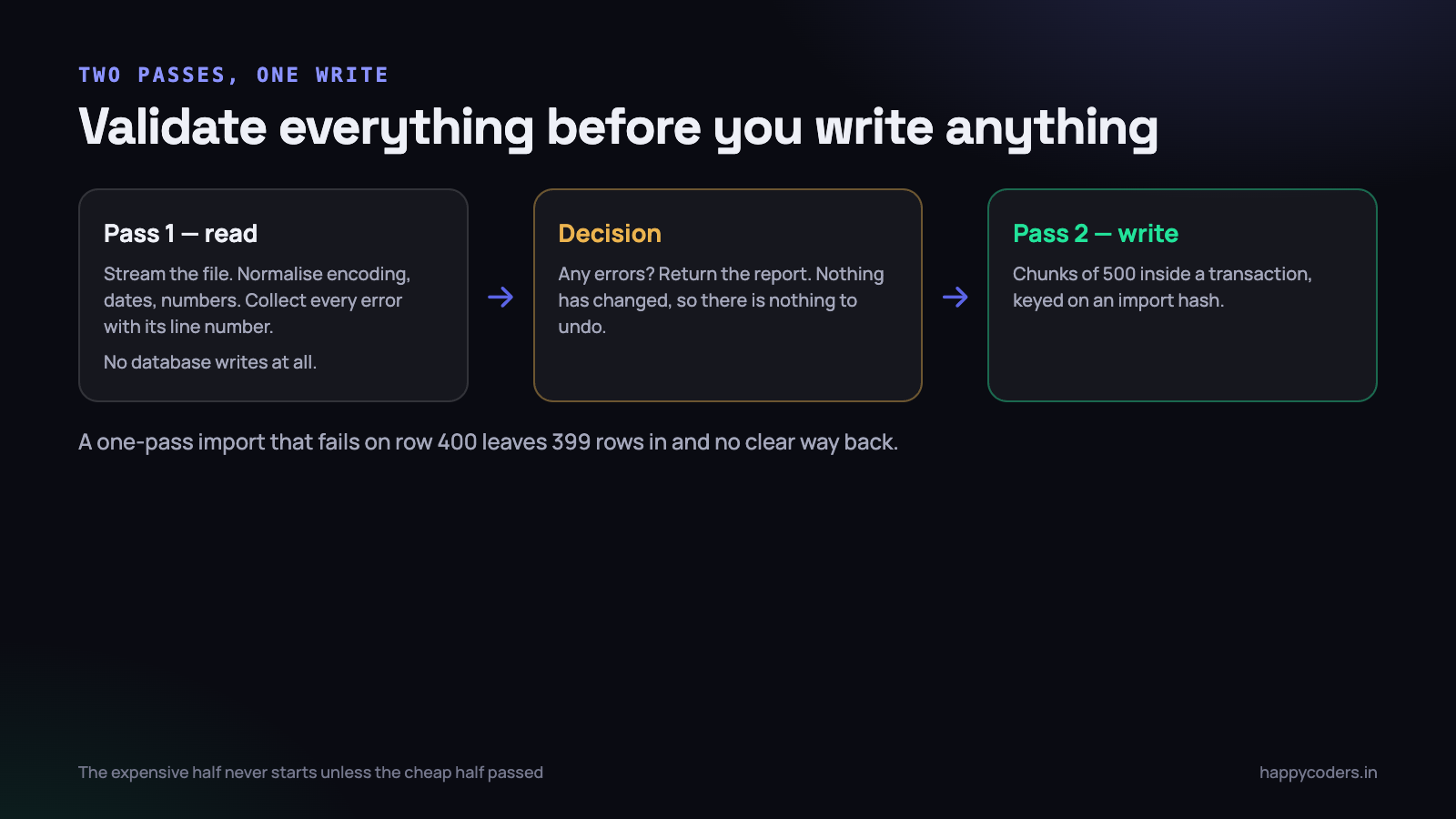
A single-pass import that writes as it reads has no good failure mode. It fails on row 400 of 900 and now there are 399 rows in the database, the user has no idea which, and a re-upload will duplicate them. Wrapping the whole thing in one transaction is better but not enough: a large file holds a transaction open for minutes, blocking other writes, and it still gives the user one error instead of all of them.
Two passes solves both. The first reads and validates the entire file and touches no tables. Only if it produces zero errors does the second pass write, in chunks, inside short transactions.
<?php
public function import(string $path, int $orgId): ImportResult
{
    $errors = [];
    $valid  = [];

    // pass 1 — no writes at all
    foreach ($this->rows($path) as $line => $row) {
        $result = $this->validateRow($row, $line, $orgId);
        if ($result->failed()) {
            $errors[] = $result->errors();
            if (count($errors) >= 500) break;   // stop; the file is wrong
            continue;
        }
        $valid[] = $result->normalised();
    }

    if ($errors) {
        return ImportResult::rejected($errors);   // nothing written, nothing to undo
    }

    // pass 2 — write in chunks
    foreach (array_chunk($valid, 500) as $chunk) {
        DB::transaction(fn () => $this->writeChunk($chunk, $orgId));
    }

    return ImportResult::imported(count($valid));
}
The cap at 500 errors matters in practice. When somebody uploads the wrong file entirely, every row fails, and building a 40,000 entry error list is slow and useless. Stop and say “the first 500 rows all failed, this may be the wrong file”.
Validate against the database too, in bulk
Row validation is not only format checking. Project names have to exist, employee codes have to resolve, references have to be unique. Doing those as per-row queries turns a 5,000 row import into 15,000 queries. Collect the distinct values in pass one and resolve them in a handful of queries before validating.
<?php
$names = collect($rows)->pluck('project')->unique()->filter();

$projects = Project::where('organization_id', $orgId)
    ->whereIn('name', $names)
    ->pluck('id', 'name');          // one query, name => id

$missing = $names->diff($projects->keys());   // report these, do not create them
Resist the temptation to create missing reference data silently. An import that auto-creates a project because of a typo in the header row leaves a project called “Projct Name” in the account forever, and the user has no idea where it came from.
The report the user gets back
The error message is the part of an import that developers spend the least time on and users spend the most time with.
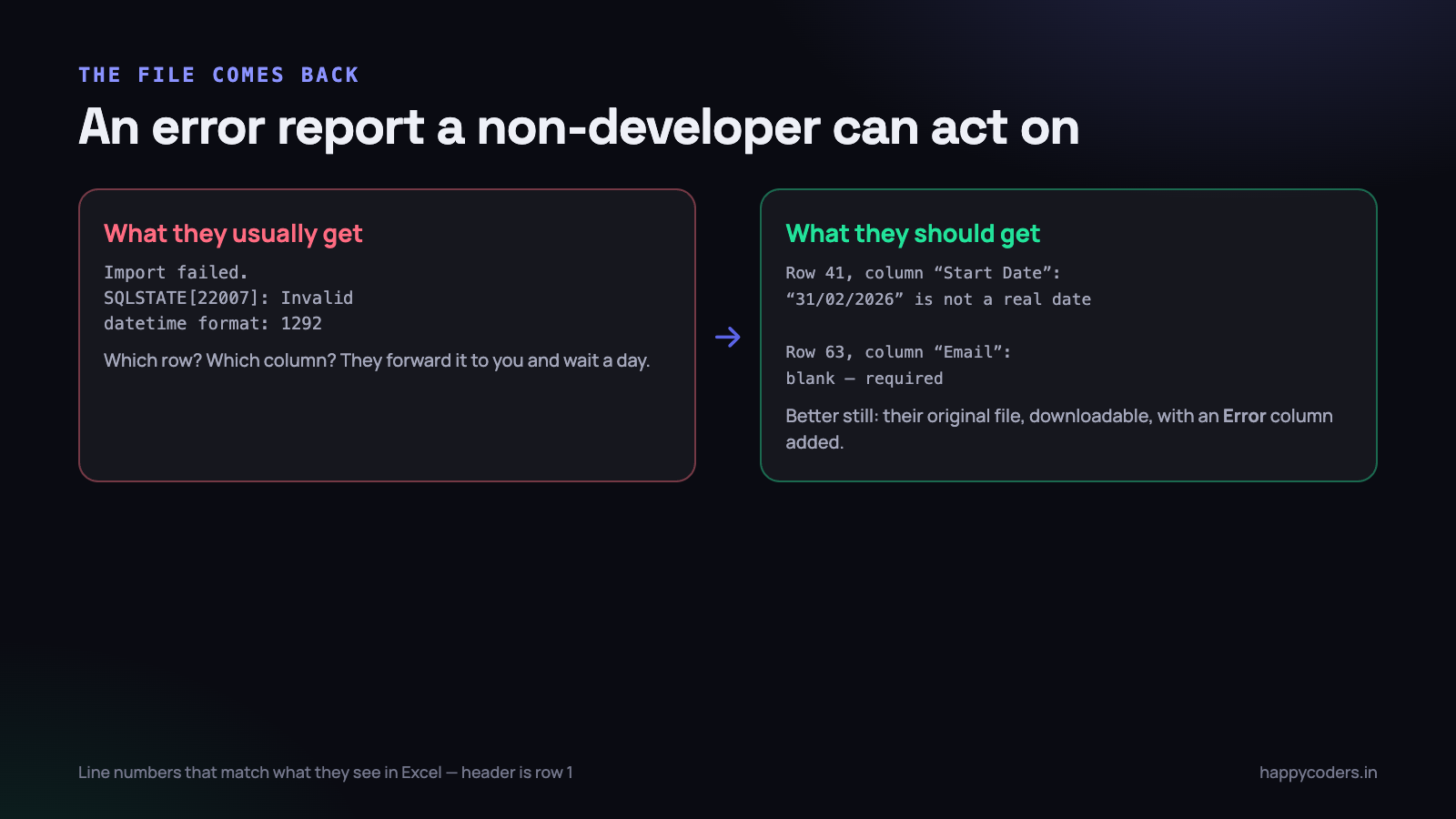
Three rules make the difference.
- Line numbers that match Excel. If the header is row 1, the first data row is row 2. Reporting it as row 1 or row 0 because that is the array index sends the user to the wrong line and destroys their confidence in the rest of the report.
- Name the column and quote the value. “Row 41, column Start Date: 31/02/2026 is not a real date” is actionable. “Invalid date format” is not.
- Say what was expected. Adding “accepted formats: 2026-08-15 or 15/08/2026” converts a complaint into a correction.
The best version costs a little more and is worth it: give back their own file, unchanged, with one extra column called Error filled in for the failing rows. They open it in Excel, fix the rows they can see, delete the column and re-upload. No translation between your row numbers and theirs, no copying between two windows.
Partial failure, and when to allow it
All-or-nothing is the right default. There is one common exception: a recurring operational import — yesterday’s attendance, a bank statement — where thirty good rows are worth having today and three bad ones can be fixed tomorrow.
If you allow it, make it an explicit choice on the upload screen, not a silent behaviour, and always return the skipped rows as a downloadable file. A partial import the user did not choose is indistinguishable from a broken one.
Idempotency, because it will be uploaded twice
Assume every file will be imported twice. Somebody double-clicks. The browser times out while the job keeps running and they try again. A colleague uploads the same file not knowing it was already done.
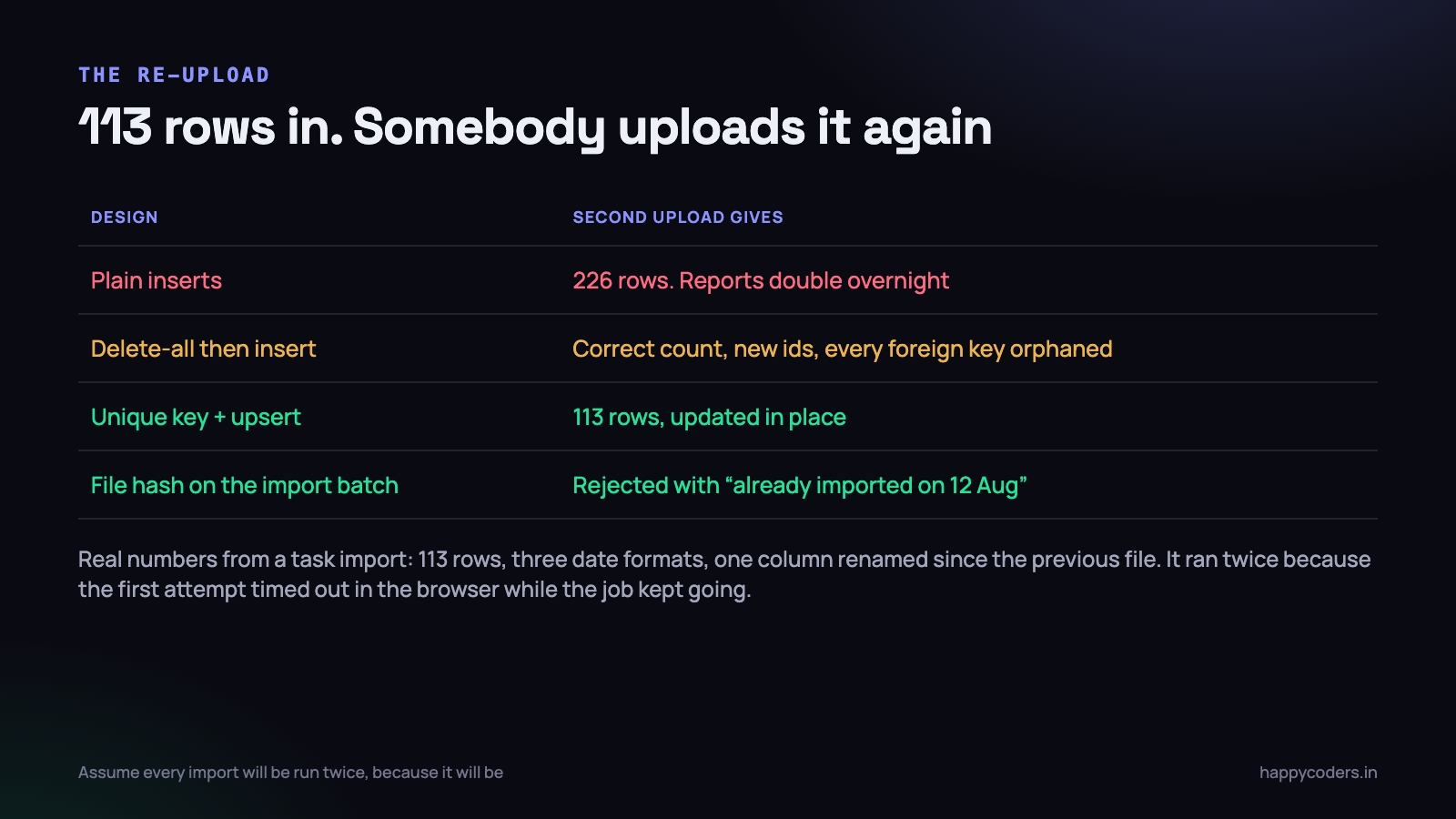
Two mechanisms, and it is worth having both.
A natural key and an upsert
<?php
// unique index: (organization_id, external_ref)
DB::table('time_entries')->upsert(
    $chunk,
    ['organization_id', 'external_ref'],           // match on
    ['project_id', 'started_at', 'duration', 'updated_at']   // update these
);
When the source has a stable identifier, use it. When it does not, derive one from the columns that make a row unique in the real world — employee, date and project, say — and hash it. The database unique index is what actually enforces this; application-level checks lose the race the moment two uploads overlap.
A hash of the file itself
<?php
$hash = hash_file('sha256', $path);

$existing = ImportBatch::where('organization_id', $orgId)
    ->where('file_hash', $hash)
    ->where('status', 'completed')
    ->first();

if ($existing) {
    return ImportResult::duplicate($existing->created_at, $existing->row_count);
}
This catches the exact-repeat case cheaply and lets you give a genuinely useful message: “this file was imported on 12 August, 113 rows”, with an option to proceed anyway. Record every attempt as a batch row with the hash, the filename, the user, the counts and the outcome. When somebody asks in three months where forty duplicate rows came from, that table is the answer.
A real one: 113 rows
A concrete example, because the abstractions above all came from somewhere. We imported 113 tasks from a client’s spreadsheet into a project tracker earlier this year.
What the file contained: descriptions with HTML markup pasted from a wiki, a label column where the values needed a group prefix added before they matched anything, three date formats in the due date column, and a header that had been renamed since the previous export from the same system.
What happened operationally is the part worth repeating. The first attempt was submitted through a browser form. The request exceeded the PHP time limit and the browser showed a 504. The background work carried on regardless and finished. The person at the keyboard saw a failure, waited, and uploaded the file again.
With a naive importer that is 226 tasks, discovered a week later when a sprint board is unreadable and nobody can tell which duplicate is the one with the comments on it. With the file hash in place, the second upload returned “already imported, 113 rows” in under a second and the whole incident was a non-event.
The other lesson from it: move the work to a queued job and show progress, rather than making the user watch a browser tab. Anything over a few hundred rows belongs in a job, with the batch record updated as it goes, and an email when it finishes. A 504 on an import is not a rare edge case — it is the normal outcome as soon as files get real.
On Monday morning
- Take your largest real import file — one a customer actually sent, not a sample — and run it through your importer on a copy of production data. Most of the problems above will surface in the first attempt.
- Add the BOM strip and the encoding check. Eight lines, and between them they account for a large share of import support tickets.
- Split the import into validate and write. This is the biggest change here and the one that removes the half-imported-file class of problem entirely.
- Put a unique index on the natural key and switch the insert to an upsert. Then add the file hash check, which is twenty lines and turns a duplicate upload into a helpful message.
- Rewrite one error message so it names the row, the column, the value and the expected format. Watch how many fewer of those tickets reach you.
An import is a piece of user interface, not a piece of data plumbing. It is used by the least technical person in the client’s office, usually under time pressure at month end, with a file they did not create. Every hour spent on the error report pays for itself in a support queue you never see.
Related: streaming large datasets without hitting the memory limit, and writing an idempotent background job.




