
PHP Memory Limits: Handling 200,000 Rows Without Crashing
PHP Memory Limits: Handling 200,000 Rows Without Crashing
“Allowed memory size of 134217728 bytes exhausted”. It arrives at 2am from a scheduled export, or from one customer clicking Download on a report that works perfectly for everybody else. The code has not changed. Their row count has.
This is where the memory actually goes, why the standard fix hides a data bug, and the four shapes that make the problem disappear rather than move it.
What actually uses the memory
One line is responsible for most of these incidents:
<?php
$entries = TimeEntry::where('organization_id', $orgId)->get();

foreach ($entries as $entry) {
    $rows[] = [$entry->started_at, $entry->duration, $entry->project->name];
}
There are three separate costs stacked on top of each other here, and people usually only picture the first.
- The raw result set. By default PDO buffers the whole result in the MySQL client before PHP sees a single row. 200,000 rows of twelve columns is roughly 40–60 MB of raw data, and it exists before your loop starts.
- The Eloquent models. Each row becomes an object with an attributes array, a second
originalarray used for dirty checking, a relations array, and a handful of properties. A model is commonly three to five times the size of the same row as a plain array. - Whatever you build from them. The
$rowsarray in that loop is a third copy, and if you then implode it into a CSV string you briefly hold a fourth.
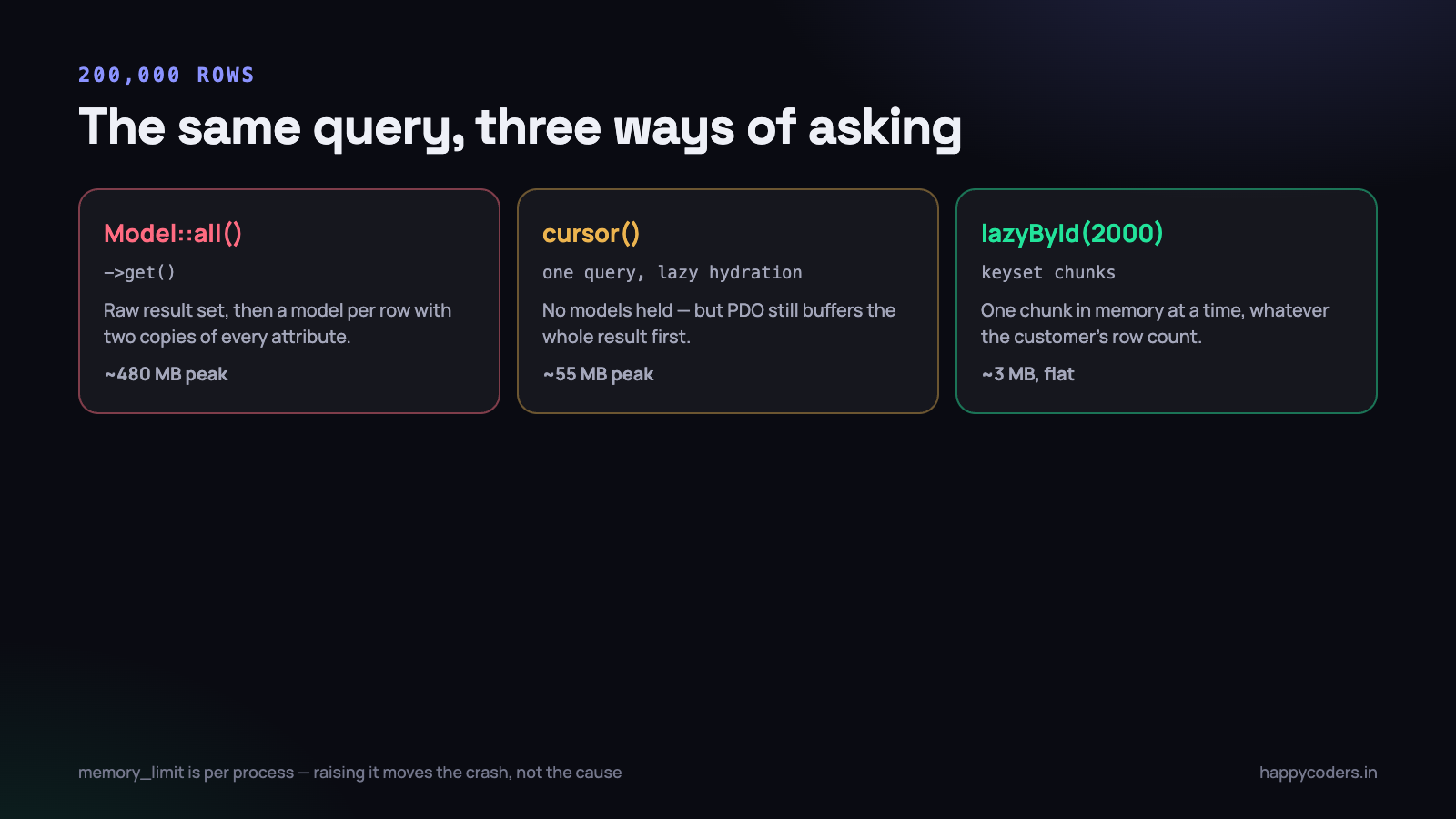
On a real measurement of our own time-entry table, 200,000 rows cost about 55 MB as raw arrays through the query builder and about 480 MB as hydrated Eloquent models. The default memory_limit of 128 MB dies somewhere around row 48,000. The customer with 40,000 entries never sees a problem, which is exactly why this ships.
The hydration cost is the surprise. If you only need values and not model behaviour,
DB::table(...)or->toBase()on the query cuts memory by four-fifths without changing a single line of your loop.
Measure, do not guess
Every argument about memory ends the moment somebody prints a number. PHP will tell you for free.
<?php
$before = memory_get_usage(true);

$entries = TimeEntry::where('organization_id', $orgId)->get();

printf("rows: %d  used: %.1f MB  peak: %.1f MB\n",
    $entries->count(),
    (memory_get_usage(true) - $before) / 1048576,
    memory_get_peak_usage(true) / 1048576
);
Pass true and you get the memory PHP actually took from the operating system, which is the number that hits the limit. Pass nothing and you get the smaller figure PHP thinks it is using, which is useful for spotting a leak but not for predicting a crash.
Put that block at the end of every long-running artisan command you own, behind a --verbose check, and log it. Three days later you know which commands are near the edge, and you know it before a customer does.
The limit is per process, not per server
A common misreading. memory_limit applies to one PHP process. Thirty PHP-FPM workers each allowed 512 MB can ask the machine for 15 GB, and a 4 GB server will start killing processes long before any of them hits its own limit. Raising the limit to make an export work is how a memory error becomes an out-of-memory kill with no PHP error at all.
The CLI usually runs with memory_limit = -1, unlimited, which is why a command that works from the terminal fails in the web request. It is also why a runaway command can take the database server down with it if they share a box.
Raising the limit is a legitimate temporary measure. It is not a fix, because the thing you are fighting scales with the customer and the limit does not.
chunk, chunkById and the bug in between
The standard answer is to process the rows in batches:
<?php
TimeEntry::where('organization_id', $orgId)
    ->orderBy('id')
    ->chunk(1000, function ($entries) {
        foreach ($entries as $entry) {
            // ...
        }
    });
Each pass holds 1,000 models instead of 200,000, and peak memory stops depending on the customer. This is correct for reading. It has a real bug for writing, and it is silent.
Why chunk skips rows when you modify them
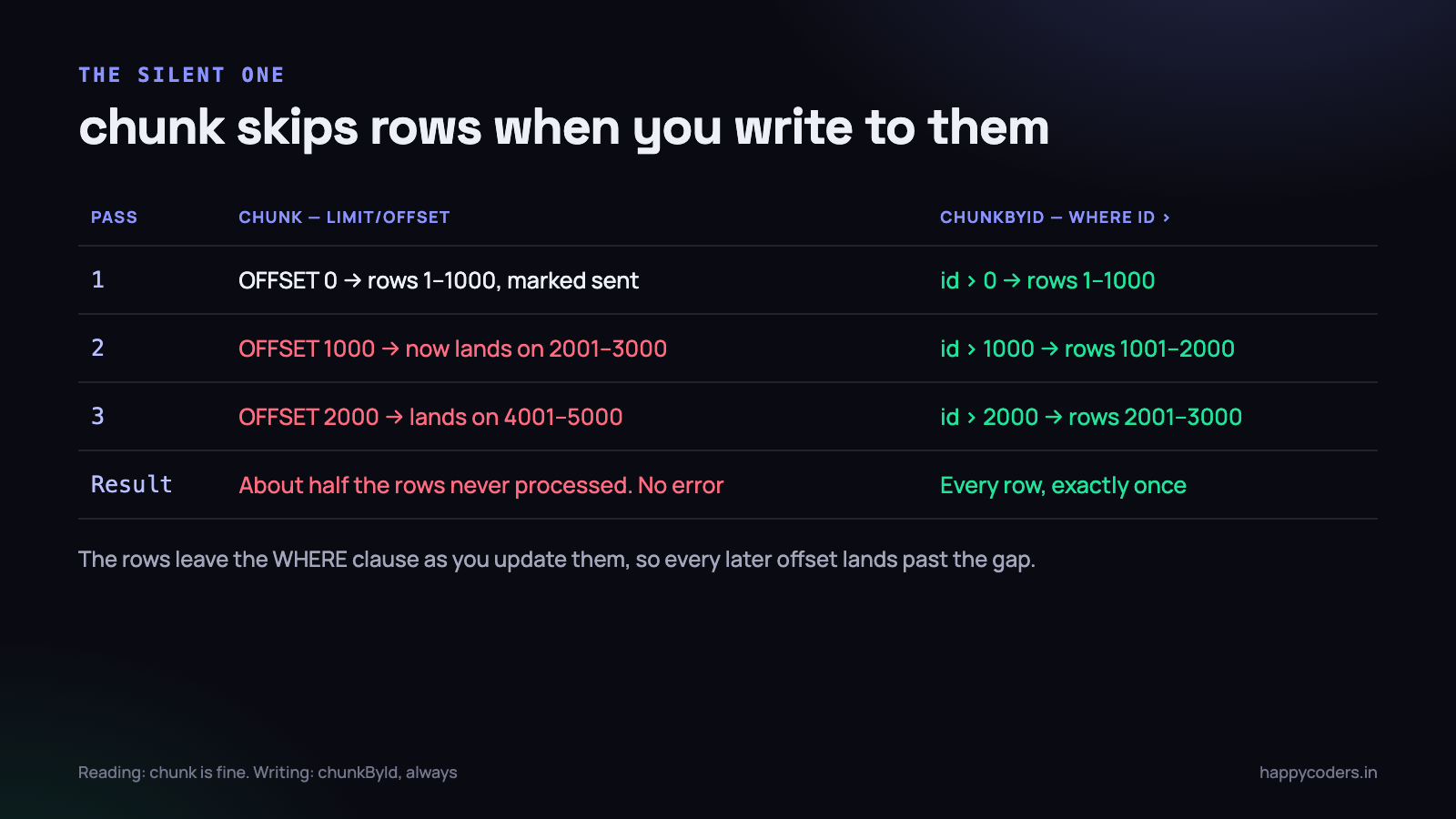
chunk is offset pagination. It runs LIMIT 1000 OFFSET 0, then OFFSET 1000, then OFFSET 2000. If your callback changes the rows in a way that affects the WHERE clause, the result set shrinks underneath you and every subsequent offset lands in the wrong place.
<?php
// BROKEN: processes roughly half the rows
Invoice::where('status', 'pending')->chunk(1000, function ($invoices) {
    foreach ($invoices as $invoice) {
        $invoice->update(['status' => 'sent']);
    }
});
The first pass takes rows 1–1,000 and marks them sent. They now fail the WHERE. The second pass asks for offset 1,000 of a result set that has lost its first thousand rows, so it returns what used to be rows 2,001–3,000. Rows 1,001–2,000 are never touched. Run it on 10,000 invoices and about 5,000 get sent, with no error anywhere.
We lost most of a month-end reminder run to exactly this. Nobody noticed for two days, because half the customers did get their email.
<?php
// Correct: keyset pagination, immune to the rows moving
Invoice::where('status', 'pending')->chunkById(1000, function ($invoices) {
    foreach ($invoices as $invoice) {
        $invoice->update(['status' => 'sent']);
    }
});
chunkById remembers the last id it saw and asks for WHERE id > 41320 ORDER BY id LIMIT 1000. There is no offset to shift, so rows leaving the result set cannot cause a skip. It also performs better on large tables, because the database stops scanning past 199,000 rows to throw them away.
- Reading only?
chunkis fine and any ordering is fine. - Writing anything that affects the WHERE clause?
chunkById, always. - Need a different order?
chunkByIdforces ordering by the key column. If you genuinely need another order, collect the ids first and chunk over those instead. - Deleting? Same trap, worse. Deleting inside a
chunkskips roughly every other batch.
Lazy collections and generators
Chunking is explicit and slightly ugly. Lazy collections give you the same flat memory with a loop that reads normally.
<?php
foreach (TimeEntry::where('organization_id', $orgId)->lazy(1000) as $entry) {
    // one model in memory at a time
}
lazy() chunks underneath and yields one model at a time, so memory stays at the size of one chunk no matter how many rows exist. lazyById() is its keyset variant and carries the same safety as chunkById. In our exports, lazyById(2000) holds a flat 30 MB whether the customer has 5,000 rows or half a million.
The cursor trap
cursor() looks like the same thing and is not, and this catches people out.
<?php
foreach (TimeEntry::where('organization_id', $orgId)->cursor() as $entry) {
    // ...
}
cursor() runs one query and hydrates models one at a time. That removes the model-hydration cost, which is the biggest of the three. But with PDO’s default buffered queries the entire raw result set is still pulled into the client before the first iteration, so you have swapped 480 MB for 55 MB rather than for nothing. On a big enough table it still dies.
Unbuffered queries remove that too, at a price: while the cursor is open you cannot run another query on the same connection, so any lookup inside the loop throws. Practically, that means lazyById() is the sane default and cursor() is for tables you have measured.
Your own generators
The same idea works anywhere, not only in Eloquent. A function that returns an array builds the whole thing first; a function that yields does not.
<?php
function rowsFromCsv(string $path): Generator
{
    $handle = fopen($path, 'r');
    fgetcsv($handle);                       // discard the header

    while (($row = fgetcsv($handle)) !== false) {
        yield $row;                         // one row lives at a time
    }

    fclose($handle);
}

foreach (rowsFromCsv($path) as $row) {
    // a 900 MB file, a few kilobytes of memory
}
This is the cheapest refactor in the whole article. Changing return $rows; to yield $row; turns a function that scales with the file into one that does not, and every caller that already used foreach keeps working unchanged.
Where lazy stops being lazy
A LazyCollection only stays lazy for operations that can work one item at a time. map, filter, each, take and reject are fine. sort, sortBy, groupBy, keyBy, reverse and count cannot be — they need every item at once, so they quietly buffer the lot and you are back where you started with an extra layer of indirection.
If you need a sort, sort in the database. That is what ORDER BY is, and it is free on an indexed column.
Streaming an export instead of building one
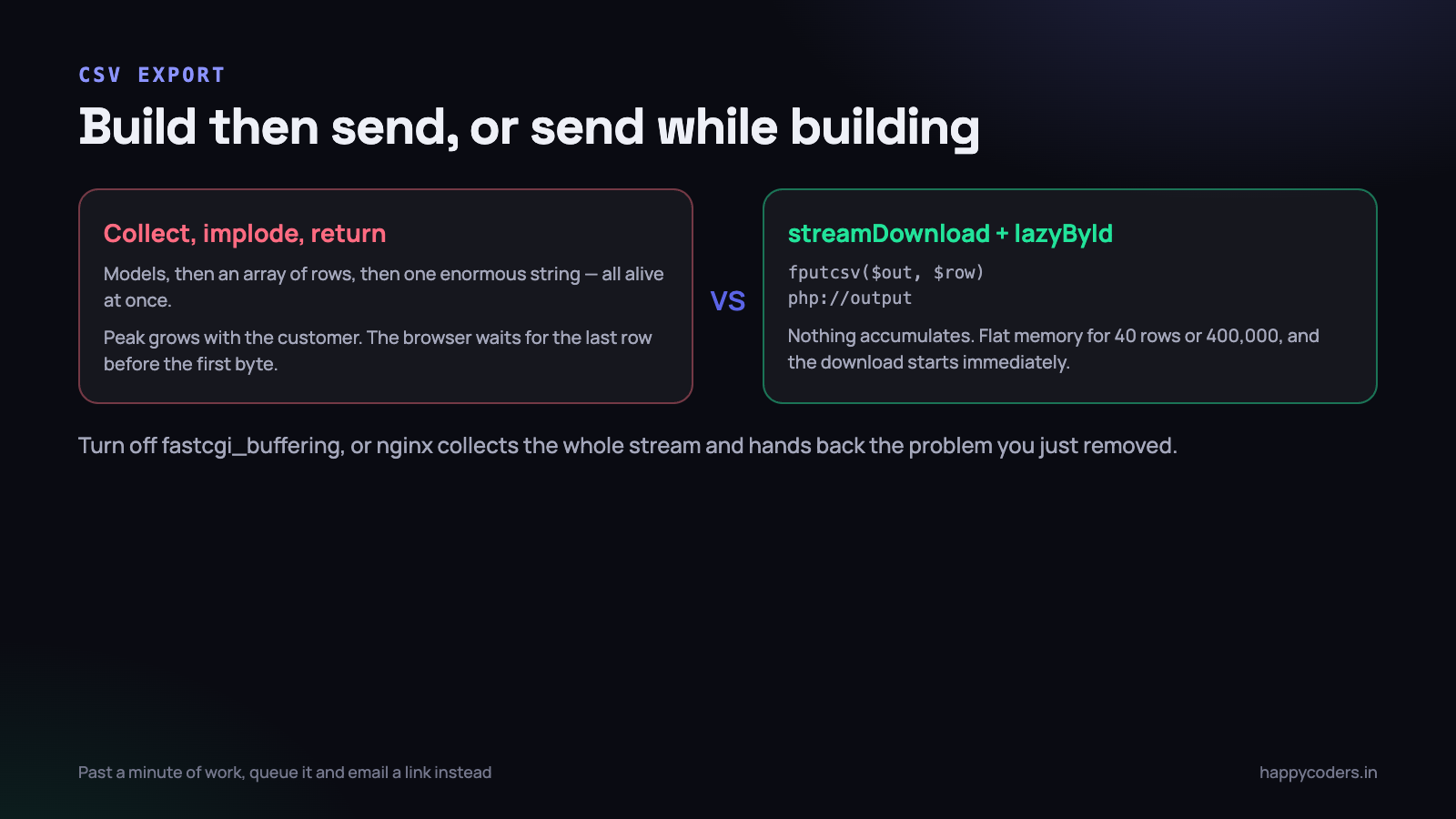
The single most common cause of this error in a business application is a CSV export written the obvious way: fetch everything, build an array, implode it, return a response. At peak you hold the models, the array and the finished string simultaneously.
<?php
public function export(Request $request): StreamedResponse
{
    $orgId = $request->user()->organization_id;

    return response()->streamDownload(function () use ($orgId) {
        $out = fopen('php://output', 'w');
        fputcsv($out, ['Date', 'Member', 'Project', 'Hours', 'Note']);

        TimeEntry::with('project:id,name', 'user:id,name')
            ->where('organization_id', $orgId)
            ->lazyById(2000)
            ->each(function ($entry) use ($out) {
                fputcsv($out, [
                    $entry->started_at->format('Y-m-d'),
                    $entry->user->name,
                    $entry->project->name,
                    round($entry->duration / 3600, 2),
                    $entry->note,
                ]);
            });

        fclose($out);
    }, 'time-entries.csv', ['Content-Type' => 'text/csv']);
}
Writing to php://output sends each line towards the browser as it is produced. Nothing accumulates. The peak memory for a 400,000-row export is the same as for a 40-row one, and the customer starts receiving the file immediately instead of waiting for the whole thing to be assembled.
Four things bite when you first do this.
- Buffering upstream. Nginx will happily collect your entire stream before forwarding it, which defeats the point. Turn off
fastcgi_bufferingfor the export route, or addX-Accel-Buffering: noto the response headers. - No Content-Length. You do not know the size in advance, so the browser cannot show a progress bar. That is the trade, and it is usually worth it.
- Execution time. Memory is fixed now, but
max_execution_timeand the load balancer timeout are not. A ten-minute export will still be cut off mid-file, and a truncated CSV looks like a valid CSV. - Errors mid-stream. Headers are already sent, so an exception halfway through cannot become a 500 page. The user gets a half file. Validate before you start streaming, not during.
Past roughly a minute of generation, stop streaming to the browser at all. Queue a job, write the file to storage, and email a signed link when it is ready. The same reasoning applies in reverse to big uploads, which we covered in handling large file uploads in PHP.
When the answer is SQL, not PHP
Half the memory problems we have fixed were not memory problems. They were PHP being asked to do something the database was already good at.
<?php
// 200,000 models loaded to produce twelve numbers
$total = TimeEntry::where('organization_id', $orgId)->get()->sum('duration');

// one row comes back
$total = TimeEntry::where('organization_id', $orgId)->sum('duration');
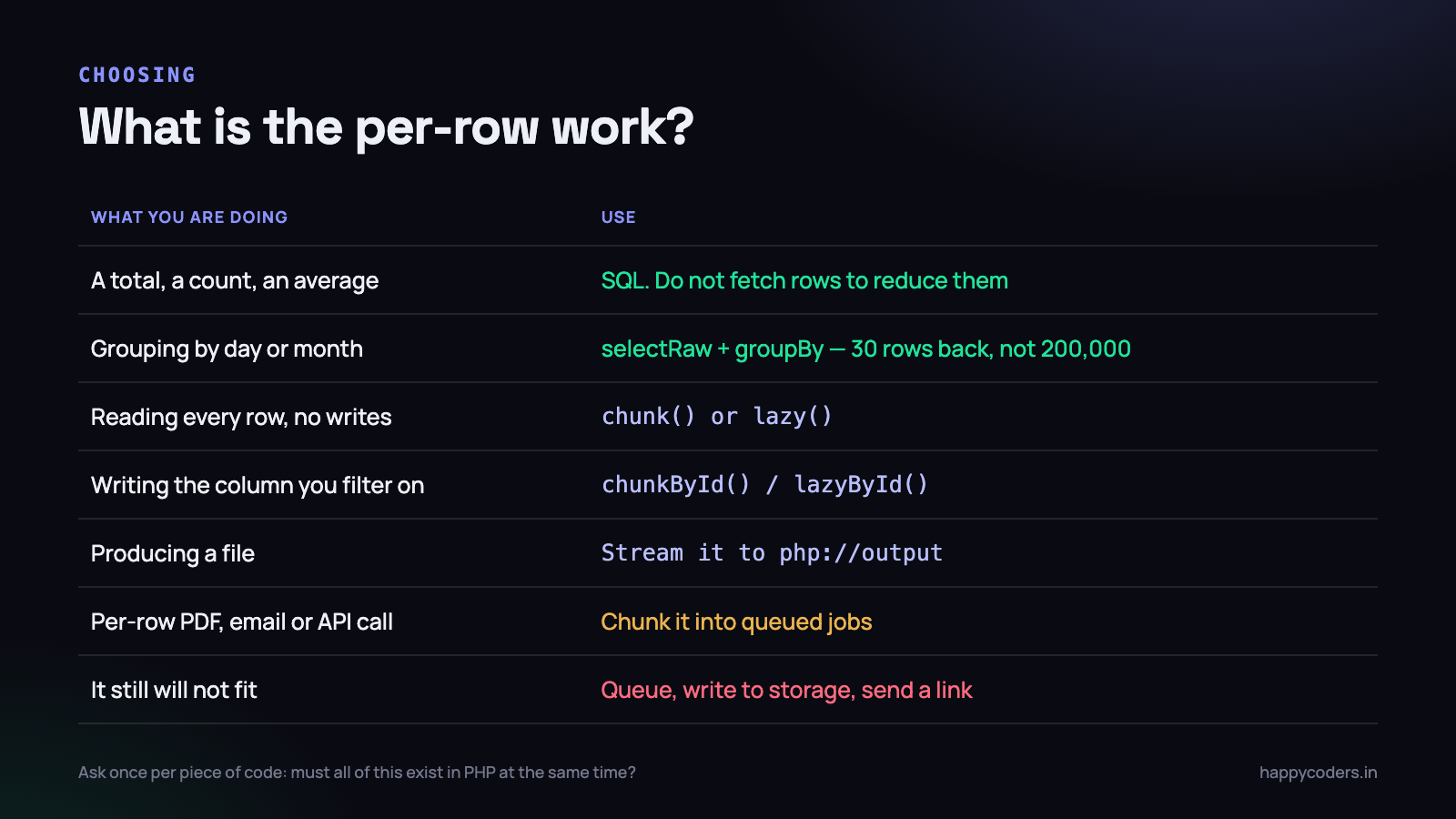
The test is simple and worth saying out loud during review: am I fetching rows only to reduce them to a smaller number of rows? If yes, the reduction belongs in SQL.
- Totals, counts and averages —
sum,count,avg, orwithSumandwithCounton a relationship. - Grouping by day or month —
selectRaw('DATE(started_at) d, SUM(duration) t')->groupBy('d')returns 30 rows instead of 200,000. - Top-N per group — a window function, not a loop that sorts each group in PHP.
- Bulk updates — one
UPDATE ... WHEREinstead of loading models to save them one at a time. Remember it skips model events, which is sometimes the point and sometimes the bug. - Deduplication and existence checks —
DISTINCTandwhereExistsbeat pulling both sets into PHP to compare them.
The counterweight: this only holds when the per-row work is arithmetic. If each row needs a PDF rendered, an API called or a template evaluated, PHP has to see every row, and the answer is chunking plus a queue rather than cleverer SQL.
Queues change the shape of the problem
A worker process is the ideal place for this work, with one condition that people forget: a long-running worker does not get a fresh memory space between jobs the way a web request does.
- Run workers with a memory ceiling.
queue:work --memory=256makes the worker exit cleanly when it crosses the line, and your supervisor restarts it. Without it, a slow leak becomes an OOM kill at 3am. - Recycle workers.
--max-jobs=500or--max-time=3600restarts the process regularly, which forgives a great deal of untidiness in third-party libraries. - One job per chunk, not one job for everything. A job that exports 5,000 rows and dispatches the next batch retries cheaply. A job that exports 400,000 rows retries from zero, three times, before failing.
- Watch static caches. Anything the framework memoises for the life of the process — a resolved container binding, a static array of currency rates — persists across jobs. In a web request it never mattered.
Three memory bugs that have nothing to do with row counts
Once you start measuring, you find a second family of problems. These are not about fetching too much; they are about copying what you already have.
array_merge inside a loop
<?php
// every iteration copies the whole accumulated array
foreach ($chunks as $chunk) {
    $all = array_merge($all, $chunk);
}

// no copy, and it is also much faster
foreach ($chunks as $chunk) {
    foreach ($chunk as $row) {
        $all[] = $row;
    }
}
array_merge builds a new array every call, so a loop of 200 merges over a growing array does an enormous amount of copying for no reason. At 50,000 accumulated rows the first version took 11 seconds and 700 MB in one of our import scripts; the second took under a second and stayed flat. The operator += on arrays has the same trap.
Building a giant string
Concatenating a 200 MB report into a variable and then writing it once is two copies of 200 MB at the moment you write. Open the file first and write each line as you produce it. The code is barely different and the peak is a few kilobytes.
Holding things after you are done with them
PHP frees a variable when the last reference to it goes away. A closure that captured a big array, a collection stored on a service object, an item still sitting in a static cache — each keeps the memory alive long after the code that cared about it finished. Inside a chunk loop, unset() on the heavy locals at the end of each pass is not superstition; it is the difference between a flat graph and a rising one.
PHP’s cyclic garbage collector only runs when its root buffer fills, which in a tight batch loop may be never. If you are chunking through millions of rows, a
gc_collect_cycles()once per chunk costs microseconds and occasionally saves a crash.
Paginate the API, not only the interface
A list screen with pagination feels safe because the human-facing page can never ask for everything. The API endpoint behind it frequently can, and integrations are not polite.
Two rules that have saved us more than once. Cap the page size server-side rather than trusting per_page — min($request->integer('per_page', 50), 200) is one line and it removes an entire class of incident. And for endpoints meant for bulk reads, offer a cursor rather than a page number: keyset pagination stays fast at page 4,000, where OFFSET 200000 makes the database read and discard two hundred thousand rows on every call.
The numbers worth carrying in your head
Rough, measured on a normal table of a dozen columns, and accurate enough to make a decision with.
- A row as a plain array or stdClass: roughly 0.3 KB.
- The same row as an Eloquent model: roughly 1.5 KB, five times more.
- So a hydrated model per 1 MB of limit is about 650 rows. 128 MB gets you tens of thousands, not hundreds of thousands.
- A chunk of 1,000 models: about 1.5 MB per pass, flat, forever.
- A streamed CSV: flat, whatever the row count. That is the whole reason to prefer it.
On Monday morning
- Grep for the two lines.
grep -rn "::all()" app/andgrep -rn "->get()"in anything that exports, reports or runs on a schedule. Every hit is a question: what is the biggest this can get? - Add a peak-memory line to the end of your three longest artisan commands and log it. You will know within a week which one is closest to the edge.
- Fix the chunk-while-writing bug first. Search for
chunk(and check whether the callback writes to the column being filtered on. That one is a correctness bug, not a performance one, and it is silent. - Convert your largest export to a stream. One route, twenty minutes, and it stops being a source of incidents permanently.
- Seed a test organisation with 100,000 rows and click through your own reports. Every memory bug you have is sitting there waiting, and your biggest customer is currently doing that testing for you.
None of this requires a bigger server. It requires deciding, once per piece of code, whether the data has to exist in PHP all at the same time. Almost always it does not, and once it does not, the customer’s row count stops being your problem.




