
Feature Flags Without Paying for a Service
Feature Flags Without Paying for a Service
Nine in the evening. A customer reports that the new invoice PDF comes out blank for anything over twenty line items. The deploy that introduced it also contained eleven other changes, three of them database migrations. Your options are to roll all of it back, or to write a hotfix while tired.
There is a third option, and it costs one boolean: turn the new PDF renderer off, serve the old one, and fix it on Tuesday with a clear head. That is the entire argument for feature flags, and you do not need to pay anybody to have them.

Three jobs, three lifetimes
“Feature flag” covers several things that behave differently, and confusing them is how a codebase ends up with forty switches nobody dares touch.
- A release toggle. Half-finished work merged into main and hidden. It exists so you can integrate daily instead of maintaining a branch for five weeks. Lifetime: days to a few weeks, then deleted.
- A kill switch. An operational off button for something that can misbehave — a third-party integration, an expensive report, a new renderer. Lifetime: as long as the risky thing exists.
- A plan gate. This feature belongs to customers on a paid plan. It is not really a flag at all; it is a product decision wearing the same clothes. Lifetime: permanent.
- An experiment. Show A to half the users and B to the other half. Honest answer for a small team: you rarely have the traffic for the result to mean anything. Skip it until you do.
The reason to separate them is that only one of the four is supposed to be deleted, and the discipline for deleting it only works if you can tell which ones are candidates. Tag every flag with its type on the day it is created.
The deeper benefit is the one nobody puts in the pitch: a flag separates deploying code from releasing a feature. Once those are separate, deploying stops being an event. You ship on a Tuesday afternoon because the code is merged and hidden, and the release becomes a decision somebody makes later, on purpose, with a way back.
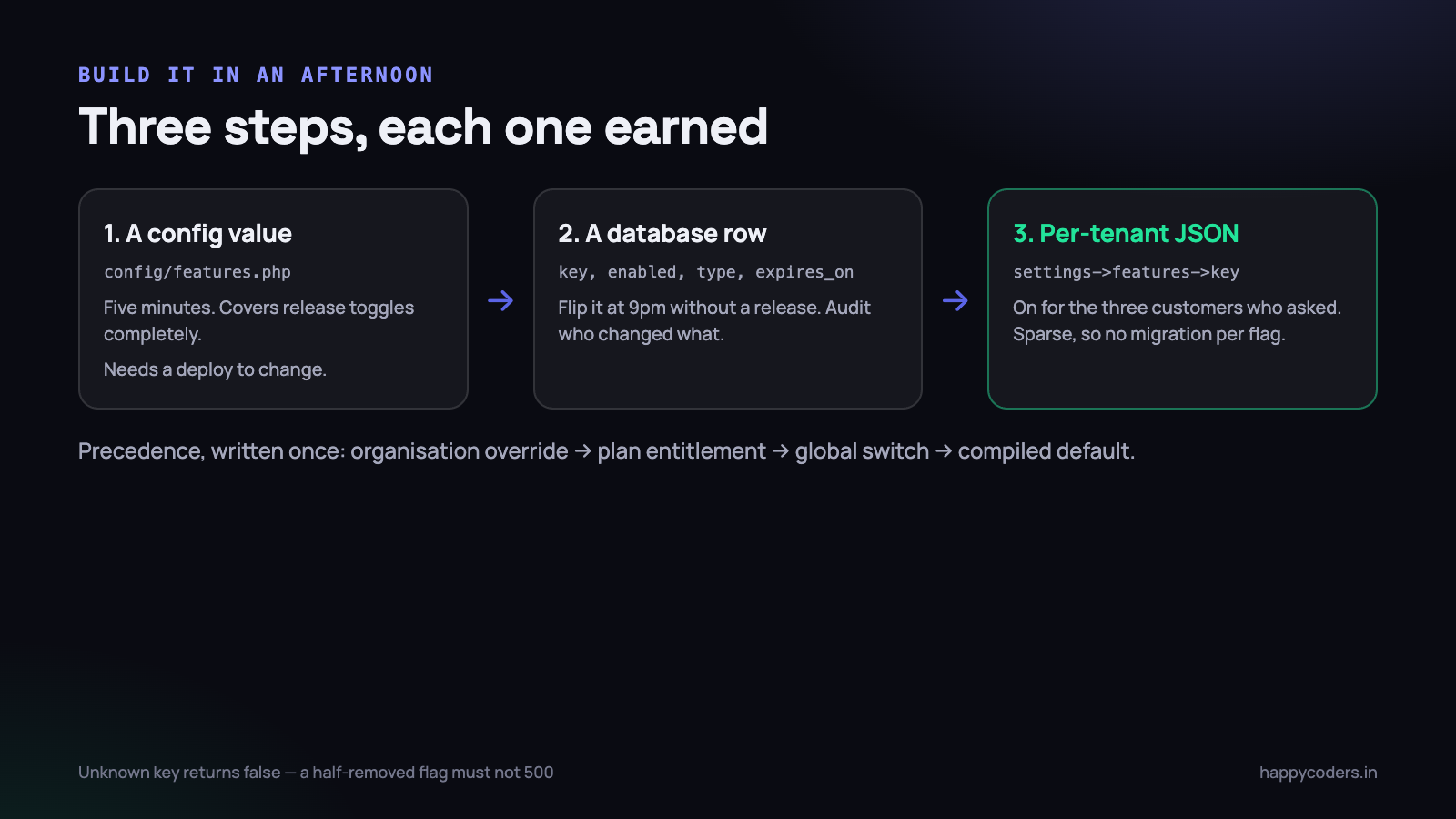
Level one: a config value
Start here. It is five minutes of work and it covers release toggles completely.
<?php
// config/features.php
return [
    'new_invoice_pdf'   => env('FEATURE_NEW_INVOICE_PDF', false),
    'weekly_digest'     => env('FEATURE_WEEKLY_DIGEST', false),
];

// anywhere
if (config('features.new_invoice_pdf')) {
    return $this->newRenderer->render($invoice);
}

return $this->legacyRenderer->render($invoice);
Default to false in the array, not in the environment file. A new server, a forgotten variable or a fresh developer machine then gets the safe answer rather than the half-built one.
- What it gives you: unfinished work can live in main. Staging can run with the flag on while production runs with it off. Zero infrastructure.
- What it does not: changing it needs an environment change and a restart. If you run
config:cache, it also needsconfig:clear, and forgetting that is how a flag appears not to work for twenty confusing minutes. - Where it stops: the moment you want a flag on for one customer and off for another, or on at 9pm without a deploy.
Level two: a database row
One small table turns the flag into something you can change while the application is running, and something you can put behind an admin screen.
<?php
Schema::create('features', function (Blueprint $table) {
    $table->id();
    $table->string('key')->unique();
    $table->boolean('enabled')->default(false);
    $table->string('type')->default('release');   // release|kill|plan
    $table->date('expires_on')->nullable();       // for release toggles
    $table->timestamps();
});
The two columns people leave out are the interesting ones. type is what lets you list the flags that are supposed to be temporary. expires_on is what lets a test complain about them, which we will come back to.
Add an audit line every time a flag changes — who, when, from what to what. When a strange support ticket arrives at 10pm, “somebody turned the new renderer on forty minutes ago” is the most valuable sentence in the investigation.
Keep the screen that flips them boring and restricted: a list of keys, a toggle, the type, who changed it last. Restrict it to super-admins, because a flag is a deploy without a pull request and it deserves the same access control as one. And resist the urge to make the screen clever — scheduled flips and conditional rules are how a flag system turns into a rules engine that nobody can reason about at 9pm.
Level three: per-tenant flags in a settings column
In a multi-tenant application the useful version is per-organisation. You want the new report enabled for the three customers who asked for it, and for nobody else, without a deploy and without a new table per feature.
<?php
// organizations.settings is a json column
$organization->settings = [
    'timezone' => 'Asia/Kolkata',
    'features' => [
        'new_invoice_pdf' => true,
    ],
];
A JSON column is the right shape here because flags are sparse: most organisations override nothing. A boolean column per feature means a migration for every flag and a table that is 95 per cent defaults.
With three possible sources, the only thing that matters is writing the precedence down once and never deciding it again at the call site.
<?php
class Features
{
    public function enabled(string $key, ?Organization $org = null): bool
    {
        $org ??= auth()->user()?->organization;

        // 1. an explicit per-organisation override wins
        $override = data_get($org?->settings, "features.{$key}");
        if (! is_null($override)) {
            return (bool) $override;
        }

        // 2. the plan entitlement, if this key is plan-gated
        if ($entitlement = $org?->plan?->features[$key] ?? null) {
            return (bool) $entitlement;
        }

        // 3. the global switch, then the compiled default
        return $this->globalFlags()[$key]
            ?? config("features.{$key}", false);
    }
}
Three rules keep this honest. The check is one method, so a future change happens in one place. An unknown key returns false rather than throwing, so a half-removed flag degrades to the old behaviour instead of a 500. And the tenant is resolved explicitly when you are inside a queued job, where auth() is empty and a silent default would be wrong for everybody.
A plan-gated feature is a flag with a price on it
The check looks identical and the ownership is completely different. Engineering decides when a release toggle flips. Product decides what a plan includes, and that decision shows up in pricing pages, invoices and sales conversations.
In Happy Tracker, the per-plan settings are things like how many days of activity data and screenshots are retained and the quality screenshots are stored at. They read exactly like flags in the code and they are, in every other sense, the product.
The bug worth learning from: an organisation with no licence record at all. Our resolver fell through to a default that was not the free tier, so free organisations were getting a paid-plan setting — in our case screenshots stored at a higher quality than the free plan says, which is storage we were paying for. Nothing failed. Nobody complained. It was found by testing a free account on purpose.
- For entitlements, missing means the lowest tier. No licence, no plan row, no match — all resolve to free. Never to “whatever the first row in the plans table is”.
- For kill switches, missing means on. A kill switch is off-by-exception. If the flag table is unreachable, the application must keep doing its normal job.
- For release toggles, missing means off. Unfinished work stays hidden by default.
- Test the no-record case explicitly. Create an organisation with nothing attached and assert every entitlement it resolves. That single test is what would have caught ours.
Caching, or every flag check becomes a query
A flag is checked in middleware, in a controller, twice in a Blade template and inside a loop. Read it from the database each time and one page becomes thirty extra queries, which is a bad trade for a boolean.
<?php
protected function globalFlags(): array
{
    return Cache::remember('features:global', 300, function () {
        return Feature::pluck('enabled', 'key')->all();
    });
}

// after any change, in the admin controller
Cache::forget('features:global');
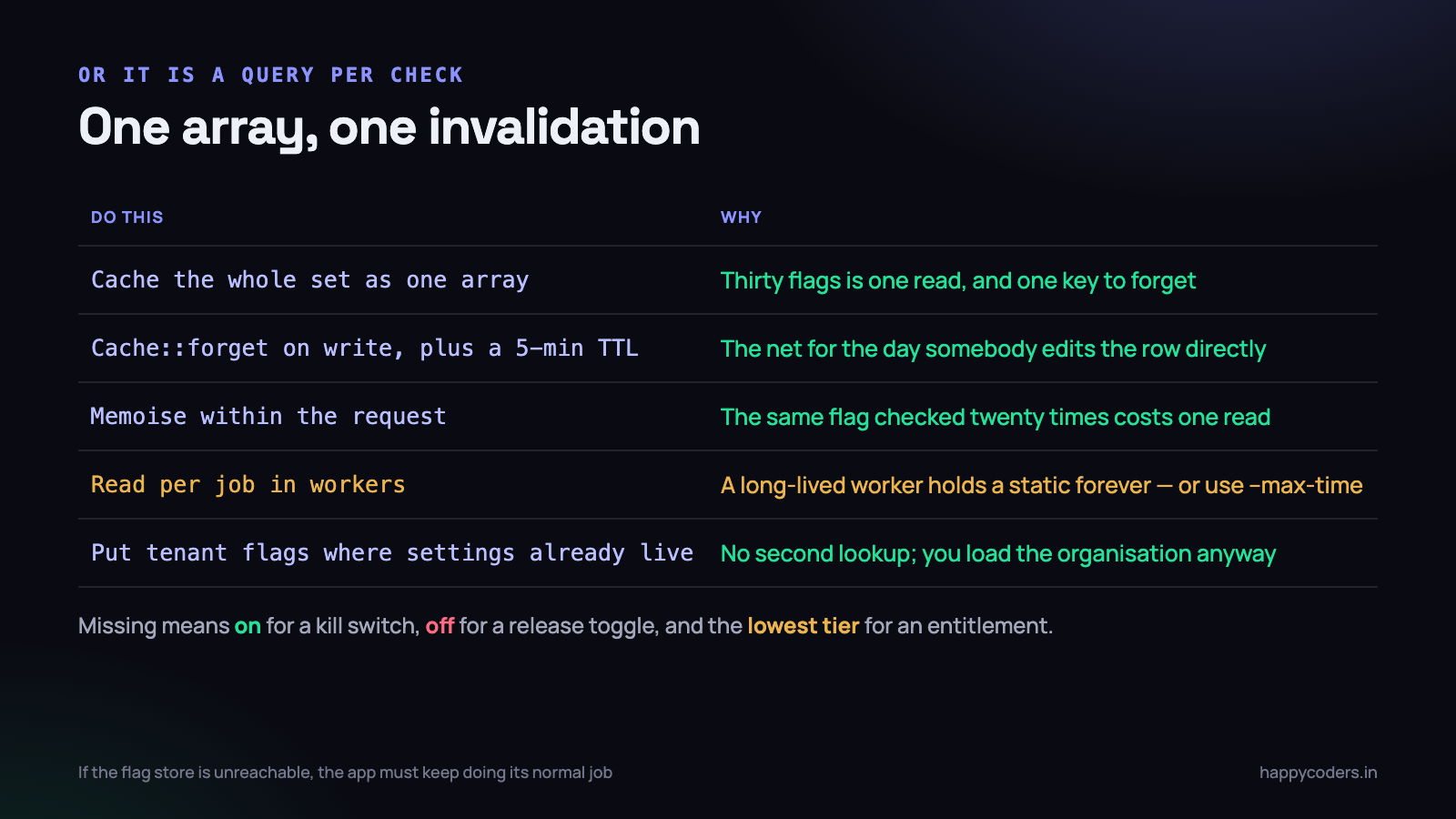
Four details make the difference between this helping and this causing an incident.
- Cache the whole set as one array, not one key per flag. Thirty flags is one cache read, not thirty, and there is a single key to invalidate.
- Invalidate on write and keep a short TTL. The explicit
forgetis the mechanism; the five-minute expiry is the safety net for the day somebody edits a row directly in the database. - Memoise within the request. A static array on the resolver means the same flag checked twenty times in one request touches the cache once.
- Remember the workers. A queue worker is a long-lived process. Anything memoised in a static property survives between jobs, so a flag flipped at 9pm will not reach the worker until it restarts. If a kill switch must take effect immediately, read it per job, or recycle workers with
--max-time.
Per-organisation flags live in the organisation record, which you are almost certainly already caching or loading anyway. Do not add a second lookup for the flags; put them where the tenant settings already are, and they cost nothing extra.
A gradual rollout, without a platform
The one capability people assume they need a paid service for is the percentage rollout: on for ten per cent of customers, then fifty, then everybody. It is about eight lines.
<?php
public function enabledForPercentage(string $key, int $percent, int $orgId): bool
{
    // stable: the same organisation always lands in the same bucket
    return crc32("{$key}:{$orgId}") % 100 < $percent;
}
The important word is stable. Hashing the organisation id together with the flag key means an organisation that got the feature yesterday still has it today, and two different flags at ten per cent do not pick the same ten per cent of customers. Random per request would flip the interface under somebody mid-task, which is worse than not rolling out at all.
Two additions make it usable. An explicit allow list that wins over the percentage, so you can include the customer who asked for the feature and your own organisation regardless of the bucket. And a deny list for the customer who is mid-audit and must not see anything change this month.
For most Indian SaaS businesses at this size, though, be honest about scale. With sixty customers, a ten per cent rollout is six organisations, and picking them by name is clearer, easier to explain to support, and easier to reverse. Percentage rollouts start earning their keep in the thousands.
Deleting the flag is part of shipping the feature
This is the part that decides whether flags help you or become the thing everybody complains about in two years.
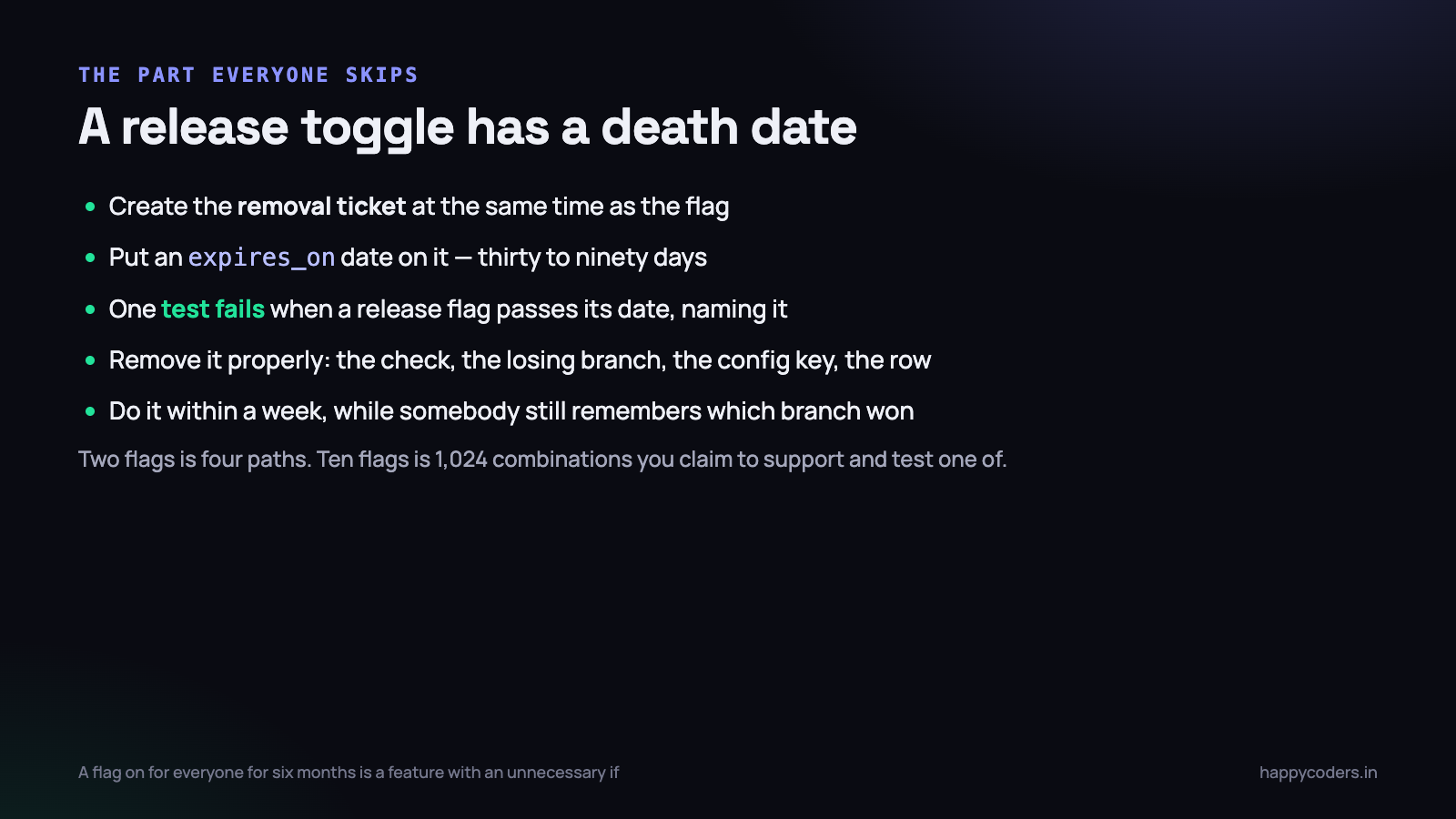
Every live flag doubles the number of paths through the code. Two flags is four combinations, ten flags is 1,024, and you are implicitly claiming all of them work while testing roughly one. Old flags also make reading the code harder in a specific, corrosive way: a developer cannot tell whether the else branch is dead code or the behaviour half your customers get, so nobody removes anything.
- Create the removal ticket at the same time as the flag, in the same sprint planning, with the flag key in the title.
- Give every release toggle an
expires_ondate, thirty to ninety days out. It is a promise, not a schedule. - Let a test fail when the date passes. One test that queries release-type flags past their expiry and fails with their names is the only mechanism we have found that actually works. A reminder in a document does not.
- Remove it as a real change: delete the check, delete the losing branch, delete the config key, delete the row. Leaving the flag permanently true is not removal; it is the same complexity with worse documentation.
- Do the removal within a week of the decision, while the person who wrote it still remembers which branch was the good one.
A flag that has been on for every customer for six months is not a flag. It is a feature with an unnecessary
ifaround it, and a small piece of risk waiting for the day somebody switches it to see what happens.
Flags and tests
Flags interact with a test suite in an awkward way, and the usual reaction — test every combination — is impossible by the third flag. What works is narrower.
- Default the test environment to production’s defaults. Tests should describe what customers actually get. A suite that runs with every flag on is testing an application nobody is using.
- Test both states only while the toggle is live. One test with it on, one with it off. When the flag is deleted, half those tests are deleted with it, which is why this stays affordable.
- For plan gates, test the gate once and the feature once. Assert that a free organisation gets a 403 or the lower limit, and test the feature itself under the plan that includes it. Do not multiply every feature test by every plan.
- Make forcing a flag one line, so writing the second test is not a chore.
<?php
// tests/TestCase.php
protected function withFeature(string $key, bool $on = true): static
{
    $this->app->instance(Features::class, new FakeFeatures([$key => $on]));

    return $this;
}

// in a test
$this->withFeature('new_invoice_pdf')
     ->actingAs($this->owner)
     ->get('/invoices/12/pdf')
     ->assertOk();
One more thing worth asserting: that the flag is actually consulted. A test that passes with the flag both on and off usually means the check is in the wrong place, or is no longer being reached at all.
There is a failure mode specific to desktop or mobile clients, worth naming if you ship one. A flag read by the server takes effect instantly; a flag baked into an installed application takes effect whenever the user updates, which may be never. Anything you might need to switch off must be decided on the server and sent to the client, otherwise the kill switch only works for the people who did not need it.
Where flags go wrong
- Checked deep inside the code instead of at the boundary. One check that picks a renderer, a route or a service is maintainable. Nineteen checks scattered through a service class are two behaviours tangled together, and neither can be deleted cleanly.
- Used to gate a schema change. A flag cannot roll back a migration. Migrate so that both branches work against the same schema — add the column, deploy, backfill, then flip — which is the same expand-and-contract discipline that makes zero-downtime migrations possible.
- Named after the ticket.
feature_ct_1841means nothing to the person reading it in a year.new_invoice_pdfmeans something forever. - Flipped without watching anything. Turning a flag on is a release. Have the error rate and the relevant page in front of you when you do it, exactly as you would for a deploy.
- No audit trail. Without one, “did anything change?” has no answer, and flags become a suspect in every incident rather than a tool in it.
- Flags nobody can see. If support cannot find out which flags a customer has, every ticket starts with an engineer running a query.
On Monday morning
- Add
config/features.phpwith one real flag — the riskiest thing currently on your branch. Ten minutes, no infrastructure, immediately useful. - Put a kill switch around your most dangerous integration: the payment gateway callback, the export that occasionally times out, the third-party API that goes down. You will use it.
- Write down your precedence order — organisation override, then plan, then global, then default — and make it one method that everything calls.
- Test the customer with no plan record. Assert every entitlement resolves to the free tier.
- List your existing flags and put a date on each one. Anything older than six months is either a permanent feature or dead code; decide which this week.
- Add the expiry test so the list never grows silently again.
Feature flags are not a platform you buy. They are a config file, a small table, a JSON column and one resolver method, plus the discipline to delete them. The tooling takes an afternoon. The discipline is the product.




