
Migrating a Live Multi-Tenant Database Without Downtime
Migrating a Live Multi-Tenant Database Without Downtime
A multi-tenant application has no quiet hour. Somebody is always working, and “we will deploy at 2am” only means it is 2am for you. So schema changes have to happen while the application is running, serving requests against the table being changed.
This is the pattern we use, the specific operations that lock a table when you did not expect them to, and how to abandon a migration safely when it goes wrong at 60%.
The rule: never change and use in the same deploy
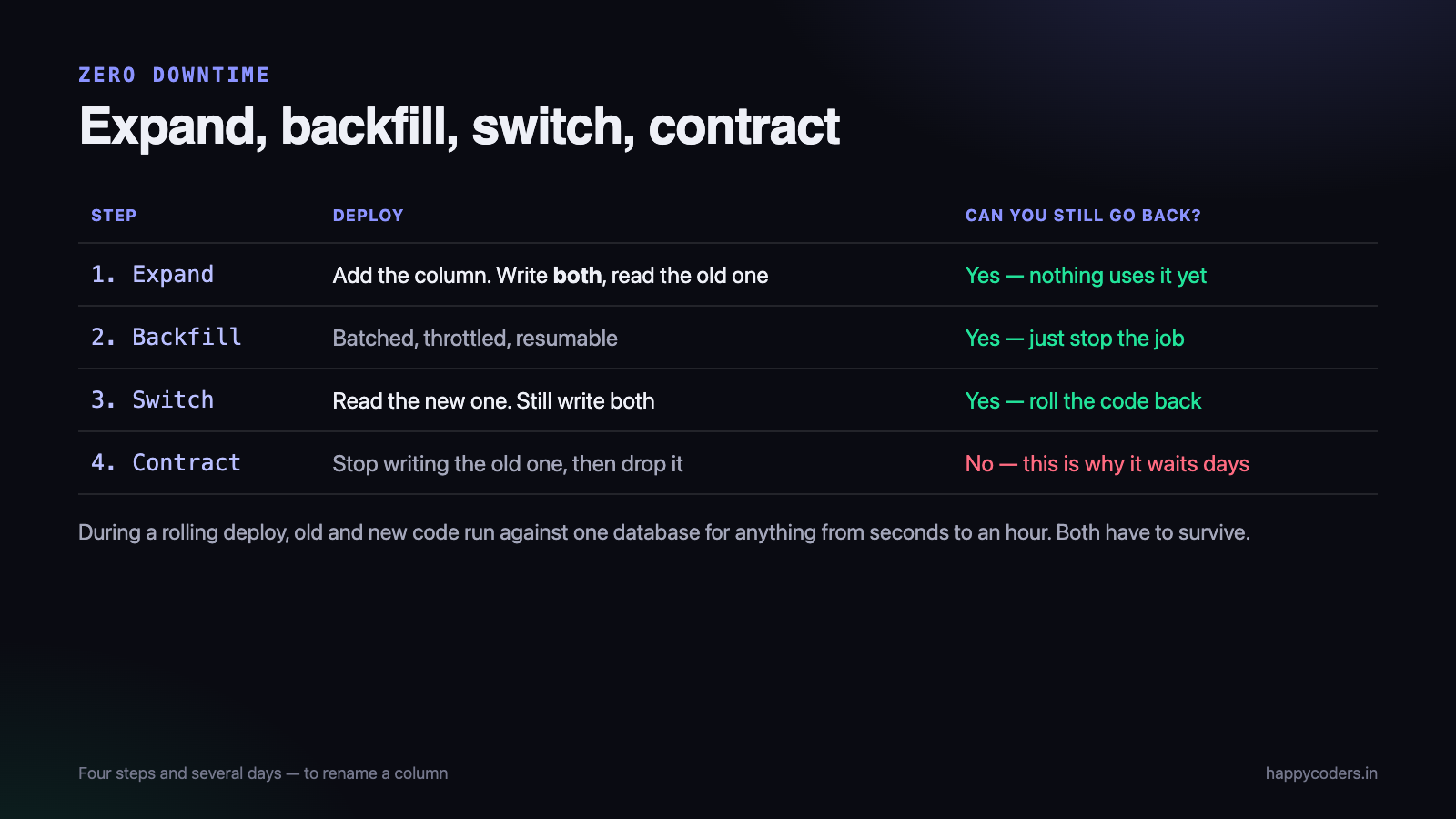
Almost every zero-downtime failure comes from one assumption — that the schema change and the code that needs it land at the same moment. They do not. During a rolling deploy, old and new application code run simultaneously against one database, for anything from seconds to an hour.
So every change has to be made in a way that both versions of the code can survive. That produces the expand-and-contract pattern, which is three separate deploys.
Renaming a column, properly
The example everyone starts with, because the naive version is a single line and takes the application down.
-- what you want to write
ALTER TABLE time_entries RENAME COLUMN duration TO duration_seconds;
The moment that runs, every running instance of the old code is querying a column that no longer exists. Errors until the deploy finishes. Instead:
- Deploy 1 — expand. Add
duration_seconds, nullable. Change the code to write both columns and read the old one. Nothing breaks; old instances carry on using the old column. - Backfill. Copy the data in batches, in the background, with no lock held for long.
- Deploy 2 — switch. Read from the new column, still write both. Verify in production for a few days.
- Deploy 3 — contract. Stop writing the old column, then drop it.
Four steps and several days to rename a column. It is genuinely worth it on a table customers are actively writing to, and the reason is step 3: for those few days you can go back, because the old column still has current data in it.
The backfill
The backfill is where large migrations go wrong, because a single statement across millions of rows holds locks and fills the transaction log.
<?php
$lastId = 0;
do {
    $affected = DB::update("
        UPDATE time_entries
        SET duration_seconds = duration
        WHERE id > ? AND duration_seconds IS NULL
        ORDER BY id
        LIMIT 1000
    ", [$lastId]);

    $lastId = DB::table('time_entries')
        ->where('id', '>', $lastId)->orderBy('id')
        ->limit(1000)->max('id') ?? $lastId;

    usleep(100_000);                 // breathe - let other queries through
} while ($affected > 0);
Three things that matter more than they look:
- Batch by primary key, not by offset. An
OFFSETof two million makes the database read two million rows to skip them. - Sleep between batches. A backfill that saturates the database is an outage with a different name. The job taking six hours instead of forty minutes costs nothing.
- Make it resumable. The
IS NULLcondition means re-running it continues rather than starting over. It will be interrupted — a deploy, a restart, a mistake — and a backfill you cannot restart safely is one you will be afraid to run.
And watch replication lag while it runs, if you have replicas. A backfill that outpaces replication produces reports built on stale data, which is confusing in a way nobody attributes to the migration.
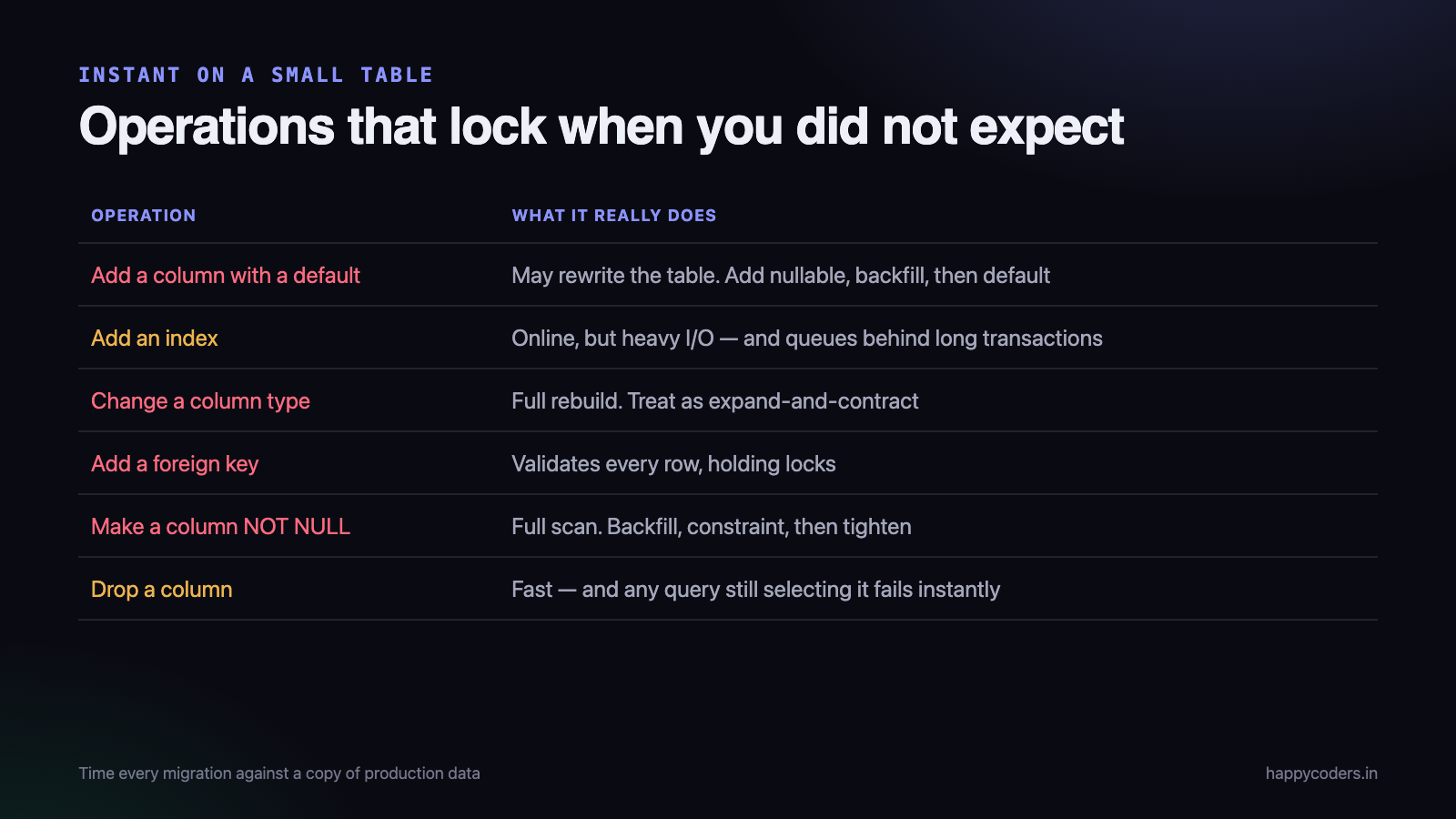
Operations that lock when you did not expect it
The dangerous ones are the operations that are instant on a small table and take minutes on a large one.
- Adding a column with a default. On older MySQL this rewrites the whole table. MySQL 8 has instant add for many cases — but not all, and the conditions are subtle. Add nullable, backfill, then add the default.
- Adding an index. Online in InnoDB, but it still consumes significant I/O, and the operation queues behind any long-running transaction.
- Changing a column type. Almost always a full table rebuild. Treat it as expand-and-contract with a new column.
- Adding a foreign key. Validates every existing row, holding locks while it does. Add it as not enforced first where your database supports it, then validate.
- Making a column NOT NULL. Full scan. Backfill first, add a check constraint, then tighten.
- Dropping a column. Usually fast, and the risk is different: any query still selecting it fails immediately. This is why contract comes last and days later.
The reliable habit: run every migration against a copy of production data before it runs against production, and time it. A change that takes 200ms on a developer’s seeded table and four minutes on real data is the normal case, not the exception.
What multi-tenancy adds
Shared-schema multi-tenancy — one set of tables with an organisation column — makes migrations simpler in one way and riskier in another.
Simpler: there is one schema, so one migration — not one per customer.
Riskier: every customer is affected simultaneously. A migration that locks a table for ninety seconds is ninety seconds of failure for everybody at once, and a mistake has no blast radius smaller than “all of them”.
Two things that help:
- Migrate behind a feature flag per organisation. The schema changes for everyone, but the code path that uses it is enabled for one customer first, then ten, then all. Most of the risk is in the code rather than the column.
- Know which tenants are large. A query that is fine for a customer with 2,000 rows can be unusable for one with four million. Test the new code path against your largest tenant’s data volume, not the average.
If you use schema-per-tenant instead, the trade reverses: migrations run hundreds of times and can be staged, and now you need to handle the ones that fail halfway through the set, with your tenants in two different schema versions.
Writes that arrive during the backfill
A subtlety that catches people on a busy table: while the backfill is copying old rows, the application is inserting new ones. If the new code is not already writing both columns, every row created during the backfill is missed, and the job finishes reporting success with a gap in the middle.
This is why the expand deploy — writing both columns — must land before the backfill starts, not alongside it. With that ordering the backfill only ever has to handle rows that existed beforehand, and the IS NULL condition is genuinely sufficient.
Verify it rather than assuming. Once the backfill reports completion, count the rows where the new column is still null. It should be zero. If it is not, something is writing through a path you did not know about — a raw query, a job, an import script, an admin tool.
-- run this after the backfill says it finished
SELECT COUNT(*) FROM time_entries WHERE duration_seconds IS NULL;
That query has found a forgotten code path for us more than once, and it takes a second to run.
Migrations in the deploy pipeline
One decision worth making explicitly: should migrations run automatically as part of a deploy?
For small, additive, instantly-applied changes, yes — the friction of a manual step costs more than it saves. For anything that touches a large table, no. Those should be run deliberately, by a person watching the numbers, at a time they chose.
The way to have both is to mark migrations as safe or unsafe and let the pipeline run only the safe ones, refusing to deploy if an unsafe migration is pending until somebody has run it. That turns “we forgot this one locks the table” from an outage into a blocked deploy.
It also means the dangerous migration is never a surprise inside a routine release — which is how most of them cause damage. Nobody plans to lock a production table for four minutes; they plan to ship a small feature that happened to include one.
Abandoning a migration at 60%
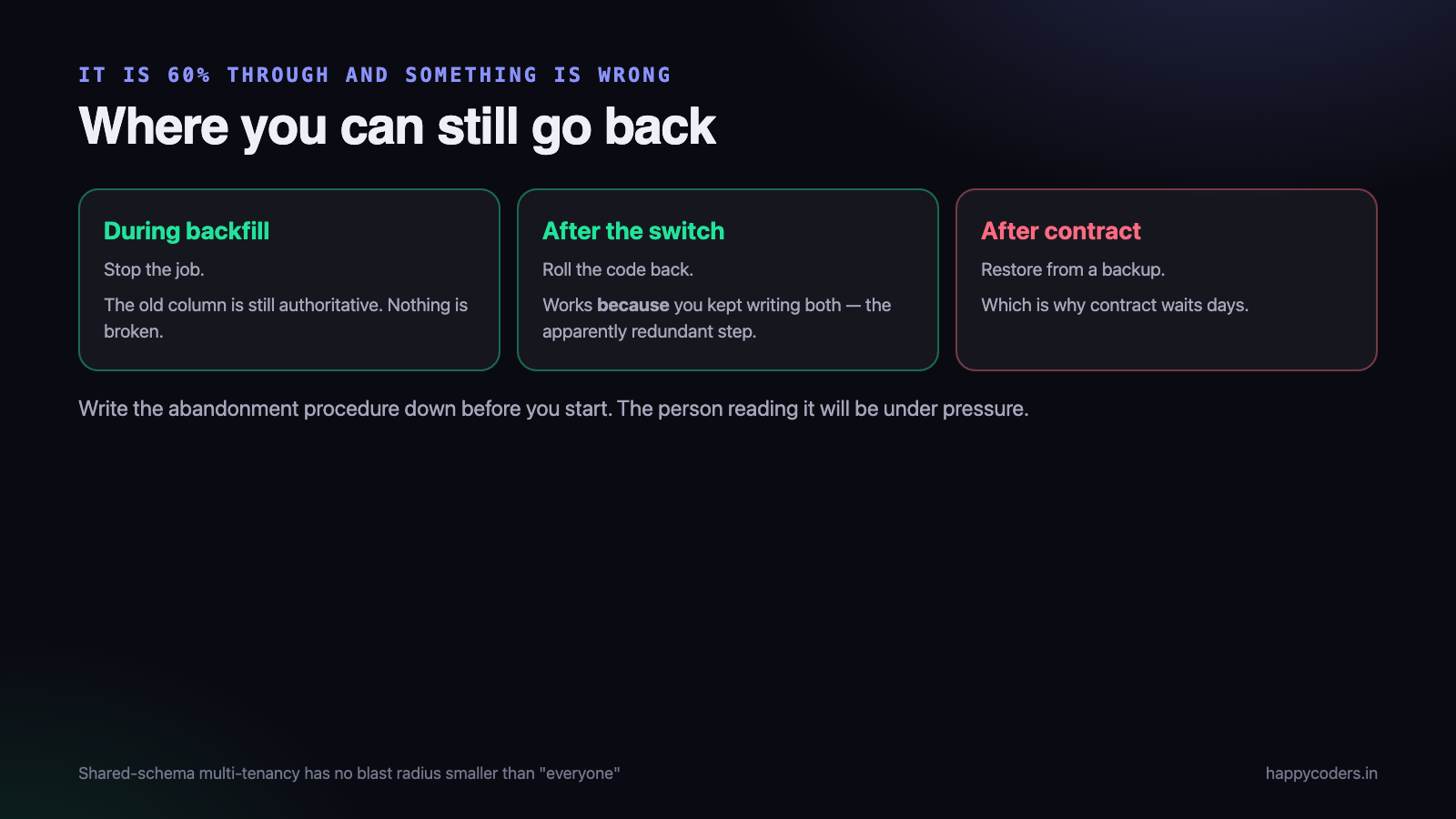
This is the part most guides skip, and it is the one you will need at some point. The backfill is two thirds through and something is wrong — replication lag climbing, an error rate rising, a value that is not converting.
The expand-and-contract pattern is what makes this survivable, and only if you have actually followed it:
- During expand and backfill — stop the job. The old column is still authoritative and the application is still reading it. Nothing is broken. Investigate calmly.
- After the switch deploy — roll the code back to reading the old column. This works precisely because you kept writing both, which is the whole reason for that apparently redundant step.
- After contract — the old column is gone and you are restoring from a backup. This is why contract waits days and happens only when you are confident.
Write the abandonment procedure down before starting, in the same document as the migration plan. At the moment you need it, the person reading it is under pressure, and “we will work it out” is not a plan.
The other half: making the code tolerant
The schema pattern above is half the answer. The other half is writing application code that does not assume the schema it was written against.
Three habits do most of the work. Never use SELECT * — naming columns means a dropped column fails in one query rather than everywhere at once, and an added one changes nothing. Tolerate nulls in new columns for the whole expand period, because during it a row genuinely may not have the value yet. And put the read behind one method, so switching from the old column to the new one is a one-line change in a single place rather than a search across the codebase.
That last one also makes the rollback real. If reading the value happens in fourteen places, going back is fourteen edits under pressure, and somebody will miss one.
Watching the right things
During any significant migration, three numbers on one screen:
- Error rate per endpoint. A rise on one endpoint names the incompatibility immediately.
- Replication lag. The first thing to move when a backfill is too aggressive.
- Database connections in use. If the backfill is holding connections, other queries queue, and the symptom users report is a slow application rather than an error.
And keep a note of the exact time each step ran. When something looks odd two days later, the first question is always whether it started when the migration did, and nobody ever remembers.
Two migrations that taught us this
Both were routine changes that were not routine on real data.
A foreign key added to a table with several million rows. It ran in under a second locally. In production it validated every existing row while holding locks, and for the duration of that validation writes queued. Nobody had thought of adding a constraint as a scan, because the statement does not look like one.
A column type widened from INT to BIGINT. The table was approaching the limit, so the change was necessary and overdue. It rebuilt the table. We ran it inside a deploy, on a Tuesday afternoon, and learned the difference between a schema change and a table rewrite in the most direct way available.
Neither was a difficult problem, and neither was caught by review, because the migration file in both cases was one line that read as obviously safe. The habit that would have caught both is the dull one: time every migration against a copy of production data before it goes near production. It takes twenty minutes and it converts “this looks fine” into a number.
Tell the customer nothing, and tell support everything
A zero-downtime migration should be invisible to customers, and that is the point of all the work above. Support is a different matter.
Give them the dates, in plain language, before it starts: what is changing, which screens touch it, what an early symptom would look like, and who to escalate to. During our column-type migration a customer reported a report loading slowly; support spent an hour on it as an ordinary performance ticket because nobody had told them a table was being rebuilt that afternoon.
It costs one message in a channel and it is the difference between a two-minute triage and an hour of guessing.
A checklist we actually use
- Can old and new code both run against this schema? If not, split it.
- Timed against a copy of production data?
- Is the backfill batched, throttled and resumable?
- Is there a step where we can still go back? How long does it last?
- Is the abandonment procedure written down?
- Do we know our largest tenant’s numbers for the affected tables?
- Is contract scheduled as a separate piece of work, days later?
- Who is watching the three numbers while it runs?
Most of that is not about SQL. The schema change is usually the easy part; the difficulty is that two versions of your application are talking to one database and both of them have to be right.
Related: multi-tenancy without data leaks, and why reports get slow and what to do before they do.




