
Storing Screenshots Cheaply: Retention, Compression and Cost per User
Storing Screenshots Cheaply: Retention, Compression and Cost per User
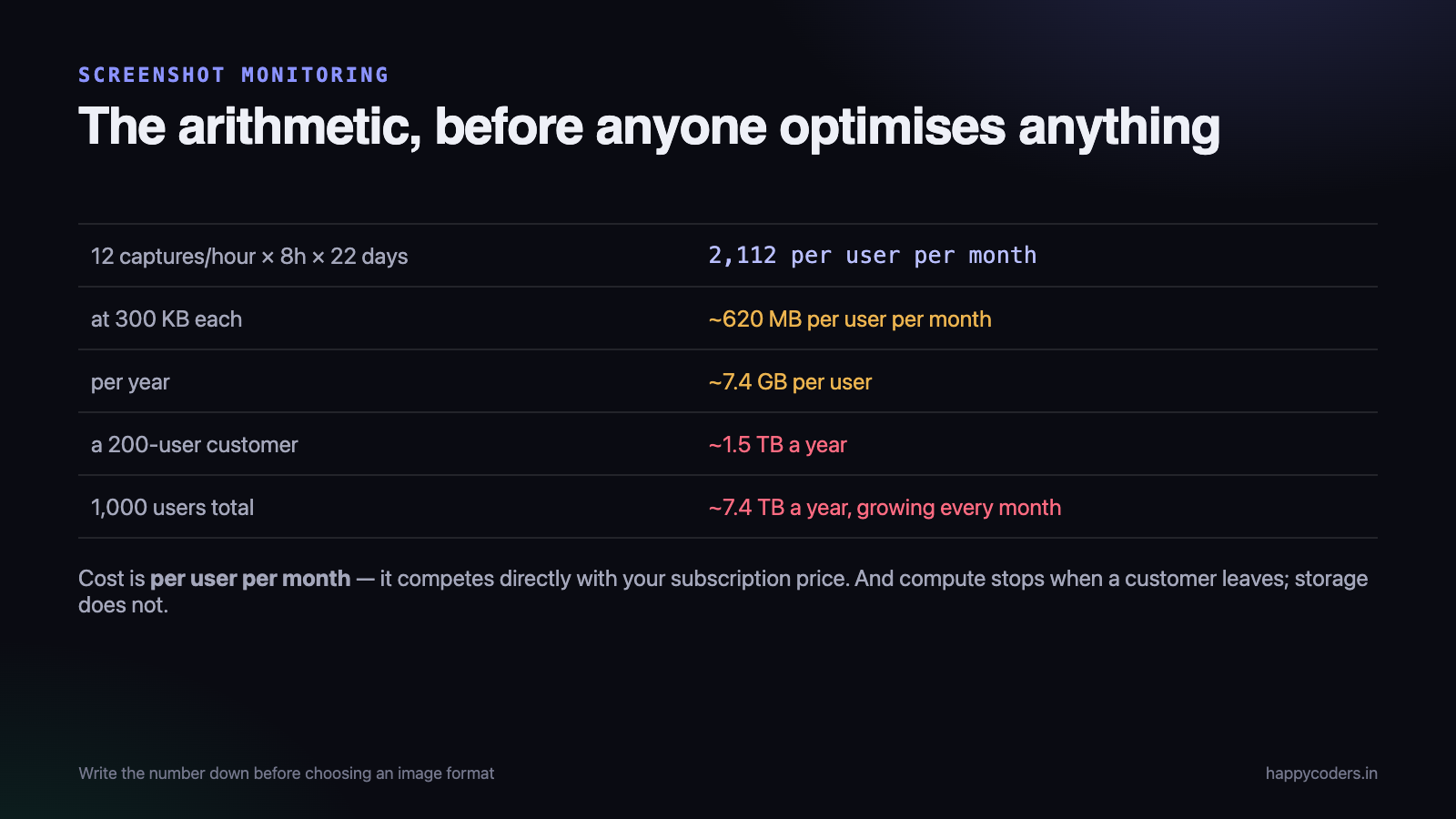
Screenshot monitoring looks like a small feature until you do the arithmetic. Twelve captures an hour, eight hours a day, twenty-two days a month, per user. At 300 KB each that is about 6.3 GB per user per year, and a customer with 200 people generates over a terabyte annually.
At that point storage stops being a line item and becomes a thing that decides your pricing. This is the arithmetic, what actually reduced it, and the one lever that matters more than all the compression work put together.
Do the arithmetic first
Before any engineering, write down the number. It is the only thing that tells you which optimisations are worth doing.
captures per hour        12
hours per working day     8
working days per month   22
                        ---
captures per user/month   2,112
at 300 KB each          ~620 MB per user per month
                        ~7.4 GB per user per year

200-user customer       ~1.5 TB per year
1,000 users total        ~7.4 TB per year, growing every month
Two things fall out immediately. Storage cost is per user per month and therefore competes directly with your subscription price — if you charge a few hundred rupees a month and spend a meaningful fraction on storage, the feature has a real margin impact.
And it accumulates. Compute costs stop when a customer leaves; storage does not, unless you delete.
What compression actually gives you
Screen content compresses differently from photographs, and the received wisdom about image formats is mostly derived from photographs.
Format
A screenshot is large flat areas, hard edges and text. PNG is lossless and handles flat areas well, but at full resolution the files are large. JPEG smears text at the quality levels that produce small files. WebP at a moderate quality setting is meaningfully smaller than JPEG at comparable legibility, and is supported everywhere that matters now.
Switching from PNG to WebP was our single largest per-file saving, and it was a one-line change on the client.
Resolution
This is the bigger lever and it is easy to miss. A screenshot from a Retina display is captured at twice the logical size — four times the pixels. For a monitoring screenshot, which exists to answer “what was on screen” rather than to be read closely, the full pixel resolution is not needed.
Capturing at the logical size, or downscaling to a maximum dimension before upload, removes about three quarters of the data before compression has done anything.
Quality
Worth tuning by looking rather than by number. For screen content the useful test is whether a person can tell which application was open and roughly what was being done — not whether every word is legible. Most monitoring screenshots are viewed as a grid of thumbnails and only occasionally opened.
That observation leads to the change that saved us the most per file: store a small thumbnail and a modest full image, not one large one. The grid loads thumbnails, which are tiny, and the full image is fetched only when somebody clicks.
Retention is the only lever that scales
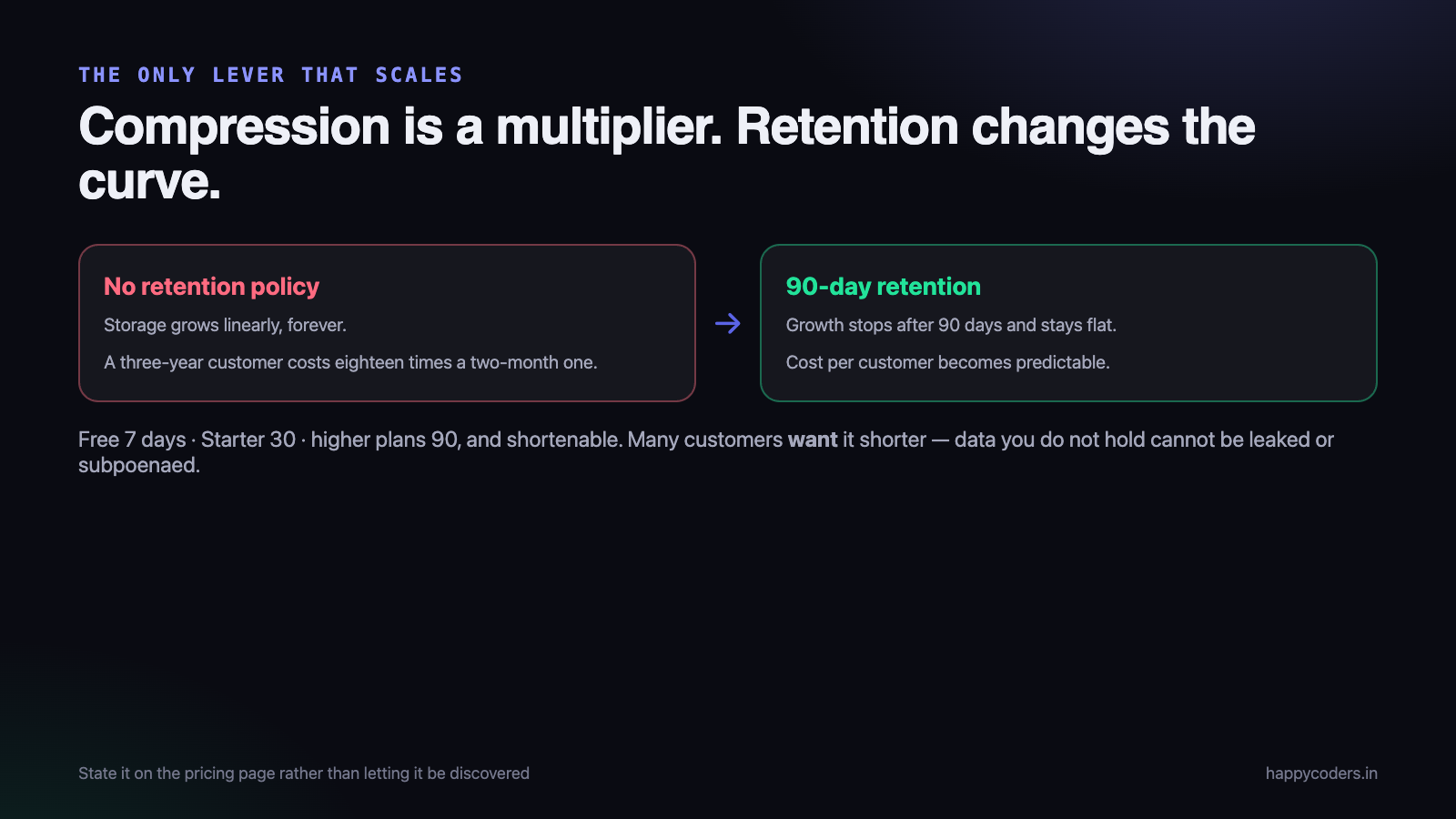
Compression gives you a multiplier. Retention changes the shape of the curve, and it is the difference between storage that grows forever and storage that reaches a steady state.
With a 90-day policy, a customer’s storage stops growing after 90 days and stays flat for as long as they are a customer. Without one, it grows linearly forever, and the cost of a three-year customer is eighteen times that of a two-month one.
What we do, per plan:
- Free — 7 days. Enough to be genuinely useful for the current week.
- Starter — 30 days.
- Higher plans — 90 days, and configurable downwards by the customer.
Two things make this defensible rather than mean. Retention is stated plainly on the pricing page rather than discovered, and the customer can always shorten it — many actively want to, because holding screenshots of their staff longer than necessary is a liability for them as well as a cost for us.
That last point is worth making to customers directly. Data you do not hold cannot be leaked, subpoenaed, or become an awkward conversation with a works council.
Deleting reliably is harder than it sounds
A retention policy is only real if the deletion actually happens, and the failure mode is silent: a job that quietly stops working leaves you paying for data you promised to delete.
Three things we got wrong first:
Deleting the row but not the file
The database row goes, the object stays in storage forever, and nothing notices because every report reads from the database. You discover it when the storage bill does not fall after a retention change.
The fix is to make the file the thing you enumerate. Periodically list what is actually in storage and reconcile it against the database, and alert on anything orphaned.
Deleting one object at a time
Millions of individual delete calls is slow and, on metered APIs, not free. Batch deletes, and prefix the storage keys by date so a whole day can be removed as a range rather than object by object.
screenshots/2026/09/15/org-42/user-7/1400-a3f9.webp
            ^^^^ ^^ ^^
            date first, so a retention sweep is a prefix scan
Getting the key layout right at the beginning is free. Changing it later means moving everything.
Deleting without a grace period
A bug in the retention calculation that deletes 90 days instead of 900 is unrecoverable, and it will be the customer who tells you. A soft-delete window — marked for deletion, actually removed a week later — costs a week of storage and converts a catastrophe into an inconvenience.
Do not store what you do not need
The cheapest byte is the one never uploaded, and there are more of those than expected.
- Do not capture while idle. If the tracker knows nobody has touched the machine for five minutes, the screen has not changed and the capture is a duplicate of the last one.
- Skip near-identical frames. A cheap perceptual hash of the previous capture catches somebody reading a long document, which produces a run of identical screenshots. On our own usage this removed a surprising share — reading is a large part of most knowledge work.
- Do not capture when the screen is locked. Obvious, and worth an explicit check rather than an assumption.
- Let the organisation turn the frequency down. Many customers want one an hour rather than twelve, and are never asked.
The last one is the most effective and the least technical. A setting that defaults to the highest frequency because it is the most impressive demo costs you money on every customer who never needed it.
Where to put them
Object storage, not your application server’s disk and not the database. That is not a close call, but two details within it matter.
Storage classes. Most providers offer cheaper tiers for data that is rarely read, with a retrieval cost or a delay. Screenshots are read almost exclusively in the first week and then almost never. A lifecycle rule that moves objects to a colder tier after thirty days is a straightforward saving on the exact access pattern this data has.
Egress. The cost that surprises people. Storage is cheap; transferring data out frequently is not. If your application servers and your storage are with different providers, every thumbnail in every grid view is paid bandwidth. Keep them in the same region and the same provider, and put a CDN in front of the thumbnails.
Two things that are not about cost at all
Storage decisions for this feature are also privacy decisions, and treating them only as an engineering problem gets you to the wrong answer on both.
Encrypt, and be able to say how
These are pictures of people’s work: open documents, client names, half-written emails. Server-side encryption at rest is the minimum and costs nothing at most providers. Objects should be private with no public URL, served through short-lived signed links generated after an authorisation check — never a guessable path that works for anybody who has it.
The test worth applying: if a screenshot URL from a customer’s dashboard were pasted into a public forum, what would it show a stranger? If the answer is not “an expired link”, fix that before optimising bytes.
Deletion has to be genuine
“Delete my data” requests are not hypothetical, and an employee leaving a customer’s company is a routine version of one. If a retention sweep marks rows deleted and leaves objects in storage, the honest answer to that request is uncomfortable.
This is the practical reason the reconciliation job matters more than its cost saving. Being able to demonstrate that what you promised to delete is actually gone is worth building before somebody asks.
What we would do differently
Two things we got to late and would set up on day one.
The key layout. We started with a flat structure keyed on an id and moved to a date-first prefix afterwards. Moving several million objects to a new layout is slow, costs a request per object, and has to be done without breaking links in the meantime. Date first, then organisation, then user — it makes retention a prefix scan and per-customer accounting a single query.
Cost attribution per customer. We could see the total bill long before we could answer “what does this customer cost us”. Tagging objects by organisation from the start turns a difficult reconstruction into a report, and that report is what tells you whether a plan is priced correctly.
Charge for it, or bound it
A per-user subscription with unbounded storage is a pricing bug, because your cost per customer grows with tenure while your revenue does not.
Three coherent approaches:
- Bound it by retention, per plan. Simple to explain, and what we do.
- Include a quota and charge above it. Honest, and adds billing complexity for something most customers never exceed.
- Price the plan with the storage in it and accept the variance. Workable if retention is bounded, dangerous if it is not.
What does not work is unlimited retention on a fixed monthly price. It is a promise whose cost you cannot predict, and the customers who take the most advantage of it are the ones you can least afford to lose.
Both of those are five minutes of thought at the start and a multi-week project afterwards, which is the usual shape of storage decisions. The bytes are easy to change later; the layout is not.
Watch the number per user, not in total
Total storage always rises, so it tells you nothing. The metric that matters is gigabytes per active user, tracked over time.
A flat line means the retention policy is working and your cost per customer is predictable. A rising line means something is not being deleted, or a default changed, or a large customer has a setting nobody noticed. We have had all three, and each one was invisible in the total.
Alert on that ratio rather than on the bill, because by the time the bill is surprising the data has already been accumulating for a month.
A number worth putting in front of sales
One report changed more decisions than any engineering change on this list: gross margin per plan, with storage included.
Before it existed, storage was an infrastructure line item somebody looked at monthly. Afterwards it was visible that one plan’s heaviest users were close to unprofitable, and that the fix was a retention default rather than a price rise — which nobody would have guessed from the total bill.
If you are adding a feature whose cost scales with usage rather than with the number of customers, build that report early. It is a day of work and it is what stops a popular feature from quietly eating the margin on a plan.
What made the difference, ranked
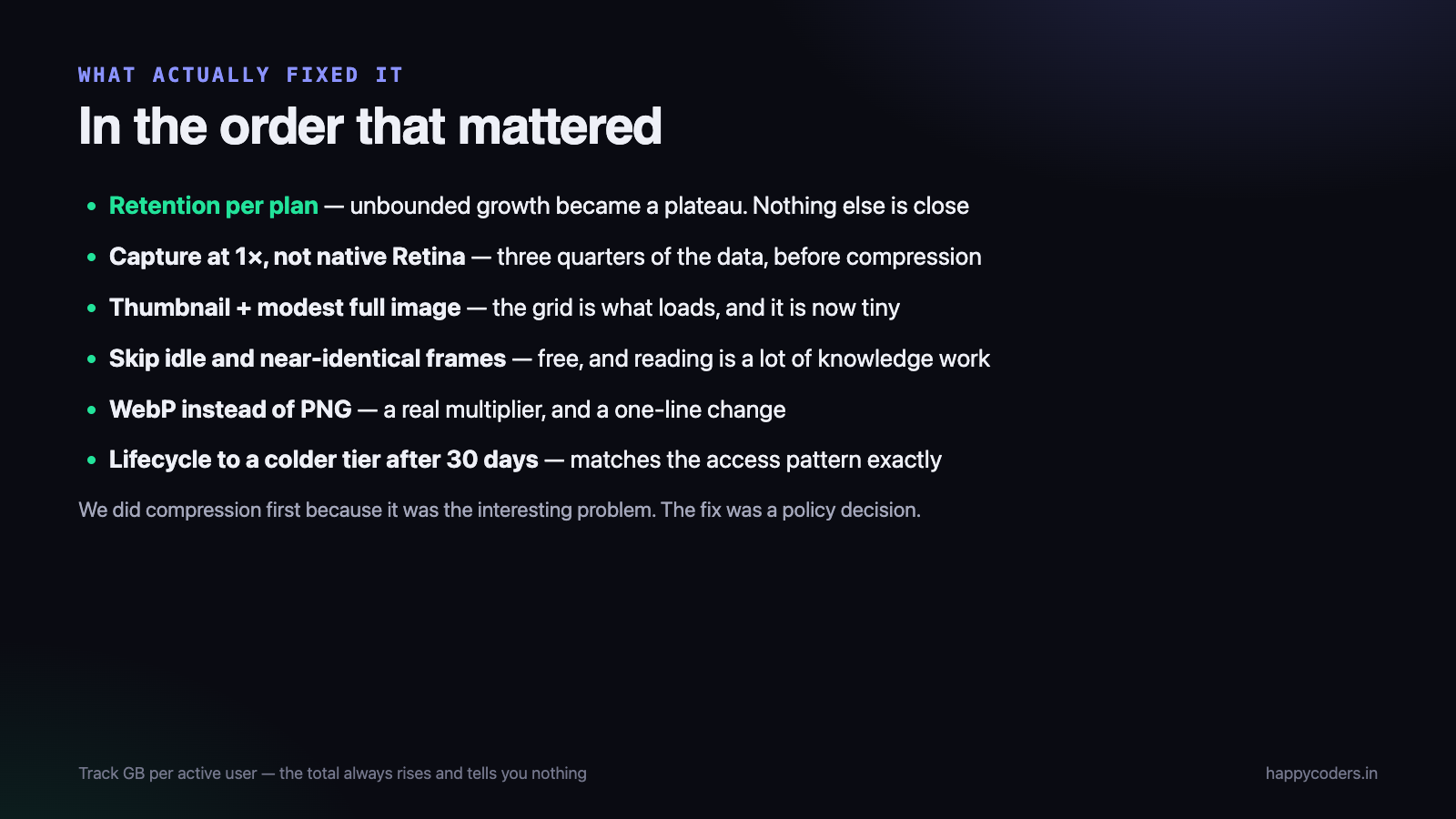
- Retention per plan. Changed unbounded growth into a plateau. Nothing else comes close.
- Capturing at logical rather than native resolution. About three quarters of the data, before compression.
- Thumbnail plus modest full image. The grid is what gets loaded, and it is now tiny.
- Skipping idle and near-identical captures. Free, and removes real volume.
- WebP instead of PNG. A worthwhile multiplier, and the easiest change of the five.
- Lifecycle rules to a colder tier. Matches the access pattern exactly.
The order is the point. We spent time on compression first because it was the interesting problem, and the change that actually fixed the economics was a policy decision about how long to keep things.
Related: screenshot monitoring that survives a conversation with HR, which is the other half of this feature — the half that decides whether customers switch it on at all.




