
In-App Notifications For A Small Team, Without A Queue Worker
In-App Notifications For A Small Team, Without A Queue Worker
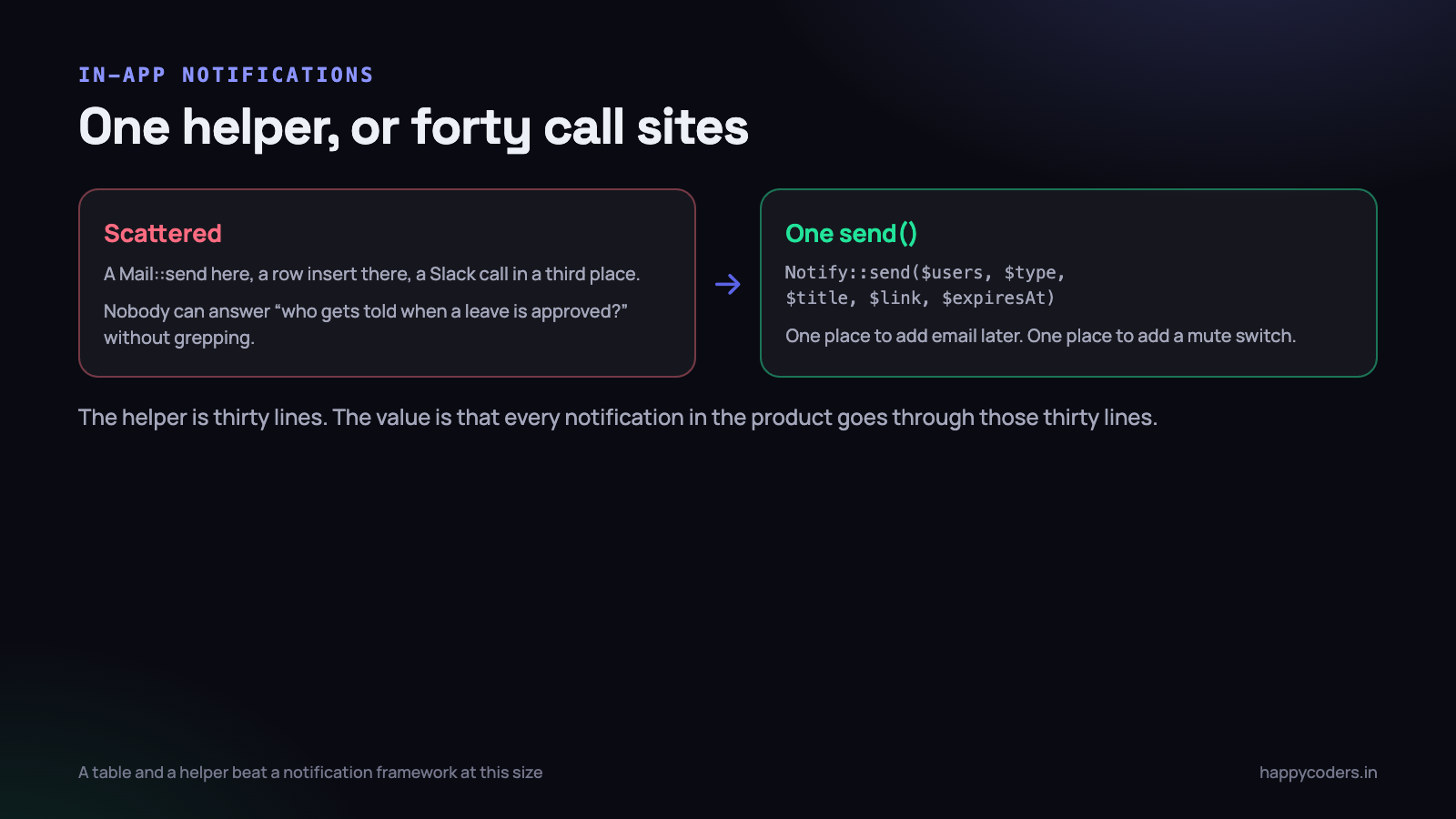
Notifications are one of those features that look like a weekend and turn into a subsystem. A leave request needs approving. A task is assigned. A timesheet is rejected. An invoice is marked paid. Each one is a small piece of work and there are forty of them, and if each one is written where the event happens you end up with a notification system that nobody can describe.
Happy Tracker serves organisations of five to fifty people on shared hosting. It has no Redis, no websocket server, and a queue worker that we deliberately do not depend on for anything a user is waiting for. This is the whole design, and the interesting part is how much you can leave out.
One table
The schema is dull and that is the point. It is a log of things that happened, addressed to a person.
Schema::create('notifications', function (Blueprint $table) {
    $table->id();
    $table->foreignId('organization_id')->constrained();
    $table->foreignId('user_id')->constrained();
    $table->string('type', 60);              // leave.requested, task.assigned
    $table->string('title', 200);
    $table->string('body', 500)->nullable();
    $table->string('link', 255)->nullable(); // where clicking it goes
    $table->json('data')->nullable();        // ids, for rendering
    $table->timestamp('read_at')->nullable();
    $table->timestamp('expires_at')->nullable();
    $table->timestamps();

    $table->index(['user_id', 'read_at']);           // the badge count
    $table->index(['user_id', 'created_at']);        // the list
    $table->index('expires_at');                     // the nightly prune
});
Three indexes for three queries, and there are only ever three queries: count my unread, list my recent, delete the expired. If a fourth query appears, be suspicious — notifications are not a reporting table and should not grow one.
Two columns are worth defending. title and body are rendered text, stored at the moment the notification is created, rather than a translation key plus arguments assembled at read time. That means a notification about a project renamed last week still says the old name, which is correct: it is a record of what happened, not a live view of the present. It also means a deleted project does not produce a notification that crashes when rendered, which the clever version does.
And type is a dotted string, not an integer enum. It is read in logs, filtered in queries and switched on in the SPA to choose an icon. A string costs a few bytes and saves every future developer a lookup table.
One helper, not forty call sites
The single most valuable decision in this feature is that nothing anywhere in the application inserts a notification row directly. Everything goes through one method.
class Notify
{
    public static function send(
        Collection|array $users,
        string $type,
        string $title,
        ?string $link = null,
        array $data = [],
        ?int $expiresInDays = 30,
    ): void {
        $users = collect($users)->filter()->unique('id');

        if ($users->isEmpty()) {
            return;
        }

        $rows = $users->map(fn ($user) => [
            'organization_id' => $user->organization_id,
            'user_id'         => $user->id,
            'type'            => $type,
            'title'           => $title,
            'link'            => $link,
            'data'            => json_encode($data),
            'expires_at'      => $expiresInDays ? now()->addDays($expiresInDays) : null,
            'created_at'      => now(),
            'updated_at'      => now(),
        ])->all();

        app()->terminating(fn () => Notification::insert($rows));
    }
}
A single insert with many rows rather than a model create per user. Twelve admins is one query, and the model events you would be firing are events nobody has subscribed to.
The value of the helper is not the code, which is trivial. It is that six months from now somebody can answer “who gets told when a leave request is approved?” by reading one file, and “should we also email these?” is one change in one place rather than a search through the whole codebase for mail calls.
When a feature is scattered across forty call sites, the feature does not really exist — forty similar features do. The helper is worth writing on the day you have two.
Deciding who gets told
Recipient selection is where notification systems become annoying, and annoying notifications get switched off, after which the feature is worse than not having it.
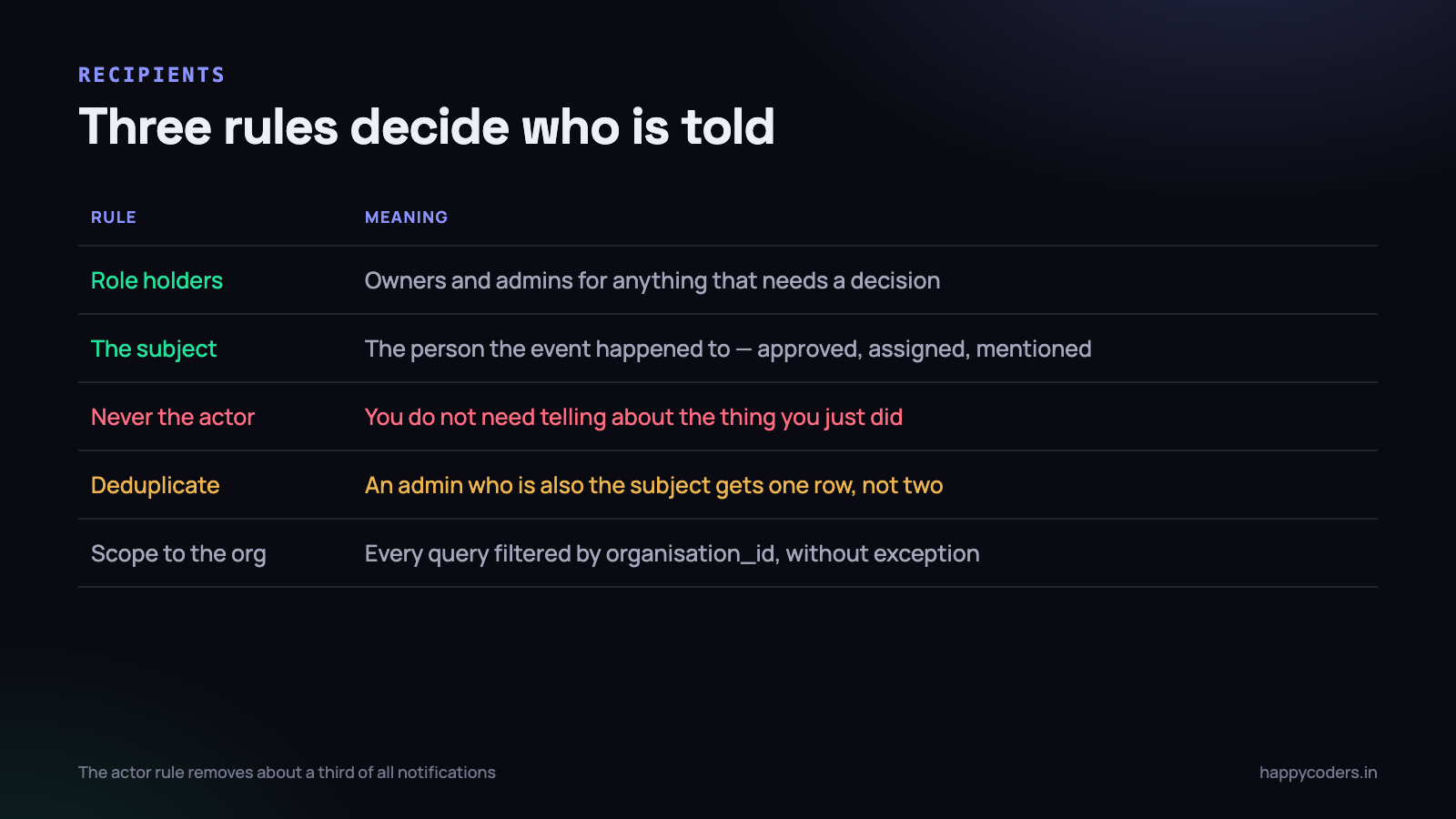
We use three rules and one piece of hygiene.
- Role holders, for anything that needs a decision. A leave request goes to owners and admins because somebody has to approve it. This is a notification that creates work, and work belongs to whoever can do it.
- The subject, for anything that happened to them. Your leave was approved. A task was assigned to you. Your timesheet was rejected. This is a notification that carries information, and it belongs to the person affected.
- Never the actor. The person who performed the action does not need telling that they performed it. This one rule removes roughly a third of all notifications a naive implementation would send, and it is the difference between a bell people check and a bell people ignore.
- Deduplicate. An admin who requests their own leave is both a role holder and the actor. Without the
uniquein the helper they would get a row telling them about their own request.
public function approve(LeaveRequest $leave)
{
    $leave->update(['status' => 'approved', 'approved_by' => auth()->id()]);

    Notify::send(
        users: [$leave->user],                       // the subject
        type:  'leave.approved',
        title: "Your leave from {$leave->from->format('d M')} was approved",
        link:  "/leave/{$leave->id}",
        data:  ['leave_id' => $leave->id],
    );
}
Named arguments are worth it here. A call site with six positional parameters is unreadable at the moment somebody is trying to work out whether the wrong person is being notified.
One more rule that is not about recipients but belongs next to them: scope every read query by organisation as well as by user. A user belongs to one organisation, so it is redundant — until the day somebody is moved between organisations and their old notifications follow them across the boundary.
Off the critical path, without a worker
Writing a notification should never slow down the request that caused it. Approving twelve leave requests in a batch should not be twelve extra inserts of latency in front of the user.
The textbook answer is to dispatch a job. That requires a queue worker running, supervised and monitored — and on the shared hosting a lot of our customers run on, a long-lived worker process is either unavailable or unreliable. We use queues for the things that genuinely need them, with all the care that involves, and we wrote about the failure modes in queue workers that do not fall over. A notification row is not one of those things.
The answer that fits is Laravel’s terminating callback. The response is sent to the browser, the connection is released, and the callback runs afterwards in the same process:
app()->terminating(function () use ($rows) {
    Notification::insert($rows);
});
The user gets their response without waiting for the insert. There is no worker to supervise, no job table, no retry logic, and no failure mode where notifications silently stop for two days because a process died at the weekend — which is the actual risk of a queue at this size.
The honest trade: if the PHP process is killed between sending the response and running the callback, that notification is lost with no retry. For a notification, that is acceptable. The leave request still exists, the approval still happened, the data is correct; a bell simply did not ring. Use this pattern for anything where the loss is a missing convenience, and never for anything where the loss is a missing fact.
The test for whether something belongs in a terminating callback rather than a queue is one question: if this silently never runs, has the system lost data, or has somebody just not been told? Only the second one is safe.
Read state and the badge
The unread badge is the entire user-facing surface of this feature, and it must be cheap, because it is requested by every open tab, every minute, forever.
public function unreadCount(Request $request)
{
    $user = $request->user();

    $count = Cache::remember("notif:unread:{$user->id}", 55, fn () =>
        Notification::where('user_id', $user->id)
            ->whereNull('read_at')
            ->where(fn ($q) => $q->whereNull('expires_at')
                                 ->orWhere('expires_at', '>', now()))
            ->count()
    );

    return response()->json(['unread' => $count]);
}
A covering index on (user_id, read_at) makes the count an index-only scan, and a fifty-five second cache against a sixty-second poll means the database sees roughly one query per user per minute regardless of how many tabs they have open. Fifty users is fifty queries a minute, which is nothing.
The cache is cleared on write — in the helper, and when anything is marked read — so a new notification appears on the next poll rather than up to a minute later. Expire on the event, not on the timer, is the same rule that applies everywhere else.
Marking as read has three actions and they are all needed:
- Read one. Opening a notification from the list. Sets
read_aton that row and follows the link. - Read all. One button, one
UPDATE ... WHERE read_at IS NULL. People who have been away for a week will use this and nothing else. - Opening the panel does not mark anything read. This is the one people get wrong. Glancing at a list is not reading it, and a panel that clears the badge on open means anything you did not act on immediately is gone.
Polling, and why it wins here
The delivery mechanism is a poll every sixty seconds. Not websockets, not server-sent events, not long polling.
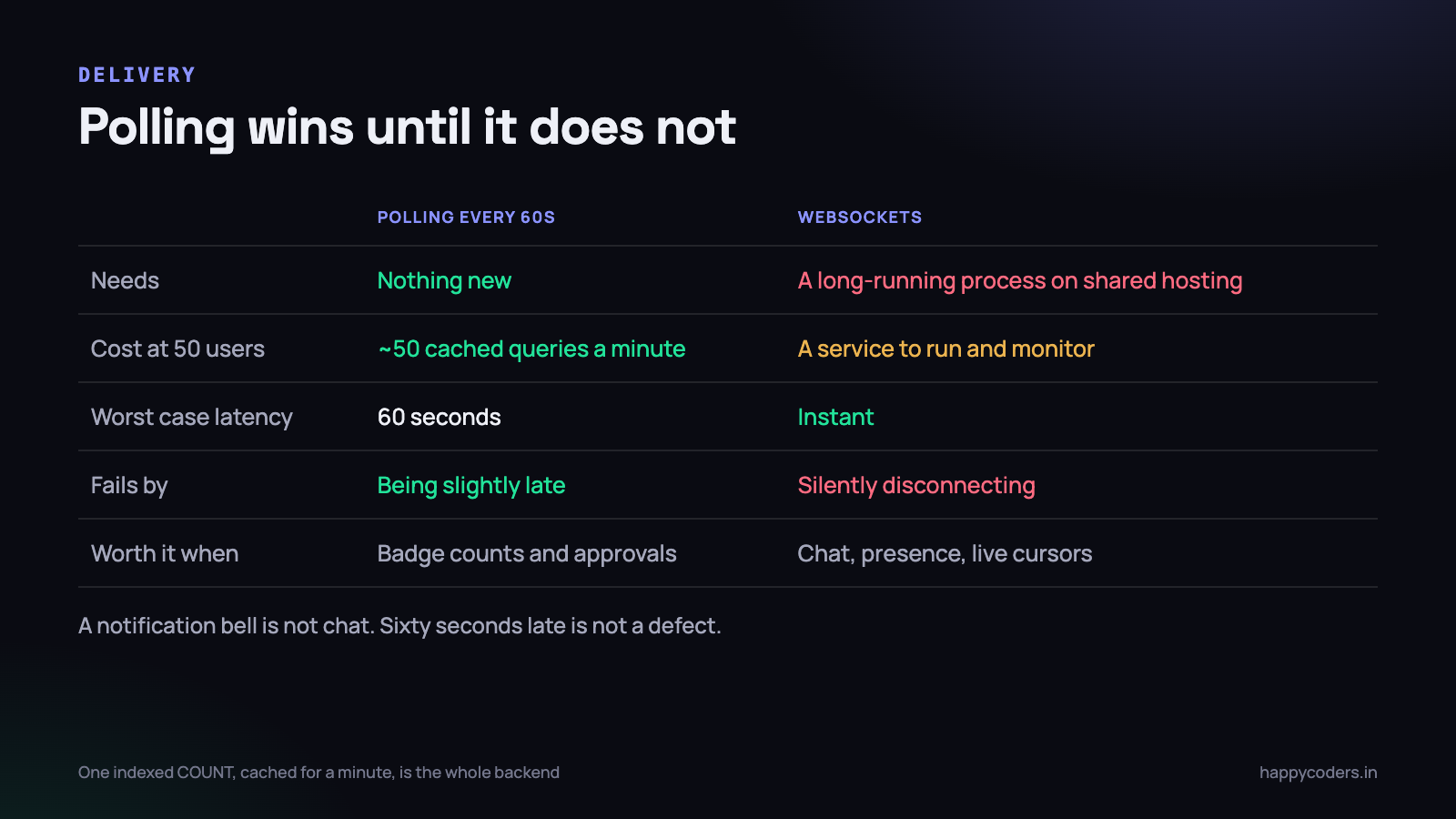
Websockets are better technology for this problem in the abstract. They are also a long-running process to deploy, supervise, monitor, secure and reconnect — on hosting where a long-running process is exactly what is hard to have. That is a permanent operational cost paid to reduce a delay that nobody has complained about.
The decisive question is what the notification is for. A chat message that arrives sixty seconds late is a broken chat application. A leave request that appears in an admin’s bell sixty seconds after it was submitted is indistinguishable from instant, because the admin was not sitting there waiting for it.
- Poll on a timer, and pause when the tab is hidden. The Page Visibility API turns off polling for the fourteen tabs nobody is looking at. This one line removes most of the traffic.
- Poll the count, not the list. The full list is fetched only when the panel is opened. A badge needs one integer.
- Back off on failure. If three polls in a row fail, slow to five minutes. A browser left open overnight against a server that is down should not be hammering it at 3am.
- Refresh immediately on focus. Coming back to the tab should feel current, and one extra request on focus is what makes the sixty-second interval invisible.
If the product ever grows a real-time feature — live presence, a shared board with cursors, chat — the calculation changes and websockets become worth the operations cost. Until then this is fifty lines of client code and no infrastructure.
When a notification should also leave the building
An in-app bell only works for people who open the app. Some events need to reach somebody who has not logged in for three days, and that means email — which is where the single helper earns its keep, because the decision is made in one place.
The rule we settled on is that email is the exception and it has to be argued for. An event gets an email only if it blocks somebody else’s work or has a deadline. A leave request waiting on an approver blocks a person planning their week, so it emails. A task assignment does not, because the assignee will see it the next time they open the board, which is several times a day.
The mechanism is a small allowlist inside the helper rather than a per-user preference matrix. Preference matrices are a lot of interface for a decision most people never make, and the ones who do make it usually just want less email in general.
private const ALSO_EMAIL = [
    'leave.requested'    => true,     // blocks an approver
    'timesheet.rejected' => true,     // has a deadline
    'invoice.overdue'    => true,
];

// inside send(), after the insert is queued
foreach ($users as $user) {
    if ((self::ALSO_EMAIL[$type] ?? false) && $user->email_notifications) {
        Mail::to($user)->queue(new GenericNotification($type, $title, $link));
    }
}
Note that email goes on the queue and the in-app row does not. That is deliberate and it is the right way round: an email involves a third-party server that can be slow or briefly down, so it needs retries. An insert into your own database needs none of that machinery, and giving it some would mean the bell stops working whenever the worker does.
Noise, grouping and the mute nobody asked for
The failure mode of a notification system is not that it breaks. It is that it works perfectly and produces so much that people stop looking, at which point the important one is missed and you get blamed for a feature that did exactly what it was told.
Two things keep the volume honest. The first is the actor rule already described. The second is collapsing bursts: if the same type fires for the same recipient about the same subject within a few minutes, update the existing unread row instead of adding another. Somebody who reorders eight tasks on a board should produce one notification, not eight.
- Collapse on type plus subject, within a window. Five minutes is long enough to catch a burst and short enough that two separate decisions stay separate.
- Only collapse unread rows. Merging into something the person has already read means the update is invisible, which is worse than a duplicate.
- Count in the title. “3 tasks assigned to you” is one row and more useful than three identical ones.
What we deliberately do not have is a per-notification-type mute screen. It is a page of switches that a handful of people will tune once, and it exists mostly to compensate for a system that sends too much. Fix the volume at the source and the mute screen stops being needed — and if it ever becomes genuinely necessary, that is a signal about the recipient rules rather than a missing feature.
Expiry, or the largest table in the database
A notifications table has no natural end. Every event in the product writes rows, one per recipient, forever. Twenty-five people generating forty notifications a day each is a million rows in three years, all of them about things that stopped mattering the week they happened.
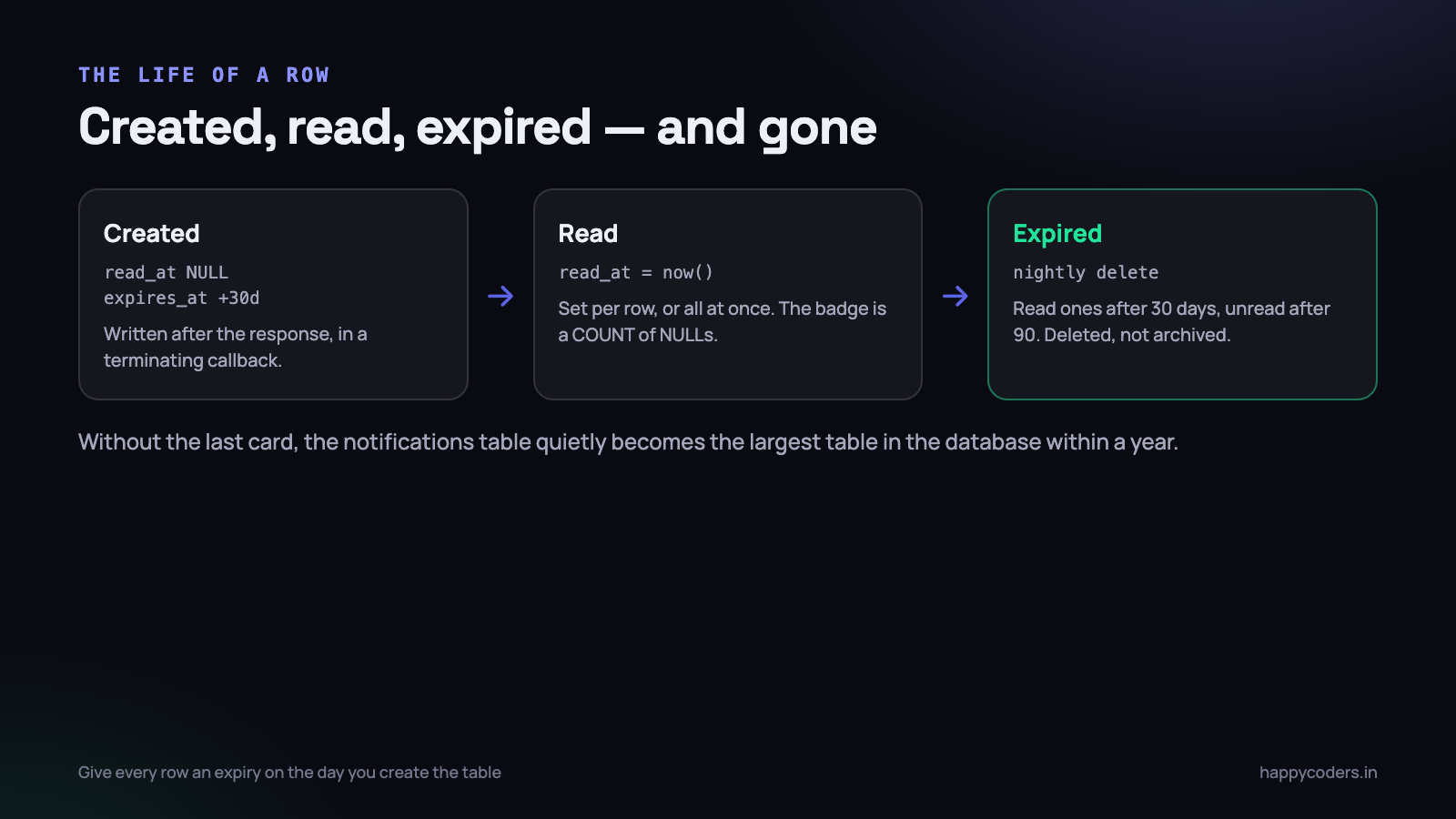
So every row gets an expires_at at creation, and a nightly command deletes in batches:
public function handle(): int
{
    $deleted = 0;

    do {
        $batch = Notification::where(function ($q) {
                $q->where('expires_at', '<', now())
                  ->orWhere(fn ($q) => $q->whereNotNull('read_at')
                                         ->where('read_at', '<', now()->subDays(30)));
            })
            ->limit(2000)
            ->delete();

        $deleted += $batch;
        usleep(100000);                       // be kind to the database
    } while ($batch > 0);

    $this->info("{$deleted} notifications pruned");

    return self::SUCCESS;
}
Two windows, deliberately different. A read notification is gone thirty days after it was read — it did its job. An unread one survives ninety days, because somebody who has been on leave should still find out that their leave was approved.
And they are deleted, not soft-deleted. A notification is not a record of anything: the leave request, the approval, the audit entry and the timestamps all still exist. Keeping a tombstone of a bell that rang is hoarding, and it is the reason soft deletes end up being the thing that makes a table slow.
On Monday morning
- Count your notification insert sites. Grep for the model or the mail facade. If it appears in more than one place, write the helper this week — it gets harder with every new event.
- Check whether you notify the actor. Trigger an action as an admin and see whether you receive a notification about your own click. If you do, that is a third of your volume gone for one line.
- Time your badge endpoint with a thousand rows per user. If it is not an index-only count, add the composite index before the table gets interesting.
- Look for expires_at. If your notifications table does not have it, add it now with a sensible backfill. Adding an expiry policy to a table with two million rows is a much worse afternoon.
- Ask one person on your team what the bell is for. If they say “I ignore it”, the recipient rules are wrong, and no amount of delivery engineering will fix that.
The whole feature is one table, one helper, a terminating callback, a cached count and a nightly delete. It took less time to build than the discussion about whether it needed websockets, which is usually the sign that the discussion was the wrong one.




