
Local Disk, S3 or a CDN: Where User Files Should Actually Live
Local Disk, S3 or a CDN: Where User Files Should Actually Live
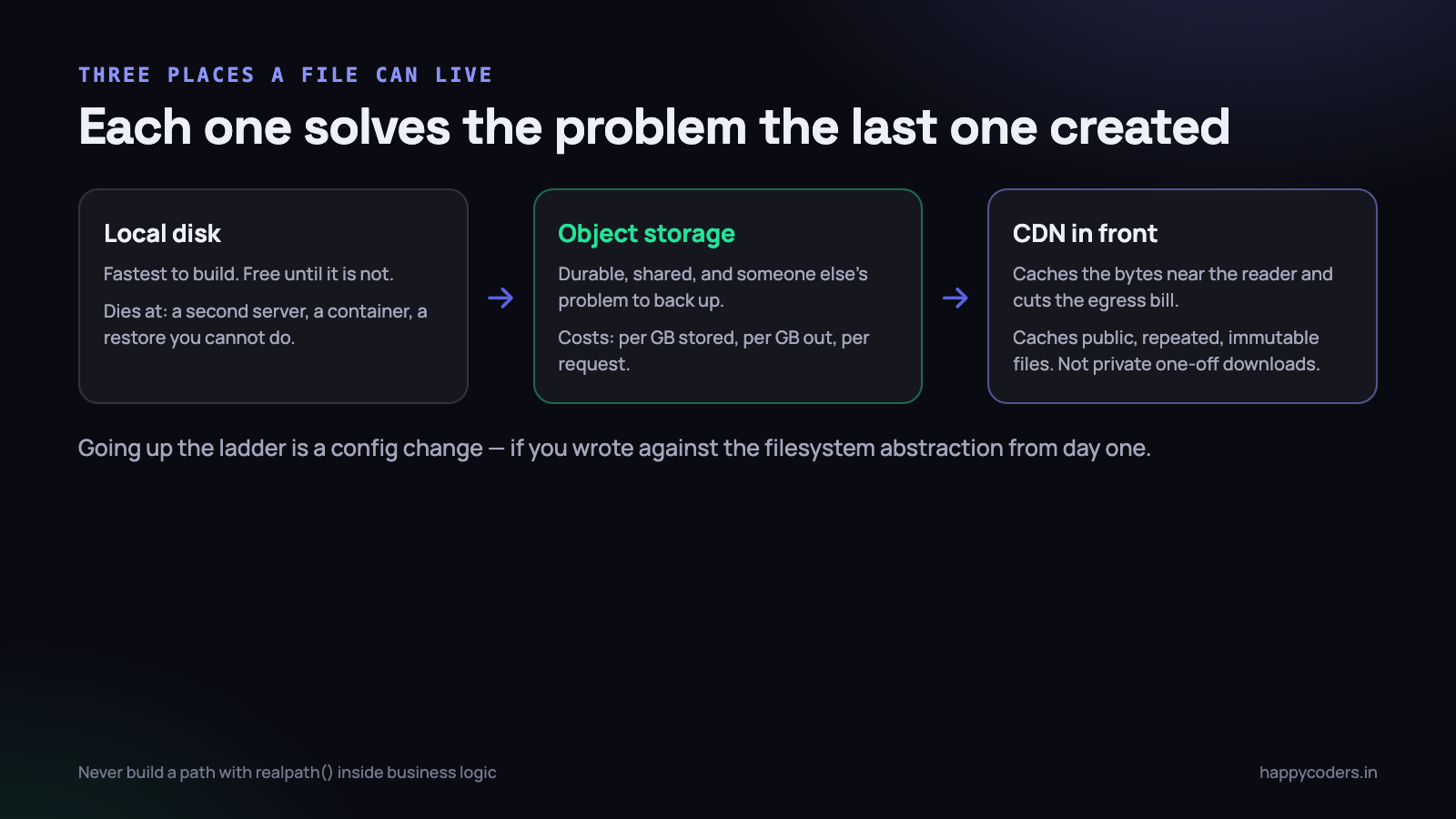
Every application that accepts a file starts the same way: move_uploaded_file() into storage/app/uploads, save the path in a column, serve it back with a route. It works, it is fast, and it costs nothing. There is nothing wrong with it on the day you write it.
What is worth knowing in advance is exactly which day it stops working, and what the next step is, because the difference between a two-hour migration and a two-week one is a decision you make before you have any files at all.
Local disk, and the four days it dies
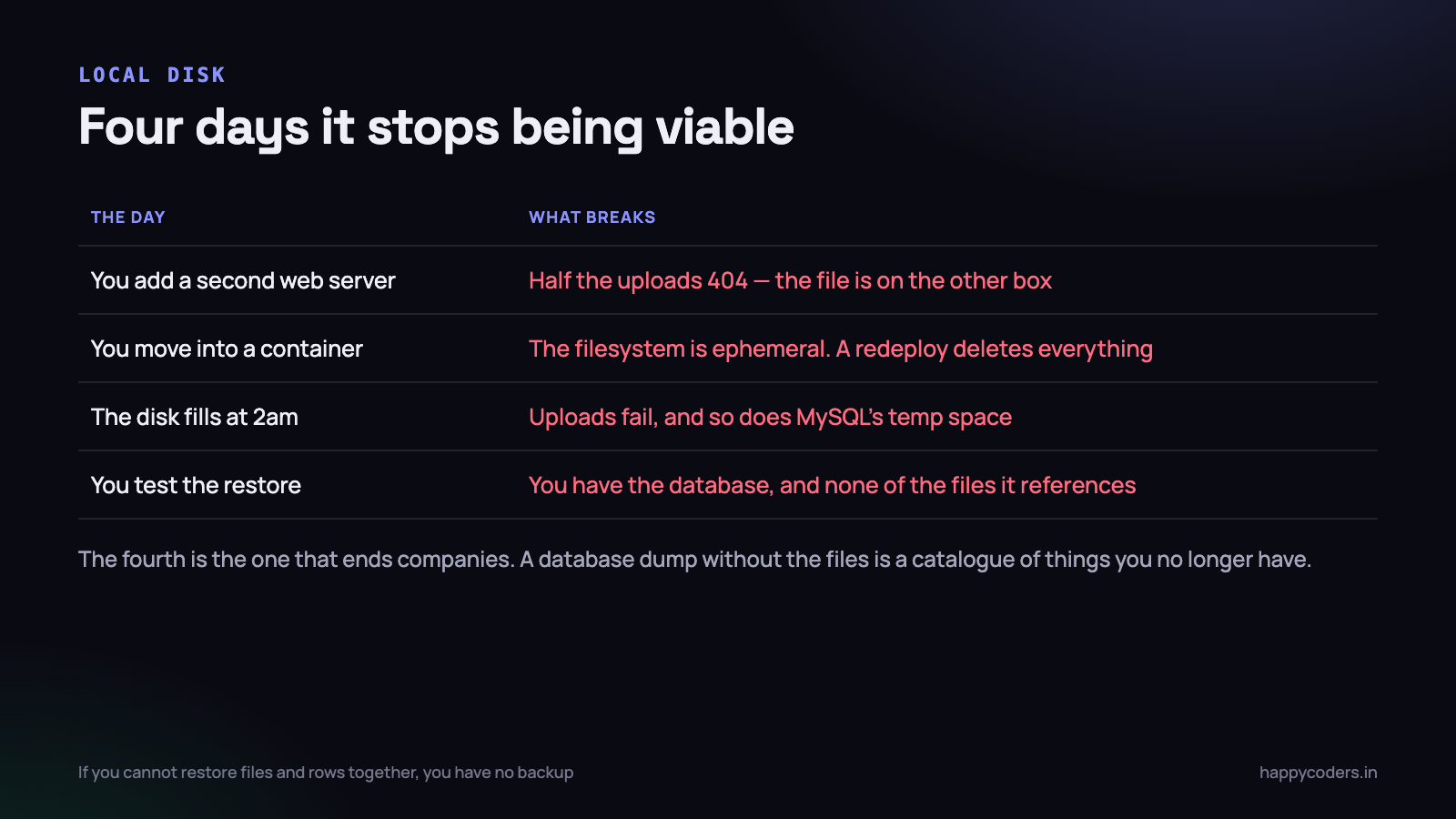
Local storage is genuinely the right answer for a single-server application with modest file volumes and a backup you have tested. It is not a beginner’s choice you grow out of on principle. It is a choice with four specific expiry conditions.
The second server
You add a second web server behind a load balancer. A user uploads a logo, the request lands on box A, the file is written to box A. Ten seconds later they reload the page, the request lands on box B, and the image 404s. Half the time. This is the classic one, and it is maddening to debug because it is intermittent by design.
NFS and rsync both exist as answers and both are worse than they look. Shared NFS gives you a single point of failure with unpleasant locking behaviour; rsync gives you a window during which the file exists on one box and not the other, which is exactly the bug you were trying to fix.
The container
You containerise. The filesystem inside a container is ephemeral by definition — every redeploy starts from the image and everything written since the last one is gone. People discover this by deploying on a Friday and getting support tickets on Monday about missing attachments. A volume mount defers the problem; it does not remove it, because now the volume is a thing you have to back up, size and move.
The full disk at 2am
A 40 GB disk with 38 GB of screenshots on it does not just stop accepting uploads. MySQL loses its temporary file space, the application log cannot be written, the session files fail, and the site goes down in a way that takes twenty minutes to attribute to a disk. Object storage has no disk to fill.
The restore you cannot do
This is the one that ends companies, and it is the reason to take the decision seriously rather than treat it as an optimisation. You have nightly database dumps. You have never tested restoring the files, because the files were “just on the server”. The server is gone. You now have a perfectly intact database full of paths to documents that no longer exist — a catalogue of things you do not have.
If your backup restores rows but not files, you do not have a backup. Test it by restoring both into a scratch environment and opening five files at random. It takes an hour and most teams have never done it.
Write against the abstraction, not the disk
The single decision that decides whether migrating later takes two hours or two weeks: never let a filesystem path leak into your business logic.
<?php
// couples you permanently to local disk
$path = public_path('uploads/' . $file->getClientOriginalName());
$file->move(public_path('uploads'), $file->getClientOriginalName());
$url  = asset('uploads/' . $file->getClientOriginalName());
Three things are wrong here beyond the coupling: the user’s filename is trusted, the file is inside the web root where it can be requested directly, and the URL is constructed by string concatenation in a view somewhere. Compare:
<?php
// disk('documents') is a config entry, not a place
$path = Storage::disk('documents')->putFile(
    "org/{$orgId}/invoices", $request->file('invoice')
);

// later, wherever the file is needed
$url      = Storage::disk('documents')->temporaryUrl($path, now()->addMinutes(5));
$contents = Storage::disk('documents')->get($path);
$exists   = Storage::disk('documents')->exists($path);
Nothing in that code knows where the bytes are. putFile generates a random name, so the user’s filename never becomes a path. Swapping local for object storage becomes an edit in config/filesystems.php and a line in .env:
'documents' => [
    'driver'   => 's3',
    'key'      => env('AWS_ACCESS_KEY_ID'),
    'secret'   => env('AWS_SECRET_ACCESS_KEY'),
    'region'   => env('AWS_DEFAULT_REGION'),
    'bucket'   => env('AWS_BUCKET'),
    'endpoint' => env('AWS_ENDPOINT'),   // set this for non-AWS providers
    'visibility' => 'private',
    'throw'    => true,
],
The endpoint line is what makes this provider-independent. The S3 API is a de facto standard, and DigitalOcean Spaces, Backblaze B2, Cloudflare R2, Wasabi and MinIO all speak it. The same Laravel driver and the same AWS SDK work against all of them, which means you are choosing a price and a region rather than an ecosystem.
Set ’throw’ => true. Without it the filesystem methods return false on failure and your code carries on as though the upload worked.
Pre-signed URLs: keep the bytes out of PHP
This is the part people skip, and it is where the real performance difference is.
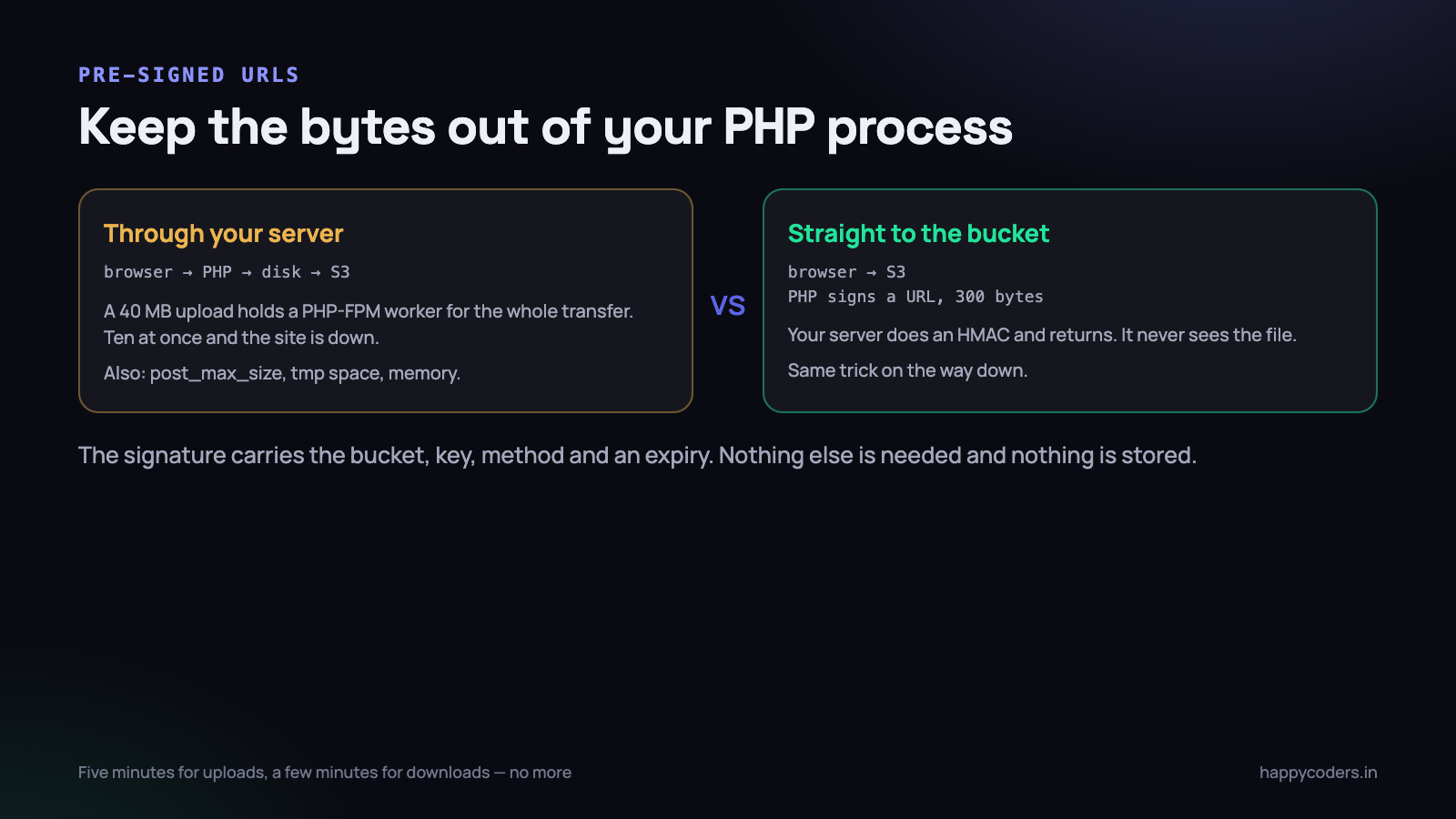
If an upload goes through your application, a 40 MB file occupies a PHP-FPM worker for the entire transfer — which on a customer’s 3 Mbps office connection is nearly two minutes. Ten concurrent uploads on a server with ten workers and your site is down for everybody else. You are also fighting upload_max_filesize, post_max_size, max_execution_time and temporary disk space, none of which have anything to do with your application.
A pre-signed URL removes the problem entirely. Your server computes an HMAC over the bucket, key, method and expiry, and returns a few hundred bytes. The browser then PUTs the file straight to the bucket.
<?php
// server: issue a short-lived upload URL
public function signUpload(Request $r)
{
    $r->validate([
        'mime' => 'required|in:image/png,image/jpeg,application/pdf',
        'size' => 'required|integer|max:10485760',
    ]);

    $key = "org/{$r->user()->organization_id}/uploads/" . Str::uuid();

    $client  = Storage::disk('documents')->getClient();
    $command = $client->getCommand('PutObject', [
        'Bucket'      => config('filesystems.disks.documents.bucket'),
        'Key'         => $key,
        'ContentType' => $r->mime,
    ]);

    return [
        'url' => (string) $client->createPresignedRequest($command, '+5 minutes')
                                 ->getUri(),
        'key' => $key,
    ];
}
Three rules that keep this safe. Validate before you sign — the signature is an authorisation, so the size limit, the content type and the tenant check all happen here, not after the upload. Keep the expiry short — five minutes is plenty, and a leaked URL expires before it is useful. Never let the client choose the key — generate it server-side with the tenant id baked in, or you have handed somebody the ability to write anywhere in the bucket.
The one thing you lose is the moment of certainty that the file arrived. The browser confirms the upload with a second call to your API, and you record the row then. Because a browser can be closed mid-upload, you also want a nightly job that deletes objects with no matching database row after 24 hours.
Downloads work the same way. Instead of streaming a file through PHP, check the user’s permission, then redirect to a temporaryUrl(). Your process does an authorisation check and a 302, and never touches the bytes.
How to name the keys
Object storage has no directories. The slashes in a key are characters, and the console draws folders to be helpful. That means you are free to design the key, and the design you pick decides how easy three later jobs are: deleting one customer’s data, applying a lifecycle rule to one category, and working out who is using the space.
org/{organization_id}/{category}/{yyyy}/{mm}/{uuid}.{ext}

org/12/screenshots/2026/09/0f3a9c41-....jpg
org/12/invoices/2026/09/8be21d77-....pdf
The tenant id first, because a deletion request for one organisation then becomes a prefix delete rather than a query. The category second, because lifecycle rules match on prefix and you will want to expire screenshots at ninety days and keep invoices for seven years. The date next, so that no single prefix accumulates millions of objects. And a UUID last, never the user’s filename — filenames collide, contain characters that need escaping, and occasionally contain a path traversal attempt.
Store the original filename in the database instead, alongside the size, the content type you verified, and a checksum. Serve it back in a Content-Disposition header on the signed URL so the user still downloads Invoice-0042.pdf, even though the object is called 8be21d77.
Two more fields worth having in that row from day one: the id of the user who uploaded it, and the time. When somebody asks in eighteen months why a customer’s bucket usage doubled, those two columns answer it in one query and their absence turns it into an afternoon.
Private and public buckets
Default to private for anything a user uploaded. A public bucket means a URL is the only credential, and URLs end up in shared spreadsheets, browser history, referrer headers and support tickets. The cost of private is one signed URL per view, which is cheap.
Public buckets are right for exactly one category: assets that are the same for everybody and are not secret. Your logo, your CSS, marketing images, the installer for your desktop application. These benefit from being cacheable by a CDN for a year, and there is nothing to protect.
A pre-signed URL is a bearer token with an expiry. Anybody who has the string can fetch the object until it expires, whether or not they are logged in. Short expiries, and do not put them in an email.
A CDN, and what it does not cache
A CDN keeps copies of your objects at points of presence close to readers. Two things follow: the file arrives faster for a user in Chennai or Frankfurt, and — the part that actually pays the bill — your origin serves each object once instead of once per request.
What it caches well:
- Public, repeated, immutable objects. Logos, avatars, product images, JS and CSS bundles with a hash in the filename.
- Anything you can give a long
Cache-Control: max-age. A year is normal for hashed filenames, because the name changes when the content does.
What it does not help with, and where people are disappointed:
- Pre-signed URLs. The signature and expiry are in the query string, so every request is a different URL and every one is a cache miss. Some CDNs can be configured to ignore specific query parameters for cache-key purposes — do that carefully, because ignoring the signature means serving the object to anybody who asks.
- One-off private downloads. A PDF invoice fetched once by one person is never served from cache. There was no second request to benefit.
- Anything that changes at the same URL. You will serve stale content, and you will spend an afternoon purging. Change the filename instead.
The pattern that works: mixed content, split by nature. Public assets behind a CDN with a one-year cache and hashed names. Private user files served through short-lived signed URLs straight from the bucket. Do not try to force the second category through the first.
What it costs, in rupees
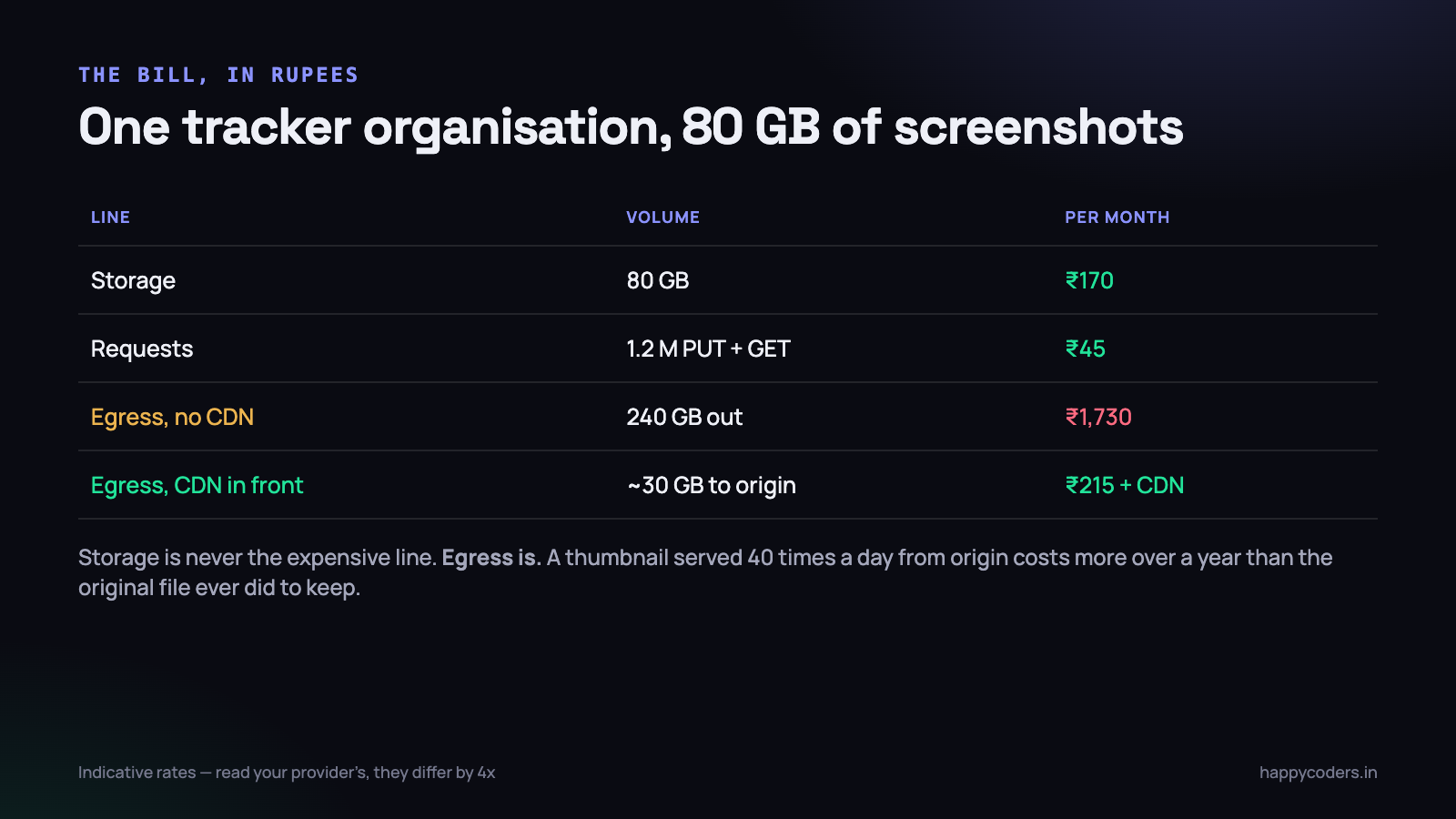
Take a real shape from our own product. One organisation of forty people, tracked with screenshots every ten minutes, produces roughly 80 GB of images after compression and a six-month retention window. The team reviews activity most days, so the same thumbnails are fetched repeatedly.
- Storage: 80 GB at typical rates is about ₹170 a month. Nothing.
- Requests: a million or so PUTs and GETs is about ₹45. Also nothing.
- Egress: 240 GB of downloads at AWS India rates is roughly ₹1,730 a month — ten times the cost of the storage itself.
So the entire cost optimisation is the third line. Put a CDN in front and origin egress drops to perhaps 30 GB, because the repeatedly-viewed thumbnails are served from cache. Or choose a provider that does not charge for egress at all — Cloudflare R2 has zero egress fees and Backblaze B2 is free up to three times your stored volume, which for this workload is effectively free.
Two more things that quietly move the number. Lifecycle rules that move objects older than ninety days to an infrequent-access tier cut the storage line by half or more — but check the retrieval charge, because an archive tier that is cheap to hold and expensive to read is a bad trade for anything a customer might open. And cross-region transfer: if your bucket is in Singapore and your server is in Mumbai, every single read is billed egress. Put them in the same region and it is free.
We wrote separately about cutting the screenshot storage bill itself, which is the other half of this: retention and compression decide how much you store, and the choices above decide what each stored gigabyte costs.
Migrating from local to object storage with no downtime
This is a well-worn path and it does not need a maintenance window. The trick is a period where the application can read from both places.
- Add a
storage_diskcolumn to the table that holds file paths, defaulting to’local’. Every existing row is now explicitly labelled. - Make reads respect it. One accessor:
Storage::disk($this->storage_disk)->get($this->path). Deploy this alone and confirm nothing changed. - Switch writes to the new disk. New uploads go to object storage and are written with
storage_disk = ’s3’. From this moment the local set is finite and shrinking in relevance. - Copy the backlog in chunks with a resumable command: read a batch of rows still marked
local, stream each file up, verify the size matches, update the row. One row at a time, so an interruption costs you one file. - Verify. Count rows per disk. Fetch a random sample of fifty migrated files and compare checksums against the originals.
- Leave the local files alone for thirty days. Disk is cheap and a mistake found in week three is recoverable. Then delete, then drop the column when every row reads
s3.
<?php
// the backlog command — safe to run repeatedly
Document::where('storage_disk', 'local')
    ->orderBy('id')
    ->chunkById(200, function ($docs) {
        foreach ($docs as $doc) {
            $stream = Storage::disk('local')->readStream($doc->path);
            Storage::disk('documents')->writeStream($doc->path, $stream);

            if (Storage::disk('documents')->size($doc->path)
                === Storage::disk('local')->size($doc->path)) {
                $doc->update(['storage_disk' => 'documents']);
            }
        }
    });
Use readStream and writeStream, not get and put. The second pair loads the whole file into PHP memory, which is fine for a 200 KB screenshot and fatal for a 300 MB video. Streaming keeps memory flat regardless of file size.
What to do on Monday morning
- Grep for
public_path,storage_pathandmove_uploaded_filein your application code. Every hit is a place you are coupled to a disk. Replace withStorage::disk()even if you never migrate. - Check whether any user upload is inside the web root. If it is, it is publicly readable and always has been.
- Test a restore. Database and files together, into a scratch environment, and open five files. Book the hour.
- Add
’throw’ => trueto your disks so a failed write cannot pass silently. - Work out your egress number — gigabytes out per month, times your provider’s rate. If it is more than your storage line, a CDN or a zero-egress provider pays for itself immediately.
- Add the
storage_diskcolumn now, even if you are staying local this quarter. It is a one-line migration today and a week of work later.
The decision is not really local versus S3. It is whether your code knows where files live. If it does not, you can move them in an afternoon whenever the day arrives. If it does, you will be rewriting upload handling under pressure on the day you add the second server.




