
Blurring Screenshots Before They Ever Leave The Machine
Blurring Screenshots Before They Ever Leave The Machine
A screenshot is a photograph of somebody’s screen. That sentence is worth keeping in front of you for the whole of this article, because every engineering decision in a screenshot pipeline is really a decision about what a photograph of a colleague’s screen is allowed to contain, who can see it, and how long it survives.
Happy Tracker takes screenshots. It is the feature that makes people uncomfortable, and being uncomfortable about it is the correct reaction. What follows is how the pipeline is actually built — where the blur happens, why the plan gate and the organisation toggle are deliberately two different questions, what metadata we keep, what we refuse to keep even though it would be easy, and what deletion means when somebody asks for it.
The decision that shapes everything else
The first design question is not how to blur. It is where the decision about what gets captured is made. There are two answers, and they lead to completely different products.
The easy answer is to capture a full-quality frame, upload it, and let the server apply whatever policy the organisation has configured. The server is where the plan data lives, it is easy to change a policy without shipping a desktop release, and you always have the original if you need it later. Every argument for it is an engineering convenience argument.
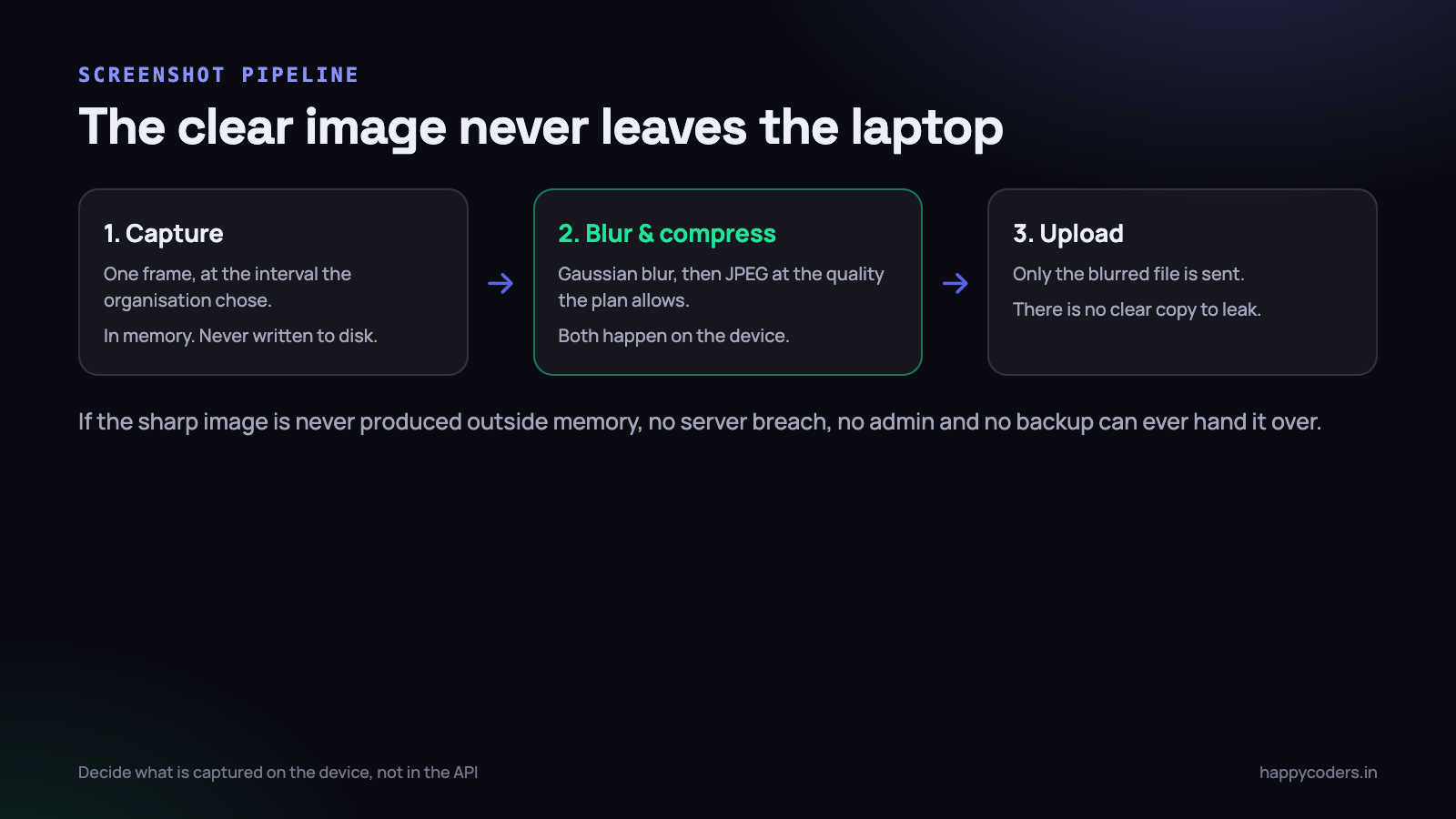
The answer we chose is that the device decides, and the clear image never leaves it. The tracker reads the current policy, applies the blur and the compression locally, and uploads only the processed file. There is no original on the server, because no original was ever produced outside a few milliseconds of memory on the employee’s own machine.
If the sharp image never exists outside the device, then no server breach, no curious administrator, no misconfigured bucket and no forgotten backup can ever produce it. That is a much stronger guarantee than a policy, because it does not depend on anyone behaving well.
The cost is real and worth stating plainly. A policy change only takes effect when the desktop app next fetches it, so there is a window — usually minutes, occasionally a day for a laptop that is closed — where an old setting is still in force. We accept that. The alternative is holding clear images of other people’s screens on a server, which is a permanent risk taken to avoid a temporary delay.
Blurring, and how much is enough
The blur is a Gaussian blur applied to the whole frame before compression. Not a region blur, not an attempt to detect and mask sensitive areas — a whole-frame blur at a radius the organisation chooses.
Selective blurring is a tempting idea and a bad one. To blur only the sensitive parts you must first decide what is sensitive, which means analysing the content of the screen, which means the very inspection you were trying to avoid. A whole-frame blur needs no understanding of what is on screen, which is exactly why it is defensible.
The useful property of a blurred screenshot is that it still answers the only question a screenshot is legitimately asked: was somebody working, and roughly on what kind of thing. You can see a code editor, a spreadsheet, a design tool, a video call, an empty desktop. You cannot read the email, the salary column, or the private message. That is the right amount of information.
On macOS the capture and blur is Core Image; on Linux the Electron app does it through a canvas filter; on Windows the WPF app uses a shader. Three implementations, one rule: the blurred bitmap is the only thing that is ever encoded to a file.
The radius is stored as a small integer rather than a pixel value, because a pixel radius that looks right on a 1080p laptop is nearly invisible on a 4K display. The device scales it against the captured resolution:
// radius is 0-10 from the server; scale it to the actual frame
let scale   = max(frameHeight / 1080.0, 1.0)
let radius  = Double(policy.blurLevel) * 4.0 * scale

let blurred = CIFilter.gaussianBlur(inputImage: frame, radius: radius)
let jpeg    = blurred.jpeg(quality: policy.imageQuality)   // 0.4 - 0.8

queue.enqueue(jpeg)     // the only bytes that ever touch disk
One detail that took an embarrassingly long time to get right: blur before compression, never after. Compressing a sharp image and then blurring the result gives a blurred picture of compression artefacts, which is somehow both larger and less readable.
Two gates that look like one
This is the part that is most often collapsed into a single boolean, and collapsing it is how a company wakes up to find that an upgrade quietly switched monitoring on.
There are two entirely separate questions:
- Is this feature sold on this organisation’s plan? That is a commercial fact. It lives on the plan row, it changes when billing changes, and nobody inside the customer’s organisation can alter it.
- Does this organisation want it switched on? That is a preference. It lives on the organisation’s settings, the owner changes it whenever they like, and its default is off.
A third, narrower question sits underneath both: does this individual member have an exception? Some organisations monitor contractors and not employees, and the per-member override exists for exactly that.
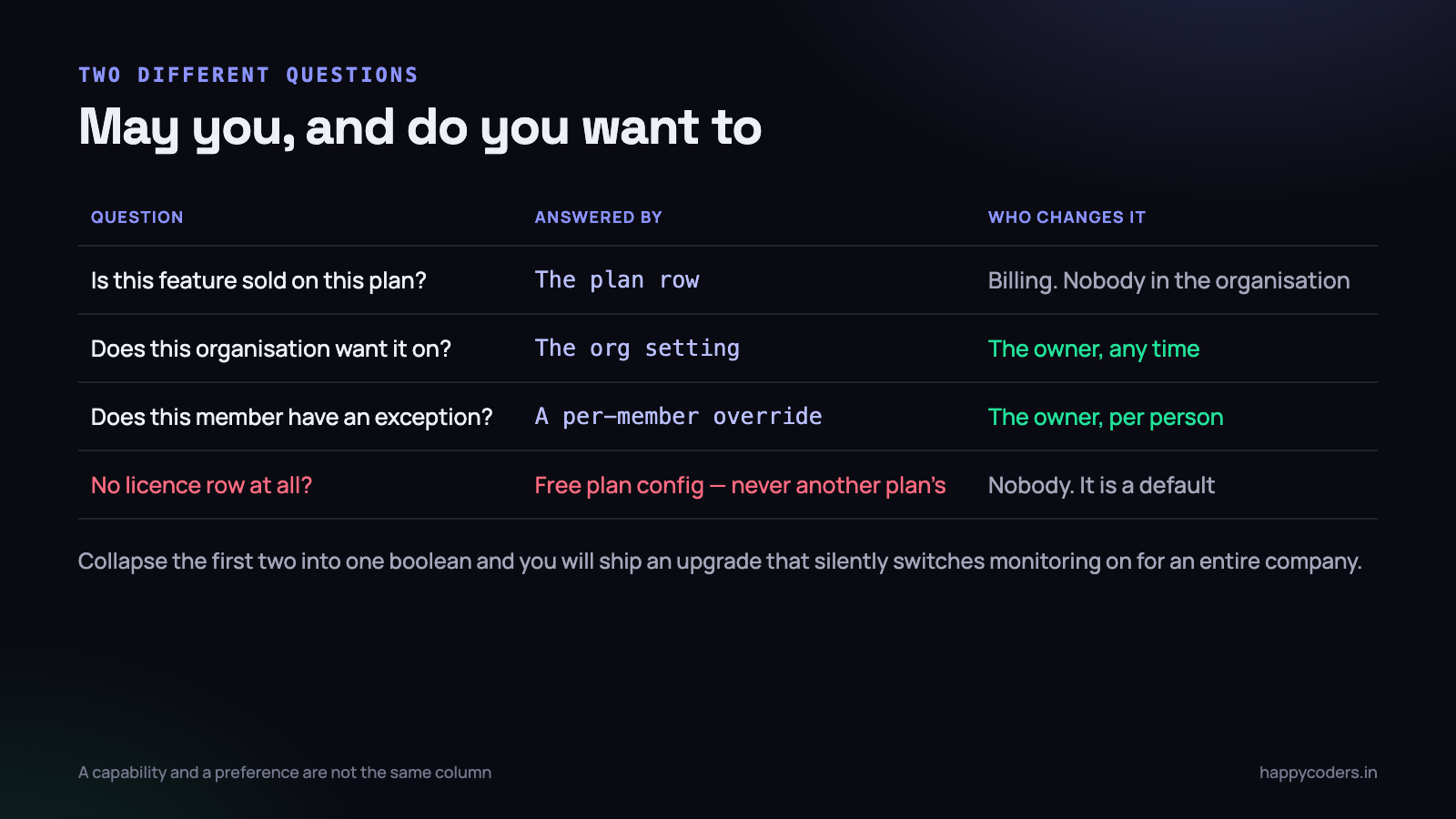
The resolver reads them in that order and the answer is an AND of the capability and the preference, never an OR:
public function screenshotPolicyFor(User $user): array
{
    $org  = $user->organization;
    $plan = $this->planFor($org);          // Free when there is no licence row

    if (! ($plan->config['screenshots'] ?? false)) {
        return ['enabled' => false, 'reason' => 'plan'];
    }

    if (! $org->settings->screenshots_enabled) {
        return ['enabled' => false, 'reason' => 'organisation'];
    }

    $member = $org->members()->where('user_id', $user->id)->first();
    if ($member && $member->screenshots_enabled === false) {
        return ['enabled' => false, 'reason' => 'member'];
    }

    return [
        'enabled'       => true,
        'interval'      => $org->settings->screenshot_interval,
        'blur_level'    => $org->settings->screenshot_blur,
        'image_quality' => $plan->config['image_quality'] ?? 'low',
    ];
}
Note what the tracker receives: a policy, not a permission. It is told the interval, the blur level and the quality, so it has everything it needs to produce the correct file without asking again. And note the reason field — the desktop app shows “screenshots are off for your organisation” rather than simply behaving differently for no visible cause.
The default when the organisation has never touched the setting is off. A monitoring feature that arrives switched on because somebody upgraded a plan is a feature that arrives as a betrayal, whatever the contract says.
Compression, and what storage actually costs
Screenshots are the only part of a time tracker whose storage cost grows without limit, so the arithmetic is worth doing before you choose a quality setting rather than after the first invoice.
Take one organisation of twenty-five people, screenshots every ten minutes, eight working hours a day, twenty-two working days a month. That is forty-eight per person per day, 26,400 a month. At 150 KB each — a blurred 1080p JPEG at quality 0.5 — that is roughly 4 GB a month, or 48 GB a year for one modest customer. At 600 KB, which is what an unblurred PNG happily produces, the same customer costs you 190 GB a year.
Blurring helps here in a way that is almost funny: a blurred image compresses far better than a sharp one, because JPEG spends most of its bits on high-frequency detail and blurring removes exactly that. The privacy decision and the cost decision point the same way, which does not happen often.
- Resize before encoding. A 1080p-wide capture is enough to see what kind of application is open. Nobody ever needed a 4K screenshot of a blurred screen.
- JPEG, not PNG. PNG is lossless, which is precisely the wrong property for a photograph of a screen you have deliberately made lossy.
- Tie quality to the plan. Higher plans get a higher quality setting. It is an honest thing to charge for, because it genuinely costs more.
- Store a thumbnail as well. The grid view loads dozens of images at once; serving full files into a 200 px box wastes bandwidth on every page load.
We also cap what a single device can upload in an hour. Not because anyone abuses it, but because a bug in an interval timer once produced a capture every second on one machine, and a rate limit is a cheaper way to find that out than a storage bill. We wrote about the general shape of that problem in image storage cost optimisation.
What the row is allowed to know
The image is only half the privacy question. The other half is the metadata stored alongside it, and metadata is where a monitoring product turns into a surveillance product without anyone deciding that it should.
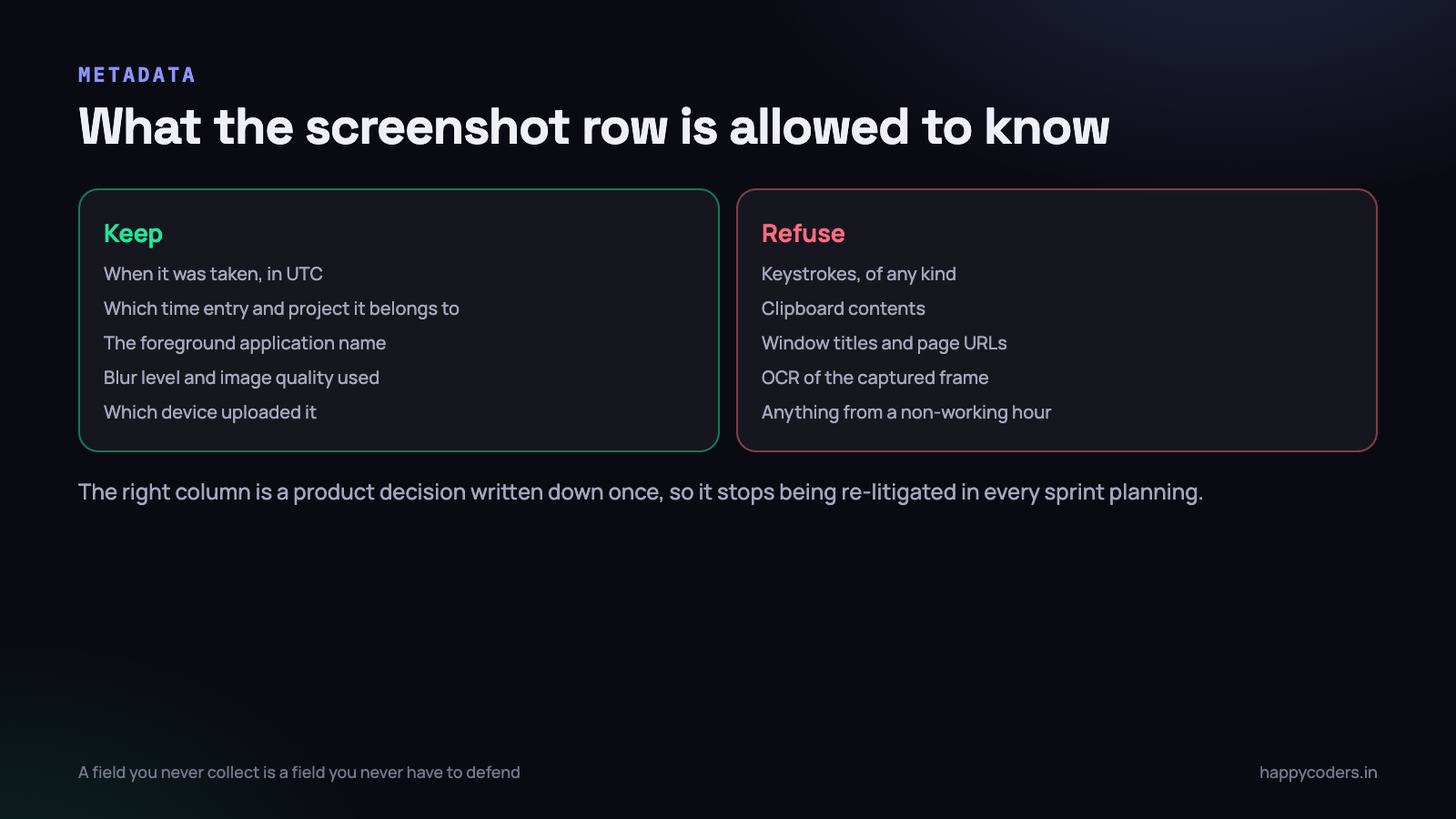
What we keep:
- When. A UTC timestamp, and the time entry it belongs to.
- Which project. Because a screenshot with no context is worse than useless — it answers no question and still costs privacy.
- The foreground application name. The name only: “PhpStorm”, “Chrome”, “Zoom”.
- How it was processed. The blur level and the image quality in force, so a screenshot can always be explained.
- Which device uploaded it. Useful for support, and for spotting a tracker misbehaving.
What we refuse to keep, in every case, regardless of who asks:
- Keystrokes. Any keylogging turns a time tracker into something else entirely. There is no configuration for this because there is no code for it.
- Clipboard contents. The clipboard is where passwords and one-time codes live.
- Window titles and page URLs. A title is a document name, a customer name, a medical search. The application name answers the legitimate question; the title answers a different one.
- OCR of the captured frame. Running text recognition over a blurred screenshot would defeat the entire pipeline, and it is exactly the kind of feature that gets requested as an enhancement.
The strongest privacy control in any system is a field you never collect. Everything else — encryption, access control, retention — is a promise about data you are holding. A column that does not exist needs no promise.
Window titles deserve a note, because they are the most frequently requested of those four and the request is always reasonable-sounding. “We only want to know which document they were in.” The trouble is that you cannot collect titles for documents without collecting them for the browser tab that says “symptoms of…”, and there is no filter that reliably separates the two. So the answer is no, and the reason is written in the code review guidelines rather than in one person’s memory.
The delete request an employee can start
Every screenshot system needs an answer to “that one caught something private, please remove it”. If the only answer is an email to an administrator, the honest description of your product is that employees have no control over their own images.
The flow we built has four steps and no negotiation:
- The member sees their own screenshots. This is the part people skip, and it is the foundation. Anyone being photographed can see every photograph of themselves, in a grid, by day.
- They request deletion on any one of them, with an optional one-line reason. The image is hidden from every other viewer immediately, at the moment of the request, not at the moment of approval.
- The owner or admin sees a queue of pending requests with the timestamp and the reason — but not the image, because it is already hidden.
- Approval deletes the file and the row. Rejection restores visibility and notifies the member, which in practice almost never happens, because nobody makes these requests frivolously.
The immediate hiding is the detail that makes it real. A request that leaves the image visible until somebody gets around to approving it is a request form, not a control.
Schema::create('screenshot_delete_requests', function (Blueprint $table) {
    $table->id();
    $table->foreignId('organization_id')->constrained();
    $table->foreignId('screenshot_id')->constrained()->cascadeOnDelete();
    $table->foreignId('requested_by')->constrained('users');
    $table->string('reason', 255)->nullable();
    $table->string('status', 20)->default('pending');   // pending|approved|rejected
    $table->foreignId('reviewed_by')->nullable()->constrained('users');
    $table->timestamp('reviewed_at')->nullable();
    $table->timestamps();

    $table->unique('screenshot_id');     // one open request per image
});
The unique constraint on screenshot_id is small and saves a genuinely awkward bug: without it, a double-click on the request button produces two rows, one approved and one pending, and the queue keeps showing a request for an image that no longer exists.
Approval deletes the file first and the row second. The reverse order leaves an orphaned file that no interface can reach and no cleanup job knows about — a file that is, in the only sense that matters, undeleted.
Retention that actually deletes
Retention is the promise most easily broken by accident, because hiding an image looks identical to deleting one from every screen in the product.
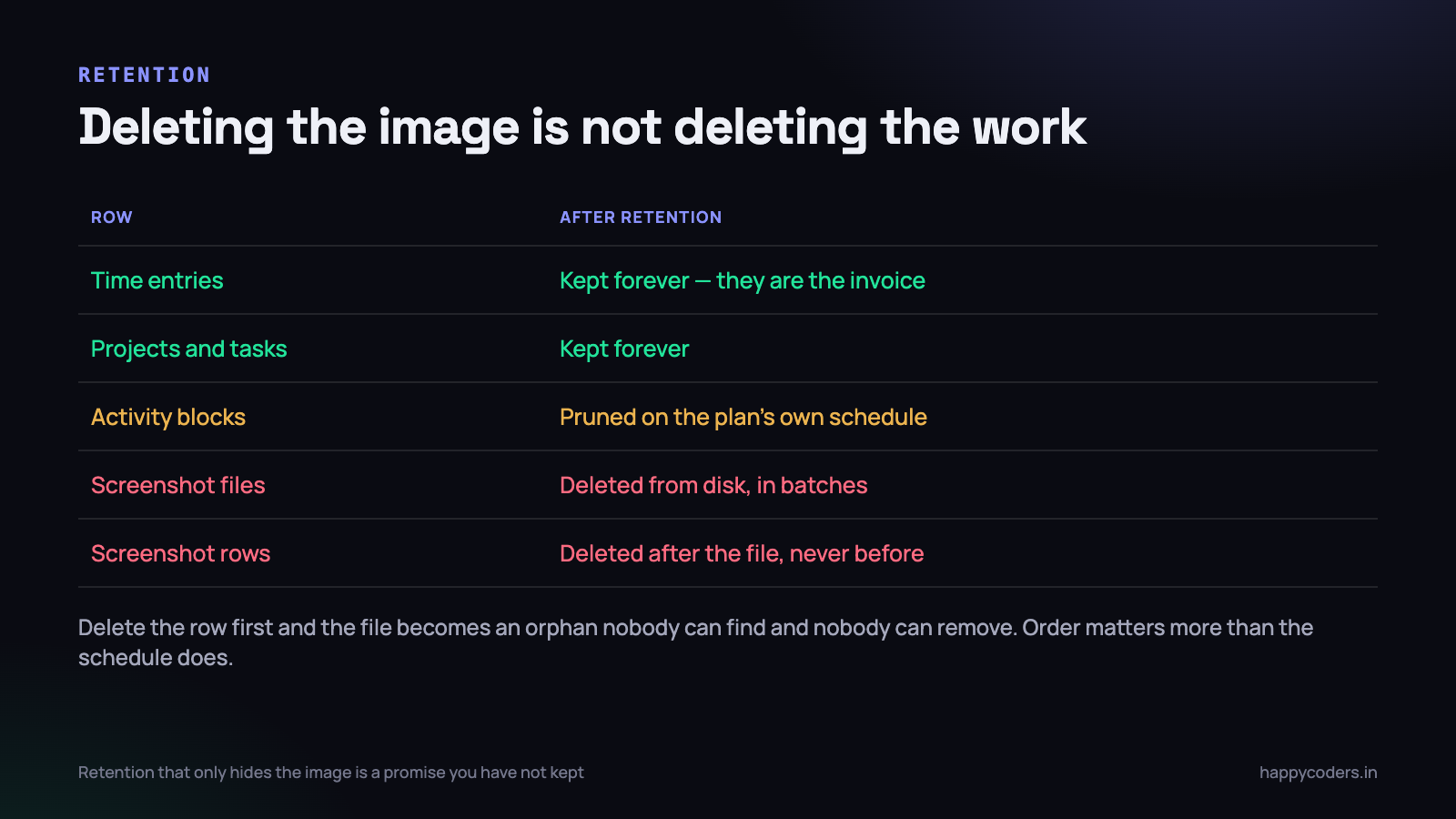
Retention in Happy Tracker is set per plan by a super-admin, so a plan can say “screenshots for thirty days, activity blocks for ninety”. A nightly command walks organisations, works out the cutoff for each, and prunes.
public function handle(): int
{
    Organization::with('plan')->chunkById(50, function ($orgs) {
        foreach ($orgs as $org) {
            $days = $org->retentionDays('screenshots');   // per plan
            if (! $days) {
                continue;                                  // unlimited
            }

            $cutoff = now()->subDays($days);

            Screenshot::where('organization_id', $org->id)
                ->where('captured_at', '<', $cutoff)
                ->chunkById(200, function ($shots) {
                    foreach ($shots as $shot) {
                        Storage::disk('screens')->delete($shot->path);
                        Storage::disk('screens')->delete($shot->thumb_path);
                        $shot->delete();                   // file first, row second
                    }
                });
        }
    });

    return self::SUCCESS;
}
Three rules keep this honest, and each of them came from getting it wrong somewhere:
- The prune touches screenshots and activity blocks only. It never touches time entries, projects, tasks or invoices. Hours are the record of work done and somebody was paid for them; the image was only ever supporting evidence.
- File before row, always. An orphaned file is invisible and permanent. An orphaned row is visible and fixable.
- Chunk everything. A customer who has been on the product for two years has hundreds of thousands of rows in that first pass. One unchunked delete will lock the table at the exact moment nobody is watching.
And then the part that makes it a promise rather than a claim: a storage page that shows, per organisation, how many screenshots exist, how much space they occupy, and the date of the oldest one. If the oldest screenshot in a thirty-day organisation is ninety days old, the retention job has been failing silently, and you would otherwise find that out from a customer.
What to test, and how
Most of this pipeline only misbehaves in conditions you have to create deliberately, so the tests are worth listing.
- Verify the uploaded bytes are blurred. Not that the blur function was called — that the file the server received is measurably lower in high-frequency detail than the source. A variance-of-Laplacian check on the decoded image is enough.
- Toggle the organisation setting off and confirm the tracker stops capturing within one policy refresh, not at the next restart.
- Downgrade a plan that includes screenshots and confirm capture stops and existing images remain visible. Downgrading must never delete a customer’s data.
- Make a delete request and check the image is hidden before approval, from a second account.
- Run the prune against an organisation with 200,000 old screenshots and watch the memory and the lock time.
- Kill the prune halfway and run it again. It must be resumable, and it must not leave files without rows.
On Monday morning
If you run a screenshot feature in your own product, or you are about to switch one on in somebody else’s, there are four things worth doing this week.
- Find out where the clear image exists. Trace one screenshot from capture to storage and write down every place a sharp copy is held, including temporary files and logs. That list is your actual privacy posture.
- Check whether your feature gate and your preference are the same column. If they are, work out what happens on the next plan upgrade. That is the accident waiting to happen.
- Read your screenshot table’s schema and ask what each column is for. Any column you cannot justify in one sentence to the person being photographed should be dropped.
- Query the oldest screenshot in every organisation and compare it with the retention you advertise. If retention has been quietly failing, today is a much better day to find out than the day somebody asks.
None of this is difficult engineering. It is a blur filter, a settings resolver, a couple of tables and a nightly command. What makes it worth writing up is that the difficulty is entirely in deciding what not to build, and those decisions are much easier to make before the feature ships than after a customer has started depending on the thing you should have refused.




