
Secrets Management for a Small Team Without a Vault
Secrets Management for a Small Team Without a Vault
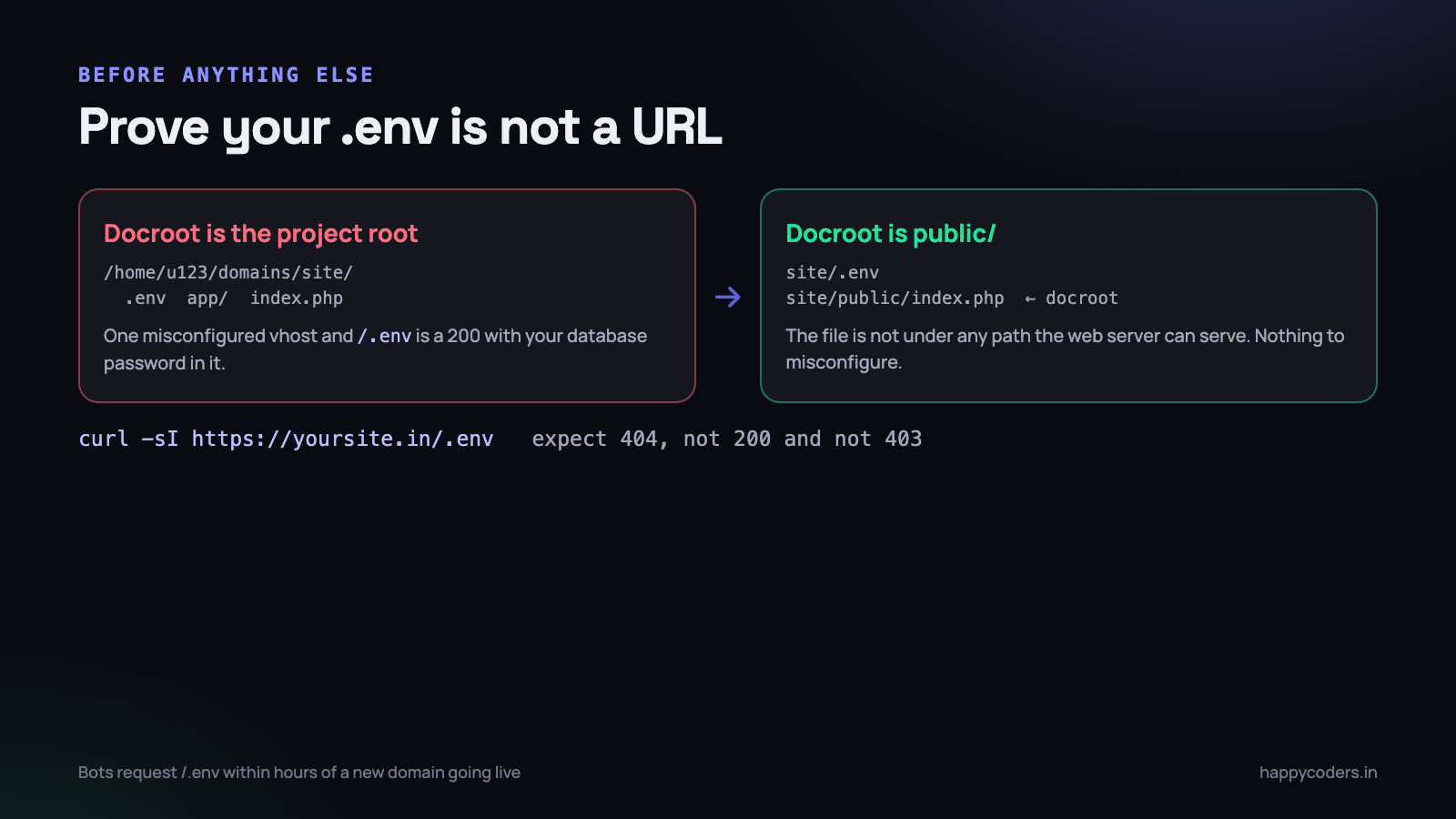
Every small team handles secrets the same way at the start. The database password is in a file on the server, the payment gateway key was pasted into a WhatsApp group when the integration was being built, and the Firebase service account JSON is in the repository because otherwise the deploy breaks. It works, until the afternoon somebody pushes to a public repository by accident and a stranger starts using your SMS credits.
You do not need a vault product to fix this. You need six habits, and most of them are an hour of work each.
The .env file and where it actually lives
The first question is not whether your secrets are in an environment file. It is whether that file sits anywhere a web server can serve it.
A Laravel project has a public/ directory that is supposed to be the document root. Everything else — the application code, the vendor directory and the .env file — sits one level above it, outside anything the web server maps to a URL. That arrangement is safe by construction: there is no path that reaches the file, so there is no rule that can be misconfigured.
What goes wrong on shared hosting is that the document root is fixed at the account root. The project gets uploaded there, and now .env is a sibling of index.php inside the served directory. It is protected by a rule in .htaccess, and that rule holds right up until somebody switches the server, changes the PHP handler, or the rule stops being read.
Two things to do, in order. Point the document root at public/ if the host allows it — most control panels do, and it is a two-minute change. Then verify from outside:
curl -sI https://yoursite.in/.env
curl -sI https://yoursite.in/storage/logs/laravel.log
curl -sI https://yoursite.in/.git/config
curl -sI https://yoursite.in/composer.lock
You want 404 on all four. A 403 means the file is there and something is choosing to deny it, which is one configuration change away from a 200. A 200 on any of them is an incident, not a finding.
Those four URLs are exactly what automated scanners request, and they request them within hours of a domain first resolving. The log file is on the list for a good reason: PHP stack traces print the arguments passed to functions, so a connection failure writes your database password into a log that is sometimes web-readable.
Add these four curl commands to your deploy script as a post-deploy check that fails loudly. It costs two seconds and it catches the day somebody rebuilds the server with different paths.
What must never reach git, and finding out whether it already has
A .gitignore entry protects you from tomorrow. It does nothing about what is already in the history, and history is what gets cloned.
The list of files that should never be committed is short and predictable:
- .env and every variant of it.
.env.production,.env.local,.env.backup. Keep.env.examplewith the keys present and the values blank — that file is documentation and belongs in the repository. - Private keys and certificates.
*.pem,id_rsa,*.p12, signing certificates for desktop or mobile builds. - Service account JSON. Firebase, Google Cloud, anything issued as a downloadable credentials file. These are full-access by default.
- Log files and database dumps.
storage/logsand any.sqlexport. These leak customer data, not just credentials, which is a larger problem than a rotated key. - Anything with the word backup in the name. Backups made during a debugging session are the single most common accidental commit.
Now check whether any of it is already there. These commands search the entire history, on every branch, not just the current checkout:
# was a .env ever added, on any branch?
git log --all --diff-filter=A --name-only -- '*.env*'

# every commit that added or removed a private key block
git log -p --all -S 'BEGIN RSA PRIVATE KEY' --oneline

# a specific key you are worried about
git log -p --all -S 'AKIA' --oneline

# what is currently tracked that probably should not be
git ls-files | grep -Ei '\.(env|pem|key|p12|sql)$|service-account'
Run the same checks against every repository, not just the main application one: the marketing site, the deployment scripts, the internal tooling, the repository somebody created to try something and never deleted. The one that leaks is usually the one nobody thinks of as a real project.
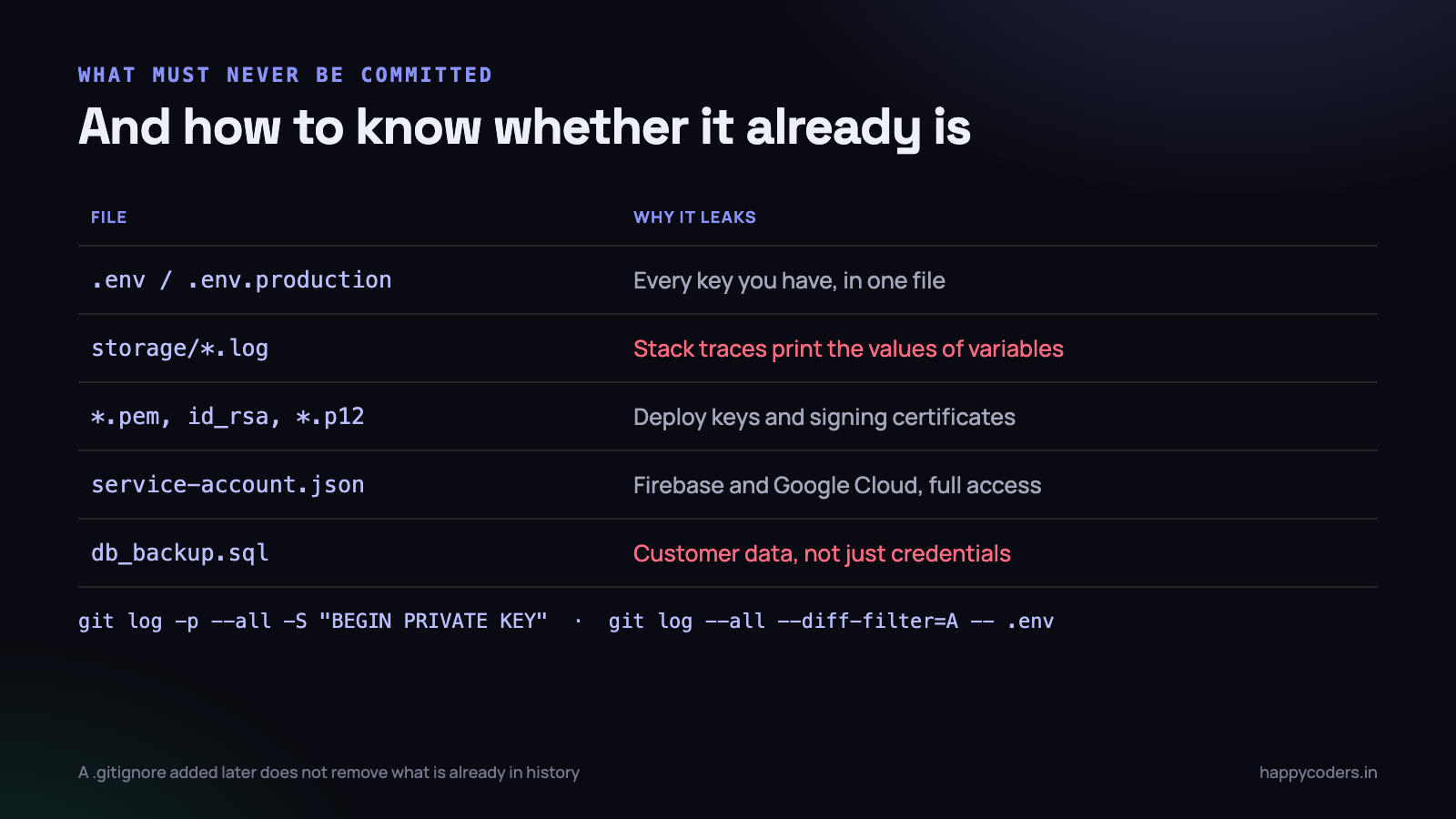
If you find something, the order of operations matters and it is the opposite of what feels natural. Do not start by rewriting history. Rotate the key first, because the value is compromised and rewriting takes time. Then clean the history with git filter-repo or BFG, force-push, and have every developer re-clone. And accept that if the repository was ever public, or ever cloned by somebody who has since left, the old value exists somewhere you cannot reach. Rotation is the only thing that actually closes the hole.
Rotating a key without taking the site down
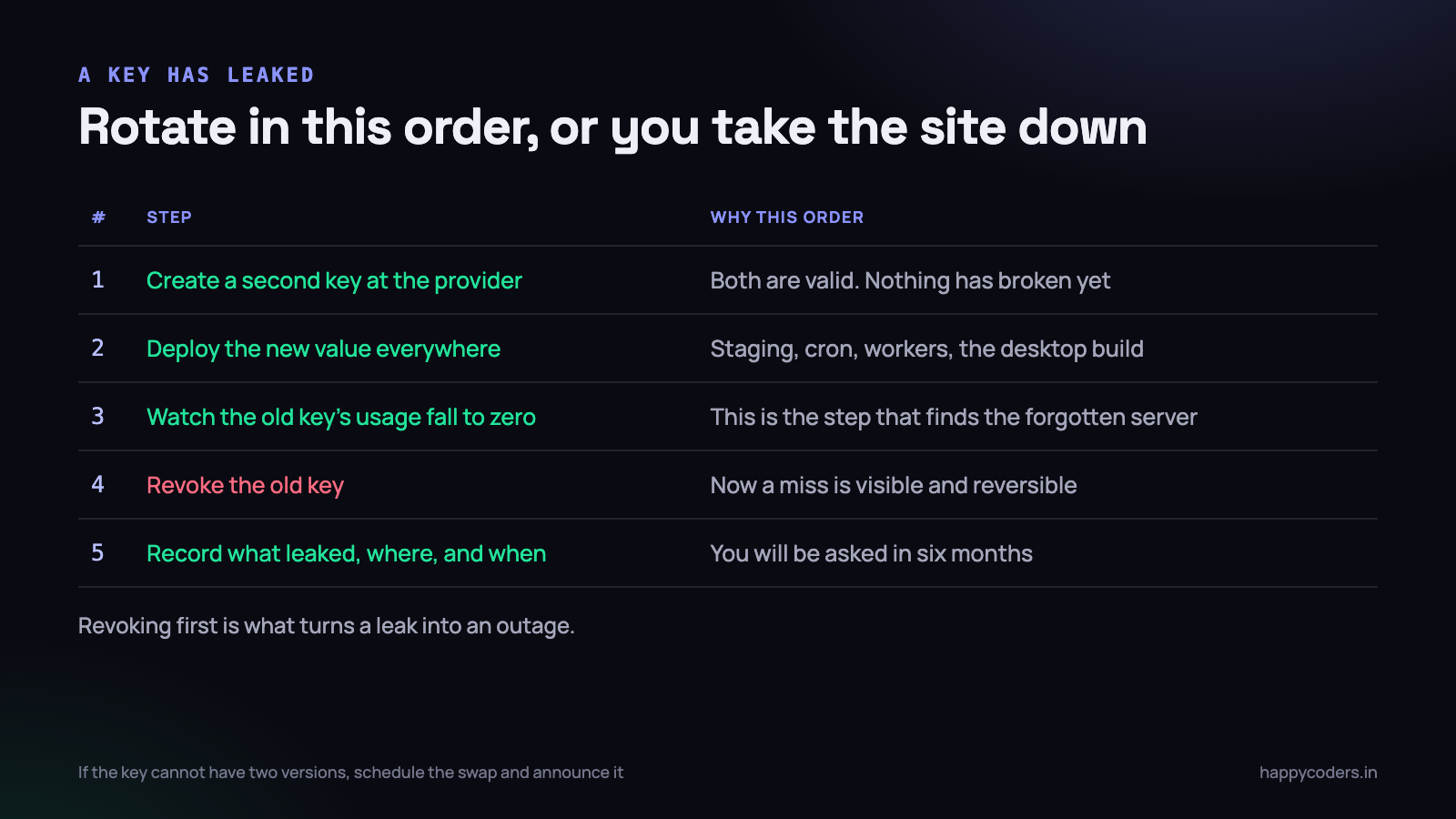
The instinct on discovering a leaked key is to revoke it immediately. That is how a leak becomes an outage: the key is in five places you remember and two you do not, and revoking it stops the nightly invoice job in a way nobody notices until the following morning.
Do it in this order instead.
- Create a second credential at the provider. Almost every provider allows two active keys precisely so that rotation is possible. Nothing has changed yet and nothing has broken.
- Deploy the new value everywhere. Production, staging, the cron server, the queue workers, the CI configuration, any desktop or mobile build that embeds it, and the developer machines that need it. Write the list down as you go, because it is the list you will need next time.
- Watch the old credential’s usage fall to zero. This is the step people skip and it is the most valuable one. Provider dashboards show last-used timestamps and request counts per key. Wait until the old key has been idle for a full business cycle — which means at least one night, so the nightly jobs get counted.
- Revoke the old credential. Now, if something still breaks, you know it was using the old key, you know roughly what it was, and the fix is to deploy the value you already have.
- Write down what happened. Which key, where it leaked, when it was rotated, what used it. In six months somebody will ask, and memory will not be good enough.
Some credentials cannot have two active versions — a database password is often one. For those, the swap has to be atomic, so schedule it, put the application in maintenance mode for ninety seconds, change the password and deploy the new value together. Ninety seconds announced is a very different thing from an outage discovered.
Sharing credentials in a team without pasting them into chat
The realistic problem for a five-person team is not the vault. It is that a new developer joins on Monday and needs eleven credentials by Monday afternoon, and the fastest way to give them is a chat message.
Chat is a poor place for a secret for reasons that have nothing to do with encryption in transit. The message is searchable forever, it is on every device that account is signed into, it gets forwarded when somebody else asks the same question, it stays after the person leaves the company, and it lands in the chat provider’s backups. A WhatsApp group with an ex-employee still in it holds your production keys.
Three workable options, in increasing order of effort:
- A one-time secret link. Paste the value into a service that generates a URL readable exactly once, then send the URL. The value is destroyed after reading, so a forwarded link is useless. Free, needs no setup, and is a strict improvement on chat for a one-off handover.
- A shared password manager. Bitwarden, 1Password or similar with a team vault. A few hundred rupees per person per month and it solves the whole category: access is granted and revoked per person, entries are grouped per environment, and there is a record of who can see what. This is the right answer for almost every small team.
- An encrypted file in the repository. Laravel ships environment encryption —
php artisan env:encryptproduces a committed, encrypted file and one decryption key. It solves distribution, but you still have to share that one key by some other means, so it is a complement to the first two rather than a replacement.
Whichever you pick, the rule to enforce is that nobody needs production credentials to do their job. Developers need development credentials. The production values live on the production server and in the team vault, and they are read by two people.
Per-environment keys, and why sandbox keys are not the point
Every credential should be different in every environment, and the reason is not only blast radius.
A development key that works against production data means a mistake in a test writes to a real customer’s record. A shared key means that rotating it after a developer leaves breaks production. And a single key across environments makes provider logs useless — you cannot tell whether the odd traffic at 2 a.m. was a job, a developer or an attacker.
# .env.example  — committed, values blank, keys present
APP_ENV=local
APP_KEY=
DB_PASSWORD=
RAZORPAY_KEY_ID=
RAZORPAY_KEY_SECRET=
MAIL_PASSWORD=
FIREBASE_CREDENTIALS=

# and a comment for anything non-obvious
# FIREBASE_CREDENTIALS = absolute path to the service account JSON,
# stored outside the web root, never committed
That committed example file is more useful than it looks. It is the only complete list of what the application needs, it makes a missing variable an obvious diff rather than a mysterious runtime failure, and it is where a new developer starts. Keep it current — an example file that is three variables behind is how the next deploy breaks.
Add a startup check that fails fast when something required is missing. A clear exception at boot is far better than a payment attempt failing at 7 p.m. because a key was empty and the SDK interpreted that as anonymous access.
What the deploy process actually needs
Deployment is where secrets tend to leak back into the repository, because the pressure is practical: the deploy fails without the file, so the file goes in.
The workable arrangement for a small team on a normal host is boring and it holds up.
- The .env lives on the server and is not deployed. It is created once, backed up in the team vault, and left alone. Deploys update code, not configuration.
- Config is cached after deploy, not before.
php artisan config:cachereads the environment file and writes a compiled file. Building that on a developer machine and shipping it bakes local values into production. - CI secrets live in the CI provider’s secret store. Not in the workflow YAML, which is in the repository. Mark them masked so they are redacted from build logs, and check a build log once to confirm the masking works.
- Deploy keys are per-server and read-only. Not a developer’s personal SSH key copied onto the server, which is the arrangement that makes offboarding impossible.
- Every access is attributable. Individual accounts on the server, no shared root login. When something odd happens you want a name, which is the same argument as for an audit log you can actually use.
One more that repeatedly catches people: keep a copy of the production environment file in the team vault. Servers get rebuilt, and a rebuild that loses the only copy of eleven credentials turns a two-hour job into a two-day one.
The secrets that are not in the environment file
Teams tidy up .env and then leave four other categories untouched, because they do not look like secrets.
- Keys compiled into a desktop or mobile build. Anything shipped to a user’s machine can be extracted from the binary in minutes. A client application should hold a token scoped to that device, issued by your server and revocable, never the master API key.
- Keys in front-end JavaScript. A publishable key is designed for this; a secret key is not. The test is whether the value appears in the page source when you press Ctrl+U.
- Values in the crash and error reporter. Exception trackers capture request payloads and environment variables by default. Configure the scrubbing list before you send your first event, not after somebody notices a password in a stack trace.
- Database backups. A dump contains password hashes, personal data and often API tokens stored in a settings table. It needs the same handling as the credentials themselves, and it is usually sitting in a Downloads folder somewhere.
The common thread is that a secret is anything whose disclosure costs you money or trust, regardless of which file it lives in. Listing them once, with where each one lives and who can read it, takes twenty minutes and is the closest thing to a security policy a five-person team needs.
The day a token turns up in a public repository
Assume it is being used. Automated scrapers watch the public commit firehose and test new credentials within a minute of the push. The window in which you could have quietly deleted the commit does not exist.
- Rotate the credential first. Before the investigation, before the post-mortem, before telling anyone. Follow the five-step order above so you do not cause an outage on top of the leak.
- Read the provider’s logs. What called the key, from which IP addresses, since when. This is what tells you whether this is an embarrassment or an incident.
- Work out the blast radius. What else could that credential reach? A database password may be shared with a read replica. A cloud key may have more permissions than the one service that used it. List everything the credential touched.
- Check for what was done with it. New users created, webhooks registered, forwarding rules added, permissions changed. An attacker who gets in usually establishes a second way in, and rotating the first key does not remove the second.
- Then clean the history and force-push. Last, because it is the least urgent step and the most disruptive to everyone else.
- Write the note. What leaked, how, when it was found, when it was rotated, what you changed so it cannot recur. Half a page. If customer data was reachable, take advice on whether you have a disclosure obligation.
The recurrence fix is almost always mechanical rather than cultural. A pre-commit hook that refuses a commit containing a credential pattern, or a scanner running in CI, stops the class of mistake entirely. Both take an afternoon, and neither depends on anybody remembering anything.
# .git/hooks/pre-commit — crude, fast, and it works
if git diff --cached --name-only | grep -qE '\.env$|\.pem$|service-account.*\.json$'; then
  echo "Refusing: a secrets file is staged."
  exit 1
fi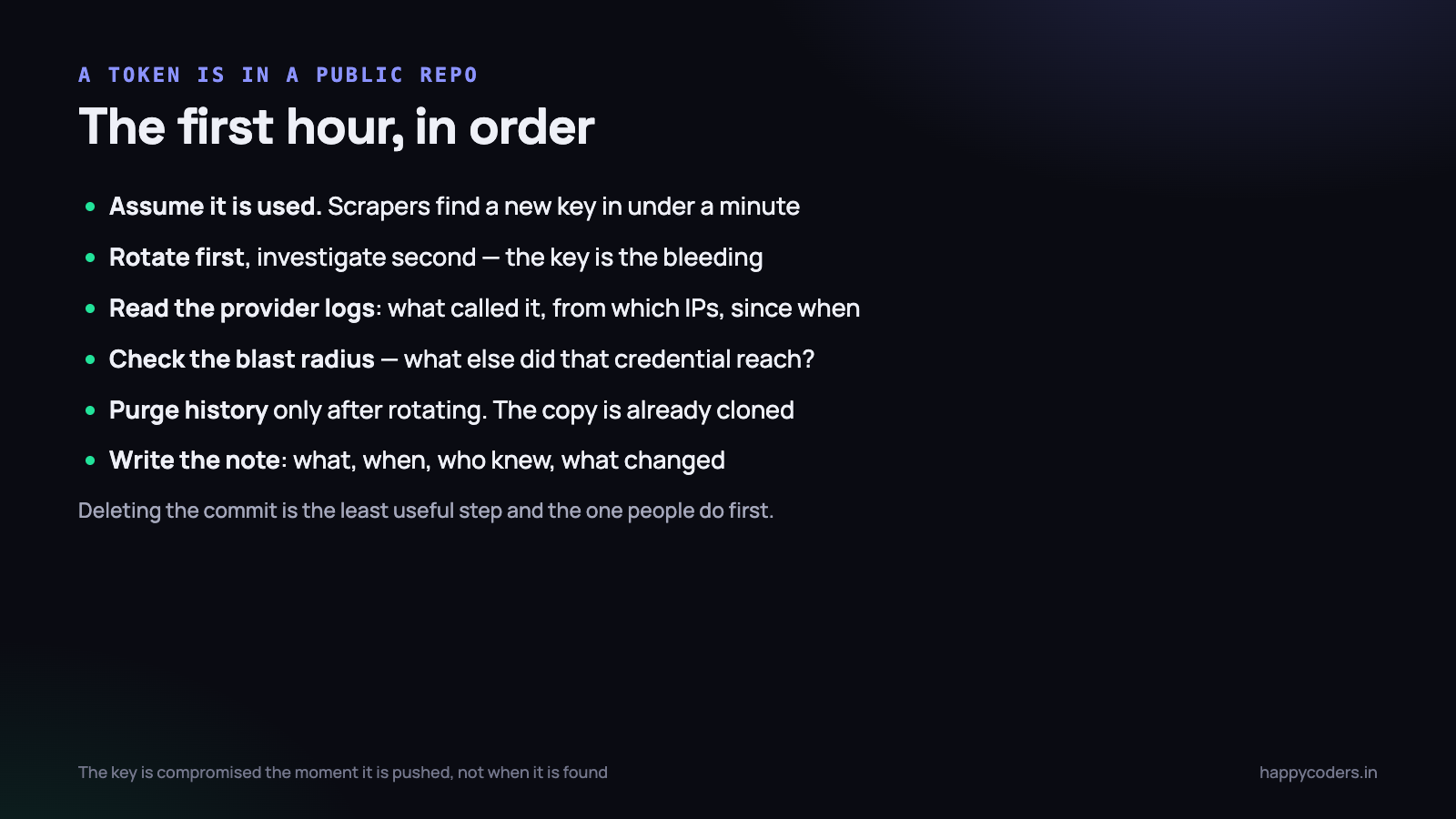
What to do on Monday morning
- Run the four curl commands against production. If any returns 200, stop reading and fix that.
- Run the git history search on every repository your team owns, including the ones nobody thinks are real projects.
- Rotate anything you find, in the five-step order, starting with credentials that can spend money: payment gateways, SMS, cloud accounts.
- Set up a team password manager and move every shared credential into it. Then delete the chat messages, knowing that deletion is housekeeping and not a fix.
- Make sure
.env.examplelists every variable the application needs, and add a boot check that fails loudly when one is missing. - Add the pre-commit hook or a CI secret scanner, so this stops being a thing anybody has to remember.
None of this requires a security budget or a vault product. It requires knowing where the file is, knowing what is in your history, and being able to rotate a key on a Tuesday afternoon without breaking the invoice run. A team that can do those three things is ahead of most companies several times its size.
Related: token authentication and device binding for a desktop app.




