
Server-Side PDF Generation in PHP: Memory, Fonts and Page Breaks
Server-Side PDF Generation in PHP: Memory, Fonts and Page Breaks
The first PDF you generate works. It is one invoice, it renders in 400 milliseconds, and everybody is pleased. The trouble arrives in three places: the rupee symbol prints as an empty box, month end tries to build forty invoices in one request and dies at the fourteenth, and a customer asks why the invoice they downloaded in August is not quite the same file as the one they downloaded today.
All three are predictable, and the decisions that avoid them are made at the start, when you choose how the PDF gets built.
The three approaches, and what they actually cost
An HTML-to-PDF library
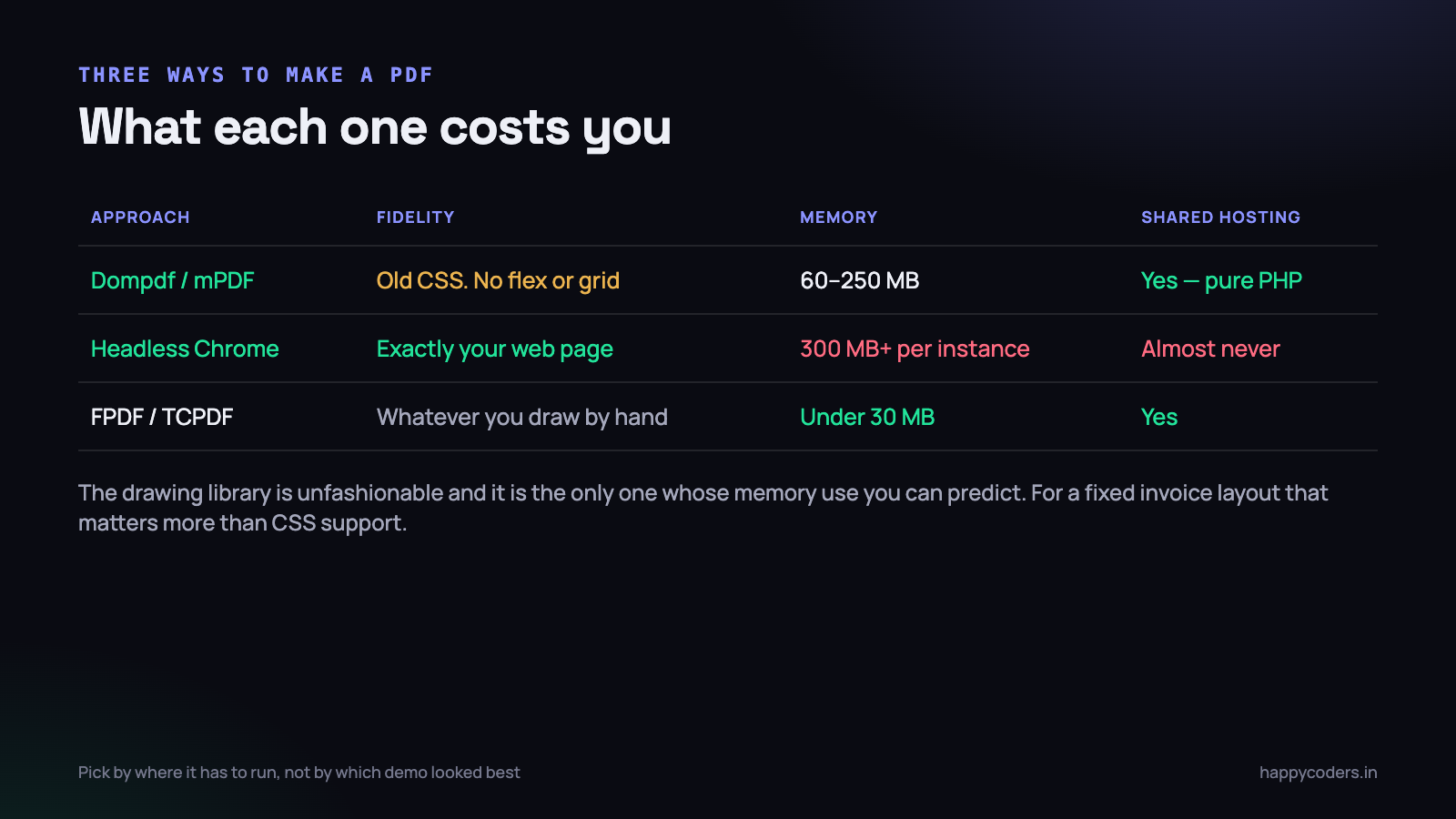
Dompdf and mPDF take an HTML string with some CSS and produce a PDF, in pure PHP, with no external binary. That last part is why they are on almost every shared-hosted project in the country.
<?php
$pdf = new Dompdf();
$pdf->loadHtml(view('invoices.pdf', ['invoice' => $invoice])->render());
$pdf->setPaper('A4');
$pdf->render();
Storage::put("invoices/{$invoice->number}.pdf", $pdf->output());
The cost is CSS support. These libraries implement a subset that stopped somewhere around 2010: no flexbox, no grid, patchy position, and layout that quietly differs from your browser. You end up writing the invoice template twice — once for the screen and once, in tables, for the PDF.
Memory is the other surprise. A large document builds a full object tree in PHP before writing anything, and 60 to 250 MB for a multi-page invoice is ordinary. It is bounded, it is just higher than people expect.
A headless browser
Puppeteer or a Chrome binary driven from PHP renders your actual page with your actual stylesheet. Fidelity is perfect because it is the same engine that drew the page on screen.
You pay for it twice. Each Chrome instance takes 300 MB or more and several hundred milliseconds to start, and the binary has to exist on the server. On shared hosting it almost never does — no ability to install packages, no process spawning, hard memory caps well below what Chrome needs. Even on a VPS, an unbounded number of concurrent Chrome processes will take the machine down faster than almost anything else you can run.
If you use it, run it as a separate service with a fixed pool size and a queue in front, never as a call inside a web request. That is a real piece of infrastructure to operate, which is exactly the point to weigh.
A drawing library
FPDF and TCPDF have no concept of HTML. You place text and lines at coordinates.
<?php
$pdf = new FPDF();
$pdf->AddPage();
$pdf->SetFont('DejaVu', 'B', 14);
$pdf->Cell(0, 8, 'TAX INVOICE', 0, 1, 'C');
$pdf->SetFont('DejaVu', '', 10);
$pdf->Cell(95, 6, $invoice->client_name, 0, 0);
$pdf->Cell(0, 6, 'Invoice ' . $invoice->number, 0, 1, 'R');
It is more code to write and dull to change. In exchange you get memory use under 30 MB that does not depend on document complexity, output you can predict exactly, and no rendering engine to be surprised by. For a fixed invoice layout that will not change for two years, this is a far better trade than it first appears.
A practical rule: if the document layout is fixed and financial, draw it. If it is content-shaped and varies — a report, a certificate, a proposal — use an HTML library. Reach for a headless browser only when the PDF must match a complex web page exactly, and only when you have somewhere to run it.
Fonts, and why the rupee symbol is blank
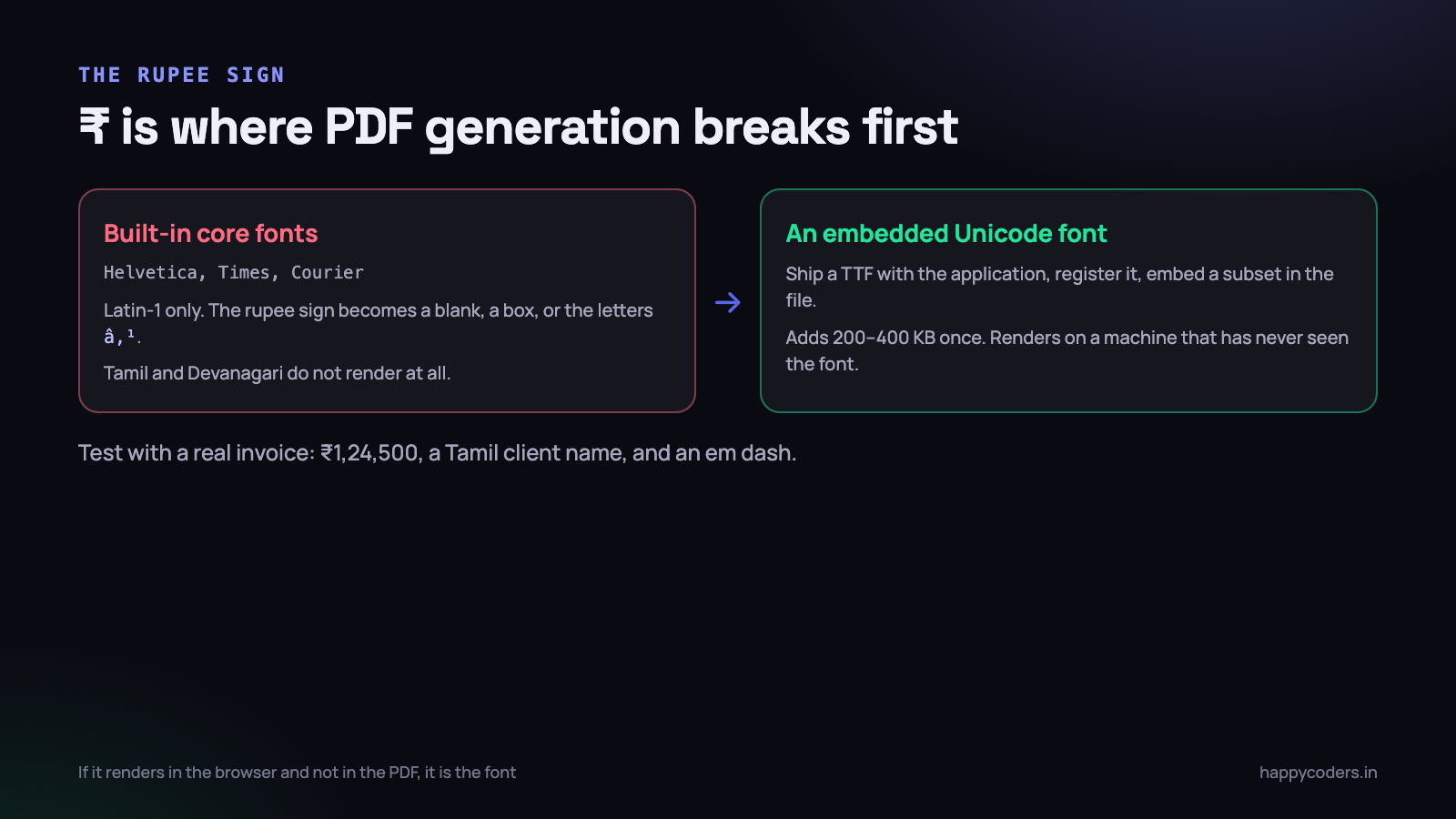
This is the first bug almost every Indian project hits. The invoice renders, the numbers are right, and the currency symbol is a blank rectangle.
The PDF format has fourteen core fonts that every reader is guaranteed to have: Helvetica, Times, Courier and a few symbol faces. They are Latin-1. The rupee sign is not in Latin-1. Neither is the em dash, the curly apostrophe, or a single character of Tamil or Devanagari.
The fix is to embed a Unicode font in the file. In a drawing library that means adding the TTF once:
<?php
// DejaVuSans covers the rupee sign, curly quotes and dashes
$pdf->AddFont('DejaVu', '', 'DejaVuSans.php');
$pdf->AddFont('DejaVu', 'B', 'DejaVuSans-Bold.php');
$pdf->SetFont('DejaVu', '', 10);
$pdf->Cell(0, 6, "Total: \u{20B9}1,24,500.00", 0, 1, 'R');
In mPDF, set the font family in your CSS to one it ships with, such as dejavusans or freeserif, and confirm it is not silently falling back. In Dompdf, register the TTF and reference it by the same name in font-family. In every case the font must be embedded, not merely named — a PDF that references a font present on your server will render as boxes on a reader that does not have it.
Two things to know about embedding. Subsetting matters: embedding a full CJK-capable font adds megabytes to every invoice, while a subset containing only the glyphs actually used adds 200 to 400 KB. And Tamil, Devanagari and other Indic scripts need a font with the right shaping tables plus a library that applies them; mPDF handles this and the lighter libraries do not.
Write one test invoice containing the rupee sign, a five-digit amount in Indian grouping, a client name in Tamil, an em dash and a curly apostrophe. Render it every time you change anything about fonts. That one file finds the problem in ten seconds instead of at the first real invoice.
Page breaks in a long table
An invoice with eleven line items fits one page. The one with ninety does not, and the default behaviour is almost never what you want: the header row appears once, a row is cut in half across the break, and the totals block lands alone on page four.
Three rules cover nearly every case.
- Repeat the header on every page. In HTML libraries, put the header row in a
theadand the body in atbody— both mPDF and Dompdf repeattheadautomatically. In a drawing library you handle this yourself in the page-break callback. - Do not split a row.
page-break-inside: avoidon the row is respected by mPDF and partially by Dompdf. When it is not respected, the reliable approach is to paginate the rows yourself, a fixed number per page, and lay each page out deliberately. - Keep the totals with something. A totals block orphaned on its own page looks like a mistake. Reserve vertical space for it while paginating, and if it does not fit, push the last two line items forward with it.
In a drawing library, the page-break hook is where all of this lives, and it is genuinely simpler than fighting CSS:
<?php
class InvoicePdf extends FPDF
{
    public function Header(): void
    {
        $this->SetFont('DejaVu', 'B', 9);
        $this->Cell(90, 7, 'Description', 1);
        $this->Cell(25, 7, 'Qty', 1, 0, 'R');
        $this->Cell(35, 7, 'Rate', 1, 0, 'R');
        $this->Cell(35, 7, 'Amount', 1, 1, 'R');
    }

    public function Footer(): void
    {
        $this->SetY(-15);
        $this->SetFont('DejaVu', '', 8);
        $this->Cell(0, 10, 'Page ' . $this->PageNo() . ' of {nb}', 0, 0, 'C');
    }
}
The {nb} placeholder and the matching AliasNbPages() call exist because the total page count is unknown until the document is finished. That is a fair summary of why PDF pagination is harder than it looks: the layout is only fully known at the end, and anything that needs the final page count has to be back-filled.
Forty invoices without a fatal error
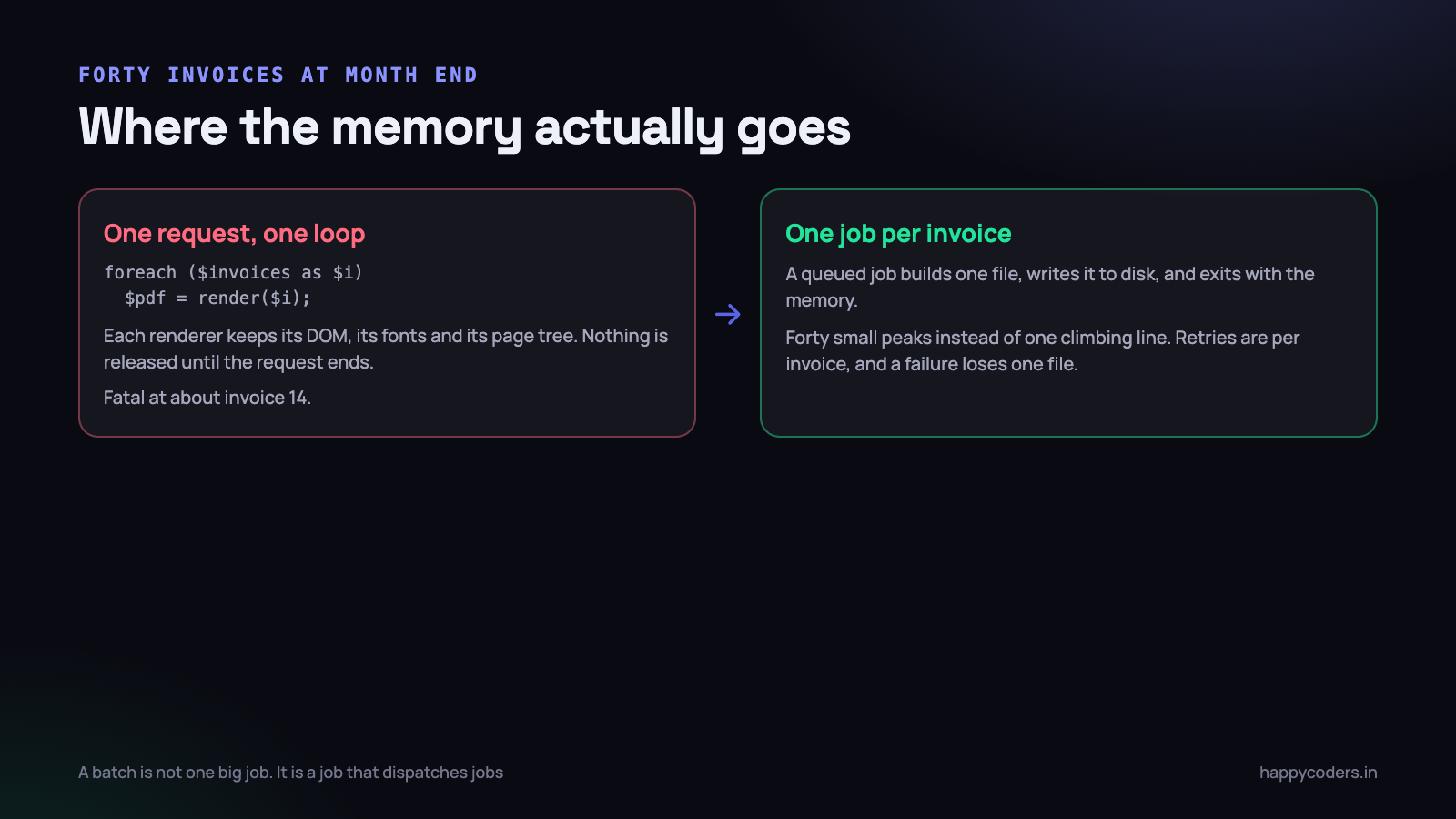
Month end arrives. A controller loops over the invoices and builds each one, and somewhere around the fourteenth the request dies with an allowed-memory-size error.
<?php
// dies around invoice 14
foreach ($invoices as $invoice) {
    $pdf = new Dompdf();
    $pdf->loadHtml($this->renderInvoice($invoice));
    $pdf->render();
    Storage::put("invoices/{$invoice->number}.pdf", $pdf->output());
}
Unsetting $pdf does not save you. Renderers hold font caches, image caches and internal references, the framework is holding the query results, and PHP returns memory to its own allocator rather than to the operating system. The line only climbs.
The fix is one job per document. A batch is not a big job; it is a job that dispatches jobs.
<?php
// the batch job just fans out
foreach ($invoices->lazy(100) as $invoice) {
    GenerateInvoicePdf::dispatch($invoice->id);
}

// and each worker process builds exactly one file
class GenerateInvoicePdf implements ShouldQueue
{
    public int $tries = 3;
    public int $timeout = 120;

    public function handle(): void
    {
        $invoice = Invoice::with('lines')->findOrFail($this->invoiceId);
        // ... render, store, mark generated_at
    }
}
Four things improve at once. Memory peaks once per invoice instead of accumulating. A failure loses one file rather than the run. Retries are per invoice. And the work is no longer inside a web request, so nothing is waiting on a 90-second HTTP timeout.
Two supporting habits. Use lazy() or chunkById() rather than get() when reading the invoices — loading four thousand models to dispatch four thousand jobs is its own memory problem, and the wider pattern is covered in streaming large datasets in PHP. And write each file to disk as it is produced rather than collecting the bytes in an array to zip at the end, which recreates the original problem in a different variable.
If the customer wants a single merged document, generate the individual files first, then merge them with a tool that streams page objects rather than one that loads every page into memory.
Cache the file, not the render
An invoice PDF is generated once and downloaded five times. Regenerating it on each request wastes the CPU and, worse, risks producing a different document each time.
Treat generation as a one-off event with a record of it:
<?php
public function download(Invoice $invoice)
{
    if (! $invoice->pdf_path || ! Storage::exists($invoice->pdf_path)) {
        GenerateInvoicePdf::dispatchSync($invoice->id);
        $invoice->refresh();
    }

    return Storage::download($invoice->pdf_path, "{$invoice->number}.pdf");
}
Store the path on the invoice row, along with a hash of the content and the time it was generated. That gives you three things: fast downloads, a way to prove which version a customer received, and an obvious answer to when a file should be rebuilt.
The invalidation rule for financial documents is narrower than for most caches. A sent invoice should not regenerate because a template changed. It should regenerate only when the invoice itself is legitimately amended, and an amendment should produce a new document with its own number rather than silently replacing the old one. For anything already sent to a customer, the cached file is the record.
Serve downloads through your application so that authorisation is checked, or through a signed URL that expires. A PDF sitting at a guessable public path is a data leak waiting for someone to increment a number in it.
Making the output deterministic
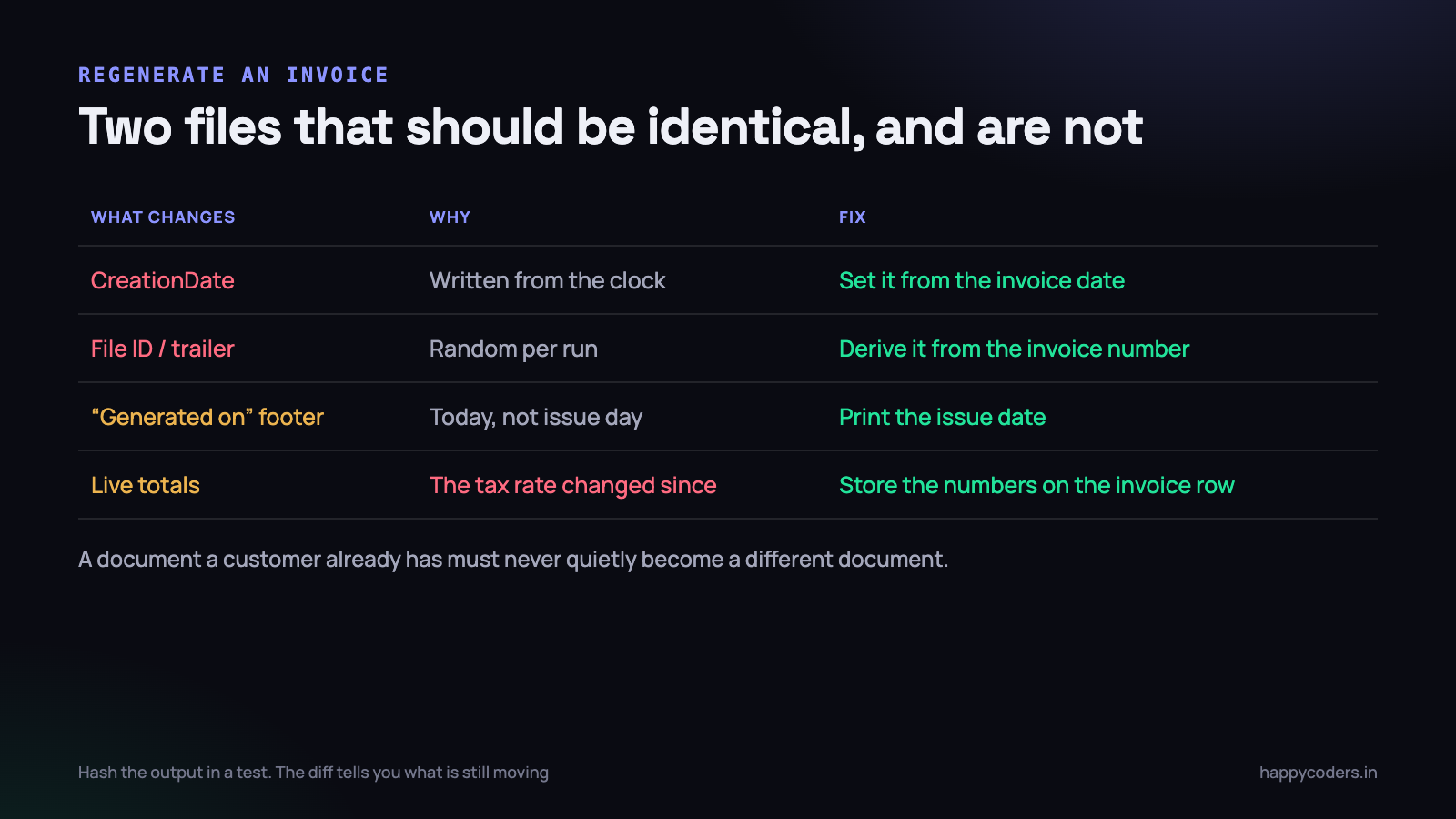
Generate the same invoice twice and compare the files. They will differ, and the reasons are worth knowing because two of them are in the format itself.
The timestamp in the document
Every PDF carries CreationDate and ModDate in its metadata, written from the clock at render time. Set them explicitly from the invoice date instead.
<?php
$pdf->SetCreationDate(strtotime($invoice->issued_at));
// mPDF equivalent: $mpdf->SetDocTemplate(...) plus an explicit
// CreationDate written into the Info dictionary
The file identifier
The trailer holds an /ID array that most libraries seed randomly. Derive it from something stable — a hash of the invoice number and its issue date — and two runs produce the same value.
Anything that says today
A footer reading “Generated on 18 September 2026” guarantees a different file tomorrow. Print the issue date. A regenerated invoice should look like the invoice, not like a receipt for the act of printing it.
Values read live instead of stored
This is the serious one, and it is a data modelling problem rather than a PDF problem. If the template reads the client address from the clients table and the tax rate from a settings table, then regenerating a March invoice in September prints September’s address and September’s tax rate on a document that is supposed to be a record of March.
Copy every value the document depends on onto the invoice at the moment it is issued: client name and address, GSTIN, rates, line descriptions, the lot. The invoice row becomes a snapshot rather than a set of pointers. This is also what makes the document defensible — the same thinking that goes into turning tracked hours into an invoice nobody argues with.
With all four handled, you can assert it in a test:
<?php
public function test_regenerating_an_invoice_is_byte_identical(): void
{
    $a = $this->generate($this->invoice);
    $this->travel(30)->days();
    $b = $this->generate($this->invoice->fresh());

    $this->assertSame(hash('sha256', $a), hash('sha256', $b));
}
When that test fails, the diff between the two files names the thing that is still moving. It is usually a timestamp and it takes five minutes to fix — but only if something is checking.
Testing a document you cannot read in a diff
PDF output resists the usual testing habits. You cannot eyeball a binary in a pull request, and nobody is going to open forty files by hand before a release. Three cheap assertions cover most of what actually goes wrong.
Assert on the extracted text. Pull the text layer back out and check the numbers that matter. This catches the class of bug where a template change quietly drops the tax line or prints the subtotal in the total field.
<?php
$pdf  = $this->generate($invoice);
$text = (new \Smalot\PdfParser\Parser())->parseContent($pdf)->getText();

$this->assertStringContainsString('INV-2026-0412', $text);
$this->assertStringContainsString("\u{20B9}1,24,500.00", $text);
$this->assertStringContainsString('GST 18%', $text);
That test also doubles as a font test. If the rupee sign came out as a box, the glyph is not in the text layer and the assertion fails with a message that points straight at it.
Assert on the page count. A fixture invoice with ninety line items should produce a known number of pages. When somebody changes a margin or a row height, the count moves, and that is exactly the change that silently orphans a totals block on its own page.
Assert on the size. A single invoice that suddenly weighs 4 MB means an unresized image got into the template. An upper bound of a few hundred kilobytes catches it on the day it is introduced rather than when a customer complains that the download is slow on mobile data.
Visual regression on rendered pages is possible — convert page one to a PNG and compare against a stored baseline — but it is fragile across font versions and library upgrades, and the maintenance usually outweighs the benefit for an invoice. The text, page-count and size assertions are three lines each and they hold up.
Things that bite later
- Images blow up the file size. A 4000-pixel logo embedded at 40 millimetres wide stores every pixel. Resize assets to roughly 300 DPI at their printed size before they go anywhere near the renderer.
- Remote images stall the render. An
imgtag pointing at a URL makes the renderer fetch it, inside your request, with whatever timeout the HTTP client defaults to. Use local paths or embedded data. - A4 is not Letter. Indian invoices are A4, 210 by 297 mm. A template designed against Letter will clip at the bottom for every customer who prints it.
- The PDF must be the only output. A stray warning or a byte of whitespace before the headers corrupts the download, and the error message the user sees is that the file cannot be opened.
- Timeouts are separate. A queued job has its own timeout, the web request has another, and the worker may have a third. The forty-page run that works locally can be killed at 60 seconds in production by a setting nobody has looked at.
What to do on Monday morning
- Render one invoice containing the rupee sign, an Indian-grouped amount, a Tamil client name and an em dash. If any glyph is a box, embed a Unicode font before writing another line of template.
- Generate forty invoices in a loop on a copy of production data and watch
memory_get_peak_usage(). If the line climbs, move generation into one job per document. - Generate the same invoice twice, half an hour apart, and diff the files. Fix the creation date and the file identifier.
- Check that a generated file is stored and reused, and that downloading it is authorised.
- Confirm that every value printed on the invoice is stored on the invoice row, not read live from a settings or clients table.
The order is deliberate. Fonts are the bug you hit this week, memory is the bug you hit at month end, and determinism is the bug you hit when a customer compares two copies of the same invoice — which will happen, and by then the code that produced the first one is a year old.




