
Soft Deletes And Referential Integrity: When Cascade Eats The Facts
Soft Deletes And Referential Integrity: When Cascade Eats The Facts
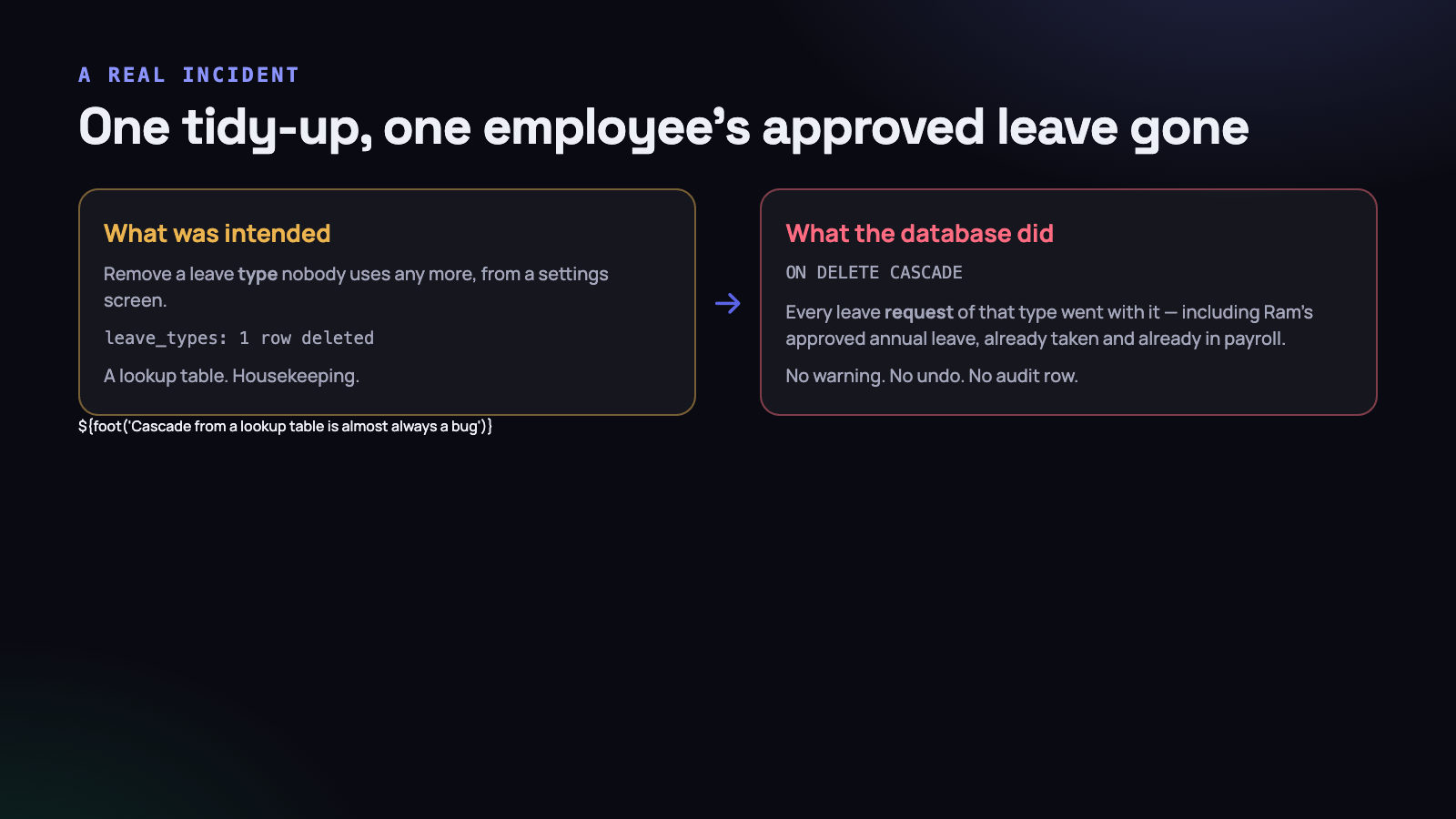
An administrator opened the leave settings page, saw a leave type nobody had used in a year, and removed it. Tidy-up, thirty seconds, the kind of thing people do on a quiet Friday.
Every leave request that had ever used that type went with it. Including Ram’s annual leave — requested in June, approved in June, taken in June, already reflected in payroll. The row no longer existed. There was no warning, no undo, and no audit entry, because from the application’s point of view exactly one thing had been deleted.
Nobody noticed for two weeks. The leave calendar looked normal, because it had no reason to display an absence it no longer knew about. It surfaced when the employee asked why her June leave was not showing on her own record — and the first three people who looked assumed a filter bug, because the idea that the rows were simply gone did not occur to anyone.
The cause was three words in a migration written eighteen months earlier.
The three words
Schema::create('leave_requests', function (Blueprint $table) {
    $table->id();
    $table->foreignId('user_id')->constrained();
    $table->foreignId('leave_type_id')->constrained()->cascadeOnDelete();
    $table->date('from_date');
    $table->date('to_date');
    $table->string('status');
    $table->timestamps();
});cascadeOnDelete(). It is the default suggestion in half the tutorials, it makes the foreign key “just work” during development, and it means the database will silently delete children when a parent goes.
On user_id that might be defensible, depending on your deletion policy. On leave_type_id it is a data-loss bug with an eighteen-month fuse, because a leave type is not a parent in any meaningful sense. It is a label. Deleting a label should never delete the things it labels.
Worse, Laravel’s SoftDeletes trait would not have helped. The trait is application-level — it sets a timestamp instead of issuing a DELETE. But forceDelete(), a query-builder delete, a console command or a database GUI all issue a real DELETE, and the cascade is in the database, below all of it. In our case the settings screen had been written with a plain $leaveType->forceDelete() because somebody wanted the name freed up for reuse.
A soft delete in the model protects you from your own controller. A foreign key constraint protects you from everything. They are not substitutes for each other, and the incident happens on whichever one you skipped.
Descriptors and facts
The useful abstraction that came out of this is a question to ask of every table before choosing a delete rule: does this row describe something, or does it record something?
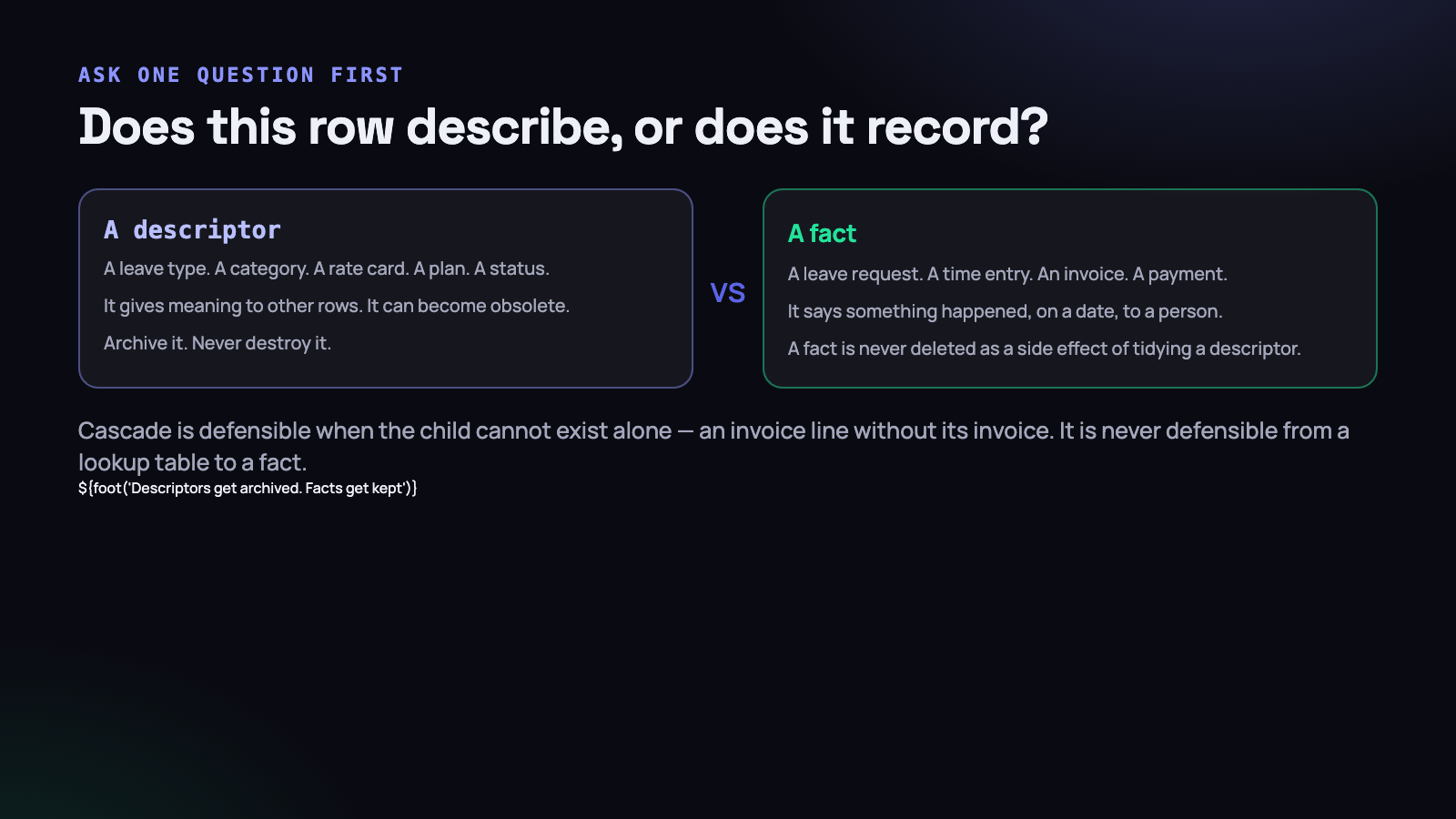
A descriptor gives meaning to other rows. A leave type, a task category, a project status, a rate card, a plan, a tag, a department. Descriptors are configuration. They become obsolete, they get renamed, they get replaced — and a business will always eventually want to stop offering one.
A fact records that something happened, on a date, to a person. A leave request. A time entry. An invoice. A payment. A screenshot. Facts are history. They are what your reports are made of, what payroll was calculated from, and what you would need in a dispute.
From that distinction, the rule writes itself:
- A descriptor is never destroyed while any fact refers to it. It is archived — hidden from the places people choose things, still readable everywhere history is displayed.
- A fact is never deleted as a side effect of tidying a descriptor. Not ever, under any circumstances, for any reason involving convenience.
- Cascade is only for composition — where the child genuinely cannot exist without the parent. An invoice line without its invoice is meaningless, so cascade is correct there. A leave request without its type is still a fact about a person who was away for four days.
If you run through your schema with that question you will usually find two or three cascades pointing the wrong way. They are all the same bug waiting for the same quiet Friday.
What to put on the foreign key instead
$table->foreignId('leave_type_id')
      ->constrained()
      ->restrictOnDelete();          // ON DELETE RESTRICT
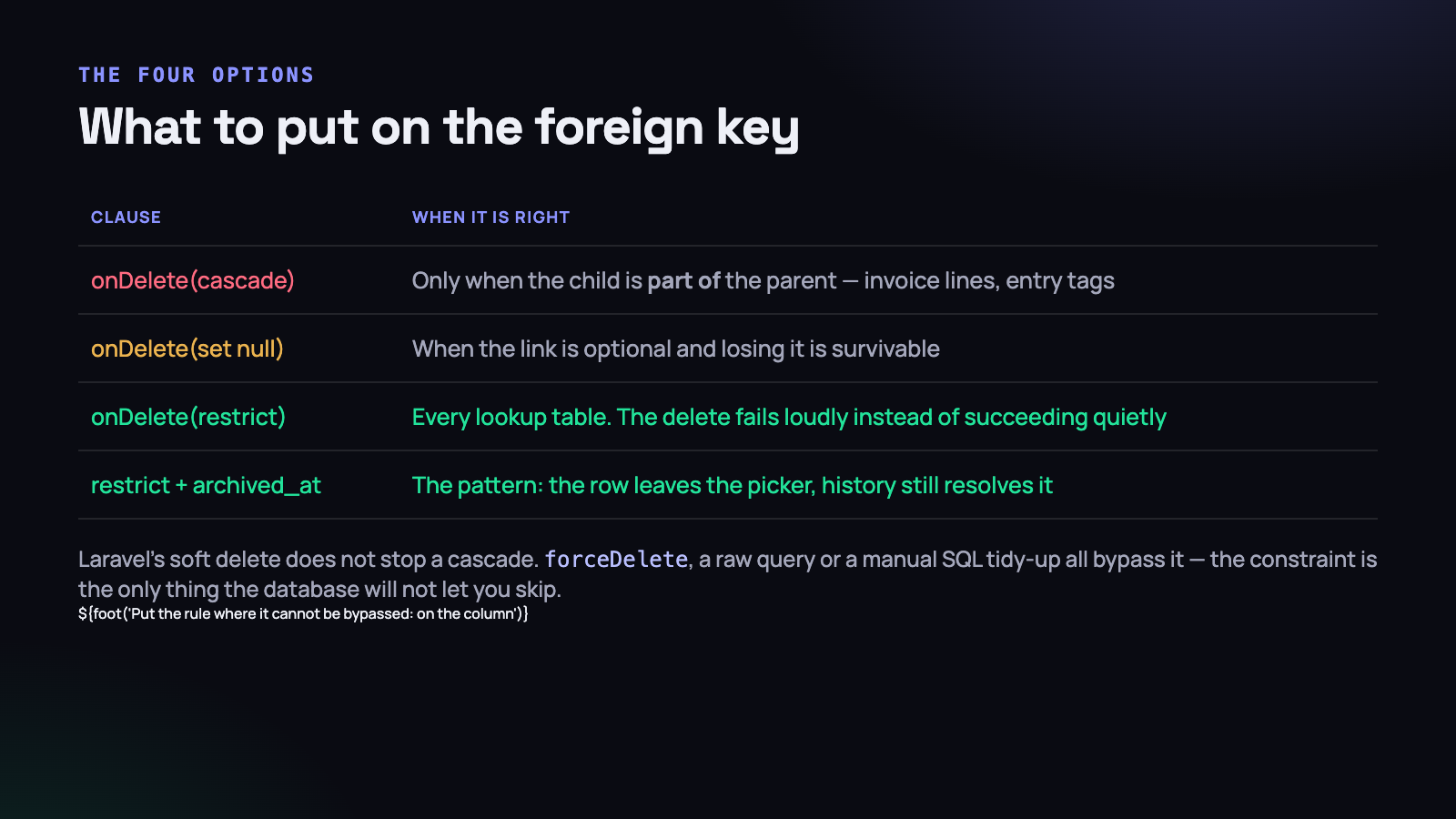
With RESTRICT, the delete fails. Loudly, immediately, with a foreign key constraint error, at the moment somebody tries it — instead of succeeding quietly and being discovered a fortnight later when a payroll report is short.
“But now the delete throws an ugly error.” Yes, and an ugly error is a hundred times better than silent data loss. It is also a prompt to build the thing you actually wanted, which is an archive.
The four options and when each is right:
- CASCADE — only when the child is part of the parent. Invoice lines, entry tags, message attachments.
- SET NULL — when the link is optional and losing it is survivable. A task’s optional category is a reasonable candidate, though see the note about history below.
- RESTRICT — every lookup table, every descriptor, anything a settings screen can remove.
- RESTRICT plus an archived flag — the pattern you actually want almost everywhere, and the subject of the rest of this article.
One caution about SET NULL: it destroys information just as thoroughly as a cascade, only more politely. A leave request whose type becomes null still exists, but the report that grouped leave by type now has a bucket called “none” that nobody can explain. If the value mattered when the fact was recorded, it still matters now.
The migration that fixed it
Changing a foreign key means dropping it and re-adding it, because MySQL will not alter the referential action in place. Laravel names the constraint predictably, so the drop is straightforward:
public function up(): void
{
    Schema::table('leave_requests', function (Blueprint $table) {
        $table->dropForeign(['leave_type_id']);

        $table->foreign('leave_type_id')
              ->references('id')->on('leave_types')
              ->restrictOnDelete()
              ->cascadeOnUpdate();
    });

    Schema::table('leave_types', function (Blueprint $table) {
        $table->timestamp('archived_at')->nullable()->index();
        $table->foreignId('archived_by')->nullable()->constrained('users');
    });
}
Two operational notes, because this runs against a live table. Drop and re-add in the same migration so there is no window where the column has no constraint at all. And run it against a copy first: if any orphan rows already exist — a leave_type_id pointing at a row that is gone — the new constraint will refuse to be created, and the error message is not especially forthcoming. Find them before you start:
SELECT r.id, r.leave_type_id
FROM leave_requests r
LEFT JOIN leave_types t ON t.id = r.leave_type_id
WHERE r.leave_type_id IS NOT NULL AND t.id IS NULL;
If that returns rows, you have already had a version of this incident and have not noticed yet. Decide what those orphans should point at — usually a new type called something honest like “Unspecified (historical)” — backfill them, and then add the constraint.
Archive, not delete
The replacement for deleting a descriptor is archiving it. Two columns and a scope:
Schema::table('leave_types', function (Blueprint $table) {
    $table->timestamp('archived_at')->nullable()->index();
    $table->foreignId('archived_by')->nullable()->constrained('users');
});
class LeaveType extends Model
{
protected static function booted(): void
{
static::addGlobalScope('active', fn ($q) => $q->whereNull('archived_at'));
}
public function scopeWithArchived(Builder $q): Builder
{
return $q->withoutGlobalScope('active');
}
}The default is now “active only”, which is what every picker, dropdown and settings list wants. History screens opt in with withArchived(). The important property is that the safe behaviour is the default and the unsafe one requires typing — the same principle as a tenant scope.
We chose explicit archived_at columns over Laravel’s SoftDeletes for descriptors, deliberately. “Archived” is what the business means and what the interface says, and deleted_at invites somebody to reach for forceDelete() because the name implies the row is on its way out. Naming shapes what people do to your data.
The two things soft deletes break
Unique indexes
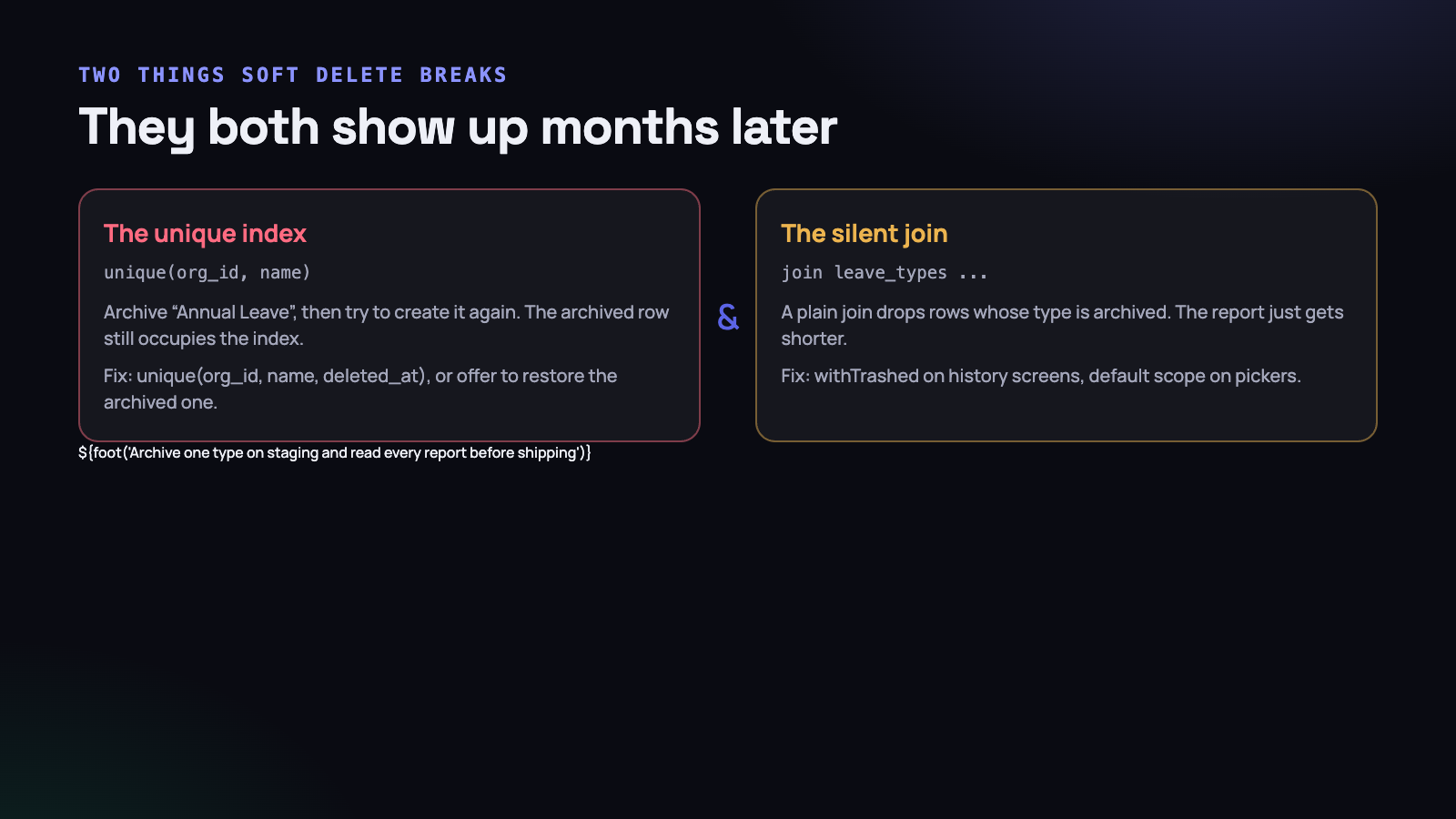
The classic. You have unique(organization_id, name) on leave types. Somebody archives “Annual Leave” and later tries to create it again. The archived row is still in the table, still occupying that index entry, so the insert fails with a duplicate key error about a record the user cannot see anywhere.
Two honest fixes.
- Include the archive column in the index:
unique(organization_id, name, archived_at). In MySQL, nulls do not collide, so multiple archived rows with the same name coexist and exactly one active one is allowed. Simple, and it works. - Detect the collision and offer to restore. When the name matches an archived row, ask: “An archived leave type called Annual Leave already exists. Restore it?” This is better product behaviour, because the user almost always wanted the old one back along with its history.
The first fix relies on a detail of the SQL standard that is worth being explicit about: in MySQL and in PostgreSQL, a unique index treats NULL as distinct from every other NULL. So unique(organization_id, name, archived_at) permits any number of archived rows sharing a name, because each has a different timestamp anyway, and permits exactly one row where archived_at is null. That is precisely the rule you wanted.
Two caveats. SQL Server does not behave this way — it treats nulls as equal in a unique index — so a project that might move databases should not lean on it. And if you archive and restore the same row twice within the same second, the timestamps collide; storing the archive time to microsecond precision removes that entirely theoretical problem and costs nothing.
Where you want the constraint to say what it means rather than rely on null semantics, a generated column does it plainly:
ALTER TABLE leave_types
  ADD COLUMN is_active TINYINT
    GENERATED ALWAYS AS (IF(archived_at IS NULL, 1, NULL)) VIRTUAL,
  ADD UNIQUE KEY uniq_active_name (organization_id, name, is_active);
On PostgreSQL the cleanest version is a partial index — CREATE UNIQUE INDEX ... WHERE archived_at IS NULL — which expresses the rule directly and indexes only the active rows. MySQL has no partial indexes, which is why the generated column exists as a workaround.
The second fix, offering to restore, is more work and is the right answer for anything users name themselves. Somebody typing “Annual Leave” into a fresh leave type is almost never trying to create a second, unrelated thing; they are trying to get the old one back, and a new row would orphan a year of history from the name it belongs to.
Joins that silently shorten reports
This one is nastier because it produces no error at all. A report joins leave requests to leave types:
// Drops every request whose type is archived - silently
$rows = LeaveRequest::join('leave_types', ...)
    ->whereBetween('from_date', [$from, $to])
    ->get();
If the model has a global scope, or the join carries the active condition, archived types disappear and every leave request attached to one vanishes from the report. The total is smaller. Nothing warns you. Somebody notices in three months, if at all.
The rule is that history screens read archived rows and pickers do not. Go through every report, export and detail view after adding the archive scope and decide explicitly which side each one is on. Then archive a type on staging and read every report before shipping — it takes twenty minutes and it is the only reliable way to find these.
The same care applies when the historical value could change. If somebody renames a leave type, your old reports quietly change too. For anything that will be argued about later — invoices especially — store the resolved label on the fact at the moment it is created, and keep the foreign key for navigation.
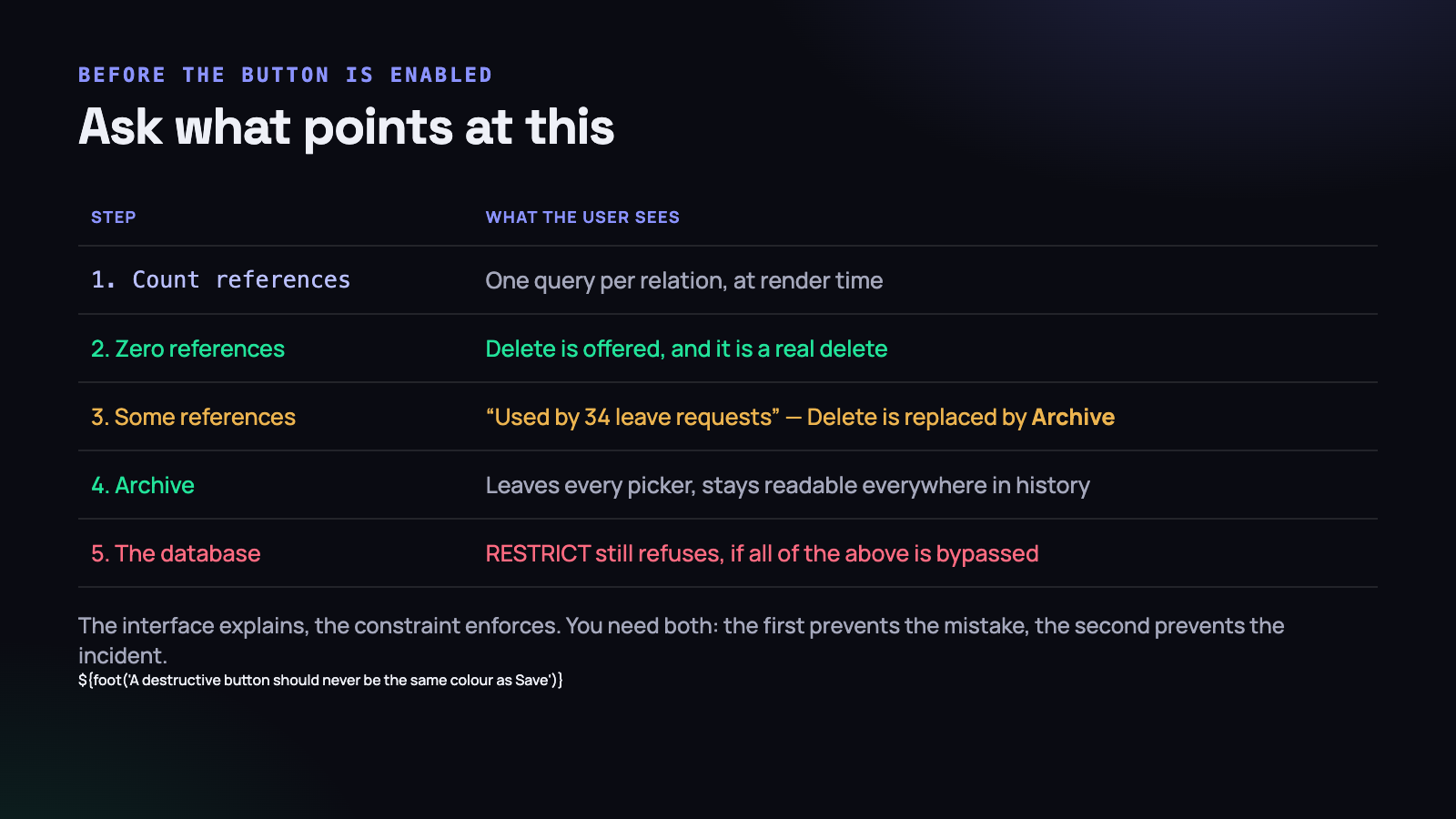
Ask what points at this, before the button is enabled
The constraint stops the disaster. It does not make the interface pleasant, and a screen where a button reliably produces an error is its own kind of bad.
So the last piece is a pre-delete check that runs when the settings page renders, not when the button is pressed.
public function deletionReport(LeaveType $type): array
{
    $counts = [
        'leave requests' => $type->requests()->withArchived()->count(),
        'policies'       => $type->policies()->count(),
    ];

    $blocking = array_filter($counts);

    return [
        'can_delete'  => $blocking === [],
        'blocked_by'  => $blocking,
    ];
}
With that, the page can be honest before anybody clicks anything:
- No references. Offer Delete. It is a real delete, and it is safe because nothing points at the row.
- Some references. Replace Delete with Archive, and say why: “Used by 34 leave requests. Archiving hides it from new requests and keeps the history.”
- Always. The database constraint still refuses, in case anything bypasses the interface — a console command, an import, a future developer.
The count query costs a few milliseconds on a settings page nobody loads often. It replaces the worst moment in software, which is a person discovering that a reasonable action had an unreasonable consequence.
One more detail from the same incident: make the destructive button look destructive. It should not be the same size, colour and position as Save. And it should never be the rightmost button in a row, which is where muscle memory expects the safe one.
The deletes that are still legitimate
None of this says never delete. Three cases remain entirely proper.
- A mistake caught immediately — a project created by accident with nothing attached. The reference count is zero and there is no history to lose.
- A legal erasure request. Not a settings-screen delete: a deliberate, audited command with a written order of operations.
- Expired operational data. Screenshots past their retention window. These are facts, but facts you promised to discard.
All three share one property: the deletion is the point of the operation, not a side effect of another one. The incident above was a delete nobody asked for, performed by the database, on rows nobody was looking at.
Testing the constraint
A schema rule is only real if something checks it. These tests are short and they fail in exactly the situation that caused the incident.
public function test_cannot_delete_a_leave_type_that_is_in_use(): void
{
    $type = LeaveType::factory()->create();
    LeaveRequest::factory()->for($type)->create();

    $this->expectException(QueryException::class);

    $type->forceDelete();               // the constraint must refuse
}

public function test_archiving_keeps_the_requests_readable(): void
{
    $type    = LeaveType::factory()->create();
    $request = LeaveRequest::factory()->for($type)->create();

    $type->archive($this->admin);

    $this->assertNull(LeaveType::find($type->id));                 // hidden
    $this->assertNotNull(LeaveType::withArchived()->find($type->id));
    $this->assertNotNull($request->fresh());                       // survives
    $this->assertSame($type->name, $request->fresh()->leaveType->name);
}
The second test is the one that matters most, because it asserts all three behaviours the archive pattern promises at once: gone from the picker, present in history, and the child untouched. If any of the three regresses, one test goes red.
There is a third worth adding for anything an administrator can remove: assert that the settings endpoint returns a refusal with a useful message rather than a 500. A constraint violation reaching the user as a generic server error is technically safe and practically indistinguishable from a broken application.
Recovering, and what it actually took
For the record, because the recovery is part of the lesson. The rows were gone from the live database and the most recent backup predated the deletion by several hours, which meant a restore would have rolled back a day of everybody else’s work to recover fourteen rows.
What we did instead was restore the backup to a scratch database, extract the affected leave requests, and re-insert them. Ram’s approved annual leave was reconstructed from the backup plus the approval email. It took most of an afternoon.
It is worth being plain about what each kind of backup would have given us, because this is the moment people discover what they actually have.
- A nightly logical dump —
mysqldumpor equivalent — gives you every row as it stood at the dump. Recovering fourteen rows from it is easy: restore to a scratch database, select the rows, re-insert. What it costs you is everything between the dump and the incident, which is why you restore beside production and copy rows across rather than restoring over the top. - Binary logs give you the statements since that dump. With them you can replay to the second before the delete, or read the log directly to see exactly which rows were removed and reconstruct them precisely. This is the difference between recovering the data and recovering the data with confidence that you got all of it.
- Neither and the honest answer is that the rows are gone. No amount of application code recovers them. You reconstruct from whatever else happens to remember — approval emails, an export somebody took, a payroll sheet — and you accept that the reconstruction is a best effort.
On most shared hosting, binary logging is off and the host’s backup is a daily snapshot they take for their own purposes. That is the third case. Check which of the three you are in before you need to know, not during.
Two things made it slower than it needed to be. There was no audit entry, because the application had recorded a single leave-type deletion and knew nothing about the fourteen children the database removed on its own. And there was no constraint, so there was nothing in the schema that would have stopped it or even flagged it. Both are now in place, along with an audit row that records what a delete is about to affect before it happens.
What to do on Monday morning
- List every cascade in your schema.
SELECT TABLE_NAME, COLUMN_NAME, REFERENCED_TABLE_NAME FROM information_schema.KEY_COLUMN_USAGE WHERE REFERENCED_TABLE_NAME IS NOT NULLgives you the map in one query. - For each one, ask the question: is the child part of the parent, or is it a fact that merely refers to it? Every cascade pointing from a lookup table at a fact table is a bug, today.
- Change those to RESTRICT in a migration. It is a schema change, not a data change, and it is one of the cheapest safety improvements available — the sort of thing that belongs in the same category as any other careful migration.
- Add archived_at to your lookup tables with a global scope defaulting to active, and change the settings screens to archive rather than delete.
- Check your unique indexes on anything now archivable. Archive a row, try to recreate it with the same name, and see what happens.
- Archive one row on staging and read every report. This is the step people skip and it is where the silent join bug lives.
- Add the pre-delete count to the one settings screen where a delete would hurt most.
The whole of this comes down to a sentence worth keeping: a row that describes something can be retired, and a row that records something must be kept. Once the schema knows the difference, an administrator tidying up a settings page on a Friday afternoon can no longer destroy a record of something that actually happened — and they should never have been able to in the first place.




