
Hardware vs Software Encoding on Apple Silicon: What We Measured
Hardware vs Software Encoding on Apple Silicon: What We Measured
“Use hardware encoding” is given as settled advice, and for camera video it mostly is. For screen content the answer is less obvious, because the thing hardware encoders are worst at — fine detail and hard edges — is exactly what a screen is made of.
This is what we measured on Apple Silicon, where each one wins, and what we shipped as the default.
What the hardware actually is
Apple Silicon includes a dedicated media engine — fixed-function silicon that does H.264 and HEVC and nothing else. It is reached through VideoToolbox, it barely touches the CPU, and it draws very little power.
The trade is that it is fixed. It implements the encoding decisions Apple built into it, at the speed it runs, and no amount of configuration changes its fundamental approach. A software encoder such as x264 is a program: slower, hungrier, and able to spend as much analysis as you are willing to pay for.
That difference is the whole article. Hardware is fast and roughly fixed in quality. Software is slow and can be pushed further, particularly on content it can be tuned for.
What we measured
Our test: a ten-minute 4K screen recording of real work — an editor, a browser being scrolled, a terminal, several window switches. Encoded on an M-series laptop, once through VideoToolbox H.264 and once through x264 at a comparable target bitrate.
The numbers that mattered to us, in the shape they came out:
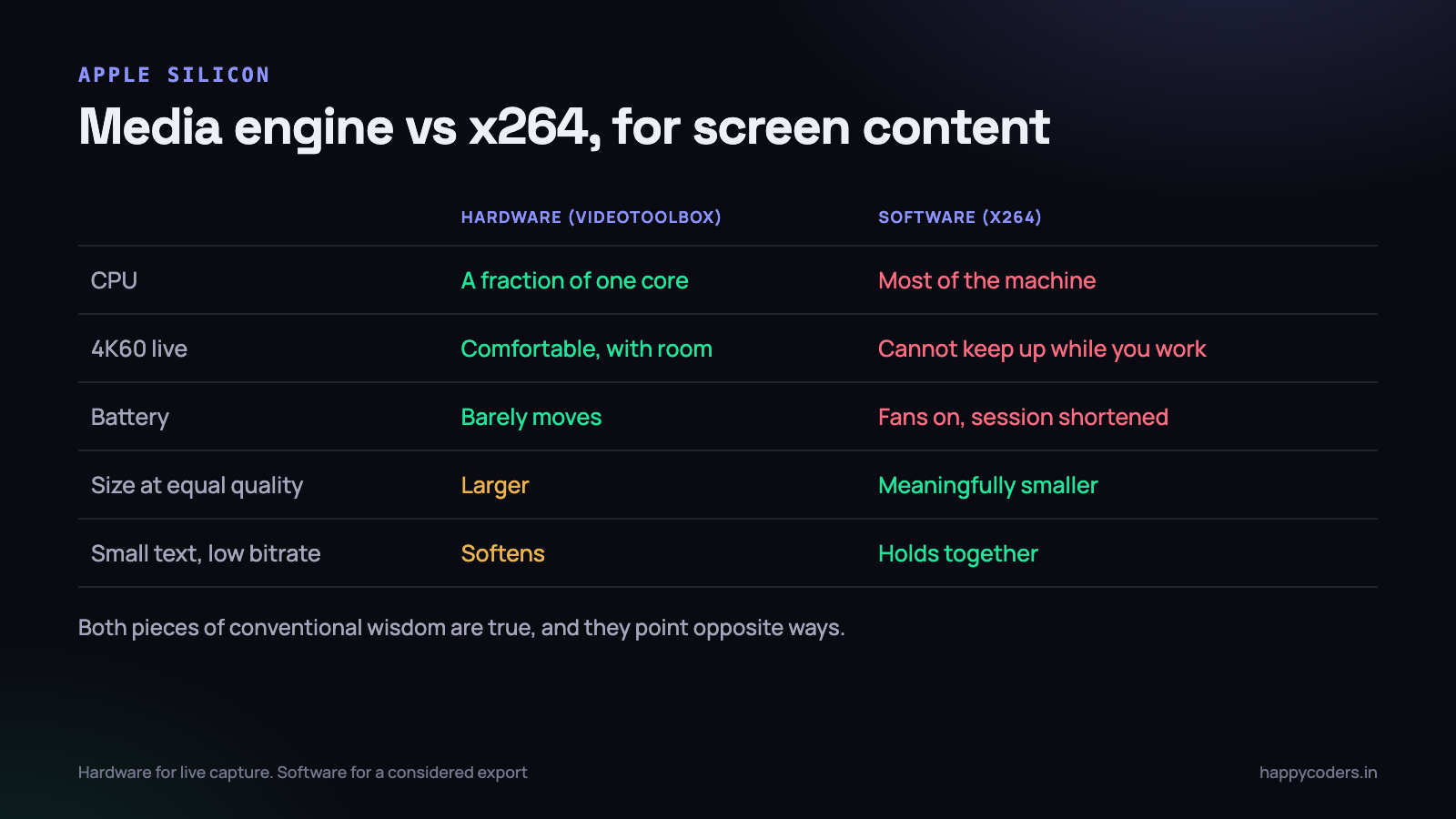
- CPU cost. Hardware encoding used a small fraction of one core. Software encoding at a quality preset good enough for screen text used most of the machine.
- Real-time capability. Hardware kept up with 4K60 capture comfortably and with room to spare. Software at the settings we wanted could not, on the same machine, while the machine was also doing the work being recorded.
- Battery. Hardware encoding barely moved the power draw. Software encoding ran the fans and visibly shortened battery life over a long session.
- File size at matched visual quality. Software produced a meaningfully smaller file for screen content — the text stayed cleaner at a lower bitrate.
- Text at low bitrate. The clearest difference. Below a certain rate, hardware-encoded small text softened noticeably while software held it together.
So both pieces of conventional wisdom are true at once, and they point in opposite directions. Hardware is dramatically cheaper. Software is better at the specific content we are encoding.
Why hardware struggles with text
Worth understanding, because it explains where the gap appears and where it does not.
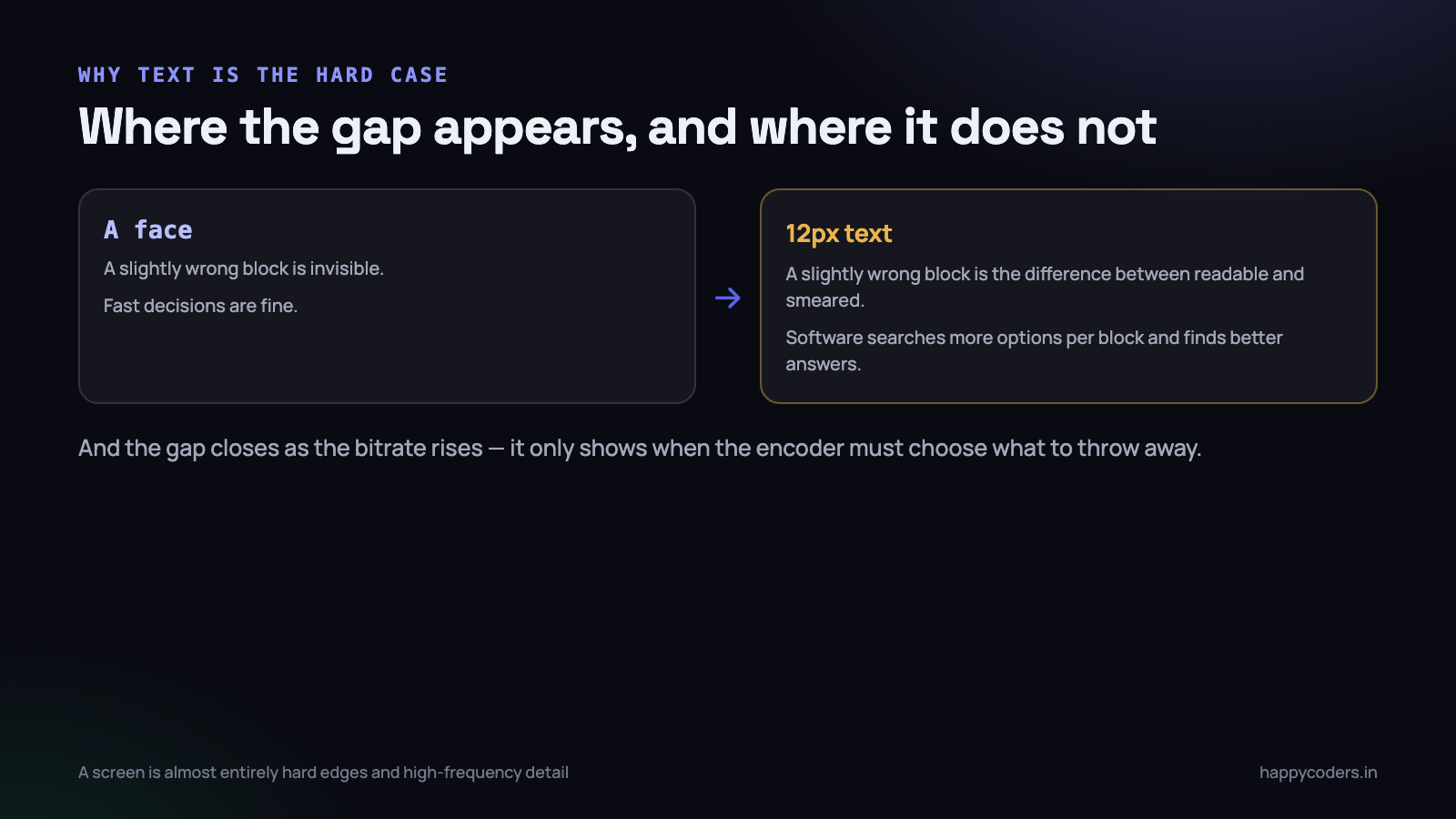
A fixed-function encoder makes its decisions quickly by design — how to split a frame into blocks, how much to quantise, where to spend bits. A software encoder can evaluate far more options per block before choosing, and on content with hard edges and high-frequency detail that search finds better answers.
Screen content is almost entirely hard edges and high-frequency detail. Text is the worst case there is for a fast decision: a slightly wrong block on a face is invisible, and on a 12-pixel letter it is the difference between readable and smeared.
This is also why the gap closes as the bitrate rises. Give both encoders plenty of bits and both produce sharp text; the difference only shows when the encoder has to choose what to throw away.
Where each one is the right answer
Hardware, for live capture
This is not close. A recorder encodes while the machine is doing something else — that is the entire point of a screen recorder. Spending most of the CPU on encoding means the thing being recorded runs badly, which shows up in the recording.
A software encoder that produces a marginally better file while making the demonstration stutter has failed at the job. For anything real-time, hardware wins on the grounds that matter.
Software, for a considered export
Different situation entirely. A finished recording being prepared for upload, where the machine has nothing else to do and time is not scarce, is exactly where a software encoder’s extra analysis is free to you.
This is the shape most video tools settle on: capture with hardware, offer an optional higher-quality export afterwards.
Hardware, on battery, always
A user recording a session on a train does not want the fans running. The power difference is large enough that it is worth overriding a quality preference when the machine is unplugged — and worth telling the user why.
Software, when the encoder must be identical everywhere
One case that is easy to overlook: the media engine is not the same across chip generations, and its output differs slightly between them. For a recorder nobody notices. For anything where two machines must produce byte-comparable output — a test suite asserting on encoded frames, a render farm, a forensic workflow — a software encoder pinned to a version is the only way to get reproducibility.
It is a narrow requirement and worth knowing about before you discover it through a test that passes on one laptop and fails on another.
The settings that matter more than the choice
Having measured all of this, the honest conclusion is that several other decisions moved quality more than encoder choice did.
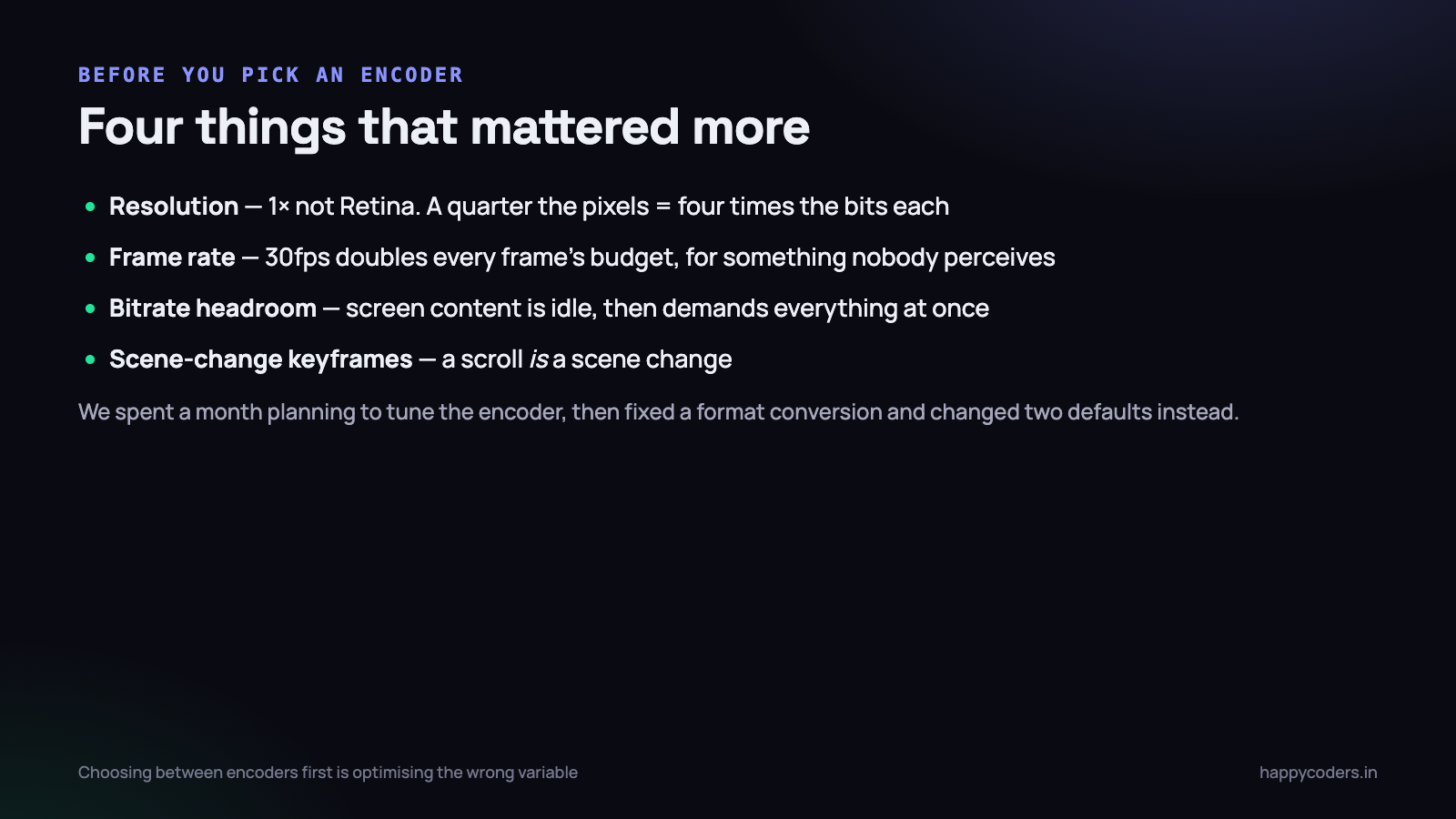
- Resolution. Recording at 1× rather than native Retina is roughly a quarter of the pixels, and therefore roughly four times the bits available per pixel at the same bitrate. This dwarfs the encoder difference.
- Frame rate. 30fps for screen content gives each frame twice the budget of 60fps at the same bitrate, for something almost nobody can perceive in a recording of typing and scrolling.
- Bitrate headroom. Screen content is idle for long stretches and then demands everything at once during a scroll. A generous ceiling matters more than which encoder is under it.
- Keyframe interval and scene detection. A scroll is effectively a scene change. Letting the encoder insert a keyframe there is the difference between a clean scroll and a smeared one, in either encoder.
A team choosing between encoders before fixing those four is optimising the wrong variable. We did exactly that for a while.
How to measure this yourself, honestly
Encoder comparisons are easy to run and easy to run wrongly, and almost every one published online has at least one of these problems.
Compare at matched quality, not matched bitrate
Two encoders at the same bitrate produce different quality, so a bitrate-matched comparison is really a quality comparison with the axis hidden. The useful question is the other way round: what bitrate does each need to reach the same quality? Find the rate at which each is acceptable, then compare those two numbers.
Use your own content
Standard test clips are camera footage of people and landscapes. They tell you almost nothing about how an encoder handles a terminal, a spreadsheet or a scrolling documentation page. Record ten minutes of your own product being used and test on that.
Measure the scroll, not the still
A static page looks fine at almost any bitrate in either encoder. The entire difference lives in the frames during a scroll or a window switch. A comparison that averages over a whole recording buries the only moment that matters — look at those seconds specifically.
Measure on the machine that will do it
Software encoding results on a desktop with many cores say nothing about a laptop on battery, which is where most recordings actually happen. And measure while something else is running, because the recorder is never alone.
Look at the picture as well as the number
Automated quality metrics are useful for tracking a regression and unreliable for deciding between two encoders on text, because they do not weight legibility the way a reader does. Two files can score within a point of each other and differ visibly in whether a menu label can be read. Look at the frames.
Things that surprised us
The hardware encoder has a warm-up
The first second or two of output is noticeably worse than the rest. For a recorder this is invisible — nobody cares about the first frames of a session. For a tool that encodes many short clips it is not, and it argues for keeping one session alive rather than creating a new encoder per clip.
It will refuse, rather than degrade
Ask for something the media engine does not support — an odd resolution, an unusual pixel format, too many simultaneous sessions — and it fails to create the session rather than falling back. Any code path that assumes hardware encoding is available needs a real software fallback, and that fallback needs to be tested rather than assumed.
HEVC is a bigger win than the encoder choice
For the same visual quality, HEVC produced substantially smaller files than H.264 on both encoders, and the media engine handles it at the same speed. The catch is compatibility: an HEVC file is excellent for an archive and risky for a file a client has to open.
We ship H.264 by default for exactly that reason, and it is the right call even though it costs file size. A recording that will not play has no quality at all.
Two encoders at once is a limit, not a setting
The media engine supports a finite number of concurrent sessions, and the number is not large. Recording the screen while the machine is also exporting something, or running a video call that is itself encoding, can push you over it — and the failure is the refusal described above rather than a slowdown.
Worth handling explicitly if your application can ever encode two things at once, and worth remembering that the user’s other software is competing for the same hardware.
Encoding is not usually the bottleneck
Having spent time optimising the encoder, the thing that limited our frame rate turned out to be a pixel format conversion earlier in the pipeline. Matching the capture format to the encoder’s input removed it entirely and did more for throughput than any encoder setting.
A note on the other two codecs
Two more will come up in any discussion of this, and both are worth a sentence.
AV1 is meaningfully more efficient than HEVC and the newest Apple Silicon can decode it in hardware, but encode support is far less widespread. For a recorder that has to produce a file the user can open anywhere today, it is premature. For an archive format in two or three years it will be the obvious answer.
ProRes is not a competitor to either of these. It is an intermediate format: very large, effectively lossless, and designed to be edited rather than delivered. The media engine handles it, and it is the right choice for a recording heading straight into heavy editing — and the wrong choice for anything else, by a very wide margin.
The practical rule we use: H.264 for anything leaving the machine, HEVC for an archive the user keeps, ProRes only when they explicitly ask for an editing source.
What we shipped
- Hardware H.264 through VideoToolbox for all live recording. The CPU cost of anything else is unacceptable while the user is working.
- A real software fallback for the machines and configurations where session creation fails, tested rather than hoped for.
- 1× resolution and 30fps as defaults, because those two choices matter more than the encoder.
- Generous bitrate with scene-change keyframes, so a scroll does not fall apart.
- H.264 in MP4 rather than HEVC, for compatibility.
None of that is a surprising list. What the measurement changed was the order we did things in.
The interesting part of the exercise was not the answer — most recorders land here — but that the measurement changed where we spent the next month. We started out planning to tune the encoder and finished by fixing a format conversion and changing two defaults, which between them did far more.
If you are working on something similar, the related piece is on where frames actually get lost in a capture pipeline — the same lesson about measuring before optimising, in a different stage.




