
The Restore Drill: Proving Your Backup Actually Works
The Restore Drill: Proving Your Backup Actually Works
Every server we have ever taken over had backups. A cron line, a folder of dated .sql.gz files, sometimes a plugin with a green tick in the dashboard. In roughly half of those handovers, the backup could not be restored.
That is not a failure of discipline. It is a failure of feedback. A backup job tells you it wrote a file. It does not tell you the file is worth anything, and there is no way to find out except by trying — which is the one thing nobody schedules.
This is the drill we run, what it catches, and how to turn it into a number you can put in front of a client.
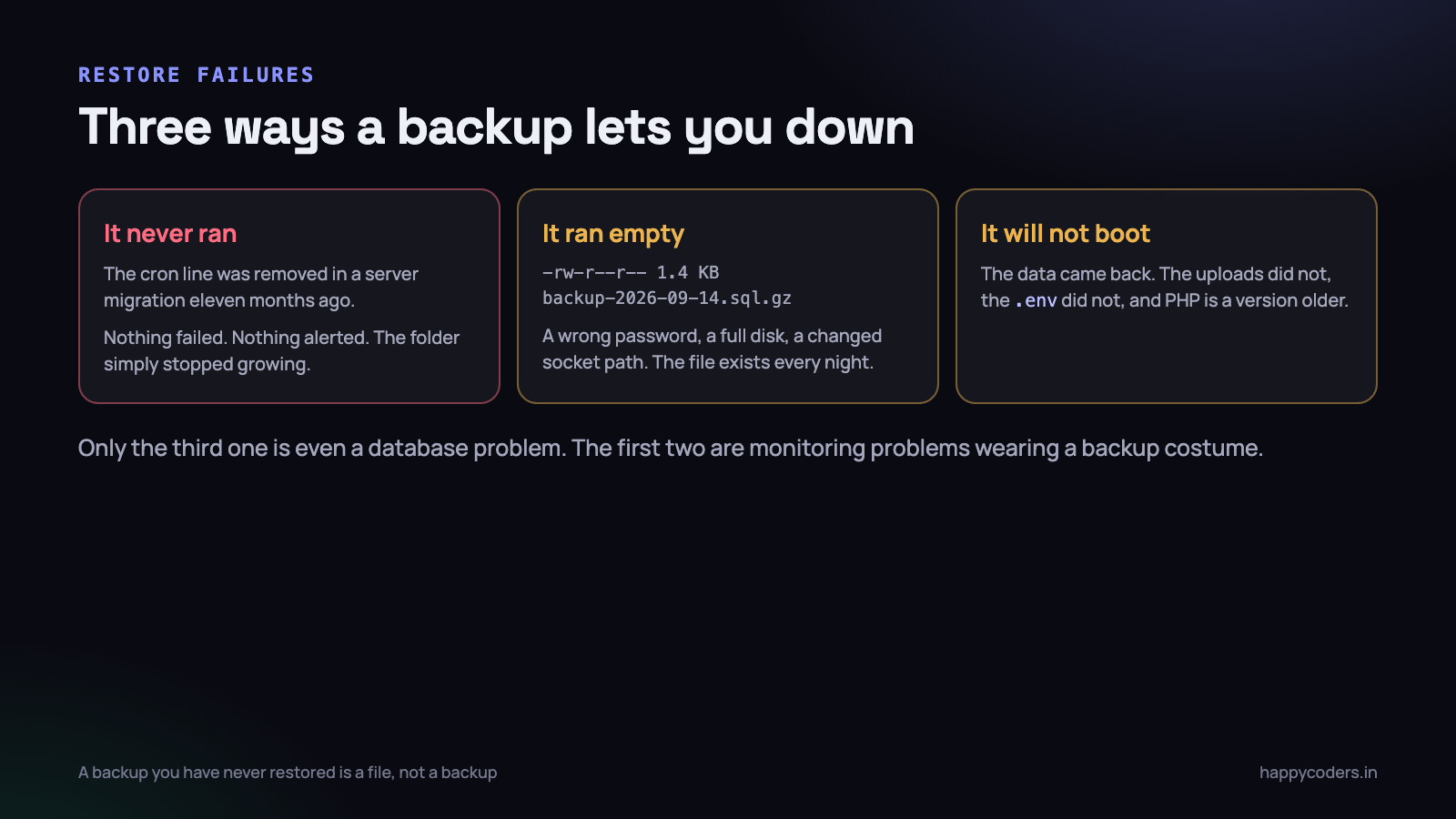
The three ways it goes wrong
Restores fail in three distinct modes, and they need three different defences. Naming them separately is most of the work.
One: the backup was never running
The most common, and the most embarrassing. A server migration in March moved the site and nobody copied the crontab. A disk filled in June and the job started exiting early. Somebody changed the MySQL password and the script has been failing authentication ever since.
In every one of those cases there is no alarm, because a cron job that fails silently is indistinguishable from one that succeeds. Cron mails output to a local mailbox nobody has read since 2019. The folder has files in it — old ones — and a quick ls looks reassuring until you read the dates.
The fix is trivial and almost universally skipped: alert on absence, not on failure. Something must complain when a fresh backup file does not appear, and that something must not live on the machine being backed up.
#!/bin/bash
# runs on a different machine, once a day
LATEST=$(ssh backup@store "ls -t /backups/prod/*.sql.gz | head -1")
AGE=$(ssh backup@store "stat -c %Y /backups/prod/$(basename $LATEST)")
NOW=$(date +%s)

if [ $(( (NOW - AGE) / 3600 )) -gt 30 ]; then
    echo "No prod backup in 30 hours. Latest: $LATEST" \
      | mail -s "BACKUP MISSING - prod" ops@example.com
fi
Two: it ran, and the file is empty
Worse, because it defeats the check above. A file appears every night at 02:15 with the right name, and it is 1.4 KB — a header, a couple of comments and nothing else. mysqldump exits with a zero status in more situations than people expect, and a shell pipeline through gzip loses the exit code of the first command unless you ask for it.
# this reports success even when mysqldump fails
mysqldump -u root db | gzip > backup.sql.gz

# this does not
set -o pipefail
mysqldump --single-transaction --routines --triggers \
  -u backup db | gzip > backup.sql.gz || exit 1

# and then check the result is plausible
SIZE=$(stat -c %s backup.sql.gz)
[ "$SIZE" -lt 1000000 ] && { echo "backup suspiciously small: $SIZE"; exit 1; }
Three lines. pipefail so a failing dump fails the script, a minimum size so an empty dump fails the script, and a floor chosen from the real size of the database rather than from nothing. If last night’s file is 340 MB and tonight’s is 900 KB, that is a fact worth an email even though nothing errored.
Check the tail of the dump too. A complete mysqldump ends with a line beginning -- Dump completed on. If that line is missing, the file was truncated — usually because the disk filled halfway through.
zcat backup.sql.gz | tail -1 | grep -q "^-- Dump completed" \
  || { echo "truncated dump"; exit 1; }
Three: it restored, and the application will not start
This is the interesting one, and the reason a drill has to go further than mysql < backup.sql. The data comes back correctly and the site still does not work, because a running application is more than its database.
The usual culprits, in the order we have actually hit them: the .env was not in the backup, so APP_KEY is gone and every encrypted column is unreadable. The uploads directory was not in the backup, so the invoices reference PDFs that do not exist. The new server runs PHP 8.4 and the application needs 8.3. The database is MySQL 8.0 and the dump came from 5.7 with a collation that no longer exists.
A database restore that takes twenty minutes and an application that takes two days to make bootable is a two-day outage, not a twenty-minute one. The client experiences the second number.
What actually has to be in the backup
Write this list down once, per project, and check it during the drill.
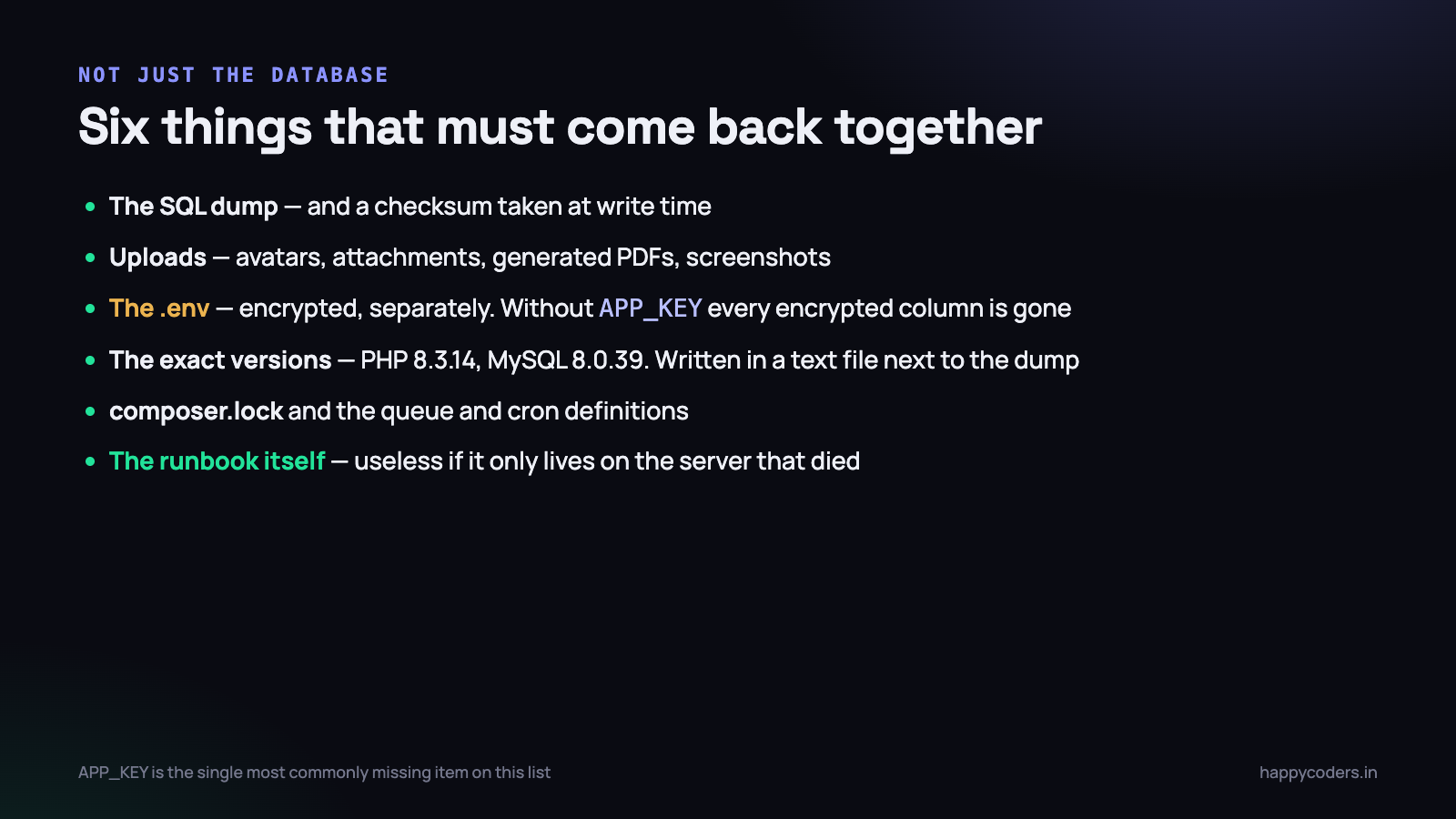
- The SQL dump, with
--single-transactionfor InnoDB so it does not lock the site, plus--routinesand--triggerswhich are not included by default and are missed by almost everybody. - User-uploaded files. Avatars, attachments, generated PDFs, screenshots. Usually far bigger than the database, which is why people leave them out and then discover the omission at the worst moment.
- The .env file, encrypted, stored separately from the dump. Without
APP_KEYevery encrypted column in a Laravel application is permanently unreadable — not difficult, impossible. - The exact versions. A plain text file next to the dump saying PHP 8.3.14, MySQL 8.0.39, nginx 1.24. Two minutes to write, and it removes the most frustrating hour of any restore.
- composer.lock, the crontab, and the queue worker or supervisor configuration. The code is in git; the things that run it usually are not.
- The runbook. If it only exists on the server that died, it does not exist.
On the uploads question, there is a sensible middle path when the directory is 80 GB. Back up the database nightly and the uploads weekly, then accept that a restore may lose a week of attachments and say so out loud in the recovery plan. An honest documented gap beats an undocumented assumption.
Where the copies live
A drill can only restore from a copy that exists somewhere reachable, so it is worth being explicit about where they sit. The old rule still holds: three copies, on two kinds of storage, one of them somewhere else entirely.
In practice, for a small team on shared or VPS hosting, that means the nightly dump on the server, a synced copy in object storage with a different provider, and a retained set that the production server cannot delete.
That last clause matters more than the count. If the production server holds the credentials that can delete the backups, then anything that compromises the server — ransomware, a bad script, a disgruntled contractor — can delete the backups too. Ransomware operators in particular look for the backup destination first, because an organisation with working backups does not pay.
- Write-only credentials from production. The key on the server can upload and list. It cannot delete or overwrite. Pruning old files is done by a separate scheduled task with different credentials.
- Object lock or versioning on the bucket, where the provider supports it. A deleted object is recoverable for thirty days regardless of what deleted it.
- A retention ladder, not a flat window. Seven dailies, four weeklies, twelve monthlies. Data corruption is often noticed weeks later, and a seven-day window means the last clean copy is already gone.
The retention ladder is the one that gets skipped, and it is the one that saves you from the slow failure: a bug that has been quietly writing wrong values since August, discovered in October. A week of backups all contain the bug. A monthly from July does not.
The drill itself
Ninety minutes, once a quarter, in the calendar with a name. It is not a review meeting. Somebody sits down and restores the system.
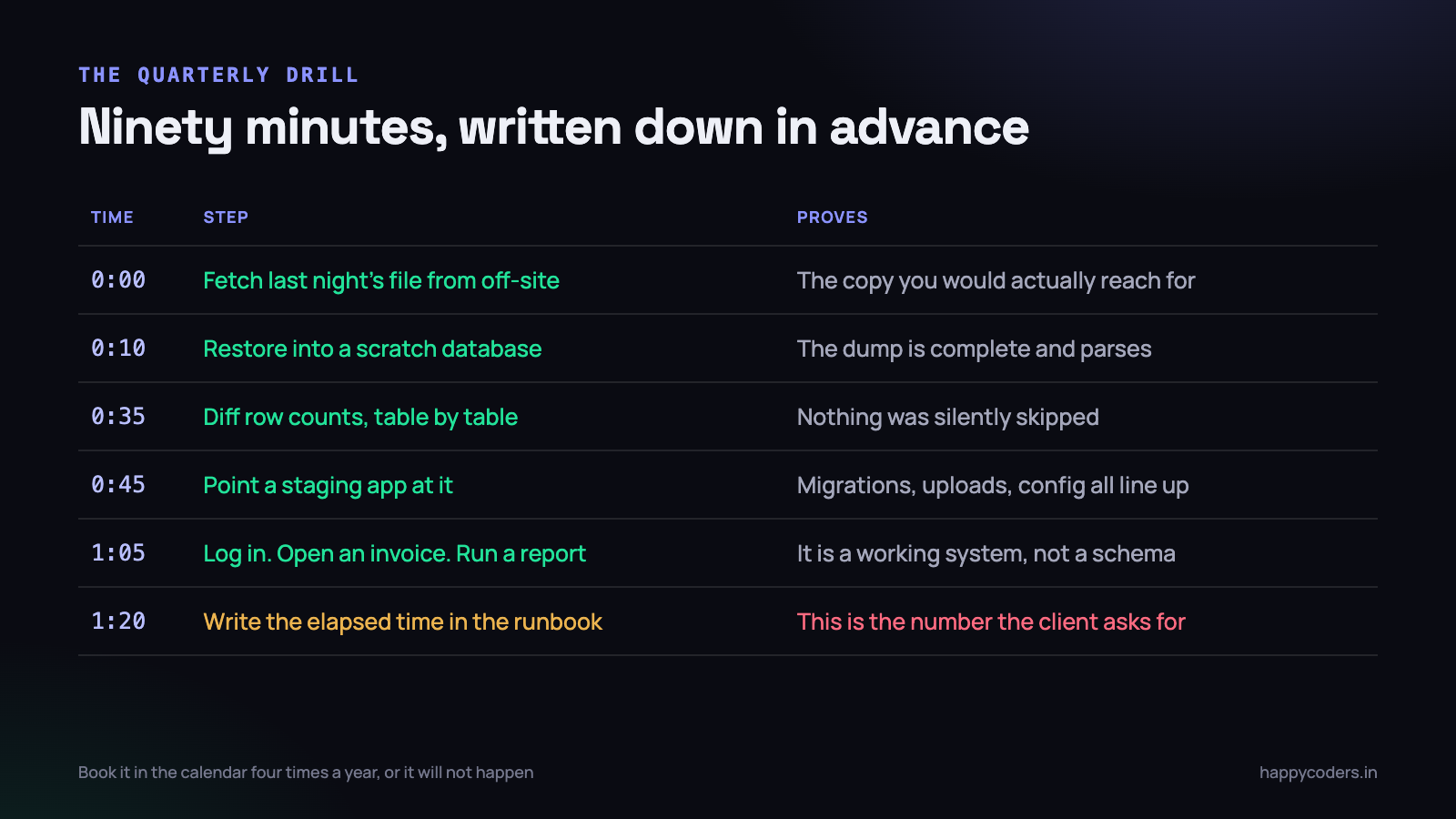
Fetch the file the way you would in a real emergency
Not the copy on the production server — that copy does not exist in the scenario where you need it. Pull it from the off-site location, over the connection you would really use, with the credentials that are really stored wherever you really store them.
This step alone has failed for us twice. Once because the S3 credentials in the runbook had been rotated. Once because the only person with access to the backup account had left the company four months earlier.
Restore into a scratch database, never over anything
mysql -u root -e "DROP DATABASE IF EXISTS drill_restore; \
  CREATE DATABASE drill_restore CHARACTER SET utf8mb4 \
  COLLATE utf8mb4_unicode_ci;"

time zcat backup-2026-09-14.sql.gz | mysql -u root drill_restore
The time is not decoration. That number is the first component of your recovery time, and it grows quietly as the database does. A restore that took four minutes two years ago may take forty now.
Diff the row counts, table by table
The single most valuable check in the drill, and it takes one query on each side.
SELECT TABLE_NAME, TABLE_ROWS
FROM information_schema.TABLES
WHERE TABLE_SCHEMA = 'drill_restore'
ORDER BY TABLE_NAME;
Run the same against production, put the two lists side by side, and look for tables that are empty in the restore or wildly short. TABLE_ROWS is an estimate for InnoDB, so allow a few percent of drift; a table with 400,000 rows in production and zero in the restore is not drift.
This is what catches the excluded-table mistake. Somebody added --ignore-table for a large log table in 2024, then a real table got added to the same list a year later during a copy-paste, and nothing said a word.
Point a real application at it
Take a staging environment, change the database name in its configuration, and run the application against the restored data. Then do three things by hand:
- Log in as a real user. This proves sessions, password hashing and, if you use encrypted columns, that the
APP_KEYin the backup matches the data in the backup. - Open something with a file attached. An invoice PDF, an uploaded avatar, a screenshot. This is the only way you find out the uploads were never backed up.
- Run the heaviest report you have. It touches the most tables and it is where a missing index or a partially restored table shows up.
Run php artisan migrate --pretend as well. If it wants to run migrations, the backup is older than the code and you need to know that before an outage, not during one.
Write the elapsed time down
The last step and the one everybody skips. Total minutes from “I have the file” to “a user could log in”. That number is the deliverable. Everything else in the drill exists to produce it.
Point-in-time recovery, and what it really costs
A nightly dump means your worst case is losing a day. For a lot of businesses that is fine. For a business whose staff log time entries all day, losing a day means a day of unbillable work reconstructed from memory — which is worse than it sounds, because people do not remember accurately.
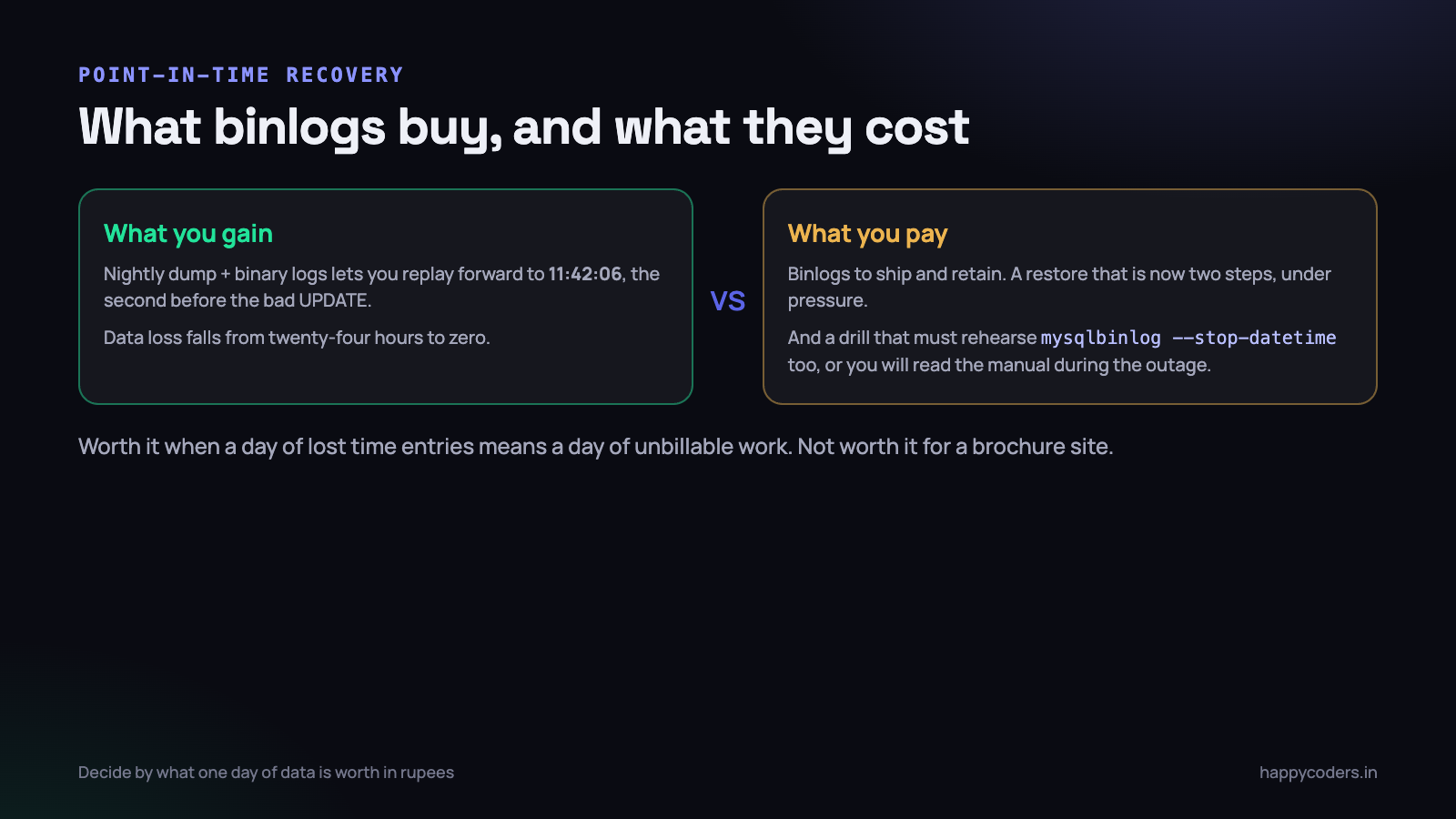
Binary logs are MySQL’s record of every change. Keep them, ship them off the server with the dumps, and you can restore last night’s backup and then replay forward to any second before the incident.
-- my.cnf
log_bin = /var/log/mysql/mysql-bin
binlog_expire_logs_seconds = 604800   -- 7 days
sync_binlog = 1
# restore the base, then replay up to the second before the bad UPDATE
zcat backup-2026-09-14.sql.gz | mysql -u root prod_restore
mysqlbinlog --start-datetime="2026-09-14 02:15:00" \
--stop-datetime="2026-09-14 11:42:06" \
/var/log/mysql/mysql-bin.0001* \
| mysql -u root prod_restoreThe costs are real and worth stating plainly. Binlogs consume disk and have to be shipped somewhere. sync_binlog = 1 costs write throughput. And the restore is now a two-step procedure performed under pressure, which means the drill has to rehearse the replay too — otherwise the first time anyone reads the mysqlbinlog manual is during an outage with a client on the phone.
A reasonable rule: if a day of lost data costs more than a week of your time to reconstruct, set up binlogs. If it does not, do not, and write the twenty-four hour exposure into the recovery plan instead.
Answering the client who asks
Indian clients running procurement, and anybody bidding for enterprise work, will ask some version of two questions. They will usually use the acronyms.
- RPO — recovery point objective. How much data can we lose? With a nightly dump, up to twenty-four hours. With binlogs shipped every five minutes, about five minutes.
- RTO — recovery time objective. How long until we are running again? This is the number from your drill, plus the time to provision a server if the old one is gone.
Most suppliers answer these with adjectives. “We take daily backups and can restore quickly.” A drill lets you answer with a sentence that is worth something:
“We restored the 14 September backup on 22 September into a clean environment. Database restore took 23 minutes, full application availability at 71 minutes. Worst-case data loss is the time since the last nightly dump, up to 24 hours. Here is the runbook.”
That paragraph has closed deals for us. Not because the numbers are impressive — seventy-one minutes is ordinary — but because almost nobody can produce them at all. It is the difference between claiming a capability and demonstrating one.
The drill will fail the first time
Expect it. The point of the exercise is to find the gap in September when it costs ninety minutes, rather than in March when it costs the client their week.
Things ours have surfaced, in no particular order: a backup user without PROCESS privilege so --single-transaction silently degraded to a locking dump; an off-site sync that had been failing for six weeks because the destination bucket policy changed; a restore that worked but produced garbled Tamil customer names because the dump was written in latin1 and the target database was utf8mb4; stored procedures missing entirely because --routines was never passed.
Every one of those was invisible from the outside. Every one would have been discovered during the outage instead.
Fix the runbook while you are in it
The drill is also the only reliable way to keep the runbook honest. Whoever runs it edits the document as they go: the command that had the wrong flag, the step that was missing, the credential that has moved. A runbook that has not been walked through in a year is fiction with good formatting.
Rotate who runs it, too. If only one person can restore the system, the restore procedure has a single point of failure that is not technical. Have somebody who has never done it work only from the document, and watch where they get stuck — that is your list of edits.
Three things worth automating between drills
The quarterly drill proves the whole chain. These three cheap checks cover the gaps in between.
- Freshness alert, from another machine. No new file in thirty hours, send an email. This catches failure mode one.
- Size and tail check, inside the backup script. Suspiciously small, or missing the
Dump completedline, and the script exits non-zero and shouts. This catches failure mode two. - A weekly automated test restore. A cron job that restores the newest dump into a scratch database, counts the rows in five key tables and emails a one-line summary. Thirty lines of shell, and it turns three months of blind trust into seven days.
#!/bin/bash
# weekly: restore last night's dump and count what matters
set -o pipefail
DB=auto_restore_check
LATEST=$(ls -t /backups/prod/*.sql.gz | head -1)

mysql -e "DROP DATABASE IF EXISTS $DB; CREATE DATABASE $DB;"
zcat "$LATEST" | mysql "$DB" || { echo "RESTORE FAILED: $LATEST"; exit 1; }

for T in users projects time_entries invoices organizations; do
  N=$(mysql -N -e "SELECT COUNT(*) FROM $DB.$T;")
  echo "$T: $N"
  [ "$N" -eq 0 ] && echo "  ^^ EMPTY - investigate"
done
Pipe the output into an email. A human glances at five numbers once a week and notices immediately when one of them goes to zero.
On Monday morning
Four things, and the first two take under half an hour between them.
- Check the date on your newest backup file. Not that backups are configured — the modification time on the actual newest file. This has been the shortest path to an unpleasant surprise more than once.
- Add
set -o pipefailand a minimum size check to the backup script. Two lines, and it converts the silent empty-file failure into a noisy one. - Put a ninety-minute restore drill in the calendar for the next quiet week, with a named owner. Not a reminder to think about backups — a booked slot to restore one.
- Write the version file — PHP, MySQL, nginx, OS — and drop it next to tonight’s dump. Two minutes now, an hour saved later.
The whole discipline reduces to one sentence worth repeating to whoever signs off the hosting bill: you do not have backups, you have restores, and until you have performed one you have neither.
Related: zero-downtime database migrations, and making migrations safe to re-run.




