Laravel’s Scheduler Went Quiet for a Month, and the Heartbeat Said It Was Fine
Laravel’s Scheduler Went Quiet for a Month, and the Heartbeat Said It Was Fine
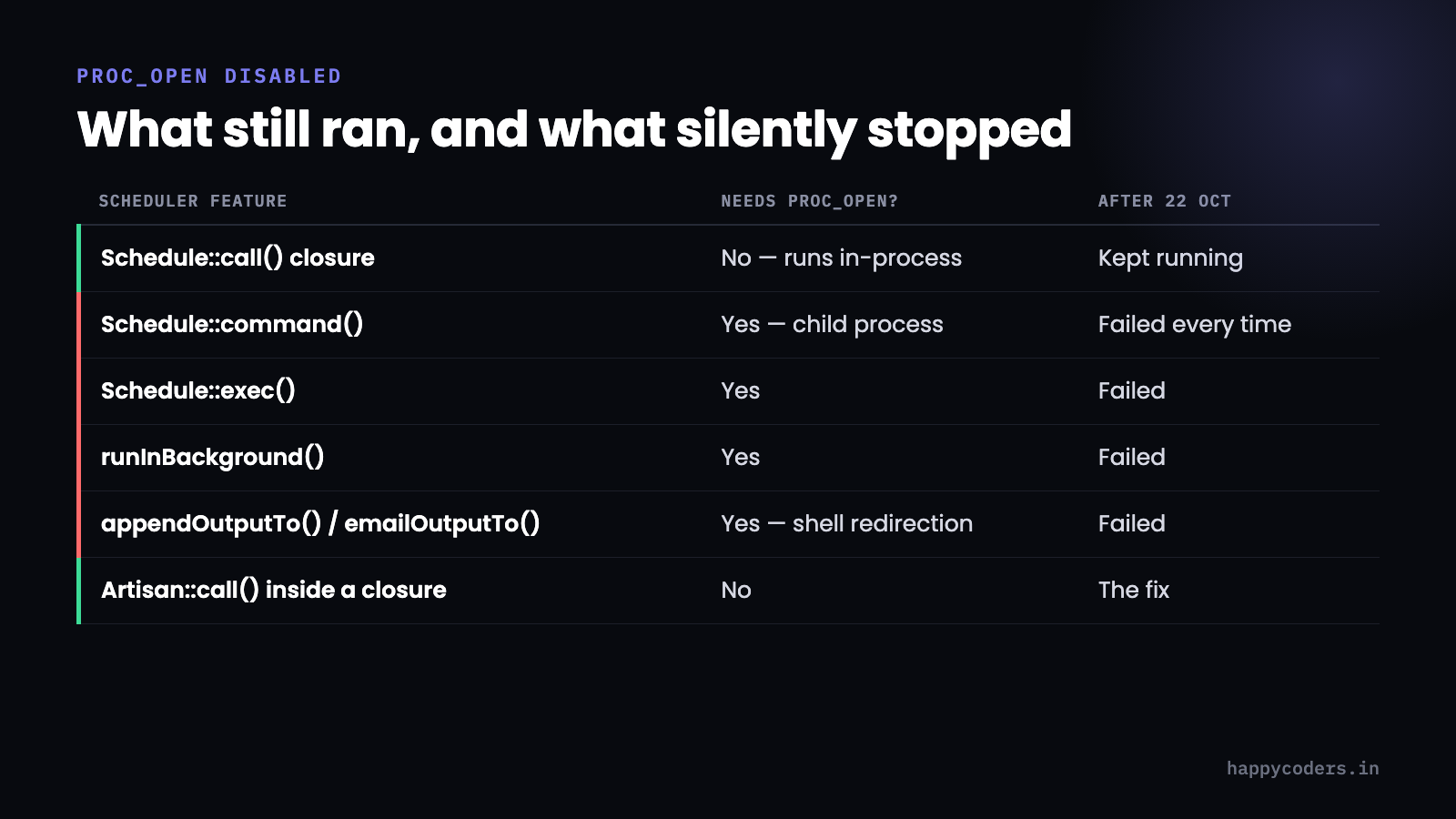
For a month, a client’s Laravel application ran its scheduled jobs exactly zero times — and every check we had said the scheduler was healthy.
The cron entry fired every minute. schedule:run started every minute. A heartbeat file, written by the scheduler for precisely this kind of monitoring, updated every minute. Meanwhile the three jobs that actually mattered — closing forgotten timesheet entries, computing a daily activity report and pruning old screenshots — threw the same exception around 290 times a day into a log file nobody was reading.
The cause was one line in the host’s PHP configuration. The lesson was about what a heartbeat really proves. This post covers both, and the small change that makes scheduled commands run on hosting that has taken proc_open away.
The setup
The app is a Laravel 11 project on shared hosting. There is no shell crontab on that host; cron jobs are added through the control panel, and that panel’s runner does not execute compound commands, so the entry calls a tiny wrapper script:
#!/bin/sh
cd /home/user/domains/api.example.com/public_html || exit 1
exec /opt/alt/php83/usr/bin/php artisan schedule:run
The schedule itself lives in routes/console.php:
Schedule::call(function () {
    file_put_contents(storage_path('logs/schedule-heartbeat.txt'), now()->toDateTimeString());
})->name('heartbeat')->everyMinute();

Schedule::command('screenshots:prune')->dailyAt('03:00');

Schedule::command('time-entries:auto-clock-out')->everyFiveMinutes()
    ->appendOutputTo(storage_path('logs/schedule.log'));

Schedule::command('activity:compute-daily-report')->dailyAt('03:30');
The heartbeat closure was added months earlier, after a different incident where the cron entry itself had silently never run. The idea was sound: if the file’s timestamp is fresh, the scheduler is alive. It stayed fresh the whole time.
What the log said
When we finally opened storage/logs/laravel.log it was 49 MB, and the tail was the same entry over and over:
production.ERROR: The Process class relies on proc_open, which is not available
on your PHP installation.
#0 vendor/symfony/process/Process.php(208): Symfony\Component\Process\Process->__construct()
#1 vendor/laravel/framework/src/Illuminate/Console/Scheduling/Event.php(201):
   Symfony\Component\Process\Process::fromShellCommandline()
...
#4 .../ScheduleRunCommand.php(194): Illuminate\Console\Scheduling\Event->run()
The first occurrence was on 22 October, mid-morning. The application’s own schedule.log — which only the auto-clock-out job appended to — had its last line about an hour earlier. Something had changed on the server that morning.
$ php -i | grep disable_functions
disable_functions => system, exec, shell_exec, passthru, ... popen, proc_open, ...
The host had added proc_open to disable_functions. Shared hosts tighten this list from time to time, usually without announcement, because proc_open and friends are how a compromised script would launch other programs. From the host’s side it is a reasonable hardening step. From ours, it switched off every scheduled command in the application.
How it was found
Not by monitoring, and not by a user. We were doing a routine health check across the client’s servers — uptime, response times, disk, recent errors — for an unrelated reason. Every page answered, every API endpoint returned 200, and the scheduler’s heartbeat file was thirty seconds old. By every check we had, the application was healthy.
The one thing that looked odd was the size of the log: 49 MB, for an application that normally logs almost nothing because its log level is set to errors only. An errors-only log that large means something is failing constantly. Grouping the last week’s entries by message took one command, and a single message accounted for nearly all of them.
The confirmation came from two files sitting in the same folder. The auto-clock-out job appends a line to its own log every time it closes a session; that log’s last line was a month old. The heartbeat file next to it, written by the same scheduler, was thirty seconds old. Two files, one scheduler, disagreeing by a month. From there to the disable_functions line took about ten minutes. Only afterwards did we go looking for damage — and found the nineteen-and-a-half-hour timesheet entry that the job would have closed weeks earlier.
It is worth being honest about what that means: we found it by luck and curiosity, not by design. If the log had been rotated daily, there would have been no 49 MB file to look odd.
Why hosts disable proc_open
It’s worth understanding the host’s side, because it tells you this will happen again. On shared hosting, hundreds of accounts share a machine. The most common way a hacked WordPress or PHP site is abused is by running other programs: a cryptominer, a spam mailer, a reverse shell. Those almost always start through exec, shell_exec, system, passthru, popen or proc_open. Disabling the whole family closes off a large class of abuse for every account at once.
The list usually grows over time rather than shrinking, and it can differ between PHP versions on the same host — the php83 binary may have a stricter list than the default php. That second point matters more than it sounds: the command-line php you reach over SSH is often not the binary the cron entry calls, so a quick manual check can pass while cron keeps failing. Always test with the exact path from your cron wrapper.
Why commands failed but the closure didn’t
This is the part worth understanding, because it is what made the failure invisible.
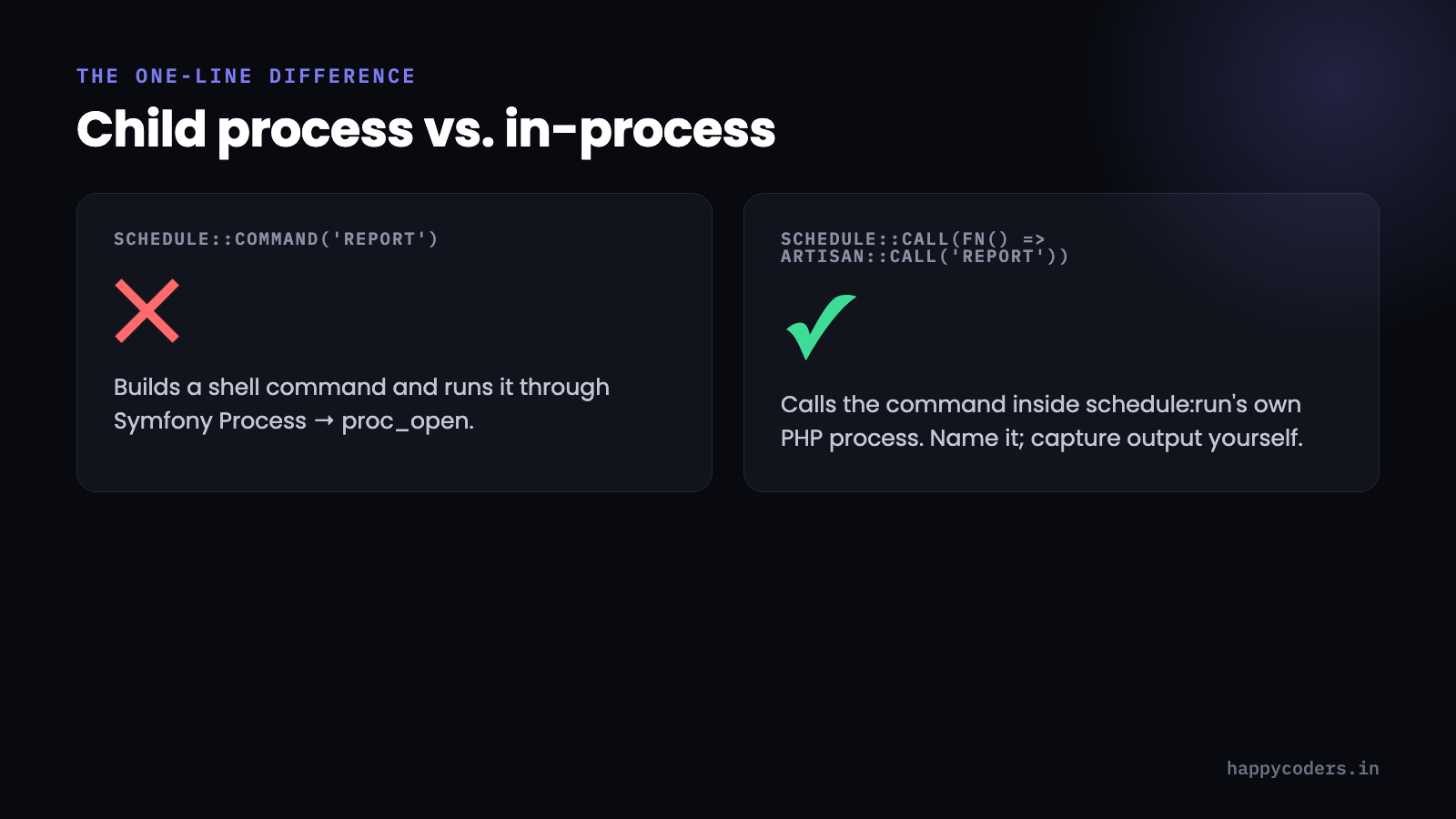
Laravel’s scheduler has two kinds of event. A Schedule::call() closure is a callback event: when it is due, schedule:run simply calls the PHP function in its own process. A Schedule::command() is a normal event: when it is due, the scheduler builds a shell command line — '/path/to/php' 'artisan' time-entries:auto-clock-out, plus any output redirection — and runs it as a child process through Symfony’s Process component. That component is built on proc_open.
So with proc_open disabled:
- The heartbeat closure ran in-process and kept writing its file. The scheduler looked healthy.
- Every
Schedule::command()threw before the command even started. The scheduler caught the exception, reported it to the log, and moved on to the next event — exactly as it is designed to, so one broken job doesn’t take down the rest.
Our heartbeat answered “did schedule:run start?” We had been reading it as “did the scheduled work happen?” Those are different questions, and for a month they had different answers.
What a month of silent failure costs
None of the three jobs was dramatic on its own. Together they touched money, reporting and storage:
- Auto clock-out never ran. Its job is to close a timesheet entry when someone forgets to clock out, at the moment they went idle. Without it, a forgotten session stayed open until the person noticed. One entry ran for nineteen and a half hours, overnight — hours that would land on a client invoice if nobody caught them.
- The daily activity report stopped at 21 October. Every report built on it after that date was quietly incomplete.
- Screenshot pruning stopped. Retention promises — “screenshots are deleted after N days” — were not being kept, and storage grew.
The middle one is the dangerous kind: no error on screen, just numbers that look plausible and are wrong.
There was a fourth, slower cost: the log itself. Around 290 stack traces a day, for a month, is how an errors-only log reaches 49 MB. Left alone for a year it would have been several hundred megabytes on a shared account with a disk quota, and a full disk takes the whole application down, not just the scheduler. Switching the log channel to daily with a retention limit means a flood like this can never grow without bound — we wrote that one up separately in The Disk That Filled Up at 2am. Ironically, rotation would also have hidden the 49 MB clue that led us here, which is one more reason the alert on the first failure matters.
The fix: run commands in-process
If the scheduler can’t start a child process, don’t ask it to. Wrap each command in a closure that calls it through Artisan::call(), which runs the command inside the current PHP process — the same way the heartbeat already worked:
use Illuminate\Support\Facades\Artisan;

Schedule::call(fn () => Artisan::call('screenshots:prune'))
    ->name('screenshots:prune')
    ->dailyAt('03:00')
    ->withoutOverlapping();

Schedule::call(function () {
    Artisan::call('time-entries:auto-clock-out');
    file_put_contents(storage_path('logs/schedule.log'), Artisan::output(), FILE_APPEND);
})->name('time-entries:auto-clock-out')->everyFiveMinutes()->withoutOverlapping();

Schedule::call(fn () => Artisan::call('activity:compute-daily-report'))
    ->name('activity:compute-daily-report')
    ->dailyAt('03:30')
    ->withoutOverlapping();
Three details in that block are easy to miss:
- Closures need a
name()before you can usewithoutOverlapping()oronOneServer(). The name is what the overlap lock is keyed on. appendOutputTo()no longer applies. It works by adding shell redirection to the command line, and there is no command line any more. CaptureArtisan::output()and write it yourself, as above.runInBackground()is gone too. It also starts a child process. Closures run one after another insideschedule:run, so a slow job now delays the next one. For three short jobs that is fine; for anything long-running, see below.
Testing the fix before trusting it
After a month of a check that lied, “it looks right” wasn’t going to be enough. Three checks, in order:
- List what the scheduler thinks it has.
php artisan schedule:listshows every event with its next due time. The closures should appear under the names you gave them; if a name is missing,withoutOverlapping()will throw. - Run one on demand.
php artisan schedule:testlets you pick a scheduled event and run it now, through the scheduler, exactly as cron would. Run each job once this way, using the same PHP binary as the cron wrapper, and confirm its effect — a row written, a file pruned — not just a clean exit. - Watch the real thing once. Wait for the next five-minute boundary and check the job’s own output, then the per-job heartbeat. Only then remove the old
Schedule::command()lines for good.
One more note: Schedule::job(), which dispatches a queued job on a schedule, is built on a callback rather than a child process, so it also keeps working without proc_open. If your jobs already live on a queue with a worker you trust, scheduling them with Schedule::job() is another clean way around the problem.
Other ways out, and when to use them
Running commands in-process is the smallest change, but it is not the only one.
- Ask the host to re-enable
proc_open. On a VPS you can do it yourself. On shared hosting the answer is usually no, and even a yes can be undone by the next hardening pass. Don’t build on it. - One cron entry per command. Skip the scheduler and point cron at
php artisan time-entries:auto-clock-outdirectly. It isolates jobs from each other and survives a slow neighbour. The cost is that scheduling now lives in the hosting control panel instead of version-controlled code, and you lose overlap protection unless the command takes its own lock. - Dispatch to a queue. Make the scheduled closure dispatch a job, and let a queue worker run it. That is the right shape for long work — but a queue worker on shared hosting is its own project, and it needs its own monitoring.
For short jobs on shared hosting, in-process closures are the pragmatic answer. For anything that might run longer than a minute, give it its own cron entry or a queue.
Catching up on the missed month
Fixing the scheduler stops the bleeding; it doesn’t undo a month. Each job needs a deliberate catch-up, and each one is different:
- Daily reports are the easy case if the command accepts a date and uses
updateOrCreatekeyed on that date. Loop over every missed day; running it twice is harmless. - Pruning catches itself up on the first run, because it deletes everything older than the cutoff, not just yesterday’s. Expect that first run to be large, and run it by hand at a quiet hour rather than letting it fire at 3 a.m. into a month of backlog.
- Auto clock-out needs care. Its rule is to close a forgotten session at the moment the person went idle, not at the moment the job notices. A naive catch-up that closes everything at “now” would credit people with weeks of hours. Review open and suspiciously long entries by hand before letting the job loose, and fix the ones it should have closed.
Monitoring the jobs, not the scheduler
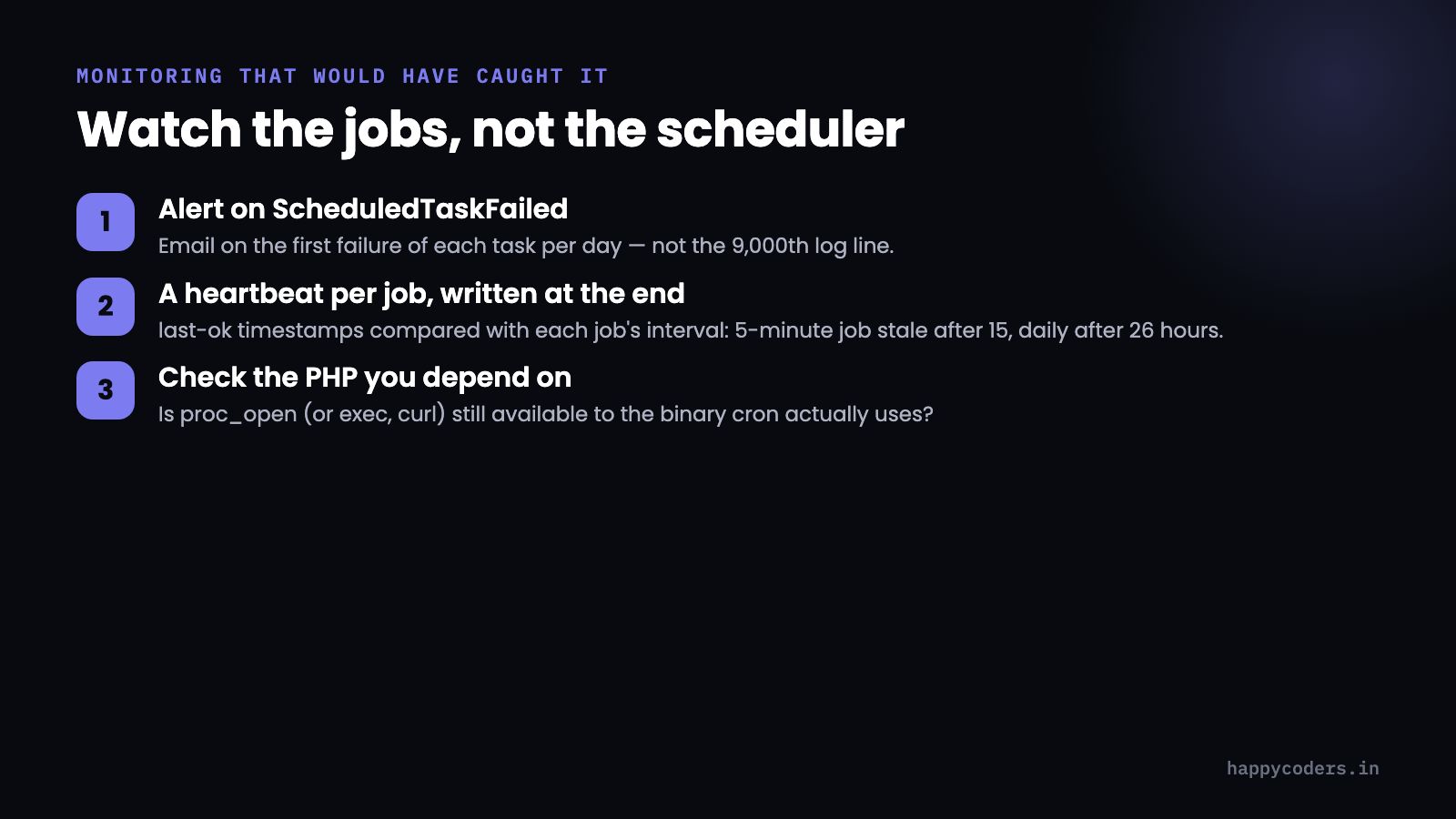
The real failure here wasn’t proc_open. Hosts change things; that will happen again. The failure was that our monitoring measured the wrong layer. Three changes fix that.
1. Listen for failed tasks
The scheduler fires an event when a task throws. A listener can turn the first failure into an email instead of the 9,000th log line:
use Illuminate\Console\Events\ScheduledTaskFailed;
use Illuminate\Support\Facades\Event;

Event::listen(function (ScheduledTaskFailed $e) {
    $key = 'sched-fail:' . ($e->task->description ?? 'task') . ':' . now()->toDateString();
    if (cache()->add($key, true, now()->endOfDay())) {      // once per task per day
        report(new RuntimeException("Scheduled task failed: {$e->task->description}"));
        // or Mail::raw(...) to whoever owns the app
    }
});
2. Give every job its own heartbeat
Instead of one file that says “the scheduler started”, record the last successful run of each job — at the end of the job, after the work is done:
Schedule::call(function () {
    Artisan::call('activity:compute-daily-report');
    cache()->forever('last-ok:activity-report', now()->toIso8601String());
})->name('activity:compute-daily-report')->dailyAt('03:30');
A health check then compares each timestamp with how often that job is supposed to run. Every five minutes means stale after fifteen. Daily means stale after twenty-six hours. Any stale job is an alert.
3. Check the environment you depend on
If your app needs a PHP function, check it is there. One line in a daily health check would have caught this on the first morning:
foreach (['proc_open', 'exec', 'curl_init'] as $fn) {
    if (!function_exists($fn) || in_array($fn, array_map('trim', explode(',', ini_get('disable_functions'))), true)) {
        $problems[] = "$fn is not available";
    }
}
Is your app affected?
Five minutes will tell you:
- Run
php -i | grep disable_functionswith the same PHP binary your cron uses — shared hosts often have several, and the command-line default may not be the one cron calls. - Search your log for
relies on proc_open. - List your scheduled tasks with
php artisan schedule:listand, for eachSchedule::command(), find evidence it actually ran recently — a row it wrote, a file it touched — not just thatschedule:runstarted. - If you use
runInBackground(),appendOutputTo()oremailOutputTo(), those depend on a shell too.
If any of those turn something up, the closure-wrapper pattern above is usually a ten-minute change.
What we’d tell ourselves a month ago
A heartbeat proves whatever writes it ran. Ours was written by the one kind of task that couldn’t fail the way the others did, so it was healthy by construction. Put the heartbeat at the end of the work you care about, alert on the first failure rather than the ten-thousandth, and check the environment you depend on as if it might change overnight — on shared hosting, it might.
We have written about the general case before in Scheduled Jobs You Can Trust: Cron, Heartbeats and Idempotence, and on alerting without a paid service in Error Monitoring Without a Service. This was the specific way it went wrong for us.