
Pause and Resume in a Screen Recorder Without Wrecking the Timeline
Pause and Resume in a Screen Recorder Without Wrecking the Timeline
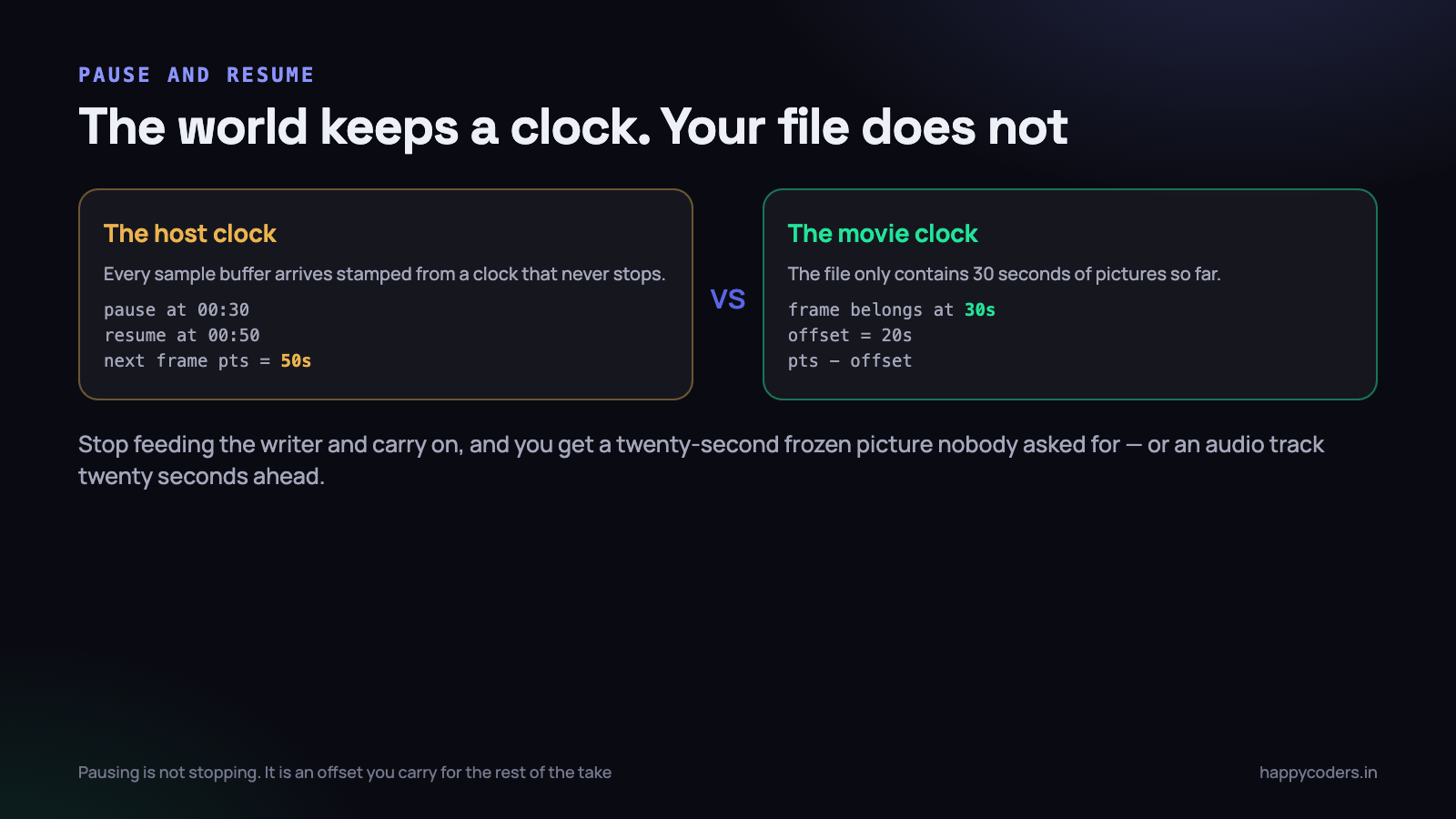
Pause looks like the easiest feature in a screen recorder. There is a button, and when it is pressed you stop handing frames to the writer. When it is pressed again you start handing them over once more. Two lines of code, roughly.
The first build we shipped did exactly that. A tester recorded thirty seconds, paused for twenty while they found a file, recorded another thirty, and got a sixty-second video that played for eighty seconds — with a twenty-second frozen picture in the middle and audio that had run off on its own by the end. Nothing had errored. Every frame we wrote was a real frame.
Why you cannot just stop feeding the writer
Every sample buffer that arrives from ScreenCaptureKit carries a presentation timestamp, and that timestamp comes from the host clock — a clock that has been running since the machine booted and has no idea you have a pause button. AVAssetWriter takes those timestamps at face value. It is not measuring anything itself; it is writing down what you tell it.
So when you stop appending for twenty seconds and then start again, the writer receives a frame stamped twenty seconds after the last one it saw. It does the only sensible thing with that information: it records that the previous frame should stay on screen for twenty seconds. Your file is now eighty seconds long and contains a very long still image.
This is the same class of bug as audio and video drifting apart over a long recording, and it has the same root: a timeline is being assembled from a clock that does not mean what the code assumes it means. The difference is that drift accumulates slowly and a bad pause is instantly, obviously wrong — which is a mercy.
The writer is not the thing that is broken here. If you hand
AVAssetWriterhonest timestamps it produces an honest file every time. Pause is entirely a problem of deciding what the honest timestamp is.
Session time and host time are different things
It helps to name the two clocks out loud, because most pause bugs are the two being confused.
- Host time is what the capture system stamps on every buffer. It advances at a steady rate whether you are recording, paused, or asleep. You do not control it and you cannot stop it.
- Session time is position in the movie. It only advances when frames are actually being written. This is the clock the user sees on the recorder’s timer, and the clock a player uses to seek.
When nothing is paused these two run in lockstep, offset by whatever host time you started at. A pause breaks that relationship permanently, and the whole feature comes down to tracking the size of the break.
One accumulated offset, and nothing else
The state you need is small. A total of all the time spent paused so far, and the host time at which the current pause began.
enum RecorderState {
    case idle, recording, pausing, paused, resuming, stopping
}

private var state: RecorderState = .idle
private var pausedTotal = CMTime.zero      // sum of every pause so far
private var pauseStartedAt: CMTime?        // host time of the current pause

private func hostNow() -> CMTime {
    CMClockGetTime(CMClockGetHostTimeClock())
}

func pause() {
    guard state == .recording else { return }
    state = .pausing
    pauseStartedAt = hostNow()
    state = .paused
}

func resume() {
    guard state == .paused, let began = pauseStartedAt else { return }
    pausedTotal = CMTimeAdd(pausedTotal, CMTimeSubtract(hostNow(), began))
    pauseStartedAt = nil
    state = .resuming          // deliberately not .recording yet
}
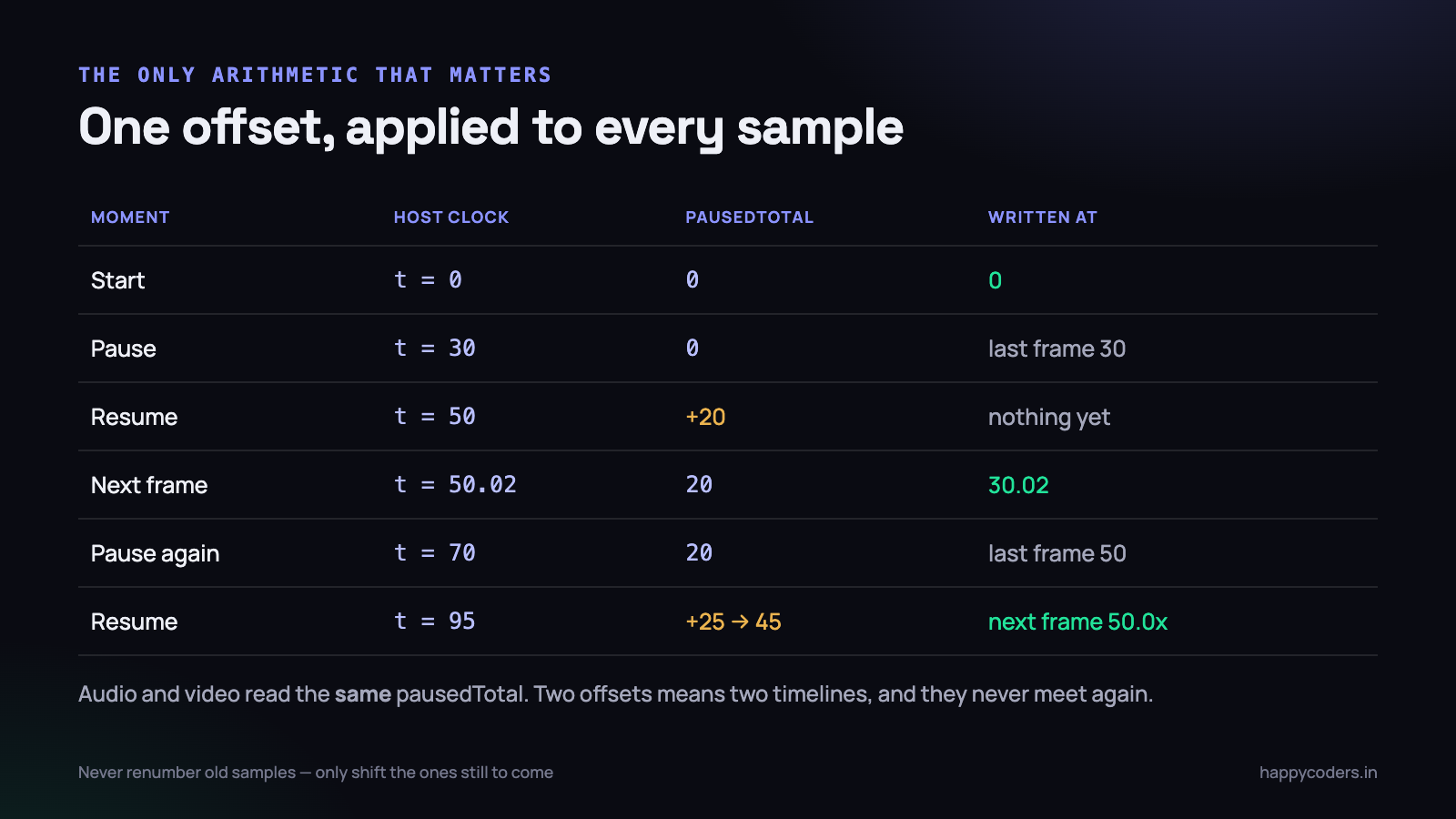
That is the entire model. pausedTotal only ever grows, it grows only on resume, and every sample buffer written from that moment on has it subtracted. Nothing already written is ever touched.
Rebasing a sample buffer
Subtracting the offset means producing a new CMSampleBuffer with corrected timing. You cannot mutate the timing of a buffer in place; you copy it with new timing information, which is cheap because the pixel data is not duplicated.
private func rebased(_ sb: CMSampleBuffer) -> CMSampleBuffer? {
    var count: CMItemCount = 0
    guard CMSampleBufferGetSampleTimingInfoArray(
            sb, entryCount: 0, arrayToFill: nil,
            entriesNeededOut: &count) == noErr else { return nil }

    var timings = [CMSampleTimingInfo](repeating: .invalid, count: count)
    guard CMSampleBufferGetSampleTimingInfoArray(
            sb, entryCount: count, arrayToFill: &timings,
            entriesNeededOut: nil) == noErr else { return nil }

    for i in 0..<count {
        timings[i].presentationTimeStamp =
            CMTimeSubtract(timings[i].presentationTimeStamp, pausedTotal)
        if timings[i].decodeTimeStamp.isValid {
            timings[i].decodeTimeStamp =
                CMTimeSubtract(timings[i].decodeTimeStamp, pausedTotal)
        }
    }

    var out: CMSampleBuffer?
    CMSampleBufferCreateCopyWithNewTiming(
        allocator: kCFAllocatorDefault, sampleBuffer: sb,
        sampleTimingEntryCount: count, sampleTimingArray: &timings,
        sampleBufferOut: &out)
    return out
}
Two details that are easy to get wrong here. An audio buffer contains many samples and may carry more than one timing entry, so ask for the count first rather than assuming one. And leave the duration alone — a frame that lasted 1/60th of a second still lasts 1/60th of a second after being moved. Only the position changes.
Do not be tempted to reset the writer session instead, with a second
startSession(atSourceTime:). A writer session is started once. Everything after that is arithmetic on the samples you feed it.
Audio and video must share the same offset
This is the mistake that produces the worst bug of the lot, because it takes a long recording to become visible. If video and audio each compute their own pause offset — even from the same moment, in two different functions — they will disagree by whatever the two code paths happen to observe, and the disagreement is permanent.
We had exactly that for a week. Video subtracted an offset captured when the pause button was pressed. Audio subtracted one captured when the audio tap next ran, about forty milliseconds later. One pause was inaudible. Six pauses in a fifteen-minute tutorial put the voice a quarter of a second behind the click it was describing, which is squarely in the range people notice without being able to say why.
The fix is to make it impossible rather than merely correct: one pausedTotal, read by the one rebased() function, used by both inputs. If a code review ever turns up a second variable holding a pause duration, that is the bug.
- One offset variable for the whole recorder, not one per track.
- One rebasing function, on the path every sample takes to the writer.
- Read it under the same lock that the state machine uses, so a resume happening mid-append cannot change it between the video and audio calls.
- Never rebase twice. If a buffer passes through two layers that both helpfully adjust timing, you get double the offset and a file that is shorter than the take.
What the audio ring buffer does while you are paused
Audio does not politely stop arriving because the user pressed pause. The input node keeps filling a ring buffer at 48,000 samples a second, and the question is what you do with those samples.
There are three options and only one of them works.
- Stop the tap or the engine. Tempting, and wrong. Tearing down and restarting an audio unit takes tens to hundreds of milliseconds, the device may be grabbed by something else in between, and on a machine with a USB interface a resume can fail outright. You also lose the sample-count continuity that makes the audio clock trustworthy.
- Keep pulling and keep the samples. Now you have twenty seconds of silence-or-office-noise queued up, and on resume it all goes into the file at once, ahead of the video. This is the version that produces an audio track that finishes well before the picture.
- Keep the tap running and discard every buffer while paused. The engine never stops, the device is never re-acquired, nothing accumulates, and on resume the very next buffer is rebased and written like any other.
func handleAudio(_ sb: CMSampleBuffer) {
    lock.lock(); let s = state; lock.unlock()

    switch s {
    case .paused, .pausing, .resuming, .idle, .stopping:
        return                      // pull it, drop it, keep the ring moving
    case .recording:
        break
    }
    guard audioInput.isReadyForMoreMediaData,
          let fixed = rebased(sb) else { return }
    audioInput.append(fixed)
}
Note that .resuming discards audio too. Until the first video frame of the new segment has been written, the timeline is not open for business, and audio that arrives a few milliseconds early would land before the picture starts.
Four states, not two
The state we shipped first was a boolean called isPaused, and it was wrong in both directions. Pausing is not instantaneous, because a frame may already be halfway through being appended. Resuming is not instantaneous either, because the capture system takes a beat to deliver the first frame after a gap — particularly if the screen has not changed, in which case it may deliver nothing at all until something moves.
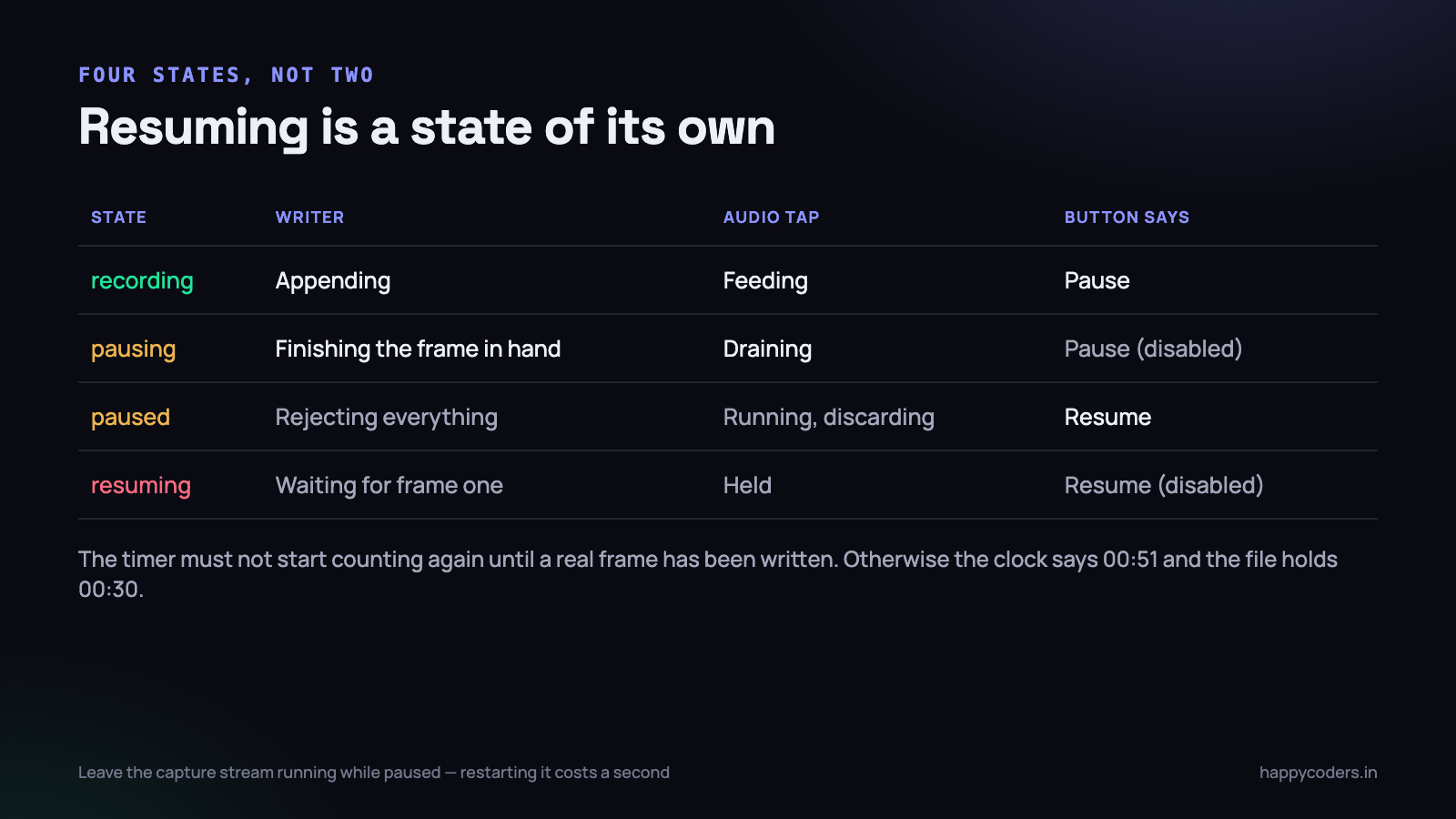
The four states earn their keep in the interface as much as in the pipeline:
- recording — timer counting, Pause enabled, red indicator solid.
- pausing — the button is disabled for the few milliseconds it takes to stop accepting samples. Without this, a fast double-click pauses and resumes with a negative interval and
pausedTotalgoes backwards. - paused — timer frozen at the last written position, indicator pulsing slowly so nobody forgets there is a recording open. We lost a take to somebody who thought a paused recorder was a stopped one.
- resuming — button disabled, and the timer still frozen. This is the state that surprises people.
Why resuming must wait for the first new frame
If you set the state to recording the moment the user clicks Resume, the timer starts counting immediately. But the file does not grow until a frame actually arrives. On a still screen that can be several hundred milliseconds, because a screen capture stream delivers frames when something changes, and a motionless desktop changes nothing.
The effect is a timer that reads 00:51 for a file that contains 00:30 of video, and the discrepancy is permanent for the rest of the session. Worse, if the user clicks Stop in that window you have written a recording whose displayed length was a lie from start to finish.
func handleVideo(_ sb: CMSampleBuffer) {
    lock.lock()
    if state == .resuming {
        state = .recording          // the timeline reopens here, not on click
        resumedAt = CMTimeSubtract(hostNow(), pausedTotal)
    }
    let s = state
    lock.unlock()

    guard s == .recording, videoInput.isReadyForMoreMediaData,
          let fixed = rebased(sb) else { return }
    videoInput.append(fixed)
}
Video opens the timeline; audio follows it. That ordering is not arbitrary — video frames are the sparse ones, so making the sparse track the gatekeeper means the dense track can never get ahead of it.
For the user this is about 200 milliseconds of a disabled button with the word “Resuming” on it. For the file it is the difference between a timeline that is correct and one that is out by a random amount on every single pause.
Leave the capture stream running
An early version stopped the SCStream on pause to save CPU and started it again on resume. It saved perhaps four per cent of one core and cost about a second of latency on resume, because starting a stream renegotiates the whole capture configuration. It also introduced a failure we could not reproduce reliably: if the user paused, changed a display arrangement, and resumed, the restarted stream sometimes came back with a different resolution than the writer was configured for, and every subsequent frame was rejected silently.
Keeping the stream running and discarding frames costs almost nothing, because a paused recorder is usually looking at a static screen and ScreenCaptureKit delivers mostly idle status frames in that situation anyway. If you are counting those, as described in our notes on where frames actually get lost, remember to exclude everything discarded during a pause from the drop statistics. Ours reported a catastrophic drop rate for any recording with a long pause in it, purely because the counter did not know about the pause.
Proving it with ffprobe
A pause bug is exactly the kind of thing that looks fine in QuickTime on the machine that made it. QuickTime is forgiving, the file is in the page cache, and a twenty-second freeze at the point where you remember pausing does not look wrong to the person who paused. You need numbers.
The test that catches everything is boring and takes ninety seconds: record thirty seconds, pause twenty, record thirty more, stop.
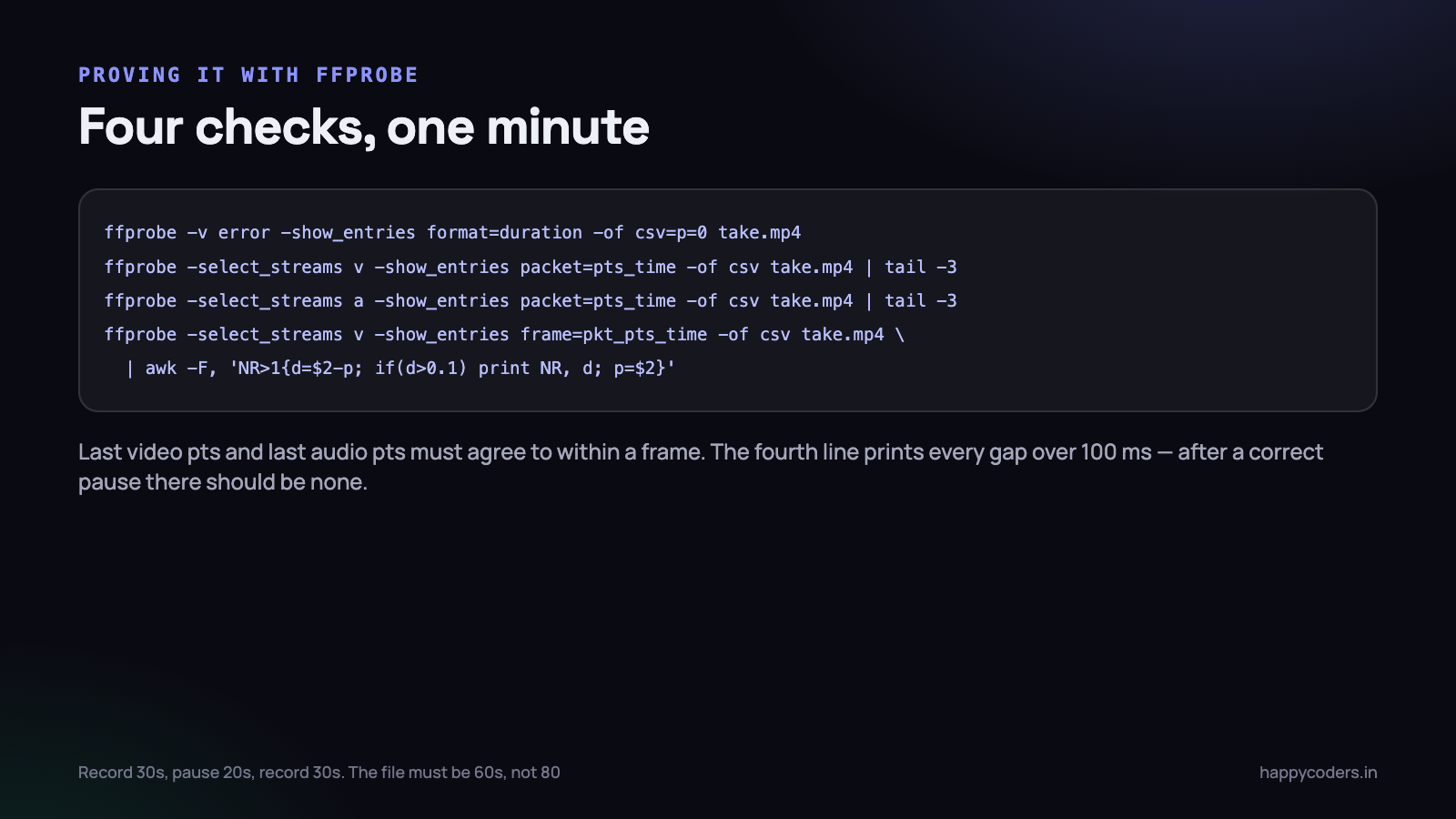
- Container duration must be 60 seconds, not 80.
ffprobe -show_entries format=duration. If it is 80, the offset is not being applied at all. - Last video pts and last audio pts must agree to within one frame interval. If audio ends earlier, audio is being fed from a different offset — or queued samples were flushed on resume.
- No gap between consecutive video timestamps larger than a couple of frame intervals. A 20-second gap is a frozen frame; a 200-millisecond one is a resume that opened the timeline too early.
- Stream duration and container duration must match. They can disagree if the writer finished while one input still had queued samples.
It is worth automating the first check even if you automate nothing else. A shell script that records a fixed pattern through your own command-line interface, probes the duration and fails if it is more than half a second off the expected value will catch a regression the day it lands, rather than three weeks later when somebody notices that a tutorial they recorded has a strange still frame in the middle of it.
Then vary it: pause immediately after starting, pause and resume five times in a row, pause and stop without resuming, and pause for five minutes. That last one found a bug in our timer formatting and a second one in the idle-frame accounting, neither of which appeared in a twenty-second pause.
The edge cases that bit us
- Stop while paused. The writer must finish with the last written timestamp, not the current host time, or the file gains a tail of frozen picture equal to however long the user sat on the pause screen.
- Pause before the first frame. If the user pauses within a few hundred milliseconds of starting, the session may not have been opened yet. Guard the pause on the session actually having started, or
pausedTotalis measured against a timeline that does not exist. - A display disconnected during a pause. The capture target can disappear while nobody is looking. We now revalidate the target on resume rather than discovering the problem on the first frame.
- Sleep and lid close. The host clock keeps running while the machine sleeps, so a recording paused at lunchtime and resumed after a nap has an offset of forty minutes — which is correct, and works, as long as nothing in the pipeline assumed offsets were small.
- The keyboard shortcut. A global shortcut that toggles pause can fire twice from one long press. The
pausingandresumingstates absorb that; a boolean does not.
What this is really about
The general lesson is one that applies well beyond recording. There were two clocks in the system, they were both called “time”, and the code treated them as interchangeable because for the first several weeks of development they were. Pause was the feature that separated them, and every bug in this article is a place where a piece of code read one clock and meant the other.
Once the distinction is written down — host time is what arrives, session time is what is written, and the difference is one number — the implementation is about sixty lines and stops being interesting. Getting to that sentence took a fortnight.
What to do on Monday morning
If your recorder has a pause button, spend ten minutes finding out whether it is honest.
- Record thirty seconds, pause twenty, record thirty. Run
ffprobe -show_entries format=durationon the result. If it says anything near 80, stop reading and go fix the offset. - Grep the codebase for every variable holding a pause duration or a time offset. If there is more than one, collapse them into a single value read by a single function.
- Check what your audio path does while paused. If it stops the engine, change it to discard buffers instead and measure the resume latency before and after.
- Add a
resumingstate and keep the on-screen timer frozen until the first frame is written. It is a twenty-line change and it removes an entire class of “the timer said five minutes but the file is four” support threads. - Write the 30–20–30 test into whatever passes for your release checklist. It takes ninety seconds and it is the only test that has ever caught a pause regression for us.




